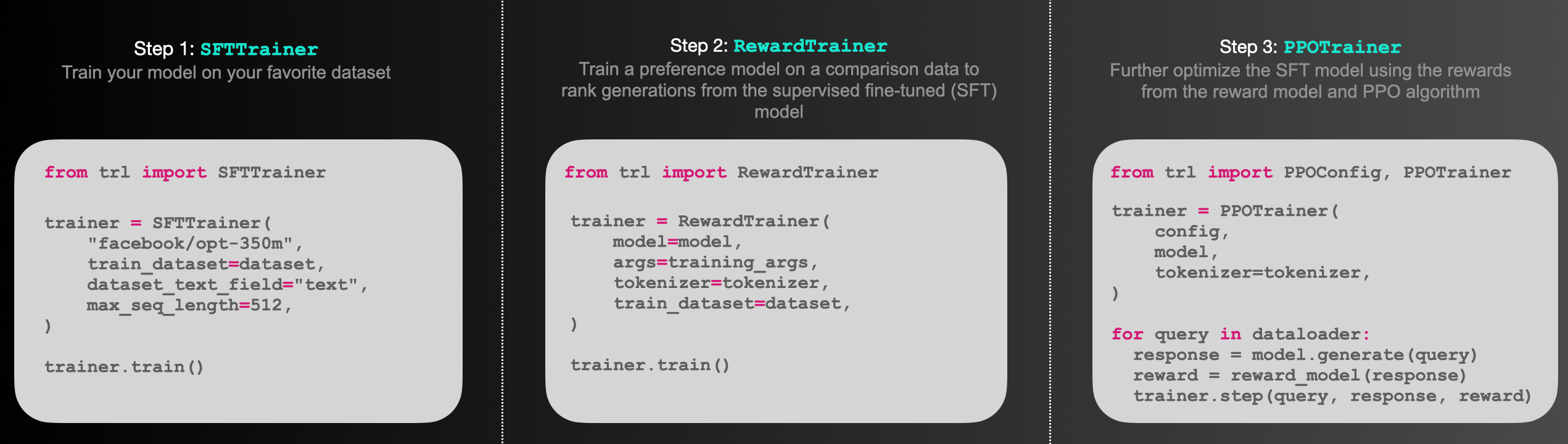
Figure: Sketch of the workflow.
## Installation
### Python package
Install the library with pip:
```bash
pip install trl
```
### From source
If you want to run the examples in the repository a few additional libraries are required. Clone the repository and install it with pip:
```bash
git clone https://github.com/huggingface/trl.git
cd trl/
pip install .
```
If you wish to develop TRL, you should install in editable mode:
```bash
pip install -e .
```
## How to use
### `SFTTrainer`
This is a basic example on how to use the `SFTTrainer` from the library. The `SFTTrainer` is a light wrapper around the `transformers` Trainer to easily fine-tune language models or adapters on a custom dataset.
```python
# imports
from datasets import load_dataset
from trl import SFTTrainer
# get dataset
dataset = load_dataset("imdb", split="train")
# get trainer
trainer = SFTTrainer(
"facebook/opt-350m",
train_dataset=dataset,
dataset_text_field="text",
max_seq_length=512,
)
# train
trainer.train()
```
### `RewardTrainer`
This is a basic example on how to use the `RewardTrainer` from the library. The `RewardTrainer` is a wrapper around the `transformers` Trainer to easily fine-tune reward models or adapters on a custom preference dataset.
```python
# imports
from transformers import AutoModelForSequenceClassification, AutoTokenizer
from trl import RewardTrainer
# load model and dataset - dataset needs to be in a specific format
model = AutoModelForSequenceClassification.from_pretrained("gpt2", num_labels=1)
tokenizer = AutoTokenizer.from_pretrained("gpt2")
...
# load trainer
trainer = RewardTrainer(
model=model,
tokenizer=tokenizer,
train_dataset=dataset,
)
# train
trainer.train()
```
### `PPOTrainer`
This is a basic example on how to use the `PPOTrainer` from the library. Based on a query the language model creates a response which is then evaluated. The evaluation could be a human in the loop or another model's output.
```python
# imports
import torch
from transformers import AutoTokenizer
from trl import PPOTrainer, PPOConfig, AutoModelForCausalLMWithValueHead, create_reference_model
from trl.core import respond_to_batch
# get models
model = AutoModelForCausalLMWithValueHead.from_pretrained('gpt2')
model_ref = create_reference_model(model)
tokenizer = AutoTokenizer.from_pretrained('gpt2')
# initialize trainer
ppo_config = PPOConfig(
batch_size=1,
)
# encode a query
query_txt = "This morning I went to the "
query_tensor = tokenizer.encode(query_txt, return_tensors="pt")
# get model response
response_tensor = respond_to_batch(model, query_tensor)
# create a ppo trainer
ppo_trainer = PPOTrainer(ppo_config, model, model_ref, tokenizer)
# define a reward for response
# (this could be any reward such as human feedback or output from another model)
reward = [torch.tensor(1.0)]
# train model for one step with ppo
train_stats = ppo_trainer.step([query_tensor[0]], [response_tensor[0]], reward)
```
## References
### Proximal Policy Optimisation
The PPO implementation largely follows the structure introduced in the paper **"Fine-Tuning Language Models from Human Preferences"** by D. Ziegler et al. \[[paper](https://arxiv.org/pdf/1909.08593.pdf), [code](https://github.com/openai/lm-human-preferences)].
### Language models
The language models utilize the `transformers` library by 🤗 Hugging Face.
## Citation
```bibtex
@misc{vonwerra2022trl,
author = {Leandro von Werra and Younes Belkada and Lewis Tunstall and Edward Beeching and Tristan Thrush and Nathan Lambert and Shengyi Huang},
title = {TRL: Transformer Reinforcement Learning},
year = {2020},
publisher = {GitHub},
journal = {GitHub repository},
howpublished = {\url{https://github.com/huggingface/trl}}
}
```