

File size: 30,310 Bytes
17c6d62 |
1 2 3 4 5 6 7 8 9 10 11 12 13 14 15 16 17 18 19 20 21 22 23 24 25 26 27 28 29 30 31 32 33 34 35 36 37 38 39 40 41 42 43 44 45 46 47 48 49 50 51 52 53 54 55 56 57 58 59 60 61 62 63 64 65 66 67 68 69 70 71 72 73 74 75 76 77 78 79 80 81 82 83 84 85 86 87 88 89 90 91 92 93 94 95 96 97 98 99 100 101 102 103 104 105 106 107 108 109 110 111 112 113 114 115 116 117 118 119 120 121 122 123 124 125 126 127 128 129 130 131 132 133 134 135 136 137 138 139 140 141 142 143 144 145 146 147 148 149 150 151 152 153 154 155 156 157 158 159 160 161 162 163 164 165 166 167 168 169 170 171 172 173 174 175 176 177 178 179 180 181 182 183 184 185 186 187 188 189 190 191 192 193 194 195 196 197 198 199 200 201 202 203 204 205 206 207 208 209 210 211 212 213 214 215 216 217 218 219 220 221 222 223 224 225 226 227 228 229 230 231 232 233 234 235 236 237 238 239 240 241 242 243 244 245 246 247 248 249 250 251 252 253 254 255 256 257 258 259 260 261 262 263 264 265 266 267 268 269 270 271 272 273 274 275 276 277 278 279 280 281 282 283 284 285 286 287 288 289 290 291 292 293 294 295 296 297 298 299 300 301 302 303 304 305 306 307 308 309 310 311 312 313 314 315 316 317 318 319 320 321 322 323 324 325 326 327 328 329 330 331 332 333 334 335 336 337 338 339 340 341 342 343 344 345 346 347 348 349 350 351 352 353 354 355 356 357 358 359 360 361 362 363 364 365 366 367 368 369 370 371 372 373 374 375 376 377 378 379 380 381 382 383 384 385 386 387 388 389 390 391 392 393 394 395 396 397 398 399 400 401 402 403 404 405 406 407 408 409 410 411 412 413 414 415 416 417 418 419 420 421 422 423 424 425 426 427 428 429 430 431 432 433 434 435 436 437 438 439 440 441 442 443 444 445 446 447 448 449 450 451 452 453 454 455 456 457 458 459 460 461 462 463 464 465 466 467 468 469 470 471 472 473 474 475 476 477 478 479 480 481 482 483 484 485 486 487 488 489 490 491 492 493 494 495 496 497 498 499 500 501 502 503 504 505 506 507 508 509 510 511 512 513 514 515 516 517 518 519 520 521 522 523 524 525 526 527 528 529 530 531 532 533 534 535 536 537 538 539 |
# الوكلاء والأدوات
[[open-in-colab]]
### ما هو الوكيل؟
يمكن للنظم اللغوية الكبيرة (LLMs) التي تم تدريبها على أداء [نمذجة اللغة السببية](./tasks/language_modeling.) التعامل مع مجموعة واسعة من المهام، ولكنها غالبًا ما تواجه صعوبات في المهام الأساسية مثل المنطق والحساب والبحث. وعندما يتم استدعاؤها في مجالات لا تؤدي فيها أداءً جيدًا، فإنها غالبًا ما تفشل في توليد الإجابة التي نتوقعها منها.
يتمثل أحد النهج للتغلب على هذا القصور في إنشاء "وكيل".
الوكيل هو نظام يستخدم LLM كمحرك له، ولديه حق الوصول إلى وظائف تسمى "أدوات".
هذه "الأدوات" هي وظائف لأداء مهمة، وتحتوي على جميع الأوصاف اللازمة للوكيل لاستخدامها بشكل صحيح.
يمكن برمجة الوكيل للقيام بما يلي:
- وضع سلسلة من الإجراءات/الأدوات وتشغيلها جميعًا في نفس الوقت مثل [`CodeAgent`] على سبيل المثال
- التخطيط للاجراءات/الأدوات وتنفيذها واحدة تلو الأخرى والانتظار حتى انتهاء كل إجراء قبل إطلاق التالي مثل [`ReactJsonAgent`] على سبيل المثال
### أنواع الوكلاء
#### الوكيل البرمجي (Code agent)
يتمتع هذا الوكيل يتبع خطوات محددة: أولًا، يخطط لسلسلة من الإجراءات التي يريد تنفيذها، ثم شفرة Python لتنفيذ جميع الإجراءات في نفس الوقت. وهو يتعامل بشكل أصلي مع أنواع مختلفة من المدخلات والمخرجات للأدوات التي يستخدمها، وبالتالي فهو الخيار الموصى به للمهام متعددة الوسائط.
#### وكلاء التفاعل
هذا هو الوكيل الذي يتم اللجوء إليه لحل مهام الاستدلال، حيث يجعل إطار ReAct ([Yao et al.، 2022](https://huggingface.co/papers/2210.03629)) من الكفاءة حقًا التفكير على أساس ملاحظاته السابقة.
نقوم بتنفيذ إصدارين من ReactJsonAgent:
- [`ReactJsonAgent`] يقوم بتوليد استدعاءات الأدوات كـ JSON في إخراجها.
- [`ReactCodeAgent`] هو نوع جديد من ReactJsonAgent يقوم بتوليد استدعاءات أدواته كمقاطع من التعليمات البرمجية، والتي تعمل بشكل جيد حقًا مع LLMs التي تتمتع بأداء قوي في البرمجة.
> [!TIP]
> اقرأ منشور المدونة [Open-source LLMs as LangChain Agents](https://huggingface.co/blog/open-source-llms-as-agents) لمعرفة المزيد عن وكيل ReAct.
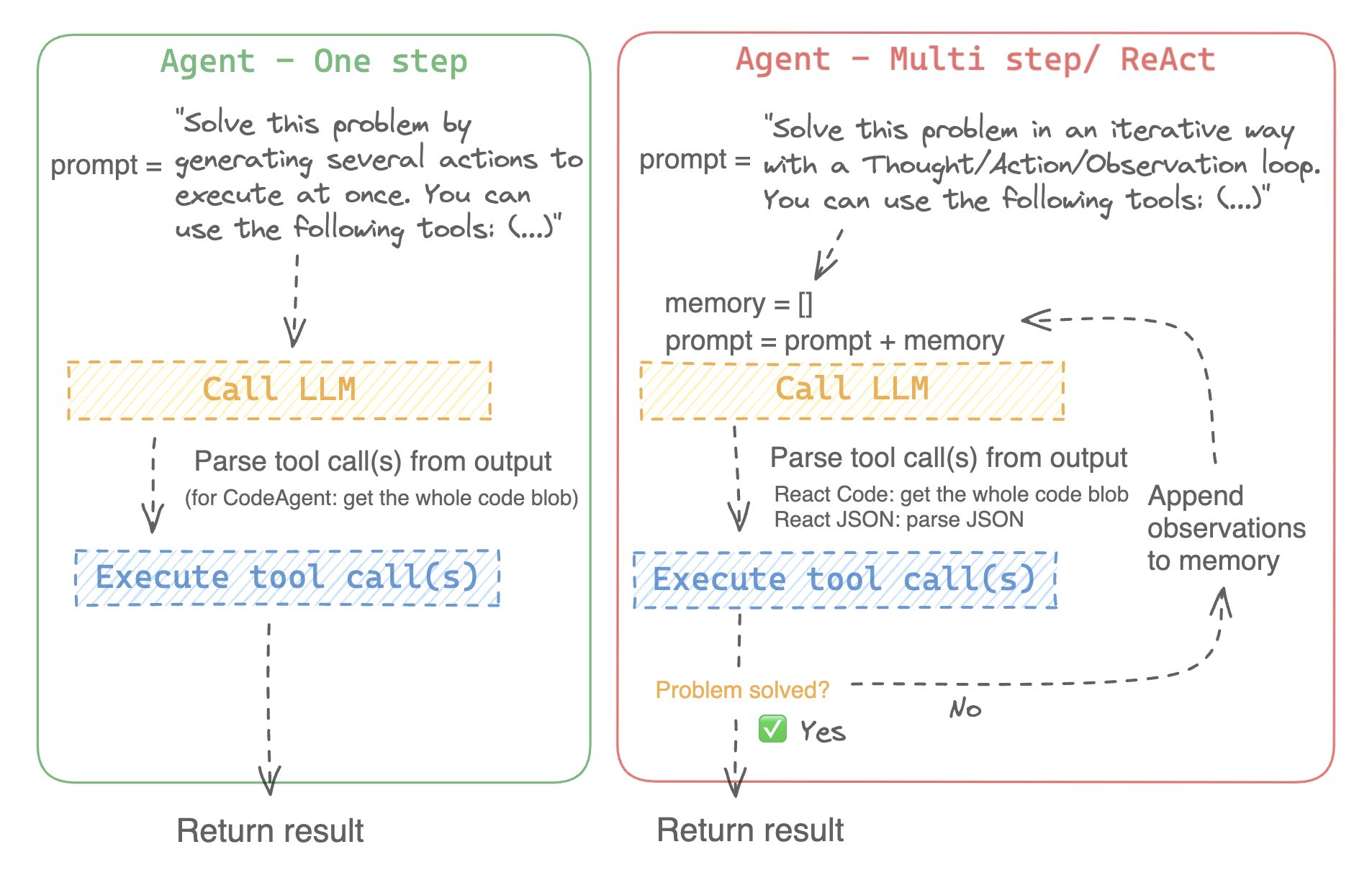
على سبيل المثال، إليك كيف يعمل وكيل ReAct Code طريقه من خلال السؤال التالي.
```py3
>>> agent.run(
... "How many more blocks (also denoted as layers) in BERT base encoder than the encoder from the architecture proposed in Attention is All You Need?",
... )
=====New task=====
How many more blocks (also denoted as layers) in BERT base encoder than the encoder from the architecture proposed in Attention is All You Need?
====Agent is executing the code below:
bert_blocks = search(query="number of blocks in BERT base encoder")
print("BERT blocks:", bert_blocks)
====
Print outputs:
BERT blocks: twelve encoder blocks
====Agent is executing the code below:
attention_layer = search(query="number of layers in Attention is All You Need")
print("Attention layers:", attention_layer)
====
Print outputs:
Attention layers: Encoder: The encoder is composed of a stack of N = 6 identical layers. Each layer has two sub-layers. The first is a multi-head self-attention mechanism, and the second is a simple, position- 2 Page 3 Figure 1: The Transformer - model architecture.
====Agent is executing the code below:
bert_blocks = 12
attention_layers = 6
diff = bert_blocks - attention_layers
print("Difference in blocks:", diff)
final_answer(diff)
====
Print outputs:
Difference in blocks: 6
Final answer: 6
```
### كيف يمكنني بناء وكيل؟
لتهيئة وكيل، تحتاج إلى هذه الوسائط:
- نموذج لغوي كبير (LLM) يشكل المحرك الأساسي للوكيل. الوكيل نفسه ليس النموذج اللغوي، بل هو برنامج يستخدم النموذج اللغوي كمحرك له.
- موجه النظام (system prompt): هذه هي التعليمات التي يتم إعطاؤها للنموذج اللغوي لإنشاء مخرجاته.
- صندوق أدوات (toolbox) يختار الوكيل منه الأدوات لتنفيذها
- محلل (parser) لاستخراج الأدوات التي يجب استدعاؤها من مخرجات النموذج اللغوي LLM والأدوات التي يجب استخدامها
عند تهيئة نظام الوكيل، يتم استخدام سمات الأداة لإنشاء وصف للأداة، ثم يتم دمجها في موجه النظام الخاص `system_prompt` للوكيل لإعلامه بالأدوات التي يمكنه استخدامها ولماذا.
للبدء، يرجى تثبيت `agents` الإضافية لتثبيت جميع التبعيات الافتراضية.
```bash
pip install transformers[agents]
```
قم ببناء محرك LLM الخاص بك من خلال تعريف طريقة `llm_engine` التي تقبل قائمة من [الرسائل](./chat_templating.) وتعيد النص. يجب أن تقبل هذه الدالة القابلة للاستدعاء أيضًا معامل `stop` يشير إلى متى يجب التوقف عن التوليد.
```python
from huggingface_hub import login, InferenceClient
login("<YOUR_HUGGINGFACEHUB_API_TOKEN>")
client = InferenceClient(model="meta-llama/Meta-Llama-3-70B-Instruct")
def llm_engine(messages, stop_sequences=["Task"]) -> str:
response = client.chat_completion(messages, stop=stop_sequences, max_tokens=1000)
answer = response.choices[0].message.content
return answer
```
يمكنك استخدام أي طريقة `llm_engine` طالما أنها:
1. يتبع تنسيق [رسائل](./chat_templating.md) لإدخاله (`List [Dict [str، str]]`) ويعيد `str`
2. يتوقف عن توليد المخراجات من التسلسلات التي تم تمريرها في معامل `stop`
أنت بحاجة أيضًا إلى معامل "الأدوات" الذي يقبل قائمة من "الأدوات". يمكنك توفير قائمة فارغة لـ "الأدوات"، ولكن استخدم صندوق الأدوات الافتراضي مع معامل اختياري `add_base_tools=True`.
الآن يمكنك إنشاء وكيل، مثل [`CodeAgent`], وتشغيله. ولتسهيل الأمر، نقدم أيضًا فئة [`HfEngine`] التي تستخدم `huggingface_hub.InferenceClient` بشكل مخفى.
```python
from transformers import CodeAgent, HfEngine
llm_engine = HfEngine(model="meta-llama/Meta-Llama-3-70B-Instruct")
agent = CodeAgent(tools=[], llm_engine=llm_engine, add_base_tools=True)
agent.run(
"Could you translate this sentence from French, say it out loud and return the audio.",
sentence="Où est la boulangerie la plus proche?",
)
```
هذه الميزة ستكون مفيدة في حالة الحاجة الملحة! يمكنك حتى ترك معامل `llm_engine` غير محدد، وسيتم إنشاء [`HfEngine`] بشكل تلقائي.
```python
from transformers import CodeAgent
agent = CodeAgent(tools=[], add_base_tools=True)
agent.run(
"Could you translate this sentence from French, say it out loud and give me the audio.",
sentence="Où est la boulangerie la plus proche?",
)
```
لاحظ أننا استخدمنا معامل "sentence" إضافي: يمكنك تمرير النص كمعامل إضافي إلى النموذج.
يمكنك أيضًا استخدام هذا للإشارة إلى مسار الملفات المحلية أو البعيدة للنموذج لاستخدامها:
```py
from transformers import ReactCodeAgent
agent = ReactCodeAgent(tools=[], llm_engine=llm_engine, add_base_tools=True)
agent.run("Why does Mike not know many people in New York?", audio="https://huggingface.co/datasets/huggingface/documentation-images/resolve/main/transformers/recording.mp3")
```
تم تحديد موجه النظام ومحلل المخرجات تلقائيًا، ولكن يمكنك فحصهما بسهولة عن طريق استدعاء `system_prompt_template` على وكيلك.
```python
print(agent.system_prompt_template)
```
من المهم أن تشرح بأكبر قدر ممكن من الوضوح المهمة التي تريد تنفيذها.
كل عملية [`~Agent.run`] مستقلة، وبما أن الوكيل مدعوم من LLM، فقد تؤدي الاختلافات الطفيفة في موجهك إلى نتائج مختلفة تمامًا.
يمكنك أيضًا تشغيل وكيل بشكل متتالي لمهام مختلفة: في كل مرة يتم فيها إعادة تهيئة سمتي `agent.task` و`agent.logs`.
#### تنفيذ التعليمات البرمجية
يقوم مفسر Python بتنفيذ التعليمات البرمجية على مجموعة من المدخلات التي يتم تمريرها جنبًا إلى جنب مع أدواتك.
يجب أن يكون هذا الأمر آمنًا لأن الوظائف الوحيدة التي يمكن استدعاؤها هي الأدوات التي قدمتها (خاصة إذا كانت أدوات من Hugging Face فقط) ووظيفة الطباعة، لذا فأنت مقيد بالفعل بما يمكن تنفيذه.
مفسر Python لا يسمح أيضًا باستدعاء دوال بشكل افتراضي خارج قائمة آمنة، لذا فإن جميع الهجمات الأكثر وضوحًا لا ينبغي أن تكون مشكلة.
يمكنك أيضًا الإذن باستيرادات إضافية عن طريق تمرير الوحدات النمطية المصرح بها كقائمة من السلاسل في معامل `additional_authorized_imports` عند تهيئة [`ReactCodeAgent`] أو [`CodeAgent`]:
```py
>>> from transformers import ReactCodeAgent
>>> agent = ReactCodeAgent(tools=[], additional_authorized_imports=['requests', 'bs4'])
>>> agent.run("Could you get me the title of the page at url 'https://huggingface.co/blog'?")
(...)
'Hugging Face – Blog'
```
سيتم إيقاف التنفيذ عند أي رمز يحاول تنفيذ عملية غير قانونية أو إذا كان هناك خطأ Python عادي في التعليمات البرمجية التي تم إنشاؤها بواسطة الوكيل.
> [!WARNING]
> يمكن لـ LLM توليد شفرة برمجية عشوائية سيتم تنفيذها بعد ذلك: لا تقمب استدعاء أى دوال غير آمنة!
### موجه النظام
ينشئ الوكيل، أو بالأحرى LLM الذي يقود الوكيل، يولد مخرجات بناءً على موجه النظام. يمكن تخصيص موجه النظام وتصميمه للمهام المقصودة. على سبيل المثال، تحقق من موجه النظام لـ [`ReactCodeAgent`] (الإصدار أدناه مبسط قليلاً).
```text
You will be given a task to solve as best you can.
You have access to the following tools:
<<tool_descriptions>>
To solve the task, you must plan forward to proceed in a series of steps, in a cycle of 'Thought:', 'Code:', and 'Observation:' sequences.
At each step, in the 'Thought:' sequence, you should first explain your reasoning towards solving the task, then the tools that you want to use.
Then in the 'Code:' sequence, you shold write the code in simple Python. The code sequence must end with '/End code' sequence.
During each intermediate step, you can use 'print()' to save whatever important information you will then need.
These print outputs will then be available in the 'Observation:' field, for using this information as input for the next step.
In the end you have to return a final answer using the `final_answer` tool.
Here are a few examples using notional tools:
---
{examples}
Above example were using notional tools that might not exist for you. You only have acces to those tools:
<<tool_names>>
You also can perform computations in the python code you generate.
Always provide a 'Thought:' and a 'Code:\n```py' sequence ending with '```<end_code>' sequence. You MUST provide at least the 'Code:' sequence to move forward.
Remember to not perform too many operations in a single code block! You should split the task into intermediate code blocks.
Print results at the end of each step to save the intermediate results. Then use final_answer() to return the final result.
Remember to make sure that variables you use are all defined.
Now Begin!
```
يتضمن موجه النظام:
- *مقدمة* تشرح كيف يجب أن يتصرف الوكيل والأدوات التي يجب عليه استخدامها.
- وصف لجميع الأدوات التي يتم تحديدها بواسطة رمز `<<tool_descriptions>>` الذي يتم استبداله ديناميكيًا في وقت التشغيل بالأدوات التي يحددها المستخدم أو يختارها.
- يأتي وصف الأداة من سمات الأداة، `name`، و`description`، و`inputs` و`output_type`، وقالب `jinja2` بسيط يمكنك تحسينه.
- شكل المخرج المتوقع.
يمكنك تحسين موجه النظام، على سبيل المثال، عن طريق إضافة شرح لتنسيق المخرجات.
للحصول على أقصى قدر من المرونة، يمكنك الكتابة فوق قالب موجه النظام بالكامل عن طريق تمرير موجه مخصص كمعامل إلى معلمة `system_prompt`.
```python
from transformers import ReactJsonAgent
from transformers.agents import PythonInterpreterTool
agent = ReactJsonAgent(tools=[PythonInterpreterTool()], system_prompt="{your_custom_prompt}")
```
> [!WARNING]
> يرجى التأكد من تحديد سلسلة `<<tool_descriptions>>` في مكان ما في `template` حتى يكون الوكيل على علم
بالأدوات المتاحة.
### فحص تشغيل الوكيل
فيما يلي بعض السمات المفيدة لفحص ما حدث بعد التشغيل:
- تخزن `agent.logs` سجلات مفصلة للوكيل. في كل خطوة من تشغيل الوكيل، يتم تخزين كل شيء في قاموس إلحاقه بـ `agent.logs`.
- تشغيل `agent.write_inner_memory_from_logs()` يخلق ذاكرة داخلية لسجلات الوكيل للنظام LLM لعرضها، كقائمة من رسائل الدردشة. تنتقل هذه الطريقة عبر كل خطوة من سجل الوكيل ولا تخزن سوى ما يهمها كرسالة: على سبيل المثال، سيحفظ موجه النظام والمهمة في رسائل منفصلة، ثم لكل خطوة سيخزن مخرج LLM كرسالة، ومخرج استدعاء الأداة كرسالة أخرى. استخدم هذا إذا كنت تريد عرضًا عامًا لما حدث - ولكن لن يتم نسخ كل سجل بواسطة هذه الطريقة.
## الأدوات
الأداة هي عبارة عن وظيفة أساسية يستخدمها الوكيل لتنفيذ مهمة محددة.
يمكنك على سبيل المثال التحقق من [`PythonInterpreterTool`]: لديه اسم ووصف ووصف للمدخلات ونوع للمخرج، وطريقة `__call__` التي تقوم بتنفيذ المهمة المطلوبة.
عند تهيئة الوكيل، يتم استخدام سمات الأداة لتوليد وصف للأداة يتم تضمينه في موجه النظام الخاص بالوكيل. يتيح هذا للوكيل معرفة الأدوات التي يمكنه استخدامها ولماذا.
### صندوق الأدوات الافتراضي
يأتي Transformers مع صندوق أدوات افتراضي لتمكين الوكلاء، والذي يمكنك إضافته إلى وكيلك عند التهيئة باستخدام معامل `add_base_tools = True`:
- **الإجابة على أسئلة المستند**: الإجابة على سؤال حول المستند (مثل ملف PDF) بتنسيق صورة ([Donut](./model_doc/donut))
- **الإجابة على أسئلة الصور**: الإجابة على سؤال حول صورة ([VILT](./model_doc/vilt))
- **التحدث إلى النص**: قم بتفريغ الكلام إلى نص ([Whisper](./model_doc/whisper))
- **النص إلى كلام**: تحويل النص إلى كلام ([SpeechT5](./model_doc/speecht5))
- **الترجمة**: ترجمة جملة معينة من لغة المصدر إلى لغة الهدف.
- **مفسر كود Python**: تشغيل كود Python الذي تم إنشاؤه بواسطة LLM في بيئة آمنة. لن يتم إضافة هذه الأداة إلى [`ReactJsonAgent`] إلا إذا استخدمت `add_base_tools=True`، نظرًا لأن الأدوات المستندة إلى التعليمات البرمجية يمكنها بالفعل تنفيذ كود Python
لا تترجم النصوص الخاصة ولا الأكواد البرمجية ولا الروابط ولا رموز HTML وCSS:
يمكنك استخدام أداة يدويًا عن طريق استدعاء دالة [`load_tool`] وتحديد مهمة لتنفيذها.
```python
from transformers import load_tool
tool = load_tool("text-to-speech")
audio = tool("This is a text to speech tool")
```
### إنشاء أداة جديدة
يمكنك إنشاء أداتك الخاصة لتغطية حالات الاستخدام التي لا تغطيها الأدوات الافتراضية من Hugging Face.
على سبيل المثال، دعنا نقوم بإنشاء أداة تعرض النموذج الأكثر تنزيلًا لمهمة معينة من Hub.
سوف نبدأ بالكود التالي.
```python
from huggingface_hub import list_models
task = "text-classification"
model = next(iter(list_models(filter=task, sort="downloads", direction=-1)))
print(model.id)
```
يمكن تحويل هذه الشيفرة إلى فئة ترث من الفئة العليا [`Tool`].
تحتاج الأداة المخصصة إلى:
- اسم `name`، والتي تمثل اسم الأداة نفسها. عادةً ما يصف الاسم وظيفتها. بما أن الكود يعيد النموذج الأكثر تنزيلًا لمهمة ما، فلنسمها `model_download_counter`.
- تستخدم خاصية `description` لملء موجه نظام الوكيل.
- خاصية `inputs`، والتي هي عبارة عن قاموس بمفاتيح "type" و"description". يحتوي على معلومات تساعد المفسر Python على اتخاذ خيارات مستنيرة بشأن المدخلات.
- خاصية `output_type`، والتي تحدد نوع المخرج.
- طريقة `forward` والتي تحتوي على الكود الذي سيتم تنفيذه للحصول على النتيجة النهائية.
```python
from transformers import Tool
from huggingface_hub import list_models
class HFModelDownloadsTool(Tool):
name = "model_download_counter"
description = (
"This is a tool that returns the most downloaded model of a given task on the Hugging Face Hub. "
"It returns the name of the checkpoint."
)
inputs = {
"task": {
"type": "text",
"description": "the task category (such as text-classification, depth-estimation, etc)",
}
}
output_type = "text"
def forward(self, task: str):
model = next(iter(list_models(filter=task, sort="downloads", direction=-1)))
return model.id
```
الآن بعد أن أصبحت فئة `HfModelDownloadsTool` المخصصة جاهزة، يمكنك حفظها في ملف باسم `model_downloads.py` واستيرادها للاستخدام.
```python
from model_downloads import HFModelDownloadsTool
tool = HFModelDownloadsTool()
```
يمكنك أيضًا مشاركة أداتك المخصصة في Hub عن طريق استدعاء [`~Tool.push_to_hub`] على الأداة. تأكد من أنك قمت بإنشاء مستودع لها على Hub وأنك تستخدم رمز وصول للقراءة.
```python
tool.push_to_hub("{your_username}/hf-model-downloads")
```
قم بتحميل الأداة باستخدام دالة [`~Tool.load_tool`] ومررها إلى معلمة `tools` في الوكيل الخاص بك.
```python
from transformers import load_tool, CodeAgent
model_download_tool = load_tool("m-ric/hf-model-downloads")
agent = CodeAgent(tools=[model_download_tool], llm_engine=llm_engine)
agent.run(
"Can you give me the name of the model that has the most downloads in the 'text-to-video' task on the Hugging Face Hub?"
)
```
ستحصل على ما يلي:
```text
======== New task ========
Can you give me the name of the model that has the most downloads in the 'text-to-video' task on the Hugging Face Hub?
==== Agent is executing the code below:
most_downloaded_model = model_download_counter(task="text-to-video")
print(f"The most downloaded model for the 'text-to-video' task is {most_downloaded_model}.")
====
```
والناتج:
`"النموذج الأكثر تنزيلًا لمهمة `text-to-video` هو ByteDance/AnimateDiff-Lightning."`
### إدارة صندوق أدوات الوكيل الخاص بك
إذا كنت قد قمت بتهيئة وكيل، فمن غير الملائم إعادة تهيئته من البداية لإضافة أداة جديدة ترغب في استخدامها. باستخدام مكتبة Transformers، يمكنك إدارة صندوق أدوات الوكيل بإضافة أو استبدال أداة موجودة.
دعنا نضيف الأداة `model_download_tool` إلى وكيل تم تهيئته مسبقًا باستخدام صندوق الأدوات الافتراضي.
```python
from transformers import CodeAgent
agent = CodeAgent(tools=[], llm_engine=llm_engine, add_base_tools=True)
agent.toolbox.add_tool(model_download_tool)
```
الآن يمكننا الاستفادة من الأداة الجديدة وأداة تحويل النص إلى كلام السابقة:
```python
agent.run(
"Can you read out loud the name of the model that has the most downloads in the 'text-to-video' task on the Hugging Face Hub and return the audio?"
)
```
| **Audio** |
|------------------------------------------------------------------------------------------------------------------------------------------------------|
| <audio controls><source src="https://huggingface.co/datasets/huggingface/documentation-images/resolve/main/transformers/damo.wav" type="audio/wav"/> |
> [!WARNING]
> احترس عند إضافة أدوات إلى وكيل يعمل بالفعل لأنه يمكن أن يؤثر على اختيار الأداة لصالح أداتك أو اختيار أداة أخرى غير المحددة بالفعل.
استخدم طريقة `agent.toolbox.update_tool()` لاستبدال أداة موجودة في صندوق أدوات الوكيل.
هذا مفيد إذا كانت أداتك الجديدة بديلاً مباشرًا للأداة الموجودة لأن الوكيل يعرف بالفعل كيفية تنفيذ تلك المهمة المحددة.
تأكد فقط من اتباع الأداة الجديدة لنفس واجهة برمجة التطبيقات (API) للأداة المستبدلة أو قم بتكييف قالب موجه النظام لضمان تحديث جميع الأمثلة التي تستخدم الأداة المستبدلة.
### استخدام مجموعة من الأدوات
يمكنك الاستفادة من مجموعات الأدوات باستخدام كائن ToolCollection، مع تحديد مجموعة الأدوات التي تريد استخدامها.
ثم قم بتمريرها كقائمة لتهيئة الوكيل الخاص بك، وبدء استخدامها!
```py
from transformers import ToolCollection, ReactCodeAgent
image_tool_collection = ToolCollection(collection_slug="huggingface-tools/diffusion-tools-6630bb19a942c2306a2cdb6f")
agent = ReactCodeAgent(tools=[*image_tool_collection.tools], add_base_tools=True)
agent.run("Please draw me a picture of rivers and lakes.")
```
لتسريع البداية، يتم تحميل الأدوات فقط إذا استدعاها الوكيل.
ستحصل على هذه الصورة:
<img src="https://huggingface.co/datasets/huggingface/documentation-images/resolve/main/transformers/rivers_and_lakes.png" />
### استخدام gradio-tools
[gradio-tools](https://github.com/freddyaboulton/gradio-tools) هي مكتبة قوية تتيح استخدام Hugging
Face Spaces كأدوات. تدعم العديد من المساحات الموجودة بالإضافة إلى مساحات مخصصة.
تدعم مكتبة Transformers `gradio_tools` باستخدام طريقة [`Tool.from_gradio`] في الفئة. على سبيل المثال، دعنا نستخدم [`StableDiffusionPromptGeneratorTool`](https://github.com/freddyaboulton/gradio-tools/blob/main/gradio_tools/tools/prompt_generator.py) من مجموعة أدوات `gradio-tools` لتحسين المطالبات لإنشاء صور أفضل.
استورد وقم بتهيئة الأداة، ثم مررها إلى طريقة `Tool.from_gradio`:
```python
from gradio_tools import StableDiffusionPromptGeneratorTool
from transformers import Tool, load_tool, CodeAgent
gradio_prompt_generator_tool = StableDiffusionPromptGeneratorTool()
prompt_generator_tool = Tool.from_gradio(gradio_prompt_generator_tool)
```
الآن يمكنك استخدامه مثل أي أداة أخرى. على سبيل المثال، دعنا نحسن الموجه `a rabbit wearing a space suit`.
```python
image_generation_tool = load_tool('huggingface-tools/text-to-image')
agent = CodeAgent(tools=[prompt_generator_tool, image_generation_tool], llm_engine=llm_engine)
agent.run(
"Improve this prompt, then generate an image of it.", prompt='A rabbit wearing a space suit'
)
```
يستفيد النموذج بشكل كافٍ من الأداة:
```text
======== New task ========
Improve this prompt, then generate an image of it.
You have been provided with these initial arguments: {'prompt': 'A rabbit wearing a space suit'}.
==== Agent is executing the code below:
improved_prompt = StableDiffusionPromptGenerator(query=prompt)
while improved_prompt == "QUEUE_FULL":
improved_prompt = StableDiffusionPromptGenerator(query=prompt)
print(f"The improved prompt is {improved_prompt}.")
image = image_generator(prompt=improved_prompt)
====
```
قبل إنشاء الصورة أخيرًا:
<img src="https://huggingface.co/datasets/huggingface/documentation-images/resolve/main/transformers/rabbit_spacesuit_flux.webp" />
> [!WARNING]
> تتطلب gradio-tools إدخالات وإخراجات *نصية* حتى عند العمل مع طرائق مختلفة مثل كائنات الصور والصوت. الإدخالات والإخراجات الصورية والصوتية غير متوافقة حاليًا.
### استخدام أدوات LangChain
نحن نحب Langchain ونعتقد أنها تحتوي على مجموعة أدوات قوية للغاية.
لاستيراد أداة من LangChain، استخدم الطريقة `from_langchain()`.
فيما يلي كيفية استخدامها لإعادة إنشاء نتيجة البحث في المقدمة باستخدام أداة بحث الويب LangChain.
```python
from langchain.agents import load_tools
from transformers import Tool, ReactCodeAgent
search_tool = Tool.from_langchain(load_tools(["serpapi"])[0])
agent = ReactCodeAgent(tools=[search_tool])
agent.run("How many more blocks (also denoted as layers) in BERT base encoder than the encoder from the architecture proposed in Attention is All You Need?")
```
## واجهة Gradio
يمكنك الاستفادة من `gradio.Chatbot` لعرض أفكار الوكيل الخاص بك باستخدام `stream_to_gradio`، إليك مثال:
```py
import gradio as gr
from transformers import (
load_tool,
ReactCodeAgent,
HfEngine,
stream_to_gradio,
)
# Import tool from Hub
image_generation_tool = load_tool("m-ric/text-to-image")
llm_engine = HfEngine("meta-llama/Meta-Llama-3-70B-Instruct")
# Initialize the agent with the image generation tool
agent = ReactCodeAgent(tools=[image_generation_tool], llm_engine=llm_engine)
def interact_with_agent(task):
messages = []
messages.append(gr.ChatMessage(role="user", content=task))
yield messages
for msg in stream_to_gradio(agent, task):
messages.append(msg)
yield messages + [
gr.ChatMessage(role="assistant", content="⏳ Task not finished yet!")
]
yield messages
with gr.Blocks() as demo:
text_input = gr.Textbox(lines=1, label="Chat Message", value="Make me a picture of the Statue of Liberty.")
submit = gr.Button("Run illustrator agent!")
chatbot = gr.Chatbot(
label="Agent",
type="messages",
avatar_images=(
None,
"https://em-content.zobj.net/source/twitter/53/robot-face_1f916.png",
),
)
submit.click(interact_with_agent, [text_input], [chatbot])
if __name__ == "__main__":
demo.launch()
``` |