

File size: 21,008 Bytes
17c6d62 |
1 2 3 4 5 6 7 8 9 10 11 12 13 14 15 16 17 18 19 20 21 22 23 24 25 26 27 28 29 30 31 32 33 34 35 36 37 38 39 40 41 42 43 44 45 46 47 48 49 50 51 52 53 54 55 56 57 58 59 60 61 62 63 64 65 66 67 68 69 70 71 72 73 74 75 76 77 78 79 80 81 82 83 84 85 86 87 88 89 90 91 92 93 94 95 96 97 98 99 100 101 102 103 104 105 106 107 108 109 110 111 112 113 114 115 116 117 118 119 120 121 122 123 124 125 126 127 128 129 130 131 132 133 134 135 136 137 138 139 140 141 142 143 144 145 146 147 148 149 150 151 152 153 154 155 156 157 158 159 160 161 162 163 164 165 166 167 168 169 170 171 172 173 174 175 176 177 178 179 180 181 182 183 184 185 186 187 188 189 190 191 192 193 194 195 196 197 198 199 200 201 202 203 204 205 206 207 208 209 210 211 212 213 214 215 216 217 218 219 220 221 222 223 224 225 226 227 228 229 230 231 232 233 234 235 236 237 238 239 240 241 242 243 244 245 246 247 248 249 250 251 252 253 254 255 256 257 258 259 260 261 262 263 264 265 266 267 268 269 270 271 272 273 274 275 276 277 278 279 280 281 282 283 284 285 286 287 288 289 290 291 292 293 294 295 296 297 298 299 300 301 302 303 304 305 306 307 308 309 310 311 312 313 314 315 316 317 318 319 320 321 322 323 324 325 326 327 328 329 330 331 332 333 334 335 336 337 338 339 340 341 342 343 344 345 346 347 348 349 350 351 352 353 354 355 356 357 358 359 360 361 362 363 364 365 366 367 368 369 370 371 372 373 374 375 376 377 378 379 380 381 382 383 384 385 386 387 388 389 390 391 392 393 394 395 396 397 398 399 400 401 402 403 404 405 406 407 408 409 410 411 412 413 414 415 416 417 418 419 420 421 422 423 424 425 426 427 428 429 430 431 432 |
<!--Copyright 2024 The HuggingFace Team. All rights reserved.
Licensed under the Apache License, Version 2.0 (the "License"); you may not use this file except in compliance with
the License. You may obtain a copy of the License at
http://www.apache.org/licenses/LICENSE-2.0
Unless required by applicable law or agreed to in writing, software distributed under the License is distributed on
an "AS IS" BASIS, WITHOUT WARRANTIES OR CONDITIONS OF ANY KIND, either express or implied. See the License for the
specific language governing permissions and limitations under the License.
⚠️ Note that this file is in Markdown but contain specific syntax for our doc-builder (similar to MDX) that may not be
rendered properly in your Markdown viewer.
-->
# Agents and tools
[[open-in-colab]]
### What is an agent?
Large Language Models (LLMs) trained to perform [causal language modeling](./tasks/language_modeling) can tackle a wide range of tasks, but they often struggle with basic tasks like logic, calculation, and search. When prompted in domains in which they do not perform well, they often fail to generate the answer we expect them to.
One approach to overcome this weakness is to create an *agent*.
An agent is a system that uses an LLM as its engine, and it has access to functions called *tools*.
These *tools* are functions for performing a task, and they contain all necessary description for the agent to properly use them.
The agent can be programmed to:
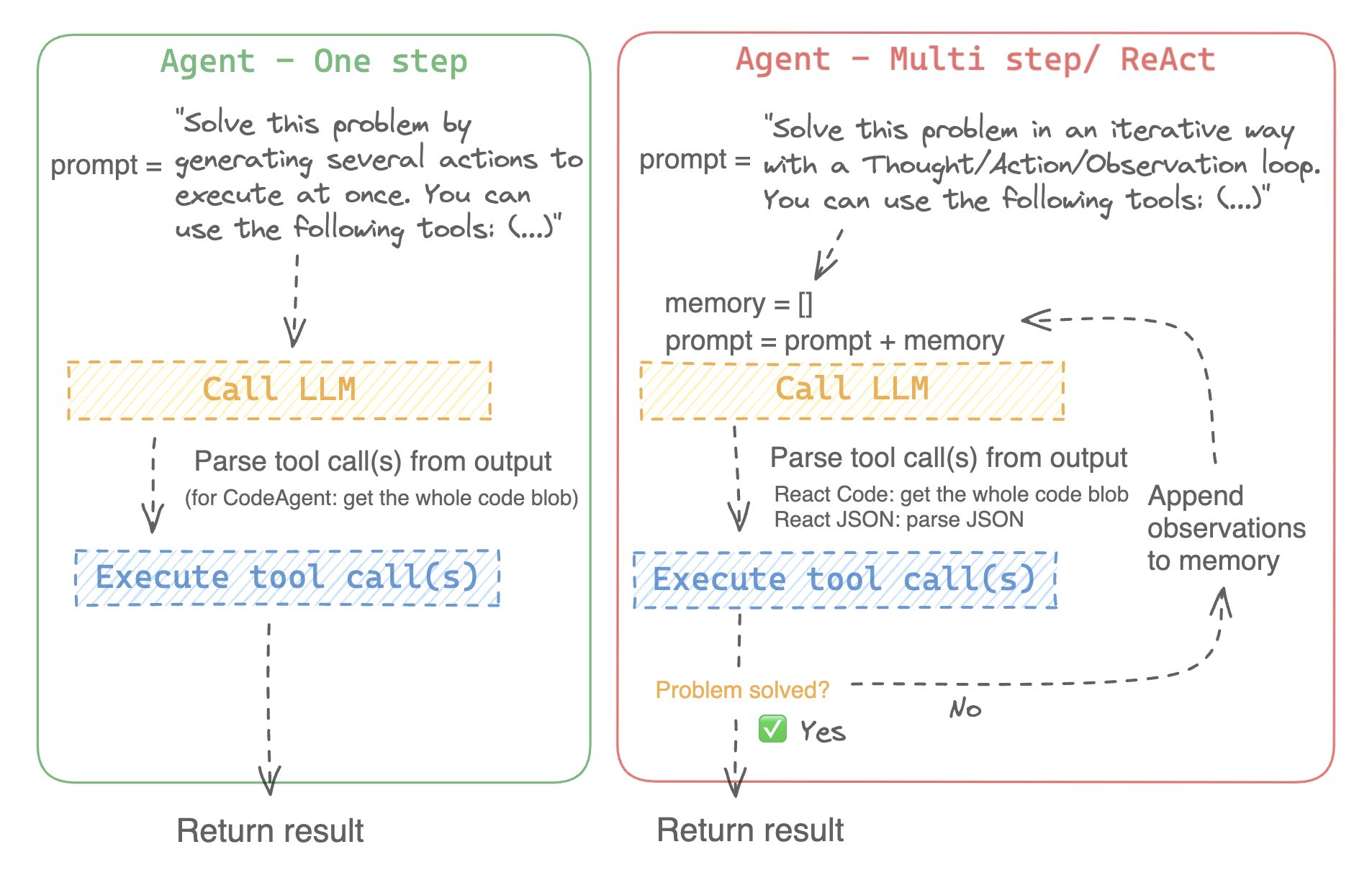
- devise a series of actions/tools and run them all at once, like the [`CodeAgent`]
- plan and execute actions/tools one by one and wait for the outcome of each action before launching the next one, like the [`ReactJsonAgent`]
### Types of agents
#### Code agent
This agent has a planning step, then generates python code to execute all its actions at once. It natively handles different input and output types for its tools, thus it is the recommended choice for multimodal tasks.
#### React agents
This is the go-to agent to solve reasoning tasks, since the ReAct framework ([Yao et al., 2022](https://huggingface.co/papers/2210.03629)) makes it really efficient to think on the basis of its previous observations.
We implement two versions of ReactJsonAgent:
- [`ReactJsonAgent`] generates tool calls as a JSON in its output.
- [`ReactCodeAgent`] is a new type of ReactJsonAgent that generates its tool calls as blobs of code, which works really well for LLMs that have strong coding performance.
> [!TIP]
> Read [Open-source LLMs as LangChain Agents](https://huggingface.co/blog/open-source-llms-as-agents) blog post to learn more about ReAct agents.
<div class="flex justify-center">
<img
class="block dark:hidden"
src="https://huggingface.co/datasets/huggingface/documentation-images/resolve/main/transformers/Agent_ManimCE.gif"
/>
<img
class="hidden dark:block"
src="https://huggingface.co/datasets/huggingface/documentation-images/resolve/main/transformers/Agent_ManimCE.gif"
/>
</div>
For example, here is how a ReAct Code agent would work its way through the following question.
```py3
>>> agent.run(
... "How many more blocks (also denoted as layers) in BERT base encoder than the encoder from the architecture proposed in Attention is All You Need?",
... )
=====New task=====
How many more blocks (also denoted as layers) in BERT base encoder than the encoder from the architecture proposed in Attention is All You Need?
====Agent is executing the code below:
bert_blocks = search(query="number of blocks in BERT base encoder")
print("BERT blocks:", bert_blocks)
====
Print outputs:
BERT blocks: twelve encoder blocks
====Agent is executing the code below:
attention_layer = search(query="number of layers in Attention is All You Need")
print("Attention layers:", attention_layer)
====
Print outputs:
Attention layers: Encoder: The encoder is composed of a stack of N = 6 identical layers. Each layer has two sub-layers. The first is a multi-head self-attention mechanism, and the second is a simple, position- 2 Page 3 Figure 1: The Transformer - model architecture.
====Agent is executing the code below:
bert_blocks = 12
attention_layers = 6
diff = bert_blocks - attention_layers
print("Difference in blocks:", diff)
final_answer(diff)
====
Print outputs:
Difference in blocks: 6
Final answer: 6
```
### How can I build an agent?
To initialize an agent, you need these arguments:
- an LLM to power your agent - the agent is not exactly the LLM, it’s more like the agent is a program that uses an LLM as its engine.
- a system prompt: what the LLM engine will be prompted with to generate its output
- a toolbox from which the agent pick tools to execute
- a parser to extract from the LLM output which tools are to call and with which arguments
Upon initialization of the agent system, the tool attributes are used to generate a tool description, then baked into the agent’s `system_prompt` to let it know which tools it can use and why.
To start with, please install the `agents` extras in order to install all default dependencies.
```bash
pip install transformers[agents]
```
Build your LLM engine by defining a `llm_engine` method which accepts a list of [messages](./chat_templating) and returns text. This callable also needs to accept a `stop` argument that indicates when to stop generating.
```python
from huggingface_hub import login, InferenceClient
login("<YOUR_HUGGINGFACEHUB_API_TOKEN>")
client = InferenceClient(model="meta-llama/Meta-Llama-3-70B-Instruct")
def llm_engine(messages, stop_sequences=["Task"]) -> str:
response = client.chat_completion(messages, stop=stop_sequences, max_tokens=1000)
answer = response.choices[0].message.content
return answer
```
You could use any `llm_engine` method as long as:
1. it follows the [messages format](./chat_templating) (`List[Dict[str, str]]`) for its input `messages`, and it returns a `str`.
2. it stops generating outputs at the sequences passed in the argument `stop_sequences`
Additionally, `llm_engine` can also take a `grammar` argument. In the case where you specify a `grammar` upon agent initialization, this argument will be passed to the calls to llm_engine, with the `grammar` that you defined upon initialization, to allow [constrained generation](https://huggingface.co/docs/text-generation-inference/conceptual/guidance) in order to force properly-formatted agent outputs.
You will also need a `tools` argument which accepts a list of `Tools` - it can be an empty list. You can also add the default toolbox on top of your `tools` list by defining the optional argument `add_base_tools=True`.
Now you can create an agent, like [`CodeAgent`], and run it. You can also create a [`TransformersEngine`] with a pre-initialized pipeline to run inference on your local machine using `transformers`.
For convenience, since agentic behaviours generally require stronger models such as `Llama-3.1-70B-Instruct` that are harder to run locally for now, we also provide the [`HfApiEngine`] class that initializes a `huggingface_hub.InferenceClient` under the hood.
```python
from transformers import CodeAgent, HfApiEngine
llm_engine = HfApiEngine(model="meta-llama/Meta-Llama-3-70B-Instruct")
agent = CodeAgent(tools=[], llm_engine=llm_engine, add_base_tools=True)
agent.run(
"Could you translate this sentence from French, say it out loud and return the audio.",
sentence="Où est la boulangerie la plus proche?",
)
```
This will be handy in case of emergency baguette need!
You can even leave the argument `llm_engine` undefined, and an [`HfApiEngine`] will be created by default.
```python
from transformers import CodeAgent
agent = CodeAgent(tools=[], add_base_tools=True)
agent.run(
"Could you translate this sentence from French, say it out loud and give me the audio.",
sentence="Où est la boulangerie la plus proche?",
)
```
Note that we used an additional `sentence` argument: you can pass text as additional arguments to the model.
You can also use this to indicate the path to local or remote files for the model to use:
```py
from transformers import ReactCodeAgent
agent = ReactCodeAgent(tools=[], llm_engine=llm_engine, add_base_tools=True)
agent.run("Why does Mike not know many people in New York?", audio="https://huggingface.co/datasets/huggingface/documentation-images/resolve/main/transformers/recording.mp3")
```
The prompt and output parser were automatically defined, but you can easily inspect them by calling the `system_prompt_template` on your agent.
```python
print(agent.system_prompt_template)
```
It's important to explain as clearly as possible the task you want to perform.
Every [`~Agent.run`] operation is independent, and since an agent is powered by an LLM, minor variations in your prompt might yield completely different results.
You can also run an agent consecutively for different tasks: each time the attributes `agent.task` and `agent.logs` will be re-initialized.
#### Code execution
A Python interpreter executes the code on a set of inputs passed along with your tools.
This should be safe because the only functions that can be called are the tools you provided (especially if it's only tools by Hugging Face) and the print function, so you're already limited in what can be executed.
The Python interpreter also doesn't allow imports by default outside of a safe list, so all the most obvious attacks shouldn't be an issue.
You can still authorize additional imports by passing the authorized modules as a list of strings in argument `additional_authorized_imports` upon initialization of your [`ReactCodeAgent`] or [`CodeAgent`]:
```py
>>> from transformers import ReactCodeAgent
>>> agent = ReactCodeAgent(tools=[], additional_authorized_imports=['requests', 'bs4'])
>>> agent.run("Could you get me the title of the page at url 'https://huggingface.co/blog'?")
(...)
'Hugging Face – Blog'
```
The execution will stop at any code trying to perform an illegal operation or if there is a regular Python error with the code generated by the agent.
> [!WARNING]
> The LLM can generate arbitrary code that will then be executed: do not add any unsafe imports!
### The system prompt
An agent, or rather the LLM that drives the agent, generates an output based on the system prompt. The system prompt can be customized and tailored to the intended task. For example, check the system prompt for the [`ReactCodeAgent`] (below version is slightly simplified).
```text
You will be given a task to solve as best you can.
You have access to the following tools:
<<tool_descriptions>>
To solve the task, you must plan forward to proceed in a series of steps, in a cycle of 'Thought:', 'Code:', and 'Observation:' sequences.
At each step, in the 'Thought:' sequence, you should first explain your reasoning towards solving the task, then the tools that you want to use.
Then in the 'Code:' sequence, you should write the code in simple Python. The code sequence must end with '/End code' sequence.
During each intermediate step, you can use 'print()' to save whatever important information you will then need.
These print outputs will then be available in the 'Observation:' field, for using this information as input for the next step.
In the end you have to return a final answer using the `final_answer` tool.
Here are a few examples using notional tools:
---
{examples}
Above example were using notional tools that might not exist for you. You only have acces to those tools:
<<tool_names>>
You also can perform computations in the python code you generate.
Always provide a 'Thought:' and a 'Code:\n```py' sequence ending with '```<end_code>' sequence. You MUST provide at least the 'Code:' sequence to move forward.
Remember to not perform too many operations in a single code block! You should split the task into intermediate code blocks.
Print results at the end of each step to save the intermediate results. Then use final_answer() to return the final result.
Remember to make sure that variables you use are all defined.
Now Begin!
```
The system prompt includes:
- An *introduction* that explains how the agent should behave and what tools are.
- A description of all the tools that is defined by a `<<tool_descriptions>>` token that is dynamically replaced at runtime with the tools defined/chosen by the user.
- The tool description comes from the tool attributes, `name`, `description`, `inputs` and `output_type`, and a simple `jinja2` template that you can refine.
- The expected output format.
You could improve the system prompt, for example, by adding an explanation of the output format.
For maximum flexibility, you can overwrite the whole system prompt template by passing your custom prompt as an argument to the `system_prompt` parameter.
```python
from transformers import ReactJsonAgent
from transformers.agents import PythonInterpreterTool
agent = ReactJsonAgent(tools=[PythonInterpreterTool()], system_prompt="{your_custom_prompt}")
```
> [!WARNING]
> Please make sure to define the `<<tool_descriptions>>` string somewhere in the `template` so the agent is aware
of the available tools.
### Inspecting an agent run
Here are a few useful attributes to inspect what happened after a run:
- `agent.logs` stores the fine-grained logs of the agent. At every step of the agent's run, everything gets stored in a dictionary that then is appended to `agent.logs`.
- Running `agent.write_inner_memory_from_logs()` creates an inner memory of the agent's logs for the LLM to view, as a list of chat messages. This method goes over each step of the log and only stores what it's interested in as a message: for instance, it will save the system prompt and task in separate messages, then for each step it will store the LLM output as a message, and the tool call output as another message. Use this if you want a higher-level view of what has happened - but not every log will be transcripted by this method.
## Tools
A tool is an atomic function to be used by an agent.
You can for instance check the [`PythonInterpreterTool`]: it has a name, a description, input descriptions, an output type, and a `__call__` method to perform the action.
When the agent is initialized, the tool attributes are used to generate a tool description which is baked into the agent's system prompt. This lets the agent know which tools it can use and why.
### Default toolbox
Transformers comes with a default toolbox for empowering agents, that you can add to your agent upon initialization with argument `add_base_tools = True`:
- **Document question answering**: given a document (such as a PDF) in image format, answer a question on this document ([Donut](./model_doc/donut))
- **Image question answering**: given an image, answer a question on this image ([VILT](./model_doc/vilt))
- **Speech to text**: given an audio recording of a person talking, transcribe the speech into text ([Whisper](./model_doc/whisper))
- **Text to speech**: convert text to speech ([SpeechT5](./model_doc/speecht5))
- **Translation**: translates a given sentence from source language to target language.
- **DuckDuckGo search***: performs a web search using DuckDuckGo browser.
- **Python code interpreter**: runs your the LLM generated Python code in a secure environment. This tool will only be added to [`ReactJsonAgent`] if you initialize it with `add_base_tools=True`, since code-based agent can already natively execute Python code
You can manually use a tool by calling the [`load_tool`] function and a task to perform.
```python
from transformers import load_tool
tool = load_tool("text-to-speech")
audio = tool("This is a text to speech tool")
```
### Create a new tool
You can create your own tool for use cases not covered by the default tools from Hugging Face.
For example, let's create a tool that returns the most downloaded model for a given task from the Hub.
You'll start with the code below.
```python
from huggingface_hub import list_models
task = "text-classification"
model = next(iter(list_models(filter=task, sort="downloads", direction=-1)))
print(model.id)
```
This code can quickly be converted into a tool, just by wrapping it in a function and adding the `tool` decorator:
```py
from transformers import tool
@tool
def model_download_tool(task: str) -> str:
"""
This is a tool that returns the most downloaded model of a given task on the Hugging Face Hub.
It returns the name of the checkpoint.
Args:
task: The task for which
"""
model = next(iter(list_models(filter="text-classification", sort="downloads", direction=-1)))
return model.id
```
The function needs:
- A clear name. The name usually describes what the tool does. Since the code returns the model with the most downloads for a task, let's put `model_download_tool`.
- Type hints on both inputs and output
- A description, that includes an 'Args:' part where each argument is described (without a type indication this time, it will be pulled from the type hint).
All these will be automatically baked into the agent's system prompt upon initialization: so strive to make them as clear as possible!
> [!TIP]
> This definition format is the same as tool schemas used in `apply_chat_template`, the only difference is the added `tool` decorator: read more on our tool use API [here](https://huggingface.co/blog/unified-tool-use#passing-tools-to-a-chat-template).
Then you can directly initialize your agent:
```py
from transformers import CodeAgent
agent = CodeAgent(tools=[model_download_tool], llm_engine=llm_engine)
agent.run(
"Can you give me the name of the model that has the most downloads in the 'text-to-video' task on the Hugging Face Hub?"
)
```
You get the following:
```text
======== New task ========
Can you give me the name of the model that has the most downloads in the 'text-to-video' task on the Hugging Face Hub?
==== Agent is executing the code below:
most_downloaded_model = model_download_tool(task="text-to-video")
print(f"The most downloaded model for the 'text-to-video' task is {most_downloaded_model}.")
====
```
And the output:
`"The most downloaded model for the 'text-to-video' task is ByteDance/AnimateDiff-Lightning."`
### Manage your agent's toolbox
If you have already initialized an agent, it is inconvenient to reinitialize it from scratch with a tool you want to use. With Transformers, you can manage an agent's toolbox by adding or replacing a tool.
Let's add the `model_download_tool` to an existing agent initialized with only the default toolbox.
```python
from transformers import CodeAgent
agent = CodeAgent(tools=[], llm_engine=llm_engine, add_base_tools=True)
agent.toolbox.add_tool(model_download_tool)
```
Now we can leverage both the new tool and the previous text-to-speech tool:
```python
agent.run(
"Can you read out loud the name of the model that has the most downloads in the 'text-to-video' task on the Hugging Face Hub and return the audio?"
)
```
| **Audio** |
|------------------------------------------------------------------------------------------------------------------------------------------------------|
| <audio controls><source src="https://huggingface.co/datasets/huggingface/documentation-images/resolve/main/transformers/damo.wav" type="audio/wav"/> |
> [!WARNING]
> Beware when adding tools to an agent that already works well because it can bias selection towards your tool or select another tool other than the one already defined.
Use the `agent.toolbox.update_tool()` method to replace an existing tool in the agent's toolbox.
This is useful if your new tool is a one-to-one replacement of the existing tool because the agent already knows how to perform that specific task.
Just make sure the new tool follows the same API as the replaced tool or adapt the system prompt template to ensure all examples using the replaced tool are updated.
### Use a collection of tools
You can leverage tool collections by using the ToolCollection object, with the slug of the collection you want to use.
Then pass them as a list to initialize you agent, and start using them!
```py
from transformers import ToolCollection, ReactCodeAgent
image_tool_collection = ToolCollection(collection_slug="huggingface-tools/diffusion-tools-6630bb19a942c2306a2cdb6f")
agent = ReactCodeAgent(tools=[*image_tool_collection.tools], add_base_tools=True)
agent.run("Please draw me a picture of rivers and lakes.")
```
To speed up the start, tools are loaded only if called by the agent.
This gets you this image:
<img src="https://huggingface.co/datasets/huggingface/documentation-images/resolve/main/transformers/rivers_and_lakes.png">
|