


File size: 5,425 Bytes
5838afe | 1 2 3 4 5 6 7 8 9 10 11 12 13 14 15 16 17 18 19 20 21 22 23 24 25 26 27 28 29 30 31 32 33 34 35 36 37 38 39 40 41 42 43 44 45 46 47 48 49 50 51 52 53 54 55 56 57 58 59 60 61 62 63 64 65 66 67 68 69 70 71 72 73 74 75 76 77 78 79 80 81 82 83 84 85 86 87 88 89 90 91 92 93 94 95 96 97 98 99 100 101 102 103 104 105 106 107 108 109 110 111 112 113 114 115 116 117 118 119 120 121 122 123 124 125 126 127 128 129 130 131 132 133 134 135 136 137 138 139 140 141 142 143 144 145 146 147 148 149 150 151 152 153 154 155 156 157 158 159 160 161 162 163 164 165 166 167 | ---
library_name: transformers
license: apache-2.0
license_link: https://huggingface.co/Qwen/Qwen3-Coder-30B-A3B-Instruct/blob/main/LICENSE
pipeline_tag: text-generation
---
# Qwen3-Coder-30B-A3B-Instruct
<a href="https://chat.qwen.ai/" target="_blank" style="margin: 2px;">
<img alt="Chat" src="https://img.shields.io/badge/%F0%9F%92%9C%EF%B8%8F%20Qwen%20Chat%20-536af5" style="display: inline-block; vertical-align: middle;"/>
</a>
## Highlights
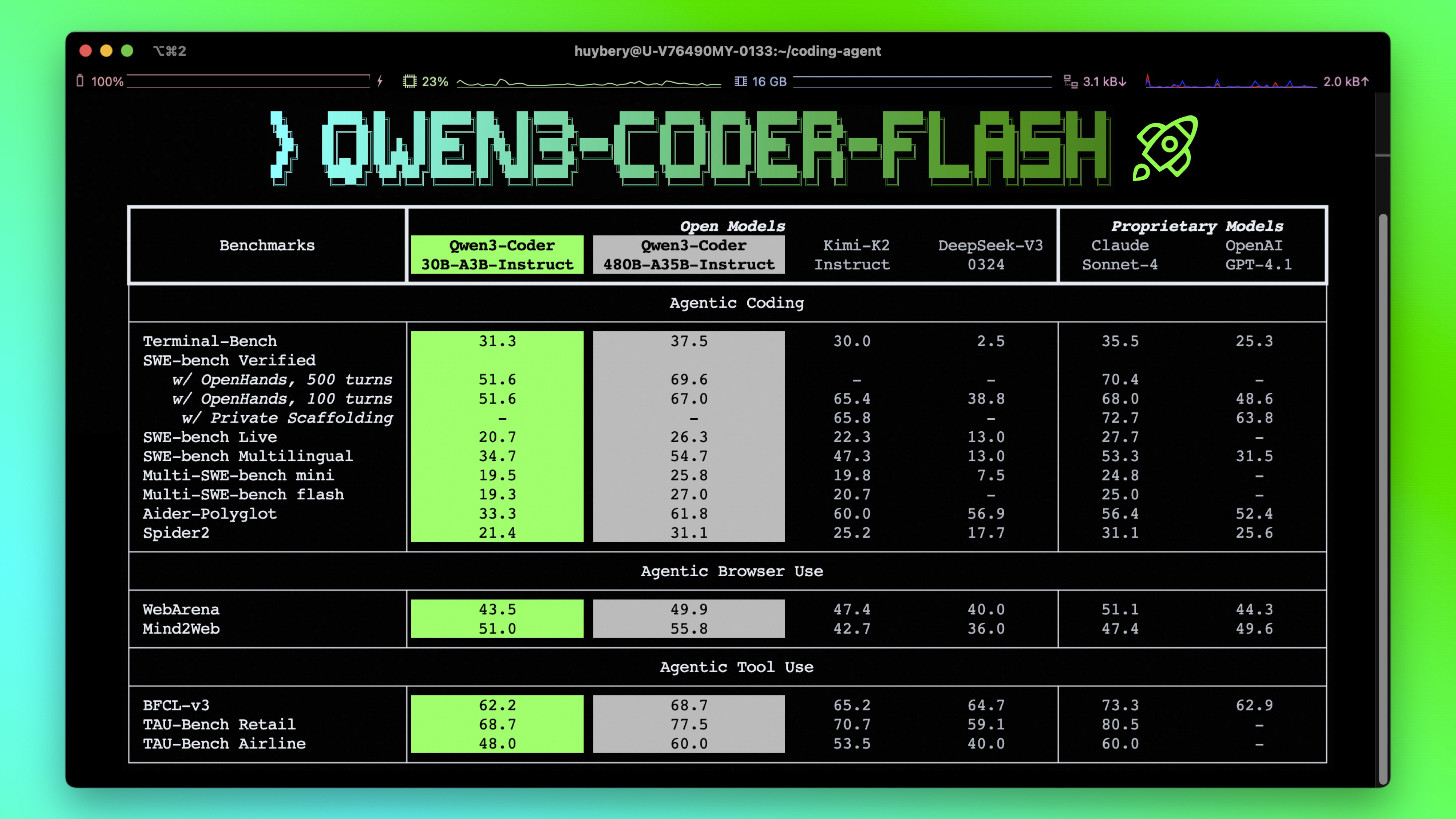
**Qwen3-Coder** is available in multiple sizes. Today, we're excited to introduce **Qwen3-Coder-30B-A3B-Instruct**. This streamlined model maintains impressive performance and efficiency, featuring the following key enhancements:
- **Significant Performance** among open models on **Agentic Coding**, **Agentic Browser-Use**, and other foundational coding tasks.
- **Long-context Capabilities** with native support for **256K** tokens, extendable up to **1M** tokens using Yarn, optimized for repository-scale understanding.
- **Agentic Coding** supporting for most platform such as **Qwen Code**, **CLINE**, featuring a specially designed function call format.
## Model Overview
**Qwen3-Coder-30B-A3B-Instruct** has the following features:
- Type: Causal Language Models
- Training Stage: Pretraining & Post-training
- Number of Parameters: 30.5B in total and 3.3B activated
- Number of Layers: 48
- Number of Attention Heads (GQA): 32 for Q and 4 for KV
- Number of Experts: 128
- Number of Activated Experts: 8
- Context Length: **262,144 natively**.
**NOTE: This model supports only non-thinking mode and does not generate ``<think></think>`` blocks in its output. Meanwhile, specifying `enable_thinking=False` is no longer required.**
For more details, including benchmark evaluation, hardware requirements, and inference performance, please refer to our [blog](https://qwenlm.github.io/blog/qwen3-coder/), [GitHub](https://github.com/QwenLM/Qwen3-Coder), and [Documentation](https://qwen.readthedocs.io/en/latest/).
## Quickstart
We advise you to use the latest version of `transformers`.
With `transformers<4.51.0`, you will encounter the following error:
```
KeyError: 'qwen3_moe'
```
The following contains a code snippet illustrating how to use the model generate content based on given inputs.
```python
from transformers import AutoModelForCausalLM, AutoTokenizer
model_name = "Qwen/Qwen3-Coder-30B-A3B-Instruct"
# load the tokenizer and the model
tokenizer = AutoTokenizer.from_pretrained(model_name)
model = AutoModelForCausalLM.from_pretrained(
model_name,
torch_dtype="auto",
device_map="auto"
)
# prepare the model input
prompt = "Write a quick sort algorithm."
messages = [
{"role": "user", "content": prompt}
]
text = tokenizer.apply_chat_template(
messages,
tokenize=False,
add_generation_prompt=True,
)
model_inputs = tokenizer([text], return_tensors="pt").to(model.device)
# conduct text completion
generated_ids = model.generate(
**model_inputs,
max_new_tokens=65536
)
output_ids = generated_ids[0][len(model_inputs.input_ids[0]):].tolist()
content = tokenizer.decode(output_ids, skip_special_tokens=True)
print("content:", content)
```
**Note: If you encounter out-of-memory (OOM) issues, consider reducing the context length to a shorter value, such as `32,768`.**
For local use, applications such as Ollama, LMStudio, MLX-LM, llama.cpp, and KTransformers have also supported Qwen3.
## Agentic Coding
Qwen3-Coder excels in tool calling capabilities.
You can simply define or use any tools as following example.
```python
# Your tool implementation
def square_the_number(num: float) -> dict:
return num ** 2
# Define Tools
tools=[
{
"type":"function",
"function":{
"name": "square_the_number",
"description": "output the square of the number.",
"parameters": {
"type": "object",
"required": ["input_num"],
"properties": {
'input_num': {
'type': 'number',
'description': 'input_num is a number that will be squared'
}
},
}
}
}
]
import OpenAI
# Define LLM
client = OpenAI(
# Use a custom endpoint compatible with OpenAI API
base_url='http://localhost:8000/v1', # api_base
api_key="EMPTY"
)
messages = [{'role': 'user', 'content': 'square the number 1024'}]
completion = client.chat.completions.create(
messages=messages,
model="Qwen3-Coder-30B-A3B-Instruct",
max_tokens=65536,
tools=tools,
)
print(completion.choice[0])
```
## Best Practices
To achieve optimal performance, we recommend the following settings:
1. **Sampling Parameters**:
- We suggest using `temperature=0.7`, `top_p=0.8`, `top_k=20`, `repetition_penalty=1.05`.
2. **Adequate Output Length**: We recommend using an output length of 65,536 tokens for most queries, which is adequate for instruct models.
### Citation
If you find our work helpful, feel free to give us a cite.
```
@misc{qwen3technicalreport,
title={Qwen3 Technical Report},
author={Qwen Team},
year={2025},
eprint={2505.09388},
archivePrefix={arXiv},
primaryClass={cs.CL},
url={https://arxiv.org/abs/2505.09388},
}
```
|