| | |
| |
|
| | Image classification is a supervised learning problem: define a set of target classes (objects to identify in images), and train a model to recognize them using labeled example photos. |
| | Using AutoTrain, its super-easy to train a state-of-the-art image classification model. Just upload a set of images, and AutoTrain will automatically train a model to classify them. |
| |
|
| | |
| |
|
| | The data for image classification must be in zip format, with each class in a separate subfolder. For example, if you want to classify cats and dogs, your zip file should look like this: |
| |
|
| | ``` |
| | cats_and_dogs.zip |
| | ├── cats |
| | │ ├── cat.1.jpg |
| | │ ├── cat.2.jpg |
| | │ ├── cat.3.jpg |
| | │ └── ... |
| | └── dogs |
| | ├── dog.1.jpg |
| | ├── dog.2.jpg |
| | ├── dog.3.jpg |
| | └── ... |
| | ``` |
| |
|
| | Some points to keep in mind: |
| |
|
| | - The zip file should contain multiple folders (the classes), each folder should contain images of a single class. |
| | - The name of the folder should be the name of the class. |
| | - The images must be jpeg, jpg or png. |
| | - There should be at least 5 images per class. |
| | - There should not be any other files in the zip file. |
| | - There should not be any other folders inside the zip folder. |
| |
|
| | When train.zip is decompressed, it creates two folders: cats and dogs. these are the two categories for classification. The images for both categories are in their respective folders. You can have as many categories as you want. |
| |
|
| | |
| |
|
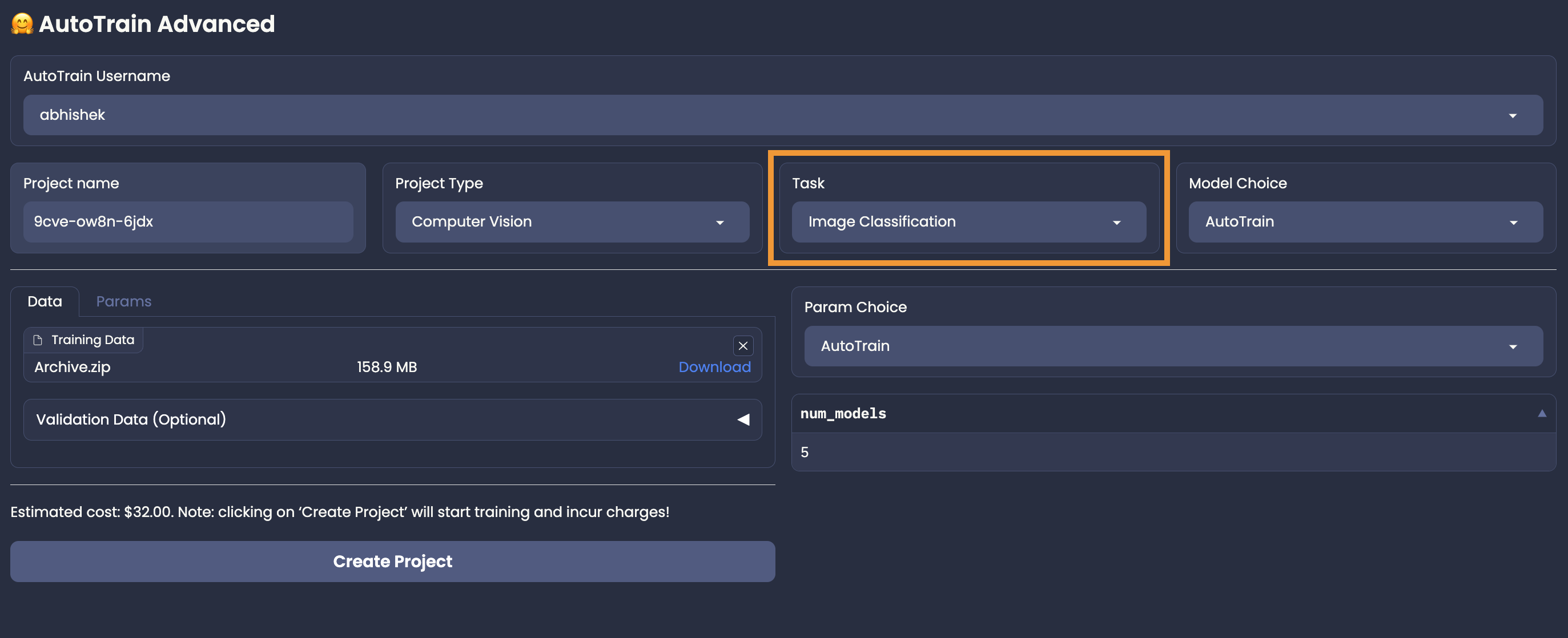
| | Once you have your data ready, you can upload it to AutoTrain and select model and parameters. |
| | If the estimate looks good, click on `Create Project` button to start training. |
| |
|
| |  |