---
base_model:
- Qwen/Qwen2.5-VL-7B-Instruct
language:
- en
library_name: transformers
license: apache-2.0
pipeline_tag: image-text-to-text
tags:
- gui
- agent
- gui-grounding
- reinforcement-learning
---
# InfiGUI-G1-7B
**[📚 Paper](https://arxiv.org/abs/2508.05731)** | **[🌐 Project Page](https://osatlas.github.io/)** | **[💻 Code](https://github.com/InfiXAI/InfiGUI-G1)**
This repository contains the InfiGUI-G1-7B model from the paper **[InfiGUI-G1: Advancing GUI Grounding with Adaptive Exploration Policy Optimization](https://arxiv.org/abs/2508.05731)**.
The model is based on `Qwen2.5-VL-7B-Instruct` and is fine-tuned using our proposed **Adaptive Exploration Policy Optimization (AEPO)** framework. AEPO is a novel reinforcement learning method designed to enhance the model's **semantic alignment** for GUI grounding tasks. It overcomes the exploration bottlenecks of standard RLVR methods by integrating a multi-answer generation strategy with a theoretically-grounded adaptive reward function, enabling more effective and efficient learning for complex GUI interactions.
## Quick Start
### Installation
First, install the required dependencies:
```bash
pip install transformers qwen-vl-utils
````
### Example
```python
import json
import math
import torch
import requests
from io import BytesIO
from PIL import Image, ImageDraw, ImageFont
from transformers import Qwen2_5_VLForConditionalGeneration, AutoProcessor
from qwen_vl_utils import process_vision_info, smart_resize
MAX_IMAGE_PIXELS = 5600 * 28 * 28
def resize_image(width: int, height: int, max_pixels: int) -> tuple[int, int]:
"""
Resize image to fit within max_pixels constraint while maintaining aspect ratio.
Applies smart_resize for final dimension optimization.
"""
current_pixels = width * height
if current_pixels <= max_pixels:
target_width, target_height = width, height
else:
scale_factor = math.sqrt(max_pixels / current_pixels)
target_width = round(width * scale_factor)
target_height = round(height * scale_factor)
# Apply smart_resize for final dimensions
final_height, final_width = smart_resize(target_height, target_width)
return final_width, final_height
def load_image(img_path: str) -> Image.Image:
"""Load image from URL or local path."""
if img_path.startswith("https://"):
response = requests.get(img_path)
return Image.open(BytesIO(response.content))
else:
return Image.open(img_path)
def visualize_points(original_image: Image.Image, points: list,
new_width: int, new_height: int,
original_width: int, original_height: int) -> None:
"""Draw prediction points on original image and save as output.png."""
output_img = original_image.copy()
draw = ImageDraw.Draw(output_img)
font = ImageFont.load_default(size=100)
for i, point_data in enumerate(points):
coords = point_data['point_2d']
# Map coordinates from resized image back to original image
original_x = int(coords[0] / new_width * original_width)
original_y = int(coords[1] / new_height * original_height)
label = str(i + 1)
# Draw circle
circle_radius = 20
draw.ellipse([original_x - circle_radius, original_y - circle_radius,
original_x + circle_radius, original_y + circle_radius],\
fill=(255, 0, 0))
# Draw label
draw.text((original_x + 20, original_y - 20), label, fill=(255, 0, 0), font=font)
print(f"Point {i+1}: Predicted coordinates {coords} -> Mapped coordinates [{original_x}, {original_y}]")
output_img.save("output.png")
print(f"Visualization with {len(points)} points saved to output.png")
def main():
# Load model and processor
model = Qwen2_5_VLForConditionalGeneration.from_pretrained(
"InfiX-ai/InfiGUI-G1-7B",
torch_dtype=torch.bfloat16,
attn_implementation="flash_attention_2",
device_map="auto"
)
processor = AutoProcessor.from_pretrained("InfiX-ai/InfiGUI-G1-7B", padding_side="left")
# Load and process image
img_path = "https://raw.githubusercontent.com/InfiXAI/InfiGUI-G1/main/assets/test_image.png"
image = load_image(img_path)
# Store original image and resize for model input
original_image = image.copy()
original_width, original_height = image.size
new_width, new_height = resize_image(original_width, original_height, MAX_IMAGE_PIXELS)
resized_image = image.resize((new_width, new_height))
# Prepare model inputs
instruction = "shuffle play the current playlist"
system_prompt = 'You FIRST think about the reasoning process as an internal monologue and then provide the final answer.
The reasoning process MUST BE enclosed within tags.'
prompt = f'''The screen's resolution is {new_width}x{new_height}.
Locate the UI element(s) for "{instruction}", output the coordinates using JSON format: [{{"point_2d": [x, y]}}, ...]'''
messages = [
{"role": "system", "content": system_prompt},
{
"role": "user",
"content": [
{"type": "image", "image": resized_image},
{"type": "text", "text": prompt}
]
}
]
# Generate predictions
text = processor.apply_chat_template([messages], tokenize=False, add_generation_prompt=True)
image_inputs, video_inputs = process_vision_info([messages])
inputs = processor(text=text, images=image_inputs, videos=video_inputs, padding=True, return_tensors="pt").to("cuda")
generated_ids = model.generate(**inputs, max_new_tokens=512)
output_text = processor.batch_decode(
[out_ids[len(in_ids):] for in_ids, out_ids in zip(inputs.input_ids, generated_ids)],
skip_special_tokens=True,
clean_up_tokenization_spaces=False
)
# Parse and visualize results
output_text = output_text[0].split("")[-1].replace("```json", "").replace("```", "").strip()
output = json.loads(output_text)
if output:
visualize_points(original_image, output, new_width, new_height, original_width, original_height)
if __name__ == "__main__":
main()
```
## Results
Our InfiGUI-G1 models, trained with the AEPO framework, establish new state-of-the-art results among open-source models across a diverse and challenging set of GUI grounding benchmarks.
### MMBench-GUI (L2) Results
On the comprehensive MMBench-GUI benchmark, which evaluates performance across various platforms and instruction complexities, our InfiGUI-G1 models establish new state-of-the-art results for open-source models in their respective size categories.
### ScreenSpot-Pro Results
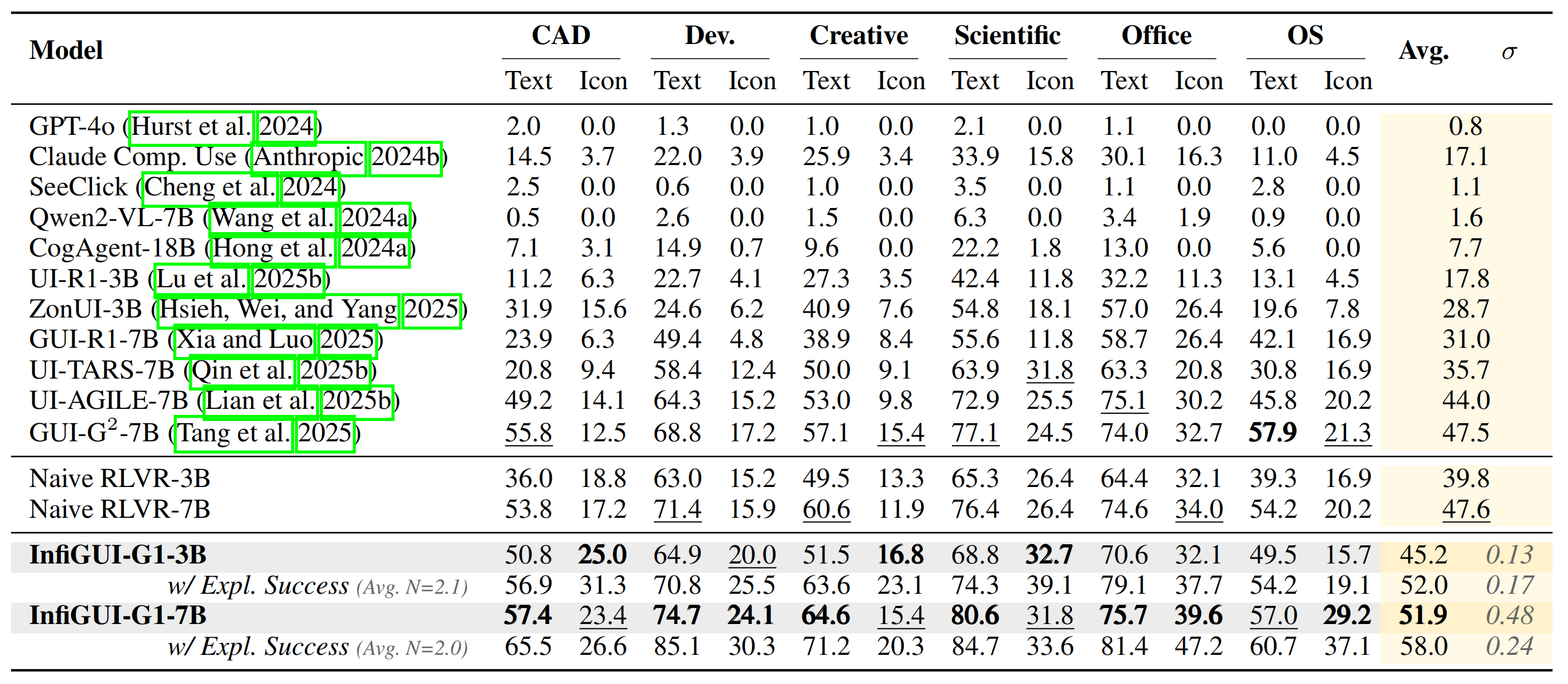
On the challenging ScreenSpot-Pro benchmark, designed to test semantic understanding on high-resolution professional software, InfiGUI-G1 demonstrates significant improvements, particularly on icon-based grounding tasks. This highlights AEPO's effectiveness in enhancing semantic alignment by associating abstract visual symbols with their functions.
### UI-Vision (Element Grounding) Results
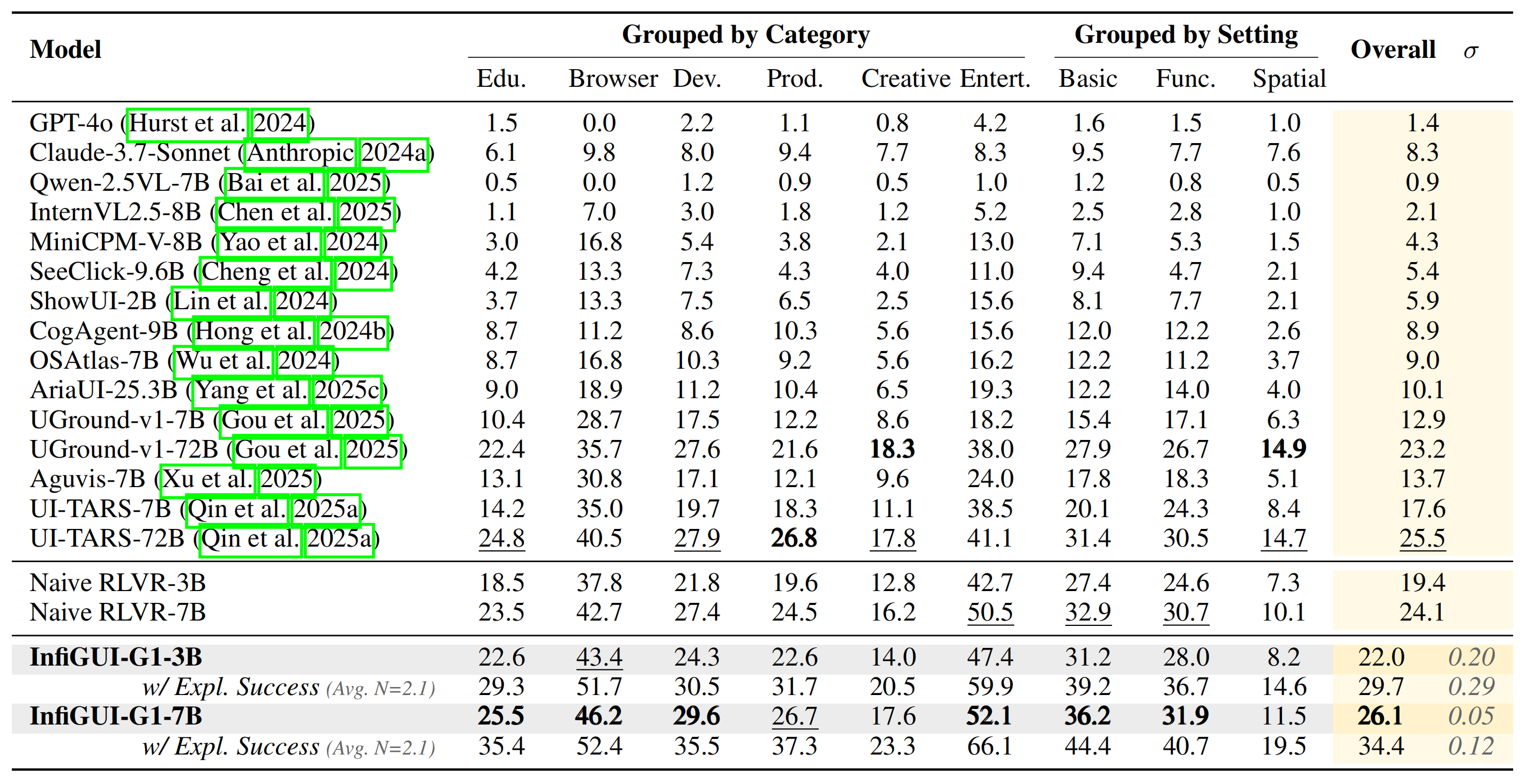
InfiGUI-G1 shows strong generalization capabilities on the UI-Vision benchmark, which is designed to test robustness across a wide variety of unseen desktop applications. Achieving high performance confirms that our AEPO framework fosters a robust understanding rather than overfitting to the training data.
### UI-I2E-Bench Results
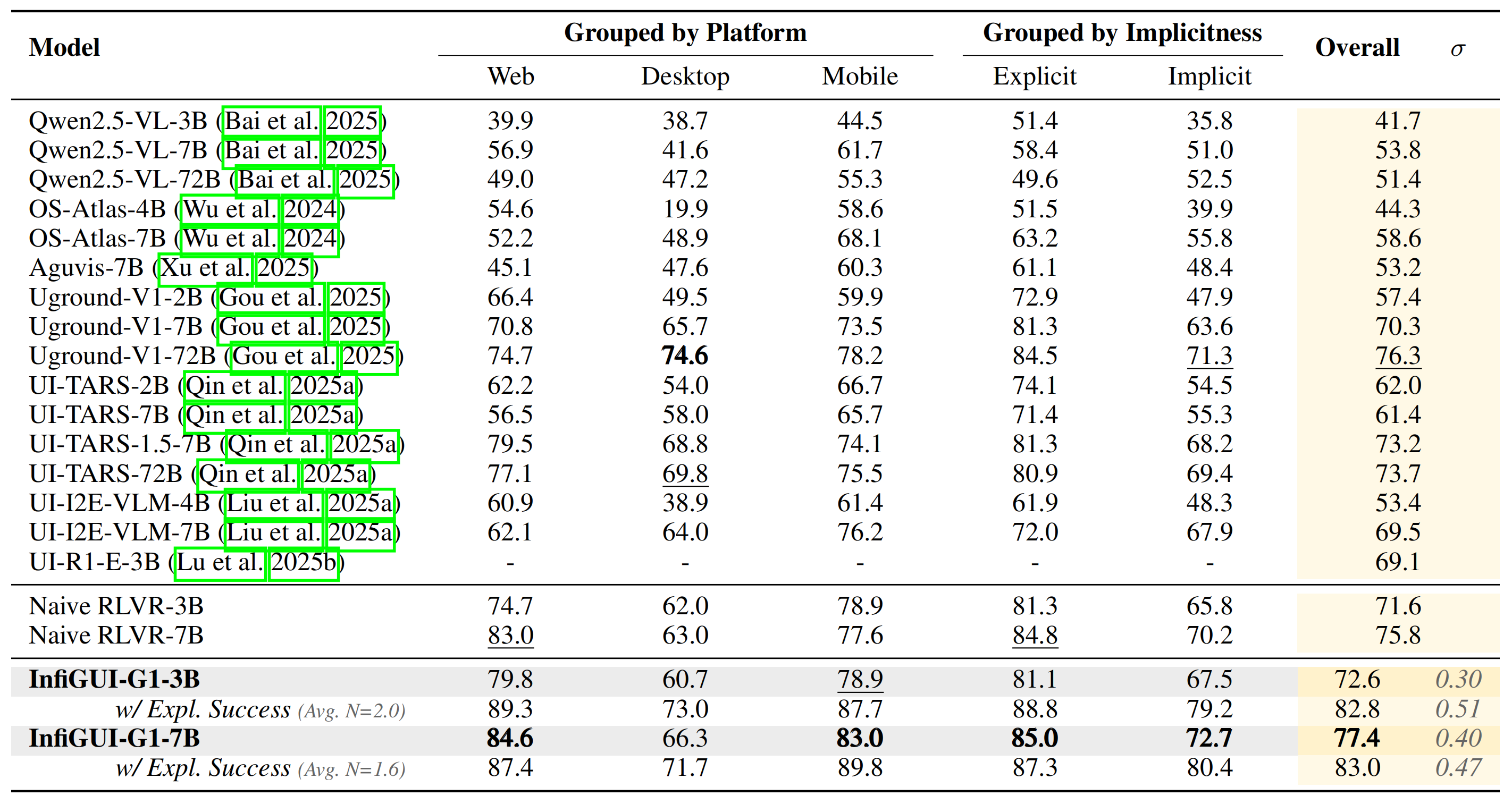
To further probe semantic reasoning, we evaluated on UI-I2E-Bench, a benchmark featuring a high proportion of implicit instructions that require reasoning beyond direct text matching. Our model's strong performance underscores AEPO's ability to handle complex, indirect commands.
### ScreenSpot-V2 Results
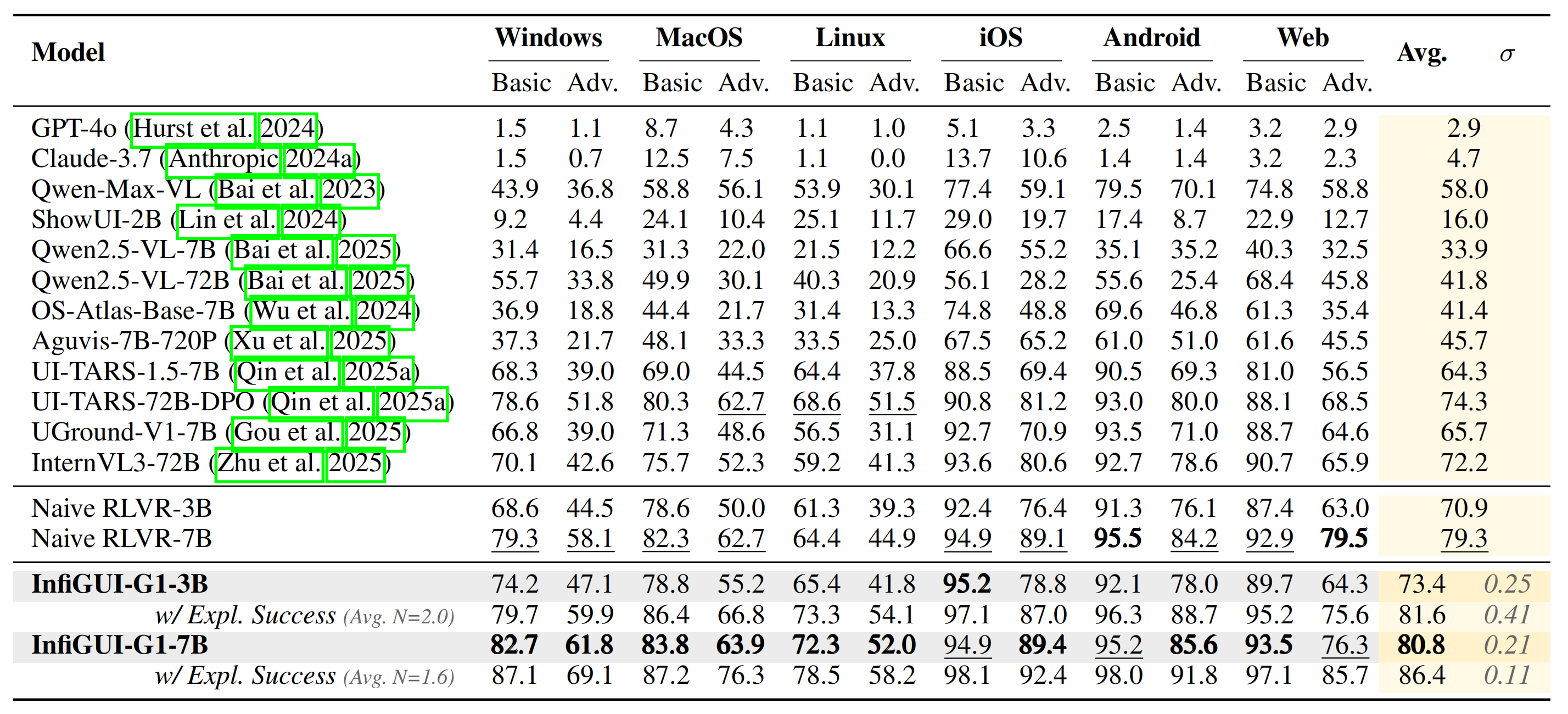
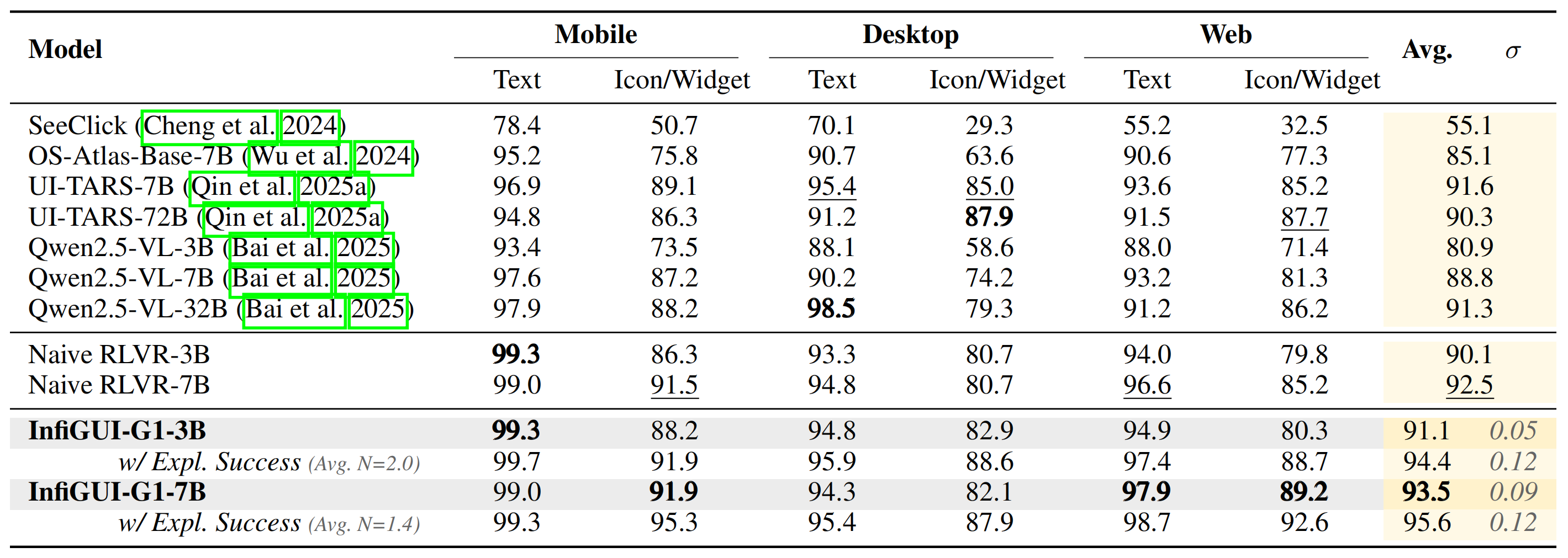
On the widely-used ScreenSpot-V2 benchmark, which provides comprehensive coverage across mobile, desktop, and web platforms, InfiGUI-G1 consistently outperforms strong baselines, demonstrating the broad applicability and data efficiency of our approach.
## ⚙️ Evaluation
This section provides instructions for reproducing the evaluation results reported in our paper.
### 1. Getting Started
Clone the repository and navigate to the project directory:
```bash
git clone https://github.com/InfiXAI/InfiGUI-G1.git
cd InfiGUI-G1
```
### 2. Environment Setup
The evaluation pipeline is built upon the [vLLM](https://github.com/vllm-project/vllm) library for efficient inference. For detailed installation guidance, please refer to the official vLLM repository. The specific versions used to obtain the results reported in our paper are as follows:
- **Python**: `3.10.12`
- **PyTorch**: `2.6.0`
- **Transformers**: `4.50.1`
- **vLLM**: `0.8.2`
- **CUDA**: `12.6`
The reported results were obtained on a server equipped with 4 x NVIDIA H800 GPUs.
### 3. Model Download
Download the InfiGUI-G1 models from the Hugging Face Hub into the `./models` directory.
```bash
# Create a directory for models
mkdir -p ./models
# Download InfiGUI-G1-3B
huggingface-cli download --resume-download InfiX-ai/InfiGUI-G1-3B --local-dir ./models/InfiGUI-G1-3B
# Download InfiGUI-G1-7B
huggingface-cli download --resume-download InfiX-ai/InfiGUI-G1-7B --local-dir ./models/InfiGUI-G1-7B
```
### 4. Dataset Download and Preparation
Download the required evaluation benchmarks into the `./data` directory.
```bash
# Create a directory for datasets
mkdir -p ./data
# Download benchmarks
huggingface-cli download --repo-type dataset --resume-download likaixin/ScreenSpot-Pro --local-dir ./data/ScreenSpot-Pro
huggingface-cli download --repo-type dataset --resume-download ServiceNow/ui-vision --local-dir ./data/ui-vision
huggingface-cli download --repo-type dataset --resume-download OS-Copilot/ScreenSpot-v2 --local-dir ./data/ScreenSpot-v2
huggingface-cli download --repo-type dataset --resume-download OpenGVLab/MMBench-GUI --local-dir ./data/MMBench-GUI
huggingface-cli download --repo-type dataset --resume-download vaundys/I2E-Bench --local-dir ./data/I2E-Bench
```
After downloading, some datasets require unzipping compressed image files.
```bash
# Unzip images for ScreenSpot-v2
unzip ./data/ScreenSpot-v2/screenspotv2_image.zip -d ./data/ScreenSpot-v2/
# Unzip images for MMBench-GUI
unzip ./data/MMBench-GUI/MMBench-GUI-OfflineImages.zip -d ./data/MMBench-GUI/
```
### 5. Running the Evaluation
To run the evaluation, use the `eval/eval.py` script. You must specify the path to the model, the benchmark name, and the tensor parallel size.
Here is an example command to evaluate the `InfiGUI-G1-3B` model on the `screenspot-pro` benchmark using 4 GPUs:
```bash
python eval/eval.py \
./models/InfiGUI-G1-3B \
--benchmark screenspot-pro \
--tensor-parallel 4
```
- **`model_path`**: The first positional argument specifies the path to the downloaded model directory (e.g., `./models/InfiGUI-G1-3B`).
- **`--benchmark`**: Specifies the benchmark to evaluate. Available options include `screenspot-pro`, `screenspot-v2`, `ui-vision`, `mmbench-gui`, and `i2e-bench`.
- **`--tensor-parallel`**: Sets the tensor parallelism size, which should typically match the number of available GPUs.
Evaluation results, including detailed logs and performance metrics, will be saved to the `./output/{model_name}/{benchmark}/` directory.
## 📚 Citation Information
If you find this work useful, we would be grateful if you consider citing the following papers:
```bibtex
@misc{liu2025infiguig1advancingguigrounding,
title={InfiGUI-G1: Advancing GUI Grounding with Adaptive Exploration Policy Optimization},
author={Yuhang Liu and Zeyu Liu and Shuanghe Zhu and Pengxiang Li and Congkai Xie and Jiasheng Wang and Xueyu Hu and Xiaotian Han and Jianbo Yuan and Xinyao Wang and Shengyu Zhang and Hongxia Yang and Fei Wu},
year={2025},
eprint={2508.05731},
archivePrefix={arXiv},
primaryClass={cs.AI},
url={https://arxiv.org/abs/2508.05731},
}
```
```bibtex
@article{liu2025infigui,
title={InfiGUI-R1: Advancing Multimodal GUI Agents from Reactive Actors to Deliberative Reasoners},
author={Liu, Yuhang and Li, Pengxiang and Xie, Congkai and Hu, Xavier and Han, Xiaotian and Zhang, Shengyu and Yang, Hongxia and Wu, Fei},
journal={arXiv preprint arXiv:2504.14239},
year={2025}
}
```
```bibtex
@article{liu2025infiguiagent,
title={InfiGUIAgent: A Multimodal Generalist GUI Agent with Native Reasoning and Reflection},
author={Liu, Yuhang and Li, Pengxiang and Wei, Zishu and Xie, Congkai and Hu, Xueyu and Xu, Xinchen and Zhang, Shengyu and Han, Xiaotian and Yang, Hongxia and Wu, Fei},
journal={arXiv preprint arXiv:2501.04575},
year={2025}
}
```
## 🙏 Acknowledgements
We would like to express our gratitude for the following open-source projects: [VERL](https://github.com/volcengine/verl), [Qwen2.5-VL](https://github.com/QwenLM/Qwen2.5-VL) and [vLLM](https://github.com/vllm-project/vllm).