

File size: 5,678 Bytes
4a28d4d | 1 2 3 4 5 6 7 8 9 10 11 12 13 14 15 16 17 18 19 20 21 22 23 24 25 26 27 28 29 30 31 32 33 34 35 36 37 38 39 40 41 42 43 44 45 46 47 48 49 50 51 52 53 54 55 56 57 58 59 60 61 62 63 64 65 66 67 68 69 70 71 72 73 74 75 76 77 78 79 80 81 82 83 84 85 86 87 88 89 90 91 92 93 94 95 96 97 98 99 100 101 102 103 104 105 106 107 108 109 110 111 112 113 114 115 116 117 118 119 120 121 122 123 124 125 126 127 128 129 130 131 132 133 134 135 136 137 138 139 140 141 142 143 144 145 146 147 148 149 150 151 152 153 154 | # OpenAI Compatible Server
This article primarily discusses the deployment of a single large vision language model across multiple GPUs on a single node, providing a service that is compatible with the OpenAI interface, as well as the usage of the service API.
For the sake of convenience, we refer to this service as `api_server`. Regarding parallel services with multiple models, please refer to the guide about [Request Distribution Server](../llm/proxy_server.md).
In the following sections, we will first introduce two methods for starting the service, choosing the appropriate one based on your application scenario.
Next, we focus on the definition of the service's RESTful API, explore the various ways to interact with the interface, and demonstrate how to try the service through the Swagger UI or LMDeploy CLI tools.
## Launch Service
Take the [llava-v1.6-vicuna-7b](https://huggingface.co/liuhaotian/llava-v1.6-vicuna-7b) model hosted on huggingface hub as an example, you can choose one the following methods to start the service.
### Option 1: Launching with lmdeploy CLI
```shell
lmdeploy serve api_server liuhaotian/llava-v1.6-vicuna-7b --server-port 23333
```
The arguments of `api_server` can be viewed through the command `lmdeploy serve api_server -h`, for instance, `--tp` to set tensor parallelism, `--session-len` to specify the max length of the context window, `--cache-max-entry-count` to adjust the GPU mem ratio for k/v cache etc.
### Option 2: Deploying with docker
With LMDeploy [official docker image](https://hub.docker.com/r/openmmlab/lmdeploy/tags), you can run OpenAI compatible server as follows:
```shell
docker run --runtime nvidia --gpus all \
-v ~/.cache/huggingface:/root/.cache/huggingface \
--env "HUGGING_FACE_HUB_TOKEN=<secret>" \
-p 23333:23333 \
--ipc=host \
openmmlab/lmdeploy:latest \
lmdeploy serve api_server liuhaotian/llava-v1.6-vicuna-7b
```
The parameters of `api_server` are the same with that mentioned in "[option 1](#option-1-launching-with-lmdeploy-cli)" section
Each model may require specific dependencies not included in the Docker image. If you run into issues, you may need to install those yourself
on a case-by-case basis. If in doubt, refer to the specific model's project for documentation.
For example, for Llava:
```
FROM openmmlab/lmdeploy:latest
RUN apt-get update && apt-get install -y python3 python3-pip git
WORKDIR /app
RUN pip3 install --upgrade pip
RUN pip3 install timm
RUN pip3 install git+https://github.com/haotian-liu/LLaVA.git --no-deps
COPY . .
CMD ["lmdeploy", "serve", "api_server", "liuhaotian/llava-v1.6-34b"]
```
## RESTful API
LMDeploy's RESTful API is compatible with the following three OpenAI interfaces:
- /v1/chat/completions
- /v1/models
- /v1/completions
The interface for image interaction is `/v1/chat/completions`, which is consistent with OpenAI.
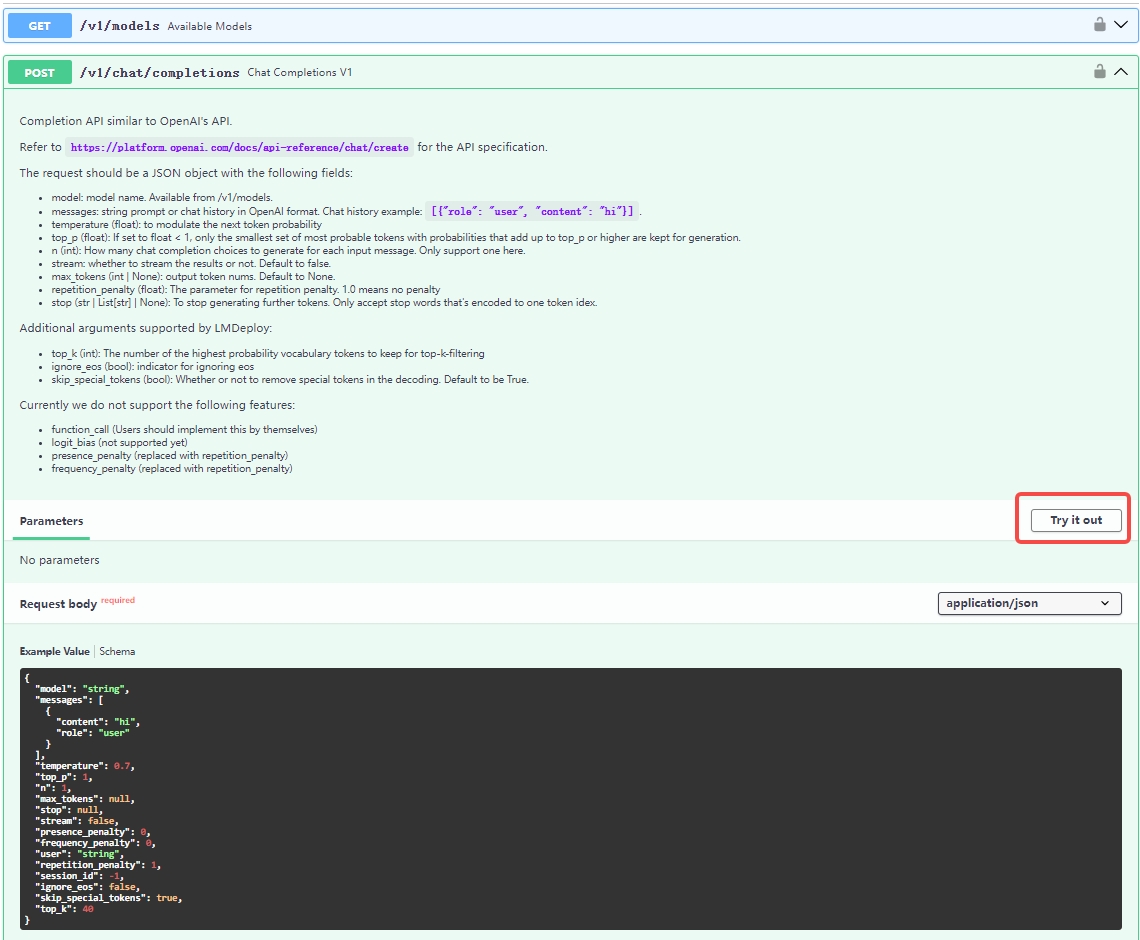
You can overview and try out the offered RESTful APIs by the website `http://0.0.0.0:23333` as shown in the below image after launching the service successfully.
If you need to integrate the service into your own projects or products, we recommend the following approach:
### Integrate with `OpenAI`
Here is an example of interaction with the endpoint `v1/chat/completions` service via the openai package.
Before running it, please install the openai package by `pip install openai`
```python
from openai import OpenAI
client = OpenAI(api_key='YOUR_API_KEY', base_url='http://0.0.0.0:23333/v1')
model_name = client.models.list().data[0].id
response = client.chat.completions.create(
model=model_name,
messages=[{
'role':
'user',
'content': [{
'type': 'text',
'text': 'Describe the image please',
}, {
'type': 'image_url',
'image_url': {
'url':
'https://raw.githubusercontent.com/open-mmlab/mmdeploy/main/tests/data/tiger.jpeg',
},
}],
}],
temperature=0.8,
top_p=0.8)
print(response)
```
### Integrate with lmdeploy `APIClient`
Below are some examples demonstrating how to visit the service through `APIClient`
If you want to use the `/v1/chat/completions` endpoint, you can try the following code:
```python
from lmdeploy.serve.openai.api_client import APIClient
api_client = APIClient(f'http://0.0.0.0:23333')
model_name = api_client.available_models[0]
messages = [{
'role':
'user',
'content': [{
'type': 'text',
'text': 'Describe the image please',
}, {
'type': 'image_url',
'image_url': {
'url':
'https://raw.githubusercontent.com/open-mmlab/mmdeploy/main/tests/data/tiger.jpeg',
},
}]
}]
for item in api_client.chat_completions_v1(model=model_name,
messages=messages):
print(item)
```
### Integrate with Java/Golang/Rust
May use [openapi-generator-cli](https://github.com/OpenAPITools/openapi-generator-cli) to convert `http://{server_ip}:{server_port}/openapi.json` to java/rust/golang client.
Here is an example:
```shell
$ docker run -it --rm -v ${PWD}:/local openapitools/openapi-generator-cli generate -i /local/openapi.json -g rust -o /local/rust
$ ls rust/*
rust/Cargo.toml rust/git_push.sh rust/README.md
rust/docs:
ChatCompletionRequest.md EmbeddingsRequest.md HttpValidationError.md LocationInner.md Prompt.md
DefaultApi.md GenerateRequest.md Input.md Messages.md ValidationError.md
rust/src:
apis lib.rs models
```
|