

File size: 11,870 Bytes
4c7218f b3c854f 4c7218f b3c854f 26a2a1d 4c7218f 26a2a1d ef760b9 4c7218f cfa4065 4c7218f 26a2a1d b7c0b01 26a2a1d c4bfb55 26a2a1d 4c7218f |
1 2 3 4 5 6 7 8 9 10 11 12 13 14 15 16 17 18 19 20 21 22 23 24 25 26 27 28 29 30 31 32 33 34 35 36 37 38 39 40 41 42 43 44 45 46 47 48 49 50 51 52 53 54 55 56 57 58 59 60 61 62 63 64 65 66 67 68 69 70 71 72 73 74 75 76 77 78 79 80 81 82 83 84 85 86 87 88 89 90 91 92 93 94 95 96 97 98 99 100 101 102 103 104 105 106 107 108 109 110 111 112 113 114 115 116 117 118 119 120 121 122 123 124 125 126 127 128 129 130 131 132 133 134 135 136 137 138 139 140 141 142 143 144 145 146 147 148 149 150 151 152 153 154 155 156 157 158 159 160 161 162 163 164 165 166 167 168 169 170 171 172 173 174 175 176 177 178 179 180 181 182 183 184 185 186 187 188 189 190 191 192 193 194 195 196 197 198 199 200 201 202 203 204 205 206 207 208 209 210 211 212 213 214 215 216 217 218 219 220 221 222 223 224 225 226 227 228 229 230 231 232 233 234 235 236 237 238 239 240 241 242 243 244 245 246 247 248 249 250 251 252 253 254 255 256 257 258 259 260 261 262 263 264 265 266 267 268 269 270 271 272 273 274 275 276 277 278 279 280 281 282 283 284 285 286 287 288 289 290 291 292 293 294 295 296 297 298 299 300 301 302 303 304 305 306 307 308 309 310 311 312 313 314 315 316 317 318 319 320 321 322 323 324 325 326 327 328 329 330 331 332 333 334 335 336 337 338 339 340 341 342 343 344 345 346 347 348 349 350 351 352 353 354 355 356 357 358 359 360 361 |
---
language:
- en
base_model:
- Qwen/Qwen3-Coder-480B-A35B-Instruct
pipeline_tag: text-generation
tags:
- qwen
- qwen3
- qwen3_moe
- conversational
- fp8
- text-generation-inference
- compressed-tensors
- code
license: apache-2.0
license_name: apache-2.0
name: RedHatAI/Qwen3-Coder-480B-A35B-Instruct-FP8
description: A quantized version of the Qwen3-Coder-480B-A35B-Instruct model, optimized for agentic coding and browser-use tasks, with FP8 data type quantization.
readme: https://huggingface.co/RedHatAI/Qwen3-Coder-480B-A35B-Instruct-FP8/main/README.md
tasks:
- text-to-text
- text-generation
- code-generation
provider: Alibaba Cloud
license_link: https://www.apache.org/licenses/LICENSE-2.0
validated_on:
- RHOAI 2.25
- RHAIIS 3.2.2
---
<h1 style="display: flex; align-items: center; gap: 10px; margin: 0;">
Qwen3-Coder-480B-A35B-Instruct-FP8
<img src="https://www.redhat.com/rhdc/managed-files/Catalog-Validated_model_0.png" alt="Model Icon" width="40" style="margin: 0; padding: 0;" />
</h1>
<a href="https://www.redhat.com/en/products/ai/validated-models" target="_blank" style="margin: 0; padding: 0;">
<img src="https://www.redhat.com/rhdc/managed-files/Validated_badge-Dark.png" alt="Validated Badge" width="250" style="margin: 0; padding: 0;" />
</a>
## Highlights
Today, we're announcing **Qwen3-Coder**, our most agentic code model to date. **Qwen3-Coder** is available in multiple sizes, but we're excited to introduce its most powerful variant first: **Qwen3-Coder-480B-A35B-Instruct**. featuring the following key enhancements:
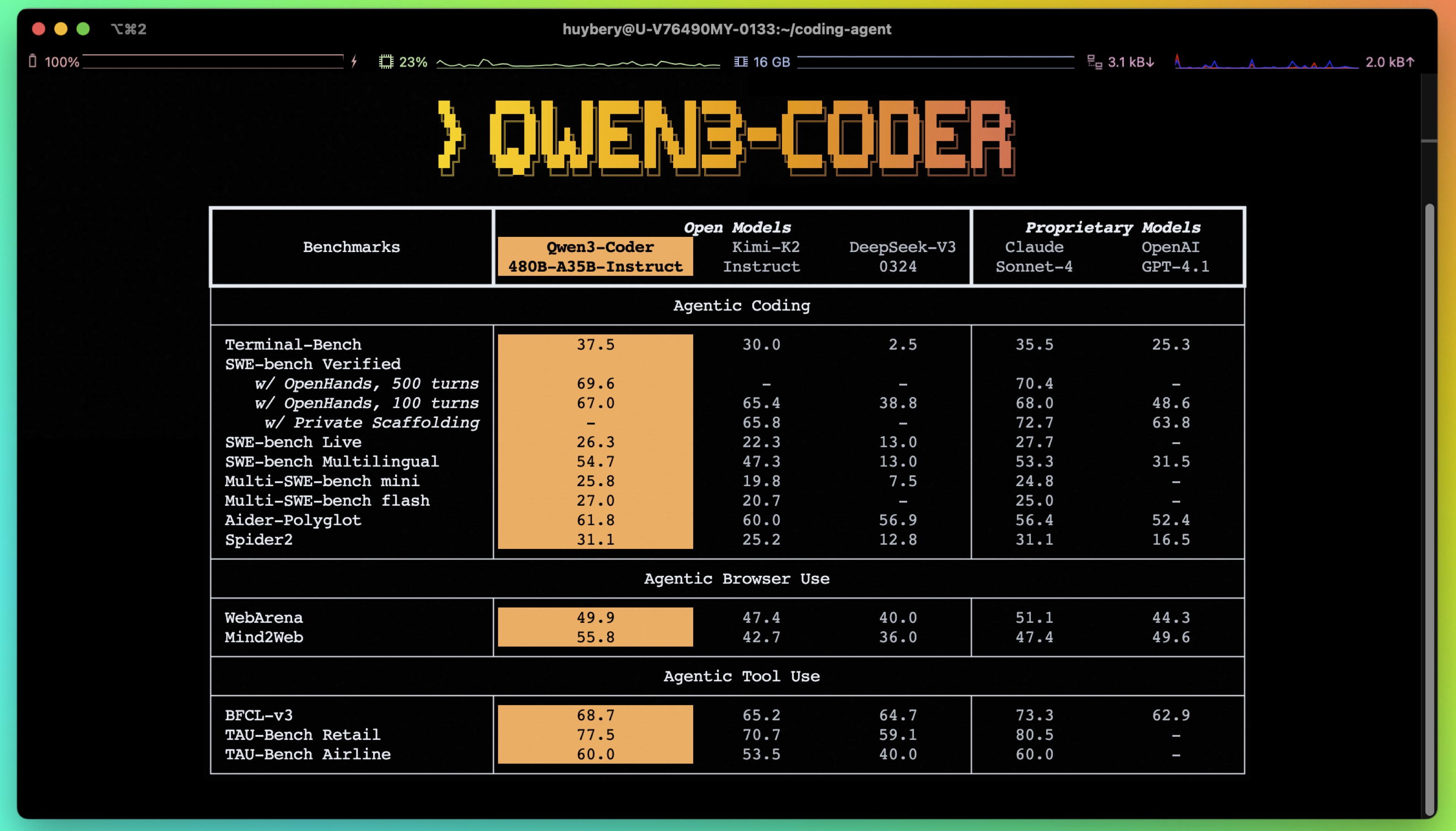
- **Significant Performance** among open models on **Agentic Coding**, **Agentic Browser-Use**, and other foundational coding tasks, achieving results comparable to Claude Sonnet.
- **Long-context Capabilities** with native support for **256K** tokens, extendable up to **1M** tokens using Yarn, optimized for repository-scale understanding.
- **Agentic Coding** supporting for most platform such as **Qwen Code**, **CLINE**, featuring a specially designed function call format.
## Model Overview
**Qwen3-480B-A35B-Instruct** has the following features:
- Type: Causal Language Models
- Training Stage: Pretraining & Post-training
- Number of Parameters: 480B in total and 35B activated
- Number of Layers: 62
- Number of Attention Heads (GQA): 96 for Q and 8 for KV
- Number of Experts: 160
- Number of Activated Experts: 8
- Context Length: **262,144 natively**.
**NOTE: This model supports only non-thinking mode and does not generate ``<think></think>`` blocks in its output. Meanwhile, specifying `enable_thinking=False` is no longer required.**
For more details, including benchmark evaluation, hardware requirements, and inference performance, please refer to our [blog](https://qwenlm.github.io/blog/qwen3-coder/), [GitHub](https://github.com/QwenLM/Qwen3-Coder), and [Documentation](https://qwen.readthedocs.io/en/latest/).
- **ModelCar Storage URI:** oci://registry.redhat.io/rhelai1/modelcar-qwen3-coder-480b-a35b-instruct-fp8:1.5
- **Validated on RHOAI 2.25:** quay.io/modh/vllm:rhoai-2.25-cuda
- **Validated on RHAIIS 3.2.2:** http://registry.redhat.io/rhaiis/vllm-cuda-rhel9:3.2.2
## Quickstart
We advise you to use the latest version of `transformers`.
With `transformers<4.51.0`, you will encounter the following error:
```
KeyError: 'qwen3_moe'
```
The following contains a code snippet illustrating how to use the model generate content based on given inputs.
```python
from transformers import AutoModelForCausalLM, AutoTokenizer
model_name = "Qwen/Qwen3-480B-A35B-Instruct"
# load the tokenizer and the model
tokenizer = AutoTokenizer.from_pretrained(model_name)
model = AutoModelForCausalLM.from_pretrained(
model_name,
torch_dtype="auto",
device_map="auto"
)
# prepare the model input
prompt = "Write a quick sort algorithm."
messages = [
{"role": "user", "content": prompt}
]
text = tokenizer.apply_chat_template(
messages,
tokenize=False,
add_generation_prompt=True,
)
model_inputs = tokenizer([text], return_tensors="pt").to(model.device)
# conduct text completion
generated_ids = model.generate(
**model_inputs,
max_new_tokens=65536
)
output_ids = generated_ids[0][len(model_inputs.input_ids[0]):].tolist()
content = tokenizer.decode(output_ids, skip_special_tokens=True)
print("content:", content)
```
**Note: If you encounter out-of-memory (OOM) issues, consider reducing the context length to a shorter value, such as `32,768`.**
## Deployment
This model can be deployed efficiently using the [vLLM](https://docs.vllm.ai/en/latest/) backend, as shown in the example below.
```python
from vllm import LLM, SamplingParams
from transformers import AutoTokenizer
model_id = "RedHatAI/Qwen3-Coder-480B-A35B-Instruct-FP8"
number_gpus = 8
sampling_params = SamplingParams(temperature=0.6, top_p=0.95, max_tokens=1024)
tokenizer = AutoTokenizer.from_pretrained(model_id)
prompt = "Give me a short introduction to large language model."
llm = LLM(model=model_id, tensor_parallel_size=number_gpus)
outputs = llm.generate(prompt, sampling_params)
generated_text = outputs[0].outputs[0].text
print(generated_text)
```
vLLM also supports OpenAI-compatible serving. See the [documentation](https://docs.vllm.ai/en/latest/) for more details.
<details>
<summary>Deploy on <strong>Red Hat AI Inference Server</strong></summary>
```bash
podman run --rm -it --device nvidia.com/gpu=all -p 8000:8000 \
--ipc=host \
--env "HUGGING_FACE_HUB_TOKEN=$HF_TOKEN" \
--env "HF_HUB_OFFLINE=0" -v ~/.cache/vllm:/home/vllm/.cache \
--name=vllm \
registry.access.redhat.com/rhaiis/rh-vllm-cuda \
vllm serve \
--tensor-parallel-size 8 \
--max-model-len 32768 \
--enforce-eager --model RedHatAI/Qwen3-Coder-480B-A35B-Instruct-FP8
```
</details>
<details>
<summary>Deploy on <strong>Red Hat Openshift AI</strong></summary>
```python
# Setting up vllm server with ServingRuntime
# Save as: vllm-servingruntime.yaml
apiVersion: serving.kserve.io/v1alpha1
kind: ServingRuntime
metadata:
name: vllm-cuda-runtime # OPTIONAL CHANGE: set a unique name
annotations:
openshift.io/display-name: vLLM NVIDIA GPU ServingRuntime for KServe
opendatahub.io/recommended-accelerators: '["nvidia.com/gpu"]'
labels:
opendatahub.io/dashboard: 'true'
spec:
annotations:
prometheus.io/port: '8080'
prometheus.io/path: '/metrics'
multiModel: false
supportedModelFormats:
- autoSelect: true
name: vLLM
containers:
- name: kserve-container
image: quay.io/modh/vllm:rhoai-2.25-cuda # CHANGE if needed. If AMD: quay.io/modh/vllm:rhoai-2.25-rocm
command:
- python
- -m
- vllm.entrypoints.openai.api_server
args:
- "--port=8080"
- "--model=/mnt/models"
- "--served-model-name={{.Name}}"
env:
- name: HF_HOME
value: /tmp/hf_home
ports:
- containerPort: 8080
protocol: TCP
```
```python
# Attach model to vllm server. This is an NVIDIA template
# Save as: inferenceservice.yaml
apiVersion: serving.kserve.io/v1beta1
kind: InferenceService
metadata:
annotations:
openshift.io/display-name: Qwen3-Coder-480B-A35B-Instruct-FP8 # OPTIONAL CHANGE
serving.kserve.io/deploymentMode: RawDeployment
name: Qwen3-Coder-480B-A35B-Instruct-FP8 # specify model name. This value will be used to invoke the model in the payload
labels:
opendatahub.io/dashboard: 'true'
spec:
predictor:
maxReplicas: 1
minReplicas: 1
model:
modelFormat:
name: vLLM
name: ''
resources:
limits:
cpu: '2' # this is model specific
memory: 8Gi # this is model specific
nvidia.com/gpu: '1' # this is accelerator specific
requests: # same comment for this block
cpu: '1'
memory: 4Gi
nvidia.com/gpu: '1'
runtime: vllm-cuda-runtime # must match the ServingRuntime name above
storageUri: oci://registry.redhat.io/rhelai1/modelcar-qwen3-coder-480b-a35b-instruct-fp8:1.5
tolerations:
- effect: NoSchedule
key: nvidia.com/gpu
operator: Exists
```
```bash
# make sure first to be in the project where you want to deploy the model
# oc project <project-name>
# apply both resources to run model
# Apply the ServingRuntime
oc apply -f vllm-servingruntime.yaml
```
```python
# Replace <inference-service-name> and <cluster-ingress-domain> below:
# - Run `oc get inferenceservice` to find your URL if unsure.
# Call the server using curl:
curl https://<inference-service-name>-predictor-default.<domain>/v1/chat/completions
-H "Content-Type: application/json" \
-d '{
"model": "Qwen3-Coder-480B-A35B-Instruct-FP8",
"stream": true,
"stream_options": {
"include_usage": true
},
"max_tokens": 1,
"messages": [
{
"role": "user",
"content": "How can a bee fly when its wings are so small?"
}
]
}'
```
See [Red Hat Openshift AI documentation](https://docs.redhat.com/en/documentation/red_hat_openshift_ai/2025) for more details.
</details>
## Note on FP8
For convenience and performance, we have provided `fp8`-quantized model checkpoint for Qwen3, whose name ends with `-FP8`. The quantization method is fine-grained `fp8` quantization with block size of 128. You can find more details in the `quantization_config` field in `config.json`.
You can use the Qwen3-480B-A35B-Instruct-FP8 model with serveral inference frameworks, including `transformers`, `sglang`, and `vllm`, as the original bfloat16 model.
However, please pay attention to the following known issues:
- `transformers`:
- there are currently issues with the "fine-grained fp8" method in `transformers` for distributed inference. You may need to set the environment variable `CUDA_LAUNCH_BLOCKING=1` if multiple devices are used in inference.
## Agentic Coding
Qwen3-Coder excels in tool calling capabilities.
You can simply define or use any tools as following example.
```python
# Your tool implementation
def square_the_number(num: float) -> dict:
return num ** 2
# Define Tools
tools=[
{
"type":"function",
"function":{
"name": "square_the_number",
"description": "output the square of the number.",
"parameters": {
"type": "object",
"required": ["input_num"],
"properties": {
'input_num': {
'type': 'number',
'description': 'input_num is a number that will be squared'
}
},
}
}
}
]
import OpenAI
# Define LLM
client = OpenAI(
# Use a custom endpoint compatible with OpenAI API
base_url='http://localhost:8000/v1', # api_base
api_key="EMPTY"
)
messages = [{'role': 'user', 'content': 'square the number 1024'}]
completion = client.chat.completions.create(
messages=messages,
model="Qwen3-Coder-480B-A35B-Instruct",
max_tokens=65536,
tools=tools,
)
print(completion.choice[0])
```
## Best Practices
To achieve optimal performance, we recommend the following settings:
1. **Sampling Parameters**:
- We suggest using `temperature=0.7`, `top_p=0.8`, `top_k=20`, `repetition_penalty=1.05`.
2. **Adequate Output Length**: We recommend using an output length of 65,536 tokens for most queries, which is adequate for instruct models.
### Citation
If you find our work helpful, feel free to give us a cite.
```
@misc{qwen3technicalreport,
title={Qwen3 Technical Report},
author={Qwen Team},
year={2025},
eprint={2505.09388},
archivePrefix={arXiv},
primaryClass={cs.CL},
url={https://arxiv.org/abs/2505.09388},
}
``` |