---
language:
- en
base_model:
- Qwen/Qwen3-Coder-480B-A35B-Instruct
pipeline_tag: text-generation
tags:
- qwen
- qwen3
- qwen3_moe
- conversational
- fp8
- text-generation-inference
- compressed-tensors
- code
license: apache-2.0
license_name: apache-2.0
name: RedHatAI/Qwen3-Coder-480B-A35B-Instruct-FP8
description: A quantized version of the Qwen3-Coder-480B-A35B-Instruct model, optimized for agentic coding and browser-use tasks, with FP8 data type quantization.
readme: https://huggingface.co/RedHatAI/Qwen3-Coder-480B-A35B-Instruct-FP8/main/README.md
tasks:
- text-to-text
- text-generation
- code-generation
provider: Alibaba Cloud
license_link: https://www.apache.org/licenses/LICENSE-2.0
validated_on:
- RHOAI 2.25
- RHAIIS 3.2.2
---
Qwen3-Coder-480B-A35B-Instruct-FP8

 ## Highlights
Today, we're announcing **Qwen3-Coder**, our most agentic code model to date. **Qwen3-Coder** is available in multiple sizes, but we're excited to introduce its most powerful variant first: **Qwen3-Coder-480B-A35B-Instruct**. featuring the following key enhancements:
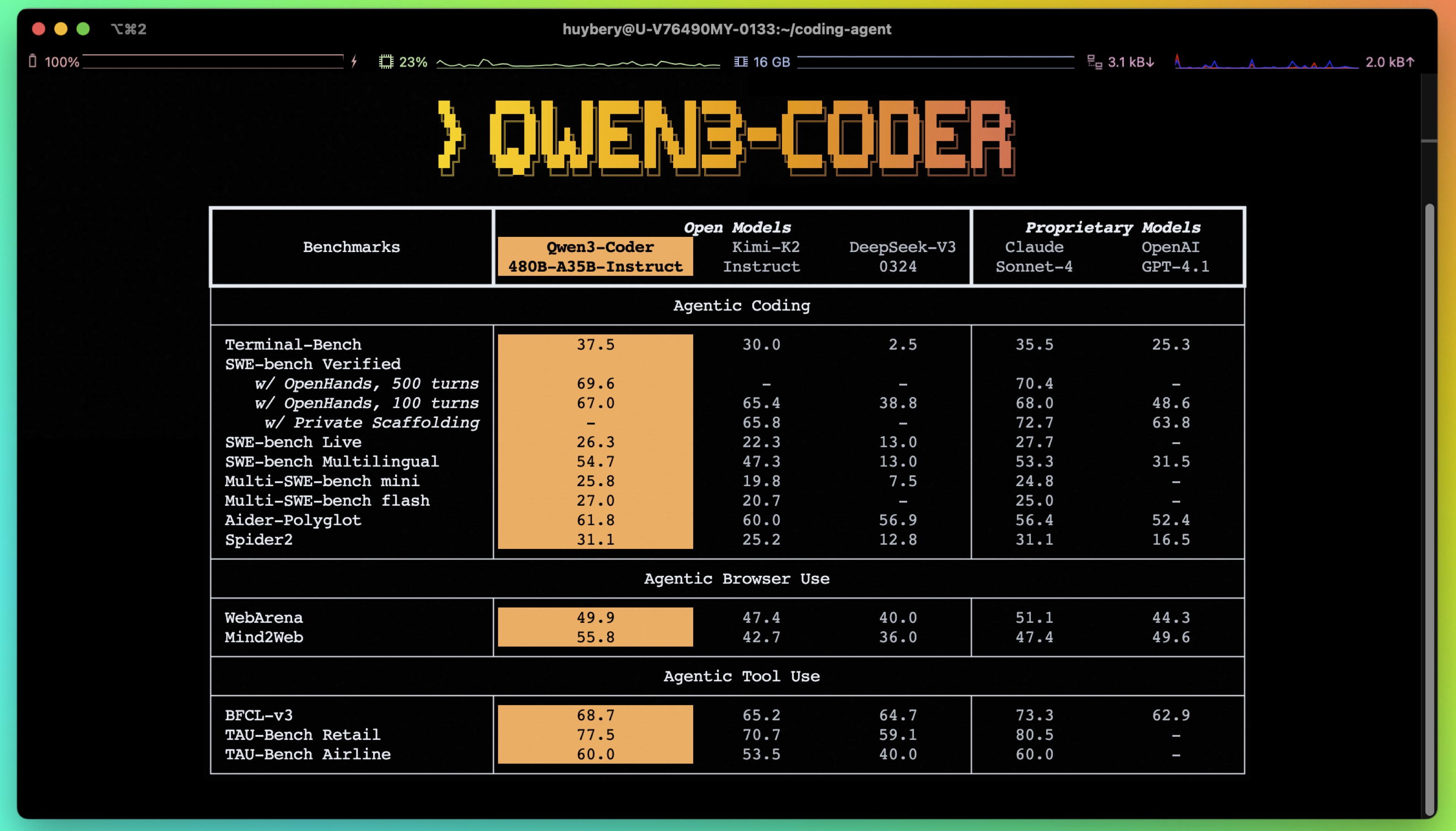
- **Significant Performance** among open models on **Agentic Coding**, **Agentic Browser-Use**, and other foundational coding tasks, achieving results comparable to Claude Sonnet.
- **Long-context Capabilities** with native support for **256K** tokens, extendable up to **1M** tokens using Yarn, optimized for repository-scale understanding.
- **Agentic Coding** supporting for most platform such as **Qwen Code**, **CLINE**, featuring a specially designed function call format.
## Model Overview
**Qwen3-480B-A35B-Instruct** has the following features:
- Type: Causal Language Models
- Training Stage: Pretraining & Post-training
- Number of Parameters: 480B in total and 35B activated
- Number of Layers: 62
- Number of Attention Heads (GQA): 96 for Q and 8 for KV
- Number of Experts: 160
- Number of Activated Experts: 8
- Context Length: **262,144 natively**.
**NOTE: This model supports only non-thinking mode and does not generate ```` blocks in its output. Meanwhile, specifying `enable_thinking=False` is no longer required.**
For more details, including benchmark evaluation, hardware requirements, and inference performance, please refer to our [blog](https://qwenlm.github.io/blog/qwen3-coder/), [GitHub](https://github.com/QwenLM/Qwen3-Coder), and [Documentation](https://qwen.readthedocs.io/en/latest/).
- **ModelCar Storage URI:** oci://registry.redhat.io/rhelai1/modelcar-qwen3-coder-480b-a35b-instruct-fp8:1.5
- **Validated on RHOAI 2.25:** quay.io/modh/vllm:rhoai-2.25-cuda
- **Validated on RHAIIS 3.2.2:** http://registry.redhat.io/rhaiis/vllm-cuda-rhel9:3.2.2
## Quickstart
We advise you to use the latest version of `transformers`.
With `transformers<4.51.0`, you will encounter the following error:
```
KeyError: 'qwen3_moe'
```
The following contains a code snippet illustrating how to use the model generate content based on given inputs.
```python
from transformers import AutoModelForCausalLM, AutoTokenizer
model_name = "Qwen/Qwen3-480B-A35B-Instruct"
# load the tokenizer and the model
tokenizer = AutoTokenizer.from_pretrained(model_name)
model = AutoModelForCausalLM.from_pretrained(
model_name,
torch_dtype="auto",
device_map="auto"
)
# prepare the model input
prompt = "Write a quick sort algorithm."
messages = [
{"role": "user", "content": prompt}
]
text = tokenizer.apply_chat_template(
messages,
tokenize=False,
add_generation_prompt=True,
)
model_inputs = tokenizer([text], return_tensors="pt").to(model.device)
# conduct text completion
generated_ids = model.generate(
**model_inputs,
max_new_tokens=65536
)
output_ids = generated_ids[0][len(model_inputs.input_ids[0]):].tolist()
content = tokenizer.decode(output_ids, skip_special_tokens=True)
print("content:", content)
```
**Note: If you encounter out-of-memory (OOM) issues, consider reducing the context length to a shorter value, such as `32,768`.**
## Deployment
This model can be deployed efficiently using the [vLLM](https://docs.vllm.ai/en/latest/) backend, as shown in the example below.
```python
from vllm import LLM, SamplingParams
from transformers import AutoTokenizer
model_id = "RedHatAI/Qwen3-Coder-480B-A35B-Instruct-FP8"
number_gpus = 8
sampling_params = SamplingParams(temperature=0.6, top_p=0.95, max_tokens=1024)
tokenizer = AutoTokenizer.from_pretrained(model_id)
prompt = "Give me a short introduction to large language model."
llm = LLM(model=model_id, tensor_parallel_size=number_gpus)
outputs = llm.generate(prompt, sampling_params)
generated_text = outputs[0].outputs[0].text
print(generated_text)
```
vLLM also supports OpenAI-compatible serving. See the [documentation](https://docs.vllm.ai/en/latest/) for more details.
## Highlights
Today, we're announcing **Qwen3-Coder**, our most agentic code model to date. **Qwen3-Coder** is available in multiple sizes, but we're excited to introduce its most powerful variant first: **Qwen3-Coder-480B-A35B-Instruct**. featuring the following key enhancements:
- **Significant Performance** among open models on **Agentic Coding**, **Agentic Browser-Use**, and other foundational coding tasks, achieving results comparable to Claude Sonnet.
- **Long-context Capabilities** with native support for **256K** tokens, extendable up to **1M** tokens using Yarn, optimized for repository-scale understanding.
- **Agentic Coding** supporting for most platform such as **Qwen Code**, **CLINE**, featuring a specially designed function call format.

## Model Overview
**Qwen3-480B-A35B-Instruct** has the following features:
- Type: Causal Language Models
- Training Stage: Pretraining & Post-training
- Number of Parameters: 480B in total and 35B activated
- Number of Layers: 62
- Number of Attention Heads (GQA): 96 for Q and 8 for KV
- Number of Experts: 160
- Number of Activated Experts: 8
- Context Length: **262,144 natively**.
**NOTE: This model supports only non-thinking mode and does not generate ```` blocks in its output. Meanwhile, specifying `enable_thinking=False` is no longer required.**
For more details, including benchmark evaluation, hardware requirements, and inference performance, please refer to our [blog](https://qwenlm.github.io/blog/qwen3-coder/), [GitHub](https://github.com/QwenLM/Qwen3-Coder), and [Documentation](https://qwen.readthedocs.io/en/latest/).
- **ModelCar Storage URI:** oci://registry.redhat.io/rhelai1/modelcar-qwen3-coder-480b-a35b-instruct-fp8:1.5
- **Validated on RHOAI 2.25:** quay.io/modh/vllm:rhoai-2.25-cuda
- **Validated on RHAIIS 3.2.2:** http://registry.redhat.io/rhaiis/vllm-cuda-rhel9:3.2.2
## Quickstart
We advise you to use the latest version of `transformers`.
With `transformers<4.51.0`, you will encounter the following error:
```
KeyError: 'qwen3_moe'
```
The following contains a code snippet illustrating how to use the model generate content based on given inputs.
```python
from transformers import AutoModelForCausalLM, AutoTokenizer
model_name = "Qwen/Qwen3-480B-A35B-Instruct"
# load the tokenizer and the model
tokenizer = AutoTokenizer.from_pretrained(model_name)
model = AutoModelForCausalLM.from_pretrained(
model_name,
torch_dtype="auto",
device_map="auto"
)
# prepare the model input
prompt = "Write a quick sort algorithm."
messages = [
{"role": "user", "content": prompt}
]
text = tokenizer.apply_chat_template(
messages,
tokenize=False,
add_generation_prompt=True,
)
model_inputs = tokenizer([text], return_tensors="pt").to(model.device)
# conduct text completion
generated_ids = model.generate(
**model_inputs,
max_new_tokens=65536
)
output_ids = generated_ids[0][len(model_inputs.input_ids[0]):].tolist()
content = tokenizer.decode(output_ids, skip_special_tokens=True)
print("content:", content)
```
**Note: If you encounter out-of-memory (OOM) issues, consider reducing the context length to a shorter value, such as `32,768`.**
## Deployment
This model can be deployed efficiently using the [vLLM](https://docs.vllm.ai/en/latest/) backend, as shown in the example below.
```python
from vllm import LLM, SamplingParams
from transformers import AutoTokenizer
model_id = "RedHatAI/Qwen3-Coder-480B-A35B-Instruct-FP8"
number_gpus = 8
sampling_params = SamplingParams(temperature=0.6, top_p=0.95, max_tokens=1024)
tokenizer = AutoTokenizer.from_pretrained(model_id)
prompt = "Give me a short introduction to large language model."
llm = LLM(model=model_id, tensor_parallel_size=number_gpus)
outputs = llm.generate(prompt, sampling_params)
generated_text = outputs[0].outputs[0].text
print(generated_text)
```
vLLM also supports OpenAI-compatible serving. See the [documentation](https://docs.vllm.ai/en/latest/) for more details.
Deploy on Red Hat AI Inference Server
```bash
podman run --rm -it --device nvidia.com/gpu=all -p 8000:8000 \
--ipc=host \
--env "HUGGING_FACE_HUB_TOKEN=$HF_TOKEN" \
--env "HF_HUB_OFFLINE=0" -v ~/.cache/vllm:/home/vllm/.cache \
--name=vllm \
registry.access.redhat.com/rhaiis/rh-vllm-cuda \
vllm serve \
--tensor-parallel-size 8 \
--max-model-len 32768 \
--enforce-eager --model RedHatAI/Qwen3-Coder-480B-A35B-Instruct-FP8
```
Deploy on Red Hat Openshift AI
```python
# Setting up vllm server with ServingRuntime
# Save as: vllm-servingruntime.yaml
apiVersion: serving.kserve.io/v1alpha1
kind: ServingRuntime
metadata:
name: vllm-cuda-runtime # OPTIONAL CHANGE: set a unique name
annotations:
openshift.io/display-name: vLLM NVIDIA GPU ServingRuntime for KServe
opendatahub.io/recommended-accelerators: '["nvidia.com/gpu"]'
labels:
opendatahub.io/dashboard: 'true'
spec:
annotations:
prometheus.io/port: '8080'
prometheus.io/path: '/metrics'
multiModel: false
supportedModelFormats:
- autoSelect: true
name: vLLM
containers:
- name: kserve-container
image: quay.io/modh/vllm:rhoai-2.25-cuda # CHANGE if needed. If AMD: quay.io/modh/vllm:rhoai-2.25-rocm
command:
- python
- -m
- vllm.entrypoints.openai.api_server
args:
- "--port=8080"
- "--model=/mnt/models"
- "--served-model-name={{.Name}}"
env:
- name: HF_HOME
value: /tmp/hf_home
ports:
- containerPort: 8080
protocol: TCP
```
```python
# Attach model to vllm server. This is an NVIDIA template
# Save as: inferenceservice.yaml
apiVersion: serving.kserve.io/v1beta1
kind: InferenceService
metadata:
annotations:
openshift.io/display-name: Qwen3-Coder-480B-A35B-Instruct-FP8 # OPTIONAL CHANGE
serving.kserve.io/deploymentMode: RawDeployment
name: Qwen3-Coder-480B-A35B-Instruct-FP8 # specify model name. This value will be used to invoke the model in the payload
labels:
opendatahub.io/dashboard: 'true'
spec:
predictor:
maxReplicas: 1
minReplicas: 1
model:
modelFormat:
name: vLLM
name: ''
resources:
limits:
cpu: '2' # this is model specific
memory: 8Gi # this is model specific
nvidia.com/gpu: '1' # this is accelerator specific
requests: # same comment for this block
cpu: '1'
memory: 4Gi
nvidia.com/gpu: '1'
runtime: vllm-cuda-runtime # must match the ServingRuntime name above
storageUri: oci://registry.redhat.io/rhelai1/modelcar-qwen3-coder-480b-a35b-instruct-fp8:1.5
tolerations:
- effect: NoSchedule
key: nvidia.com/gpu
operator: Exists
```
```bash
# make sure first to be in the project where you want to deploy the model
# oc project
# apply both resources to run model
# Apply the ServingRuntime
oc apply -f vllm-servingruntime.yaml
```
```python
# Replace and below:
# - Run `oc get inferenceservice` to find your URL if unsure.
# Call the server using curl:
curl https://-predictor-default./v1/chat/completions
-H "Content-Type: application/json" \
-d '{
"model": "Qwen3-Coder-480B-A35B-Instruct-FP8",
"stream": true,
"stream_options": {
"include_usage": true
},
"max_tokens": 1,
"messages": [
{
"role": "user",
"content": "How can a bee fly when its wings are so small?"
}
]
}'
```
See [Red Hat Openshift AI documentation](https://docs.redhat.com/en/documentation/red_hat_openshift_ai/2025) for more details.
## Note on FP8
For convenience and performance, we have provided `fp8`-quantized model checkpoint for Qwen3, whose name ends with `-FP8`. The quantization method is fine-grained `fp8` quantization with block size of 128. You can find more details in the `quantization_config` field in `config.json`.
You can use the Qwen3-480B-A35B-Instruct-FP8 model with serveral inference frameworks, including `transformers`, `sglang`, and `vllm`, as the original bfloat16 model.
However, please pay attention to the following known issues:
- `transformers`:
- there are currently issues with the "fine-grained fp8" method in `transformers` for distributed inference. You may need to set the environment variable `CUDA_LAUNCH_BLOCKING=1` if multiple devices are used in inference.
## Agentic Coding
Qwen3-Coder excels in tool calling capabilities.
You can simply define or use any tools as following example.
```python
# Your tool implementation
def square_the_number(num: float) -> dict:
return num ** 2
# Define Tools
tools=[
{
"type":"function",
"function":{
"name": "square_the_number",
"description": "output the square of the number.",
"parameters": {
"type": "object",
"required": ["input_num"],
"properties": {
'input_num': {
'type': 'number',
'description': 'input_num is a number that will be squared'
}
},
}
}
}
]
import OpenAI
# Define LLM
client = OpenAI(
# Use a custom endpoint compatible with OpenAI API
base_url='http://localhost:8000/v1', # api_base
api_key="EMPTY"
)
messages = [{'role': 'user', 'content': 'square the number 1024'}]
completion = client.chat.completions.create(
messages=messages,
model="Qwen3-Coder-480B-A35B-Instruct",
max_tokens=65536,
tools=tools,
)
print(completion.choice[0])
```
## Best Practices
To achieve optimal performance, we recommend the following settings:
1. **Sampling Parameters**:
- We suggest using `temperature=0.7`, `top_p=0.8`, `top_k=20`, `repetition_penalty=1.05`.
2. **Adequate Output Length**: We recommend using an output length of 65,536 tokens for most queries, which is adequate for instruct models.
### Citation
If you find our work helpful, feel free to give us a cite.
```
@misc{qwen3technicalreport,
title={Qwen3 Technical Report},
author={Qwen Team},
year={2025},
eprint={2505.09388},
archivePrefix={arXiv},
primaryClass={cs.CL},
url={https://arxiv.org/abs/2505.09388},
}
```