


🤗 Original Base Model | 📑 Research Paper | 📑 Blog | 🤗 Official Demo
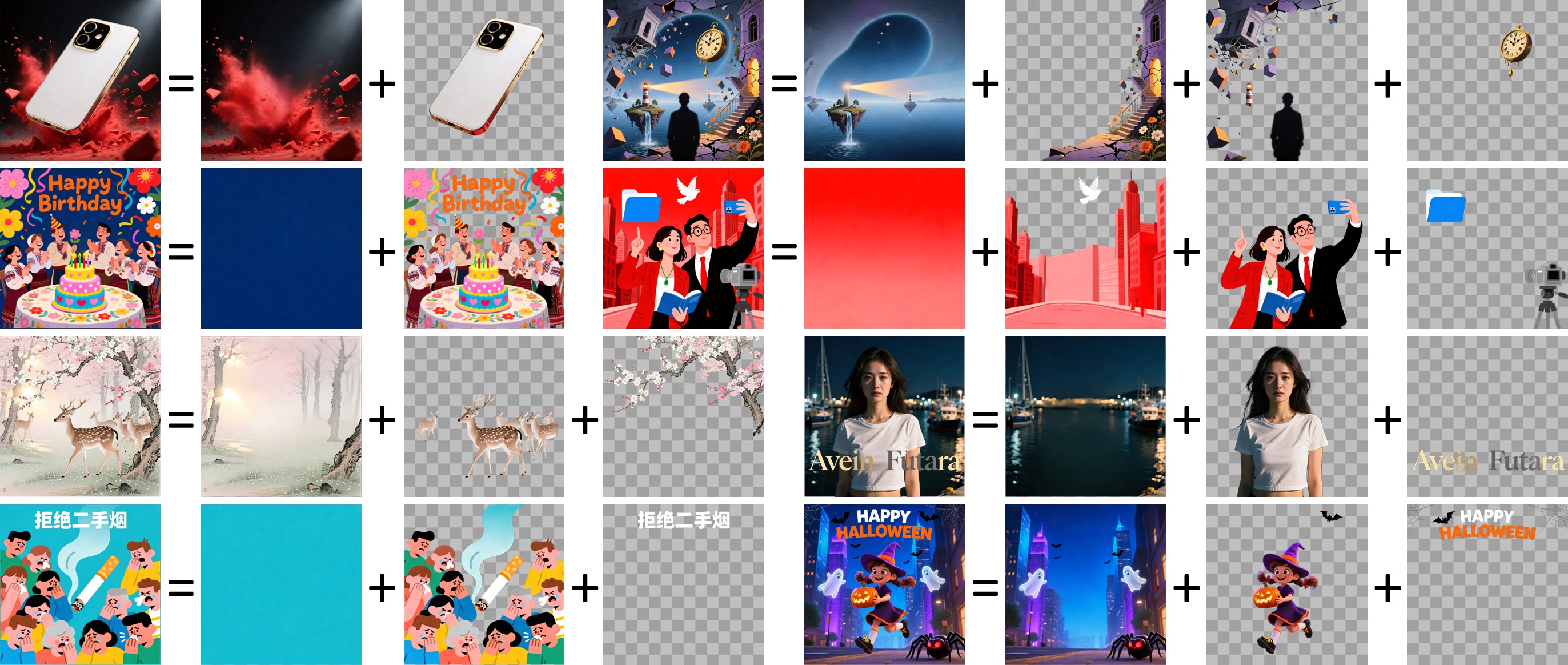
## Introduction This model is a **custom-adapted, designer-focused version of Qwen-Image-Layered**, enhanced to convert flat visual designs into fully editable, production-ready layered assets. While the base Qwen-Image-Layered model introduces the ability to decompose an image into multiple RGBA layers, we have tailored and extended the ecosystem with several key custom additions: ### 🎨 Custom Modifications & Key Features 1. **Designer-Layer LoRA Fine-Tuning**: - **Targeted Training**: Fine-tuned using a transformer LoRA adapter on curated, permissioned multi-layer graphic designs and campaign materials. - **Semantic Separation**: Specialized in distinguishing foreground text, product imagery, badges, decorative elements, and clean background plates into separate, logical layers. - **Edge Quality & Transparency**: Focuses on preserving crisp alpha masks and canvas alignment, minimizing artifact bleeding when individual layers are moved or hidden. 2. **Automated Photoshop PSD Packaging**: - Includes custom downstream packaging tools (`package_psd.py` / `run_layered_diffusers.py`) that bundle decomposed RGBA layers into standard, editable **Adobe Photoshop (`.psd`)** documents. - Preserves layer stack order, naming conventions, exact canvas coordinates, and blend properties ready for professional editing workflows. 3. **GGUF Quantization & Local Inference**: - Provides quantized GGUF weights (Q5_0, Q5_1, Q5_K_M, Q5_K_S, Q6_K) leveraging the **Unsloth Dynamic 2.0** methodology to enable fast, low-VRAM local execution on consumer GPUs. 4. **Interactive Layer Studio UI**: - Accompanied by a lightweight local web interface (**Editable-Image-Layers-REA**) and REST API, allowing users to upload images, preview live decompositions, inspect individual layers, and export PSD or ZIP archives with a single click. --- ## Quick Start ### 1. Using Diffusers with the Designer LoRA Adapter ```python from diffusers import QwenImageLayeredPipeline import torch from PIL import Image # Load base pipeline pipeline = QwenImageLayeredPipeline.from_pretrained("Qwen/Qwen-Image-Layered", torch_dtype=torch.bfloat16) pipeline = pipeline.to("cuda") # (Optional) Load custom designer LoRA adapter # pipeline.load_lora_weights("path/to/designer-lora") image = Image.open("input_design.png").convert("RGBA") inputs = { "image": image, "generator": torch.Generator(device='cuda').manual_seed(42), "true_cfg_scale": 4.0, "negative_prompt": " ", "num_inference_steps": 50, "num_images_per_prompt": 1, "layers": 4, # Number of layers to extract "resolution": 640, # Recommended resolution bucket (640 or 1024) "cfg_normalize": True, "use_en_prompt": True, } with torch.inference_mode(): output = pipeline(**inputs) layers = output.images[0] # Save individual layer PNGs for i, layer in enumerate(layers): layer.save(f"layer_{i:02d}.png") ``` ### 2. Exporting to Layered Photoshop PSD You can package the exported layer PNGs directly into a layered `.psd` file: ```bash python package_psd.py --composite source.png --layers layer_00.png layer_01.png layer_02.png layer_03.png --output decomposition.psd ``` --- ## Capabilities ### Layer Decomposition in Application Given an input design, the model decomposes it into several RGBA layers: - **Independent Manipulation**: Edits can be applied exclusively to targeted layers, physically isolating changes from the rest of the canvas. - **Subject & Text Replacement**: Replace specific layer elements (e.g. swap subjects or text) without altering backgrounds. - **Recoloring & Styling**: Recolor specific graphics, badges, or backgrounds while preserving unaffected elements. - **Elementary Operations**: - **Clean Object Removal**: Erase elements cleanly by simply hiding or deleting layers. - **Repositioning & Resizing**: Move or resize objects freely on the canvas without distortion or background hole-filling issues. ### Flexible and Iterative Decomposition - **Variable Layer Counts**: Supports decomposing images into arbitrary layer counts (e.g., 2, 4, 6, 8+ layers) depending on complexity. - **Recursive Decomposition**: Any decomposed layer can be recursively passed back into the model to break it down further into sub-components. --- ## License Agreement Qwen-Image-Layered is licensed under Apache 2.0. ## Citation ```bibtex @misc{yin2025qwenimagelayered, title={Qwen-Image-Layered: Towards Inherent Editability via Layer Decomposition}, author={Shengming Yin, Zekai Zhang, Zecheng Tang, Kaiyuan Gao, Xiao Xu, Kun Yan, Jiahao Li, Yilei Chen, Yuxiang Chen, Heung-Yeung Shum, Lionel M. Ni, Jingren Zhou, Junyang Lin, Chenfei Wu}, year={2025}, eprint={2512.15603}, archivePrefix={arXiv}, primaryClass={cs.CV}, url={https://arxiv.org/abs/2512.15603}, } ```