

File size: 13,292 Bytes
c8660ff |
1 2 3 4 5 6 7 8 9 10 11 12 13 14 15 16 17 18 19 20 21 22 23 24 25 26 27 28 29 30 31 32 33 34 35 36 37 38 39 40 41 42 43 44 45 46 47 48 49 50 51 52 53 54 55 56 57 58 59 60 61 62 63 64 65 66 67 68 69 70 71 72 73 74 75 76 77 78 79 80 81 82 83 84 85 86 87 88 89 90 91 92 93 94 95 96 97 98 99 100 101 102 103 104 105 106 107 108 109 110 111 112 113 114 115 116 117 118 119 120 121 122 123 124 125 126 127 128 129 130 131 132 133 134 135 136 137 138 139 140 141 142 143 144 145 146 147 148 149 150 151 152 153 154 155 156 157 158 159 160 161 162 163 164 165 166 167 168 169 170 171 172 173 174 175 176 177 178 179 180 181 182 183 184 185 186 187 188 189 190 191 192 193 194 195 196 197 198 199 200 201 202 203 204 205 206 207 208 209 210 211 212 213 214 215 216 217 218 219 220 221 222 223 224 225 226 227 228 229 230 231 232 233 234 235 236 237 238 239 240 241 242 243 244 245 246 247 248 249 250 251 252 253 254 255 256 257 258 259 260 261 262 263 264 265 266 267 268 269 270 271 272 273 274 275 276 277 278 279 280 281 282 |
# SimWorld: An Open-ended Realistic Simulator for Autonomous Agents in Physical and Social Worlds
<p align="center">
<img src="https://github.com/user-attachments/assets/5d2da588-9470-44ef-82a9-5d45d592497a" width="840" height="795" alt="image" />
</p>
**SimWorld** is a simulation platform for developing and evaluating **LLM/VLM** AI agents in complex physical and social environments.
<div align="center">
<a href="https://simworld-ai.github.io/"><img src="https://img.shields.io/badge/Website-SimWorld-blue" alt="Website" /></a>
<a href="https://github.com/maitrix-org/SimWorld"><img src="https://img.shields.io/github/stars/maitrix-org/SimWorld?style=social" alt="GitHub Stars" /></a>
<a href="https://simworld.readthedocs.io/en/latest"><img src="https://img.shields.io/badge/Documentation-Read%20Docs-green" alt="Documentation" /></a>
<a href="https://arxiv.org/abs/2512.01078"><img src="https://img.shields.io/badge/arXiv-2512.01078-b31b1b?logo=arxiv&logoColor=white" alt="arXiv:2512.01078" /></a>
</div>
## 🔥 News
- 2025.11 The white paper of **SimWorld** is available on arxiv!
- 2025.9 **SimWorld** has been accepted to NeurIPS 2025 main track as a **spotlight** paper! 🎉
- 2025.6 The first formal release of **SimWorld** has been published! 🚀
- 2025.3 Our demo of **SimWorld** has been accepted by CVPR 2025 Demonstration Track! 🎉
## 💡 Introduction
SimWorld is built on Unreal Engine 5 and offers core capabilities to meet the needs of modern agent development. It provides:
- Realistic, open-ended world simulation with accurate physics and language-based procedural generation.
- Rich interface for LLM/VLM agents, supporting multi-modal perception and natural language actions.
- Diverse and customizable physical and social reasoning scenarios, enabling systematic training and evaluation of complex agent behaviors like navigation, planning, and strategic cooperation.
## 🏗️ Architecture
<p align="center">
<img width="799" height="671" alt="image" src="https://github.com/user-attachments/assets/2e67356a-7dca-4eba-ab57-de1226e080bb" />
</p>
**SimWorld** consists of three layers:
- the Unreal Engine Backend, providing diverse and open-ended environments, rich assets and realistic physics simulation;
- the Environment layer, supporting procedural city generation, language-driven scene editing, gym-like APIs for LLM/VLM agents and traffic simulation;
- the Agent layer, enabling LLM/VLM agents to reason over multimodal observations and history while executing actions via a local action planner;
SimWorld's architecture is designed to be modular and flexible, supporting an array of functionalities such as dynamic world generation, agent control, and performance benchmarking. The components are seamlessly integrated to provide a robust platform for **Embodied AI** and **Agents** research and applications.
### Project Structure
```bash
simworld/ # Python package
local_planner/ # Local action planner component
agent/ # Agent system
assets_rp/ # Live editor component for retrieval and re-placing
citygen/ # City layout procedural generator
communicator/ # Core component to connect Unreal Engine
config/ # Configuration loader and default config file
llm/ # Basic llm class
map/ # Basic map class and waypoint system
traffic/ # Traffic system
utils/ # Utility functions
data/ # Necessary input data
config/ # Example configuration file and user configuration file
scripts/ # Examples of usage, such as layout generation and traffic simulation
docs/ # Documentation source files
README.md
```
## Setup
### Installation
+ Python Client
Make sure to use Python 3.10 or later.
```bash
git clone https://github.com/SimWorld-AI/SimWorld.git
cd SimWorld
conda create -n simworld python=3.10
conda activate simworld
pip install -e .
```
+ UE server
Download the SimWorld server executable from S3:
We offer two versions of the SimWorld UE package: the base version, which comes with an empty map, and the additional environments version, which provides extra pre-defined environments for more diverse simulation scenarios. Both versions include all the core features of SimWorld.
| Platform | Package | Scenes/Maps Included | Download | Notes |
| --- | --- | --- | --- | --- |
| Windows | Base | Empty map for procedural generation | [Download (Base)](https://simworld-release.s3.us-east-1.amazonaws.com/SimWorld-Win64-v0_1_0-Foundation.zip) | Full agent features; smaller download. |
| Windows | Additional Environments | 100+ maps (including the empty one) | [Download (100+ Maps)](https://simworld-release.s3.us-east-1.amazonaws.com/SimWorld-Win64-v0_1_0-100Maps.zip) | Full agent features; larger download. |
| Linux | Base | Empty map for procedural generation | [Download (Base)](https://simworld-release.s3.us-east-1.amazonaws.com/SimWorld-Linux-v0_1_0-Foundation.zip) | Full agent features; smaller download. |
| Linux | Additional Environments | 100+ maps (including the empty one) | [Download (100+ Maps)](https://simworld-release.s3.us-east-1.amazonaws.com/SimWorld-Linux-v0_1_0-100Maps.zip) | Full agent features; larger download. |
**Note:**
1. Please check the [documentation](https://simworld.readthedocs.io/en/latest/getting_started/additional_environments.html#usage) for usage instructions of the **100+ Maps** version.
2. If you only need core functionality for development or testing, use **Base**. If you want richer demonstrations and more scenes, use the **Additional Environments (100+ Maps)**.
### Quick Start
We provide several examples of code in `examples/`, showcasing how to use the basic functionalities of SimWorld, including city layout generation, traffic simulation, asset retrieval, and activity-to-actions. Please follow the examples to see how SimWorld works.
#### Configuration
SimWorld uses YAML-formatted configuration files for system settings. The default configuration files are located in the `simworld/config` directory while user configurations are placed in the `config` directory.
- `simworld/config/default.yaml` serves as the default configuration file.
- `config/example.yaml` is provided as a template for custom configurations.
Users can switch between different configurations by specifying a custom configuration file path through the `Config` class:
To set up your own configuration:
1. Create your custom configuration by copying the example template:
```bash
cp config/example.yaml config/your_config.yaml
```
2. Modify the configuration values in `your_config.yaml` according to your needs
3. Load your custom configuration in your code:
```python
from simworld.config import Config
config = Config('path/to/your_config') # use absolute path here
```
#### Agent Action Space
SimWorld provides a comprehensive action space for pedestrians, vehicles and robots (e.g., move forward, sit down, pick up). For more details, see [actions](https://simworld.readthedocs.io/en/latest/components/ue_detail.html#actions) and `examples/ue_command.ipynb`.
#### Using the Camera
SimWorld supports a variety of sensors, including RGB images, segmentation maps, and depth images. For more details, please refer to the [sensors](https://simworld.readthedocs.io/en/latest/components/ue_detail.html#sensors) and the example script `examples/camera.ipynb`.
#### Commonly Used APIs
All APIs are located in `simworld/communicator`. Some of the most commonly used ones are listed below:
- `communicator.get_camera_observation`
- `communicator.spawn_object`
- `communicator.spawn_agent`
- `communicator.generate_world`
- `communicator.clear_env`
#### Simple Running Example
Once the SimWorld UE5 environment is running, you can connect from Python and control an in-world humanoid agent in just a few lines:
(The whole example of minimal demo is shown in `examples/gym_interface_demo.ipynb`)
```python
from simworld.communicator.unrealcv import UnrealCV
from simworld.communicator.communicator import Communicator
from simworld.agent.humanoid import Humanoid
from simworld.utils.vector import Vector
from simworld.llm.base_llm import BaseLLM
from simworld.local_planner.local_planner import LocalPlanner
from simworld.llm.a2a_llm import A2ALLM
# Connect to the running Unreal Engine instance via UnrealCV
ucv = UnrealCV()
comm = Communicator(ucv)
class Agent:
def __init__(self, goal):
self.goal = goal
self.llm = BaseLLM("gpt-4o")
self.system_prompt = f"You are an intelligent agent in a 3D world. Your goal is to: {self.goal}."
def action(self, obs):
prompt = f"{self.system_prompt}\n You are currently at: {obs}\nWhat is your next action?"
action = self.llm.generate_text(system_prompt=self.system_prompt, user_prompt=prompt)
return action
class Environment:
def __init__(self, comm: Communicator):
self.comm = comm
self.agent: Humanoid | None = None
self.action_planner = None
self.agent_name: str | None = None
self.target: Vector | None = None
self.action_planner_llm = A2ALLM(model_name="gpt-4o-mini")
def reset(self):
"""Clear the UE scene and (re)spawn the humanoid and target."""
# Clear spawned objects
self.comm.clear_env()
# Blueprint path for the humanoid agent to spawn in the UE level
agent_bp = "/Game/TrafficSystem/Pedestrian/Base_User_Agent.Base_User_Agent_C"
# Initial spawn position and facing direction for the humanoid (2D)
spawn_location, spawn_forward = Vector(0, 0), Vector(0, 1)
self.agent = Humanoid(spawn_location, spawn_forward)
self.action_planner = LocalPlanner(agent=self.agent, model=self.action_planner_llm, rule_based=False)
# Spawn the humanoid agent in the Unreal world
self.comm.spawn_agent(self.agent, name=None, model_path=agent_bp, type="humanoid")
# Define a target position the agent is encouraged to move toward (example value)
self.target = Vector(1000, 0)
# Return initial observation (optional, but RL-style)
observation = self.comm.get_camera_observation(self.agent.camera_id, "lit")
return observation
def step(self, action):
"""Use action planner to execute the given action."""
# Parse the action text and map it to the action space
primitive_actions = self.action_planner.parse(action)
self.action_planner.execute(primitive_actions)
# Get current location from UE (x, y, z) and convert to 2D Vector
location = Vector(*self.comm.unrealcv.get_location(self.agent)[:2])
# Camera observation for RL
observation = self.comm.get_camera_observation(self.agent.camera_id, "lit")
# Reward: negative Euclidean distance in 2D plane
reward = -location.distance(self.target)
return observation, reward
if __name__ == "__main__":
# Create the environment wrapper
agent = Agent(goal='Go to (1700, -1700) and pick up GEN_BP_Box_1_C.')
env = Environment(comm)
obs = env.reset()
# Roll out a short trajectory
for _ in range(100):
action = agent.action(obs)
obs, reward = env.step(action)
print(f"obs: {obs}, reward: {reward}")
# Plug this into your RL loop / logging as needed
```
## For Contributors
### Precommit Setup
We use Google docstring format for our docstrings and the pre-commit library to check our code. To install pre-commit, run the following command:
```bash
conda install pre-commit # or pip install pre-commit
pre-commit install
```
The pre-commit hooks will run automatically when you try to commit changes to the repository.
### Commit Message Guidelines
All commit messages should be clear, concise, and follow this format:
```
<type>: <short summary>
[optional body explaining the change]
```
Recommended types:
+ feat: A new feature
+ fix: A bug fix
+ docs: Documentation changes
+ refactor: Code restructuring without behavior changes
+ style: Code style changes (formatting, linting)
+ test: Adding or updating tests
+ chore: Non-code changes (e.g., updating dependencies)
Example:
```
feat: add user login API
```
### Issue Guidelines
+ Use clear titles starting with [Bug] or [Feature].
+ Describe the problem or request clearly.
+ Include steps to reproduce (for bugs), expected behavior, and screenshots if possible.
+ Mention your environment (OS, browser/runtime, version, etc.).
### Pull Request Guidelines
+ Fork the repo and create a new branch (e.g., feature/your-feature, fix/bug-name).
+ Keep PRs focused: one feature or fix per PR.
+ Follow the project’s coding style and naming conventions.
+ Test your changes before submitting.
+ Link related issues using Fixes #issue-number if applicable.
+ Add comments or documentation if needed.
We appreciate clean, well-described contributions! 🚀
## Star History
[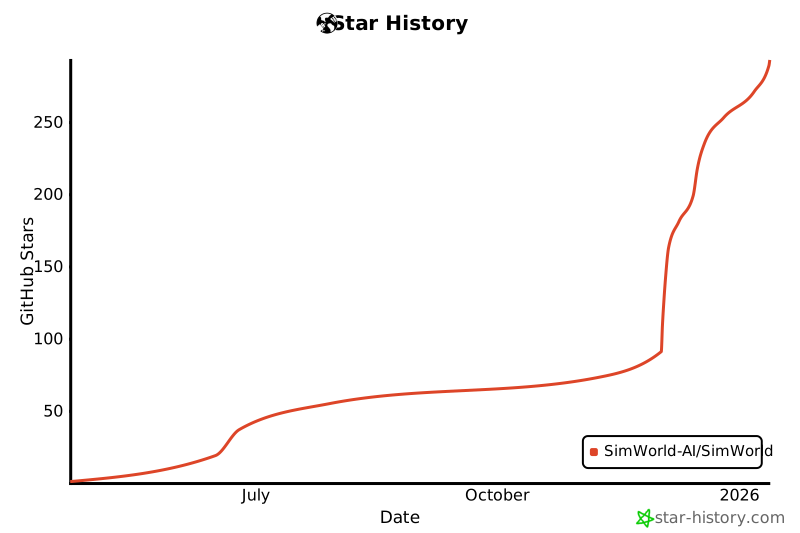](https://www.star-history.com/#SimWorld-AI/SimWorld&type=date&legend=bottom-right)
|