

File size: 11,361 Bytes
ac3c219 15e403b ac3c219 15e403b ac3c219 6033fe9 ac3c219 6033fe9 ac3c219 9cc3ae2 6033fe9 ac3c219 6033fe9 ac3c219 6033fe9 ac3c219 6033fe9 ac3c219 6033fe9 ac3c219 6033fe9 ac3c219 6033fe9 ac3c219 15e403b ac3c219 6033fe9 ac3c219 6033fe9 ac3c219 15e403b ac3c219 15e403b ac3c219 15e403b ac3c219 6033fe9 9cc3ae2 ac3c219 6033fe9 ac3c219 15e403b 6033fe9 ac3c219 9cc3ae2 ac3c219 6033fe9 ac3c219 6033fe9 9cc3ae2 ac3c219 6033fe9 ac3c219 6033fe9 ac3c219 6033fe9 ac3c219 6033fe9 ac3c219 6033fe9 ac3c219 6033fe9 ac3c219 | 1 2 3 4 5 6 7 8 9 10 11 12 13 14 15 16 17 18 19 20 21 22 23 24 25 26 27 28 29 30 31 32 33 34 35 36 37 38 39 40 41 42 43 44 45 46 47 48 49 50 51 52 53 54 55 56 57 58 59 60 61 62 63 64 65 66 67 68 69 70 71 72 73 74 75 76 77 78 79 80 81 82 83 84 85 86 87 88 89 90 91 92 93 94 95 96 97 98 99 100 101 102 103 104 105 106 107 108 109 110 111 112 113 114 115 116 117 118 119 120 121 122 123 124 125 126 127 128 129 130 131 132 133 134 135 136 137 138 139 140 141 142 143 144 145 146 147 148 149 150 151 152 153 154 155 156 157 158 159 160 161 162 163 164 165 166 167 168 169 170 171 172 173 174 175 176 177 178 179 180 181 182 183 184 185 186 187 188 189 190 191 192 193 194 195 196 197 198 199 200 201 202 203 204 205 206 207 208 209 210 211 212 213 214 215 216 217 | ---
license: mit
pipeline_tag: image-to-image
tags:
- steppe
- latent-upscaler
- upscaler
- super-resolution
- video-super-resolution
- frame-interpolation
- comfyui
- wan
- wan2.1
- wan2.2
- qwen-image
- flow-matching
- distillation
base_model:
- Wan-AI/Wan2.1-T2V-14B
- Wan-AI/Wan2.1-T2V-1.3B
- Wan-AI/Wan2.1-I2V-14B-720P
- Wan-AI/Wan2.1-I2V-14B-480P
- Wan-AI/Wan2.2-T2V-A14B
- Wan-AI/Wan2.2-I2V-A14B
- Qwen/Qwen-Image
- Qwen/Qwen-Image-Edit
base_model_relation: adapter
---
# Steppe for Wan 2.1 VAE latents
[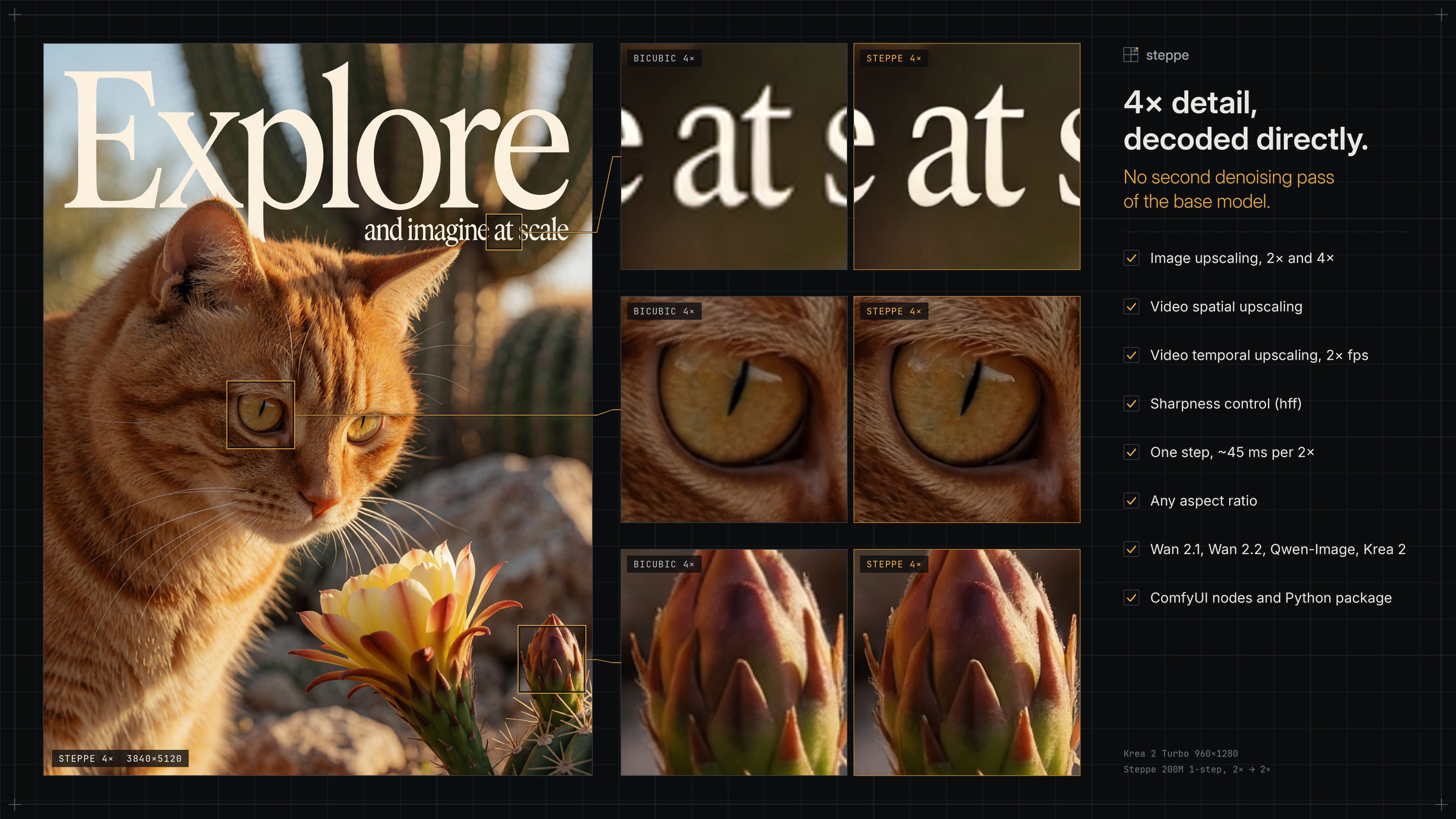](https://raw.githubusercontent.com/tensorforger/tensorforger/main/assets/steppe/hero_cat.png)
> ### 🧩 ComfyUI nodes: [ComfyUI-Steppe](https://github.com/TensorForger/ComfyUI-Steppe)
> Available in **ComfyUI-Manager**: search for "Steppe" and install (or `comfy node install steppe`).
> The nodes download these models on first use.
>
> [](https://github.com/TensorForger/ComfyUI-Steppe)
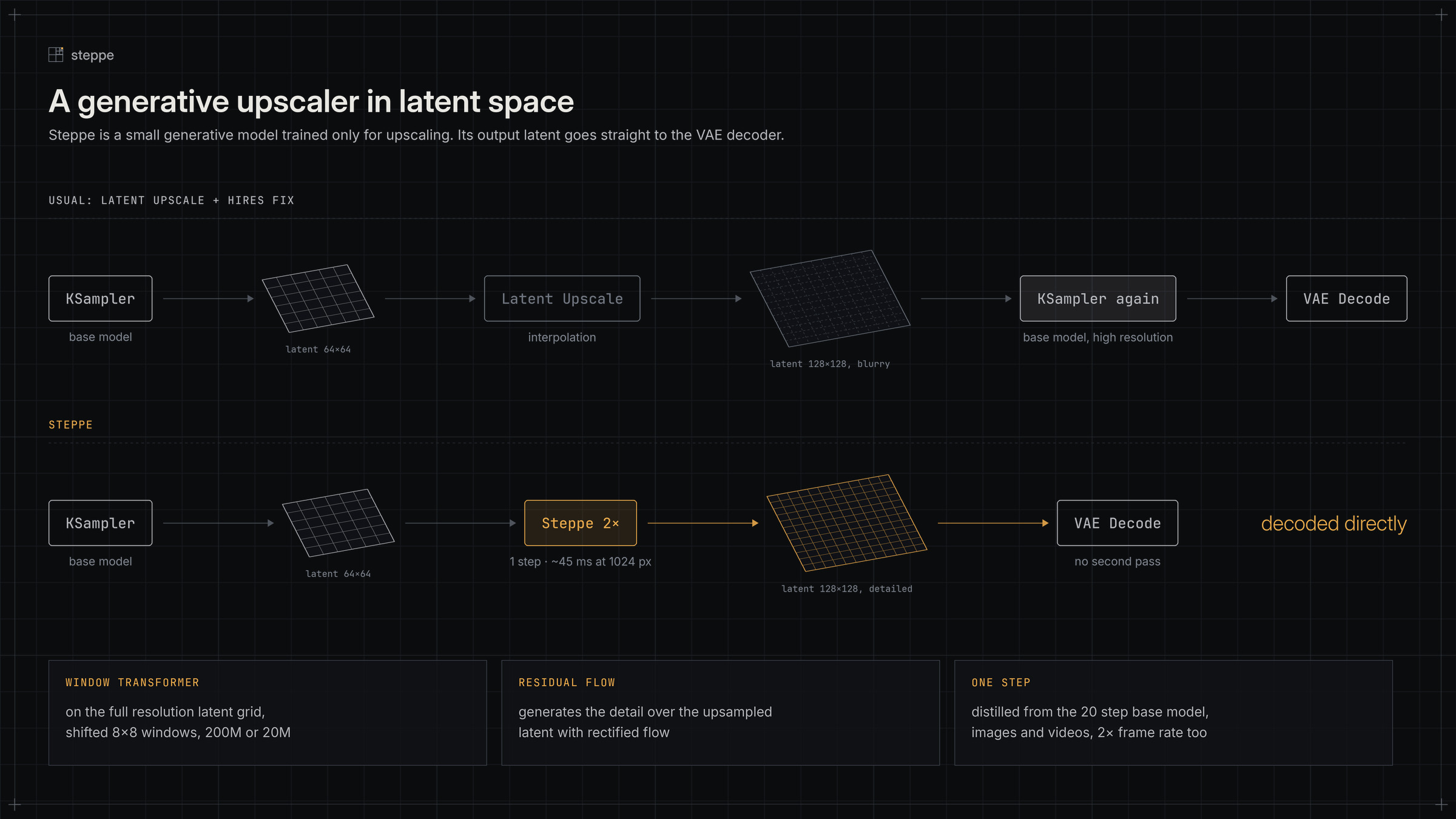
**Steppe** is a family of *generative latent upscalers*: small generative models trained only for upscaling,
which run directly on VAE latents. The upscaled latent is **decoded straight by the VAE**: no second sampling pass of
the base model, no hires fix, no prompt.
These models upscale latents of the **Wan 2.1 VAE**, the latent space shared by Wan 2.1, Wan 2.2 14B, Qwen-Image,
Qwen-Image-Edit and Krea 2.
- **2x resolution** of images and videos, e.g. 512 → 1024 or 1024 → 2048, and chained 2x → 2x.
- **2x frame rate** of videos (latent frame interpolation), also combined with 2x resolution.
- **One step**: ~45 ms for a 1024 px image with the default model (RTX 5090). Most of the time goes to the VAE decode.
- **Sharpness control** through the high frequency feature conditioning (hff).
<video src="https://huggingface.co/TensorForger/Steppe-Wan2.1/resolve/main/assets/video_compare.mp4" controls autoplay loop muted></video>
*Wan 2.1 1.3B, 640x512 at 16 fps → Steppe 1280x1024 at 32 fps (2x resolution and 2x frame rate in one pass).*
## Gallery
[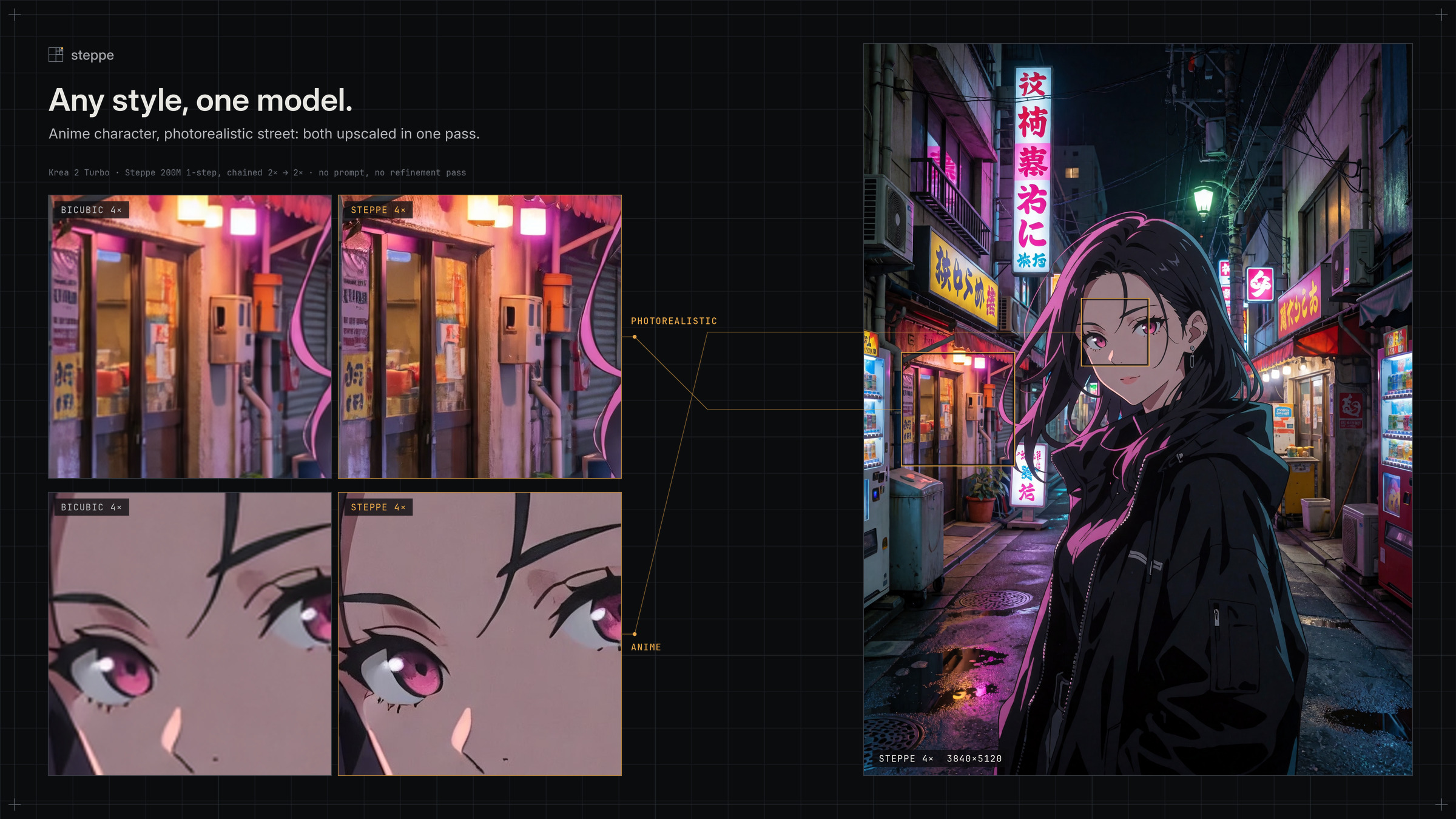](https://raw.githubusercontent.com/tensorforger/tensorforger/main/assets/steppe/compare_anime.png)
[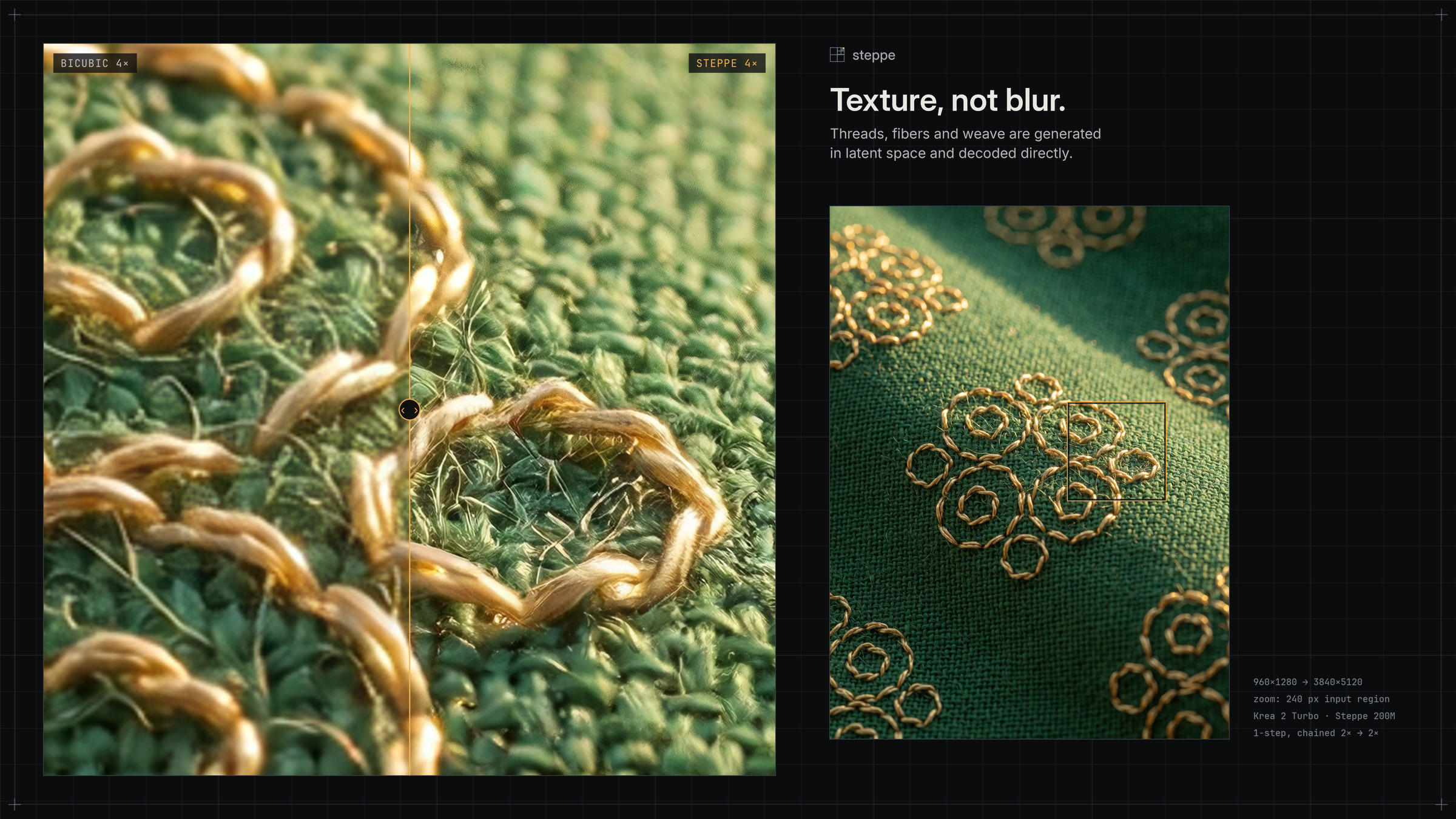](https://raw.githubusercontent.com/tensorforger/tensorforger/main/assets/steppe/compare_cloth.png)
[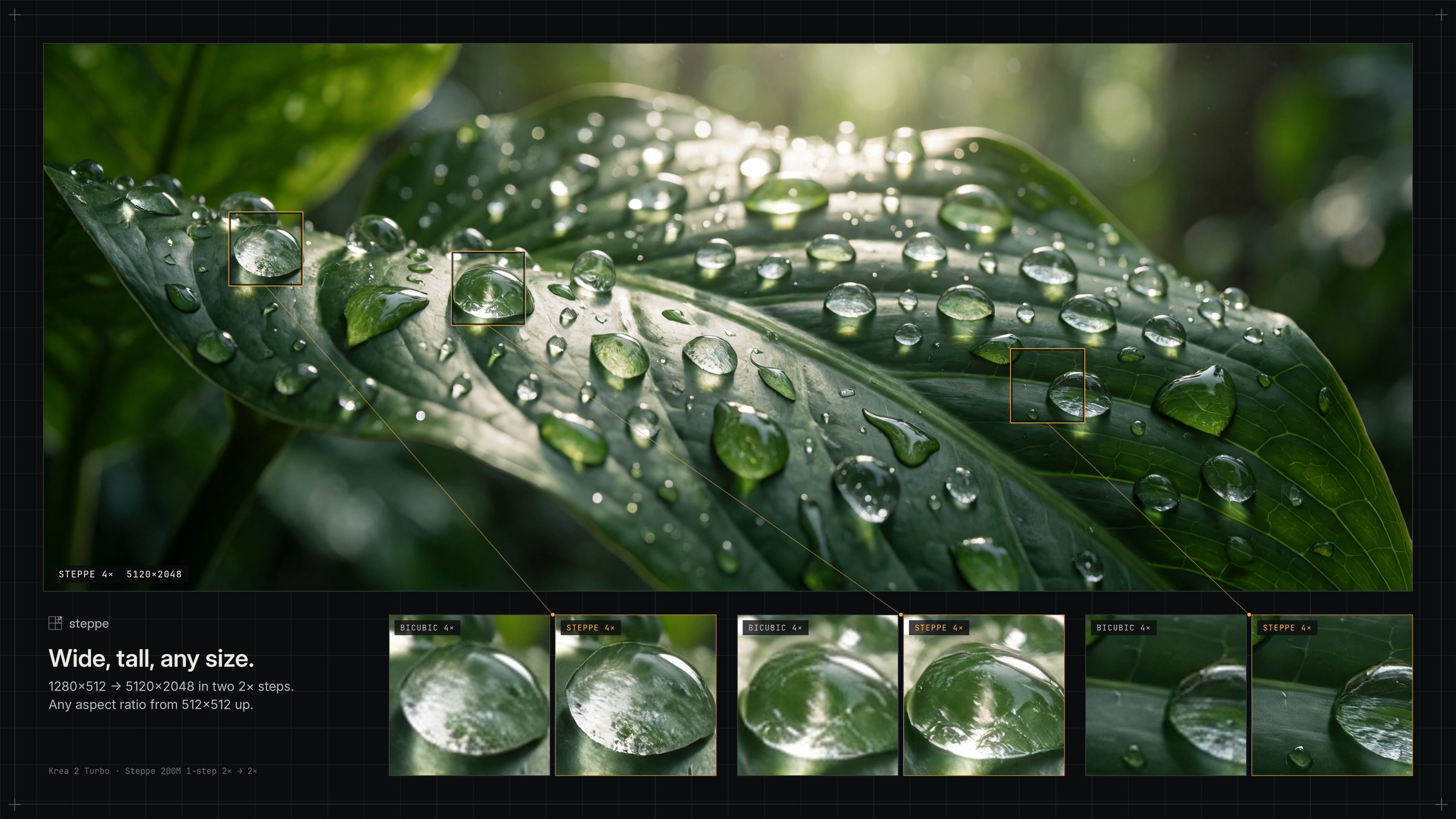](https://raw.githubusercontent.com/tensorforger/tensorforger/main/assets/steppe/compare_leaves.png)
All examples: Krea 2 Turbo, Steppe 200M 1-step, chained 2x → 2x, no prompt and no refinement pass. Bicubic tiles are
upscaled by the same factor from the same input. Click an image for the full resolution card.
## Use in ComfyUI
Install [ComfyUI-Steppe](https://github.com/TensorForger/ComfyUI-Steppe): search for "Steppe" in ComfyUI-Manager,
or run `comfy node install steppe`. The models download automatically on first use.
`KSampler → Steppe Upscale Latent → VAE Decode`
Example workflows (Krea 2 image 4x, Wan 2.1 video 2x resolution + 2x frame rate) are in
[`example_workflows/`](https://github.com/TensorForger/ComfyUI-Steppe/tree/main/example_workflows).
To install the models manually, put the files into `ComfyUI/models/latent_upscale_models`.
## Files
[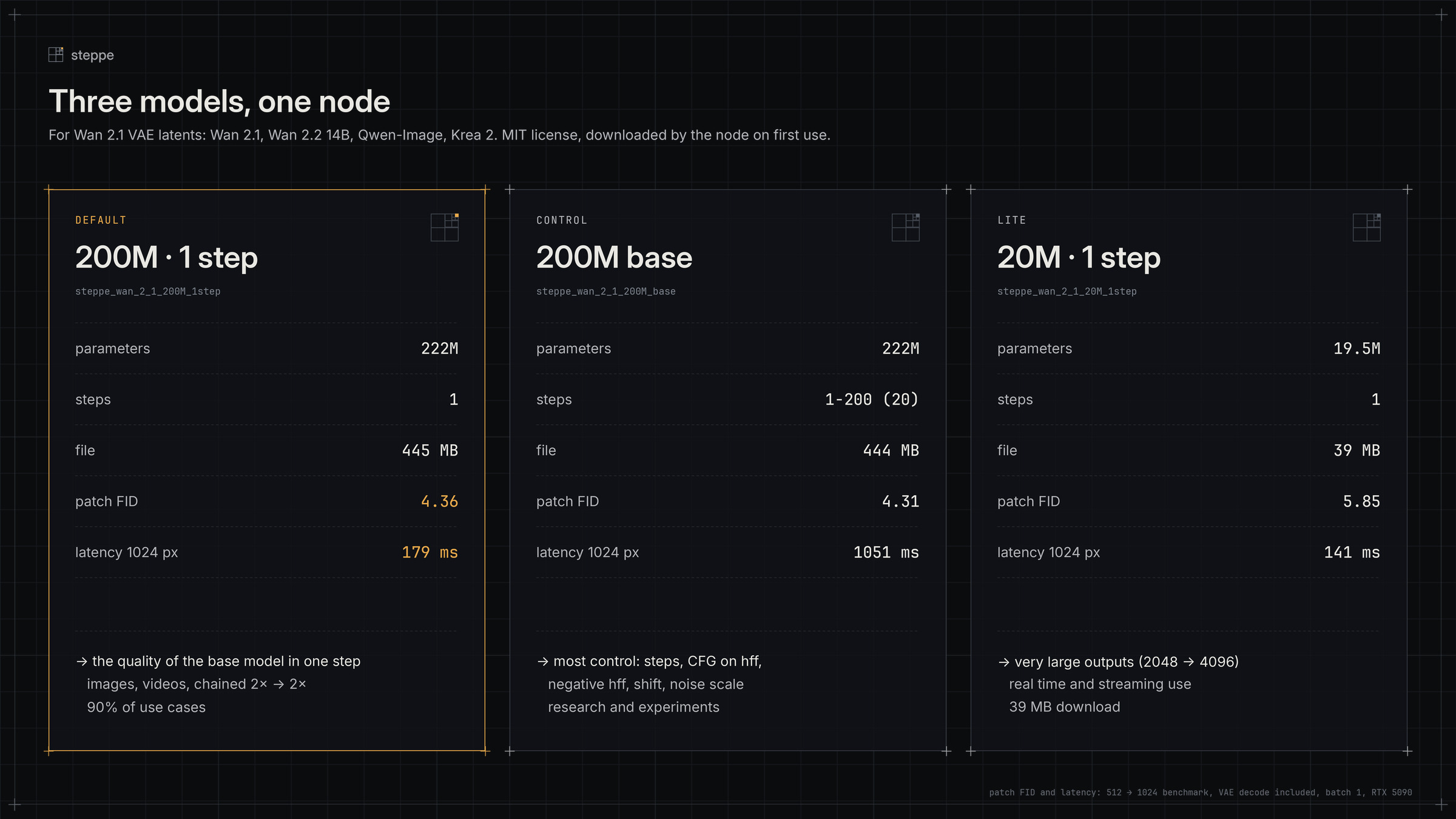](https://raw.githubusercontent.com/tensorforger/tensorforger/main/assets/steppe/models_lineup.png)
| file | steps | parameters | use |
|---|---|---|---|
| [`steppe_wan_2_1_200M_1step.safetensors`](steppe_wan_2_1_200M_1step.safetensors) | 1 | 222M | **default**, 90% of use cases: the quality of the base model in one step |
| [`steppe_wan_2_1_200M_base.safetensors`](steppe_wan_2_1_200M_base.safetensors) | 1-200 (20) | 222M | most control and research: steps, CFG on hff; same quality as the 1-step model in general use |
| [`steppe_wan_2_1_20M_1step.safetensors`](steppe_wan_2_1_20M_1step.safetensors) | 1 | 19.5M | lite: very large outputs (2048 → 4096), real time and streaming use |
All files are bfloat16 safetensors with the model configuration in the metadata. `config.json` is the catalog of this
repository (versions, recommended settings).
## Compatibility
| model | VAE | status |
|---|---|---|
| Wan 2.1 (T2V, I2V, FLF2V, VACE; 1.3B, 14B) | Wan 2.1 VAE | native |
| Wan 2.2 A14B (T2V, I2V) | Wan 2.1 VAE | native |
| Qwen-Image, Qwen-Image-Edit | Qwen-Image VAE: the Wan 2.1 encoder (identical weights) with a fine-tuned decoder | native, tested with `qwen_image_vae` |
| Krea 2 | Wan 2.1 VAE | native, tested |
| Wan 2.2 TI2V 5B | Wan 2.2 VAE (48 channels) | **not supported** |
| FLUX, SD3, SDXL, … | other VAEs | **not supported** |
Tested in ComfyUI with both `wan_2.1_vae` and `qwen_image_vae`, chained 2x → 2x, any aspect ratio, inputs from
512x512 pixels up.
## Settings
[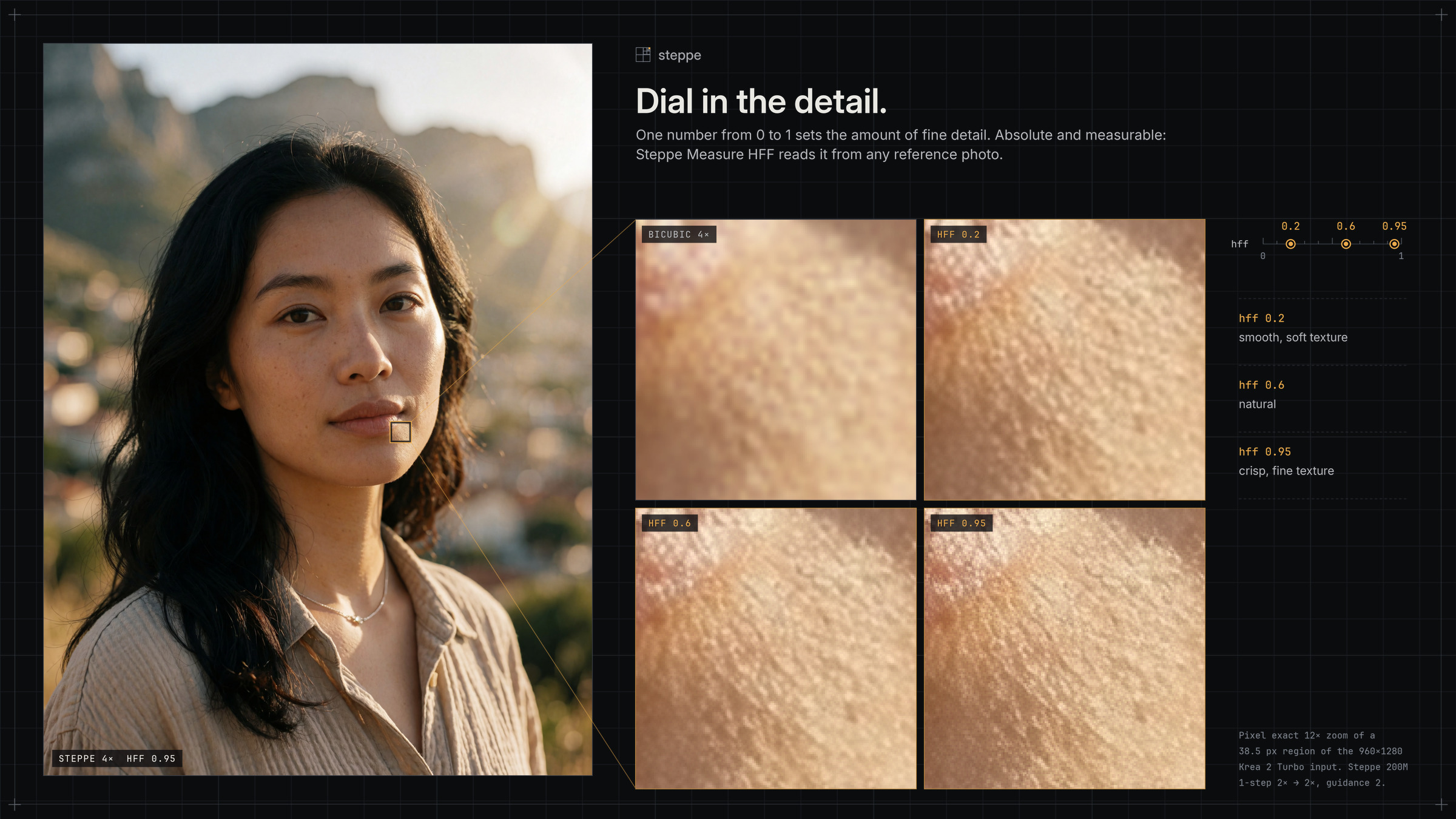](https://raw.githubusercontent.com/tensorforger/tensorforger/main/assets/steppe/hff_portrait.png)
- **hff** (`0...1`, default 0.9): target amount of fine detail and sharpness. Off (`-1`) lets the model choose.
The values are absolute: an Immerkaer noise estimate, quantile-normalized on ReLAION photos.
- **guidance**:
- 1-step models: a distilled guidance input, trained on 1-3, no extra cost. The default 1 (off) is safe and
stable; 2 also works well.
- Base model: classifier free guidance between the hff and the null hff. Use 4-8 for a strong effect; the cost is
two passes per step.
- **Base model sampler**: 20 Euler steps, sigma shift 4. The initial noise scale is 1.0 for spatial upscaling and
0.8 for temporal only.
- **Temporal 2x**: T latent frames become 1 + 2 (T - 1), i.e. 81 → 161 pixel frames. The first frame is kept.
## Benchmark
1000 photos (Axis-V1), 512 → 1024. Every solution gets only the Wan 2.1 latent (no prompt). Patch FID on native
256 px tiles (lower is better); latency at batch 1, VAE decode included, RTX 5090, eager bfloat16.
[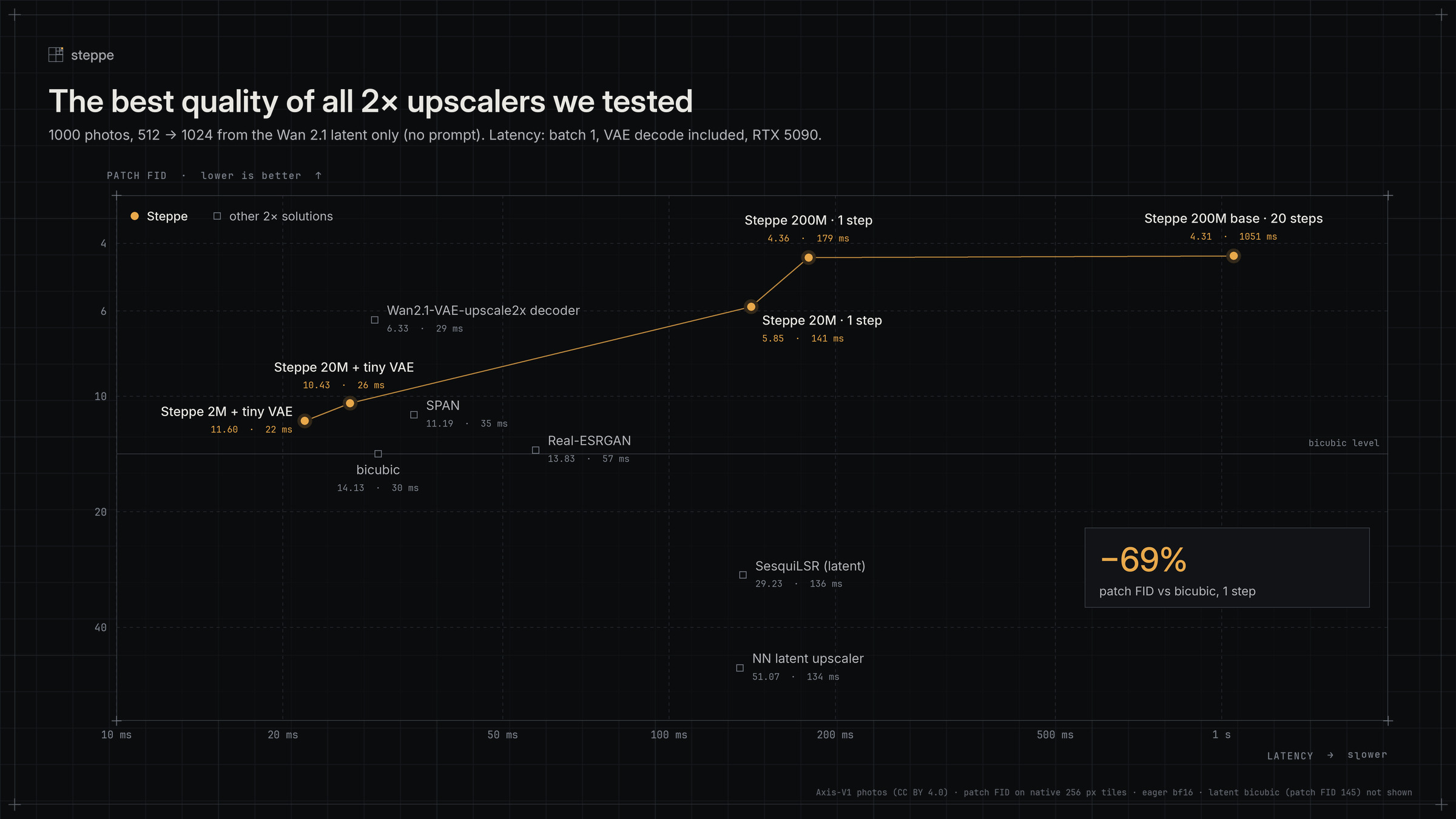](https://raw.githubusercontent.com/tensorforger/tensorforger/main/assets/steppe/benchmark_plot.png)
| solution | patch FID | FID | latency | peak VRAM |
|---|---|---|---|---|
| Steppe 200M base, 20 steps | **4.31** | 3.01 | 1051 ms | 5.0 GB |
| Steppe 200M 1-step | 4.36 | 3.07 | 179 ms | 4.9 GB |
| Steppe 20M 1-step | 5.85 | 3.85 | 141 ms | 4.5 GB |
| Wan2.1-VAE-upscale2x decoder (spacepxl) | 6.33 | 5.80 | 29 ms | 1.3 GB |
| SPAN 2x after decode | 11.19 | 4.83 | 35 ms | 1.3 GB |
| Real-ESRGAN x2 after decode | 13.83 | 8.83 | 57 ms | 1.3 GB |
| bicubic after decode | 14.13 | 3.33 | 30 ms | 1.3 GB |
| SesquiLSR (latent, made for hires fix) | 29.23 | 7.65 | 136 ms | 4.5 GB |
Steppe stays close to the input: the roundtrip color error (ΔE00 2.36) equals the VAE reconstruction floor.
[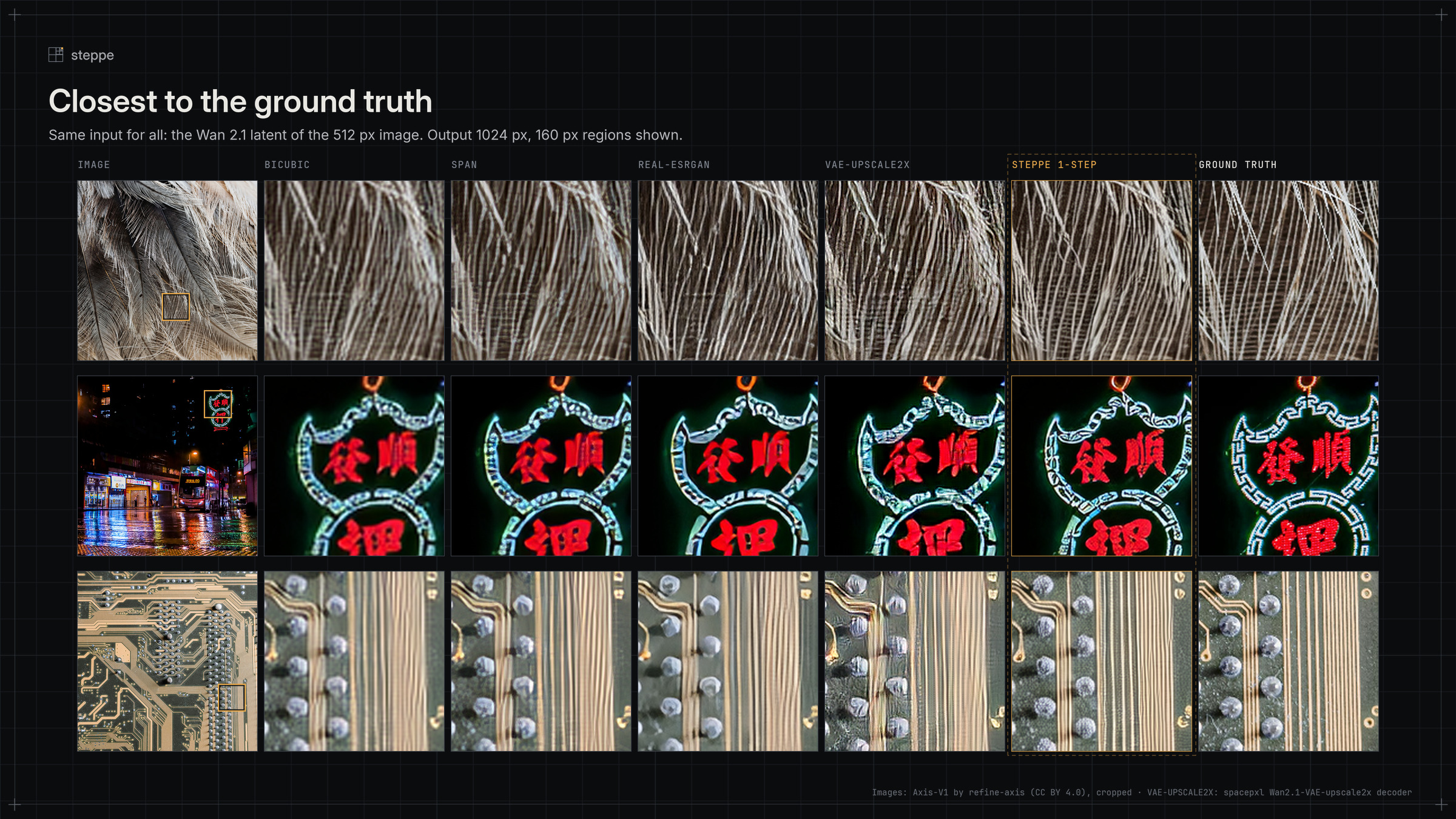](https://raw.githubusercontent.com/tensorforger/tensorforger/main/assets/steppe/benchmark_gallery.png)
Benchmark images: [Axis-V1](https://huggingface.co/datasets/refine-axis/axis-v1_1k) by refine-axis (CC BY 4.0), cropped.
## Python
```bash
pip install "steppe[standalone] @ git+https://github.com/TensorForger/ComfyUI-Steppe"
```
```python
import torch
from diffusers import AutoencoderKLWan
from steppe import UpscaleSettings, load_upscaler
vae = AutoencoderKLWan.from_pretrained(
"Wan-AI/Wan2.1-T2V-1.3B-Diffusers", subfolder="vae", torch_dtype=torch.float32
).to("cuda")
upscaler = load_upscaler("steppe_wan_2_1_200M_1step.safetensors")
upscaler.model.to("cuda")
# pixels: [B, 3, T, H, W] in [-1, 1]; raw (unnormalized) latents in and out
latents = vae.encode(pixels.to("cuda")).latent_dist.mode()
upscaled = upscaler.upscale(
latents, UpscaleSettings(spatial=True, temporal=False, hff=0.9, guidance=1.0)
)
pixels_2x = vae.decode(upscaled.to("cuda")).sample
```
## How it works
[](https://raw.githubusercontent.com/tensorforger/tensorforger/main/assets/steppe/how_it_works.png)
A window transformer runs on the full resolution latent grid. It uses DiT style adaLN-zero blocks, shifted 8x8
window attention and a causal depthwise temporal convolution. A learned source encoder upsamples the input latent.
The model generates the normalized residual over the aligned low resolution latent with rectified flow, conditioned
on the noise level and the hff.
- **Base model**: 222M parameters, trained from scratch for ~46 h on 6 RTX 5090s. Data: images from
[ReLAION-high-resolution](https://huggingface.co/datasets/laion/relaion-high-resolution) (512 → 1024 and 256 → 512)
and a set of ~50k video clips at 1024x1024 (17 → 33 frames at 512, plus 1024 and combined spatial and temporal
pairs). Training pairs are made by downscaling and encoding with the Wan 2.1 VAE; no captions are used.
hff dropout enables classifier free guidance.
- **1-step model**: rectified flow distillation of the base model (40k teacher pairs, 2 h on 8 GPUs). It keeps ~99%
of the base model's quality.
- **20M model**: the same architecture scaled down and trained from scratch on pairs from the 1-step model.
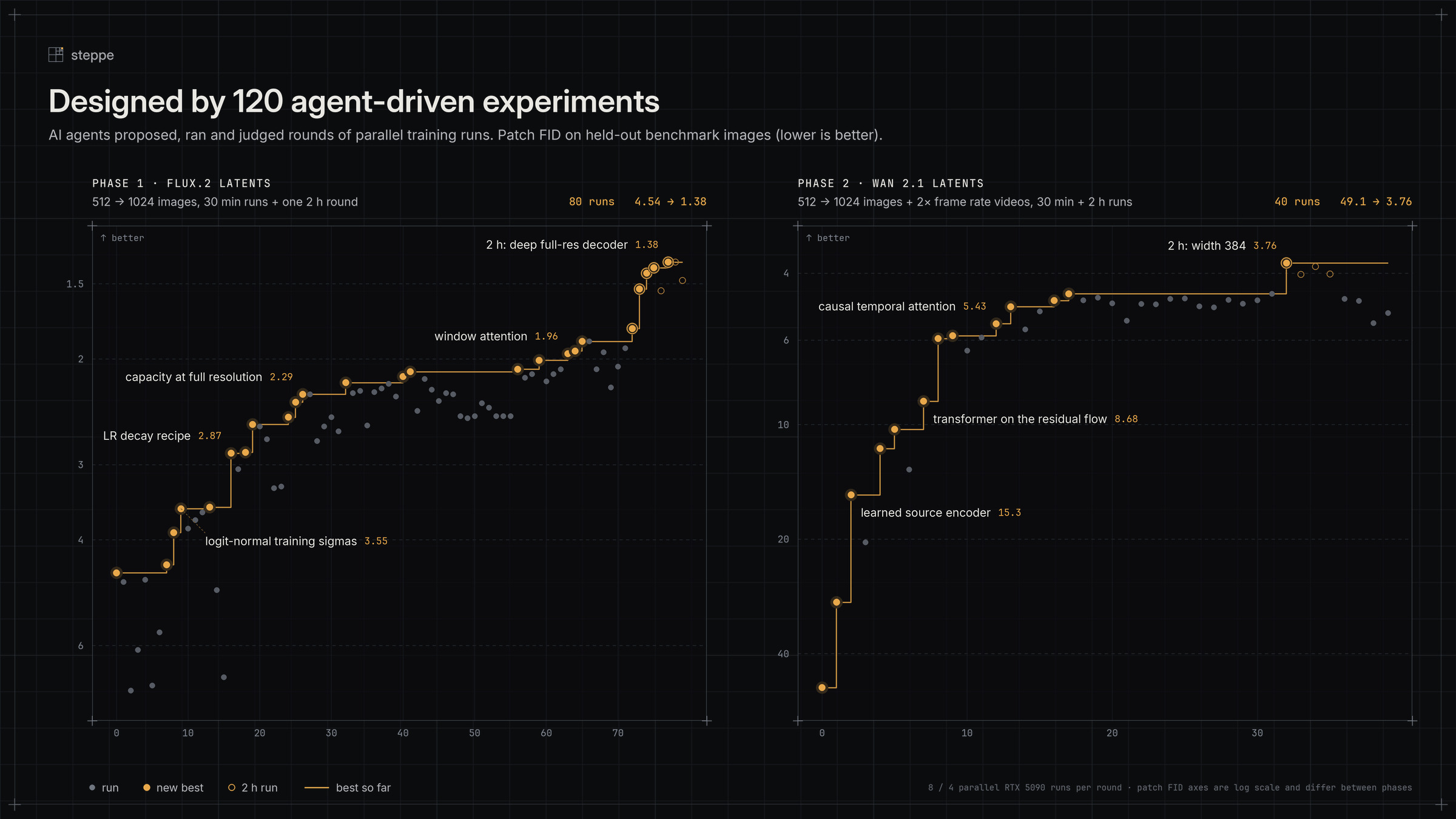
The architecture and recipe come from agent-driven autoresearch: ~80 runs on FLUX.2 latents, then ~70 on Wan 2.1
latents (rounds of parallel 30 min and 2 h training runs, judged by patch FID).
[](https://raw.githubusercontent.com/tensorforger/tensorforger/main/assets/steppe/autoresearch.png)
## Limitations
- Small text and small background faces are where all upscalers fail. Steppe improves them less than textures and
edges, and the 20M model the least.
- The upscaling factor is fixed at 2x. For 4x, chain two upscales (the 1-step model is as good as the base model
there).
- Long videos run in one pass, but the model was trained on clips up to 33 output frames. For very long clips,
temporal windows (Advanced node) can be more stable.
## License
MIT. Steppe works on latents of the Wan 2.1 VAE (Apache-2.0, Wan Team, Alibaba Group), see `NOTICE`. This repository
does not contain VAE weights.
The ancestor of Steppe is [comfyui-flow-upscaler](https://github.com/tensorforger/comfyui-flow-upscaler) (FLUX.2).
```bibtex
@misc{steppe2026,
author = {TensorForger},
title = {Steppe: Generative Latent Upscalers},
year = {2026},
url = {https://huggingface.co/TensorForger/Steppe-Wan2.1}
}
```
|