Image-Text-to-Text
Transformers
Safetensors
English
qwen3_vl
chart-understanding
visual-question-answering
tool-use
agent
conversational
Instructions to use TonyZhan/ChartAdept with libraries, inference providers, notebooks, and local apps. Follow these links to get started.
- Libraries
- Transformers
How to use TonyZhan/ChartAdept with Transformers:
# Use a pipeline as a high-level helper from transformers import pipeline pipe = pipeline("image-text-to-text", model="TonyZhan/ChartAdept") messages = [ { "role": "user", "content": [ {"type": "image", "url": "https://huggingface.co/datasets/huggingface/documentation-images/resolve/main/p-blog/candy.JPG"}, {"type": "text", "text": "What animal is on the candy?"} ] }, ] pipe(text=messages)# pip install -U transformers accelerate # Load model directly from transformers import AutoProcessor, AutoModelForMultimodalLM processor = AutoProcessor.from_pretrained("TonyZhan/ChartAdept") model = AutoModelForMultimodalLM.from_pretrained("TonyZhan/ChartAdept", device_map="auto") messages = [ { "role": "user", "content": [ {"type": "image", "url": "https://huggingface.co/datasets/huggingface/documentation-images/resolve/main/p-blog/candy.JPG"}, {"type": "text", "text": "What animal is on the candy?"} ] }, ] inputs = processor.apply_chat_template( messages, add_generation_prompt=True, tokenize=True, return_dict=True, return_tensors="pt", ).to(model.device) outputs = model.generate(**inputs, max_new_tokens=256) print(processor.decode(outputs[0][inputs["input_ids"].shape[-1]:])) - Notebooks
- Google Colab
- Kaggle
- Local Apps Settings
- vLLM
How to use TonyZhan/ChartAdept with vLLM:
Install from pip and serve model
# Install vLLM from pip: pip install vllm # Start the vLLM server: vllm serve "TonyZhan/ChartAdept" # Call the server using curl (OpenAI-compatible API): curl -X POST "http://localhost:8000/v1/chat/completions" \ -H "Content-Type: application/json" \ --data '{ "model": "TonyZhan/ChartAdept", "messages": [ { "role": "user", "content": [ { "type": "text", "text": "Describe this image in one sentence." }, { "type": "image_url", "image_url": { "url": "https://cdn.britannica.com/61/93061-050-99147DCE/Statue-of-Liberty-Island-New-York-Bay.jpg" } } ] } ] }'Use Docker
docker model run hf.co/TonyZhan/ChartAdept
- SGLang
How to use TonyZhan/ChartAdept with SGLang:
Install from pip and serve model
# Install SGLang from pip: pip install sglang # Start the SGLang server: python3 -m sglang.launch_server \ --model-path "TonyZhan/ChartAdept" \ --host 0.0.0.0 \ --port 30000 # Call the server using curl (OpenAI-compatible API): curl -X POST "http://localhost:30000/v1/chat/completions" \ -H "Content-Type: application/json" \ --data '{ "model": "TonyZhan/ChartAdept", "messages": [ { "role": "user", "content": [ { "type": "text", "text": "Describe this image in one sentence." }, { "type": "image_url", "image_url": { "url": "https://cdn.britannica.com/61/93061-050-99147DCE/Statue-of-Liberty-Island-New-York-Bay.jpg" } } ] } ] }'Use Docker images
docker run --gpus all \ --shm-size 32g \ -p 30000:30000 \ -v ~/.cache/huggingface:/root/.cache/huggingface \ --env "HF_TOKEN=<secret>" \ --ipc=host \ lmsysorg/sglang:latest \ python3 -m sglang.launch_server \ --model-path "TonyZhan/ChartAdept" \ --host 0.0.0.0 \ --port 30000 # Call the server using curl (OpenAI-compatible API): curl -X POST "http://localhost:30000/v1/chat/completions" \ -H "Content-Type: application/json" \ --data '{ "model": "TonyZhan/ChartAdept", "messages": [ { "role": "user", "content": [ { "type": "text", "text": "Describe this image in one sentence." }, { "type": "image_url", "image_url": { "url": "https://cdn.britannica.com/61/93061-050-99147DCE/Statue-of-Liberty-Island-New-York-Bay.jpg" } } ] } ] }' - Docker Model Runner
How to use TonyZhan/ChartAdept with Docker Model Runner:
docker model run hf.co/TonyZhan/ChartAdept
Add inference visualization and code examples link
Browse files
README.md
CHANGED
|
@@ -18,6 +18,10 @@ ChartAdept is a Qwen3-VL-4B-Instruct-based policy for scientific-chart question
|
|
| 18 |
|
| 19 |
Code and runtime: https://github.com/TonyZhan10/ChartAdept
|
| 20 |
|
|
|
|
|
|
|
|
|
|
|
|
|
| 21 |
## Files and use
|
| 22 |
|
| 23 |
This directory contains the original four safetensors shards, model configuration, tokenizer, processor, and chat template. The export stores float32 tensors (approximately 19.3 GB). The provided inference server loads weights in BF16. No optimizer state is included.
|
|
|
|
| 18 |
|
| 19 |
Code and runtime: https://github.com/TonyZhan10/ChartAdept
|
| 20 |
|
| 21 |
+
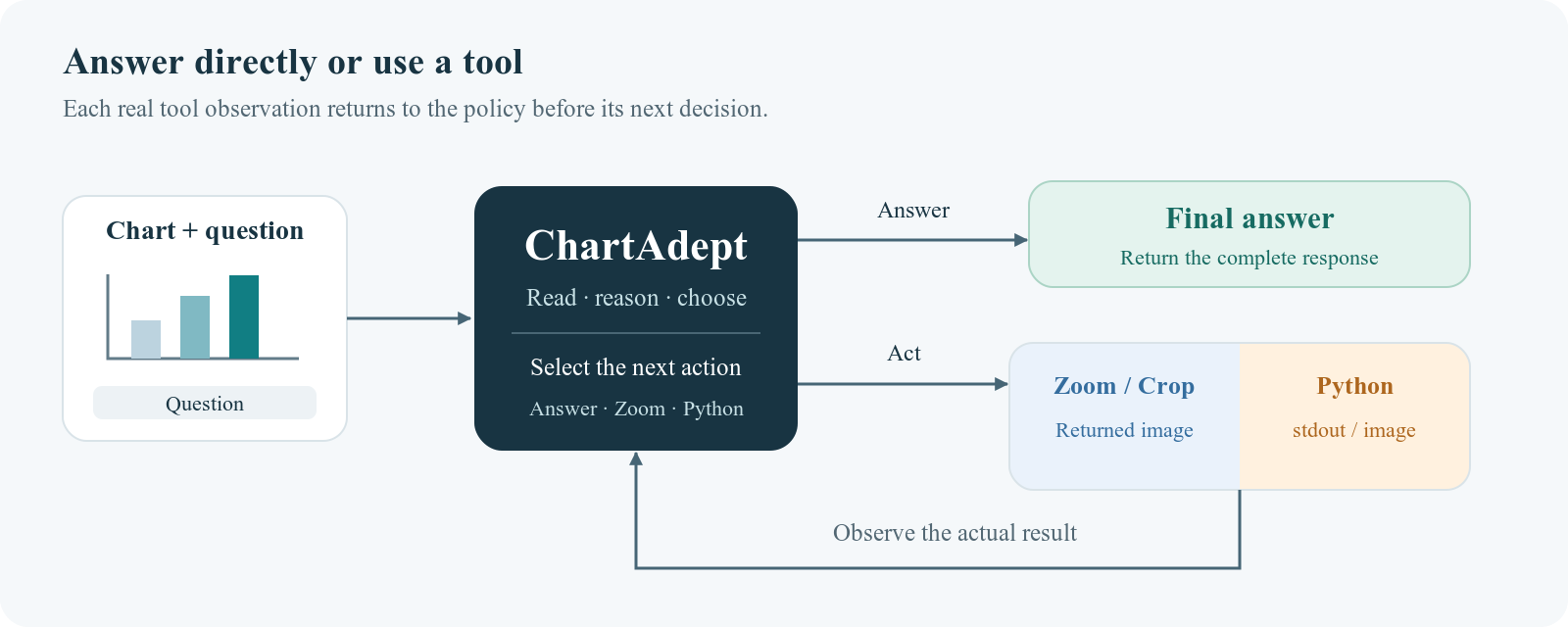
|
| 22 |
+
|
| 23 |
+
See the [visual examples](https://github.com/TonyZhan10/ChartAdept#examples) and [reported benchmark comparison](https://github.com/TonyZhan10/ChartAdept#results) in the code repository.
|
| 24 |
+
|
| 25 |
## Files and use
|
| 26 |
|
| 27 |
This directory contains the original four safetensors shards, model configuration, tokenizer, processor, and chat template. The export stores float32 tensors (approximately 19.3 GB). The provided inference server loads weights in BF16. No optimizer state is included.
|