Scaling OpenEnv: From Free Usage to Thousands of Concurrent Environments







This post shows how to scale OpenEnv environments usinf free tools like Hugging Face spaces. Then, it shows how to scale the same tool from from 128 sessions on HF Spaces to 16k on multi-node clusters, with benchmarks and deployment code for each tier.
What is OpenEnv?
OpenEnv is a community (Meta, Unsloth, Hugging Face) collaboration to standardize agentic execution environments. An environment defines the tools, APIs, and execution context an agent needs—exposed through reset(), step(), and close(). The same environment works for training (with TRL, verl, TorchForge) and deployment.
from textarena import WordleEnv, WordleAction

with WordleEnv(base_url="https://openenv-wordle.hf.space") as env:
    obs = env.reset()
    result = env.step(WordleAction(guess="crane"))
Why Scaling Matters
Reinforcement Learning needs concurrent sessions for models to interact with the environment in parallel, generating trajectories in parallel. For sample efficiency, we need thousands of concurrent sessions so that GPUs are not idle waiting on the environment to respond.
RL environments are extremely heterogeneous, with different interfaces, different state spaces, and different reward spaces. As a result, scaling environments is not a trivial task. In most cases, complex rollouts are dealt with by horizontally scaling environment containers, which OpenEnv supports. However, resource constrained developers may not have access to compute clusters, and may not want to deal with the complexity of scaling environments.
To address this, we equipped OpenEnv with a WebSocket interface, which allows for concurrent sessions to be served by a single container. This is in contrast to the HTTP interface, which would require a new container for each session. Moreover, these same gains translate back up to cluster level scaling, where we can scale to thousands of concurrent sessions across multiple nodes.
Scaling Examples
Now, let's see how to scale OpenEnv environments using various tools.
If you're training on a single GPU device, Hugging Face Spaces is a great way to get started. It can scale to 128 concurrent sessions for free, and more with a paid CPU upgrade spaces.
from textarena import WordleEnv, WordleAction

with WordleEnv(base_url="https://openenv-wordle.hf.space") as env:
    obs = env.reset()
    result = env.step(WordleAction(guess="crane"))
For development and single-machine training, pull any environment from HF Spaces and run locally. No network latency, full resource control. Local Docker achieves > 256 sessions per core—an 8-core machine handles 2,048 concurrent episodes.
docker pull registry.hf.space/openenv-echo-env:latest
docker run -d -p 8000:8000 -e WORKERS=8 -e MAX_CONCURRENT_ENVS=400 \
    registry.hf.space/openenv-echo-env:latest
For large-scale RL training beyond 2K concurrent, run multiple containers behind an Envoy load balancer. We tested 96 cores across 2 SLURM nodes—16,384 concurrent sessions with 100% success rate. For a detailed guide on implementing this, see the scaling experiments repository.
Scaling Experiments
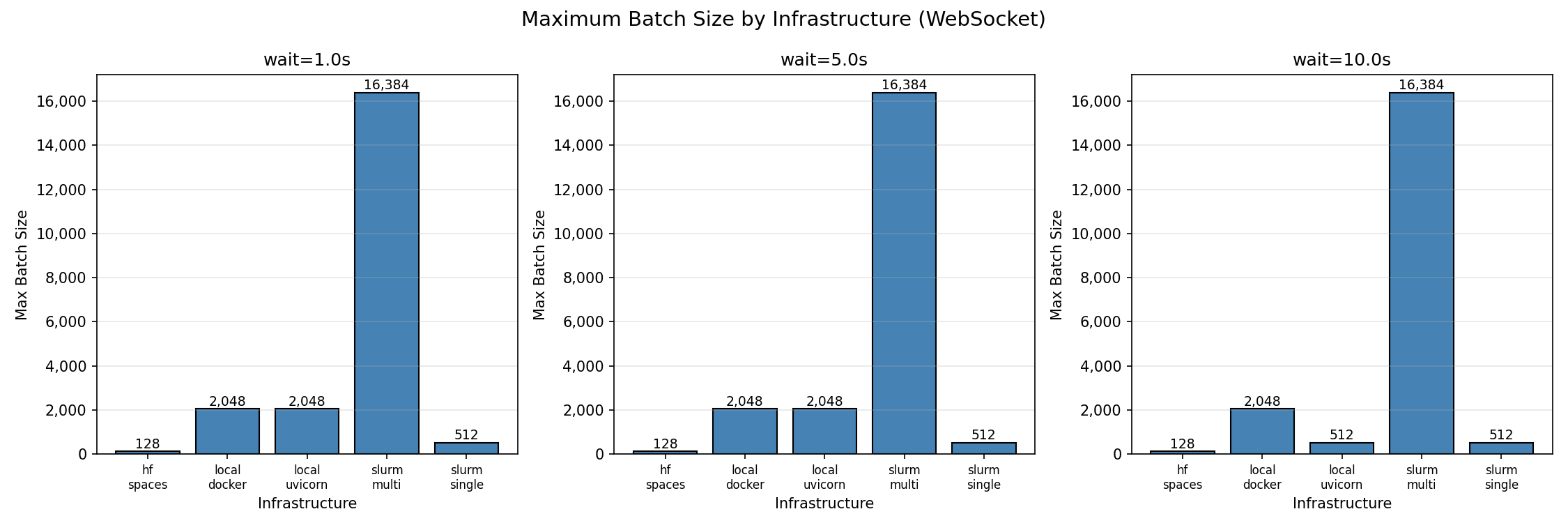
We benchmarked five infrastructure configurations: local Uvicorn, local Docker, HF Spaces, SLURM single-node (48 cores), and SLURM multi-node (96 cores). Full code and data at burtenshaw/openenv-scaling.
We focused on two key metrics: maximum batch size (concurrent sessions with ≥95% success rate) and per-core efficiency.
The first figure shows maximum batch size (concurrent sessions with ≥95% success rate) for each infrastructure. Multi-node SLURM achieves the highest absolute throughput at 16,384 concurrent sessions. Local deployments max out at 2,048, and HF Spaces caps at 128.
Per-core efficiency
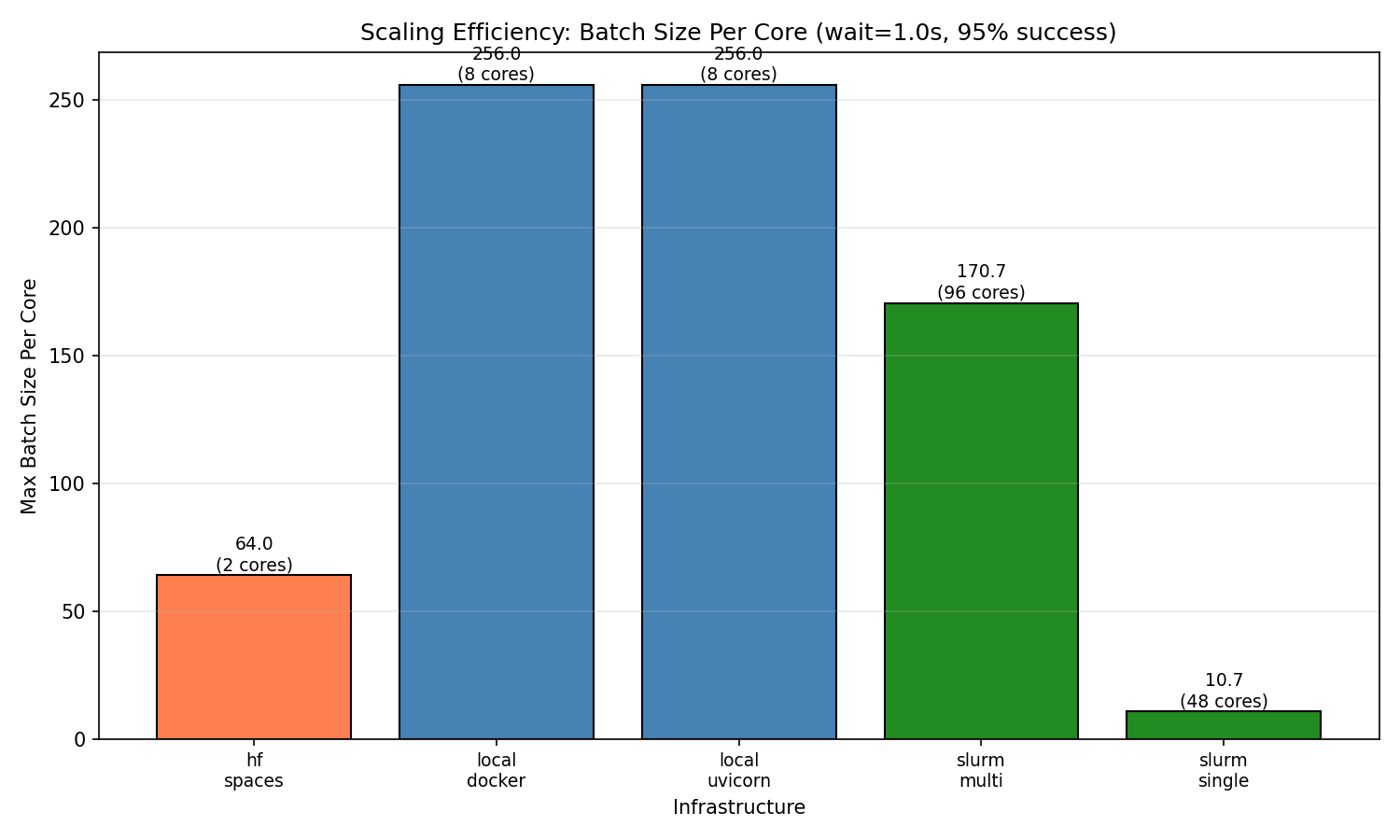
Raw throughput doesn't tell the full story. When we normalize by core count, local deployments are the most efficient at 256 sessions per core. Multi-node achieves 170.7 sessions/core—lower efficiency but necessary for workloads exceeding single-machine capacity. HF Spaces achieves 64 sessions/core (128 sessions on 2 cores). Single-node SLURM shows surprisingly low efficiency (10.7 sessions/core), likely due to HPC network overhead and connection limits.
This is important if you do not have an infinite budget for compute. For example, using a single HF space, a local machine, or cloud compute, high per-core efficiency means lower bills. A researcher with an 8-core laptop can run meaningful experiments at 2K concurrent—no cluster required. Teams scaling to production should expect diminishing returns per core as they add nodes, but gain the ability to handle workloads that simply don't fit on one machine.
Scaling behavior
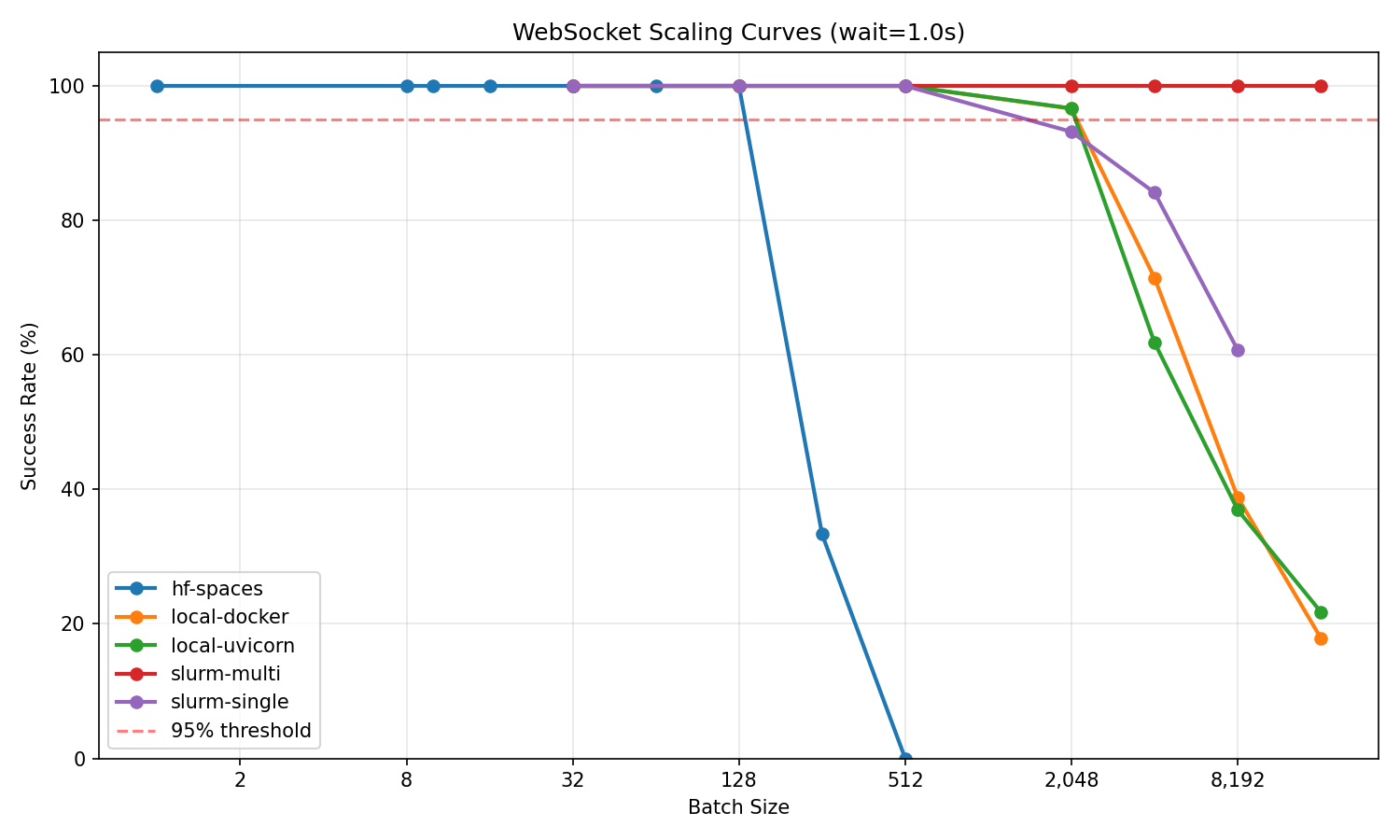
The scaling curves show how each infrastructure degrades under load. For most users starting with HF Spaces, the key finding is that free-tier Spaces reliably handle 128 concurrent sessions—enough for single-GPU training or evaluation runs. Push beyond that and connections become unstable. If you need more, pull the same environment to local Docker and immediately jump to 2K concurrent. Multi-node clusters extend this further for teams running large-scale experiments.
Multi-node vs single-node
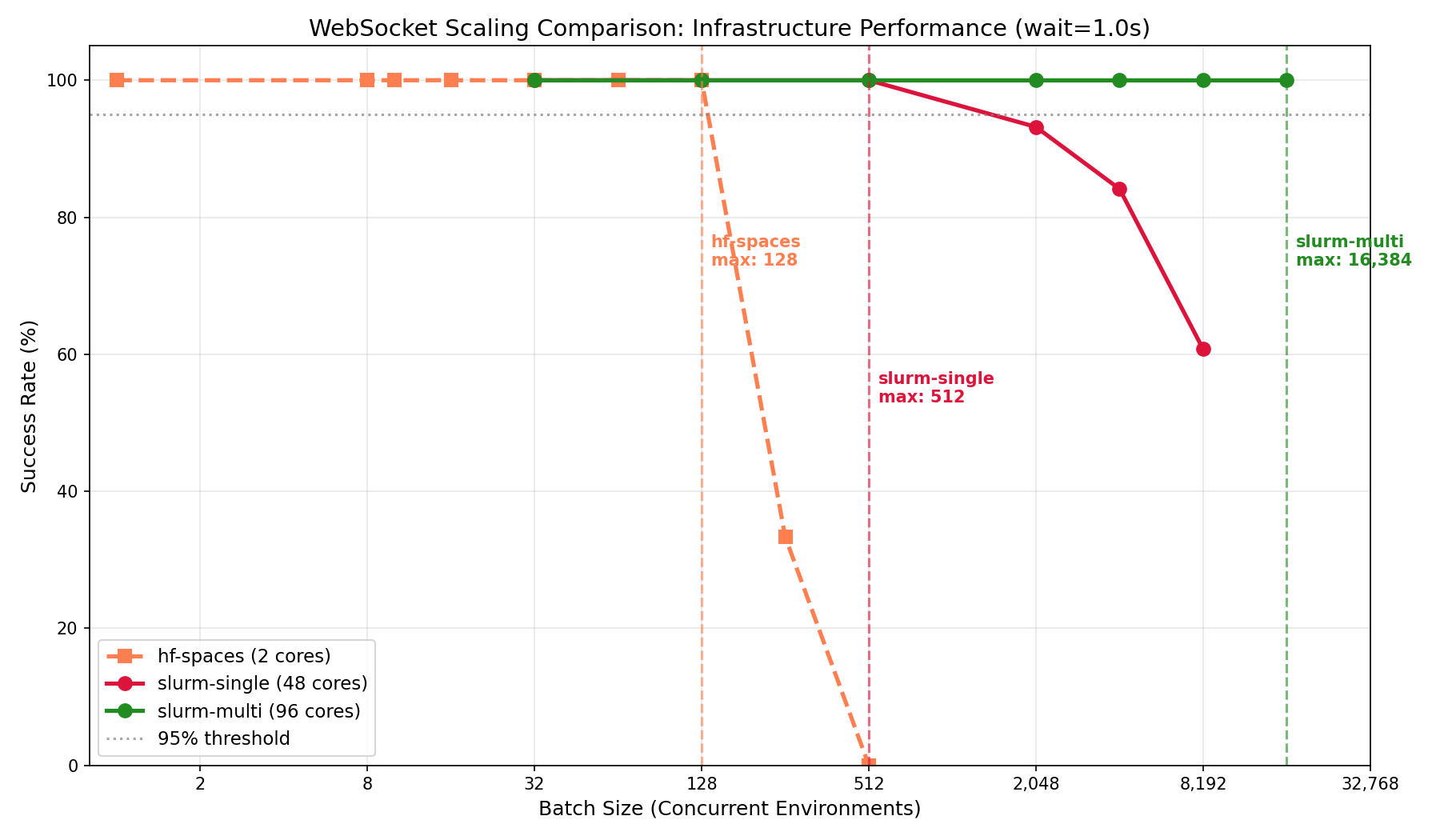
If you're training on a cluster with multiple GPUs across nodes, which is common for GRPO, you'll need environment throughput to match. Single-node deployments hit a ceiling around 512 concurrent sessions regardless of core count. Multi-node with Envoy load balancing scales linearly: adding nodes adds capacity. This is the setup for teams at labs or companies running experiments that require thousands of parallel rollouts.
Key takeaways
- Hobbyists and researchers can use HF Spaces for free up to 128 concurrent sessions—enough for single-GPU training, demos, and evaluation. Just connect to a deployed Space and start running episodes.
- Individual developers with a local machine should run Docker locally for best efficiency (256 sessions/core). An 8-core laptop handles 2K concurrent episodes with no cluster setup.
- Teams at labs or companies running large-scale GRPO need multi-node deployments. Expect ~170 sessions/core, but the ability to scale to 16K+ concurrent by adding nodes.
- Everyone should use WebSocket mode—HTTP success rates drop significantly beyond 32 concurrent sessions.
Quick Reference
Configure scaling with environment variables: WORKERS (default 4) sets Uvicorn worker processes, MAX_CONCURRENT_ENVS (default 100) sets max WebSocket sessions per worker.
Run your own benchmarks:
git clone https://github.com/burtenshaw/openenv-scaling
cd openenv-scaling && pip install -e .
python tests/test_scaling.py --url http://localhost:8000 --requests-grid 32,128,512,2048 --mode ws
Recommendations
Use local Docker for development and training under 2K concurrent. Use HF Spaces for demos and published environments. Scale to multi-node with Envoy when you need >2K concurrent sessions. For GPU environments, use one container per GPU.
OpenEnv integrates with TRL, verl, TorchForge, and SkyRL—the same environment scales from local testing to distributed training without code changes.
Resources
- OpenEnv Announcement — Meta/HF launch post
- OpenEnv Repository — Source code and RFCs
- Environment Hub — Community environments
- Scaling Experiments — Benchmark code and data
- TRL Integration — RL training docs
- Deployment Guide — Full deployment walkthrough
- Scaling Details — WebSocket architecture and benchmarks