
What Is Jev AI? A Decision Layer for AI Agents



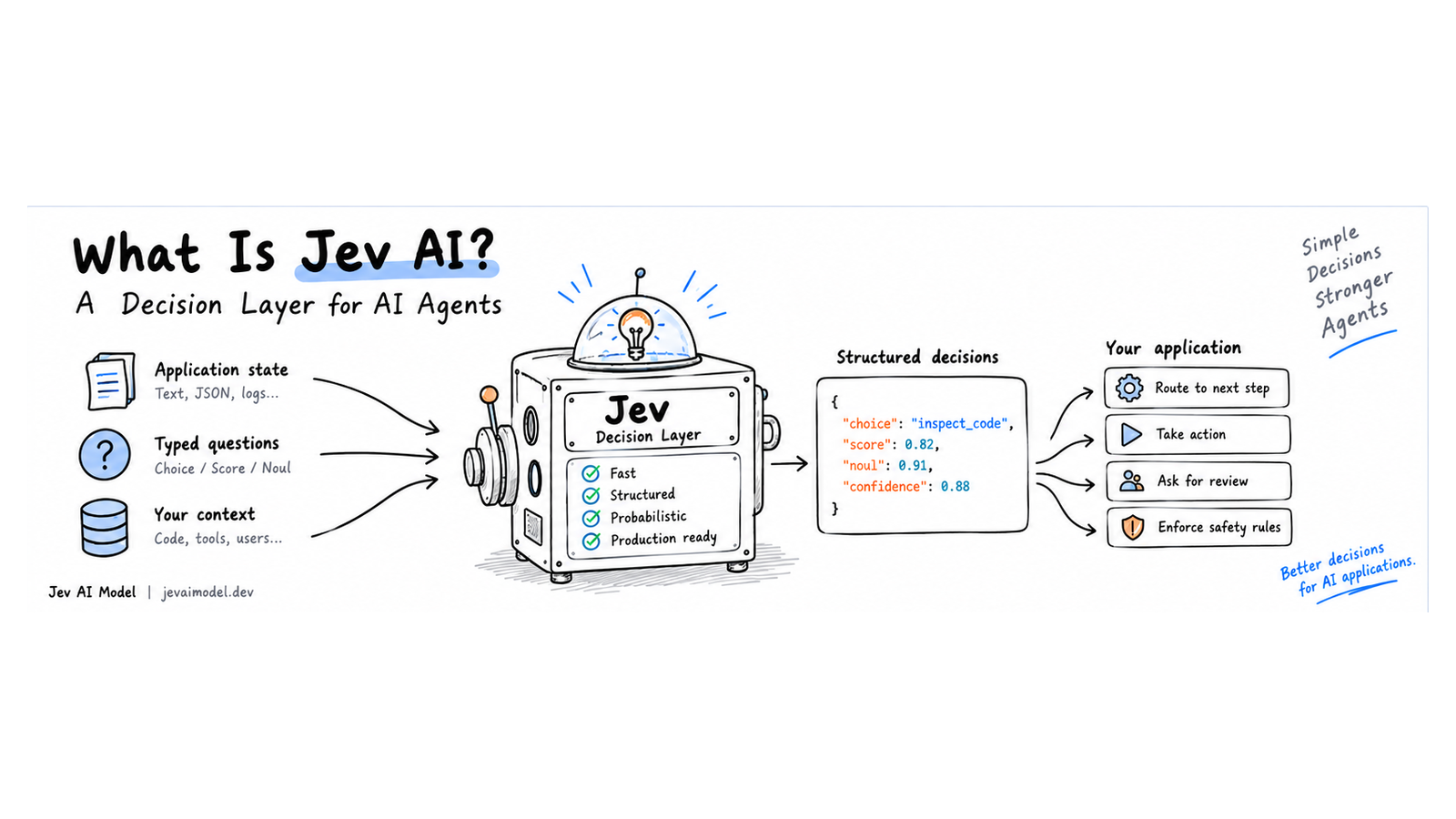 Jev AI is a model for bounded decisions inside software. Give it application state and typed questions; it returns structured answers that code can route, score, or use to choose a next step. It is not a chat assistant that writes explanations or executes tools.
That distinction matters in an agent. A coding agent can spend many model calls reading files, selecting tools, checking test results, and deciding whether an action is safe. A generative model is still useful for planning and writing. Jev can handle a narrower job in the middle: answer a small, defined question quickly enough for the application to keep the workflow moving.
The short answer: Jev turns state into typed decisions
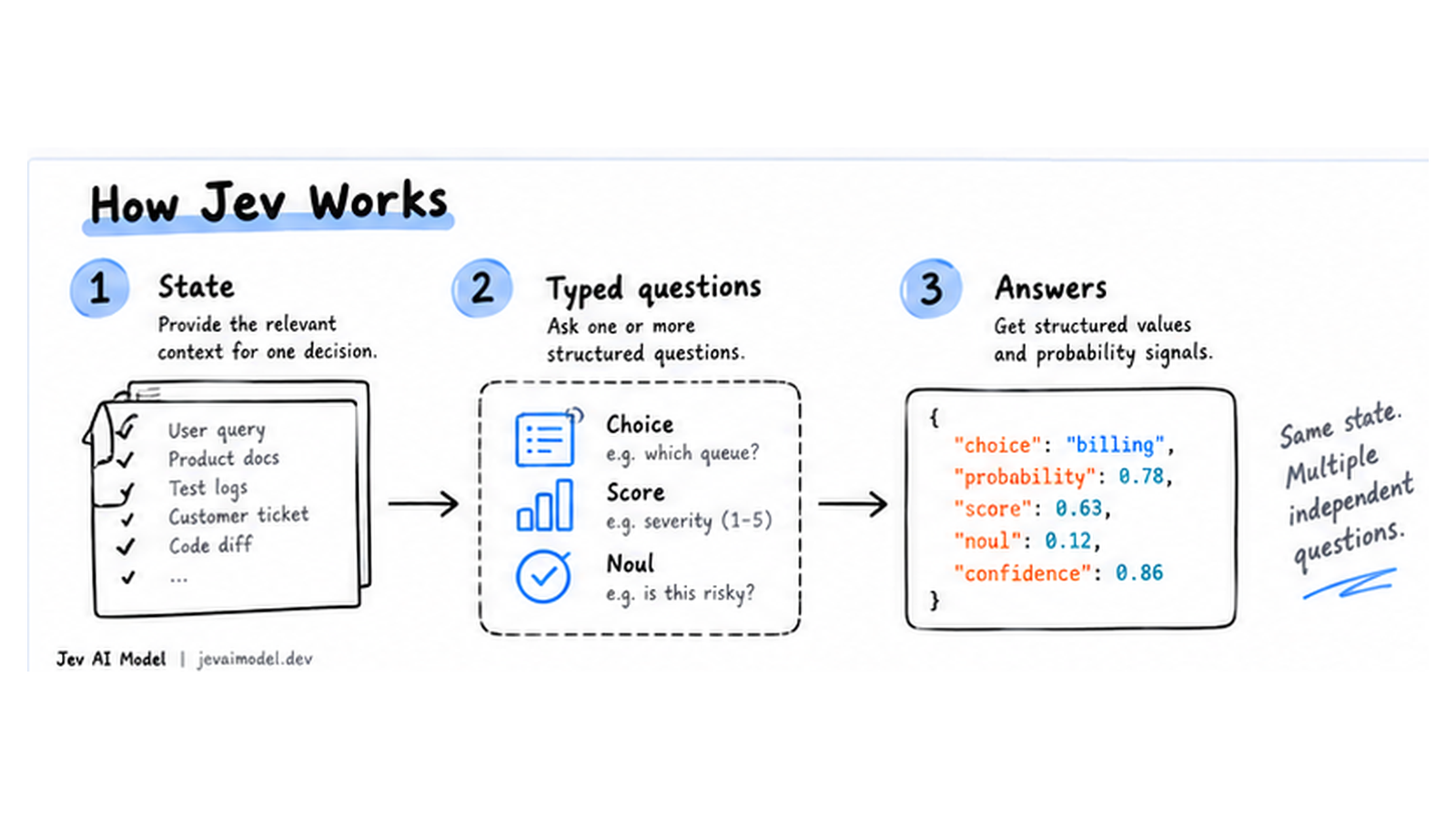
Jev is TypeSafe AI’s first public System One model. The official interface is built around three parts:
- State — the text or structured context relevant to one decision.
- Typed questions — the choice, score, or yes/no judgment the application needs.
- Answers — structured values and probability signals that application code can inspect.
The model evaluates each question against the same state. It does not generate a paragraph and ask your application to parse an implied answer out of it. TypeSafe’s documentation describes Choice, Score, and Noul as its three primitives, and says they can be combined in one request. Questions are evaluated independently, so the application should combine their outputs when a decision depends on several dimensions. TypeSafe introduction · System One overview
What Jev is—and what it is not
A useful mental model is a decision function inside a larger AI system. A generative model can explain a code change, draft a customer reply, or plan a multi-step task. Jev is suited to narrower questions such as “Which queue should receive this ticket?”, “How severe is this incident on our rubric?”, or “Does this result contain evidence that the test failed?”
| Need | Better fit | Why |
|---|---|---|
| Explain a failure or write a response | Generative LLM | The result needs open-ended language |
| Select a queue from known options | Jev Choice |
The application already knows the allowed destinations |
| Rank urgency against a rubric | Jev Score |
The answer is an ordered decision, not a paragraph |
| Judge one proposition | Jev Noul |
The application needs a yes-probability signal |
| Enforce a permission or invariant | Deterministic code | The rule should be exact and auditable |
Jev does not replace the planning model, call tools, own permissions, or guarantee that its judgment is correct. A typed response controls the shape of the answer; it does not make every semantic judgment true. Probability and confidence are signals for application policy, not a substitute for labeled evaluation or human oversight. TypeSafe makes calibration claims about distributions of decisions; calibration does not promise that an individual answer is right.
How to think about the three question types
Choice: route or classify
Use a Choice question when the answer must come from a known set: billing, technical, or account, for example. Make options mutually understandable, provide descriptions that distinguish edge cases, and include a safe fallback when your real workflow has one.
Score: place state on an ordered rubric
Use Score when the application needs a graded result such as severity or priority. Define the levels with operational meaning. “Level 3 means a production outage affecting all customers” is more useful than “high severity.” Keep the rubric stable enough to evaluate over time.
Noul: estimate whether one statement is true
Use Noul for a bounded proposition such as “Does the test output show a failed assertion?” or “Does this proposed action delete customer data?” The value is a probability that the proposition is true, not a free-form explanation. Put any threshold or policy in application code.
A practical rule from the official documentation is to keep questions atomic. If “Should we refund this order?” depends on whether a duplicate charge occurred, whether the customer requested a refund, and whether the policy allows one, ask those as separate questions and combine them in code. That keeps the policy visible and adjustable.
A concrete example: coding-agent test triage
Suppose a coding agent has just run a test suite. The agent’s main LLM needs enough evidence to decide whether to inspect code, retry a flaky test, or report a blocker. Passing every line of a large test log into the next turn wastes context; keeping only “failed” can discard the file path or authorization detail that makes the failure actionable.
A decision layer can ask:
- Which next step best fits this result: inspect code, retry, or report a blocker?
- How relevant is this result to the current task?
- Does the output indicate a permission or security constraint that must be retained?
The application should first parse deterministic facts such as exit status, test names, and file locations. Jev can judge semantic relevance in the gray area. The agent then applies its own context budget and tool policy.
The core control flow is simple:
collect state
  -> ask bounded questions
  -> inspect typed answers and probabilities
  -> apply application thresholds and permissions
  -> continue, retry, or request human review
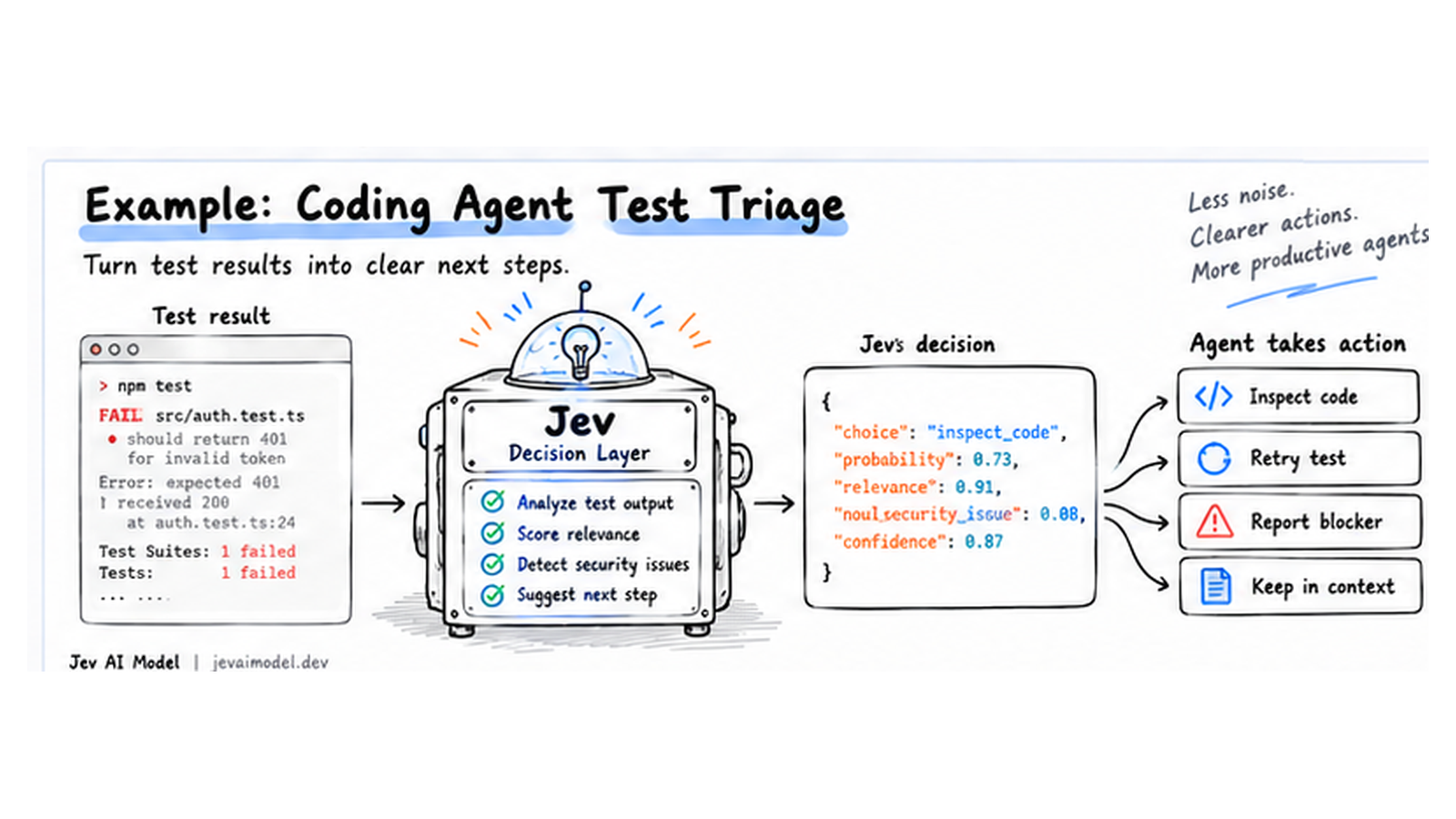
This is the “fast judgment” role described in the original practical Jev AI article. The article’s local demo is an engineering example, not a public benchmark; its reported token savings should not be generalized to another agent without reproducing the evaluation on that agent’s traces. Original Chinese field report
Keep the product boundary honest
The names bestjevai.com and jevaimodel.dev refer to independent Jev experiences and documentation, not TypeSafe’s official service. Best Jev AI describes itself as an independent playground and API gateway; the Jev AI Model site provides its own playground and API documentation. Check which service issued an API key and which endpoint its documentation describes before using it. Credentials, billing, and terms should not be assumed to transfer between providers.
For a first experiment, use a low-risk, measurable decision such as support-ticket routing or test-log triage. You can explore the Best Jev AI playground or the Jev AI Model playground, then follow the matching site’s API guide. Do not put real credentials, private customer data, or secrets into an experiment until you have reviewed the applicable service’s data and account terms.
When should you use Jev AI?
Jev is worth evaluating when all of these are true:
- The application makes the same kind of semantic decision repeatedly.
- You can define an answer space or rubric before each request.
- Your code can use a structured answer without asking the model to explain itself.
- You can measure false positives, false negatives, and uncertain cases on representative data.
- Your workflow has a safe fallback when the answer is wrong or unclear.
Keep a generative LLM for writing, open-ended investigation, and multi-step planning. Keep deterministic code for exact rules, access control, and irreversible operations. Use Jev as a focused decision component between them, then measure whether it earns that position in your own workflow.
Frequently asked questions
Is Jev AI a chatbot?
No. Jev is designed to return typed decisions from state and typed questions. Use a generative model when the product needs a conversational answer or explanation.
Does a typed output mean the answer is always correct?
No. The output contract constrains answer shape. The semantic decision can still be wrong, so evaluate representative examples and define safe thresholds.
Can Jev execute an agent tool call?
Jev returns a decision. The surrounding agent or application executes tools and must enforce its own permissions, confirmation rules, and audit requirements.
Does Jev accept images or audio as state?
TypeSafe’s current System One documentation lists text, JSON objects, and arrays of text as supported inputs; images, audio, and video are not currently supported as direct inputs. Check the latest official docs before implementation.
