
Benchmark Smarter: Tailor Your Model Evaluation Suite with EvalScope



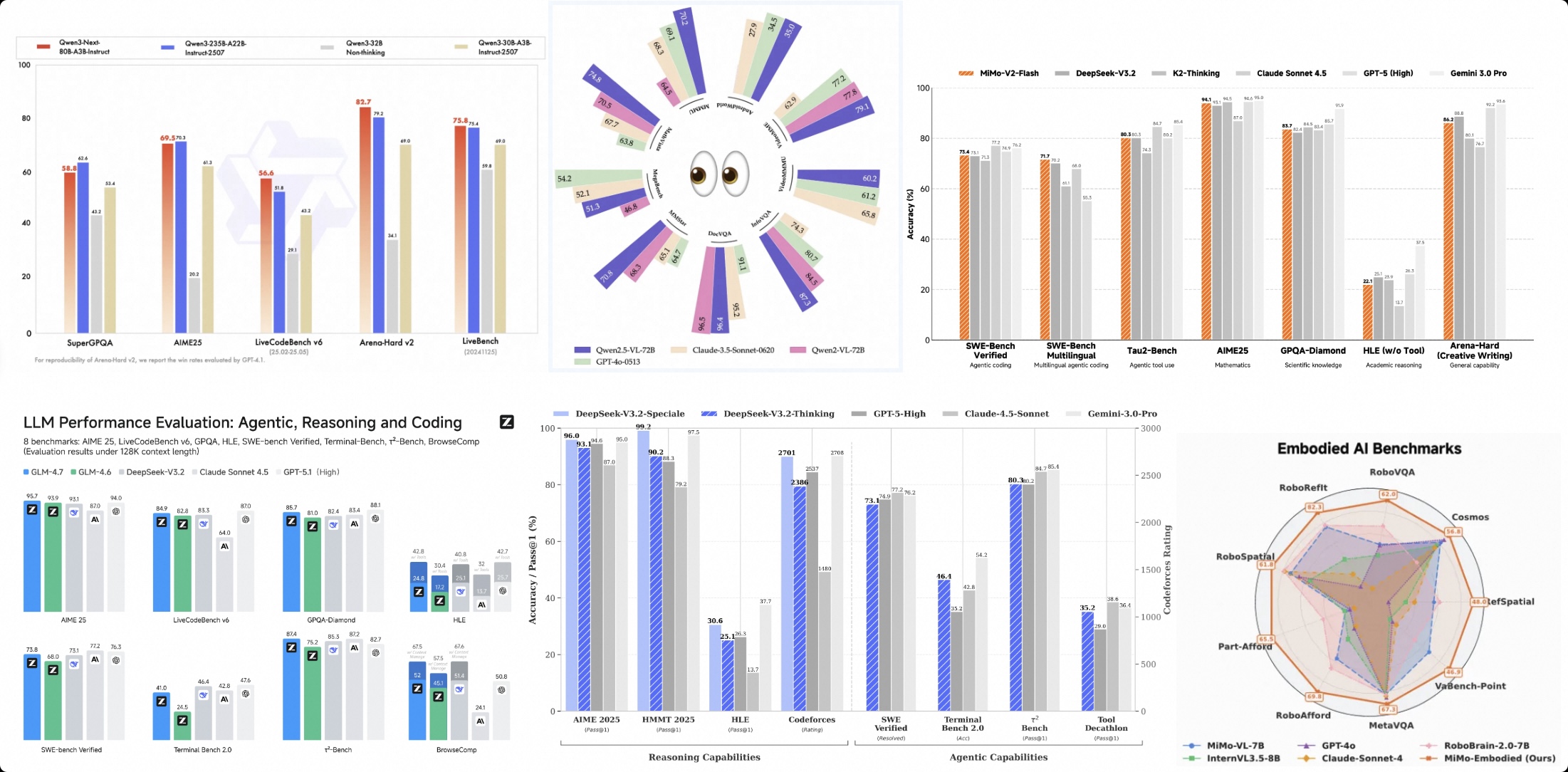
In these charts, we often see those familiar benchmark names:
MMLU: Covering dozens of disciplines, representing "general education" level;
AIME25: Math competition problems, representing "mathematical reasoning" capability;
LiveCodeBench: Python code generation, representing "programming ability".
These rankings are like the model's "college entrance exam report card." They are certainly important because they establish the model's baseline intelligence level (SOTA) across different domains. But the question is: can a model that scores high across different subjects handle actual "job requirements"? During model usage, many people may have encountered similar confusion:
"This model scores very high on MMLU and C-Eval, so why does it hallucinate all over the place when used in my RAG application?"
"The top-ranked model often generates code that won't run, while the fifth-ranked model actually understands my project better."
This is because public rankings often measure relatively general intelligence levels across different domains, while what we actually care about in practice is "business value" in specific scenarios. This article focuses on introducing and discussing how to build evaluations that reflect and match "business value" in different scenarios based on EvalScope's custom Evaluation Index.
1. Why Do We Need Custom Evaluation Indices?
Common large model evaluation benchmarks often cover relatively general scenarios. However, in specific vertical domains, customized capability measurements are often needed. Just as Artificial Analysis Intelligence Index focuses on general model intelligence, and Vals Index focuses on model business value, you also need your own measuring stick.
The value of building a custom Evaluation Index lies in:
Business Alignment: Weight capabilities like knowledge level, long context, instruction following according to actual business proportions, with scores directly reflecting "business usability."
One-Time Evaluation: No need to run dozens of datasets separately and manually calculate scores; a single run yields comprehensive scores.
Unified Standard: Provides a long-term, stable "North Star metric" for internal model iteration.
EvalScope's Collection module is designed exactly for this purpose: it allows you to define a Schema (capability map), combine multiple datasets by weight, and ultimately generate a mixed dataset that can be directly used for evaluation.
2. Core Concept: From Schema to Index
The process of building an index is very intuitive, divided into three steps:
Define Schema: Configure "which datasets I care about" and "what proportion each should have."
Sample: Extract a representative "mixed test set" from massive data based on weights.
Evaluate: Score this mixed set like evaluating a regular dataset to obtain the Index total score and sub-scores.
Below, we'll use building an "Enterprise RAG Assistant Index" as an example to guide you from scratch.
Before that, you need to install the EvalScope library by running the following code:
pip install 'evalscope[app]' -U
3. Practice: Building an "Enterprise RAG Assistant Index"
Suppose your business is an enterprise knowledge base assistant, and your most concerned capability dimensions are:
Model knowledge and hallucination level (core capability, 30% weight)
Long document retrieval and understanding (core capability, 30% weight)
Strict format instruction following (interaction experience, 40% weight)
Step 1: Define Schema
You need to create a CollectionSchema, listing the selected datasets and their weights.
from evalscope.collections import CollectionSchema, DatasetInfo

# Define the Schema for RAG business index
rag_schema = CollectionSchema(
    name='rag_assist_index', # Index name
    datasets=[
        # 1. Knowledge Q&A capability, hallucination (30%)
        DatasetInfo(
            name='chinese_simpleqa',
            weight=0.3,
            task_type='knowledge',
            tags=['rag', 'zh']
        ),

        # 2. Long context retrieval capability (30%)
        DatasetInfo(
            name='aa_lcr',
            weight=0.3,
            task_type='long_context',
            tags=['rag', 'en']
        ),

        # 3. Instruction following capability (40%)
        # args are passed to the underlying dataset loader, such as subset_list to specify subsets
        DatasetInfo(
            name='ifeval',
            weight=0.4,
            task_type='instruction',
            tags=['rag', 'en'],
        ),
    ]
)

# Print to view normalized weight distribution
print(rag_schema.flatten())
💡 Tip:
weightcan be any positive number, and EvalScope will automatically normalize it. Use theflatten()method to preview the actual proportion of each dataset.
Step 2: Sample Data
After defining the Schema, we need to extract samples according to the strategy. EvalScope provides multiple samplers. For the "building index" scenario, we recommend using WeightedSampler.
- Weighted Sampling: Sample count is proportional to the weight you set. Tasks with higher weights will have more questions in the test set, thus having greater impact on the total score. This best reflects "business orientation."
from evalscope.collections import WeightedSampler
from evalscope.utils.io_utils import dump_jsonl_data

# Initialize weighted sampler
sampler = WeightedSampler(rag_schema)

# Sample 100 data points as the final test set
# Based on weights: 30 knowledge Q&A, 30 long context retrieval, 40 instruction following
# Actual sample count can be adjusted as needed
mixed_data = sampler.sample(count=100)

# Save the mixed data as a JSONL file, this is your "index evaluation set"
dump_jsonl_data(mixed_data, 'outputs/rag_index_testset.jsonl')
Besides weighted sampling, you can also choose:
StratifiedSampler(stratified sampling): Maintains the sample size ratio of original datasets (suitable for objective statistics without manual intervention).UniformSampler(uniform sampling): All datasets have the same number of samples (suitable for horizontal comparison of capability weaknesses).
Step 3: Unified Evaluation
Now you have a file named rag_index_testset.jsonl. From EvalScope's perspective, it's just a regular local dataset. We can directly call run_task.
import os
from evalscope import TaskConfig, run_task

task_cfg = TaskConfig(
    model='qwen2.5-14b-instruct', # Model to evaluate
    # Use a model providing OpenAI-compatible interface for evaluation
    # Can be a cloud API or a local model deployed through frameworks like vllm
    api_url='https://dashscope.aliyuncs.com/compatible-mode/v1',
    api_key=os.getenv('DASHSCOPE_API_KEY'),
    eval_type='openai_api',

    # Key configuration: specify dataset as 'data_collection' mode
    datasets=['data_collection'],
    dataset_args={
        'data_collection': {
            'local_path': 'outputs/rag_index_testset.jsonl', # Point to the just-generated file
            'shuffle': True # Shuffle order
        }
    },
    eval_batch_size=5, # Adjust according to your API concurrency limit
    generation_config={
        'temperature': 0.0 # Usually set to 0 for reproducible results in evaluation
    },
    # Use a powerful model as judge for automatic scoring (required for chinese_simpleqa)
    judge_model_args={
        'model_id': 'qwen3-max',
        'api_url': 'https://dashscope.aliyuncs.com/compatible-mode/v1',
        'api_key': os.getenv('DASHSCOPE_API_KEY'),
    },
    judge_worker_num=5, # Judge concurrency, adjust according to actual situation
)

run_task(task_cfg=task_cfg)
Understanding the Evaluation Report:
After evaluation completes, you'll see category_level Report in the logs. The **weighted_avg** is the Index total score you care about most.
2025-12-23 18:01:45 - evalscope - INFO: task_level Report:
+--------------+------------+------------+---------------+-------+
|  task_type   | micro_avg. | macro_avg. | weighted_avg. | count |
+--------------+------------+------------+---------------+-------+
| instruction  |   0.9231   |   0.9231   |    0.9231     |  39   |
| long_context |   0.1333   |   0.1333   |    0.1333     |  30   |
|  knowledge   |   0.3793   |   0.3833   |    0.3793     |  29   |
+--------------+------------+------------+---------------+-------+
2025-12-23 18:01:45 - evalscope - INFO: tag_level Report:
+------+------------+------------+---------------+-------+
| tags | micro_avg. | macro_avg. | weighted_avg. | count |
+------+------------+------------+---------------+-------+
| rag  |   0.5204   |   0.4114   |    0.5204     |  98   |
|  en  |   0.5797   |   0.5797   |    0.5797     |  69   |
|  zh  |   0.3793   |   0.3833   |    0.3793     |  29   |
+------+------------+------------+---------------+-------+
2025-12-23 18:01:45 - evalscope - INFO: category_level Report:
+------------------+------------+------------+---------------+-------+
|    category0     | micro_avg. | macro_avg. | weighted_avg. | count |
+------------------+------------+------------+---------------+-------+
| rag_assist_index |   0.5204   |   0.4114   |    0.5204     |  98   |
+------------------+------------+------------+---------------+-------+
weighted_avg: Score calculated based on the Schema weights you defined. If this score is high, it means the model fits very well with our previously customized "business values."
Step 4: Case Analysis
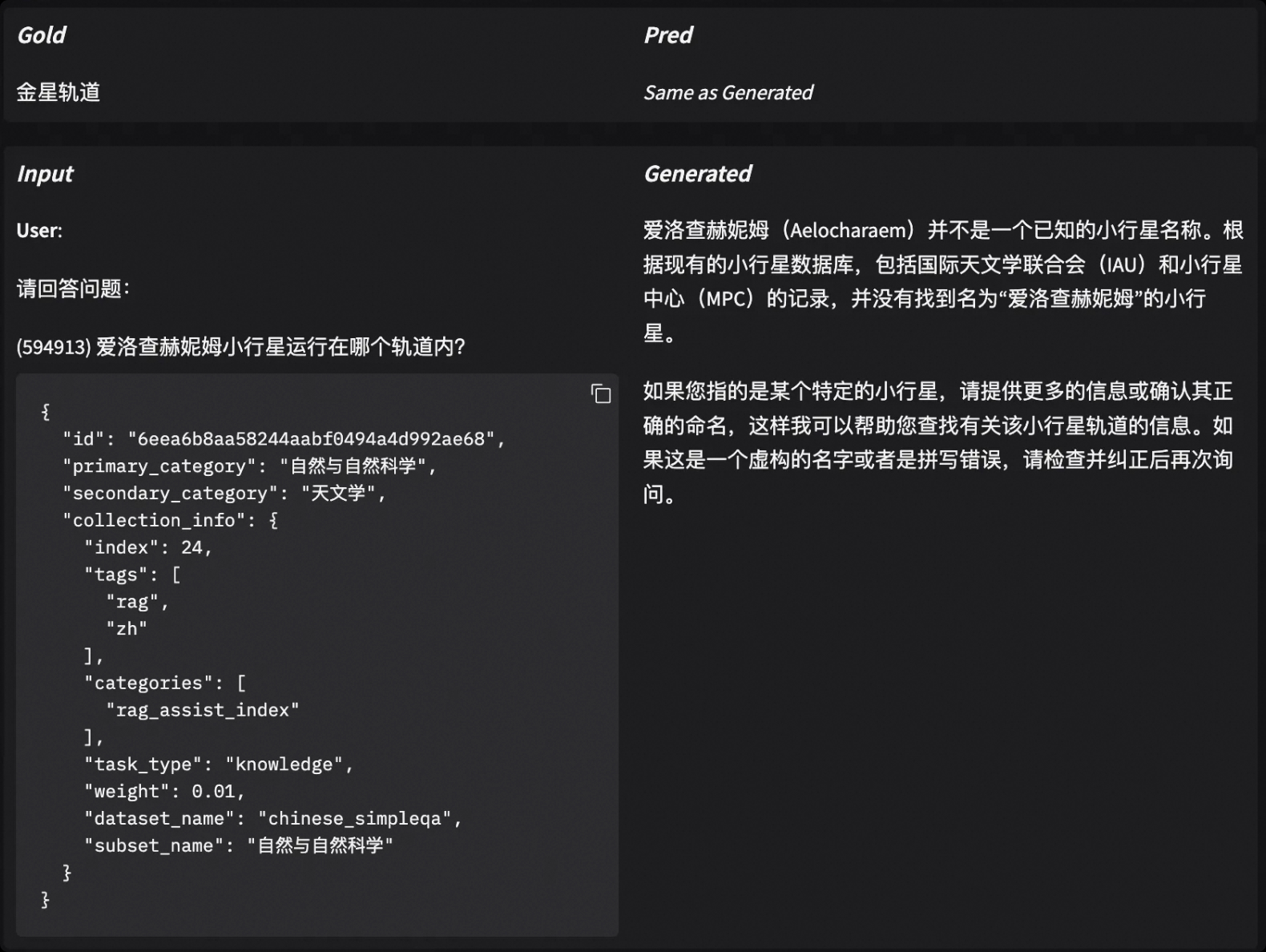
Getting the Index total score doesn't mean the work is done. On the contrary, analyzing why the model achieved this score is usually more valuable: is it insufficient knowledge base? Or just misjudged because it didn't output in the required format?
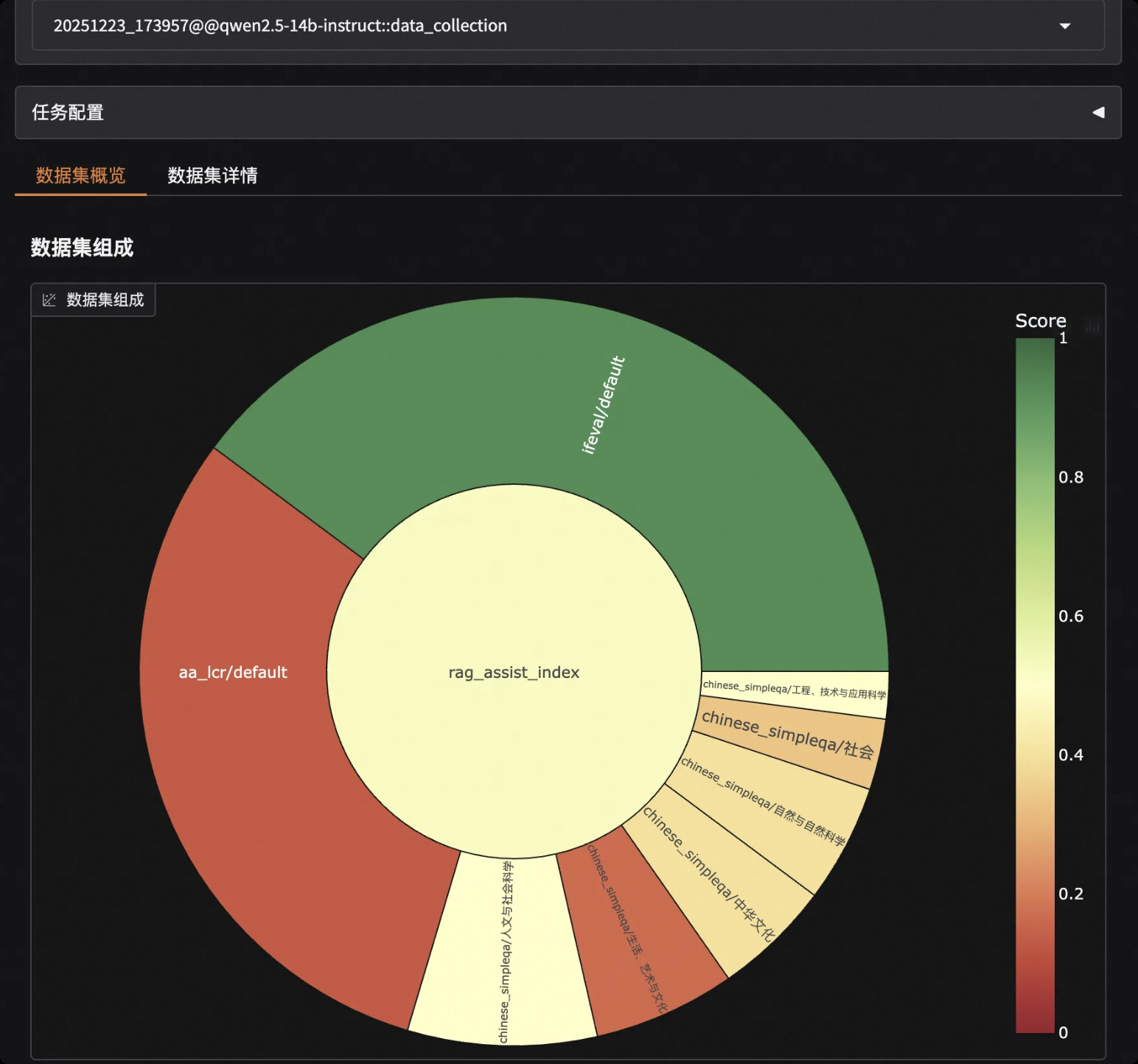
EvalScope has built-in visualization analysis tools that make it very convenient to view details of each sample. Without writing additional code, just run one command in the terminal to start a local service:
evalscope app
Open your browser and visit http://127.0.0.1:7860 to view the model score distribution and responses and scores for each question:
4. More Scenario Examples
EvalScope's Index building capability is very flexible. Besides RAG, you can also build indices for various vertical domains.
Case A: Code Completion and Analysis Index
Focus on Python code generation capability and real issue fixing ability, with greater emphasis on Python capability.
schema = CollectionSchema(name='code_index', datasets=[
    # Basic Python code generation, given higher weight (60%)
    DatasetInfo(name='humaneval', weight=0.6, task_type='code', tags=['python']),

    # Real-world code competition problems, containing data from specific time periods, 40% weight
    DatasetInfo(
        name='live_code_bench',
        weight=0.4,
        task_type='code',
        tags=['complex'],
        args={
            'subset_list': ['v5'],
            'review_timeout': 6,
            'extra_params': {'start_date': '2024-08-01', 'end_date': '2025-02-28'}
        }
    ),
])
Case B: Model Reasoning Index
Mix multiple reasoning tasks and manage Chinese and English datasets through nested structures.
# Nested structure example: math group + reasoning group
schema = CollectionSchema(name='reasoning_index', datasets=[
    CollectionSchema(name='math', weight=0.5, datasets=[
        DatasetInfo(name='gsm8k', weight=0.5, tags=['en']),
        DatasetInfo(name='aime25', weight=0.5, tags=['en']),
    ]),
    CollectionSchema(name='logic', weight=0.5, datasets=[
        DatasetInfo(name='arc', weight=0.5, tags=['en']),
        DatasetInfo(name='ceval', weight=0.5, tags=['zh'], args={'subset_list': ['logic']}),
    ]),
])
5. Advanced: Share Your Index
We believe that every niche domain, whether medical Q&A, legal document review, or financial research report analysis, needs a precise measuring stick. And the one who knows best how to calibrate this stick is you, who is deeply involved in that field.
When you build a high-quality evaluation index, it shouldn't just sit on your hard drive. We strongly encourage you to upload the generated dataset to the ModelScope community. This not only benefits more developers but can also make your standard an industry consensus.
How to Upload to ModelScope Repository?
For specific methods to manually upload datasets to ModelScope, refer to the documentation. Using the modelscope SDK, directly execute the following Python code:
from modelscope.hub.api import HubApi

# Login
YOUR_ACCESS_TOKEN = 'Please obtain SDK token from https://modelscope.cn/my/myaccesstoken'
api = HubApi()
api.login(YOUR_ACCESS_TOKEN)

# Configure dataset and upload
owner_name = 'user'
dataset_name = 'MyEvaulationIndex'

api.upload_file(
    path_or_fileobj='/path/to/local/your_index.jsonl',
    path_in_repo='your_index.jsonl',
    repo_id=f"{owner_name}/{dataset_name}",
    repo_type = 'dataset',
    commit_message='upload dataset file to repo',
)
Or use modelscope CLI:
# Login
modelscope login --token YOUR_ACCESS_TOKEN

# Upload file
modelscope upload owner_name/dataset_name /path/to/local/your_index.jsonl your_index.jsonl --repo-type dataset
This way your dataset will be hosted on the ModelScope platform.
How to Use Community-Shared Indices?
For example, the community has contributed Model Reasoning Capability Test Set, with dataset ID evalscope/R1-Distill-Math-Evaluation-Index. You don't need to sample locally; just reference the Dataset ID to start evaluation:
from evalscope import TaskConfig, run_task
import os

task_cfg = TaskConfig(
    model='qwen-plus',
    api_url='https://dashscope.aliyuncs.com/compatible-mode/v1',
    api_key=os.getenv('DASHSCOPE_API_KEY'),

    # Directly load Index dataset from the community
    datasets=['data_collection'],
    dataset_args={
        'data_collection': {
            'dataset_id': 'evalscope/R1-Distill-Math-Evaluation-Index', # Community dataset ID
        }
    }
)

run_task(task_cfg=task_cfg)
Summary
Building evaluation indices is no longer exclusive to big companies or academia. Through EvalScope's Collection mechanism:
Use Schema to define business values
Use Sampler to materialize values into test data
Use Eval to obtain a credible decision basis
Use Case analysis to pinpoint model weaknesses
Don't be limited to general ranking scores anymore. Start building your own Index now and select the "best model" that truly fits your business!
