
Buckets:

hf-doc-build/doc-dev / text-generation-inference /main /en /basic_tutorials /visual_language_models.html

| <meta charset="utf-8" /><meta name="hf:doc:metadata" content="{"title":"Vision Language Model Inference in TGI","local":"vision-language-model-inference-in-tgi","sections":[{"title":"How to Use a Vision Language Model?","local":"how-to-use-a-vision-language-model","sections":[{"title":"Hugging Face Hub Python Library","local":"hugging-face-hub-python-library","sections":[],"depth":3},{"title":"Inference Through Sending cURL Requests","local":"inference-through-sending-curl-requests","sections":[],"depth":3},{"title":"Inference Through JavaScript","local":"inference-through-javascript","sections":[],"depth":3}],"depth":2},{"title":"Combining Vision Language Models with Other Features","local":"combining-vision-language-models-with-other-features","sections":[],"depth":2}],"depth":1}"> | |
| <link href="/docs/text-generation-inference/main/en/_app/immutable/assets/0.e3b0c442.css" rel="modulepreload"> | |
| <link rel="modulepreload" href="/docs/text-generation-inference/main/en/_app/immutable/entry/start.1810066f.js"> | |
| <link rel="modulepreload" href="/docs/text-generation-inference/main/en/_app/immutable/chunks/scheduler.362310b7.js"> | |
| <link rel="modulepreload" href="/docs/text-generation-inference/main/en/_app/immutable/chunks/singletons.fa2b0eb7.js"> | |
| <link rel="modulepreload" href="/docs/text-generation-inference/main/en/_app/immutable/chunks/index.7f53ec41.js"> | |
| <link rel="modulepreload" href="/docs/text-generation-inference/main/en/_app/immutable/chunks/paths.284aef40.js"> | |
| <link rel="modulepreload" href="/docs/text-generation-inference/main/en/_app/immutable/entry/app.8cfc1931.js"> | |
| <link rel="modulepreload" href="/docs/text-generation-inference/main/en/_app/immutable/chunks/index.57dfc70d.js"> | |
| <link rel="modulepreload" href="/docs/text-generation-inference/main/en/_app/immutable/nodes/0.543c9bd9.js"> | |
| <link rel="modulepreload" href="/docs/text-generation-inference/main/en/_app/immutable/chunks/each.e59479a4.js"> | |
| <link rel="modulepreload" href="/docs/text-generation-inference/main/en/_app/immutable/nodes/12.d7fd037a.js"> | |
| <link rel="modulepreload" href="/docs/text-generation-inference/main/en/_app/immutable/chunks/CodeBlock.d3c47f83.js"> | |
| <link rel="modulepreload" href="/docs/text-generation-inference/main/en/_app/immutable/chunks/EditOnGithub.9633c464.js"><!-- HEAD_svelte-u9bgzb_START --><meta name="hf:doc:metadata" content="{"title":"Vision Language Model Inference in TGI","local":"vision-language-model-inference-in-tgi","sections":[{"title":"How to Use a Vision Language Model?","local":"how-to-use-a-vision-language-model","sections":[{"title":"Hugging Face Hub Python Library","local":"hugging-face-hub-python-library","sections":[],"depth":3},{"title":"Inference Through Sending cURL Requests","local":"inference-through-sending-curl-requests","sections":[],"depth":3},{"title":"Inference Through JavaScript","local":"inference-through-javascript","sections":[],"depth":3}],"depth":2},{"title":"Combining Vision Language Models with Other Features","local":"combining-vision-language-models-with-other-features","sections":[],"depth":2}],"depth":1}"><!-- HEAD_svelte-u9bgzb_END --> <p></p> <h1 class="relative group"><a id="vision-language-model-inference-in-tgi" class="header-link block pr-1.5 text-lg no-hover:hidden with-hover:absolute with-hover:p-1.5 with-hover:opacity-0 with-hover:group-hover:opacity-100 with-hover:right-full" href="#vision-language-model-inference-in-tgi"><span><svg class="" xmlns="http://www.w3.org/2000/svg" xmlns:xlink="http://www.w3.org/1999/xlink" aria-hidden="true" role="img" width="1em" height="1em" preserveAspectRatio="xMidYMid meet" viewBox="0 0 256 256"><path d="M167.594 88.393a8.001 8.001 0 0 1 0 11.314l-67.882 67.882a8 8 0 1 1-11.314-11.315l67.882-67.881a8.003 8.003 0 0 1 11.314 0zm-28.287 84.86l-28.284 28.284a40 40 0 0 1-56.567-56.567l28.284-28.284a8 8 0 0 0-11.315-11.315l-28.284 28.284a56 56 0 0 0 79.196 79.197l28.285-28.285a8 8 0 1 0-11.315-11.314zM212.852 43.14a56.002 56.002 0 0 0-79.196 0l-28.284 28.284a8 8 0 1 0 11.314 11.314l28.284-28.284a40 40 0 0 1 56.568 56.567l-28.285 28.285a8 8 0 0 0 11.315 11.314l28.284-28.284a56.065 56.065 0 0 0 0-79.196z" fill="currentColor"></path></svg></span></a> <span>Vision Language Model Inference in TGI</span></h1> <p data-svelte-h="svelte-c5mqsg">Visual Language Model (VLM) are models that consume both image and text inputs to generate text.</p> <p data-svelte-h="svelte-bme3bd">VLM’s are trained on a combination of image and text data and can handle a wide range of tasks, such as image captioning, visual question answering, and visual dialog.</p> <blockquote data-svelte-h="svelte-oo54gt"><p>What distinguishes VLMs from other text and image models is their ability to handle long context and generate text that is coherent and relevant to the image even after multiple turns or in some cases, multiple images.</p></blockquote> <p data-svelte-h="svelte-1u3863s">Below are couple of common use cases for vision language models:</p> <ul data-svelte-h="svelte-9wqdub"><li><strong>Image Captioning</strong>: Given an image, generate a caption that describes the image.</li> <li><strong>Visual Question Answering (VQA)</strong>: Given an image and a question about the image, generate an answer to the question.</li> <li><strong>Mulimodal Dialog</strong>: Generate response to multiple turns of images and conversations.</li> <li><strong>Image Information Retrieval</strong>: Given an image, retrieve information from the image.</li></ul> <h2 class="relative group"><a id="how-to-use-a-vision-language-model" class="header-link block pr-1.5 text-lg no-hover:hidden with-hover:absolute with-hover:p-1.5 with-hover:opacity-0 with-hover:group-hover:opacity-100 with-hover:right-full" href="#how-to-use-a-vision-language-model"><span><svg class="" xmlns="http://www.w3.org/2000/svg" xmlns:xlink="http://www.w3.org/1999/xlink" aria-hidden="true" role="img" width="1em" height="1em" preserveAspectRatio="xMidYMid meet" viewBox="0 0 256 256"><path d="M167.594 88.393a8.001 8.001 0 0 1 0 11.314l-67.882 67.882a8 8 0 1 1-11.314-11.315l67.882-67.881a8.003 8.003 0 0 1 11.314 0zm-28.287 84.86l-28.284 28.284a40 40 0 0 1-56.567-56.567l28.284-28.284a8 8 0 0 0-11.315-11.315l-28.284 28.284a56 56 0 0 0 79.196 79.197l28.285-28.285a8 8 0 1 0-11.315-11.314zM212.852 43.14a56.002 56.002 0 0 0-79.196 0l-28.284 28.284a8 8 0 1 0 11.314 11.314l28.284-28.284a40 40 0 0 1 56.568 56.567l-28.285 28.285a8 8 0 0 0 11.315 11.314l28.284-28.284a56.065 56.065 0 0 0 0-79.196z" fill="currentColor"></path></svg></span></a> <span>How to Use a Vision Language Model?</span></h2> <h3 class="relative group"><a id="hugging-face-hub-python-library" class="header-link block pr-1.5 text-lg no-hover:hidden with-hover:absolute with-hover:p-1.5 with-hover:opacity-0 with-hover:group-hover:opacity-100 with-hover:right-full" href="#hugging-face-hub-python-library"><span><svg class="" xmlns="http://www.w3.org/2000/svg" xmlns:xlink="http://www.w3.org/1999/xlink" aria-hidden="true" role="img" width="1em" height="1em" preserveAspectRatio="xMidYMid meet" viewBox="0 0 256 256"><path d="M167.594 88.393a8.001 8.001 0 0 1 0 11.314l-67.882 67.882a8 8 0 1 1-11.314-11.315l67.882-67.881a8.003 8.003 0 0 1 11.314 0zm-28.287 84.86l-28.284 28.284a40 40 0 0 1-56.567-56.567l28.284-28.284a8 8 0 0 0-11.315-11.315l-28.284 28.284a56 56 0 0 0 79.196 79.197l28.285-28.285a8 8 0 1 0-11.315-11.314zM212.852 43.14a56.002 56.002 0 0 0-79.196 0l-28.284 28.284a8 8 0 1 0 11.314 11.314l28.284-28.284a40 40 0 0 1 56.568 56.567l-28.285 28.285a8 8 0 0 0 11.315 11.314l28.284-28.284a56.065 56.065 0 0 0 0-79.196z" fill="currentColor"></path></svg></span></a> <span>Hugging Face Hub Python Library</span></h3> <p data-svelte-h="svelte-fwtu6p">To infer with vision language models through Python, you can use the <a href="https://pypi.org/project/huggingface-hub/" rel="nofollow"><code>huggingface_hub</code></a> library. The <code>InferenceClient</code> class provides a simple way to interact with the <a href="https://huggingface.co/docs/api-inference/index" rel="nofollow">Inference API</a>. Images can be passed as URLs or base64-encoded strings. The <code>InferenceClient</code> will automatically detect the image format.</p> <div class="code-block relative"><div class="absolute top-2.5 right-4"><button class="inline-flex items-center relative text-sm focus:text-green-500 cursor-pointer focus:outline-none transition duration-200 ease-in-out opacity-0 mx-0.5 text-gray-600 " title="code excerpt" type="button"><svg class="" xmlns="http://www.w3.org/2000/svg" aria-hidden="true" fill="currentColor" focusable="false" role="img" width="1em" height="1em" preserveAspectRatio="xMidYMid meet" viewBox="0 0 32 32"><path d="M28,10V28H10V10H28m0-2H10a2,2,0,0,0-2,2V28a2,2,0,0,0,2,2H28a2,2,0,0,0,2-2V10a2,2,0,0,0-2-2Z" transform="translate(0)"></path><path d="M4,18H2V4A2,2,0,0,1,4,2H18V4H4Z" transform="translate(0)"></path><rect fill="none" width="32" height="32"></rect></svg> <div class="absolute pointer-events-none transition-opacity bg-black text-white py-1 px-2 leading-tight rounded font-normal shadow left-1/2 top-full transform -translate-x-1/2 translate-y-2 opacity-0"><div class="absolute bottom-full left-1/2 transform -translate-x-1/2 w-0 h-0 border-black border-4 border-t-0" style="border-left-color: transparent; border-right-color: transparent; "></div> Copied</div></button></div> <pre class=""><!-- HTML_TAG_START --><span class="hljs-keyword">from</span> huggingface_hub <span class="hljs-keyword">import</span> InferenceClient | |
| client = InferenceClient(<span class="hljs-string">"http://127.0.0.1:3000"</span>) | |
| image = <span class="hljs-string">"https://huggingface.co/datasets/huggingface/documentation-images/resolve/main/transformers/rabbit.png"</span> | |
| prompt = <span class="hljs-string">f"What is this a picture of?\n\n"</span> | |
| <span class="hljs-keyword">for</span> token <span class="hljs-keyword">in</span> client.text_generation(prompt, max_new_tokens=<span class="hljs-number">16</span>, stream=<span class="hljs-literal">True</span>): | |
| <span class="hljs-built_in">print</span>(token) | |
| <span class="hljs-comment"># This is a picture of an anthropomorphic rabbit in a space suit.</span><!-- HTML_TAG_END --></pre></div> <div class="code-block relative"><div class="absolute top-2.5 right-4"><button class="inline-flex items-center relative text-sm focus:text-green-500 cursor-pointer focus:outline-none transition duration-200 ease-in-out opacity-0 mx-0.5 text-gray-600 " title="code excerpt" type="button"><svg class="" xmlns="http://www.w3.org/2000/svg" aria-hidden="true" fill="currentColor" focusable="false" role="img" width="1em" height="1em" preserveAspectRatio="xMidYMid meet" viewBox="0 0 32 32"><path d="M28,10V28H10V10H28m0-2H10a2,2,0,0,0-2,2V28a2,2,0,0,0,2,2H28a2,2,0,0,0,2-2V10a2,2,0,0,0-2-2Z" transform="translate(0)"></path><path d="M4,18H2V4A2,2,0,0,1,4,2H18V4H4Z" transform="translate(0)"></path><rect fill="none" width="32" height="32"></rect></svg> <div class="absolute pointer-events-none transition-opacity bg-black text-white py-1 px-2 leading-tight rounded font-normal shadow left-1/2 top-full transform -translate-x-1/2 translate-y-2 opacity-0"><div class="absolute bottom-full left-1/2 transform -translate-x-1/2 w-0 h-0 border-black border-4 border-t-0" style="border-left-color: transparent; border-right-color: transparent; "></div> Copied</div></button></div> <pre class=""><!-- HTML_TAG_START --><span class="hljs-keyword">from</span> huggingface_hub <span class="hljs-keyword">import</span> InferenceClient | |
| <span class="hljs-keyword">import</span> base64 | |
| <span class="hljs-keyword">import</span> requests | |
| <span class="hljs-keyword">import</span> io | |
| client = InferenceClient(<span class="hljs-string">"http://127.0.0.1:3000"</span>) | |
| <span class="hljs-comment"># read image from local file</span> | |
| image_path = <span class="hljs-string">"rabbit.png"</span> | |
| <span class="hljs-keyword">with</span> <span class="hljs-built_in">open</span>(image_path, <span class="hljs-string">"rb"</span>) <span class="hljs-keyword">as</span> f: | |
| image = base64.b64encode(f.read()).decode(<span class="hljs-string">"utf-8"</span>) | |
| image = <span class="hljs-string">f"data:image/png;base64,<span class="hljs-subst">{image}</span>"</span> | |
| prompt = <span class="hljs-string">f"What is this a picture of?\n\n"</span> | |
| <span class="hljs-keyword">for</span> token <span class="hljs-keyword">in</span> client.text_generation(prompt, max_new_tokens=<span class="hljs-number">10</span>, stream=<span class="hljs-literal">True</span>): | |
| <span class="hljs-built_in">print</span>(token) | |
| <span class="hljs-comment"># This is a picture of an anthropomorphic rabbit in a space suit.</span><!-- HTML_TAG_END --></pre></div> <p data-svelte-h="svelte-1bhwrgr">or via the <code>chat_completion</code> endpoint:</p> <div class="code-block relative"><div class="absolute top-2.5 right-4"><button class="inline-flex items-center relative text-sm focus:text-green-500 cursor-pointer focus:outline-none transition duration-200 ease-in-out opacity-0 mx-0.5 text-gray-600 " title="code excerpt" type="button"><svg class="" xmlns="http://www.w3.org/2000/svg" aria-hidden="true" fill="currentColor" focusable="false" role="img" width="1em" height="1em" preserveAspectRatio="xMidYMid meet" viewBox="0 0 32 32"><path d="M28,10V28H10V10H28m0-2H10a2,2,0,0,0-2,2V28a2,2,0,0,0,2,2H28a2,2,0,0,0,2-2V10a2,2,0,0,0-2-2Z" transform="translate(0)"></path><path d="M4,18H2V4A2,2,0,0,1,4,2H18V4H4Z" transform="translate(0)"></path><rect fill="none" width="32" height="32"></rect></svg> <div class="absolute pointer-events-none transition-opacity bg-black text-white py-1 px-2 leading-tight rounded font-normal shadow left-1/2 top-full transform -translate-x-1/2 translate-y-2 opacity-0"><div class="absolute bottom-full left-1/2 transform -translate-x-1/2 w-0 h-0 border-black border-4 border-t-0" style="border-left-color: transparent; border-right-color: transparent; "></div> Copied</div></button></div> <pre class=""><!-- HTML_TAG_START --><span class="hljs-keyword">from</span> huggingface_hub <span class="hljs-keyword">import</span> InferenceClient | |
| client = InferenceClient(<span class="hljs-string">"http://127.0.0.1:3000"</span>) | |
| chat = client.chat_completion( | |
| messages=[ | |
| { | |
| <span class="hljs-string">"role"</span>: <span class="hljs-string">"user"</span>, | |
| <span class="hljs-string">"content"</span>: [ | |
| {<span class="hljs-string">"type"</span>: <span class="hljs-string">"text"</span>, <span class="hljs-string">"text"</span>: <span class="hljs-string">"Whats in this image?"</span>}, | |
| { | |
| <span class="hljs-string">"type"</span>: <span class="hljs-string">"image_url"</span>, | |
| <span class="hljs-string">"image_url"</span>: { | |
| <span class="hljs-string">"url"</span>: <span class="hljs-string">"https://huggingface.co/datasets/huggingface/documentation-images/resolve/main/transformers/rabbit.png"</span> | |
| }, | |
| }, | |
| ], | |
| }, | |
| ], | |
| seed=<span class="hljs-number">42</span>, | |
| max_tokens=<span class="hljs-number">100</span>, | |
| ) | |
| <span class="hljs-built_in">print</span>(chat) | |
| <span class="hljs-comment"># ChatCompletionOutput(choices=[ChatCompletionOutputComplete(finish_reason='length', index=0, message=ChatCompletionOutputMessage(role='assistant', content=" The image you've provided features an anthropomorphic rabbit in spacesuit attire. This rabbit is depicted with human-like posture and movement, standing on a rocky terrain with a vast, reddish-brown landscape in the background. The spacesuit is detailed with mission patches, circuitry, and a helmet that covers the rabbit's face and ear, with an illuminated red light on the chest area.\n\nThe artwork style is that of a", name=None, tool_calls=None), logprobs=None)], created=1714589614, id='', model='llava-hf/llava-v1.6-mistral-7b-hf', object='text_completion', system_fingerprint='2.0.2-native', usage=ChatCompletionOutputUsage(completion_tokens=100, prompt_tokens=2943, total_tokens=3043))</span> | |
| <!-- HTML_TAG_END --></pre></div> <p data-svelte-h="svelte-6ske6k">or with OpenAI’s <a href="https://github.com/openai/openai-python" rel="nofollow">client library</a>:</p> <div class="code-block relative"><div class="absolute top-2.5 right-4"><button class="inline-flex items-center relative text-sm focus:text-green-500 cursor-pointer focus:outline-none transition duration-200 ease-in-out opacity-0 mx-0.5 text-gray-600 " title="code excerpt" type="button"><svg class="" xmlns="http://www.w3.org/2000/svg" aria-hidden="true" fill="currentColor" focusable="false" role="img" width="1em" height="1em" preserveAspectRatio="xMidYMid meet" viewBox="0 0 32 32"><path d="M28,10V28H10V10H28m0-2H10a2,2,0,0,0-2,2V28a2,2,0,0,0,2,2H28a2,2,0,0,0,2-2V10a2,2,0,0,0-2-2Z" transform="translate(0)"></path><path d="M4,18H2V4A2,2,0,0,1,4,2H18V4H4Z" transform="translate(0)"></path><rect fill="none" width="32" height="32"></rect></svg> <div class="absolute pointer-events-none transition-opacity bg-black text-white py-1 px-2 leading-tight rounded font-normal shadow left-1/2 top-full transform -translate-x-1/2 translate-y-2 opacity-0"><div class="absolute bottom-full left-1/2 transform -translate-x-1/2 w-0 h-0 border-black border-4 border-t-0" style="border-left-color: transparent; border-right-color: transparent; "></div> Copied</div></button></div> <pre class=""><!-- HTML_TAG_START --><span class="hljs-keyword">from</span> openai <span class="hljs-keyword">import</span> OpenAI | |
| <span class="hljs-comment"># init the client but point it to TGI</span> | |
| client = OpenAI(base_url=<span class="hljs-string">"http://localhost:3000/v1"</span>, api_key=<span class="hljs-string">"-"</span>) | |
| chat_completion = client.chat.completions.create( | |
| model=<span class="hljs-string">"tgi"</span>, | |
| messages=[ | |
| { | |
| <span class="hljs-string">"role"</span>: <span class="hljs-string">"user"</span>, | |
| <span class="hljs-string">"content"</span>: [ | |
| {<span class="hljs-string">"type"</span>: <span class="hljs-string">"text"</span>, <span class="hljs-string">"text"</span>: <span class="hljs-string">"Whats in this image?"</span>}, | |
| { | |
| <span class="hljs-string">"type"</span>: <span class="hljs-string">"image_url"</span>, | |
| <span class="hljs-string">"image_url"</span>: { | |
| <span class="hljs-string">"url"</span>: <span class="hljs-string">"https://huggingface.co/datasets/huggingface/documentation-images/resolve/main/transformers/rabbit.png"</span> | |
| }, | |
| }, | |
| ], | |
| }, | |
| ], | |
| stream=<span class="hljs-literal">False</span>, | |
| ) | |
| <span class="hljs-built_in">print</span>(chat_completion) | |
| <span class="hljs-comment"># ChatCompletion(id='', choices=[Choice(finish_reason='eos_token', index=0, logprobs=None, message=ChatCompletionMessage(content=' The image depicts an anthropomorphic rabbit dressed in a space suit with gear that resembles NASA attire. The setting appears to be a solar eclipse with dramatic mountain peaks and a partial celestial body in the sky. The artwork is detailed and vivid, with a warm color palette and a sense of an adventurous bunny exploring or preparing for a journey beyond Earth. ', role='assistant', function_call=None, tool_calls=None))], created=1714589732, model='llava-hf/llava-v1.6-mistral-7b-hf', object='text_completion', system_fingerprint='2.0.2-native', usage=CompletionUsage(completion_tokens=84, prompt_tokens=2943, total_tokens=3027))</span><!-- HTML_TAG_END --></pre></div> <h3 class="relative group"><a id="inference-through-sending-curl-requests" class="header-link block pr-1.5 text-lg no-hover:hidden with-hover:absolute with-hover:p-1.5 with-hover:opacity-0 with-hover:group-hover:opacity-100 with-hover:right-full" href="#inference-through-sending-curl-requests"><span><svg class="" xmlns="http://www.w3.org/2000/svg" xmlns:xlink="http://www.w3.org/1999/xlink" aria-hidden="true" role="img" width="1em" height="1em" preserveAspectRatio="xMidYMid meet" viewBox="0 0 256 256"><path d="M167.594 88.393a8.001 8.001 0 0 1 0 11.314l-67.882 67.882a8 8 0 1 1-11.314-11.315l67.882-67.881a8.003 8.003 0 0 1 11.314 0zm-28.287 84.86l-28.284 28.284a40 40 0 0 1-56.567-56.567l28.284-28.284a8 8 0 0 0-11.315-11.315l-28.284 28.284a56 56 0 0 0 79.196 79.197l28.285-28.285a8 8 0 1 0-11.315-11.314zM212.852 43.14a56.002 56.002 0 0 0-79.196 0l-28.284 28.284a8 8 0 1 0 11.314 11.314l28.284-28.284a40 40 0 0 1 56.568 56.567l-28.285 28.285a8 8 0 0 0 11.315 11.314l28.284-28.284a56.065 56.065 0 0 0 0-79.196z" fill="currentColor"></path></svg></span></a> <span>Inference Through Sending cURL Requests</span></h3> <p data-svelte-h="svelte-omocvk">To use the <code>generate_stream</code> endpoint with curl, you can add the <code>-N</code> flag. This flag disables curl default buffering and shows data as it arrives from the server.</p> <div class="code-block relative"><div class="absolute top-2.5 right-4"><button class="inline-flex items-center relative text-sm focus:text-green-500 cursor-pointer focus:outline-none transition duration-200 ease-in-out opacity-0 mx-0.5 text-gray-600 " title="code excerpt" type="button"><svg class="" xmlns="http://www.w3.org/2000/svg" aria-hidden="true" fill="currentColor" focusable="false" role="img" width="1em" height="1em" preserveAspectRatio="xMidYMid meet" viewBox="0 0 32 32"><path d="M28,10V28H10V10H28m0-2H10a2,2,0,0,0-2,2V28a2,2,0,0,0,2,2H28a2,2,0,0,0,2-2V10a2,2,0,0,0-2-2Z" transform="translate(0)"></path><path d="M4,18H2V4A2,2,0,0,1,4,2H18V4H4Z" transform="translate(0)"></path><rect fill="none" width="32" height="32"></rect></svg> <div class="absolute pointer-events-none transition-opacity bg-black text-white py-1 px-2 leading-tight rounded font-normal shadow left-1/2 top-full transform -translate-x-1/2 translate-y-2 opacity-0"><div class="absolute bottom-full left-1/2 transform -translate-x-1/2 w-0 h-0 border-black border-4 border-t-0" style="border-left-color: transparent; border-right-color: transparent; "></div> Copied</div></button></div> <pre class=""><!-- HTML_TAG_START -->curl -N 127.0.0.1:3000/generate_stream \ | |
| -X POST \ | |
| -d <span class="hljs-string">'{"inputs":"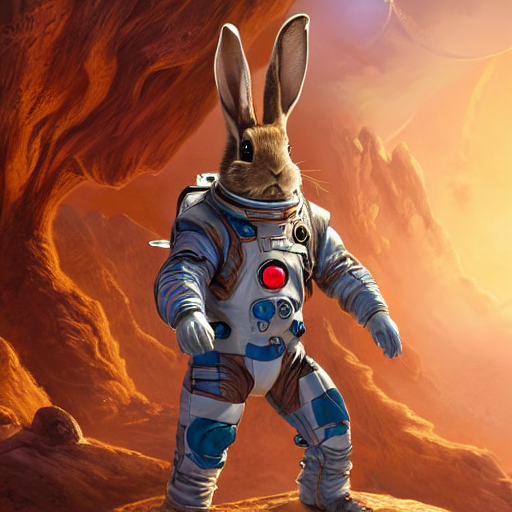What is this a picture of?\n\n","parameters":{"max_new_tokens":16, "seed": 42}}'</span> \ | |
| -H <span class="hljs-string">'Content-Type: application/json'</span> | |
| <span class="hljs-comment"># ...</span> | |
| <span class="hljs-comment"># data:{"index":16,"token":{"id":28723,"text":".","logprob":-0.6196289,"special":false},"generated_text":"This is a picture of an anthropomorphic rabbit in a space suit.","details":null}</span><!-- HTML_TAG_END --></pre></div> <h3 class="relative group"><a id="inference-through-javascript" class="header-link block pr-1.5 text-lg no-hover:hidden with-hover:absolute with-hover:p-1.5 with-hover:opacity-0 with-hover:group-hover:opacity-100 with-hover:right-full" href="#inference-through-javascript"><span><svg class="" xmlns="http://www.w3.org/2000/svg" xmlns:xlink="http://www.w3.org/1999/xlink" aria-hidden="true" role="img" width="1em" height="1em" preserveAspectRatio="xMidYMid meet" viewBox="0 0 256 256"><path d="M167.594 88.393a8.001 8.001 0 0 1 0 11.314l-67.882 67.882a8 8 0 1 1-11.314-11.315l67.882-67.881a8.003 8.003 0 0 1 11.314 0zm-28.287 84.86l-28.284 28.284a40 40 0 0 1-56.567-56.567l28.284-28.284a8 8 0 0 0-11.315-11.315l-28.284 28.284a56 56 0 0 0 79.196 79.197l28.285-28.285a8 8 0 1 0-11.315-11.314zM212.852 43.14a56.002 56.002 0 0 0-79.196 0l-28.284 28.284a8 8 0 1 0 11.314 11.314l28.284-28.284a40 40 0 0 1 56.568 56.567l-28.285 28.285a8 8 0 0 0 11.315 11.314l28.284-28.284a56.065 56.065 0 0 0 0-79.196z" fill="currentColor"></path></svg></span></a> <span>Inference Through JavaScript</span></h3> <p data-svelte-h="svelte-1qcvblx">First, we need to install the <code>@huggingface/inference</code> library.</p> <div class="code-block relative"><div class="absolute top-2.5 right-4"><button class="inline-flex items-center relative text-sm focus:text-green-500 cursor-pointer focus:outline-none transition duration-200 ease-in-out opacity-0 mx-0.5 text-gray-600 " title="code excerpt" type="button"><svg class="" xmlns="http://www.w3.org/2000/svg" aria-hidden="true" fill="currentColor" focusable="false" role="img" width="1em" height="1em" preserveAspectRatio="xMidYMid meet" viewBox="0 0 32 32"><path d="M28,10V28H10V10H28m0-2H10a2,2,0,0,0-2,2V28a2,2,0,0,0,2,2H28a2,2,0,0,0,2-2V10a2,2,0,0,0-2-2Z" transform="translate(0)"></path><path d="M4,18H2V4A2,2,0,0,1,4,2H18V4H4Z" transform="translate(0)"></path><rect fill="none" width="32" height="32"></rect></svg> <div class="absolute pointer-events-none transition-opacity bg-black text-white py-1 px-2 leading-tight rounded font-normal shadow left-1/2 top-full transform -translate-x-1/2 translate-y-2 opacity-0"><div class="absolute bottom-full left-1/2 transform -translate-x-1/2 w-0 h-0 border-black border-4 border-t-0" style="border-left-color: transparent; border-right-color: transparent; "></div> Copied</div></button></div> <pre class=""><!-- HTML_TAG_START -->npm install @huggingface/inference<!-- HTML_TAG_END --></pre></div> <p data-svelte-h="svelte-yp1xs4">If you’re using the free Inference API, you can use <a href="https://huggingface.co/docs/huggingface.js/inference/README" rel="nofollow">Huggingface.js</a>’s <code>HfInference</code>. If you’re using inference endpoints, you can use <code>HfInferenceEndpoint</code> class to easily interact with the Inference API.</p> <p data-svelte-h="svelte-nw2yki">We can create a <code>HfInferenceEndpoint</code> providing our endpoint URL and We can create a <code>HfInferenceEndpoint</code> providing our endpoint URL and <a href="https://huggingface.co/settings/tokens" rel="nofollow">Hugging Face access token</a>.</p> <div class="code-block relative"><div class="absolute top-2.5 right-4"><button class="inline-flex items-center relative text-sm focus:text-green-500 cursor-pointer focus:outline-none transition duration-200 ease-in-out opacity-0 mx-0.5 text-gray-600 " title="code excerpt" type="button"><svg class="" xmlns="http://www.w3.org/2000/svg" aria-hidden="true" fill="currentColor" focusable="false" role="img" width="1em" height="1em" preserveAspectRatio="xMidYMid meet" viewBox="0 0 32 32"><path d="M28,10V28H10V10H28m0-2H10a2,2,0,0,0-2,2V28a2,2,0,0,0,2,2H28a2,2,0,0,0,2-2V10a2,2,0,0,0-2-2Z" transform="translate(0)"></path><path d="M4,18H2V4A2,2,0,0,1,4,2H18V4H4Z" transform="translate(0)"></path><rect fill="none" width="32" height="32"></rect></svg> <div class="absolute pointer-events-none transition-opacity bg-black text-white py-1 px-2 leading-tight rounded font-normal shadow left-1/2 top-full transform -translate-x-1/2 translate-y-2 opacity-0"><div class="absolute bottom-full left-1/2 transform -translate-x-1/2 w-0 h-0 border-black border-4 border-t-0" style="border-left-color: transparent; border-right-color: transparent; "></div> Copied</div></button></div> <pre class=""><!-- HTML_TAG_START --><span class="hljs-keyword">import</span> { <span class="hljs-title class_">HfInferenceEndpoint</span> } <span class="hljs-keyword">from</span> <span class="hljs-string">"@huggingface/inference"</span>; | |
| <span class="hljs-keyword">const</span> hf = <span class="hljs-keyword">new</span> <span class="hljs-title class_">HfInferenceEndpoint</span>(<span class="hljs-string">"http://127.0.0.1:3000"</span>, <span class="hljs-string">"HF_TOKEN"</span>); | |
| <span class="hljs-keyword">const</span> prompt = | |
| <span class="hljs-string">"What is this a picture of?\n\n"</span>; | |
| <span class="hljs-keyword">const</span> stream = hf.<span class="hljs-title function_">textGenerationStream</span>({ | |
| <span class="hljs-attr">inputs</span>: prompt, | |
| <span class="hljs-attr">parameters</span>: { <span class="hljs-attr">max_new_tokens</span>: <span class="hljs-number">16</span>, <span class="hljs-attr">seed</span>: <span class="hljs-number">42</span> }, | |
| }); | |
| <span class="hljs-keyword">for</span> <span class="hljs-keyword">await</span> (<span class="hljs-keyword">const</span> r <span class="hljs-keyword">of</span> stream) { | |
| <span class="hljs-comment">// yield the generated token</span> | |
| process.<span class="hljs-property">stdout</span>.<span class="hljs-title function_">write</span>(r.<span class="hljs-property">token</span>.<span class="hljs-property">text</span>); | |
| } | |
| <span class="hljs-comment">// This is a picture of an anthropomorphic rabbit in a space suit.</span><!-- HTML_TAG_END --></pre></div> <h2 class="relative group"><a id="combining-vision-language-models-with-other-features" class="header-link block pr-1.5 text-lg no-hover:hidden with-hover:absolute with-hover:p-1.5 with-hover:opacity-0 with-hover:group-hover:opacity-100 with-hover:right-full" href="#combining-vision-language-models-with-other-features"><span><svg class="" xmlns="http://www.w3.org/2000/svg" xmlns:xlink="http://www.w3.org/1999/xlink" aria-hidden="true" role="img" width="1em" height="1em" preserveAspectRatio="xMidYMid meet" viewBox="0 0 256 256"><path d="M167.594 88.393a8.001 8.001 0 0 1 0 11.314l-67.882 67.882a8 8 0 1 1-11.314-11.315l67.882-67.881a8.003 8.003 0 0 1 11.314 0zm-28.287 84.86l-28.284 28.284a40 40 0 0 1-56.567-56.567l28.284-28.284a8 8 0 0 0-11.315-11.315l-28.284 28.284a56 56 0 0 0 79.196 79.197l28.285-28.285a8 8 0 1 0-11.315-11.314zM212.852 43.14a56.002 56.002 0 0 0-79.196 0l-28.284 28.284a8 8 0 1 0 11.314 11.314l28.284-28.284a40 40 0 0 1 56.568 56.567l-28.285 28.285a8 8 0 0 0 11.315 11.314l28.284-28.284a56.065 56.065 0 0 0 0-79.196z" fill="currentColor"></path></svg></span></a> <span>Combining Vision Language Models with Other Features</span></h2> <p data-svelte-h="svelte-kstfyt">VLMs in TGI have several advantages, for example these models can be used in tandem with other features for more complex tasks. For example, you can use VLMs with <a href="/docs/conceptual/guided-generation">Guided Generation</a> to generate specific JSON data from an image.</p> <div class="flex justify-center" data-svelte-h="svelte-vm0v0f"><img src="https://huggingface.co/datasets/huggingface/documentation-images/resolve/main/transformers/rabbit.png" width="400"></div> <p data-svelte-h="svelte-1fqoo0l">For example we can extract information from the rabbit image and generate a JSON object with the location, activity, number of animals seen, and the animals seen. That would look like this:</p> <div class="code-block relative"><div class="absolute top-2.5 right-4"><button class="inline-flex items-center relative text-sm focus:text-green-500 cursor-pointer focus:outline-none transition duration-200 ease-in-out opacity-0 mx-0.5 text-gray-600 " title="code excerpt" type="button"><svg class="" xmlns="http://www.w3.org/2000/svg" aria-hidden="true" fill="currentColor" focusable="false" role="img" width="1em" height="1em" preserveAspectRatio="xMidYMid meet" viewBox="0 0 32 32"><path d="M28,10V28H10V10H28m0-2H10a2,2,0,0,0-2,2V28a2,2,0,0,0,2,2H28a2,2,0,0,0,2-2V10a2,2,0,0,0-2-2Z" transform="translate(0)"></path><path d="M4,18H2V4A2,2,0,0,1,4,2H18V4H4Z" transform="translate(0)"></path><rect fill="none" width="32" height="32"></rect></svg> <div class="absolute pointer-events-none transition-opacity bg-black text-white py-1 px-2 leading-tight rounded font-normal shadow left-1/2 top-full transform -translate-x-1/2 translate-y-2 opacity-0"><div class="absolute bottom-full left-1/2 transform -translate-x-1/2 w-0 h-0 border-black border-4 border-t-0" style="border-left-color: transparent; border-right-color: transparent; "></div> Copied</div></button></div> <pre class=""><!-- HTML_TAG_START --><span class="hljs-punctuation">{</span> | |
| <span class="hljs-attr">"activity"</span><span class="hljs-punctuation">:</span> <span class="hljs-string">"Standing"</span><span class="hljs-punctuation">,</span> | |
| <span class="hljs-attr">"animals"</span><span class="hljs-punctuation">:</span> <span class="hljs-punctuation">[</span><span class="hljs-string">"Rabbit"</span><span class="hljs-punctuation">]</span><span class="hljs-punctuation">,</span> | |
| <span class="hljs-attr">"animals_seen"</span><span class="hljs-punctuation">:</span> <span class="hljs-number">1</span><span class="hljs-punctuation">,</span> | |
| <span class="hljs-attr">"location"</span><span class="hljs-punctuation">:</span> <span class="hljs-string">"Rocky surface with mountains in the background and a red light on the rabbit's chest"</span> | |
| <span class="hljs-punctuation">}</span><!-- HTML_TAG_END --></pre></div> <p data-svelte-h="svelte-4bcx48">All we need to do is provide a JSON schema to the VLM model and it will generate the JSON object for us.</p> <div class="code-block relative"><div class="absolute top-2.5 right-4"><button class="inline-flex items-center relative text-sm focus:text-green-500 cursor-pointer focus:outline-none transition duration-200 ease-in-out opacity-0 mx-0.5 text-gray-600 " title="code excerpt" type="button"><svg class="" xmlns="http://www.w3.org/2000/svg" aria-hidden="true" fill="currentColor" focusable="false" role="img" width="1em" height="1em" preserveAspectRatio="xMidYMid meet" viewBox="0 0 32 32"><path d="M28,10V28H10V10H28m0-2H10a2,2,0,0,0-2,2V28a2,2,0,0,0,2,2H28a2,2,0,0,0,2-2V10a2,2,0,0,0-2-2Z" transform="translate(0)"></path><path d="M4,18H2V4A2,2,0,0,1,4,2H18V4H4Z" transform="translate(0)"></path><rect fill="none" width="32" height="32"></rect></svg> <div class="absolute pointer-events-none transition-opacity bg-black text-white py-1 px-2 leading-tight rounded font-normal shadow left-1/2 top-full transform -translate-x-1/2 translate-y-2 opacity-0"><div class="absolute bottom-full left-1/2 transform -translate-x-1/2 w-0 h-0 border-black border-4 border-t-0" style="border-left-color: transparent; border-right-color: transparent; "></div> Copied</div></button></div> <pre class=""><!-- HTML_TAG_START -->curl localhost:3000/generate \ | |
| -X POST \ | |
| -H <span class="hljs-string">'Content-Type: application/json'</span> \ | |
| -d <span class="hljs-string">'{ | |
| "inputs":"What is this a picture of?\n\n", | |
| "parameters": { | |
| "max_new_tokens": 100, | |
| "seed": 42, | |
| "grammar": { | |
| "type": "json", | |
| "value": { | |
| "properties": { | |
| "location": { | |
| "type": "string" | |
| }, | |
| "activity": { | |
| "type": "string" | |
| }, | |
| "animals_seen": { | |
| "type": "integer", | |
| "minimum": 1, | |
| "maximum": 5 | |
| }, | |
| "animals": { | |
| "type": "array", | |
| "items": { | |
| "type": "string" | |
| } | |
| } | |
| }, | |
| "required": ["location", "activity", "animals_seen", "animals"] | |
| } | |
| } | |
| } | |
| }'</span> | |
| <span class="hljs-comment"># {</span> | |
| <span class="hljs-comment"># "generated_text": "{ \"activity\": \"Standing\", \"animals\": [ \"Rabbit\" ], \"animals_seen\": 1, \"location\": \"Rocky surface with mountains in the background and a red light on the rabbit's chest\" }"</span> | |
| <span class="hljs-comment"># }</span><!-- HTML_TAG_END --></pre></div> <p data-svelte-h="svelte-am908w">Want to learn more about how Vision Language Models work? Check out the <a href="https://huggingface.co/blog/vlms" rel="nofollow">awesome blog post on the topic</a>.</p> <a class="!text-gray-400 !no-underline text-sm flex items-center not-prose mt-4" href="https://github.com/huggingface/text-generation-inference/blob/main/docs/source/basic_tutorials/visual_language_models.md" target="_blank"><span data-svelte-h="svelte-1kd6by1"><</span> <span data-svelte-h="svelte-x0xyl0">></span> <span data-svelte-h="svelte-1dajgef"><span class="underline ml-1.5">Update</span> on GitHub</span></a> <p></p> | |
| <script> | |
| { | |
| __sveltekit_1dfb6m4 = { | |
| assets: "/docs/text-generation-inference/main/en", | |
| base: "/docs/text-generation-inference/main/en", | |
| env: {} | |
| }; | |
| const element = document.currentScript.parentElement; | |
| const data = [null,null]; | |
| Promise.all([ | |
| import("/docs/text-generation-inference/main/en/_app/immutable/entry/start.1810066f.js"), | |
| import("/docs/text-generation-inference/main/en/_app/immutable/entry/app.8cfc1931.js") | |
| ]).then(([kit, app]) => { | |
| kit.start(app, element, { | |
| node_ids: [0, 12], | |
| data, | |
| form: null, | |
| error: null | |
| }); | |
| }); | |
| } | |
| </script> | |
Xet Storage Details
- Size:
- 39.1 kB
- Xet hash:
- 768bc73047733a837ae7c5b8439c655bc49150ea4e1fd3e06dbb1e4f7472f318
·
Xet efficiently stores files, intelligently splitting them into unique chunks and accelerating uploads and downloads. More info.