Image Segmentation
MLX
apple-silicon
video-matting
green-screen
blue-screen
chroma-key
vfx
fp32
fp16
quantized
Instructions to use cdelta/CorridorKey-v2-MLX with libraries, inference providers, notebooks, and local apps. Follow these links to get started.
- Libraries
- MLX
How to use cdelta/CorridorKey-v2-MLX with MLX:
# Download the model from the Hub pip install huggingface_hub[hf_xet] hf download cdelta/CorridorKey-v2-MLX --local-dir CorridorKey-v2-MLX
- Notebooks
- Google Colab
- Kaggle
- Local Apps Settings
- LM Studio
- Atomic Chat
|
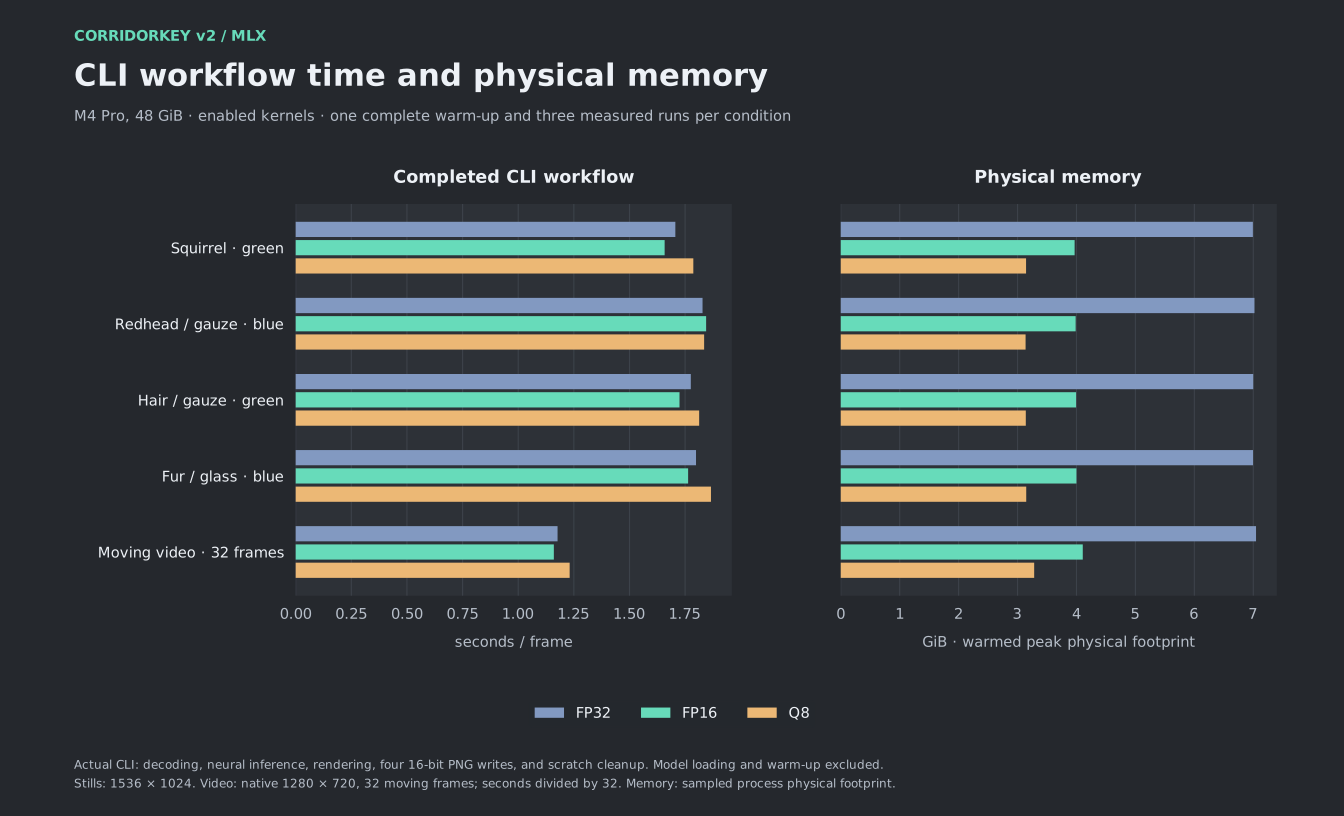
Download assets/cli-workflow.svg from cdelta/CorridorKey-v2-MLX: direct link, hf CLI and curl.
- Browser
- Download file 20.8 kB
-
https://huggingface.co/cdelta/CorridorKey-v2-MLX/resolve/main/assets/cli-workflow.svg
- Command line
-
hf download hf://cdelta/CorridorKey-v2-MLX/assets/cli-workflow.svg
-
curl -L -o cli-workflow.svg https://huggingface.co/cdelta/CorridorKey-v2-MLX/resolve/main/assets/cli-workflow.svg
20.8 kB