

File size: 24,380 Bytes
b0c0df0 |
1 2 3 4 5 6 7 8 9 10 11 12 13 14 15 16 17 18 19 20 21 22 23 24 25 26 27 28 29 30 31 32 33 34 35 36 37 38 39 40 41 42 43 44 45 46 47 48 49 50 51 52 53 54 55 56 57 58 59 60 61 62 63 64 65 66 67 68 69 70 71 72 73 74 75 76 77 78 79 80 81 82 83 84 85 86 87 88 89 90 91 92 93 94 95 96 97 98 99 100 101 102 103 104 105 106 107 108 109 110 111 112 113 114 115 116 117 118 119 120 121 122 123 124 125 126 127 128 129 130 131 132 133 134 135 136 137 138 139 140 141 142 143 144 145 146 147 148 149 150 151 152 153 154 155 156 157 158 159 160 161 162 163 164 165 166 167 168 169 170 171 172 173 174 175 176 177 178 179 180 181 182 183 184 185 186 187 188 189 190 191 192 193 194 195 196 197 198 199 200 201 202 203 204 205 206 207 208 209 210 211 212 213 214 215 216 217 218 219 220 221 222 223 224 225 226 227 228 229 230 231 232 233 234 235 236 237 238 239 240 241 242 243 244 245 246 247 248 249 250 251 252 253 254 255 256 257 258 259 260 261 262 263 264 265 266 267 268 269 270 271 272 273 274 275 276 277 278 279 280 281 282 283 284 285 286 287 288 289 290 291 292 293 294 295 296 297 298 299 300 301 302 303 304 305 306 307 308 309 310 311 312 313 314 315 316 317 318 319 320 321 322 323 324 325 326 327 328 329 330 331 332 333 334 335 336 337 338 339 340 341 342 343 344 345 346 347 348 349 350 351 352 353 354 355 356 357 358 359 360 361 362 363 364 365 366 367 368 369 370 371 372 373 374 375 376 377 378 379 380 381 382 383 384 385 386 387 388 389 390 391 392 393 394 395 396 397 398 399 400 401 402 403 404 405 406 407 408 409 410 411 412 413 414 415 416 417 418 419 420 421 422 423 424 425 426 427 428 429 430 431 432 433 434 435 436 437 438 439 440 441 442 443 444 445 446 447 448 449 450 451 452 453 454 455 456 457 458 459 460 461 462 463 464 465 466 467 468 469 470 471 472 473 474 475 476 477 478 479 480 481 482 483 484 485 486 487 488 489 490 491 492 493 494 495 496 497 498 499 500 501 502 503 504 505 506 507 508 509 510 511 512 513 514 515 516 517 518 519 520 521 522 523 524 525 526 527 528 529 530 531 532 533 534 535 536 537 538 539 540 541 542 543 544 545 546 547 548 549 550 551 552 553 554 555 556 557 558 559 560 561 562 563 564 565 566 567 568 569 570 571 572 573 574 575 576 577 578 579 580 581 582 583 584 585 586 587 588 589 590 591 592 593 594 595 596 597 598 599 600 601 602 603 604 605 606 607 608 609 610 611 612 613 614 615 616 617 618 619 620 621 622 623 624 625 626 627 628 629 630 631 632 633 634 635 636 637 638 639 640 641 642 643 644 645 646 647 648 649 650 651 652 653 654 655 656 657 658 659 660 661 662 663 664 665 666 |
# LMMS-Eval v0.4: Major Update Release
## Introduction
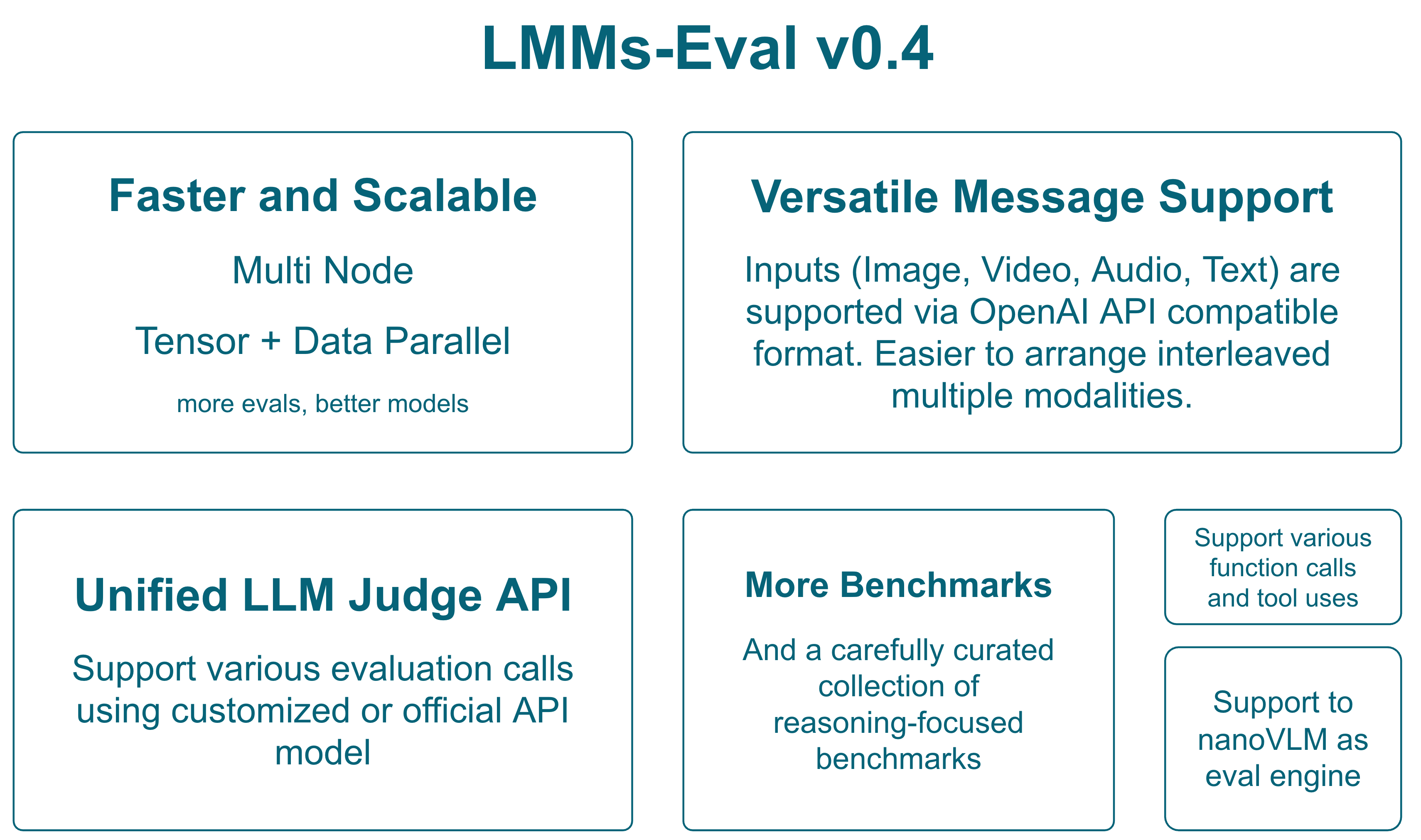
LMMS-Eval v0.4 represents a significant evolution in multimodal model evaluation, introducing groundbreaking features for distributed evaluation, reasoning-oriented benchmarks, and a unified interface for modern multimodal models. This release focuses on scalability, extensibility, and comprehensive evaluation capabilities across diverse multimodal tasks.
## Table of Contents
- [LMMS-Eval v0.4: Major Update Release](#lmms-eval-v04-major-update-release)
- [Introduction](#introduction)
- [Table of Contents](#table-of-contents)
- [Backward Compatibility Check](#backward-compatibility-check)
- [Major Features](#major-features)
- [1. Unified Message Interface](#1-unified-message-interface)
- [2. Multi-Node Distributed Evaluation](#2-multi-node-distributed-evaluation)
- [3. Unified LLM/LMM Judge Interface](#3-unified-llmlmm-judge-interface)
- [4. Tool Call Integration](#4-tool-call-integration)
- [6. NanoVLM Integration](#6-nanovlm-integration)
- [Programmatic API Usage](#programmatic-api-usage)
- [Basic Evaluation API](#basic-evaluation-api)
- [Advanced API with Custom Configuration](#advanced-api-with-custom-configuration)
- [Task Management API](#task-management-api)
- [Distributed Evaluation API](#distributed-evaluation-api)
- [Judge API Integration](#judge-api-integration)
- [Batch Processing and Efficiency](#batch-processing-and-efficiency)
- [New Benchmarks](#new-benchmarks)
- [Vision Understanding](#vision-understanding)
- [Reasoning-Oriented Benchmarks](#reasoning-oriented-benchmarks)
- [Mathematical Reasoning](#mathematical-reasoning)
- [Olympic-Level Challenges](#olympic-level-challenges)
- [Technical Details](#technical-details)
- [Multi-Node Evaluation Architecture](#multi-node-evaluation-architecture)
- [Async OpenAI API Integration](#async-openai-api-integration)
- [Migration Guide](#migration-guide)
- [Updating Task Configurations](#updating-task-configurations)
- [Model Implementation Changes](#model-implementation-changes)
- [Deprecated Features](#deprecated-features)
- [Deprecated Models](#deprecated-models)
- [Legacy Interfaces](#legacy-interfaces)
- [Future Roadmap](#future-roadmap)
- [Upcoming in v0.4.x](#upcoming-in-v04x)
- [Long-term Vision](#long-term-vision)
- [Contributing](#contributing)
- [High-Priority Areas](#high-priority-areas)
- [How to Contribute](#how-to-contribute)
- [Acknowledgments](#acknowledgments)
- [Core Development Team](#core-development-team)
- [Getting Help](#getting-help)
## Backward Compatibility Check
To ensure backward compatibility, we've conducted comprehensive performance comparisons between v0.3 and v0.4 across multiple models and benchmarks. The following table shows performance metrics for the same models evaluated with both versions:
| Models (v0.3/v0.4) | AI2D | ChartQA | DocVQA-Val | MME Perception | MME Cognition | RealWorldQA | OCRBench | MiaBench | MMMU-Val Reasoning | MathVerse Testmini | MathVision Testmini | MathVista Testmini | K12 Reasoning |
|---|---|---|---|---|---|---|---|---|---|---|---|---|---|
| **LLaVA-OneVision-7B** | 81.35/81.35 | 80.0/80.0 | 87.1/87.1 | 1578.64/1578.64 | 418.21/418.21 | 66.27/66.27 | 621/621 | 76.25/77.63 | 42.44/41.67 | 30.53/29.52 | 18.09/17.76 | 60.50/60.60 | 20.80/20.20 |
| **Qwen-2.5-VL-3B** (qwen2_5_vl) | 78.66/78.89 | 83.52/83.44 | 92.42/92.54 | 1520.52/1534.44 | 630/614.28 | 59.08/59.08 | 786/791 | 77.98/80.85 | 44.00/42.22 | 36.22/33.43 | 15.46/15.46 | 61.9/61.00 | 27.8/26.40 |
| **Qwen-2.5-VL-3B** (vllm) | 79.05/78.95 | 83.76/83.68 | 92.88/92.81 | 1521.87/1515.25 | 613.57/619.64 | 60.00/59.22 | 778/781 | 53.83/55.15 | 43.33/43.22 | 30.28/31.78 | 16.78/15.82 | 63.40/64.40 | 26.00/27.60 |
We could see that most benchmarks show minimal performance differences between v0.3 and v0.4. Both native PyTorch and VLLM implementations maintain consistent performance, and performance remains stable across different model architectures (Qwen2.5-VL vs LLaVA-OneVision).
## Major Features
### 1. Unified Message Interface
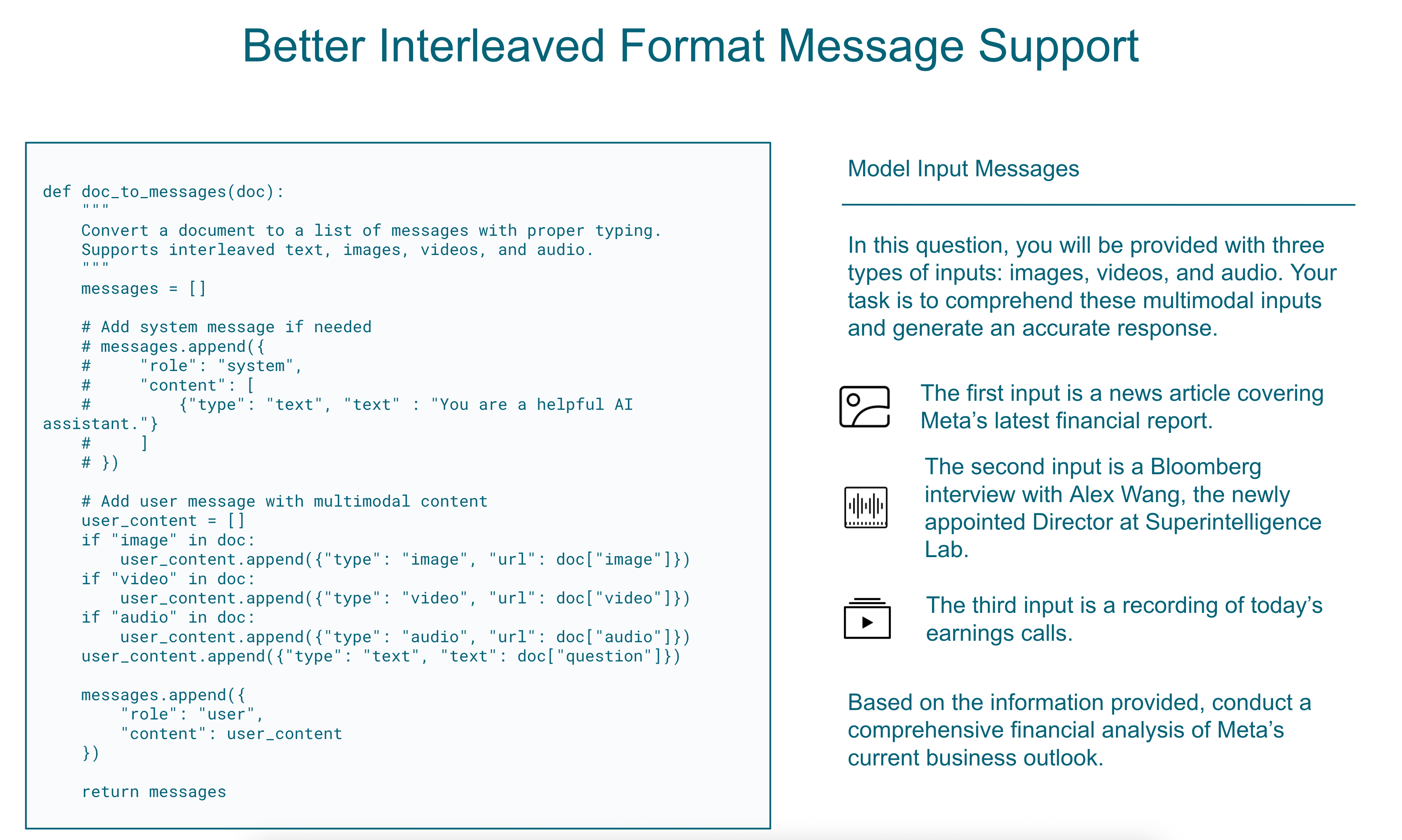
**Replacing Legacy `doc_to_visual` and `doc_to_text` with `doc_to_messages`**
The new unified interface streamlines how multimodal inputs are processed, providing a consistent format across all modalities:
```python
def doc_to_messages(doc):
"""
Convert a document to a list of messages with proper typing.
Supports interleaved text, images, videos, and audio.
"""
messages = []
# Add system message if needed
# messages.append({
# "role": "system",
# "content": [
# {"type": "text", "text" : "You are a helpful AI assistant."}
# ]
# })
# Add user message with multimodal content
user_content = []
if "image" in doc:
user_content.append({"type": "image", "url": doc["image"]})
if "video" in doc:
user_content.append({"type": "video", "url": doc["video"]})
if "audio" in doc:
user_content.append({"type": "audio", "url": doc["audio"]})
user_content.append({"type": "text", "text": doc["question"]})
messages.append({
"role": "user",
"content": user_content
})
return messages
```
This change provides:
- **Consistency**: Single interface for all multimodal inputs
- **Flexibility**: Easy support for interleaved modalities
- **Compatibility**: Aligns with modern chat-based model APIs
We provide two examples to guide the implementation of a custom `doc_to_messages` function:
1. In `api/task.py`, within the `ConfigurableMessagesTask` class, you can find a `doc_to_messages` function used for tasks that do not implement `doc_to_messages` directly but instead define `doc_to_text` and `doc_to_visual`. This allows the new chat model to be compatible with legacy tasks lacking explicit `doc_to_messages` implementations.
2. For a more customized approach, refer to the `mmmu_doc_to_messages` function in `tasks/mmmu/utils.py`. This implementation demonstrates how to format text and image inputs into a well-structured, interleaved message format, replacing older image token representations.
To utilize `doc_to_messages`, we provide a protocol class that allows you to convert the output into either Hugging Face chat template format or OpenAI messages format. Here's a basic example:
```python
chat_messages = doc_to_messages(self.task_dict[task][split][doc_id])
chat_messages: ChatMessages = ChatMessages(**{"messages": chat_messages})
# To openai messages
messages = chat_messages.to_openai_messages()
# To hf messages
hf_messages = chat_messages.to_hf_messages()
```
You can then use these messages with a chat template or the chat completion API. If you wish to implement your own message processing logic, please refer to the protocol definition in `lmms_eval/protocol.py` for more details.
**Replacing the Simple Model with a Chat Model**
To use the `doc_to_messages` function, you must implement a chat model capable of processing the message format it produces. Examples of such models can be found in the `lmms_eval/models/chat` directory.
If you prefer to fall back to the previous simple model implementation, you can add the `--force_simple` flag to the launch command.
To implement a new chat model, follow these steps:
1. Create the chat model (e.g., `lmms_eval/models/vllm.py`).
2. Register the model in `lmms_eval/models/__init__.py`.
### 2. Multi-Node Distributed Evaluation
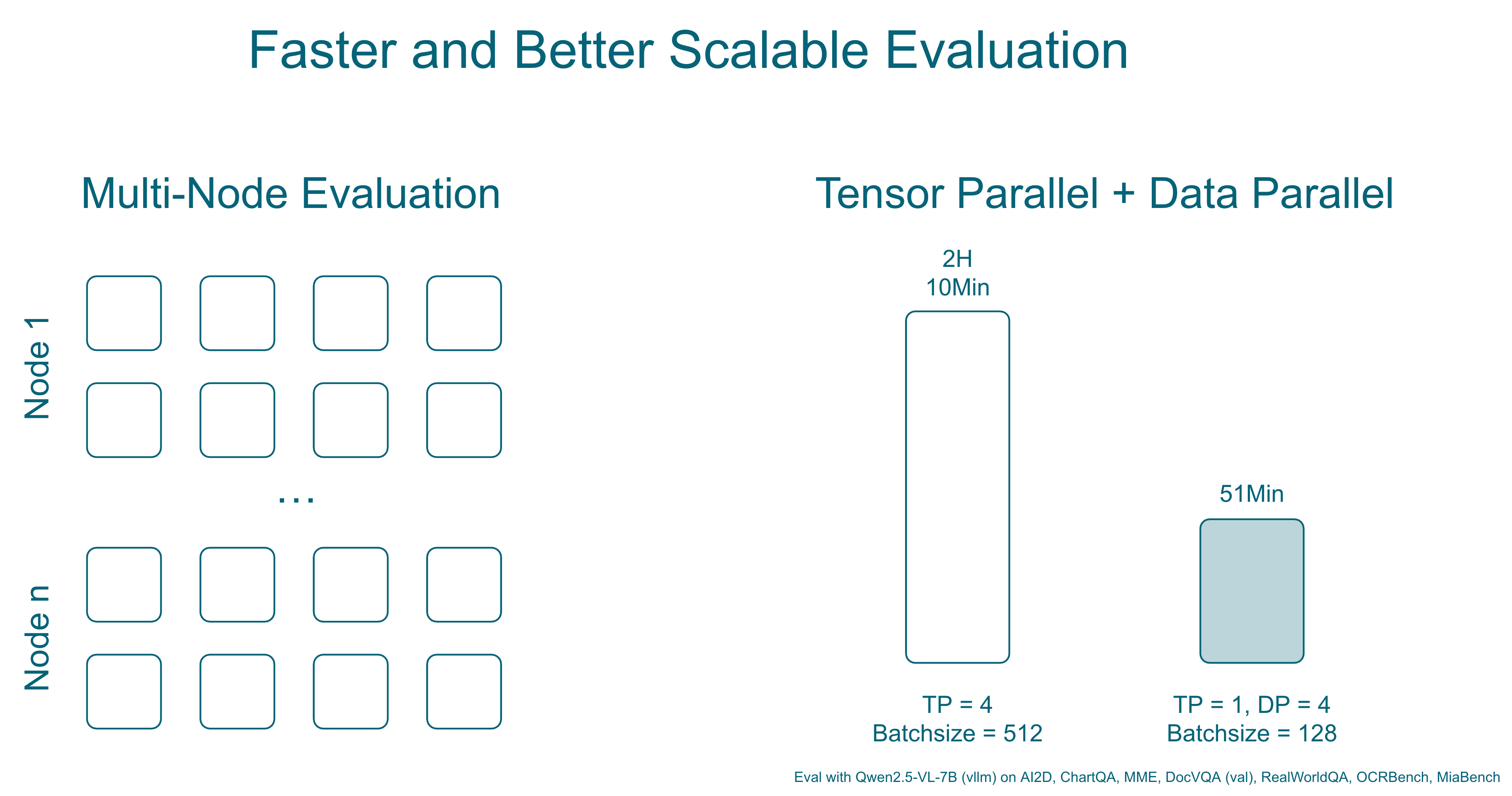
Support for large-scale evaluations across multiple machines using PyTorch's distributed capabilities:
```bash
torchrun --nproc_per_node="${MLP_WORKER_GPU}" \
--nnodes="${MLP_WORKER_NUM}" \
--node_rank="${MLP_ROLE_INDEX}" \
--master_addr="${MLP_WORKER_0_HOST}" \
--master_port="${MLP_WORKER_0_PORT}" \
-m lmms_eval \
--model qwen2_5_vl \
--model_args pretrained=Qwen/Qwen2.5-VL-3B-Instruct,device_map=cuda \
--tasks mmmu_val \
--batch_size 1 \
--output_path ./logs/ \
--log_samples
```
For vllm, you can use the following command to enable tensor parallel and data parallel to launch more workers to split data for faster evaluation:
```bash
accelerate launch --num_processes=1 --main_process_port=12346 -m lmms_eval \
--model vllm \
--model_args=model=Qwen/Qwen2.5-VL-3B-Instruct,tensor_parallel_size=2,data_parallel_size=4 \
--tasks ai2d \
--batch_size 512 \
--verbosity=DEBUG
```
**Key Benefits**:
- **Scalability**: Evaluate large models and datasets across multiple GPUs/nodes
- **Efficiency**: Automatic work distribution and result aggregation
- **Flexibility**: Works with existing PyTorch distributed infrastructure
### 3. Unified LLM/LMM Judge Interface
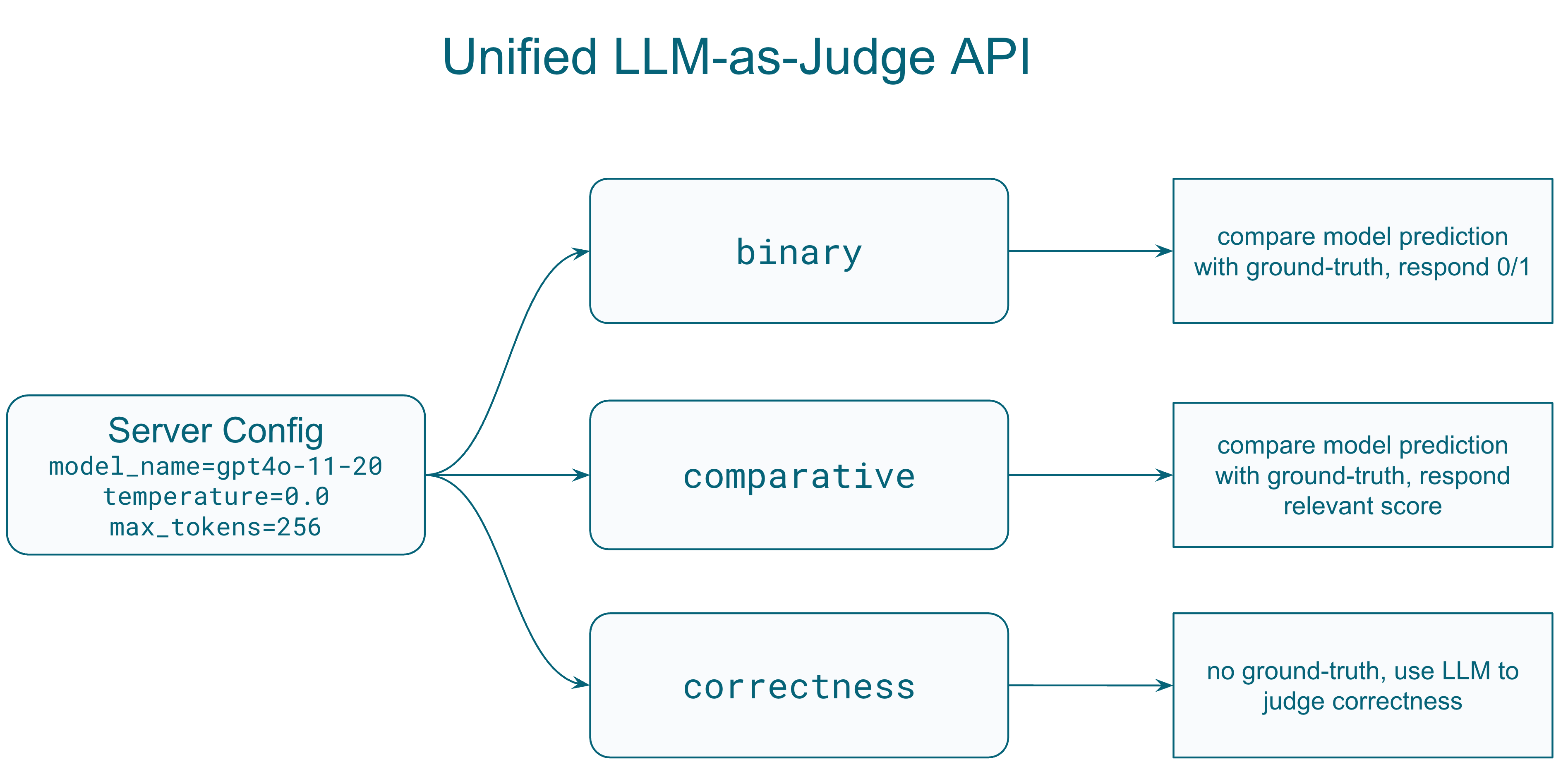
A standardized protocol for using language models as judges to evaluate other model outputs:
```python
from lmms_eval.llm_judge.protocol import Request, ServerConfig
# Configure the judge model
config = ServerConfig(
model_name="gpt-4o-2024-11-20",
temperature=0.0,
max_tokens=1024,
judge_type="score", # Options: 'general', 'binary', 'score', 'comparative'
score_range=(0, 10),
evaluation_criteria={
"accuracy": "How factually correct is the response?",
"completeness": "Does the response fully address the question?"
}
)
# Create evaluation request
request = Request(
question="What objects are in this image?",
answer="A cat sitting on a red couch", # Ground truth
prediction="A dog on a sofa", # Model output to evaluate
images=["path/to/image.jpg"], # Optional visual context
config=config
)
```
**Supported Judge Types**:
- **General**: Open-ended evaluation with custom prompts
- **Binary**: Yes/No or 0/1 judgments
- **Score**: Numerical scoring within a defined range
- **Comparative**: Compare two model responses
**Key Features**:
- **Structured Input Format**: Consistent interface for question, answer, prediction, and context
- **Multimodal Support**: Handle both text and image inputs for evaluation
- **Flexible Output Formats**: Configurable response formats (JSON/text)
- **Retry Logic**: Built-in retry mechanism with configurable delays
- **Concurrent Processing**: Support for parallel evaluation requests
**Tasks Using the Unified Judge API**:
*Mathematical Reasoning Tasks:*
- **MathVista**: Uses custom `MathVistaEvaluator` with `get_chat_response()` method
- **MathVerse**: Dedicated `MathVerseEvaluator` class with `score_answer()` method
- **MathVision**: Binary evaluation for mathematical correctness
- **K12**: Yes/no evaluation focusing on semantic correctness while ignoring formatting differences
*Competition and Advanced Tasks:*
- **OlympiadBench**: Binary evaluation for competition math problems (physics, mathematics)
- **MMMU Thinking**: Enhanced evaluation for multi-modal reasoning tasks
*Example Task Implementation:*
```python
# In task utils.py
from lmms_eval.llm_judge import ServerConfig, get_server
def process_results_with_judge(doc, results):
prediction = results[0].strip()
question = doc["question"]
answer = doc["answer"]
# Configure judge
config = ServerConfig(
model_name="gpt-4o-2024-11-20",
temperature=0.0,
max_tokens=256
)
server = get_server(server_name="openai", config=config)
# Evaluate with binary judge
result = server.evaluate_binary(
question=question,
answer=answer,
prediction=prediction,
output_format="1/0",
custom_prompt="Judge if the prediction is mathematically equivalent to the answer."
)
return {"llm_as_judge_eval": 1 if result["success"] and result["result"] == "1" else 0}
```
*Task YAML Configuration:*
```yaml
metric_list:
- metric: llm_as_judge_eval
aggregation: mean
higher_is_better: true
process_results: !function utils.process_results_with_judge
```
### 4. Tool Call Integration
Support for models that can make tool/function calls during evaluation:
```bash
accelerate launch --num_processes=1 --main_process_port 12345 -m lmms_eval \
--model async_openai \
--model_args model_version=Qwen/Qwen2.5-VL-7B-Instruct,mcp_server_path=path/to/mcp_server.py\
--tasks mmmu_val \
--batch_size 1 \
--output_path ./logs/ \
--log_samples
```
Features:
- **Tool-use Evaluation**: Assess models' ability to call external functions
- **Multi-step Reasoning**: Support for complex reasoning with tool assistance
- **Function Call Integration**: Seamless integration with various API endpoints
To use this feature, you must first setup a vllm/sglang or any openai compatible server that support tool parsing. If the default model template does not support tool parsing, you might need to create your own for it, examples can be found in `examples/chat_templates/tool_call_qwen2_5_vl.jinja`
### 6. NanoVLM Integration
Direct support for [HuggingFace's NanoVLM](https://github.com/huggingface/nanoVLM) framework:
- Simplified model loading and evaluation
- Optimized for small-scale vision-language models
- Efficient training/finetuning integration
## Programmatic API Usage
LMMS-Eval v0.4 provides a comprehensive Python API for programmatic evaluation, making it easy to integrate into research workflows, training pipelines, and automated benchmarking systems.
### Basic Evaluation API
```python
from lmms_eval.evaluator import simple_evaluate
from lmms_eval.models.simple.qwen2_5_vl import Qwen2_5_VL
# Initialize your model
model = Qwen2_5_VL(
pretrained="Qwen/Qwen2.5-VL-3B-Instruct",
device="cuda"
)
# Run evaluation on multiple tasks
results = simple_evaluate(
model=model,
tasks=["mmstar", "mme", "mathvista_testmini"],
batch_size=1,
num_fewshot=0,
device="cuda",
limit=100 # Limit for testing
)
# Results structure:
# {
# "results": {
# "mmstar": {
# "acc": 0.75,
# "acc_stderr": 0.02
# },
# "mme": {
# "mme_perception_score": 1245.5,
# "mme_cognition_score": 287.5
# },
# "mathvista_testmini": {
# "llm_as_judge_eval": 0.68
# }
# },
# "config": {...},
# "samples": [...] if log_samples=True
# }
```
### Advanced API with Custom Configuration
```python
from lmms_eval.evaluator import evaluate
from lmms_eval.tasks import TaskManager, get_task_dict
# Create task manager with custom task paths
task_manager = TaskManager(
include_path="/path/to/custom/tasks"
)
# Get specific task configurations
task_dict = get_task_dict(
task_name_list=["custom_task", "mmmu_val"],
task_manager=task_manager
)
# Run evaluation with full control
results = evaluate(
lm=model, # Must be LM object, not string
task_dict=task_dict,
limit=None,
bootstrap_iters=100, # For confidence intervals
log_samples=True
)
```
### Task Management API
```python
from lmms_eval.tasks import TaskManager, get_task_dict
# List available tasks
task_manager = TaskManager()
all_tasks = task_manager.all_tasks
print(f"Available tasks: {all_tasks}")
# Get task groups
all_groups = task_manager.all_groups
print(f"Task groups: {all_groups}")
# Get task dictionary for evaluation
task_dict = get_task_dict(
task_name_list=["mmstar", "mme", "vqav2"],
task_manager=task_manager
)
```
### Distributed Evaluation API
```python
import os
import torch
import torch.distributed as dist
from lmms_eval.evaluator import simple_evaluate
from lmms_eval.models.simple.qwen2_5_vl import Qwen2_5_VL
# Initialize distributed environment
dist.init_process_group(backend="nccl")
local_rank = int(os.environ["LOCAL_RANK"])
torch.cuda.set_device(local_rank)
# Model with distributed support
model = Qwen2_5_VL(
pretrained="Qwen/Qwen2.5-VL-72B-Instruct",
device_map=f"cuda:{local_rank}"
)
# Distributed evaluation
results = simple_evaluate(
model=model,
tasks=["mmmu_val", "mathvista_testmini"],
batch_size=4,
device=f"cuda:{local_rank}"
)
# Results are automatically aggregated across all processes
if dist.get_rank() == 0:
print(f"Final results: {results}")
```
### Judge API Integration
```python
from lmms_eval.llm_judge.protocol import ServerConfig
from lmms_eval.llm_judge import get_server
# Setup judge for custom evaluation
judge_config = ServerConfig(
model_name="gpt-4o-2024-11-20",
temperature=0.0,
max_tokens=256,
judge_type="binary"
)
judge_server = get_server("openai", judge_config)
# Custom evaluation with judge
def evaluate_responses(questions, predictions, ground_truths):
results = []
for q, p, gt in zip(questions, predictions, ground_truths):
result = judge_server.evaluate_binary(
question=q,
answer=gt,
prediction=p,
output_format="1/0"
)
results.append(1 if result["success"] and result["result"] == "1" else 0)
return sum(results) / len(results)
```
### Batch Processing and Efficiency
```python
import torch
from lmms_eval.evaluator import simple_evaluate
from lmms_eval.models.simple.qwen2_5_vl import Qwen2_5_VL
# Efficient batch processing
def batch_evaluate_models(models, tasks, batch_size=8):
results = {}
for model_name, model in models.items():
print(f"Evaluating {model_name}...")
model_results = simple_evaluate(
model=model,
tasks=tasks,
batch_size=batch_size,
device="cuda",
limit=None,
cache_requests=True, # Enable caching for faster re-runs
write_out=False, # Disable debug output
log_samples=False # Save memory
)
results[model_name] = model_results["results"]
# Clean up GPU memory between models
torch.cuda.empty_cache()
return results
# Usage
models = {
"qwen2.5-vl-3b": Qwen2_5_VL(pretrained="Qwen/Qwen2.5-VL-3B-Instruct", device="cuda"),
"qwen2.5-vl-7b": Qwen2_5_VL(pretrained="Qwen/Qwen2.5-VL-7B-Instruct", device="cuda")
}
benchmark_results = batch_evaluate_models(
models=models,
tasks=["mmstar", "mme", "vqav2_val"],
batch_size=4
)
```
## New Benchmarks
### Vision Understanding
- **[VideoEval-Pro](https://arxiv.org/abs/2505.14640)**: Comprehensive video understanding evaluation
- **V***: Visual reasoning benchmark
- **VLMs are Blind**: Challenging visual perception tasks
- **HallusionBench**: Detecting visual hallucinations
- **VisualWebBench**: Web-based visual understanding
- **TOMATO**: Temporal and motion understanding
- **MMVU**: Multi-modal visual understanding
### Reasoning-Oriented Benchmarks
A new suite of benchmarks focusing on mathematical and logical reasoning:
#### Mathematical Reasoning
- **AIME**: Advanced mathematical problem solving
- **AMC**: American Mathematics Competitions tasks
- **OpenAI Math**: Diverse mathematical challenges
- **MMK12**: K-12 mathematics curriculum
- **MathVision TestMini**: Visual mathematics problems
- **MathVerse TestMini**: Multimodal math reasoning
- **MathVista TestMini**: Mathematical visual understanding
- **WeMath**: Comprehensive math evaluation
- **Dynamath**: Dynamic mathematical reasoning
#### Olympic-Level Challenges
- **OlympiadBench**: International olympiad problems
- **OlympiadBench MIMO**: Multi-input multi-output format
## Technical Details
### Multi-Node Evaluation Architecture
The distributed evaluation system introduces significant architectural changes:
- **Global Rank Management**: All rank and world size operations now use global rank, with local rank used only for device management
- **Automatic Work Distribution**: Tasks are automatically distributed across nodes based on dataset size
- **Result Aggregation**: Efficient gathering of results from all nodes with deduplication
### Async OpenAI API Integration
Enhanced API calling with asynchronous support:
```python
import asyncio
import aiohttp
# Concurrent API calls for faster evaluation
async def evaluate_with_api(samples, model="gpt-4o-2024-11-20"):
async with aiohttp.ClientSession() as session:
tasks = [evaluate_single(session, sample, model) for sample in samples]
results = await asyncio.gather(*tasks)
return results
```
Benefits:
- **10x faster evaluation** for API-based models
- **Rate limit handling** with automatic retry
- **Cost optimization** through batching
## Migration Guide
### Updating Task Configurations
**Old Format (v0.3)**:
```yaml
doc_to_visual: !function utils.doc_to_visual
doc_to_text: !function utils.doc_to_text
```
**New Format (v0.4)**:
```yaml
doc_to_messages: !function utils.doc_to_messages
```
### Model Implementation Changes
Models should now implement the unified message interface:
```python
class MyModel(lmms):
def generate_until(self, requests: list[Instance]) -> list[str]:
for request in requests:
# New: Extract messages directly
doc_to_messages, gen_kwargs, doc_id, task, split = request.args
messages = doc_to_messages(doc)
# Process messages with proper role handling
response = self.process_messages(messages, **gen_kwargs)
```
## Deprecated Features
### Deprecated Models
The following models are deprecated in v0.4:
- **mplug_owl**: Legacy architecture incompatible with modern transformers
- **video-chatgpt**: Superseded by newer video models
**Migration Path**:
- For continued use, manually copy model implementations from v0.3
- Consider migrating to supported alternatives (e.g., LLaVA-NeXT for video)
### Legacy Interfaces
- `doc_to_visual` and `doc_to_text` are deprecated
- Simple model interface is discouraged for new implementations
## Future Roadmap
### Upcoming in v0.4.x
- **Cached Requests**: Persistent caching for expensive computations
- **Insights Feature**: Automated error analysis and pattern detection
- **Agent Benchmarks**: Comprehensive evaluation of tool-use capabilities
### Long-term Vision
- **Unified Evaluation Platform**: Single framework for all modality combinations
- **Community Benchmark Hub**: Easier integration of community benchmarks
## Contributing
We welcome contributions to LMMS-Eval v0.4! Here are the priority areas where contributions are most needed:
### High-Priority Areas
1. **New Benchmark Implementations**: Help us add more evaluation tasks and datasets
2. **Model Integrations**: Add support for new multimodal models
3. **Performance Optimizations**: Improve evaluation speed and memory efficiency
4. **Documentation**: Enhance guides, examples, and API documentation
### How to Contribute
1. Fork the repository and create a feature branch
2. Follow existing code patterns and documentation style
3. Test your changes thoroughly
4. Submit a pull request with clear description of changes
For specific implementation guidelines, refer to:
- **Model Guide** (`docs/model_guide.md`) - For adding new models
- **Task Guide** (`docs/task_guide.md`) - For implementing new benchmarks
- **Existing implementations** in `lmms_eval/models/` and `lmms_eval/tasks/`
## Acknowledgments
The v0.4 release was made possible by contributions from the LMMS-Eval community:
### Core Development Team
- **Bo Li** - Unified judge interface and mathematical reasoning benchmarks
- **Kaichen Zhang** - Unified message interface and architecture improvements
- **Cong Pham Ba** - VisualWebBench and MMVU benchmark implementations
- **Thang Luu** - TOMATO benchmark and temporal understanding tasks
## Getting Help
For questions and support:
- **Issues**: Report bugs or request features on [GitHub Issues](https://github.com/EvolvingLMMs-Lab/lmms-eval/issues)
- **Discussions**: Join community discussions on [GitHub Discussions](https://github.com/EvolvingLMMs-Lab/lmms-eval/discussions)
- **Documentation**: Check the `docs/` directory for implementation guides |