 Your library will be rebuilt if you make edits.
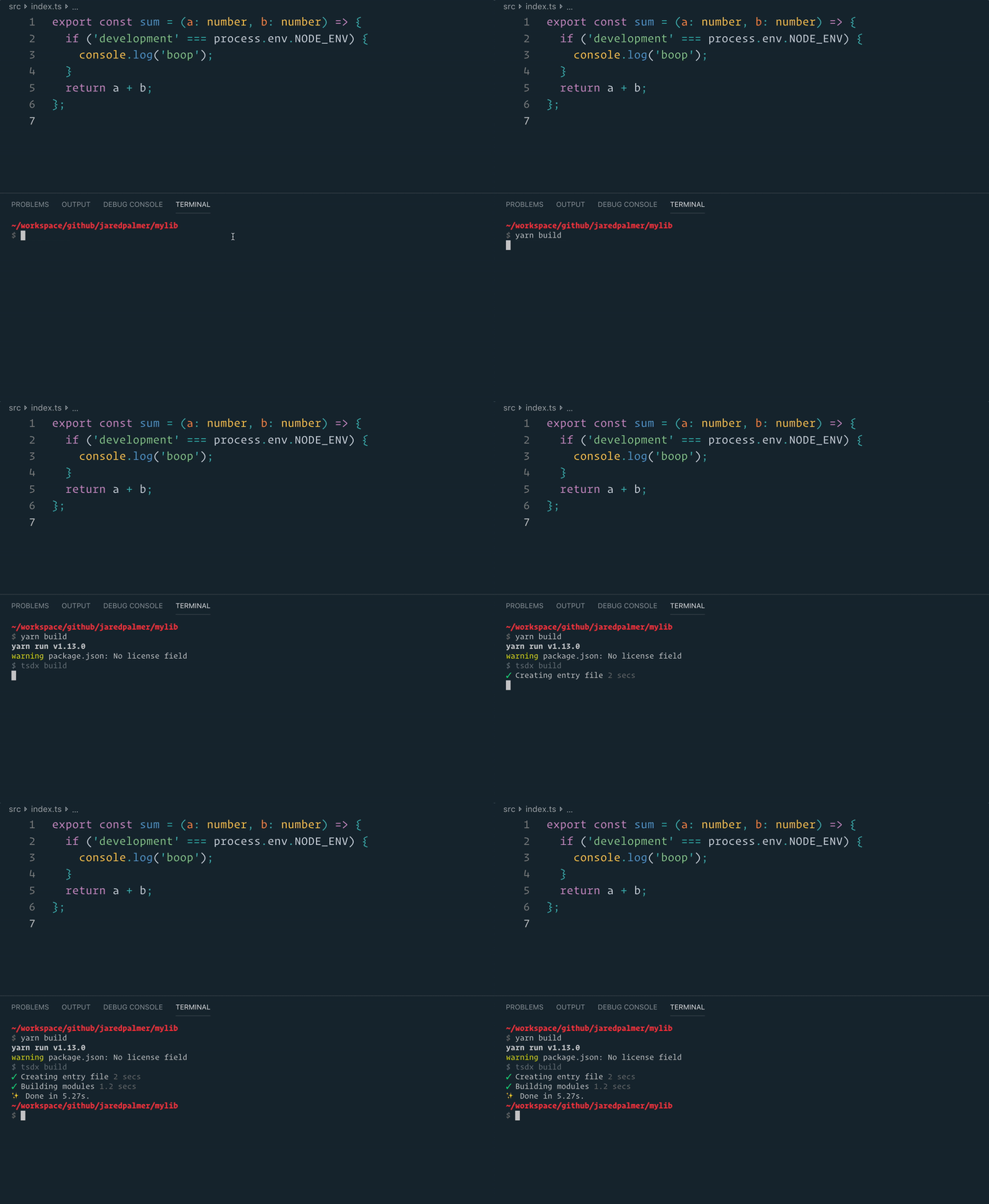
### `npm run build` or `yarn build`
Bundles the package to the `dist` folder.
The package is optimized and bundled with Rollup into multiple formats (CommonJS, UMD, and ES Module).
Your library will be rebuilt if you make edits.
### `npm run build` or `yarn build`
Bundles the package to the `dist` folder.
The package is optimized and bundled with Rollup into multiple formats (CommonJS, UMD, and ES Module).
 ### `npm test` or `yarn test`
Runs your tests using Jest.
### `npm run lint` or `yarn lint`
Runs Eslint with Prettier on .ts and .tsx files.
If you want to customize eslint you can add an `eslint` block to your package.json, or you can run `yarn lint --write-file` and edit the generated `.eslintrc.js` file.
### `prepare` script
Bundles and packages to the `dist` folder.
Runs automatically when you run either `npm publish` or `yarn publish`. The `prepare` script will run the equivalent of `npm run build` or `yarn build`. It will also be run if your module is installed as a git dependency (ie: `"mymodule": "github:myuser/mymodule#some-branch"`) so it can be depended on without checking the transpiled code into git.
## Optimizations
Aside from just bundling your module into different formats, TSDX comes with some optimizations for your convenience. They yield objectively better code and smaller bundle sizes.
After TSDX compiles your code with TypeScript, it processes your code with 3 Babel plugins:
- [`babel-plugin-annotate-pure-calls`](https://github.com/Andarist/babel-plugin-annotate-pure-calls): Injects for `#__PURE` annotations to enable treeshaking
- [`babel-plugin-dev-expressions`](https://github.com/4Catalyzer/babel-plugin-dev-expression): A mirror of Facebook's dev-expression Babel plugin. It reduces or eliminates development checks from production code
- [`babel-plugin-rename-import`](https://github.com/laat/babel-plugin-transform-rename-import): Used to rewrite any `lodash` imports
### Development-only Expressions + Treeshaking
`babel-plugin-annotate-pure-calls` + `babel-plugin-dev-expressions` work together to fully eliminate dead code (aka treeshake) development checks from your production code. Let's look at an example to see how it works.
Imagine our source code is just this:
```tsx
// ./src/index.ts
export const sum = (a: number, b: number) => {
if (process.env.NODE_ENV !== 'production') {
console.log('Helpful dev-only error message');
}
return a + b;
};
```
`tsdx build` will output an ES module file and 3 CommonJS files (dev, prod, and an entry file). If you want to specify a UMD build, you can do that as well. For brevity, let's examine the CommonJS output (comments added for emphasis):
```js
// Entry File
// ./dist/index.js
'use strict';
// This determines which build to use based on the `NODE_ENV` of your end user.
if (process.env.NODE_ENV === 'production') {
module.exports = require('./mylib.cjs.production.js');
} else {
module.exports = require('./mylib.development.cjs');
}
```
```js
// CommonJS Development Build
// ./dist/mylib.development.cjs
'use strict';
const sum = (a, b) => {
{
console.log('Helpful dev-only error message');
}
return a + b;
};
exports.sum = sum;
//# sourceMappingURL=mylib.development.cjs.map
```
```js
// CommonJS Production Build
// ./dist/mylib.cjs.production.js
'use strict';
exports.sum = (s, t) => s + t;
//# sourceMappingURL=test-react-tsdx.cjs.production.js.map
```
AS you can see, TSDX stripped out the development check from the production code. **This allows you to safely add development-only behavior (like more useful error messages) without any production bundle size impact.**
For ESM build, it's up to end-user to build environment specific build with NODE_ENV replace (done by Webpack 4 automatically).
#### Rollup Treeshaking
TSDX's rollup config [removes getters and setters on objects](https://github.com/palmerhq/tsdx/blob/1f6a1b6819bb17678aa417f0df5349bec12f59ac/src/createRollupConfig.ts#L73) so that property access has no side effects. Don't do it.
#### Advanced `babel-plugin-dev-expressions`
TSDX will use `babel-plugin-dev-expressions` to make the following replacements _before_ treeshaking.
##### `__DEV__`
Replaces
```ts
if (__DEV__) {
console.log('foo');
}
```
with
```js
if (process.env.NODE_ENV !== 'production') {
console.log('foo');
}
```
**IMPORTANT:** To use `__DEV__` in TypeScript, you need to add `declare var __DEV__: boolean` somewhere in your project's type path (e.g. `./types/index.d.ts`).
```ts
// ./types/index.d.ts
declare var __DEV__: boolean;
```
> **Note:** The `dev-expression` transform does not run when `NODE_ENV` is `test`. As such, if you use `__DEV__`, you will need to define it as a global constant in your test environment.
##### `invariant`
Replaces
```js
invariant(condition, 'error message here');
```
with
```js
if (!condition) {
if ('production' !== process.env.NODE_ENV) {
invariant(false, 'error message here');
} else {
invariant(false);
}
}
```
Note: TSDX doesn't supply an `invariant` function for you, you need to import one yourself. We recommend https://github.com/alexreardon/tiny-invariant.
To extract and minify `invariant` error codes in production into a static `codes.json` file, specify the `--extractErrors` flag in command line. For more details see [Error extraction docs](#error-extraction).
##### `warning`
Replaces
```js
warning(condition, 'dev warning here');
```
with
```js
if ('production' !== process.env.NODE_ENV) {
warning(condition, 'dev warning here');
}
```
Note: TSDX doesn't supply a `warning` function for you, you need to import one yourself. We recommend https://github.com/alexreardon/tiny-warning.
### Using lodash
If you want to use a lodash function in your package, TSDX will help you do it the _right_ way so that your library does not get fat shamed on Twitter. However, before you continue, seriously consider rolling whatever function you are about to use on your own. Anyways, here is how to do it right.
First, install `lodash` and `lodash-es` as _dependencies_
```bash
yarn add lodash lodash-es
```
Now install `@types/lodash` to your development dependencies.
```bash
yarn add @types/lodash --dev
```
Import your lodash method however you want, TSDX will optimize it like so.
```tsx
// ./src/index.ts
import kebabCase from 'lodash/kebabCase';
export const KebabLogger = (msg: string) => {
console.log(kebabCase(msg));
};
```
For brevity let's look at the ES module output.
```js
import o from"lodash-es/kebabCase";const e=e=>{console.log(o(e))};export{e as KebabLogger};
//# sourceMappingURL=test-react-tsdx.esm.production.js.map
```
TSDX will rewrite your `import kebabCase from 'lodash/kebabCase'` to `import o from 'lodash-es/kebabCase'`. This allows your library to be treeshakable to end consumers while allowing to you to use `@types/lodash` for free.
> Note: TSDX will also transform destructured imports. For example, `import { kebabCase } from 'lodash'` would have also been transformed to `import o from "lodash-es/kebabCase".
### Error extraction
After running `--extractErrors`, you will have a `./errors/codes.json` file with all your extracted `invariant` error codes. This process scans your production code and swaps out your `invariant` error message strings for a corresponding error code (just like React!). This extraction only works if your error checking/warning is done by a function called `invariant`.
Note: We don't provide this function for you, it is up to you how you want it to behave. For example, you can use either `tiny-invariant` or `tiny-warning`, but you must then import the module as a variable called `invariant` and it should have the same type signature.
⚠️Don't forget: you will need to host the decoder somewhere. Once you have a URL, look at `./errors/ErrorProd.js` and replace the `reactjs.org` URL with yours.
> Known issue: our `transformErrorMessages` babel plugin currently doesn't have sourcemap support, so you will see "Sourcemap is likely to be incorrect" warnings. [We would love your help on this.](https://github.com/palmerhq/tsdx/issues/184)
_TODO: Simple guide to host error codes to be completed_
## Customization
### Rollup
> **❗⚠️❗ Warning**:
### `npm test` or `yarn test`
Runs your tests using Jest.
### `npm run lint` or `yarn lint`
Runs Eslint with Prettier on .ts and .tsx files.
If you want to customize eslint you can add an `eslint` block to your package.json, or you can run `yarn lint --write-file` and edit the generated `.eslintrc.js` file.
### `prepare` script
Bundles and packages to the `dist` folder.
Runs automatically when you run either `npm publish` or `yarn publish`. The `prepare` script will run the equivalent of `npm run build` or `yarn build`. It will also be run if your module is installed as a git dependency (ie: `"mymodule": "github:myuser/mymodule#some-branch"`) so it can be depended on without checking the transpiled code into git.
## Optimizations
Aside from just bundling your module into different formats, TSDX comes with some optimizations for your convenience. They yield objectively better code and smaller bundle sizes.
After TSDX compiles your code with TypeScript, it processes your code with 3 Babel plugins:
- [`babel-plugin-annotate-pure-calls`](https://github.com/Andarist/babel-plugin-annotate-pure-calls): Injects for `#__PURE` annotations to enable treeshaking
- [`babel-plugin-dev-expressions`](https://github.com/4Catalyzer/babel-plugin-dev-expression): A mirror of Facebook's dev-expression Babel plugin. It reduces or eliminates development checks from production code
- [`babel-plugin-rename-import`](https://github.com/laat/babel-plugin-transform-rename-import): Used to rewrite any `lodash` imports
### Development-only Expressions + Treeshaking
`babel-plugin-annotate-pure-calls` + `babel-plugin-dev-expressions` work together to fully eliminate dead code (aka treeshake) development checks from your production code. Let's look at an example to see how it works.
Imagine our source code is just this:
```tsx
// ./src/index.ts
export const sum = (a: number, b: number) => {
if (process.env.NODE_ENV !== 'production') {
console.log('Helpful dev-only error message');
}
return a + b;
};
```
`tsdx build` will output an ES module file and 3 CommonJS files (dev, prod, and an entry file). If you want to specify a UMD build, you can do that as well. For brevity, let's examine the CommonJS output (comments added for emphasis):
```js
// Entry File
// ./dist/index.js
'use strict';
// This determines which build to use based on the `NODE_ENV` of your end user.
if (process.env.NODE_ENV === 'production') {
module.exports = require('./mylib.cjs.production.js');
} else {
module.exports = require('./mylib.development.cjs');
}
```
```js
// CommonJS Development Build
// ./dist/mylib.development.cjs
'use strict';
const sum = (a, b) => {
{
console.log('Helpful dev-only error message');
}
return a + b;
};
exports.sum = sum;
//# sourceMappingURL=mylib.development.cjs.map
```
```js
// CommonJS Production Build
// ./dist/mylib.cjs.production.js
'use strict';
exports.sum = (s, t) => s + t;
//# sourceMappingURL=test-react-tsdx.cjs.production.js.map
```
AS you can see, TSDX stripped out the development check from the production code. **This allows you to safely add development-only behavior (like more useful error messages) without any production bundle size impact.**
For ESM build, it's up to end-user to build environment specific build with NODE_ENV replace (done by Webpack 4 automatically).
#### Rollup Treeshaking
TSDX's rollup config [removes getters and setters on objects](https://github.com/palmerhq/tsdx/blob/1f6a1b6819bb17678aa417f0df5349bec12f59ac/src/createRollupConfig.ts#L73) so that property access has no side effects. Don't do it.
#### Advanced `babel-plugin-dev-expressions`
TSDX will use `babel-plugin-dev-expressions` to make the following replacements _before_ treeshaking.
##### `__DEV__`
Replaces
```ts
if (__DEV__) {
console.log('foo');
}
```
with
```js
if (process.env.NODE_ENV !== 'production') {
console.log('foo');
}
```
**IMPORTANT:** To use `__DEV__` in TypeScript, you need to add `declare var __DEV__: boolean` somewhere in your project's type path (e.g. `./types/index.d.ts`).
```ts
// ./types/index.d.ts
declare var __DEV__: boolean;
```
> **Note:** The `dev-expression` transform does not run when `NODE_ENV` is `test`. As such, if you use `__DEV__`, you will need to define it as a global constant in your test environment.
##### `invariant`
Replaces
```js
invariant(condition, 'error message here');
```
with
```js
if (!condition) {
if ('production' !== process.env.NODE_ENV) {
invariant(false, 'error message here');
} else {
invariant(false);
}
}
```
Note: TSDX doesn't supply an `invariant` function for you, you need to import one yourself. We recommend https://github.com/alexreardon/tiny-invariant.
To extract and minify `invariant` error codes in production into a static `codes.json` file, specify the `--extractErrors` flag in command line. For more details see [Error extraction docs](#error-extraction).
##### `warning`
Replaces
```js
warning(condition, 'dev warning here');
```
with
```js
if ('production' !== process.env.NODE_ENV) {
warning(condition, 'dev warning here');
}
```
Note: TSDX doesn't supply a `warning` function for you, you need to import one yourself. We recommend https://github.com/alexreardon/tiny-warning.
### Using lodash
If you want to use a lodash function in your package, TSDX will help you do it the _right_ way so that your library does not get fat shamed on Twitter. However, before you continue, seriously consider rolling whatever function you are about to use on your own. Anyways, here is how to do it right.
First, install `lodash` and `lodash-es` as _dependencies_
```bash
yarn add lodash lodash-es
```
Now install `@types/lodash` to your development dependencies.
```bash
yarn add @types/lodash --dev
```
Import your lodash method however you want, TSDX will optimize it like so.
```tsx
// ./src/index.ts
import kebabCase from 'lodash/kebabCase';
export const KebabLogger = (msg: string) => {
console.log(kebabCase(msg));
};
```
For brevity let's look at the ES module output.
```js
import o from"lodash-es/kebabCase";const e=e=>{console.log(o(e))};export{e as KebabLogger};
//# sourceMappingURL=test-react-tsdx.esm.production.js.map
```
TSDX will rewrite your `import kebabCase from 'lodash/kebabCase'` to `import o from 'lodash-es/kebabCase'`. This allows your library to be treeshakable to end consumers while allowing to you to use `@types/lodash` for free.
> Note: TSDX will also transform destructured imports. For example, `import { kebabCase } from 'lodash'` would have also been transformed to `import o from "lodash-es/kebabCase".
### Error extraction
After running `--extractErrors`, you will have a `./errors/codes.json` file with all your extracted `invariant` error codes. This process scans your production code and swaps out your `invariant` error message strings for a corresponding error code (just like React!). This extraction only works if your error checking/warning is done by a function called `invariant`.
Note: We don't provide this function for you, it is up to you how you want it to behave. For example, you can use either `tiny-invariant` or `tiny-warning`, but you must then import the module as a variable called `invariant` and it should have the same type signature.
⚠️Don't forget: you will need to host the decoder somewhere. Once you have a URL, look at `./errors/ErrorProd.js` and replace the `reactjs.org` URL with yours.
> Known issue: our `transformErrorMessages` babel plugin currently doesn't have sourcemap support, so you will see "Sourcemap is likely to be incorrect" warnings. [We would love your help on this.](https://github.com/palmerhq/tsdx/issues/184)
_TODO: Simple guide to host error codes to be completed_
## Customization
### Rollup
> **❗⚠️❗ Warning**: 


