

File size: 13,811 Bytes
20dbb3c | 1 2 3 4 5 6 7 8 9 10 11 12 13 14 15 16 17 18 19 20 21 22 23 24 25 26 27 28 29 30 31 32 33 34 35 36 37 38 39 40 41 42 43 44 45 46 47 48 49 50 51 52 53 54 55 56 57 58 59 60 61 62 63 64 65 66 67 68 69 70 71 72 73 74 75 76 77 78 79 80 81 82 83 84 85 86 87 88 89 90 91 92 93 94 95 96 97 98 99 100 101 102 103 104 105 106 107 108 109 110 111 112 113 114 115 116 117 118 119 120 121 122 123 124 125 126 127 128 129 130 131 132 133 134 135 136 137 138 139 140 141 142 143 144 145 146 147 148 149 150 151 152 153 154 155 156 157 158 159 160 161 162 163 164 165 166 167 168 169 170 171 172 173 174 175 176 177 178 179 180 181 182 183 184 185 186 187 188 189 190 191 192 193 194 195 196 197 198 199 200 201 202 203 204 205 206 207 208 209 210 211 212 213 214 215 216 217 218 219 220 221 222 223 224 225 226 227 228 229 230 231 232 233 234 235 236 237 238 239 240 241 242 243 244 245 246 247 248 249 250 251 252 253 254 255 256 257 258 259 260 261 262 263 264 265 266 267 268 269 270 271 272 273 274 275 276 277 278 279 280 281 282 283 284 285 286 287 288 289 290 291 292 293 294 295 296 297 298 299 300 301 302 303 304 305 306 307 308 309 310 311 312 313 314 315 316 317 318 319 320 321 322 323 324 325 326 | <p align="center">
<strong>Hermes Web UI</strong>
<a href="./README_zh.md">中文</a>
</p>
<p align="center">
A full-featured web dashboard for <a href="https://github.com/NousResearch/hermes-agent">Hermes Agent</a>.<br/>
Manage AI chat sessions, monitor usage & costs, configure platform channels,<br/>
schedule cron jobs, browse skills — all from a clean, responsive web interface.
</p>
<p align="center">
<code>npm install -g hermes-web-ui && hermes-web-ui start</code>
</p>
<p align="center">
<img src="https://github.com/EKKOLearnAI/hermes-web-ui/blob/main/packages/client/src/assets/image1.png" alt="Hermes Web UI Demo" width="680"/>
</p>
<p align="center">
<img src="https://github.com/EKKOLearnAI/hermes-web-ui/blob/main/packages/client/src/assets/image2.png" alt="Hermes Web UI Demo" width="680"/>
</p>
<p align="center">
<a href="https://www.npmjs.com/package/hermes-web-ui"><img src="https://img.shields.io/npm/v/hermes-web-ui?style=flat-square&color=blue" alt="npm version"/></a>
<a href="https://github.com/EKKOLearnAI/hermes-web-ui/blob/main/LICENSE"><img src="https://img.shields.io/npm/l/hermes-web-ui?style=flat-square" alt="license"/></a>
<a href="https://github.com/EKKOLearnAI/hermes-web-ui/stargazers"><img src="https://img.shields.io/github/stars/EKKOLearnAI/hermes-web-ui?style=flat-square" alt="stars"/></a>
</p>
---
## Features
### AI Chat
- Real-time chat streaming over Socket.IO `/chat-run`; chat runs execute through the Hermes agent bridge
- Multi-session management — create, rename, delete, switch between sessions
- **Self-built session database** — local SQLite storage for Web UI sessions; Hermes state.db remains a read-only source for Hermes history APIs
- Session grouping by source (Telegram, Discord, Slack, etc.) with collapsible accordion
- Active session indicator — live sessions pin to top with spinner icon
- Sessions sorted by latest message time
- Markdown rendering with syntax highlighting and code copy
- Tool call detail expansion (arguments / result)
- Profile-scoped file uploads
- File download support — download uploaded files and agent-generated files by resolved path across local, Docker, SSH, and Singularity backends
- Session search — Ctrl+K search across the Web UI local session database; read-only Hermes history sessions are not included
- Profile-aware model selector — discovers models available to the signed-in account through authorized Hermes profiles
- Per-session model display badge and context token usage
### Platform Channels
Unified configuration for **8 platforms** in one page:
| Platform | Features |
| ------------- | ---------------------------------------------------------------------- |
| Telegram | Bot token, mention control, reactions, free-response chats |
| Discord | Bot token, mention, auto-thread, reactions, channel allow/ignore lists |
| Slack | Bot token, mention control, bot message handling |
| WhatsApp | Enable/disable, mention control, mention patterns |
| Matrix | Access token, homeserver, auto-thread, DM mention threads |
| Feishu (Lark) | App ID / Secret, mention control |
| WeChat | QR code login (scan in browser, auto-save credentials) |
| WeCom | Bot ID / Secret |
- Credential management writes to `~/.hermes/.env`
- Channel behavior settings write to `~/.hermes/config.yaml`
- Per-platform configured/unconfigured status detection
### Usage Analytics
- Total token usage breakdown (input / output)
- Session count with daily average
- Estimated cost tracking & cache hit rate
- Model usage distribution chart
- 30-day daily trend (bar chart + data table)
### Scheduled Jobs
- Create, edit, pause, resume, delete cron jobs
- Trigger immediate execution
- Cron expression quick presets
### Model Management
- Auto-discover models from credential pool (`~/.hermes/auth.json`)
- Fetch available models from each provider endpoint (`/v1/models`)
- Add, update, and delete providers (preset & custom OpenAI-compatible)
- OpenAI Codex & Nous Portal OAuth login
- Provider URL auto-detection for non-v1 API versions (e.g. `/v4`)
- Provider-level model grouping with default model switching
### Multi-Profile
- Create, rename, delete, and switch between Hermes profiles
- Clone existing profile or import from archive (`.tar.gz`)
- Export profile for backup or sharing
- Profile-scoped configuration, cache, uploads, sessions, jobs, usage, memory, skills, plugins, providers, and model visibility
- Account-bound profile access: super administrators can manage every profile; regular administrators only see and use profiles assigned to their account
### File Browser
- Browse files on remote backends (local, Docker, SSH, Singularity)
- Upload, download, rename, copy, move, and delete files
- Store uploaded files under the selected/requested Hermes profile while keeping downloads path-based for agent-generated artifacts outside the upload directory
- Create directories
- View file content with syntax highlighting
### Group Chat
- Multi-agent chat rooms with real-time messaging via Socket.IO
- @mention routing — mention an agent to trigger a contextual reply
- Context compression — automatic conversation summarization when history exceeds token threshold
- Typing status and reply progress indicators
- Room creation, deletion, and invite code management
- Agent management — add/remove agents from rooms with per-agent profiles
- SQLite message persistence
- Mobile responsive with collapsible sidebar
### Skills & Memory
- Browse and search installed skills
- View skill details and attached files
- User notes and profile management
### Logs
- View agent / server / error logs
- Filter by log level, log file, and keyword
- Structured log parsing with HTTP access log highlighting
### Authentication
- Token-based auth (auto-generated on first run or set via `AUTH_TOKEN` env var)
- Username/password login with account management in Settings
- Default bootstrap credentials are `admin` / `123456`; users are prompted after login to change the default username and password
- Super administrators can manage users and profile bindings; regular administrators can manage their own account details
CLI maintenance commands:
```bash
# Delete persisted login IP lock records
hermes-web-ui clear-login-locks
# Delete login locks and restart the running Web UI process
hermes-web-ui clear-login-locks --restart
# Create or reset the default super administrator login to admin / 123456
hermes-web-ui reset-default-login
```
`clear-login-locks` removes `${HERMES_WEB_UI_HOME:-~/.hermes-web-ui}/.login-lock.json`. If the server is running, restart it to clear in-memory lock state. `reset-default-login` updates the Web UI account database; if an `admin` user already exists, its password is reset to `123456` and the account is enabled as a super administrator.
### Settings
- Display (streaming, compact mode, reasoning, cost display)
- Agent (max turns, timeout, tool enforcement)
- Memory (enable/disable, char limits)
- Session reset (idle timeout, scheduled reset)
- Privacy (PII redaction)
- Model settings (default model & provider)
- Profile and provider configuration
### Web Terminal
- Integrated terminal powered by node-pty and @xterm/xterm
- Multi-session support — create, switch between, and close terminal sessions
- Real-time keyboard input and PTY output streaming via WebSocket
- Window resize support
---
## Quick Start
### npm (Recommended)
```bash
npm install -g hermes-web-ui
hermes-web-ui start
```
Open **http://localhost:8648**
### One-line Setup (Auto-detect OS)
Automatically installs Node.js (if missing) and hermes-web-ui on Debian/Ubuntu/macOS:
```bash
bash <(curl -fsSL https://raw.githubusercontent.com/EKKOLearnAI/hermes-web-ui/main/scripts/setup.sh)
```
### WSL
```bash
bash <(curl -fsSL https://raw.githubusercontent.com/EKKOLearnAI/hermes-web-ui/main/scripts/setup.sh)
hermes-web-ui start
```
> WSL uses the same Web UI daemon startup flow as other local installs; no separate gateway service is started by Web UI.
### Docker Compose
Single-container deployment with integrated Hermes Agent:
```bash
# Use pre-built image (Recommended)
WEBUI_IMAGE=ekkoye8888/hermes-web-ui docker compose up -d
# Or build from source
docker compose up -d --build
docker compose logs -f hermes-webui
```
Open **http://localhost:6060**
- Persistent Hermes data is stored in `./hermes_data`
- Web UI auth token is stored in `./hermes_data/hermes-web-ui/.token`
- On first run with auth enabled, the token is printed to container logs
- All runtime settings are environment-variable driven in `docker-compose.yml`
For detailed notes and troubleshooting, see [`docs/docker.md`](./docs/docker.md).
### Hermes Agent Runtime Discovery
When Web UI starts backend chat features, it prefers a source checkout that
contains `run_agent.py` such as `~/.hermes/hermes-agent`. If no source checkout
is found, it falls back to the Python environment used by the installed
`hermes` command, then the system Python. This supports both source installs
and package installs such as `pip install hermes-agent`.
## Web UI Environment Variables
These variables configure Hermes Web UI itself. Provider API keys and Hermes Agent settings are managed separately through Hermes profiles.
| Variable | Default | Description |
| --- | --- | --- |
| `PORT` | `8648` | Web UI listen port. |
| `BIND_HOST` | `0.0.0.0` | Web UI bind host. Set `::` explicitly for IPv6. |
| `HERMES_WEB_UI_HOME` | `~/.hermes-web-ui` | Web UI data home for auth token, credentials, logs, DB, and default uploads. `HERMES_WEBUI_STATE_DIR` is also supported as a compatibility alias. |
| `UPLOAD_DIR` | `$HERMES_WEB_UI_HOME/upload` | Upload root override. Files are stored below profile-scoped subdirectories. |
| `CORS_ORIGINS` | `*` | Koa CORS origin setting. |
| `AUTH_TOKEN` | auto-generated | Explicit bearer token. If unset, Web UI creates one under `HERMES_WEB_UI_HOME`. |
| `PROFILE` | `default` | Startup/default Hermes profile. Runtime requests use the profile selected by the frontend and authorized for the current account. |
| `LOG_LEVEL` | `info` | Server log level. |
| `BRIDGE_LOG_LEVEL` | `$LOG_LEVEL` or `info` | Bridge log level. |
| `MAX_DOWNLOAD_SIZE` | `200MB` | Maximum file download size. |
| `MAX_EDIT_SIZE` | `10MB` | Maximum editable file size. |
| `WORKSPACE_BASE` | `/opt/data/workspace` | Base directory for workspace browsing. |
### CLI Commands
| Command | Description |
| --------------------------------- | ---------------------------------- |
| `hermes-web-ui start` | Start in background (daemon mode) |
| `hermes-web-ui start --port 9000` | Start on custom port |
| `hermes-web-ui stop` | Stop background process |
| `hermes-web-ui restart` | Restart background process |
| `hermes-web-ui status` | Check if running |
| `hermes-web-ui update` | Update to latest version & restart |
| `hermes-web-ui upgrade` | Alias for `update` |
| `hermes-web-ui -v` | Show version number |
| `hermes-web-ui -h` | Show help message |
`update` / `upgrade` first attempt `npm cache clean --force`, then run `npm install -g hermes-web-ui@latest` and restart. Cache cleanup is best-effort; if it fails, the updater continues with the install.
### Auto Configuration
On startup the BFF server automatically:
- Initializes Web UI data directories, local databases, and bundled skills
- Starts the Hermes agent bridge used by `/chat-run`
- Opens browser on successful startup
---
## Development
```bash
git clone https://github.com/EKKOLearnAI/hermes-web-ui.git
cd hermes-web-ui
npm install
npm run dev
```
- Frontend: http://localhost:5173
- BFF Server: http://localhost:8648
```bash
npm run build # outputs to dist/
```
See [DEVELOPMENT.md](./DEVELOPMENT.md) for project development guidelines.
## Architecture
```
Browser → BFF (Koa, :8648) → Socket.IO /chat-run
↓
Hermes agent bridge → Hermes Agent runtime
↓
Hermes CLI / profiles
profile config.yaml (channel/provider behavior)
profile auth.json (credential pool)
Tencent iLink API (WeChat QR login)
```
The frontend is designed with **multi-agent extensibility** — all Hermes-specific code is namespaced under `hermes/` directories (API, components, views, stores), making it straightforward to add new agent integrations alongside.
The BFF layer handles Socket.IO chat streaming, the Hermes agent bridge, profile-aware file upload and path-based download (multi-backend: local/Docker/SSH/Singularity), session CRUD, account- and profile-scoped management, config/credential management, WeChat QR login, model discovery, skills/memory management, log reading, and static file serving.
## Tech Stack
**Frontend:** Vue 3 + TypeScript + Vite + Naive UI + Pinia + Vue Router + vue-i18n + SCSS + markdown-it + highlight.js
**Backend:** Koa 2 (BFF server) + node-pty (web terminal)
## Star History
[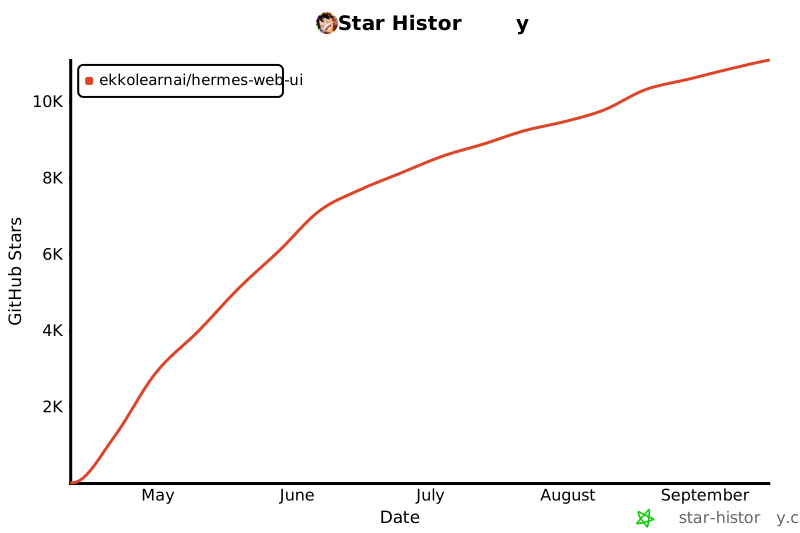](https://star-history.com/#EKKOLearnAI/hermes-web-ui&Date)
<!-- If the chart above doesn't load, visit https://star-history.com/#EKKOLearnAI/hermes-web-ui -->
## License
[BSL-1.1](./LICENSE)
|