---
license: apache-2.0
base_model: MiniMaxAI/MiniMax-H3
base_model_relation: adapter
library_name: diffusers
tags:
- modular-diffusers
- minimax-h3
- inpainting
- video-to-video
- audio-video
pipeline_tag: video-to-video
---
# MiniMax-H3 — masked video and audio inpainting
Modular Diffusers custom blocks for video inpainting with MiniMax-H3🧨.
Inspired by & based on ComfyUI workflows created by **Ablejones, Nekodificador, and drozbay**.
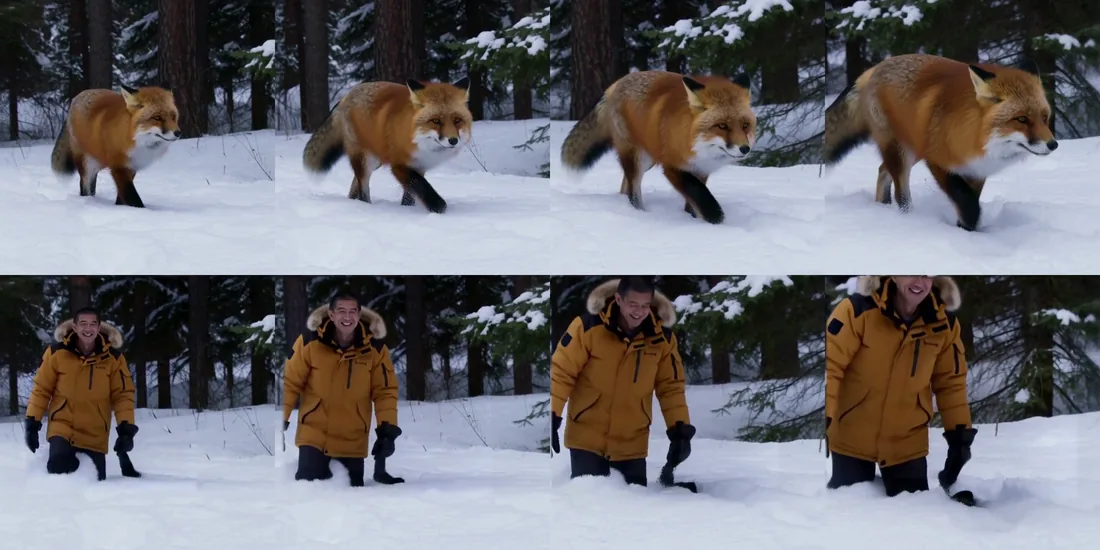
Above: the plate. Below: the same clip with the animal replaced from one reference photo, in 6 steps. The forest,
the snow, the camera push and the original soundtrack are untouched.
## Use it
```python
import torch
from diffusers.modular_pipelines import ModularPipelineBlocks
from diffusers.modular_pipelines.minimax_h3.references import MiniMaxH3ImageReference
blocks = ModularPipelineBlocks.from_pretrained(
"diffusers-modular/minimax-h3-inpainting", trust_remote_code=True
)
pipe = blocks.init_pipeline("MiniMaxAI/MiniMax-H3")
pipe.load_components(dtype=torch.bfloat16)
pipe.to("cuda")
state = pipe(
prompt=" the man from the picture, walking through deep snow in a pine forest",
references=[MiniMaxH3ImageReference.from_file("subject.png")],
source_video=frames, # (num_frames, height, width, 3) uint8
source_fps=24,
mask=mask, # (num_frames, height, width) — 1 repaints, 0 preserves
source_audio=waveform, # optional; preserved whole unless `audio_mask` says otherwise
source_audio_sample_rate=48000,
num_inference_steps=28,
generator=torch.Generator("cpu").manual_seed(0),
)
video, audio = state.get("videos")[0], state.get("audio")[0]
```
`MiniMaxH3Ref2VAInpaintGeneratorBlocks` is the same thing without the text-encoder step, for split deployments where
the encoder lives elsewhere and `prompt_embeds` / `text_token_tags` are the wire format.
## How it works
MiniMax-H3 denoises one packed sequence in which **every row carries its own timestep** — that is how a keyframe
anchor sits at `t = 0.999`, essentially clean, beside target rows still stepping down the schedule. Nothing says which
rows may do that, so pointing it at an arbitrary subset of the target rows *is* inpainting.
| mask | row timestep | content |
|---|---|---|
| `1` — repaint | the schedule's `t` | the model's |
| `0` — preserve | `max(t, 0.999)` video, `1.0` audio | the source, clean |
| feathered | `1 − m·σ` | blended to that level |
This matters because the usual recipe — re-noise the source to the current sigma and blend — is *off-distribution*
here: it hands the model a target row claiming timestep `t` while holding content at a level it never saw paired with
that label. Presenting preserved rows as conditioning is a distribution the checkpoint knows well.
## The mask lands on three grids
A generic resize reproduces none of them, and getting any one wrong is a silent quality bug:
- **spatially** — the VAE's 16× compression, then the transformer's 2×2 patch. A row is one token: it carries one
timestep and is written back whole, so a 2×2 latent patch is the finest a mask can be.
- **temporally** — the VAE's chunked causal grouping, `(1, 4, 4, 4, 4)` repeating every 17 frames. Not uniform.
- **on the audio clock** — 40 latents per second, *not* 24 frames per second. Aligning an audio mask to the video
grid is what puts a masked soundtrack out of sync.
`pixel_mask_to_row_mask` and `audio_mask_to_row_mask` do this; every reduction is a maximum, so a row regenerates as
much as the most-masked pixel it covers asks it to.
## Use hard masks
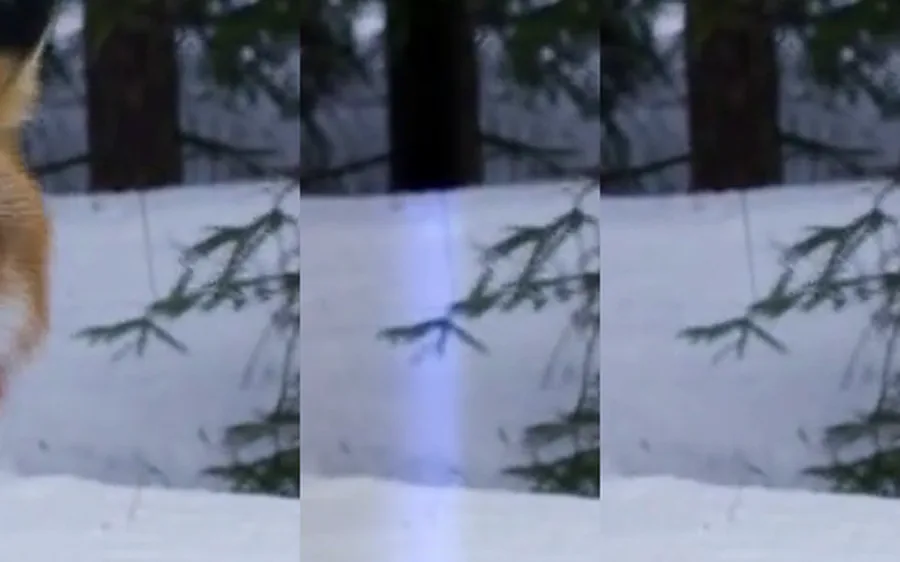
Plate · feathered mask · hard mask, at the same boundary.
A feathered mask leaves its edge rows at intermediate timesteps holding a *mixture* of source and repaint — lower
contrast than either. Paste that through an upscale and crossfade it into a sharp plate and you get a visible band
along the mask, as in the middle panel. Squaring the mask off and generating at the plate's own size removes it. The
paste's own feather is what should hide the join.
## Give the mask room

Mask geometry decides what a prompt can do. A box fitted to a walking quadruped is a quadruped-shaped hole: asked for
a person, the model will put one in it *on all fours* rather than contradict the border it was told to preserve. Only
a mask with a standing footprint lets it stand up. When you are replacing a subject rather than editing one, grow the
mask well past the outline.
`crop.py` ships the other half of the practical workflow: one stable box around everything the mask ever touches,
a canvas that never upscales it, and a feathered paste back into the plate. Cost is set by the canvas, not by how
much of the frame changes, so cropping to the subject is the memory lever.
## Practice notes
- **Keep the soundtrack** and the model animates to the words already there. That is the lip-sync recipe.
- **Per-shot prompting is unavoidable.** Masking makes the prompt less strict, not optional.
- **`ref2va` needs at least one reference.** Prompt-only object removal is the `t2va` partition's job.
- **5–15 s per pass.** Longer clips have to be inpainted in segments.
- **The decoder is not perfectly local.** Preserved latents are preserved exactly, but the video decoder is a
36-layer attention stack, so a change inside the mask moves decoded pixels just outside it — 5.5/255 within 8 px,
1.2/255 by 32 px, gone by 128 px. Confining the paste to the mask discards that halo.