---
language:
- en
tags:
- FaceSwap
- Headshot
- SmoothChange
- FaceChange
- SmoothSwap
- SwapFace
- FaceEditing
license: apache-2.0
---
# FaceSwap - AI-Powered Headshot Generator
**FaceSwap** is a flow designed to seamlessly swap faces between two images. This project is built on top of ComfyUI, a modular and flexible interface that enables easy integration and customization of AI workflows. FaceSwap utilizes models to detect key facial landmarks, map them to the target face, and generate a realistic face swap by considering aspects like lighting, expression, and pose. This flow is designed to provide an easy-to-use interface through ComfyUI, allowing users to swap faces effortlessly with minimal setup.
## Requirements
To run **FaceSwap**, you'll need to install **ComfyUI** and set up a few dependencies. Follow the steps below for installation and setup.
### Prerequisites
- **Python 3.9 or higher** (Ensure Python 3.9+ is installed on your machine)
- **NVIDIA GPU** (Recommended for faster processing, though CPU can also be used)
---
## Step-by-Step Installation
1. Clone the ComfyUI Repository
Start by cloning the main ComfyUI repository:
```bash
git clone https://github.com/comfyanonymous/ComfyUI.git
cd ComfyUI
```
2. Install Dependencies
Install all the required dependencies for ComfyUI:
```bash
pip install -r requirements.txt
```
3. Install **ComfyUI-Manager**
To manage custom nodes, you'll need to install ComfyUI-Manager. Run the following commands inside the **ComfyUI/custom_nodes** directory:
```bash
cd ComfyUI/custom_nodes
git clone https://github.com/ltdrdata/ComfyUI-Manager.git
```
After cloning the ComfyUI-Manager, **restart ComfyUI**.
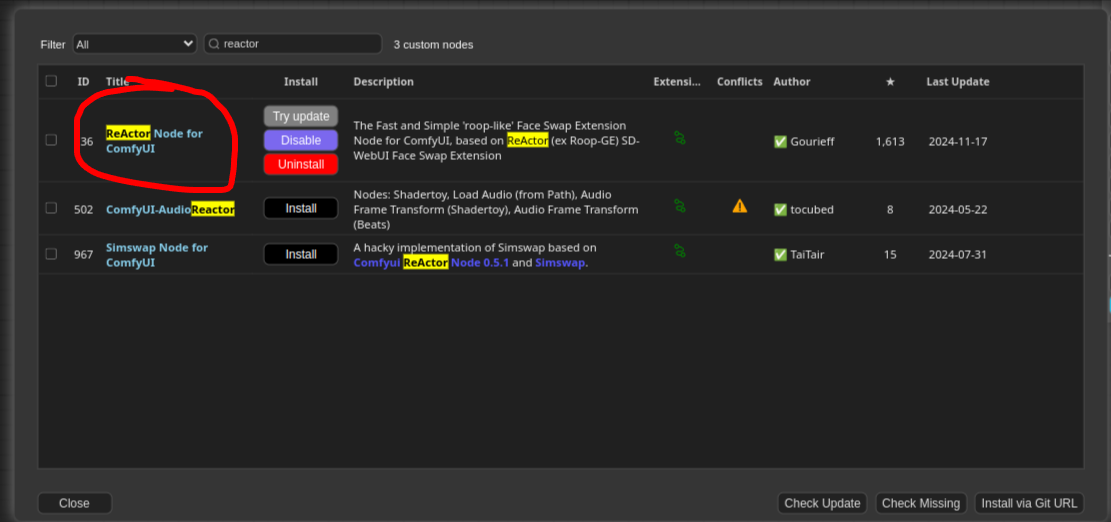
4. Install **Reactor Node for ComfyUI** by clicking on Manager -> Custom Nodes Manage
or you can clone the repository in the directory **ComfyUI/custom_nodes**
```bash
git clone https://github.com/Gourieff/comfyui-reactor-node.git
```
5. Download Pre-trained Models
Download **inswapper_128.onnx** and place the downloaded model in the ComfyUI/models/insightface/ directory
Note: If directory don't exist, create them manually.
4. Start ComfyUI
Run ComfyUI by executing the following command:
```bash
python3 FaceSwap.py
```
This will start ComfyUI, and you can access the interface by navigating to http://127.0.0.1:8188 in your browser.
## Setting Up and Using the FaceSwap Workflow
1. Clone the Headshot_Generator-FaceSwap Repository
Clone this repository that contains the FaceSwap workflow and assets:
```bash
git clone https://huggingface.co/foduucom/Headshot_Generator-FaceSwap
cd Headshot_Generator-FaceSwap
```
2. How to use
Once ComfyUI is running, open the browser window (default: http://127.0.0.1:8188), and follow these steps:
- Click on the **Load button** in the menu bar and select the **workflow.json** file from this repo you just cloned.
- Upload the **Workflow.json** to start the face-swapping process.
- Provide Input Images
- **Source Image:** The image containing the face you want to swap.
- **Target Image:** The image where the face will be swapped into.
- Click **Queue Prompt** to initiate the face-swapping process. The AI model will process the images and generate the output.
or you can use by python script provided in this repository:
```bash
python3 FaceSwap.py
#Remember change the input paths in script here :
#prompt["1"]["inputs"]["image"] = "//put your input image"
#prompt["2"]["inputs"]["image"] = "//put your source face image"
```
## Troubleshooting
- ComfyUI Not Running: Ensure that all dependencies are installed correctly and that you’re using Python 3.9 or higher. If issues persist, check the ComfyUI GitHub repository for troubleshooting guides.
- Missing Models: Ensure you’ve downloaded the required models (sam_vit_h_4b8939.pth and groundingdino_swint_ogc.pth) and placed them in the correct directories (ComfyUI/models/sams/ and ComfyUI/models/grounding-dino/).
## Slow Performance:
Using a GPU is highly recommended for better performance. If you’re using a CPU, the processing time may be longer.
## Compute Infrastructure
## Hardware
NVIDIA GeForce RTX 3060 card
## Model Card Contact
For inquiries and contributions, please contact us at info@foduu.com.
```bibtex
@ModelCard{
author = {Nehul Agrawal and
Priyal Mehta},
title = {FaceSwap - AI-Powered Face Swap / Headshot Generator},
year = {2024}
}
```