

File size: 2,037 Bytes
4bec42e |
1 2 3 4 5 6 7 8 9 10 11 12 13 14 15 16 17 18 19 20 21 22 23 24 25 26 27 28 29 30 31 32 33 34 35 36 37 38 39 40 41 42 43 44 45 46 47 48 49 50 51 52 53 54 55 56 57 |
# BME680
[](https://github.com/pimoroni/bme680-python/actions/workflows/test.yml)
[](https://coveralls.io/github/pimoroni/bme680-python?branch=main)
[](https://pypi.python.org/pypi/bme680)
[](https://pypi.python.org/pypi/bme680)
https://shop.pimoroni.com/products/bme680
The state-of-the-art BME680 breakout lets you measure temperature, pressure, humidity, and indoor air quality.
## Installing
### Full install (recommended):
We've created an easy installation script that will install all pre-requisites and get your BME680
up and running with minimal efforts. To run it, fire up Terminal which you'll find in Menu -> Accessories -> Terminal
on your Raspberry Pi desktop, as illustrated below:
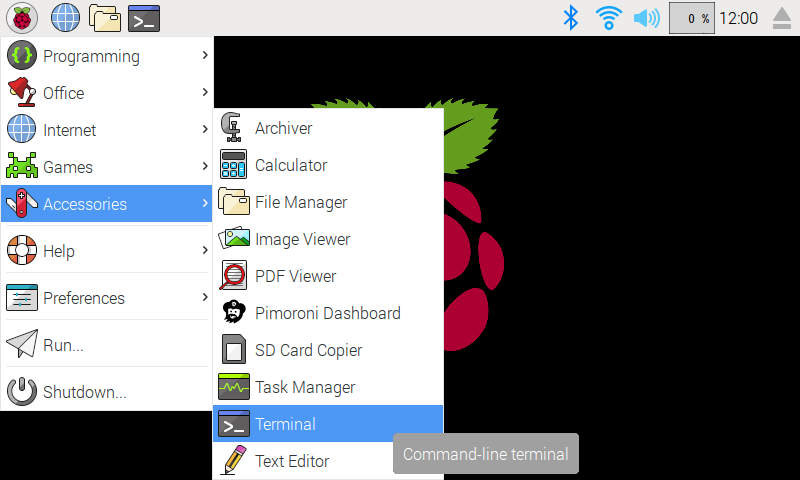
In the new terminal window type the command exactly as it appears below (check for typos) and follow the on-screen instructions:
```bash
git clone https://github.com/pimoroni/bme680-python
cd bme680-python
./install.sh
```
**Note** Libraries will be installed in the "pimoroni" virtual environment, you will need to activate it to run examples:
```
source ~/.virtualenvs/pimoroni/bin/activate
```
### Development:
If you want to contribute, or like living on the edge of your seat by having the latest code, you can install the development version like so:
```bash
git clone https://github.com/pimoroni/bme680-python
cd bme680-python
./install.sh --unstable
```
In all cases you will have to enable the i2c bus:
```
sudo raspi-config nonint do_i2c 0
```
## Documentation & Support
* Guides and tutorials - https://learn.pimoroni.com/bme680-breakout
* Get help - http://forums.pimoroni.com/c/support
|