

File size: 6,999 Bytes
db4810d |
1 2 3 4 5 6 7 8 9 10 11 12 13 14 15 16 17 18 19 20 21 22 23 24 25 26 27 28 29 30 31 32 33 34 35 36 37 38 39 40 41 42 43 44 45 46 47 48 49 50 51 52 53 54 55 56 57 58 59 60 61 62 63 64 65 66 67 68 69 70 71 72 73 74 75 76 77 78 79 80 81 82 83 84 85 86 87 88 89 90 91 92 93 94 95 96 97 98 99 100 101 102 103 104 105 106 107 108 109 110 111 112 113 114 115 116 117 118 119 120 121 122 123 124 125 126 127 128 129 130 131 132 133 134 135 136 137 138 139 140 141 142 143 144 145 146 147 148 149 150 151 152 153 154 155 156 157 158 159 160 161 162 163 164 165 166 167 168 169 170 171 172 173 174 175 176 177 178 179 180 181 182 183 184 185 186 187 188 189 190 191 192 193 194 |
<picture>
<source media="(prefers-color-scheme: dark)" srcset="./static/browser-use-dark.png">
<source media="(prefers-color-scheme: light)" srcset="./static/browser-use.png">
<img alt="Shows a black Browser Use Logo in light color mode and a white one in dark color mode." src="./static/browser-use.png" width="full">
</picture>
<h1 align="center">Enable AI to control your browser 🤖</h1>
[](https://github.com/gregpr07/browser-use/stargazers)
[](https://link.browser-use.com/discord)
[](https://cloud.browser-use.com)
[](https://docs.browser-use.com)
[](https://x.com/gregpr07)
[](https://x.com/mamagnus00)
[](https://app.workweave.ai/reports/repository/org_T5Pvn3UBswTHIsN1dWS3voPg/881458615)
🌐 Browser-use is the easiest way to connect your AI agents with the browser.
💡 See what others are building and share your projects in our [Discord](https://link.browser-use.com/discord)! Want Swag? Check out our [Merch store](https://browsermerch.com).
🌤️ Skip the setup - try our <b>hosted version</b> for instant browser automation! <b>[Try the cloud ☁︎](https://cloud.browser-use.com)</b>.
# Quick start
With pip (Python>=3.11):
```bash
pip install browser-use
```
install playwright:
```bash
playwright install
```
Spin up your agent:
```python
from langchain_openai import ChatOpenAI
from browser_use import Agent
import asyncio
from dotenv import load_dotenv
load_dotenv()
async def main():
agent = Agent(
task="Compare the price of gpt-4o and DeepSeek-V3",
llm=ChatOpenAI(model="gpt-4o"),
)
await agent.run()
asyncio.run(main())
```
Add your API keys for the provider you want to use to your `.env` file.
```bash
OPENAI_API_KEY=
```
For other settings, models, and more, check out the [documentation 📕](https://docs.browser-use.com).
### Test with UI
You can test [browser-use with a UI repository](https://github.com/browser-use/web-ui)
Or simply run the gradio example:
```
uv pip install gradio
```
```bash
python examples/ui/gradio_demo.py
```
# Demos
<br/><br/>
[Task](https://github.com/browser-use/browser-use/blob/main/examples/use-cases/shopping.py): Add grocery items to cart, and checkout.
[](https://www.youtube.com/watch?v=L2Ya9PYNns8)
<br/><br/>
Prompt: Add my latest LinkedIn follower to my leads in Salesforce.
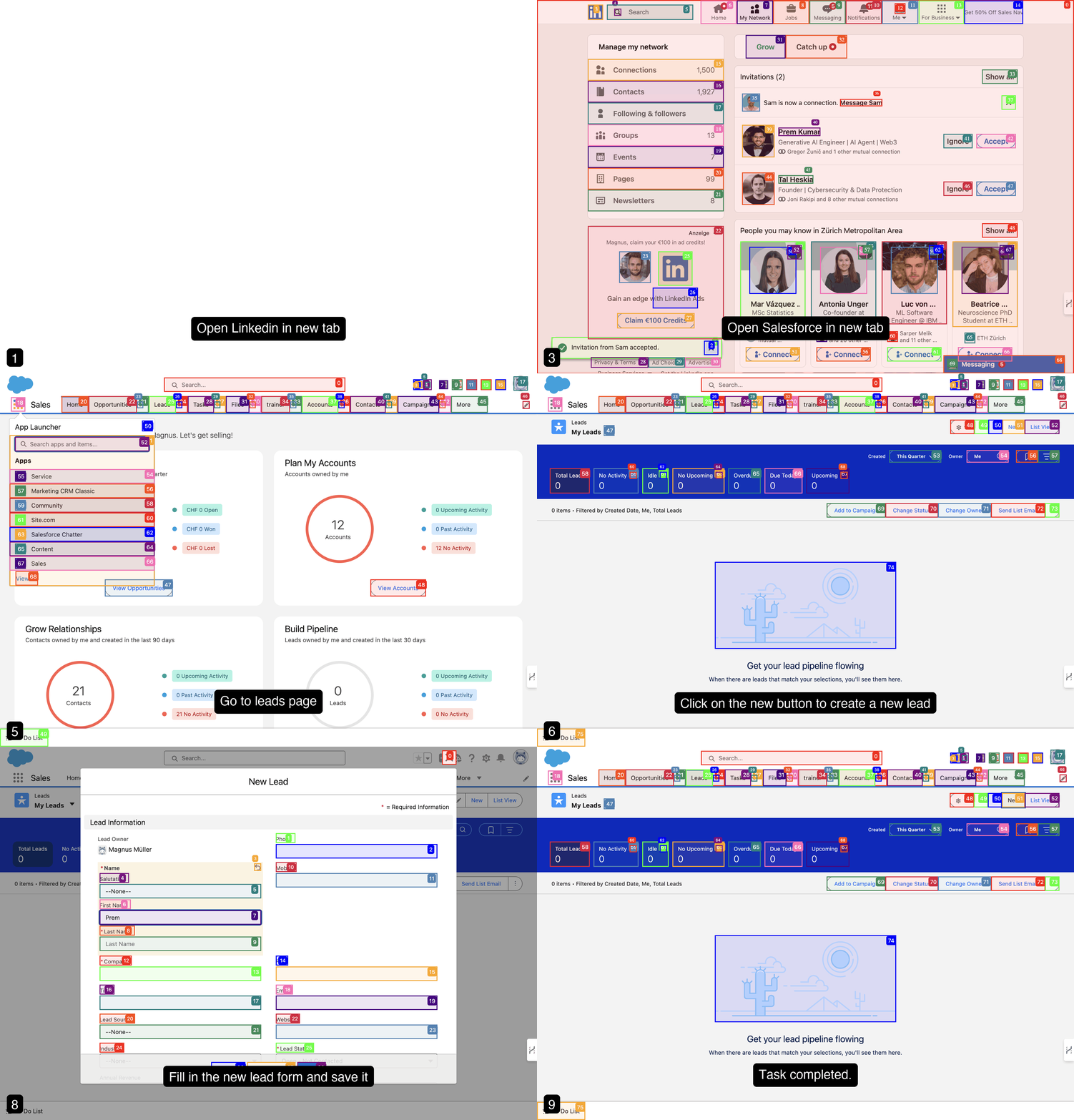
<br/><br/>
[Prompt](https://github.com/browser-use/browser-use/blob/main/examples/use-cases/find_and_apply_to_jobs.py): Read my CV & find ML jobs, save them to a file, and then start applying for them in new tabs, if you need help, ask me.'
https://github.com/user-attachments/assets/171fb4d6-0355-46f2-863e-edb04a828d04
<br/><br/>
[Prompt](https://github.com/browser-use/browser-use/blob/main/examples/browser/real_browser.py): Write a letter in Google Docs to my Papa, thanking him for everything, and save the document as a PDF.

<br/><br/>
[Prompt](https://github.com/browser-use/browser-use/blob/main/examples/custom-functions/save_to_file_hugging_face.py): Look up models with a license of cc-by-sa-4.0 and sort by most likes on Hugging face, save top 5 to file.
https://github.com/user-attachments/assets/de73ee39-432c-4b97-b4e8-939fd7f323b3
<br/><br/>
## More examples
For more examples see the [examples](examples) folder or join the [Discord](https://link.browser-use.com/discord) and show off your project.
# Vision
Tell your computer what to do, and it gets it done.
## Roadmap
### Agent
- [ ] Improve agent memory (summarize, compress, RAG, etc.)
- [ ] Enhance planning capabilities (load website specific context)
- [ ] Reduce token consumption (system prompt, DOM state)
### DOM Extraction
- [ ] Improve extraction for datepickers, dropdowns, special elements
- [ ] Improve state representation for UI elements
### Rerunning tasks
- [ ] LLM as fallback
- [ ] Make it easy to define workfows templates where LLM fills in the details
- [ ] Return playwright script from the agent
### Datasets
- [ ] Create datasets for complex tasks
- [ ] Benchmark various models against each other
- [ ] Fine-tuning models for specific tasks
### User Experience
- [ ] Human-in-the-loop execution
- [ ] Improve the generated GIF quality
- [ ] Create various demos for tutorial execution, job application, QA testing, social media, etc.
## Contributing
We love contributions! Feel free to open issues for bugs or feature requests. To contribute to the docs, check out the `/docs` folder.
## Local Setup
To learn more about the library, check out the [local setup 📕](https://docs.browser-use.com/development/local-setup).
## Cooperations
We are forming a commission to define best practices for UI/UX design for browser agents.
Together, we're exploring how software redesign improves the performance of AI agents and gives these companies a competitive advantage by designing their existing software to be at the forefront of the agent age.
Email [Toby](mailto:tbiddle@loop11.com?subject=I%20want%20to%20join%20the%20UI/UX%20commission%20for%20AI%20agents&body=Hi%20Toby%2C%0A%0AI%20found%20you%20in%20the%20browser-use%20GitHub%20README.%0A%0A) to apply for a seat on the committee.
## Swag
Want to show off your Browser-use swag? Check out our [Merch store](https://browsermerch.com). Good contributors will receive swag for free 👀.
## Citation
If you use Browser Use in your research or project, please cite:
```bibtex
@software{browser_use2024,
author = {Müller, Magnus and Žunič, Gregor},
title = {Browser Use: Enable AI to control your browser},
year = {2024},
publisher = {GitHub},
url = {https://github.com/browser-use/browser-use}
}
```
<div align="center"> <img src="https://github.com/user-attachments/assets/402b2129-b6ac-44d3-a217-01aea3277dce" width="400"/>
[](https://x.com/gregpr07)
[](https://x.com/mamagnus00)
</div>
<div align="center">
Made with ❤️ in Zurich and San Francisco
</div>
|