# Fully Sharded Data Parallel
[Fully sharded data parallel](https://pytorch.org/docs/stable/fsdp.html) (FSDP) is developed for distributed training of large pretrained models up to 1T parameters. FSDP achieves this by sharding the model parameters, gradients, and optimizer states across data parallel processes and it can also offload sharded model parameters to a CPU. The memory efficiency afforded by FSDP allows you to scale training to larger batch or model sizes.
Both of these features are supported in 🤗 Accelerate, and you can use them with 🤗 PEFT.
# Use PEFT and FSDP
This section of guide will help you learn how to use our DeepSpeed [training script](https://github.com/huggingface/peft/blob/main/examples/sft/train.py) for performing SFT. You'll configure the script to do SFT (supervised fine-tuning) of Llama-70B model with LoRA and FSDP on 8xH100 80GB GPUs on a single machine. You can configure it to scale to multiple machines by changing the accelerate config.
## Configuration
Start by running the following command to [create a FSDP configuration file](https://huggingface.co/docs/accelerate/quicktour#launching-your-distributed-script) with 🤗 Accelerate. The `--config_file` flag allows you to save the configuration file to a specific location, otherwise it is saved as a `default_config.yaml` file in the 🤗 Accelerate cache.
The configuration file is used to set the default options when you launch the training script.
```bash
accelerate config --config_file fsdp_config.yaml
```
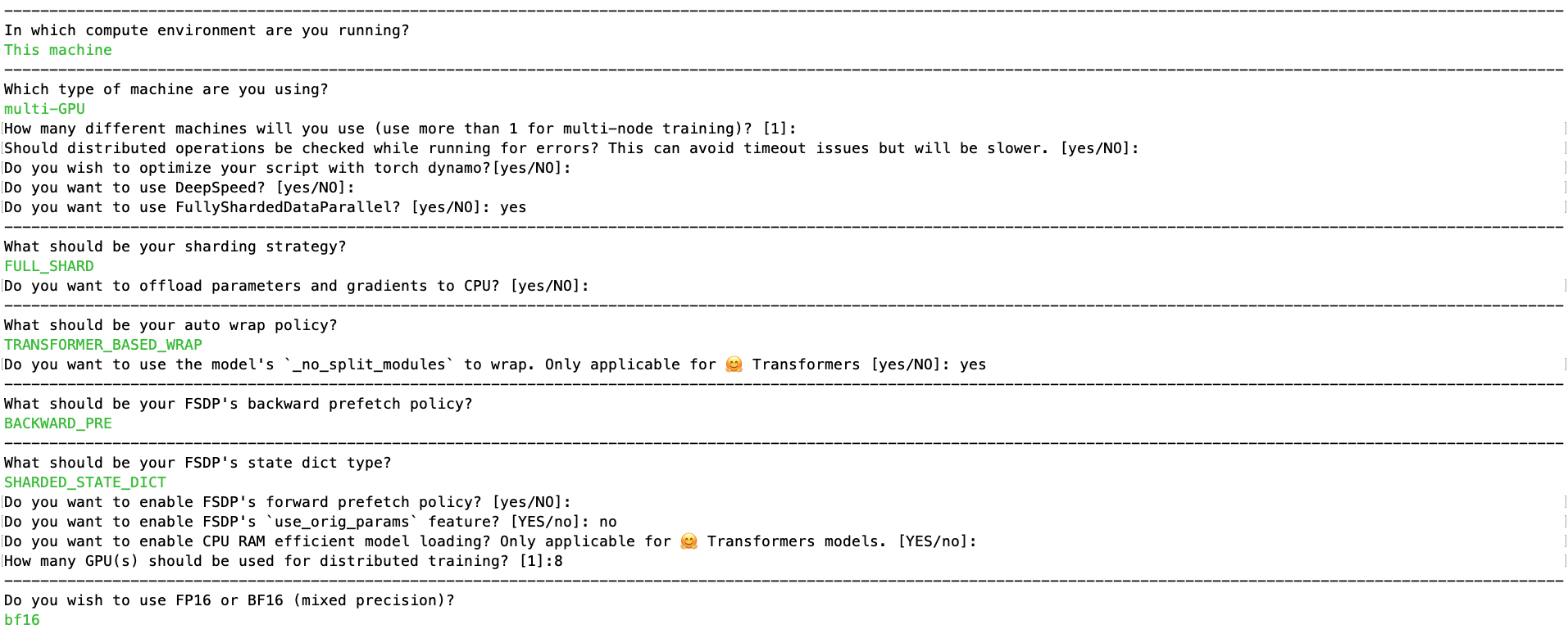
You'll be asked a few questions about your setup, and configure the following arguments. In this example, you'll answer the questionnaire as shown in the image below.
Creating Accelerate's config to use FSDP
Once this is done, the corresponding config should look like below and you can find it in config folder at [fsdp_config.yaml](https://github.com/huggingface/peft/blob/main/examples/sft/configs/fsdp_config.yaml):
```yml
compute_environment: LOCAL_MACHINE
debug: false
distributed_type: FSDP
downcast_bf16: 'no'
fsdp_config:
fsdp_auto_wrap_policy: TRANSFORMER_BASED_WRAP
fsdp_backward_prefetch: BACKWARD_PRE
fsdp_cpu_ram_efficient_loading: true
fsdp_forward_prefetch: false
fsdp_offload_params: false
fsdp_sharding_strategy: FULL_SHARD
fsdp_state_dict_type: SHARDED_STATE_DICT
fsdp_sync_module_states: true
fsdp_use_orig_params: false
machine_rank: 0
main_training_function: main
mixed_precision: bf16
num_machines: 1
num_processes: 8
rdzv_backend: static
same_network: true
tpu_env: []
tpu_use_cluster: false
tpu_use_sudo: false
use_cpu: false
```
## Launch command
The launch command is available at [run_peft_fsdp.sh](https://github.com/huggingface/peft/blob/main/examples/sft/run_peft_fsdp.sh) and it is also shown below:
```bash
accelerate launch --config_file "configs/fsdp_config.yaml" train.py \
--seed 100 \
--model_name_or_path "meta-llama/Llama-2-70b-hf" \
--dataset_name "smangrul/ultrachat-10k-chatml" \
--chat_template_format "chatml" \
--add_special_tokens False \
--append_concat_token False \
--splits "train,test" \
--max_seq_len 2048 \
--num_train_epochs 1 \
--logging_steps 5 \
--log_level "info" \
--logging_strategy "steps" \
--eval_strategy "epoch" \
--save_strategy "epoch" \
--push_to_hub \
--hub_private_repo True \
--hub_strategy "every_save" \
--bf16 True \
--packing True \
--learning_rate 1e-4 \
--lr_scheduler_type "cosine" \
--weight_decay 1e-4 \
--warmup_ratio 0.0 \
--max_grad_norm 1.0 \
--output_dir "llama-sft-lora-fsdp" \
--per_device_train_batch_size 8 \
--per_device_eval_batch_size 8 \
--gradient_accumulation_steps 4 \
--gradient_checkpointing True \
--use_reentrant False \
--dataset_text_field "content" \
--use_flash_attn True \
--use_peft_lora True \
--lora_r 8 \
--lora_alpha 16 \
--lora_dropout 0.1 \
--lora_target_modules "all-linear" \
--use_4bit_quantization False
```
Notice that we are using LoRA with rank=8, alpha=16 and targeting all linear layers. We are passing the FSDP config file and finetuning the 70B Llama model on a subset of the [ultrachat dataset](https://huggingface.co/datasets/HuggingFaceH4/ultrachat_200k).
## The important parts
Let's dive a little deeper into the script so you can see what's going on, and understand how it works.
The first thing to know is that the script uses FSDP for distributed training as the FSDP config has been passed. The [`~trl.SFTTrainer`] class handles all the heavy lifting of creating PEFT model using the peft config that is passed. After that when you call `trainer.train()`, Trainer internally uses 🤗 Accelerate to prepare model, optimizer and trainer using the FSDP config to create FSDP wrapped model which is then trained. The main code snippet is below:
```python
# trainer
trainer = SFTTrainer(
model=model,
processing_class=tokenizer,
args=training_args,
train_dataset=train_dataset,
eval_dataset=eval_dataset,
peft_config=peft_config,
)
trainer.accelerator.print(f"{trainer.model}")
if model_args.use_peft_lora:
# handle PEFT+FSDP case
trainer.model.print_trainable_parameters()
if getattr(trainer.accelerator.state, "fsdp_plugin", None):
from peft.utils.other import fsdp_auto_wrap_policy
fsdp_plugin = trainer.accelerator.state.fsdp_plugin
fsdp_plugin.auto_wrap_policy = fsdp_auto_wrap_policy(trainer.model)
# train
checkpoint = None
if training_args.resume_from_checkpoint is not None:
checkpoint = training_args.resume_from_checkpoint
trainer.train(resume_from_checkpoint=checkpoint)
# saving final model
if trainer.is_fsdp_enabled:
trainer.accelerator.state.fsdp_plugin.set_state_dict_type("FULL_STATE_DICT")
trainer.save_model()
```
Here, one main thing to note currently when using FSDP with PEFT is that `use_orig_params` needs to be `False` to realize GPU memory savings. Due to `use_orig_params=False`, the auto wrap policy for FSDP needs to change so that trainable and non-trainable parameters are wrapped separately. This is done by the code snippt below which uses the util function `fsdp_auto_wrap_policy` from PEFT:
```
if getattr(trainer.accelerator.state, "fsdp_plugin", None):
from peft.utils.other import fsdp_auto_wrap_policy
fsdp_plugin = trainer.accelerator.state.fsdp_plugin
fsdp_plugin.auto_wrap_policy = fsdp_auto_wrap_policy(trainer.model)
```
## Memory usage
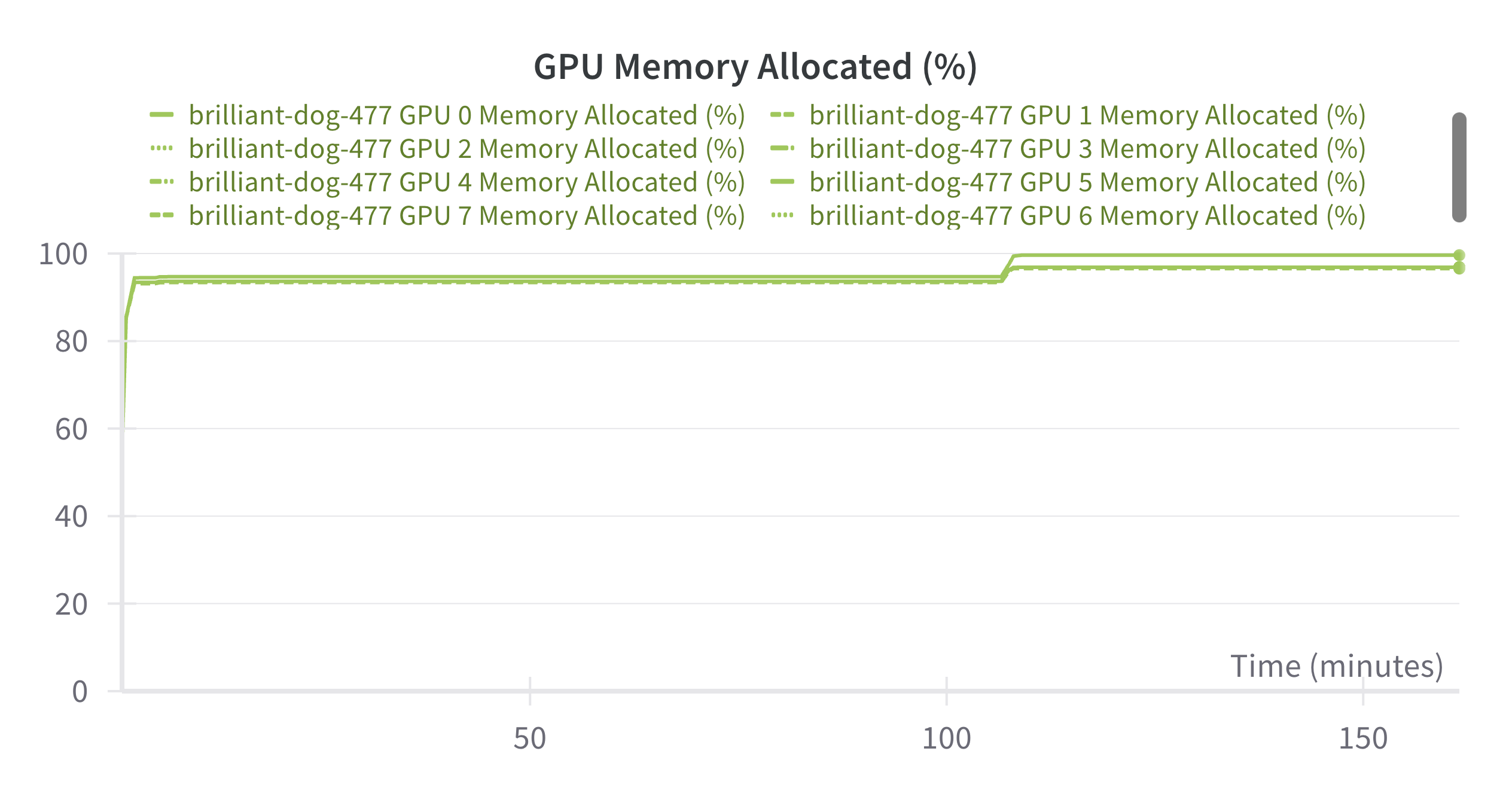
In the above example, the memory consumed per GPU is 72-80 GB (90-98%) as seen in the screenshot below. The slight increase in GPU memory at the end is when saving the model using `FULL_STATE_DICT` state dict type instead of the `SHARDED_STATE_DICT` so that the model has adapter weights that can be loaded normally with `from_pretrained` method during inference:
GPU memory usage for the training run
# Use PEFT QLoRA and FSDP for finetuning large models on multiple GPUs
In this section, we will look at how to use QLoRA and FSDP for finetuning 70B llama model on 2X24GB GPUs. [Answer.AI](https://www.answer.ai/) in collaboration with bitsandbytes and Hugging Face 🤗 open sourced code enabling the usage of FSDP+QLoRA and explained the whole process in their insightful blogpost [You can now train a 70b language model at home](https://www.answer.ai/posts/2024-03-06-fsdp-qlora.html). This is now integrated in Hugging Face ecosystem.
For this, we first need `bitsandbytes>=0.43.3`, `accelerate>=1.0.1`, `transformers>4.44.2`, `trl>0.11.4` and `peft>0.13.0`. We need to set `fsdp_cpu_ram_efficient_loading=true`, `fsdp_use_orig_params=false` and `fsdp_offload_params=true`(cpu offloading) when using Accelerate config. When not using accelerate launcher, you can alternately set the environment variable `export FSDP_CPU_RAM_EFFICIENT_LOADING=true`. Here, we will be using accelerate config and below is the config which can be found at [fsdp_config_qlora.yaml](https://github.com/huggingface/peft/blob/main/examples/sft/configs/fsdp_config_qlora.yaml):
```yml
compute_environment: LOCAL_MACHINE
debug: false
distributed_type: FSDP
downcast_bf16: 'no'
fsdp_config:
fsdp_auto_wrap_policy: TRANSFORMER_BASED_WRAP
fsdp_backward_prefetch: BACKWARD_PRE
fsdp_cpu_ram_efficient_loading: true
fsdp_forward_prefetch: false
fsdp_offload_params: true
fsdp_sharding_strategy: FULL_SHARD
fsdp_state_dict_type: SHARDED_STATE_DICT
fsdp_sync_module_states: true
fsdp_use_orig_params: false
machine_rank: 0
main_training_function: main
mixed_precision: 'no'
num_machines: 1
num_processes: 2
rdzv_backend: static
same_network: true
tpu_env: []
tpu_use_cluster: false
tpu_use_sudo: false
use_cpu: false
```
Launch command is given below which is available at [run_peft_qlora_fsdp.sh](https://github.com/huggingface/peft/blob/main/examples/sft/run_peft_qlora_fsdp.sh):
```
accelerate launch --config_file "configs/fsdp_config_qlora.yaml" train.py \
--seed 100 \
--model_name_or_path "meta-llama/Llama-2-70b-hf" \
--dataset_name "smangrul/ultrachat-10k-chatml" \
--chat_template_format "chatml" \
--add_special_tokens False \
--append_concat_token False \
--splits "train,test" \
--max_seq_len 2048 \
--num_train_epochs 1 \
--logging_steps 5 \
--log_level "info" \
--logging_strategy "steps" \
--eval_strategy "epoch" \
--save_strategy "epoch" \
--push_to_hub \
--hub_private_repo True \
--hub_strategy "every_save" \
--bf16 True \
--packing True \
--learning_rate 1e-4 \
--lr_scheduler_type "cosine" \
--weight_decay 1e-4 \
--warmup_ratio 0.0 \
--max_grad_norm 1.0 \
--output_dir "llama-sft-qlora-fsdp" \
--per_device_train_batch_size 2 \
--per_device_eval_batch_size 2 \
--gradient_accumulation_steps 2 \
--gradient_checkpointing True \
--use_reentrant True \
--dataset_text_field "content" \
--use_flash_attn True \
--use_peft_lora True \
--lora_r 8 \
--lora_alpha 16 \
--lora_dropout 0.1 \
--lora_target_modules "all-linear" \
--use_4bit_quantization True \
--use_nested_quant True \
--bnb_4bit_compute_dtype "bfloat16" \
--bnb_4bit_quant_storage_dtype "bfloat16"
```
Notice the new argument being passed, `bnb_4bit_quant_storage_dtype`, which denotes the data type for packing the 4-bit parameters. For example, when it is set to `bfloat16`, **16/4 = 4** 4-bit params are packed together post quantization. When using mixed precision training with `bfloat16`, `bnb_4bit_quant_storage_dtype` can be either `bfloat16` for pure `bfloat16` finetuning, or `float32` for automatic mixed precision (this consumes more GPU memory). When using mixed precision training with `float16`, `bnb_4bit_quant_storage_dtype` should be set to `float32` for stable automatic mixed precision training.
In terms of training code, the important code changes are:
```diff
...
bnb_config = BitsAndBytesConfig(
load_in_4bit=args.use_4bit_quantization,
bnb_4bit_quant_type=args.bnb_4bit_quant_type,
bnb_4bit_compute_dtype=compute_dtype,
bnb_4bit_use_double_quant=args.use_nested_quant,
+ bnb_4bit_quant_storage=quant_storage_dtype,
)
...
model = AutoModelForCausalLM.from_pretrained(
args.model_name_or_path,
quantization_config=bnb_config,
trust_remote_code=True,
attn_implementation="flash_attention_2" if args.use_flash_attn else "eager",
+ torch_dtype=quant_storage_dtype or torch.float32,
)
```
Notice that `torch_dtype` for `AutoModelForCausalLM` is same as the `bnb_4bit_quant_storage` data type. That's it. Everything else is handled by Trainer and TRL.
## Memory usage
In the above example, the memory consumed per GPU is **19.6 GB** while CPU RAM usage is around **107 GB**. When disabling CPU offloading, the GPU memory usage is **35.6 GB/ GPU**. Therefore, what took 16X80GB GPUs for full finetuning, 8X80GB GPUs with FSDP+LoRA, and a couple of 80GB GPUs with DDP+QLoRA, now requires 2X24GB GPUs. This makes finetuning of large models more accessible.
## More resources
You can also refer the [llama-recipes](https://github.com/facebookresearch/llama-recipes/?tab=readme-ov-file#fine-tuning) repo and [Getting started with Llama](https://llama.meta.com/get-started/#fine-tuning) guide on how to finetune using FSDP and PEFT.
## Caveats
1. Merging when using PEFT and FSDP is currently unsupported and will raise error.
2. Passing `modules_to_save` config parameter to is untested at present.
3. GPU Memory saving when using CPU Offloading is untested at present.
4. When using FSDP+QLoRA, `paged_adamw_8bit` currently results in an error when saving a checkpoint.
5. DoRA training with FSDP should work (albeit at lower speed than LoRA). If combined with bitsandbytes (QDoRA), 4-bit quantization should also work, but 8-bit quantization has known issues and is not recommended.