
Spaces:
Runtime error

Runtime error
File size: 5,651 Bytes
d333edb 87901eb d333edb a80d866 eee8b22 b6cd416 d333edb b6cd416 bbaf7be d333edb b6cd416 d333edb 87901eb d333edb |
1 2 3 4 5 6 7 8 9 10 11 12 13 14 15 16 17 18 19 20 21 22 23 24 25 26 27 28 29 30 31 32 33 34 35 36 37 38 39 40 41 42 43 44 45 46 47 48 49 50 51 52 53 54 55 56 57 58 59 60 61 62 63 64 65 66 67 68 69 70 71 72 73 74 75 76 77 78 79 80 81 82 83 84 85 86 87 88 89 90 91 92 93 94 95 96 97 98 99 100 101 102 103 104 105 106 107 108 109 110 111 112 113 114 115 116 117 118 119 120 121 122 123 124 125 126 127 128 129 130 131 132 133 134 135 136 137 138 139 140 141 142 143 144 145 146 147 148 149 150 151 152 153 154 155 156 157 158 159 160 161 162 163 164 165 |
import asyncio
import os
import threading
from threading import Event
from typing import Optional
import discord
import gradio as gr
from discord import Permissions
from discord.ext import commands
from discord.utils import oauth_url
import gradio_client as grc
from gradio_client.utils import QueueError
event = Event()
DISCORD_TOKEN = os.getenv("DISCORD_TOKEN")
async def wait(job):
while not job.done():
await asyncio.sleep(0.2)
## GRADIO UI API LINK ##
def get_client(session: Optional[str] = None) -> grc.Client:
client = grc.Client("https://cryptoscoutv1-cryptoscout-crewai-coinsearchv2.hf.space/", hf_token=os.getenv("HF_TOKEN"))
if session:
client.session_hash = session
return client
def truncate_response(response: str) -> str:
ending = "...\nTruncating response to 2000 characters due to discord api limits."
if len(response) > 2000:
return response[: 2000 - len(ending)] + ending
else:
return response
intents = discord.Intents.default()
intents.message_content = True
bot = commands.Bot(command_prefix="/", intents=intents)
## BOT COMMANDS ##
@bot.event
async def on_ready():
print(f"Logged in as {bot.user} (ID: {bot.user.id})")
synced = await bot.tree.sync()
print(f"Synced commands: {', '.join([s.name for s in synced])}.")
event.set()
print("------")
# Generate OAuth URL when the bot is ready
permissions = Permissions(326417525824)
url = oauth_url(bot.user.id, permissions=permissions)
print(f"Add this bot to your server by clicking this link: {url}")
thread_to_client = {}
thread_to_user = {}
## /echo command to return the llm repsonse ##
@bot.hybrid_command(name="cscoinsearch", description="Enter the cryptocurrency TICKER or SYMBOL")
async def chat(ctx, symbol: str): # Remove the optional parameter CoinName
if len(symbol) > 5:
await ctx.send("The symbol should be at most 5 characters long.")
return
if ctx.author.id == bot.user.id:
return
try:
# Acknowledge the command immediately
await ctx.send(f"Generating report for - {symbol}. Please wait 2-3 minutes.")
loop = asyncio.get_running_loop()
client = await loop.run_in_executor(None, get_client, None)
job = client.submit(symbol, api_name="/predict")
await wait(job)
try:
job.result()
response = job.outputs()[-1]
await ctx.send(f"```{truncate_response(response)}```") # Send the LLM response
except QueueError:
await ctx.send("The gradio space powering this bot is really busy! Please try again later!")
except Exception as e:
print(f"{e}")
@bot.hybrid_command(name="cshelp", description="Get information on how to use this bot.")
async def help_command(ctx):
help_message = """
**How to Use This Bot**
- Use `/echo your_message` to interact with the bot.
- Your message will be processed, and you will get a response.
- If you need any assistance, contact the server admins.
"""
await ctx.send(help_message)
@bot.event
async def on_message(message):
if message.author.bot:
return
if message.content.startswith(bot.command_prefix):
await bot.process_commands(message)
def run_bot():
if not DISCORD_TOKEN:
print("DISCORD_TOKEN NOT SET")
event.set()
else:
bot.run(DISCORD_TOKEN)
threading.Thread(target=run_bot).start()
event.wait()
if not DISCORD_TOKEN:
welcome_message = """
## You have not specified a DISCORD_TOKEN, which means you have not created a bot account. Please follow these steps:
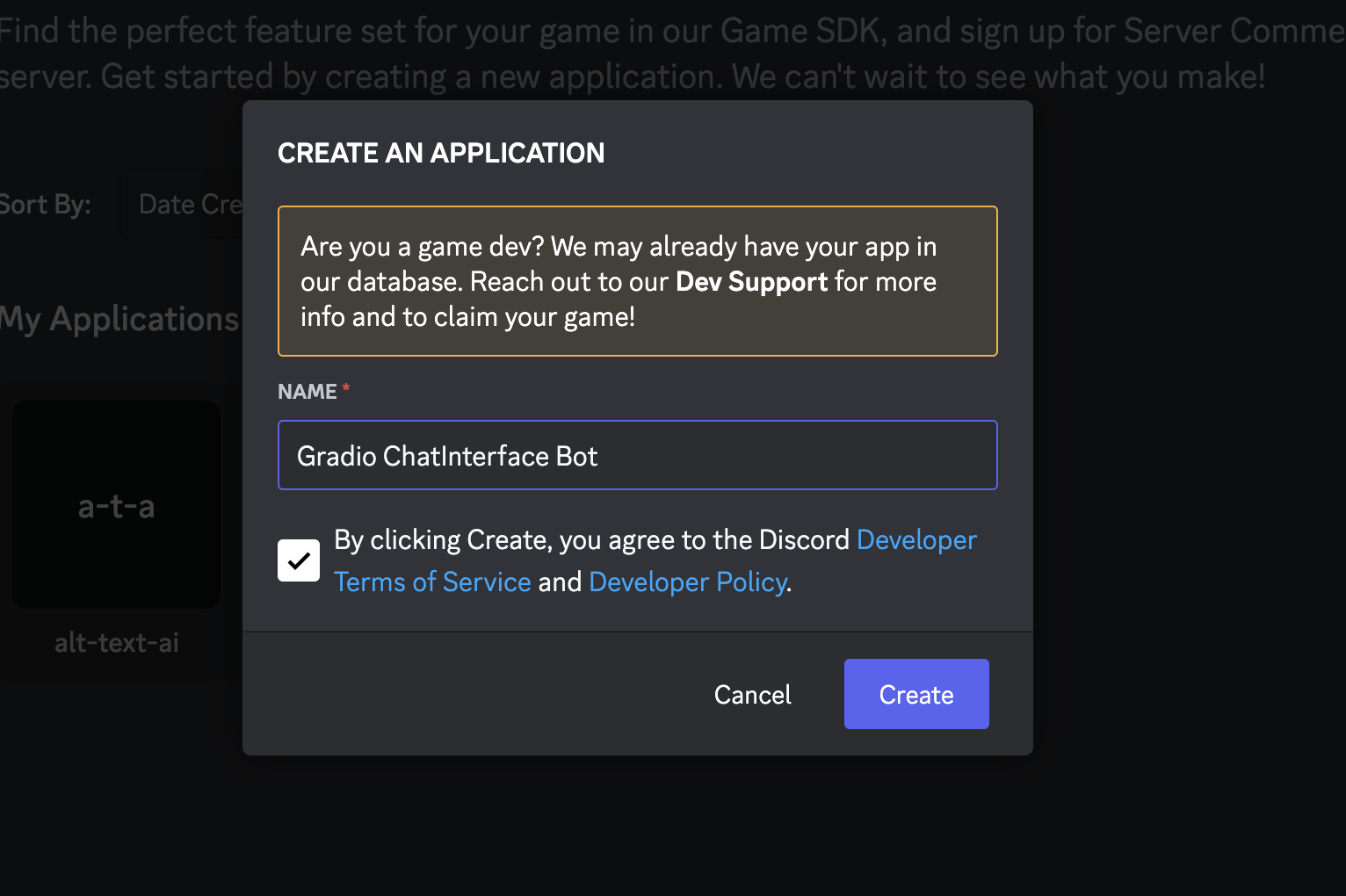
### 1. Go to https://discord.com/developers/applications and click 'New Application'
### 2. Give your bot a name 🤖
## 3. In Settings > Bot, click the 'Reset Token' button to get a new token. Write it down and keep it safe 🔐
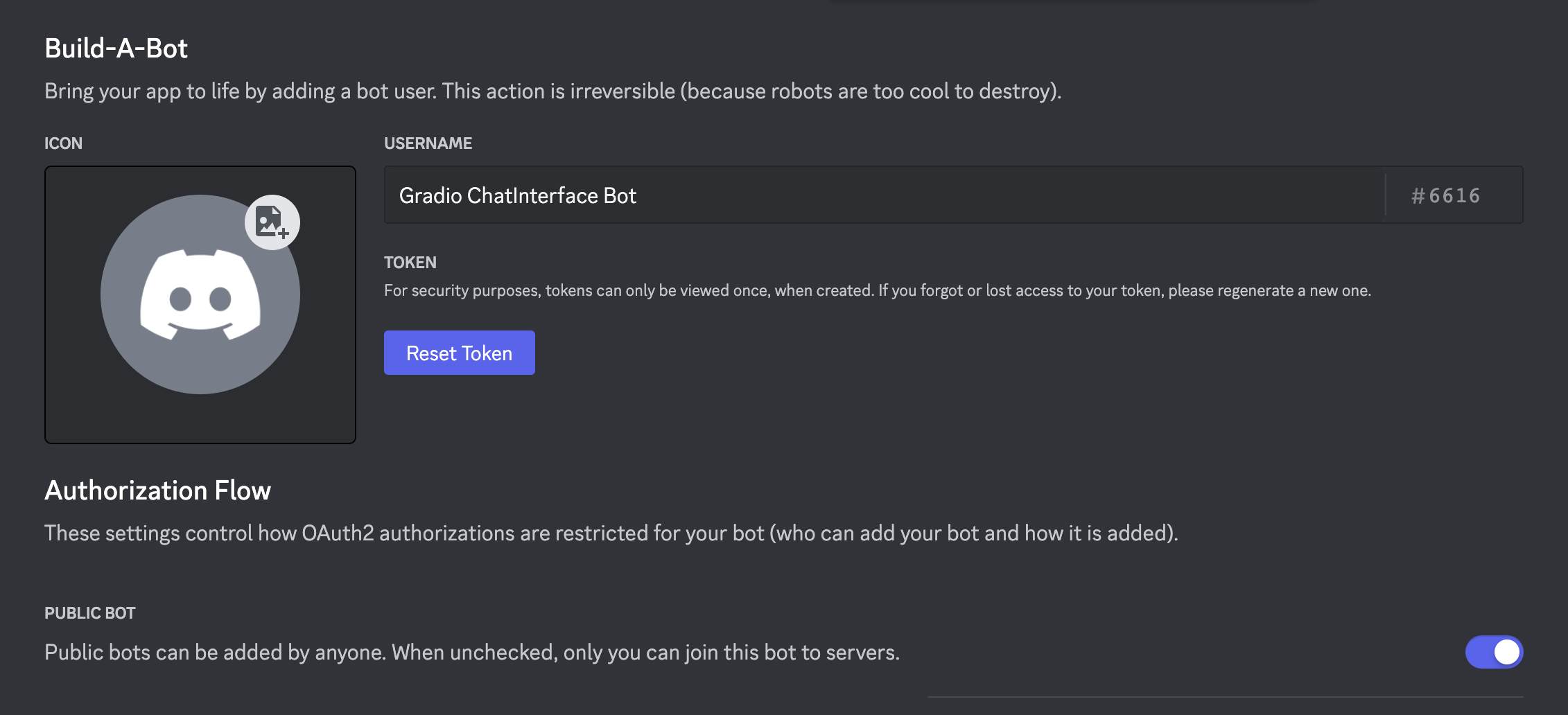
## 4. Optionally make the bot public if you want anyone to be able to add it to their servers
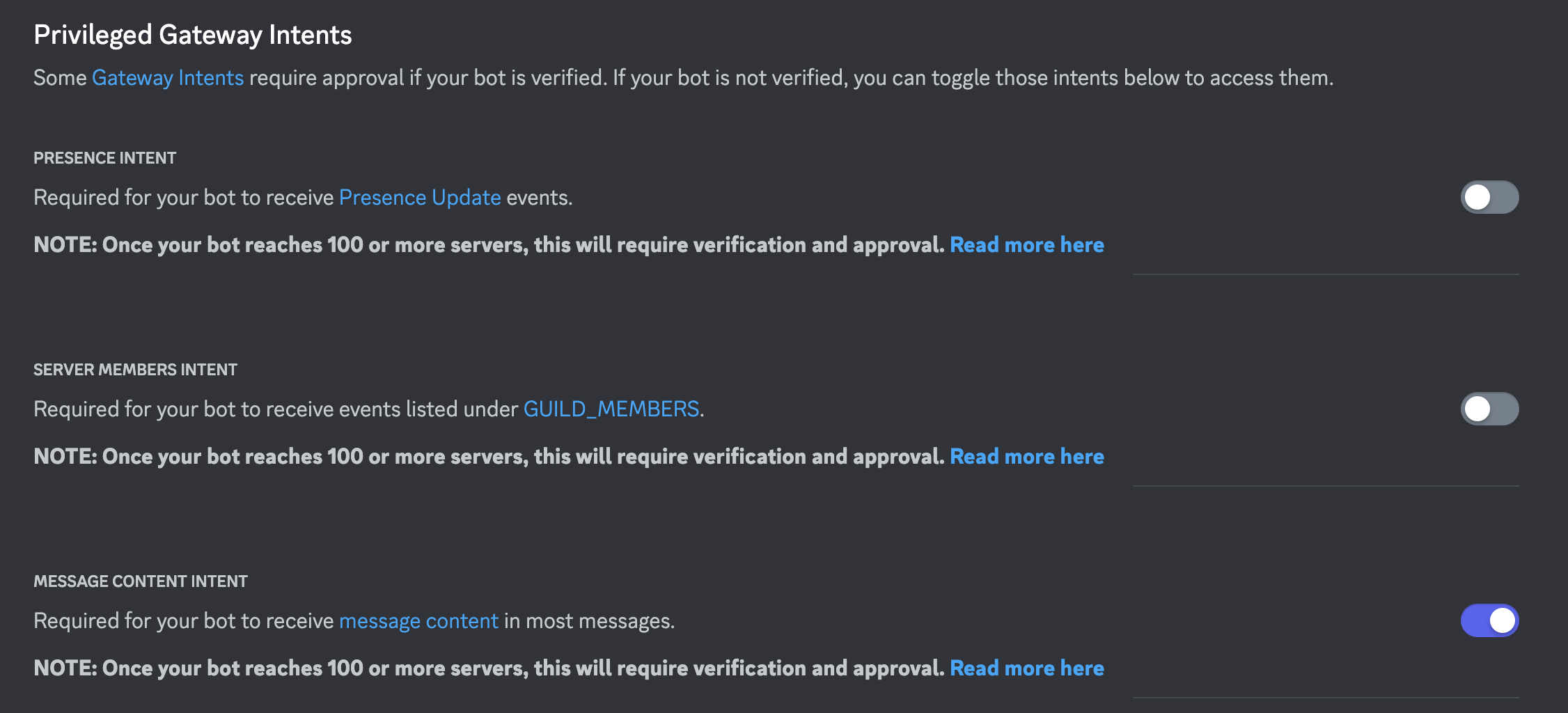
## 5. Scroll down and enable 'Message Content Intent' under 'Priviledged Gateway Intents'
## 6. Save your changes!
## 7. The token from step 3 is the DISCORD_TOKEN. Rerun the deploy_discord command, e.g client.deploy_discord(discord_bot_token=DISCORD_TOKEN, ...), or add the token as a space secret manually.
"""
else:
permissions = Permissions(326417525824)
url = oauth_url(bot.user.id, permissions=permissions)
welcome_message = f"""
## Add this bot to your server by clicking this link:
{url}
## How to use it?
The bot can be triggered via `!echo` followed by your text prompt.
## Enabling slash commands
If you are the owner of this bot, call the `!sync` command from your discord server.
This will allow anyone in your server to call the bot via `/echo`.
This is known as a slash command and is a nicer experience than calling the bot via `!echo`.
After calling `!sync`, it may take a few minutes for `/echo` to be recognized as a valid command
in your server.
⚠️ Note ⚠️: It is best to create a separate bot per command if you intend to use slash commands. Also make sure
none of your bots have matching command names.
"""
with gr.Blocks() as demo:
gr.Markdown(
f"""
# Cryptoscout-crewai-coinsearch
{welcome_message}
"""
)
demo.launch() |