

File size: 11,791 Bytes
06ba7ea | 1 2 3 4 5 6 7 8 9 10 11 12 13 14 15 16 17 18 19 20 21 22 23 24 25 26 27 28 29 30 31 32 33 34 35 36 37 38 39 40 41 42 43 44 45 46 47 48 49 50 51 52 53 54 55 56 57 58 59 60 61 62 63 64 65 66 67 68 69 70 71 72 73 74 75 76 77 78 79 80 81 82 83 84 85 86 87 88 89 90 91 92 93 94 95 96 97 98 99 100 101 102 103 104 105 106 107 108 109 110 111 112 113 114 115 116 117 118 119 120 121 122 123 124 125 126 127 128 129 130 131 132 133 134 135 136 137 138 139 140 141 142 143 144 145 146 147 148 149 150 151 152 153 154 155 156 157 158 159 160 161 162 163 164 165 166 167 168 169 170 171 172 173 174 175 176 177 178 179 180 181 182 183 184 185 186 187 188 189 190 191 192 193 194 195 196 197 198 199 200 201 202 203 204 205 206 207 208 209 210 211 212 213 214 215 216 217 218 219 220 221 222 223 224 225 226 227 228 229 230 231 232 233 234 235 236 237 238 239 240 241 242 243 244 245 246 247 248 249 250 251 252 253 254 255 256 257 258 259 260 261 262 263 264 265 266 267 268 269 270 271 272 273 274 275 276 277 278 279 280 | <div align="center">
<a href="#gh-light-mode-only">
<img
src="https://image-url-2-feature-1251524319.cos.ap-shanghai.myqcloud.com/openstoryline/web/static/brand_white.png"
alt="openstoryline"
width="70%"
/>
</a>
<a href="#gh-dark-mode-only">
<img
src="https://image-url-2-feature-1251524319.cos.ap-shanghai.myqcloud.com/openstoryline/web/static/brand_black.png"
alt="openstoryline"
width="70%"
/>
</a>
<p>
<a href="./README_zh.md">🇨🇳 简体中文</a> |
<a href="./README.md">🌏 English</a>
</p>
<p>
<a href="https://huggingface.co/FireRedTeam" target="_blank">
<img alt="Hugging Face" src="https://img.shields.io/badge/%F0%9F%A4%97%20Hugging%20Face-FireRedTeam-ffc107?color=ffc107&logoColor=white" style="display: inline-block;"/>
</a>
<img src="https://img.shields.io/badge/python-≥3.11-blue" alt="Python">
<img src="https://img.shields.io/badge/license-Apache%202.0-blue" alt="License">
<a href="https://image-url-2-feature-1251524319.cos.ap-shanghai.myqcloud.com/openstoryline/docs/media/others/group.jpg"><img src="https://img.shields.io/badge/Xiaohongshu-Group-E9DBFC?style=flat&logo=xiaohongshu&logoColor=white" alt="xiaohongshu"></a>
</p>
</div>
<div align="center">
[🤗 HuggingFace Demo](https://fireredteam-firered-openstoryline.hf.space/) • [🌐 Homepage](https://fireredteam.github.io/demos/firered_openstoryline/)
</div>
<div align="center">
<video src="https://github.com/user-attachments/assets/9116767e-bcd9-417a-93d8-2db4d3d5df8e" width="70%" poster=""> </video>
</div>
**FireRed-OpenStoryline** 将复杂的视频创作转化为自然直观的对话体验。兼顾易用性和企业级可靠性,让视频创作对初学者和创意爱好者都变得简单友好。
> FireRed,字面意思红色的火苗,取自“星星之火,可以燎原”。我们将这团火苗取名为 FireRed,就是希望将我们在真实场景中打磨出的 SOTA 能力,像火种一样撒向旷野,点燃全球开发者的想象力,共同改变这个 AI 的世界。
## ✨ 核心特性
- 🌐 **智能素材搜索与整理**: 自动在线搜索并下载符合你需求的图片和视频片段。基于用户主题素材进行片段拆分与内容理解
- ✍️ **智能文案生成**: 结合用户主题、画面理解与情绪识别,自动构建故事线及契合的旁白。内置少样本(Few-shot)仿写能力,支持通过输入参考文本(如种草测评、日常碎碎念等)定义文案风格,实现语感、节奏与句式的精准复刻。
- 🎵 **智能推荐音乐、配音与字体**:支持导入私有歌单,根据视频内容和情绪自动推荐背景音乐并智能卡点。只需描述"克制一点","偏情绪化","像纪录片旁白"等风格,系统即可匹配合适的配音与字体,保证整体风格协调统一。
- 💬 **对话式精修**:支持快速删减、替换或重组片段;修改任意字幕文案;调整文字颜色、字体、描边、位置等视觉元素——所有操作均通过自然语言完成,即改即得。
- ⚡ **剪辑技能沉淀**: 可一键保存为专属剪辑Skill,记录完整的剪辑逻辑。下次只需更换素材并选择对应Skill,即可快速复刻同款风格,实现高效批量生产。
## 🏗️ 架构
<p align="center">
<img src="https://raw.githubusercontent.com/FireRedTeam/fireredteam.github.io/main/demos/firered_openstoryline/pics/structure.jpg" alt="openstoryline 架构" width="800">
</p>
## ✨ 演示案例
<table align="center">
<tr>
<td align="center"><b>种草视频</b></td>
<td align="center"><b>幽默有趣</b></td>
<td align="center"><b>好物分享</b></td>
<td align="center"><b>文艺风格</b></td>
</tr>
<tr>
<td align="center"><video src="https://github.com/user-attachments/assets/28043813-1fda-4077-80d4-c6f540d7c7cb" controls width="220"></video></td>
<td align="center"><video src="https://github.com/user-attachments/assets/a1e33da2-a799-4398-a1bb-b25bb5143d7c" controls width="220"></video></td>
<td align="center"><video src="https://github.com/user-attachments/assets/444fd0fb-8824-4c25-b449-9309b0fcfd85" controls width="220"></video></td>
<td align="center"><video src="https://github.com/user-attachments/assets/2e69fa0d-b693-4d4f-b4d2-45146254f9e8" controls width="220"></video></td>
</tr>
</tr>
<tr>
<td align="center"><b>开箱视频</b></td>
<td align="center"><b>宠物说话</b></td>
<td align="center"><b>旅行Vlog</b></td>
<td align="center"><b>年终总结</b></td>
</tr>
<tr>
<td align="center"><video src="https://github.com/user-attachments/assets/ff1d669b-1d27-4cf8-b0be-1b141c717466" controls width="220"></video></td>
<td align="center"><video src="https://github.com/user-attachments/assets/063608bb-7fbd-4841-a08f-032ae459499f" controls width="220"></video></td>
<td align="center"><video src="https://github.com/user-attachments/assets/bc441dfa-e995-4575-8401-ecefa269e57b" controls width="220"></video></td>
<td align="center"><video src="https://github.com/user-attachments/assets/533ef5c3-bb76-4416-bff7-825e88b00b7d" controls width="220"></video></td>
</tr>
</tr>
</table>
> <sub>
> 🎨 <b>效果说明:</b>受限于开源素材的版权协议,第一行默认演示中的元素(字体/音乐)仅为基础效果。<b>强烈建议</b>接入<a href="https://github.com/FireRedTeam/FireRed-OpenStoryline/blob/main/docs/source/zh/guide.md#2-%E9%AB%98%E7%BA%A7%E4%BD%BF%E7%94%A8%E6%95%99%E7%A8%8B">自建元素库教程</a>,解锁商用级字体、音乐、特效等,可实现显著优于默认效果的视频质量。<br>
> ⚠️ <b>画质注:</b>受限于README展示空间,演示视频经过极限压缩。实际运行默认保持原分辨率输出,支持自定义尺寸。<br>
> Demo中:<b>第一行</b>为默认开源素材效果(受限模式),<b>第二行</b>为小红书App「AI剪辑」元素库效果。👉 <a href="https://image-url-2-feature-1251524319.cos.ap-shanghai.myqcloud.com/openstoryline/docs/media/others/ai_cut_guide.png">点击查看体验教程</a><br>
> ⚖️ <b>免责声明:</b>演示中包含的用户自摄素材及品牌标识仅作技术能力展示,版权归原作者所有,严禁二次分发。如有侵权请联系删除。
> </sub>
## 📦 安装
### 1. 克隆仓库
```bash
# 如果没有安装git,参考官方网站进行安装:https://git-scm.com/install/
# 或手动打包下载,并解压
git clone https://github.com/FireRedTeam/FireRed-OpenStoryline.git
cd FireRed-OpenStoryline
```
### 2. 创建虚拟环境
按照官方指南安装 Conda(推荐Miniforge,安装过程中建议勾选上自动配置环境变量):https://docs.conda.io/projects/conda/en/latest/user-guide/install/index.html
```
# 要求python>=3.11
conda create -n storyline python=3.11
conda activate storyline
```
### 3. 资源下载与依赖安装
#### 3.1 一键安装(仅支持Linux和MacOS)
```
sh build_env.sh
```
#### 3.2 手动安装
##### A. MacOS 或 Linux
- Step 1: 安装 wget(如果尚未安装)
```
# MacOS: 如果你还没有安装 Homebrew,请先安装:https://brew.sh/
brew install wget
# Ubuntu/Debian
sudo apt-get install wget
# CentOS
sudo yum install wget
```
- Step 2: 下载资源
```bash
sh download.sh
```
- Step 3: 安装依赖
```bash
pip install -r requirements.txt
```
###### B. Windows
- Step 1: 准备目录:在项目根目录下新建目录 `.storyline`。
- Step 2: 下载并解压:
* [下载模型 (models.zip)](https://image-url-2-feature-1251524319.cos.ap-shanghai.myqcloud.com/openstoryline/models.zip) -> 解压至 `.storyline` 目录。
* [下载资源 (resource.zip)](https://image-url-2-feature-1251524319.cos.ap-shanghai.myqcloud.com/openstoryline/resource.zip) -> 解压至 `resource` 目录。
- Step 3: **安装依赖**:
```bash
pip install -r requirements.txt
```
## 🚀 快速开始
注意:在开始之前,您需要先在 config.toml 中配置 API-Key。详细信息请参阅文档 [API-Key 配置](docs/source/zh/api-key.md)
### 1. 启动 MCP 服务器
#### MacOS or Linux
```bash
PYTHONPATH=src python -m open_storyline.mcp.server
```
#### Windows
```
$env:PYTHONPATH="src"; python -m open_storyline.mcp.server
```
### 2. 启动对话界面
- 方式 1:命令行界面
```bash
python cli.py
```
- 方式 2:Web 界面
```bash
uvicorn agent_fastapi:app --host 127.0.0.1 --port 7860
```
## 🐳 Docker 部署
如果未安装 Docker,请先安装 https://www.docker.com/products/docker-desktop/
### 拉取镜像
```
docker pull openstoryline/openstoryline:v1.0.0
```
### 启动镜像
```
docker run \
-v $(pwd)/config.toml:/app/config.toml \
-v $(pwd)/outputs:/app/outputs \
-p 7860:7860 \
openstoryline/openstoryline:v1.0.0
```
启动后访问Web界面 http://127.0.0.1:7860
## 📁 项目结构
```
FireRed-OpenStoryline/
├── 🎯 src/open_storyline/ 核心应用
│ ├── mcp/ 🔌 模型上下文协议
│ ├── nodes/ 🎬 视频处理节点
│ ├── skills/ 🛠️ Agent 技能库
│ ├── storage/ 💾 Agent 记忆系统
│ ├── utils/ 🧰 工具函数
│ ├── agent.py 🤖 Agent 构建
│ └── config.py ⚙️ 配置管理
├── 📚 docs/ 文档
├── 🐳 Dockerfile Docker 配置
├── 💬 prompts/ LLM 提示词模板
├── 🎨 resource/ 静态资源
│ ├── bgms/ 背景音乐库
│ ├── fonts/ 字体文件
│ ├── script_templates/ 视频脚本模板
│ └── unicode_emojis.json Emoji 列表
├── 🔧 scripts/ 工具脚本
├── 🌐 web/ Web 界面
├── 🚀 agent_fastapi.py FastAPI 服务器
├── 🖥️ cli.py 命令行界面
├── ⚙️ config.toml 主配置文件
├── 🚀 build_env.sh 环境构建脚本
├── 📥 download.sh 资源下载脚本
├── 📦 requirements.txt 运行时依赖
└── ▶️ run.sh 启动脚本
```
## 📚 文档
### 📖 教程索引
- [API申请与配置](docs/source/zh/api-key.md) - 如何申请和配置 API 密钥
- [使用教程](docs/source/zh/guide.md) - 常见用例和基本操作
- [常见问题](docs/source/zh/faq.md) - 常见问题解答
## TODO
- [ ] 添加口播类型视频剪辑功能
- [ ] 添加音色克隆功能
- [ ] 添加更多的转场/滤镜/特效功能
- [ ] 添加图像/视频生成和编辑能力
- [ ] 支持GPU渲染和高光裁切
## 致谢
本项目基于以下优秀的开源项目构建:
### 核心依赖
- [MoviePy](https://github.com/Zulko/moviepy) - 视频编辑库
- [FFmpeg](https://ffmpeg.org/) - 多媒体框架
- [LangChain](https://www.langchain.com/) - 提供预构建Agent的框架
## 📄 License
This project is licensed under the Apache License 2.0 - see the [LICENSE](LICENSE) file for details.
## ⭐ Star History
[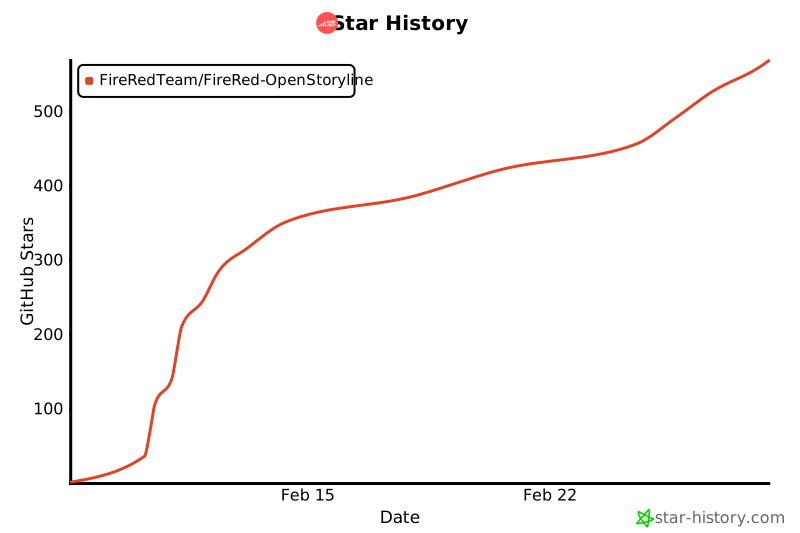](https://www.star-history.com/#FireRedTeam/FireRed-OpenStoryline&type=date&legend=top-left)
|