


File size: 8,620 Bytes
4bcd925 | 1 2 3 4 5 6 7 8 9 10 11 12 13 14 15 16 17 18 19 20 21 22 23 24 25 26 27 28 29 30 31 32 33 34 35 36 37 38 39 40 41 42 43 44 45 46 47 48 49 50 51 52 53 54 55 56 57 58 59 60 61 62 63 64 65 66 67 68 69 70 71 72 73 74 75 76 77 78 79 80 81 82 83 84 85 86 87 88 89 90 91 92 93 94 95 96 97 98 99 100 101 102 103 104 105 106 107 108 109 110 111 112 113 114 115 116 117 118 119 120 121 122 123 124 125 126 127 128 129 130 131 132 133 134 135 136 137 138 139 140 141 142 143 144 145 146 147 148 149 150 151 152 153 154 155 156 157 158 159 160 161 162 163 164 165 166 167 168 169 170 171 172 173 174 175 176 177 178 179 180 181 182 183 184 185 186 187 188 189 190 191 192 193 194 195 196 197 198 199 200 201 202 203 204 205 206 207 208 209 210 211 212 213 214 215 216 217 218 219 220 221 222 223 224 225 226 227 228 229 230 231 232 233 234 235 236 237 238 239 240 241 242 243 244 245 246 247 248 | <p align="center">
<img src="../docs/logo.svg" width="120" alt="Gemini Business2API logo" />
</p>
<h1 align="center">Gemini Business2API</h1>
<p align="center">Empowering AI with seamless integration</p>
<p align="center">
<a href="../README.md">简体中文</a> | <strong>English</strong>
</p>
<p align="center"><img src="https://img.shields.io/badge/License-MIT-yellow.svg" /> <img src="https://img.shields.io/badge/Python-3.11+-3776AB?logo=python&logoColor=white" /> <img src="https://img.shields.io/badge/FastAPI-0.110-009688?logo=fastapi&logoColor=white" /> <img src="https://img.shields.io/badge/Vue-3-4FC08D?logo=vue.js&logoColor=white" /> <img src="https://img.shields.io/badge/Vite-7-646CFF?logo=vite&logoColor=white" /> <img src="https://img.shields.io/badge/Docker-ready-2496ED?logo=docker&logoColor=white" /></p>
<p align="center">
<a href="https://huggingface.co/spaces/xiaoyukkkk/gemini-business2api?duplicate=true">
<img src="https://huggingface.co/datasets/huggingface/badges/resolve/main/deploy-to-spaces-md.svg" />
</a>
</p>
<p align="center"><em>💡 Tip: Remote environments (Hugging Face/Linux) and local environments can share the same database for automatic account data synchronization</em></p>
<p align="center">Convert Gemini Business to OpenAI-compatible API with multi-account load balancing, image generation, multimodal capabilities, and built-in admin panel.</p>
---
## 📜 License & Disclaimer
**License**: MIT License - See [LICENSE](../LICENSE) for details
### ⚠️ Prohibited Use & Anti-Abuse Policy
**This tool is strictly prohibited for:**
- Commercial use or profit-making activities
- Batch operations or automated abuse of any scale
- Market disruption or malicious competition
- Violations of Google's Terms of Service
- Violations of Microsoft's Terms of Service
**Consequences of Abuse**: Violations may result in permanent account suspension, legal liability, and all consequences are the sole responsibility of the user.
**Legitimate Use Only**: This project is intended solely for personal learning, technical research, and non-commercial educational purposes.
📖 **Full Disclaimer**: [DISCLAIMER_EN.md](DISCLAIMER_EN.md)
---
## ✨ Features
- ✅ Full OpenAI API compatibility - Seamless integration with existing tools
- ✅ Multi-account load balancing - Round-robin with automatic failover
- ✅ Automated account management - Auto registration and login with DuckMail and Microsoft email integration, supports headless browser mode
- ✅ Streaming output - Real-time responses
- ✅ Multimodal input - 100+ file types (images, PDF, Office docs, audio, video, code, etc.)
- ✅ Image generation & image-to-image - Configurable models, Base64 or URL output
- ✅ Smart file handling - Auto file type detection, supports URL and Base64
- ✅ Logging & monitoring - Real-time status and statistics
- ✅ Proxy support - Configure in the admin settings
- ✅ Built-in admin panel - Online configuration and account management
- ✅ Optional PostgreSQL backend — persists accounts/settings/stats [thanks PR](https://github.com/Dreamy-rain/gemini-business2api/pull/4)
## 🤖 Model Capabilities
| Model ID | Vision | Native Web | File Multimodal | Image Gen |
| ------------------------ | ------ | ---------- | --------------- | --------- |
| `gemini-auto` | ✅ | ✅ | ✅ | Optional |
| `gemini-2.5-flash` | ✅ | ✅ | ✅ | Optional |
| `gemini-2.5-pro` | ✅ | ✅ | ✅ | Optional |
| `gemini-3-flash-preview` | ✅ | ✅ | ✅ | Optional |
| `gemini-3-pro-preview` | ✅ | ✅ | ✅ | Optional |
## 🚀 Quick Start
### Method 1: Using Setup Script (Recommended)
**Linux/macOS:**
```bash
git clone https://github.com/Dreamy-rain/gemini-business2api.git
cd gemini-business2api
bash setup.sh
cp .env.example .env
# Edit .env to set ADMIN_KEY
source .venv/bin/activate # Linux/macOS
# .venv\Scripts\activate.bat # Windows
python main.py
# Run with pm2 in background
# Make sure you're in the project directory
pm2 start main.py --name gemini-api --interpreter ./.venv/bin/python3
```
**Windows:**
```cmd
git clone https://github.com/Dreamy-rain/gemini-business2api.git
cd gemini-business2api
setup.bat
copy .env.example .env
# Edit .env to set ADMIN_KEY
source .venv/bin/activate # Linux/macOS
# .venv\Scripts\activate.bat # Windows
python main.py
# Run with pm2 in background
# Make sure you're in the project directory
pm2 start main.py --name gemini-api --interpreter ./.venv/bin/python3
```
**Script Features:**
- ✅ Automatically syncs latest code
- ✅ Updates frontend to latest versions
- ✅ Creates/updates Python virtual environment
- ✅ Installs/updates dependencies
- ✅ Automatically creates `.env` config file (if not exists)
**First Installation:** After completion, edit `.env` to set `ADMIN_KEY`, then run `python main.py`
**Update Project:** Simply run the same command, the script will automatically update all components (code, dependencies, frontend)
### Method 2: Manual Deployment
```bash
git clone https://github.com/Dreamy-rain/gemini-business2api.git
cd gemini-business2api
# Build frontend
cd frontend
npm install
npm run build
cd ..
# Create virtual environment (recommended)
python3 -m venv .venv
source .venv/bin/activate # Linux/macOS
# .venv\Scripts\activate.bat # Windows
# Install Python dependencies
pip install -r requirements.txt
cp .env.example .env
# win copy .env.example .env
# Edit .env to set ADMIN_KEY
python main.py
# Run with pm2 in background
# Make sure you're in the project directory
pm2 start main.py --name gemini-api --interpreter ./.venv/bin/python3
```
### Method 3: Docker Compose (Recommended for Production)
**Supports ARM64 and AMD64 architectures**
```bash
# 1. Clone the repository
git clone https://github.com/Dreamy-rain/gemini-business2api.git
cd gemini-business2api
# 2. Configure environment variables
cp .env.example .env
# Edit .env to set ADMIN_KEY
# 3. Start the service
docker-compose up -d
# 4. View logs
docker-compose logs -f
# 5. Update to the latest version
docker-compose pull && docker-compose up -d
```
Thanks to [PR #9](https://github.com/Dreamy-rain/gemini-business2api/pull/9) for optimizing the Dockerfile build
### Optional: Database Persistence (Local / HF Spaces)
- Recommended on HF Spaces (free tier) to avoid data loss after restart
- Set `DATABASE_URL=postgresql://user:password@host/dbname?sslmode=require`
- Local: put it in `.env`
- HF Spaces: Settings -> Variables/Secrets
- Accounts/settings/stats are stored in the database
- Keep the connection string secret (it includes credentials)
```
# Get DATABASE_URL from Neon (recommended)
1. Open https://neon.tech and sign in
2. Create project -> choose a region
3. Open the project page, copy the Connection string
4. Example:
postgresql://user:password@ep-xxx.neon.tech/dbname?sslmode=require
```
### Access
- Admin Panel: `http://localhost:7860/` (Login with `ADMIN_KEY`)
- OpenAI-compatible API: `http://localhost:7860/v1/chat/completions`
### Configuration Tips
- Account config prioritizes `ACCOUNTS_CONFIG` env var, or can be entered in admin panel and saved to `data/accounts.json`.
- For authentication, configure `API_KEY` in the admin settings to protect `/v1/chat/completions`.
### Documentation
- Supported file types: [SUPPORTED_FILE_TYPES.md](SUPPORTED_FILE_TYPES.md)
## 📸 Screenshots
### Admin System
<table>
<tr>
<td><img src="img/1.png" alt="Admin System 1" /></td>
<td><img src="img/2.png" alt="Admin System 2" /></td>
</tr>
<tr>
<td><img src="img/3.png" alt="Admin System 3" /></td>
<td><img src="img/4.png" alt="Admin System 4" /></td>
</tr>
<tr>
<td><img src="img/5.png" alt="Admin System 5" /></td>
<td><img src="img/6.png" alt="Admin System 6" /></td>
</tr>
</table>
### Image Effects
<table>
<tr>
<td><img src="img/img_1.png" alt="Image Effects 1" /></td>
<td><img src="img/img_2.png" alt="Image Effects 2" /></td>
</tr>
<tr>
<td><img src="img/img_3.png" alt="Image Effects 3" /></td>
<td><img src="img/img_4.png" alt="Image Effects 4" /></td>
</tr>
</table>
## ⭐ Star History
[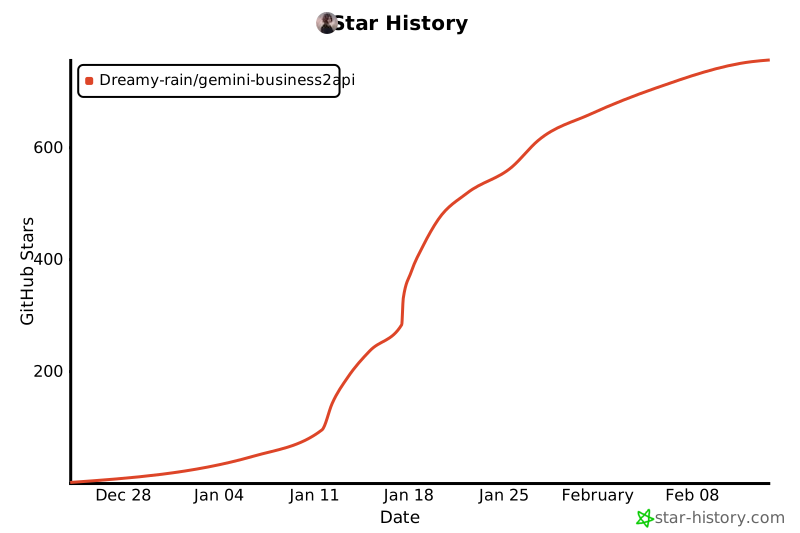](https://www.star-history.com/#Dreamy-rain/gemini-business2api&type=date&legend=top-left)
**If this project helps you, please give it a ⭐ Star!**
|