
Spaces:
Running

Running

| """ | |
| Title: MultipleChoice Task with Transfer Learning | |
| Author: Md Awsafur Rahman | |
| Date created: 2023/09/14 | |
| Last modified: 2025/06/16 | |
| Description: Use pre-trained nlp models for multiplechoice task. | |
| Accelerator: GPU | |
| """ | |
| """ | |
| ## Introduction | |
| In this example, we will demonstrate how to perform the **MultipleChoice** task by | |
| finetuning pre-trained DebertaV3 model. In this task, several candidate answers are | |
| provided along with a context and the model is trained to select the correct answer | |
| unlike question answering. We will use SWAG dataset to demonstrate this example. | |
| """ | |
| """ | |
| ## Setup | |
| """ | |
| """shell | |
| """ | |
| import keras_hub | |
| import keras | |
| import tensorflow as tf # For tf.data only. | |
| import numpy as np | |
| import pandas as pd | |
| import matplotlib.pyplot as plt | |
| """ | |
| ## Dataset | |
| In this example we'll use **SWAG** dataset for multiplechoice task. | |
| """ | |
| """shell | |
| wget "https://github.com/rowanz/swagaf/archive/refs/heads/master.zip" -O swag.zip | |
| unzip -q swag.zip | |
| """ | |
| """shell | |
| ls swagaf-master/data | |
| """ | |
| """ | |
| ## Configuration | |
| """ | |
| class CFG: | |
| preset = "deberta_v3_extra_small_en" # Name of pretrained models | |
| sequence_length = 200 # Input sequence length | |
| seed = 42 # Random seed | |
| epochs = 5 # Training epochs | |
| batch_size = 8 # Batch size | |
| augment = True # Augmentation (Shuffle Options) | |
| """ | |
| ## Reproducibility | |
| Sets value for random seed to produce similar result in each run. | |
| """ | |
| keras.utils.set_random_seed(CFG.seed) | |
| """ | |
| ## Meta Data | |
| * **train.csv** - will be used for training. | |
| * `sent1` and `sent2`: these fields show how a sentence starts, and if you put the two | |
| together, you get the `startphrase` field. | |
| * `ending_<i>`: suggests a possible ending for how a sentence can end, but only one of | |
| them is correct. | |
| * `label`: identifies the correct sentence ending. | |
| * **val.csv** - similar to `train.csv` but will be used for validation. | |
| """ | |
| # Train data | |
| train_df = pd.read_csv( | |
| "swagaf-master/data/train.csv", index_col=0 | |
| ) # Read CSV file into a DataFrame | |
| train_df = train_df.sample(frac=0.02) | |
| print("# Train Data: {:,}".format(len(train_df))) | |
| # Valid data | |
| valid_df = pd.read_csv( | |
| "swagaf-master/data/val.csv", index_col=0 | |
| ) # Read CSV file into a DataFrame | |
| valid_df = valid_df.sample(frac=0.02) | |
| print("# Valid Data: {:,}".format(len(valid_df))) | |
| """ | |
| ## Contextualize Options | |
| Our approach entails furnishing the model with question and answer pairs, as opposed to | |
| employing a single question for all five options. In practice, this signifies that for | |
| the five options, we will supply the model with the same set of five questions combined | |
| with each respective answer choice (e.g., `(Q + A)`, `(Q + B)`, and so on). This analogy | |
| draws parallels to the practice of revisiting a question multiple times during an exam to | |
| promote a deeper understanding of the problem at hand. | |
| > Notably, in the context of SWAG dataset, question is the start of a sentence and | |
| options are possible ending of that sentence. | |
| """ | |
| # Define a function to create options based on the prompt and choices | |
| def make_options(row): | |
| row["options"] = [ | |
| f"{row.startphrase}\n{row.ending0}", # Option 0 | |
| f"{row.startphrase}\n{row.ending1}", # Option 1 | |
| f"{row.startphrase}\n{row.ending2}", # Option 2 | |
| f"{row.startphrase}\n{row.ending3}", | |
| ] # Option 3 | |
| return row | |
| """ | |
| Apply the `make_options` function to each row of the dataframe | |
| """ | |
| train_df = train_df.apply(make_options, axis=1) | |
| valid_df = valid_df.apply(make_options, axis=1) | |
| """ | |
| ## Preprocessing | |
| **What it does:** The preprocessor takes input strings and transforms them into a | |
| dictionary (`token_ids`, `padding_mask`) containing preprocessed tensors. This process | |
| starts with tokenization, where input strings are converted into sequences of token IDs. | |
| **Why it's important:** Initially, raw text data is complex and challenging for modeling | |
| due to its high dimensionality. By converting text into a compact set of tokens, such as | |
| transforming `"The quick brown fox"` into `["the", "qu", "##ick", "br", "##own", "fox"]`, | |
| we simplify the data. Many models rely on special tokens and additional tensors to | |
| understand input. These tokens help divide input and identify padding, among other tasks. | |
| Making all sequences the same length through padding boosts computational efficiency, | |
| making subsequent steps smoother. | |
| Explore the following pages to access the available preprocessing and tokenizer layers in | |
| **KerasHub**: | |
| - [Preprocessing](https://keras.io/api/keras_hub/preprocessing_layers/) | |
| - [Tokenizers](https://keras.io/api/keras_hub/tokenizers/) | |
| """ | |
| preprocessor = keras_hub.models.DebertaV3Preprocessor.from_preset( | |
| preset=CFG.preset, # Name of the model | |
| sequence_length=CFG.sequence_length, # Max sequence length, will be padded if shorter | |
| ) | |
| """ | |
| Now, let's examine what the output shape of the preprocessing layer looks like. The | |
| output shape of the layer can be represented as $(num\_choices, sequence\_length)$. | |
| """ | |
| outs = preprocessor(train_df.options.iloc[0]) # Process options for the first row | |
| # Display the shape of each processed output | |
| for k, v in outs.items(): | |
| print(k, ":", v.shape) | |
| """ | |
| We'll use the `preprocessing_fn` function to transform each text option using the | |
| `dataset.map(preprocessing_fn)` method. | |
| """ | |
| def preprocess_fn(text, label=None): | |
| text = preprocessor(text) # Preprocess text | |
| return ( | |
| (text, label) if label is not None else text | |
| ) # Return processed text and label if available | |
| """ | |
| ## Augmentation | |
| In this notebook, we'll experiment with an interesting augmentation technique, | |
| `option_shuffle`. Since we're providing the model with one option at a time, we can | |
| introduce a shuffle to the order of options. For instance, options `[A, C, E, D, B]` | |
| would be rearranged as `[D, B, A, E, C]`. This practice will help the model focus on the | |
| content of the options themselves, rather than being influenced by their positions. | |
| **Note:** Even though `option_shuffle` function is written in pure | |
| tensorflow, it can be used with any backend (e.g. JAX, PyTorch) as it is only used | |
| in `tf.data.Dataset` pipeline which is compatible with Keras 3 routines. | |
| """ | |
| def option_shuffle(options, labels, prob=0.50, seed=None): | |
| if tf.random.uniform([]) > prob: # Shuffle probability check | |
| return options, labels | |
| # Shuffle indices of options and labels in the same order | |
| indices = tf.random.shuffle(tf.range(tf.shape(options)[0]), seed=seed) | |
| # Shuffle options and labels | |
| options = tf.gather(options, indices) | |
| labels = tf.gather(labels, indices) | |
| return options, labels | |
| """ | |
| In the following function, we'll merge all augmentation functions to apply to the text. | |
| These augmentations will be applied to the data using the `dataset.map(augment_fn)` | |
| approach. | |
| """ | |
| def augment_fn(text, label=None): | |
| text, label = option_shuffle(text, label, prob=0.5) # Shuffle the options | |
| return (text, label) if label is not None else text | |
| """ | |
| ## DataLoader | |
| The code below sets up a robust data flow pipeline using `tf.data.Dataset` for data | |
| processing. Notable aspects of `tf.data` include its ability to simplify pipeline | |
| construction and represent components in sequences. | |
| To learn more about `tf.data`, refer to this | |
| [documentation](https://www.tensorflow.org/guide/data). | |
| """ | |
| def build_dataset( | |
| texts, | |
| labels=None, | |
| batch_size=32, | |
| cache=False, | |
| augment=False, | |
| repeat=False, | |
| shuffle=1024, | |
| ): | |
| AUTO = tf.data.AUTOTUNE # AUTOTUNE option | |
| slices = ( | |
| (texts,) | |
| if labels is None | |
| else (texts, keras.utils.to_categorical(labels, num_classes=4)) | |
| ) # Create slices | |
| ds = tf.data.Dataset.from_tensor_slices(slices) # Create dataset from slices | |
| ds = ds.cache() if cache else ds # Cache dataset if enabled | |
| if augment: # Apply augmentation if enabled | |
| ds = ds.map(augment_fn, num_parallel_calls=AUTO) | |
| ds = ds.map(preprocess_fn, num_parallel_calls=AUTO) # Map preprocessing function | |
| ds = ds.repeat() if repeat else ds # Repeat dataset if enabled | |
| opt = tf.data.Options() # Create dataset options | |
| if shuffle: | |
| ds = ds.shuffle(shuffle, seed=CFG.seed) # Shuffle dataset if enabled | |
| opt.experimental_deterministic = False | |
| ds = ds.with_options(opt) # Set dataset options | |
| ds = ds.batch(batch_size, drop_remainder=True) # Batch dataset | |
| ds = ds.prefetch(AUTO) # Prefetch next batch | |
| return ds # Return the built dataset | |
| """ | |
| Now let's create train and valid dataloader using above function. | |
| """ | |
| # Build train dataloader | |
| train_texts = train_df.options.tolist() # Extract training texts | |
| train_labels = train_df.label.tolist() # Extract training labels | |
| train_ds = build_dataset( | |
| train_texts, | |
| train_labels, | |
| batch_size=CFG.batch_size, | |
| cache=True, | |
| shuffle=True, | |
| repeat=True, | |
| augment=CFG.augment, | |
| ) | |
| # Build valid dataloader | |
| valid_texts = valid_df.options.tolist() # Extract validation texts | |
| valid_labels = valid_df.label.tolist() # Extract validation labels | |
| valid_ds = build_dataset( | |
| valid_texts, | |
| valid_labels, | |
| batch_size=CFG.batch_size, | |
| cache=True, | |
| shuffle=False, | |
| repeat=False, | |
| augment=False, | |
| ) | |
| """ | |
| ## LR Schedule | |
| Implementing a learning rate scheduler is crucial for transfer learning. The learning | |
| rate initiates at `lr_start` and gradually tapers down to `lr_min` using **cosine** | |
| curve. | |
| **Importance:** A well-structured learning rate schedule is essential for efficient model | |
| training, ensuring optimal convergence and avoiding issues such as overshooting or | |
| stagnation. | |
| """ | |
| import math | |
| def get_lr_callback(batch_size=8, mode="cos", epochs=10, plot=False): | |
| lr_start, lr_max, lr_min = 1.0e-6, 0.6e-6 * batch_size, 1e-6 | |
| lr_ramp_ep, lr_sus_ep = 2, 0 | |
| def lrfn(epoch): # Learning rate update function | |
| if epoch < lr_ramp_ep: | |
| lr = (lr_max - lr_start) / lr_ramp_ep * epoch + lr_start | |
| elif epoch < lr_ramp_ep + lr_sus_ep: | |
| lr = lr_max | |
| else: | |
| decay_total_epochs, decay_epoch_index = ( | |
| epochs - lr_ramp_ep - lr_sus_ep + 3, | |
| epoch - lr_ramp_ep - lr_sus_ep, | |
| ) | |
| phase = math.pi * decay_epoch_index / decay_total_epochs | |
| lr = (lr_max - lr_min) * 0.5 * (1 + math.cos(phase)) + lr_min | |
| return lr | |
| if plot: # Plot lr curve if plot is True | |
| plt.figure(figsize=(10, 5)) | |
| plt.plot( | |
| np.arange(epochs), | |
| [lrfn(epoch) for epoch in np.arange(epochs)], | |
| marker="o", | |
| ) | |
| plt.xlabel("epoch") | |
| plt.ylabel("lr") | |
| plt.title("LR Scheduler") | |
| plt.show() | |
| return keras.callbacks.LearningRateScheduler( | |
| lrfn, verbose=False | |
| ) # Create lr callback | |
| _ = get_lr_callback(CFG.batch_size, plot=True) | |
| """ | |
| ## Callbacks | |
| The function below will gather all the training callbacks, such as `lr_scheduler`, | |
| `model_checkpoint`. | |
| """ | |
| def get_callbacks(): | |
| callbacks = [] | |
| lr_cb = get_lr_callback(CFG.batch_size) # Get lr callback | |
| ckpt_cb = keras.callbacks.ModelCheckpoint( | |
| f"best.keras", | |
| monitor="val_accuracy", | |
| save_best_only=True, | |
| save_weights_only=False, | |
| mode="max", | |
| ) # Get Model checkpoint callback | |
| callbacks.extend([lr_cb, ckpt_cb]) # Add lr and checkpoint callbacks | |
| return callbacks # Return the list of callbacks | |
| callbacks = get_callbacks() | |
| """ | |
| ## MultipleChoice Model | |
| """ | |
| """ | |
| ### Pre-trained Models | |
| The `KerasHub` library provides comprehensive, ready-to-use implementations of popular | |
| NLP model architectures. It features a variety of pre-trained models including `Bert`, | |
| `Roberta`, `DebertaV3`, and more. In this notebook, we'll showcase the usage of | |
| `DistillBert`. However, feel free to explore all available models in the [KerasHub | |
| documentation](https://keras.io/api/keras_hub/models/). Also for a deeper understanding | |
| of `KerasHub`, refer to the informative [getting started | |
| guide](https://keras.io/guides/keras_hub/getting_started/). | |
| Our approach involves using `keras_hub.models.XXClassifier` to process each question and | |
| option pari (e.g. (Q+A), (Q+B), etc.), generating logits. These logits are then combined | |
| and passed through a softmax function to produce the final output. | |
| """ | |
| """ | |
| ### Classifier for Multiple-Choice Tasks | |
| When dealing with multiple-choice questions, instead of giving the model the question and | |
| all options together `(Q + A + B + C ...)`, we provide the model with one option at a | |
| time along with the question. For instance, `(Q + A)`, `(Q + B)`, and so on. Once we have | |
| the prediction scores (logits) for all options, we combine them using the `Softmax` | |
| function to get the ultimate result. If we had given all options at once to the model, | |
| the text's length would increase, making it harder for the model to handle. The picture | |
| below illustrates this idea: | |
| 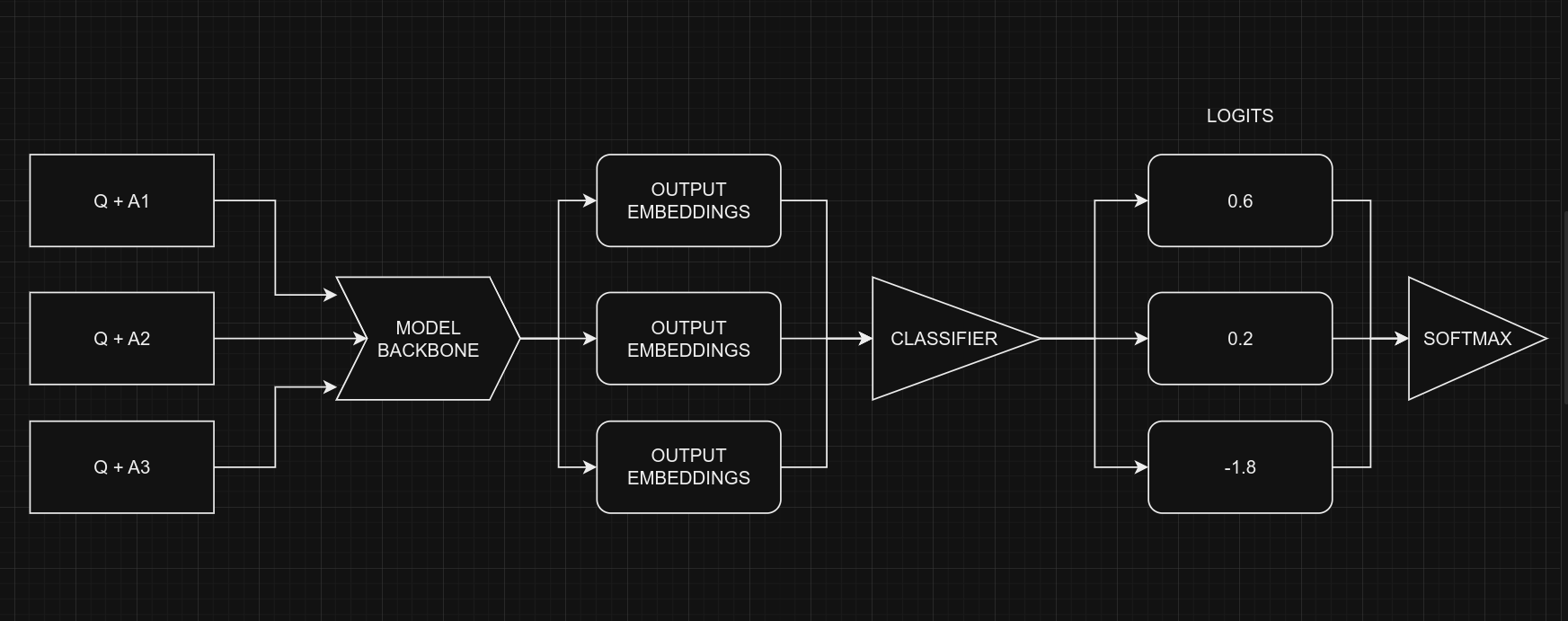 | |
| <div align="center"><b> Picture Credit: </b> <a href="https://twitter.com/johnowhitaker"> | |
| @johnowhitaker </a> </div><br> | |
| From a coding perspective, remember that we use the same model for all five options, with | |
| shared weights. Despite the figure suggesting five separate models, they are, in fact, | |
| one model with shared weights. Another point to consider is the the input shapes of | |
| Classifier and MultipleChoice. | |
| * Input shape for **Multiple Choice**: $(batch\_size, num\_choices, seq\_length)$ | |
| * Input shape for **Classifier**: $(batch\_size, seq\_length)$ | |
| Certainly, it's clear that we can't directly give the data for the multiple-choice task | |
| to the model because the input shapes don't match. To handle this, we'll use **slicing**. | |
| This means we'll separate the features of each option, like $feature_{(Q + A)}$ and | |
| $feature_{(Q + B)}$, and give them one by one to the NLP classifier. After we get the | |
| prediction scores $logits_{(Q + A)}$ and $logits_{(Q + B)}$ for all the options, we'll | |
| use the Softmax function, like $\operatorname{Softmax}([logits_{(Q + A)}, logits_{(Q + | |
| B)}])$, to combine them. This final step helps us make the ultimate decision or choice. | |
| > Note that in the classifier, we set `num_classes=1` instead of `5`. This is because the | |
| classifier produces a single output for each option. When dealing with five options, | |
| these individual outputs are joined together and then processed through a softmax | |
| function to generate the final result, which has a dimension of `5`. | |
| """ | |
| # Selects one option from five | |
| class SelectOption(keras.layers.Layer): | |
| def __init__(self, index, **kwargs): | |
| super().__init__(**kwargs) | |
| self.index = index | |
| def call(self, inputs): | |
| # Selects a specific slice from the inputs tensor | |
| return inputs[:, self.index, :] | |
| def get_config(self): | |
| # For serialize the model | |
| base_config = super().get_config() | |
| config = { | |
| "index": self.index, | |
| } | |
| return {**base_config, **config} | |
| def build_model(): | |
| # Define input layers | |
| inputs = { | |
| "token_ids": keras.Input(shape=(4, None), dtype="int32", name="token_ids"), | |
| "padding_mask": keras.Input( | |
| shape=(4, None), dtype="int32", name="padding_mask" | |
| ), | |
| } | |
| # Create a DebertaV3Classifier model | |
| classifier = keras_hub.models.DebertaV3Classifier.from_preset( | |
| CFG.preset, | |
| preprocessor=None, | |
| num_classes=1, # one output per one option, for five options total 5 outputs | |
| ) | |
| logits = [] | |
| # Loop through each option (Q+A), (Q+B) etc and compute associated logits | |
| for option_idx in range(4): | |
| option = { | |
| k: SelectOption(option_idx, name=f"{k}_{option_idx}")(v) | |
| for k, v in inputs.items() | |
| } | |
| logit = classifier(option) | |
| logits.append(logit) | |
| # Compute final output | |
| logits = keras.layers.Concatenate(axis=-1)(logits) | |
| outputs = keras.layers.Softmax(axis=-1)(logits) | |
| model = keras.Model(inputs, outputs) | |
| # Compile the model with optimizer, loss, and metrics | |
| model.compile( | |
| optimizer=keras.optimizers.AdamW(5e-6), | |
| loss=keras.losses.CategoricalCrossentropy(label_smoothing=0.02), | |
| metrics=[ | |
| keras.metrics.CategoricalAccuracy(name="accuracy"), | |
| ], | |
| jit_compile=True, | |
| ) | |
| return model | |
| # Build the Build | |
| model = build_model() | |
| """ | |
| Let's checkout the model summary to have a better insight on the model. | |
| """ | |
| model.summary() | |
| """ | |
| Finally, let's check the model structure visually if everything is in place. | |
| """ | |
| keras.utils.plot_model(model, show_shapes=True) | |
| """ | |
| ## Training | |
| """ | |
| # Start training the model | |
| history = model.fit( | |
| train_ds, | |
| epochs=CFG.epochs, | |
| validation_data=valid_ds, | |
| callbacks=callbacks, | |
| steps_per_epoch=int(len(train_df) / CFG.batch_size), | |
| verbose=1, | |
| ) | |
| """ | |
| ## Inference | |
| """ | |
| # Make predictions using the trained model on last validation data | |
| predictions = model.predict( | |
| valid_ds, | |
| batch_size=CFG.batch_size, # max batch size = valid size | |
| verbose=1, | |
| ) | |
| # Format predictions and true answers | |
| pred_answers = np.arange(4)[np.argsort(-predictions)][:, 0] | |
| true_answers = valid_df.label.values | |
| # Check 5 Predictions | |
| print("# Predictions\n") | |
| for i in range(0, 50, 10): | |
| row = valid_df.iloc[i] | |
| question = row.startphrase | |
| pred_answer = f"ending{pred_answers[i]}" | |
| true_answer = f"ending{true_answers[i]}" | |
| print(f"❓ Sentence {i+1}:\n{question}\n") | |
| print(f"✅ True Ending: {true_answer}\n >> {row[true_answer]}\n") | |
| print(f"🤖 Predicted Ending: {pred_answer}\n >> {row[pred_answer]}\n") | |
| print("-" * 90, "\n") | |
| """ | |
| ## Reference | |
| * [Multiple Choice with | |
| HF](https://twitter.com/johnowhitaker/status/1689790373454041089?s=20) | |
| * [Keras NLP](https://keras.io/api/keras_hub/) | |
| * [BirdCLEF23: Pretraining is All you Need | |
| [Train]](https://www.kaggle.com/code/awsaf49/birdclef23-pretraining-is-all-you-need-train) | |
| [Train]](https://www.kaggle.com/code/awsaf49/birdclef23-pretraining-is-all-you-need-train) | |
| * [Triple Stratified KFold with | |
| TFRecords](https://www.kaggle.com/code/cdeotte/triple-stratified-kfold-with-tfrecords) | |
| """ | |