---
title: Aileen 3 Core - Information Foraging MCP Server
emoji: 👩🏻💼
colorFrom: purple
colorTo: blue
sdk: docker
pinned: false
license: cc-by-4.0
short_description: Use priors to surface novel insights in noisy communications
tags:
- building-mcp-track-enterprise
- building-mcp-track-customer
- anthropic
- gemini
- elevenlabs
---
# Aileen 3 Core: Information Foraging MCP Server
> **"Information is surprises. You learn something when things don’t turn out the way you expected."** ⸺ Roger Schank
## ♨️ Problem: The Noise-Signal Ratio
Professionals working at the intersection of regulation and technology drink from a firehose of information. Staying current requires monitoring hours of conferences, webinars, and podcasts.
Standard AI **summarization fails** here because it creates "flat" summaries that rehash what you already know. It treats every sentence as equally important.
## ✅ Solution: Expectation-Driven Analysis
**Aileen 3 Core** is a Model Context Protocol (MCP) server designed for **Information Foraging**. Grounded in cognitive science, it models "novelty" as **prediction error**.
Instead of asking "Summarize this video," Aileen 3 Core allows users to task a Large Language Model with:
*"Here is what I already know, and here is what I expect the speaker to say. Tell me only where they deviate from this baseline."*. As part of a larger agentic AI system, the prior knowledge can even be derived from a memory bank.
### 💪 Key Capabilities
* **⛳️ Expectation-Driven Briefings:** Uses Google Gemini to analyze audio/video against user-supplied priors (context, expectations, and knowledge gaps) to surface genuine surprises.
* **🔍 Context-Biased Transcription:** Prevents hallucinations (e.g., confusing the German treaty "NOOTS" for "emergency state") by feeding media metadata as priors to the model.
* **🖼️ Visual Slide Extraction:** Automatically detects, extracts, and, on request, translates slide stills from video feeds, treating slides as high-density information artifacts.
* **🔌 Universal MCP Support:** Works with **Claude Desktop**, or any custom Agent.
---
## 🏗️ Architecture
Aileen 3 Core exposes tools that bridge the gap between raw media and reasoning agents.
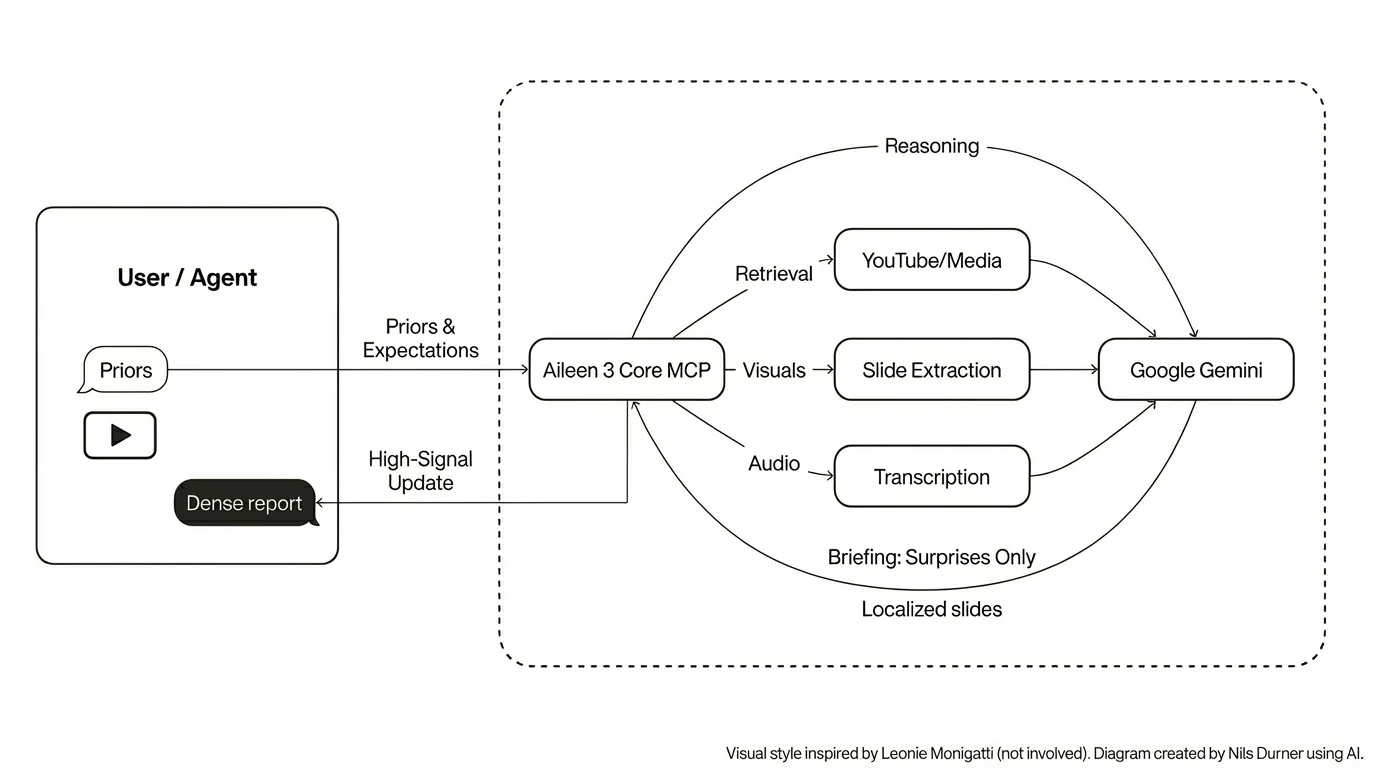 ## 🚀 Quick Start: Claude Desktop
Aileen 3 Core is designed to be the "eyes and ears" for your local LLM client.
1. **Install:**
```bash
# Clone and install dependencies
pip install -e ./mcp
```
2. Obtain a Google Gemini API key: [Google AI Studio](https://aistudio.google.com)
3. **Configure `claude_desktop_config.json`:**. The Gemini API key will be read from the environment, so can also be set here:
```json
{
"mcpServers": {
"aileen3-mcp": {
"command": "python",
"args": ["-m", "aileen3_mcp.server"],
"env": {
"GEMINI_API_KEY": "AI..."
}
}
}
}
```
4. Restart Claude
5. The Haiku 4.5 model is sufficient for basic tasks. To make your plans fully transparent to the LLM, refer to "aileen3" explicitly in the prompt, e.g.:
> Use aileen3 to translate slide 3 from YouTube video reference eXP-PvKcI9A to German.
## 🚀 Quick Start: Claude Desktop
Aileen 3 Core is designed to be the "eyes and ears" for your local LLM client.
1. **Install:**
```bash
# Clone and install dependencies
pip install -e ./mcp
```
2. Obtain a Google Gemini API key: [Google AI Studio](https://aistudio.google.com)
3. **Configure `claude_desktop_config.json`:**. The Gemini API key will be read from the environment, so can also be set here:
```json
{
"mcpServers": {
"aileen3-mcp": {
"command": "python",
"args": ["-m", "aileen3_mcp.server"],
"env": {
"GEMINI_API_KEY": "AI..."
}
}
}
}
```
4. Restart Claude
5. The Haiku 4.5 model is sufficient for basic tasks. To make your plans fully transparent to the LLM, refer to "aileen3" explicitly in the prompt, e.g.:
> Use aileen3 to translate slide 3 from YouTube video reference eXP-PvKcI9A to German.
 ### 🔍 Debugging
The message exchange and Claude-facing error messages can be read from Claude log files:
```
tail -n 20 -F ~/Library/Logs/Claude/mcp*.log
```
## 🧪 The Gradio Space (Interactive Demo)
We have built a custom **Gradio 6** application that acts as a visual frontend for the MCP server. It demonstrates the pipeline step-by-step:
1. **Health Check:** Verifies `ffmpeg`, `yt-dlp`, and Gemini connectivity.
2. **Hallucination Check:** Demonstrates how lack of context leads to speech recognition errors.
3. **Context-biased Transcription:** Fixes these errors by establishing priors.
4. **Expectation-driven Analysis:** The core engine in action.
5. **Slide Translation:** Extracting and localizing visual assets.
[**👉 Try the Live Demo Here**](https://ndurner.de/links/aileen3-hf-space)
## 📘 MCP server overview
The MCP server is implemented in `mcp/src/aileen3_mcp` and exposes tools over stdio via `aileen3_mcp.server`. Google Gemini powers the analysis, transcription, and slide translation flows. Media retrieval is handled by `yt-dlp` and `ffmpeg`.
Environment prerequisites:
- `GEMINI_API_KEY` set to a valid Gemini API key
- `ffmpeg`, `deno`, `yt-dlp` installed and on `PATH`
Optional configuration:
- `AILEEN3_ANALYSIS_MODEL` to override the default Gemini model used for expectation-driven analysis (defaults to `gemini-flash-latest` for straightforward experimentation on the free tier of Google AI Studio; `gemini-3-pro-preview` recommended for accuracy).
- `AILEEN3_CACHE_DIR` to change the base cache directory (default: `~/.cache/aileen3`).
- `AILEEN3_DEBUG=1` to enable additional debug artefacts on disk.
### ⭐️ Example client integration
The companion project [Aileen 3 Agent](https://ndurner.de/links/aileen3-agent-github) uses this MCP server via the `google.adk` `McpToolset`, spawning `aileen3_mcp.server` over stdio with:
- `command`: `sys.executable`
- `args`: `["-m", "aileen3_mcp.server"]`
- `env`: explicitly forwarding `GEMINI_API_KEY` into the MCP process
- `timeout`: `1200` seconds at the MCP transport level, to accommodate long-running video analysis and transcription jobs beyond the 30 seconds default
When integrating this MCP into your own agent or client:
- Set transport-level timeouts generously (10–20 minutes) and rely on the tools’ `wait_seconds` argument plus status polling for progress.
- Ensure `GEMINI_API_KEY` (and any optional `AILEEN3_*` variables you use) are visible in the environment of the MCP server process, not just the client.
### 🛠️ MCP tools overview
All tools are registered in `aileen3_mcp.server.make_app` and exposed via a stdio MCP server for use by the Gradio demo, Claude Desktop, and other clients.
In short, the public tools are:
- `health`
- `search_youtube`
- `start_media_retrieval` / `get_media_retrieval_status`
- `start_slide_extraction` / `get_extracted_slides`
- `translate_slide`
- `start_media_analysis` / `get_media_analysis_result`
- `start_media_transcription` / `get_media_transcription_result`
These tools are designed to be called from an agentic AI system that:
- first chooses a media `source` (optionally using `search_youtube`)
- then calls `start_media_retrieval`
- and finally uses the `reference` token to drive analysis, transcription, or slide translation.
For detailed tool contracts (arguments, return payloads, and error shapes), see `mcp/README.md`.
## 🏆 Hackathon Context & Journey
Aileen 3 Core was built for the [MCP's 1st Birthday - Hosted by Anthropic and Gradio](https://huggingface.co/MCP-1st-Birthday) and serves as the backbone for the [Aileen 3 Agent](https://ndurner.de/links/aileen3-kaggle-writeup) (developed for the [AI Agents Intensive Course with Google](https://www.kaggle.com/learn-guide/5-day-agents)).
The required supplements - HuggingFace Space, demo video, and social media post - are behind the badges at the very top of this page.
## 📦 Local Development
```bash
# Build the Docker image
docker build -t aileen3-core .
# Run the Gradio interface
docker run -it -p 7860:7860 aileen3-core
```
## 🛡️ Security & privacy
- Your Gemini key is used only server-side to call Gemini models.
- Media is downloaded to cache for repeatability; clear ~/.cache/aileen3 to remove artefacts.
- No analytics or third-party telemetry included.
## 🚧 Limitations
- `translate_slide` does currently not benefit from priors; translation quality could be improved that way
- No AI safety guardrails (tone, style, anti prompt-injection, ...) included
- No cost control included
- Hallucination risk - Aileen may make mistakes.
- Remote MCP operating mode not tested; would rely on external access protection
## 👾 Troubleshooting
- Gemini 401 “API keys are not supported…”: use AI Studio key starting with “AI…”, not Vertex keys (“AQ…”).
- Long jobs: increase transport timeout (10–20 min) and leverage wait_seconds + polling get_* tools.
- YouTube access:
* ensure YouTube is reachable
* yt-dlp is recent
* if site JS protection breaks, install yt-dlp-ejs (see Space health check).
### 🔍 Debugging
The message exchange and Claude-facing error messages can be read from Claude log files:
```
tail -n 20 -F ~/Library/Logs/Claude/mcp*.log
```
## 🧪 The Gradio Space (Interactive Demo)
We have built a custom **Gradio 6** application that acts as a visual frontend for the MCP server. It demonstrates the pipeline step-by-step:
1. **Health Check:** Verifies `ffmpeg`, `yt-dlp`, and Gemini connectivity.
2. **Hallucination Check:** Demonstrates how lack of context leads to speech recognition errors.
3. **Context-biased Transcription:** Fixes these errors by establishing priors.
4. **Expectation-driven Analysis:** The core engine in action.
5. **Slide Translation:** Extracting and localizing visual assets.
[**👉 Try the Live Demo Here**](https://ndurner.de/links/aileen3-hf-space)
## 📘 MCP server overview
The MCP server is implemented in `mcp/src/aileen3_mcp` and exposes tools over stdio via `aileen3_mcp.server`. Google Gemini powers the analysis, transcription, and slide translation flows. Media retrieval is handled by `yt-dlp` and `ffmpeg`.
Environment prerequisites:
- `GEMINI_API_KEY` set to a valid Gemini API key
- `ffmpeg`, `deno`, `yt-dlp` installed and on `PATH`
Optional configuration:
- `AILEEN3_ANALYSIS_MODEL` to override the default Gemini model used for expectation-driven analysis (defaults to `gemini-flash-latest` for straightforward experimentation on the free tier of Google AI Studio; `gemini-3-pro-preview` recommended for accuracy).
- `AILEEN3_CACHE_DIR` to change the base cache directory (default: `~/.cache/aileen3`).
- `AILEEN3_DEBUG=1` to enable additional debug artefacts on disk.
### ⭐️ Example client integration
The companion project [Aileen 3 Agent](https://ndurner.de/links/aileen3-agent-github) uses this MCP server via the `google.adk` `McpToolset`, spawning `aileen3_mcp.server` over stdio with:
- `command`: `sys.executable`
- `args`: `["-m", "aileen3_mcp.server"]`
- `env`: explicitly forwarding `GEMINI_API_KEY` into the MCP process
- `timeout`: `1200` seconds at the MCP transport level, to accommodate long-running video analysis and transcription jobs beyond the 30 seconds default
When integrating this MCP into your own agent or client:
- Set transport-level timeouts generously (10–20 minutes) and rely on the tools’ `wait_seconds` argument plus status polling for progress.
- Ensure `GEMINI_API_KEY` (and any optional `AILEEN3_*` variables you use) are visible in the environment of the MCP server process, not just the client.
### 🛠️ MCP tools overview
All tools are registered in `aileen3_mcp.server.make_app` and exposed via a stdio MCP server for use by the Gradio demo, Claude Desktop, and other clients.
In short, the public tools are:
- `health`
- `search_youtube`
- `start_media_retrieval` / `get_media_retrieval_status`
- `start_slide_extraction` / `get_extracted_slides`
- `translate_slide`
- `start_media_analysis` / `get_media_analysis_result`
- `start_media_transcription` / `get_media_transcription_result`
These tools are designed to be called from an agentic AI system that:
- first chooses a media `source` (optionally using `search_youtube`)
- then calls `start_media_retrieval`
- and finally uses the `reference` token to drive analysis, transcription, or slide translation.
For detailed tool contracts (arguments, return payloads, and error shapes), see `mcp/README.md`.
## 🏆 Hackathon Context & Journey
Aileen 3 Core was built for the [MCP's 1st Birthday - Hosted by Anthropic and Gradio](https://huggingface.co/MCP-1st-Birthday) and serves as the backbone for the [Aileen 3 Agent](https://ndurner.de/links/aileen3-kaggle-writeup) (developed for the [AI Agents Intensive Course with Google](https://www.kaggle.com/learn-guide/5-day-agents)).
The required supplements - HuggingFace Space, demo video, and social media post - are behind the badges at the very top of this page.
## 📦 Local Development
```bash
# Build the Docker image
docker build -t aileen3-core .
# Run the Gradio interface
docker run -it -p 7860:7860 aileen3-core
```
## 🛡️ Security & privacy
- Your Gemini key is used only server-side to call Gemini models.
- Media is downloaded to cache for repeatability; clear ~/.cache/aileen3 to remove artefacts.
- No analytics or third-party telemetry included.
## 🚧 Limitations
- `translate_slide` does currently not benefit from priors; translation quality could be improved that way
- No AI safety guardrails (tone, style, anti prompt-injection, ...) included
- No cost control included
- Hallucination risk - Aileen may make mistakes.
- Remote MCP operating mode not tested; would rely on external access protection
## 👾 Troubleshooting
- Gemini 401 “API keys are not supported…”: use AI Studio key starting with “AI…”, not Vertex keys (“AQ…”).
- Long jobs: increase transport timeout (10–20 min) and leverage wait_seconds + polling get_* tools.
- YouTube access:
* ensure YouTube is reachable
* yt-dlp is recent
* if site JS protection breaks, install yt-dlp-ejs (see Space health check).

