

File size: 17,468 Bytes
c92aa92 | 1 2 3 4 5 6 7 8 9 10 11 12 13 14 15 16 17 18 19 20 21 22 23 24 25 26 27 28 29 30 31 32 33 34 35 36 37 38 39 40 41 42 43 44 45 46 47 48 49 50 51 52 53 54 55 56 57 58 59 60 61 62 63 64 65 66 67 68 69 70 71 72 73 74 75 76 77 78 79 80 81 82 83 84 85 86 87 88 89 90 91 92 93 94 95 96 97 98 99 100 101 102 103 104 105 106 107 108 109 110 111 112 113 114 115 116 117 118 119 120 121 122 123 124 125 126 127 128 129 130 131 132 133 134 135 136 137 138 139 140 141 142 143 144 145 146 147 148 149 150 151 152 153 154 155 156 157 158 159 160 161 162 163 164 165 166 167 168 169 170 171 172 173 174 175 176 177 178 179 180 181 182 183 184 185 186 187 188 189 190 191 192 193 194 195 196 197 198 199 200 201 202 203 204 205 206 207 208 209 210 211 212 213 214 215 216 217 218 219 220 221 222 223 224 225 226 227 228 229 230 231 232 233 234 235 236 237 238 239 240 241 242 243 244 245 246 247 248 249 250 251 252 253 254 255 256 257 258 259 260 261 262 263 264 265 266 267 268 269 270 271 272 273 274 275 276 277 278 279 280 281 282 283 284 285 286 287 288 289 290 291 292 293 294 295 296 297 298 299 300 301 302 303 304 305 306 307 308 309 310 311 312 313 314 315 316 317 318 319 320 321 322 323 324 325 326 327 328 329 330 331 332 333 334 335 336 337 338 339 340 341 342 343 344 345 346 347 348 349 350 351 352 353 354 355 356 357 358 359 360 361 362 363 364 365 366 367 368 369 370 371 372 373 374 375 376 377 378 379 380 381 382 383 384 385 386 387 388 389 390 391 392 393 394 395 396 397 398 399 400 401 402 403 404 405 406 407 408 409 410 411 412 413 414 415 416 417 418 419 420 421 422 423 424 425 426 427 428 429 430 431 432 433 434 435 436 437 438 439 440 441 442 443 444 445 446 447 448 449 450 451 452 453 454 455 456 457 458 459 460 461 462 463 464 465 466 467 468 469 470 471 472 473 474 475 476 477 478 479 480 481 482 483 484 485 486 487 488 489 490 491 492 493 494 495 496 497 498 499 500 501 502 503 504 505 506 507 508 509 510 511 512 513 514 515 516 517 518 519 520 521 522 523 524 525 526 527 528 529 530 531 532 533 534 535 536 537 538 539 540 541 542 543 544 545 546 547 548 549 550 551 552 553 554 555 556 557 558 559 560 561 562 563 564 565 566 567 568 569 570 571 572 573 574 575 576 577 578 579 580 581 582 583 584 585 586 587 588 589 590 591 592 593 594 595 596 597 598 599 600 601 | ---
title: Open-WebSearch MCP
emoji: 🔎
colorFrom: blue
colorTo: indigo
sdk: docker
app_port: 3000
pinned: false
---
<div align="center">
# Open-WebSearch MCP Server
[](https://www.modelscope.cn/mcp/servers/Aasee1/open-webSearch)
[](https://archestra.ai/mcp-catalog/aas-ee__open-websearch)
[](https://smithery.ai/server/@Aas-ee/open-websearch)



**[🇨🇳 中文](./README-zh.md) | 🇺🇸 English**
</div>
A Model Context Protocol (MCP) server based on multi-engine search results, supporting free web search without API keys.
## Features
- Web search using multi-engine results
- bing
- baidu
- ~~linux.do~~ temporarily unsupported
- csdn
- duckduckgo
- exa
- brave
- juejin
- HTTP proxy configuration support for accessing restricted resources
- No API keys or authentication required
- Returns structured results with titles, URLs, and descriptions
- Configurable number of results per search
- Customizable default search engine
- Support for fetching individual article content
- csdn
- github (README files)
- generic HTTP(S) page / Markdown content
## TODO
- Support for ~~Bing~~ (already supported), ~~DuckDuckGo~~ (already supported), ~~Exa~~ (already supported), ~~Brave~~ (already supported), Google and other search engines
- Support for more blogs, forums, and social platforms
- Optimize article content extraction, add support for more sites
- ~~Support for GitHub README fetching~~ (already supported)
## Deploy to Hugging Face Spaces
This repository can be deployed directly as a **Docker Space**.
### 1. Create a Docker Space
Create a new Space on Hugging Face and choose **Docker** as the SDK, or push this repository to an existing Docker Space.
### 2. Required runtime variables
In **Space Settings → Variables and secrets**, configure:
| Variable | Recommended Value | Description |
|----------|-------------------|-------------|
| `MODE` | `http` | Run the HTTP server only in Spaces |
| `PORT` | `3000` | Must match `app_port` in the YAML header |
| `ENABLE_CORS` | `true` | Allows browser-based access if needed |
| `CORS_ORIGIN` | `*` | Relaxed CORS for public/demo use |
| `DEFAULT_SEARCH_ENGINE` | `duckduckgo` | A reliable default for public Spaces |
Optional:
| Variable | Example Value | Description |
|----------|---------------|-------------|
| `ALLOWED_SEARCH_ENGINES` | `duckduckgo,bing,baidu,csdn,juejin` | Restrict allowed engines |
| `USE_PROXY` | `false` | Enable HTTP proxy support |
| `PROXY_URL` | `http://127.0.0.1:7890` | Proxy URL when proxying is enabled |
### 3. Public endpoints after deployment
- Home page: `/`
- Health check: `/healthz`
- MCP endpoint: `/mcp`
- Legacy SSE endpoint: `/sse`
After the Space is live, your MCP URL will look like:
```text
https://<your-space-subdomain>.hf.space/mcp
```
### 4. Notes
- The Space UI loads `/`, so this project now serves a lightweight landing page there.
- If you change the runtime port, update both `PORT` and `app_port` to the same value.
## Installation Guide
### NPX Quick Start (Recommended)
The fastest way to get started:
```bash
# Basic usage
npx open-websearch@latest
# With environment variables (Linux/macOS)
DEFAULT_SEARCH_ENGINE=duckduckgo ENABLE_CORS=true npx open-websearch@latest
# Windows PowerShell
$env:DEFAULT_SEARCH_ENGINE="duckduckgo"; $env:ENABLE_CORS="true"; npx open-websearch@latest
# Windows CMD
set MODE=stdio && set DEFAULT_SEARCH_ENGINE=duckduckgo && npx open-websearch@latest
# Cross-platform (requires cross-env, Used for local development)
npm install -g open-websearch
npx cross-env DEFAULT_SEARCH_ENGINE=duckduckgo ENABLE_CORS=true open-websearch
```
**Environment Variables:**
| Variable | Default | Options | Description |
|----------|-------------------------|---------|-------------|
| `ENABLE_CORS` | `false` | `true`, `false` | Enable CORS |
| `CORS_ORIGIN` | `*` | Any valid origin | CORS origin configuration |
| `DEFAULT_SEARCH_ENGINE` | `bing` | `bing`, `duckduckgo`, `exa`, `brave`, `baidu`, `csdn`, `juejin` | Default search engine |
| `USE_PROXY` | `false` | `true`, `false` | Enable HTTP proxy |
| `PROXY_URL` | `http://127.0.0.1:7890` | Any valid URL | Proxy server URL |
| `MODE` | `both` | `both`, `http`, `stdio` | Server mode: both HTTP+STDIO, HTTP only, or STDIO only |
| `PORT` | `3000` | 1-65535 | Server port |
| `ALLOWED_SEARCH_ENGINES` | empty (all available) | Comma-separated engine names | Limit which search engines can be used; if the default engine is not in this list, the first allowed engine becomes the default |
| `MCP_TOOL_SEARCH_NAME` | `search` | Valid MCP tool name | Custom name for the search tool |
| `MCP_TOOL_FETCH_LINUXDO_NAME` | `fetchLinuxDoArticle` | Valid MCP tool name | Custom name for the Linux.do article fetch tool |
| `MCP_TOOL_FETCH_CSDN_NAME` | `fetchCsdnArticle` | Valid MCP tool name | Custom name for the CSDN article fetch tool |
| `MCP_TOOL_FETCH_GITHUB_NAME` | `fetchGithubReadme` | Valid MCP tool name | Custom name for the GitHub README fetch tool |
| `MCP_TOOL_FETCH_JUEJIN_NAME` | `fetchJuejinArticle` | Valid MCP tool name | Custom name for the Juejin article fetch tool |
| `MCP_TOOL_FETCH_WEB_NAME` | `fetchWebContent` | Valid MCP tool name | Custom name for generic web/Markdown fetch tool |
**Common configurations:**
```bash
# Enable proxy for restricted regions
USE_PROXY=true PROXY_URL=http://127.0.0.1:7890 npx open-websearch@latest
# Full configuration
DEFAULT_SEARCH_ENGINE=duckduckgo ENABLE_CORS=true USE_PROXY=true PROXY_URL=http://127.0.0.1:7890 PORT=8080 npx open-websearch@latest
```
### Local Installation
1. Clone or download this repository
2. Install dependencies:
```bash
npm install
```
3. Build the server:
```bash
npm run build
```
4. Add the server to your MCP configuration:
**Cherry Studio:**
```json
{
"mcpServers": {
"web-search": {
"name": "Web Search MCP",
"type": "streamableHttp",
"description": "Multi-engine web search with article fetching",
"isActive": true,
"baseUrl": "http://localhost:3000/mcp"
}
}
}
```
**VSCode (Claude Dev Extension):**
```json
{
"mcpServers": {
"web-search": {
"transport": {
"type": "streamableHttp",
"url": "http://localhost:3000/mcp"
}
},
"web-search-sse": {
"transport": {
"type": "sse",
"url": "http://localhost:3000/sse"
}
}
}
}
```
**Claude Desktop:**
```json
{
"mcpServers": {
"web-search": {
"type": "http",
"url": "http://localhost:3000/mcp"
},
"web-search-sse": {
"type": "sse",
"url": "http://localhost:3000/sse"
}
}
}
```
**NPX Command Line Configuration:**
```json
{
"mcpServers": {
"web-search": {
"args": [
"open-websearch@latest"
],
"command": "npx",
"env": {
"MODE": "stdio",
"DEFAULT_SEARCH_ENGINE": "duckduckgo",
"ALLOWED_SEARCH_ENGINES": "duckduckgo,bing,exa"
}
}
}
}
```
**Local STDIO Configuration for Cherry Studio (Windows):**
```json
{
"mcpServers": {
"open-websearch-local": {
"command": "node",
"args": ["C:/path/to/your/project/build/index.js"],
"env": {
"MODE": "stdio",
"DEFAULT_SEARCH_ENGINE": "duckduckgo",
"ALLOWED_SEARCH_ENGINES": "duckduckgo,bing,exa"
}
}
}
}
```
### Docker Deployment
Quick deployment using Docker Compose:
```bash
docker-compose up -d
```
Or use Docker directly:
```bash
docker run -d --name web-search -p 3000:3000 -e ENABLE_CORS=true -e CORS_ORIGIN=* ghcr.io/aas-ee/open-web-search:latest
```
Environment variable configuration:
| Variable | Default | Options | Description |
|----------|-------------------------|---------|-------------|
| `ENABLE_CORS` | `false` | `true`, `false` | Enable CORS |
| `CORS_ORIGIN` | `*` | Any valid origin | CORS origin configuration |
| `DEFAULT_SEARCH_ENGINE` | `bing` | `bing`, `duckduckgo`, `exa`, `brave` | Default search engine |
| `USE_PROXY` | `false` | `true`, `false` | Enable HTTP proxy |
| `PROXY_URL` | `http://127.0.0.1:7890` | Any valid URL | Proxy server URL |
| `PORT` | `3000` | 1-65535 | Server port |
Then configure in your MCP client:
```json
{
"mcpServers": {
"web-search": {
"name": "Web Search MCP",
"type": "streamableHttp",
"description": "Multi-engine web search with article fetching",
"isActive": true,
"baseUrl": "http://localhost:3000/mcp"
},
"web-search-sse": {
"transport": {
"name": "Web Search MCP",
"type": "sse",
"description": "Multi-engine web search with article fetching",
"isActive": true,
"url": "http://localhost:3000/sse"
}
}
}
}
```
## Usage Guide
The server provides six tools: `search`, `fetchLinuxDoArticle`, `fetchCsdnArticle`, `fetchGithubReadme`, `fetchJuejinArticle`, and `fetchWebContent`.
### search Tool Usage
```typescript
{
"query": string, // Search query
"limit": number, // Optional: Number of results to return (default: 10)
"engines": string[] // Optional: Engines to use (bing,baidu,linuxdo,csdn,duckduckgo,exa,brave,juejin) default bing
}
```
Usage example:
```typescript
use_mcp_tool({
server_name: "web-search",
tool_name: "search",
arguments: {
query: "search content",
limit: 3, // Optional parameter
engines: ["bing", "csdn", "duckduckgo", "exa", "brave", "juejin"] // Optional parameter, supports multi-engine combined search
}
})
```
Response example:
```json
[
{
"title": "Example Search Result",
"url": "https://example.com",
"description": "Description text of the search result...",
"source": "Source",
"engine": "Engine used"
}
]
```
### fetchCsdnArticle Tool Usage
Used to fetch complete content of CSDN blog articles.
```typescript
{
"url": string // URL from CSDN search results using the search tool
}
```
Usage example:
```typescript
use_mcp_tool({
server_name: "web-search",
tool_name: "fetchCsdnArticle",
arguments: {
url: "https://blog.csdn.net/xxx/article/details/xxx"
}
})
```
Response example:
```json
[
{
"content": "Example search result"
}
]
```
### fetchLinuxDoArticle Tool Usage
Used to fetch complete content of Linux.do forum articles.
```typescript
{
"url": string // URL from linuxdo search results using the search tool
}
```
Usage example:
```typescript
use_mcp_tool({
server_name: "web-search",
tool_name: "fetchLinuxDoArticle",
arguments: {
url: "https://xxxx.json"
}
})
```
Response example:
```json
[
{
"content": "Example search result"
}
]
```
### fetchGithubReadme Tool Usage
Used to fetch README content from GitHub repositories.
```typescript
{
"url": string // GitHub repository URL (supports HTTPS, SSH formats)
}
```
Usage example:
```typescript
use_mcp_tool({
server_name: "web-search",
tool_name: "fetchGithubReadme",
arguments: {
url: "https://github.com/Aas-ee/open-webSearch"
}
})
```
Supported URL formats:
- HTTPS: `https://github.com/owner/repo`
- HTTPS with .git: `https://github.com/owner/repo.git`
- SSH: `git@github.com:owner/repo.git`
- URLs with parameters: `https://github.com/owner/repo?tab=readme`
Response example:
```json
[
{
"content": "<div align=\"center\">\n\n# Open-WebSearch MCP Server..."
}
]
```
### fetchWebContent Tool Usage
Fetch content directly from public HTTP(S) links, including Markdown files (`.md`) and ordinary web pages.
```typescript
{
"url": string, // Public HTTP(S) URL
"maxChars": number // Optional: max returned content length (1000-200000, default 30000)
}
```
Usage example:
```typescript
use_mcp_tool({
server_name: "web-search",
tool_name: "fetchWebContent",
arguments: {
url: "https://raw.githubusercontent.com/Aas-ee/open-webSearch/main/README.md",
maxChars: 12000
}
})
```
Response example:
```json
{
"url": "https://raw.githubusercontent.com/Aas-ee/open-webSearch/main/README.md",
"finalUrl": "https://raw.githubusercontent.com/Aas-ee/open-webSearch/main/README.md",
"contentType": "text/plain; charset=utf-8",
"title": "",
"truncated": false,
"content": "# Open-WebSearch MCP Server ..."
}
```
### fetchJuejinArticle Tool Usage
Used to fetch complete content of Juejin articles.
```typescript
{
"url": string // Juejin article URL from search results
}
```
Usage example:
```typescript
use_mcp_tool({
server_name: "web-search",
tool_name: "fetchJuejinArticle",
arguments: {
url: "https://juejin.cn/post/7520959840199360563"
}
})
```
Supported URL format:
- `https://juejin.cn/post/{article_id}`
Response example:
```json
[
{
"content": "🚀 开源 AI 联网搜索工具:Open-WebSearch MCP 全新升级,支持多引擎 + 流式响应..."
}
]
```
## Usage Limitations
Since this tool works by scraping multi-engine search results, please note the following important limitations:
1. **Rate Limiting**:
- Too many searches in a short time may cause the used engines to temporarily block requests
- Recommendations:
- Maintain reasonable search frequency
- Use the limit parameter judiciously
- Add delays between searches when necessary
2. **Result Accuracy**:
- Depends on the HTML structure of corresponding engines, may fail when engines update
- Some results may lack metadata like descriptions
- Complex search operators may not work as expected
3. **Legal Terms**:
- This tool is for personal use only
- Please comply with the terms of service of corresponding engines
- Implement appropriate rate limiting based on your actual use case
4. **Search Engine Configuration**:
- Default search engine can be set via the `DEFAULT_SEARCH_ENGINE` environment variable
- Supported engines: bing, duckduckgo, exa, brave
- The default engine is used when searching specific websites
5. **Proxy Configuration**:
- HTTP proxy can be configured when certain search engines are unavailable in specific regions
- Enable proxy with environment variable `USE_PROXY=true`
- Configure proxy server address with `PROXY_URL`
## Contributing
Welcome to submit issue reports and feature improvement suggestions!
### Contributor Guide
If you want to fork this repository and publish your own Docker image, you need to make the following configurations:
#### GitHub Secrets Configuration
To enable automatic Docker image building and publishing, please add the following secrets in your GitHub repository settings (Settings → Secrets and variables → Actions):
**Required Secrets:**
- `GITHUB_TOKEN`: Automatically provided by GitHub (no setup needed)
**Optional Secrets (for Alibaba Cloud ACR):**
- `ACR_REGISTRY`: Your Alibaba Cloud Container Registry URL (e.g., `registry.cn-hangzhou.aliyuncs.com`)
- `ACR_USERNAME`: Your Alibaba Cloud ACR username
- `ACR_PASSWORD`: Your Alibaba Cloud ACR password
- `ACR_IMAGE_NAME`: Your image name in ACR (e.g., `your-namespace/open-web-search`)
#### CI/CD Workflow
The repository includes a GitHub Actions workflow (`.github/workflows/docker.yml`) that automatically:
1. **Trigger Conditions**:
- Push to `main` branch
- Push version tags (`v*`)
- Manual workflow trigger
2. **Build and Push to**:
- GitHub Container Registry (ghcr.io) - always enabled
- Alibaba Cloud Container Registry - only enabled when ACR secrets are configured
3. **Image Tags**:
- `ghcr.io/your-username/open-web-search:latest`
- `your-acr-address/your-image-name:latest` (if ACR is configured)
#### Fork and Publish Steps:
1. **Fork the repository** to your GitHub account
2. **Configure secrets** (if you need ACR publishing):
- Go to Settings → Secrets and variables → Actions in your forked repository
- Add the ACR-related secrets listed above
3. **Push changes** to the `main` branch or create version tags
4. **GitHub Actions will automatically build and push** your Docker image
5. **Use your image**, update the Docker command:
```bash
docker run -d --name web-search -p 3000:3000 -e ENABLE_CORS=true -e CORS_ORIGIN=* ghcr.io/your-username/open-web-search:latest
```
#### Notes:
- If you don't configure ACR secrets, the workflow will only publish to GitHub Container Registry
- Make sure your GitHub repository has Actions enabled
- The workflow will use your GitHub username (converted to lowercase) as the GHCR image name
<div align="center">
## Star History
If you find this project helpful, please consider giving it a ⭐ Star!
[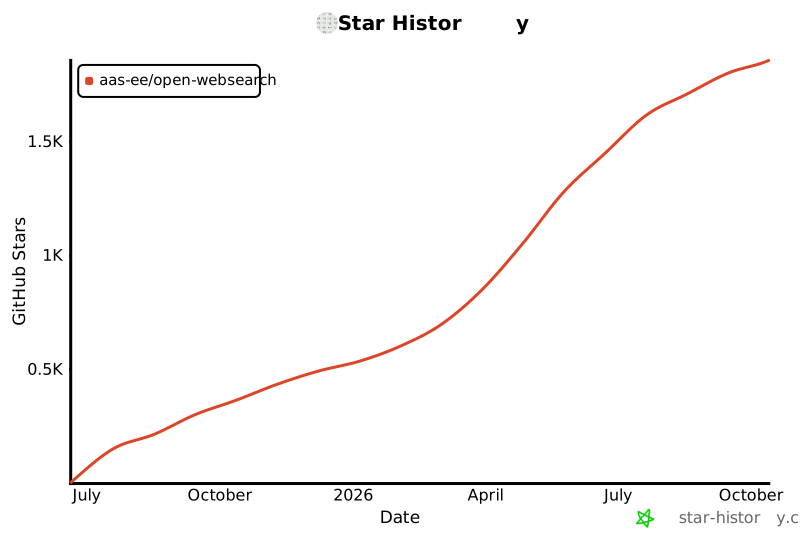](https://www.star-history.com/#Aas-ee/open-webSearch&Date)
</div>
|