\n\n# Open-WebSearch MCP Server..."
}
]
```
### fetchWebContent Tool Usage
Fetch content directly from public HTTP(S) links, including Markdown files (`.md`) and ordinary web pages.
```typescript
{
"url": string, // Public HTTP(S) URL
"maxChars": number // Optional: max returned content length (1000-200000, default 30000)
}
```
Usage example:
```typescript
use_mcp_tool({
server_name: "web-search",
tool_name: "fetchWebContent",
arguments: {
url: "https://raw.githubusercontent.com/Aas-ee/open-webSearch/main/README.md",
maxChars: 12000
}
})
```
Response example:
```json
{
"url": "https://raw.githubusercontent.com/Aas-ee/open-webSearch/main/README.md",
"finalUrl": "https://raw.githubusercontent.com/Aas-ee/open-webSearch/main/README.md",
"contentType": "text/plain; charset=utf-8",
"title": "",
"truncated": false,
"content": "# Open-WebSearch MCP Server ..."
}
```
### fetchJuejinArticle Tool Usage
Used to fetch complete content of Juejin articles.
```typescript
{
"url": string // Juejin article URL from search results
}
```
Usage example:
```typescript
use_mcp_tool({
server_name: "web-search",
tool_name: "fetchJuejinArticle",
arguments: {
url: "https://juejin.cn/post/7520959840199360563"
}
})
```
Supported URL format:
- `https://juejin.cn/post/{article_id}`
Response example:
```json
[
{
"content": "🚀 开源 AI 联网搜索工具:Open-WebSearch MCP 全新升级,支持多引擎 + 流式响应..."
}
]
```
## Usage Limitations
Since this tool works by scraping multi-engine search results, please note the following important limitations:
1. **Rate Limiting**:
- Too many searches in a short time may cause the used engines to temporarily block requests
- Recommendations:
- Maintain reasonable search frequency
- Use the limit parameter judiciously
- Add delays between searches when necessary
2. **Result Accuracy**:
- Depends on the HTML structure of corresponding engines, may fail when engines update
- Some results may lack metadata like descriptions
- Complex search operators may not work as expected
3. **Legal Terms**:
- This tool is for personal use only
- Please comply with the terms of service of corresponding engines
- Implement appropriate rate limiting based on your actual use case
4. **Search Engine Configuration**:
- Default search engine can be set via the `DEFAULT_SEARCH_ENGINE` environment variable
- Supported engines: bing, duckduckgo, exa, brave
- The default engine is used when searching specific websites
5. **Proxy Configuration**:
- HTTP proxy can be configured when certain search engines are unavailable in specific regions
- Enable proxy with environment variable `USE_PROXY=true`
- Configure proxy server address with `PROXY_URL`
## Contributing
Welcome to submit issue reports and feature improvement suggestions!
### Contributor Guide
If you want to fork this repository and publish your own Docker image, you need to make the following configurations:
#### GitHub Secrets Configuration
To enable automatic Docker image building and publishing, please add the following secrets in your GitHub repository settings (Settings → Secrets and variables → Actions):
**Required Secrets:**
- `GITHUB_TOKEN`: Automatically provided by GitHub (no setup needed)
**Optional Secrets (for Alibaba Cloud ACR):**
- `ACR_REGISTRY`: Your Alibaba Cloud Container Registry URL (e.g., `registry.cn-hangzhou.aliyuncs.com`)
- `ACR_USERNAME`: Your Alibaba Cloud ACR username
- `ACR_PASSWORD`: Your Alibaba Cloud ACR password
- `ACR_IMAGE_NAME`: Your image name in ACR (e.g., `your-namespace/open-web-search`)
#### CI/CD Workflow
The repository includes a GitHub Actions workflow (`.github/workflows/docker.yml`) that automatically:
1. **Trigger Conditions**:
- Push to `main` branch
- Push version tags (`v*`)
- Manual workflow trigger
2. **Build and Push to**:
- GitHub Container Registry (ghcr.io) - always enabled
- Alibaba Cloud Container Registry - only enabled when ACR secrets are configured
3. **Image Tags**:
- `ghcr.io/your-username/open-web-search:latest`
- `your-acr-address/your-image-name:latest` (if ACR is configured)
#### Fork and Publish Steps:
1. **Fork the repository** to your GitHub account
2. **Configure secrets** (if you need ACR publishing):
- Go to Settings → Secrets and variables → Actions in your forked repository
- Add the ACR-related secrets listed above
3. **Push changes** to the `main` branch or create version tags
4. **GitHub Actions will automatically build and push** your Docker image
5. **Use your image**, update the Docker command:
```bash
docker run -d --name web-search -p 3000:3000 -e ENABLE_CORS=true -e CORS_ORIGIN=* ghcr.io/your-username/open-web-search:latest
```
#### Notes:
- If you don't configure ACR secrets, the workflow will only publish to GitHub Container Registry
- Make sure your GitHub repository has Actions enabled
- The workflow will use your GitHub username (converted to lowercase) as the GHCR image name
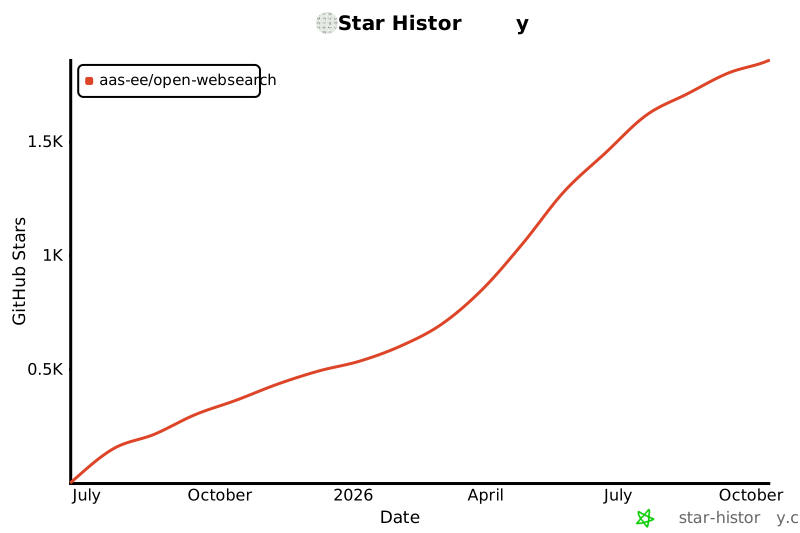
## Star History
If you find this project helpful, please consider giving it a ⭐ Star!
[](https://www.star-history.com/#Aas-ee/open-webSearch&Date)