---
title: Indian Banking Email Intelligence
emoji: 🏦
colorFrom: indigo
colorTo: blue
sdk: gradio
sdk_version: "4.44.1"
app_file: app.py
pinned: true
license: mit
tags:
- build-small
- build-small-hackathon
- backyard-ai
- off-the-grid
- multi-agent
- gradio
- qwen
- moondream
- offline-rag
- indian-banking
- local-llm
- gguf
- finance
- track:backyard
- track:wood
- achievement:offgrid
- achievement:offbrand
- achievement:llama
- achievement:fieldnotes
---
# 🏦 Indian Banking Email Intelligence
> **Multi-Agent AI Dashboard** that reads your banking emails, extracts transactions, surfaces promotional offers, and delivers offline spending analytics — all with models under 5B parameters.
[](https://build-small-hackathon-field-guide.hf.space/)
[](https://build-small-hackathon-field-guide.hf.space/)
[](https://python.org)
[](https://gradio.app)
[](LICENSE)
---
## 📺 Video Demo & 📖 Full Write-up
Check out the deep dive into the architecture and the story behind the build:
📰 **Read the full breakdown on Medium**: [Sorting my bank emails offline with small AI models](https://medium.com/@aa911mdccxxix/sorting-my-bank-emails-offline-with-small-ai-models-fec305c564f6)
🎥 **Watch the Demo on YouTube:**
[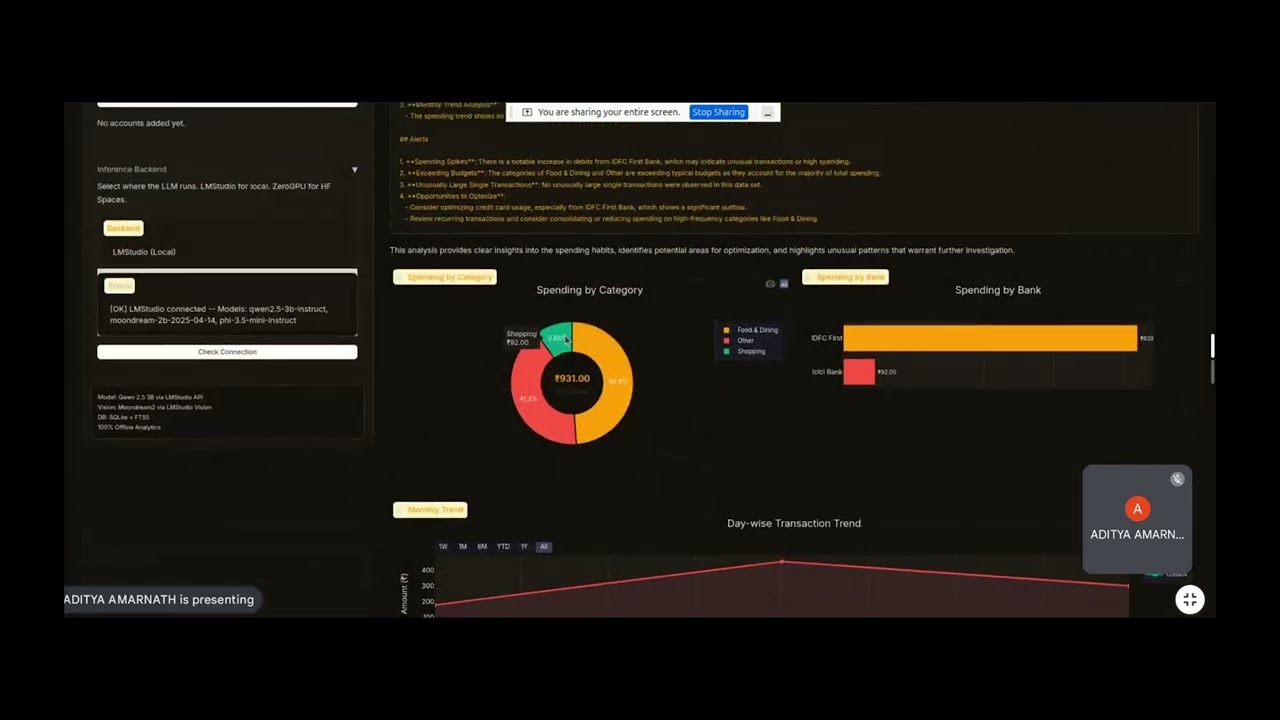](https://youtu.be/s6H9iZR8PDs)
---
## 🎯 The Problem
Indian consumers receive **hundreds** of banking emails monthly — transaction alerts from HDFC, SBI, ICICI, Kotak, IDFC First, Amex, and more. Buried in these emails are:
- Actual debit/credit transaction records
- Pre-approved loan offers & credit card promotions
- Monthly statements, KYC notices, OTPs
Manually tracking spending across 4–6 bank accounts is tedious. Existing finance apps require bank API access. **This app works with just your email.**
## 💡 The Solution
A **3-agent pipeline** that:
1. **Email Agent** — Connects to IMAP, performs delta sync, filters only Indian banking emails
2. **Vision Agent** — (Fallback) Reads promotional banner images via Moondream2 OCR when email body text is sparse
3. **Classifier Agent** — Classifies emails into 8 categories using an 8-category taxonomy, extracts structured transaction data, and generates offline RAG summaries
All inference runs on models **under 5B parameters**. Once emails are synced, **everything works 100% offline**.
---
## 🏗️ Architecture
```
┌───────────────────────────────────────────────────────────┐
│ Gradio Dashboard UI │
│ ┌──────────┐ ┌──────────┐ ┌──────────┐ ┌──────────────┐ │
│ │ Sync Log │ │Analytics │ │ Offers │ │ Data Browser │ │
│ └────┬─────┘ └────┬─────┘ └────┬─────┘ └──────┬───────┘ │
└───────┼────────────┼────────────┼───────────────┼─────────┘
│ │ │ │
┌────▼──────┐ ┌──▼───────────▼───┐ ┌──────▼───────┐
│ Email │ │ Classifier Agent │ │ SQLite DB │
│ Agent │ │ Qwen 2.5 3B │ │ + FTS5 │
│ (IMAP) │ │ - Classify │ │ │
└────┬──────┘ │ - Extract │ │ banking_ │
│ │ - RAG Summarize │ │ vault.db │
┌────▼──────┐ │ - Plot Charts │ └──────────────┘
│ Vision │ └──────────────────┘
│ Agent │
│ Moondream │
│ (~1.8B) │
└───────────┘
```
### Agent Pipeline (3-Phase)
| Phase | Agent | Model | Task |
|-------|-------|-------|------|
| **Phase 1** | Email Agent | — | IMAP delta sync, Indian bank filtering |
| **Phase 2** | Vision Agent | Moondream2 (~1.8B) | OCR extraction from promotional banners (fallback) |
| **Phase 3** | Classifier Agent | Qwen 2.5 3B Instruct | 8-category classification + structured data extraction |
---
## 🧠 Models Used
| Model | Parameters | Purpose | Format |
|-------|-----------|---------|--------|
| **Qwen 2.5 3B Instruct** | ~3B | Email classification, transaction extraction, RAG | GGUF Q4_K_M / HF Hub |
| **Moondream2** | ~1.8B | Vision OCR for banner images (fallback only) | HF Hub / LMStudio |
Both models are well under the **32B parameter limit**.
### 🔄 Dynamic Model Switching
To ensure this entire pipeline runs on consumer hardware with limited VRAM (like an 8GB GPU or a standard laptop), the app employs a **dynamic model switching strategy**:
- **Only one model is loaded at a time**.
- During the Vision Phase, `Moondream2` is loaded into memory to perform OCR on images.
- Once OCR is complete, Moondream is **evicted** from memory, freeing up VRAM.
- `Qwen 2.5 3B` is then loaded to perform the heavy lifting of classification, structured extraction, and RAG.
- This "hot-swapping" ensures we never OOM (Out of Memory), staying true to the "Build Small" ethos.
### 💻 Hardware Specifications (The "Backyard AI" setup)
This entire project was successfully built and executed on a very modest, older-generation laptop. This perfectly demonstrates why local, small models and memory-efficient switching are so critical for the **Off the Grid** track:
- **CPU:** Intel(R) Core(TM) i7-8750H @ 2.20GHz (6 Cores, 12 Threads)
- **RAM:** 16 GB System Memory
- **GPU:** NVIDIA GeForce GTX 1050 Mobile (4 GB VRAM)
*With only 4 GB of VRAM available, loading a 7B parameter model is impossible, and loading our two 1.8B/3B models simultaneously would cause an instant crash. The dynamic model eviction strategy makes this heavy RAG pipeline run flawlessly on a 2018-era GPU!*
### 🗄️ Why SQLite FTS5 instead of a Vector DB?
Most modern RAG applications default to heavy Vector Databases (Pinecone, Chroma, Weaviate) and embedding models. For personal banking data, this is overkill and introduces privacy risks.
- **Deterministic vs Semantic:** We don't need fuzzy "semantic search" to find a transaction. We need deterministic SQL filters (`WHERE amount > 5000 AND category = 'Food'`).
- **Zero Dependencies:** SQLite is built into Python. No external servers or Docker containers required.
- **Full Text Search:** SQLite's `FTS5` extension provides lightning-fast keyword search across email bodies and extracted JSON data.
- **100% Local Privacy:** Your financial data is stored in a single `banking_vault.db` file on your hard drive. No vectors or embeddings are sent to the cloud.
---
## 🎨 Features
### Multi-Account Email Sync
- Connect Gmail, Outlook, Yahoo via IMAP
- **Delta sync** — only fetches new emails since last sync (Rule 4)
- Identifies 20+ Indian banks (SBI, HDFC, ICICI, Kotak, IDFC First, Amex, Axis, etc.)
- Credentials entered at runtime, cleared after use (Rule 2)
### 8-Category AI Classification
Emails are classified into a precise Indian banking taxonomy:
| Category | Description | Trigger |
|----------|-------------|---------|
| `FUNDS_DEBITED_ALERT` | Money sent out | "debited from A/c XX1234" |
| `FUNDS_CREDITED_ALERT` | Money received / refunds | "credited to A/c XX5678" |
| `CREDIT_LOAN_PROMOTION` | Pre-approved loans, new card offers | No card/account number |
| `ACCOUNT_STATEMENT_BILL` | Monthly e-statements, bills | Subject: "Statement" |
| `OTP_SECURITY_ALERT` | OTPs, login alerts | "OTP", "login detected" |
| `REGULATORY_KYC_NOTICE` | KYC deadlines, PAN linking | "Re-KYC", "PAN" |
| `CREDIT_SCORE_BUREAU_ALERT` | CIBIL/Experian updates | "credit score" |
| `CREDIT_LIMIT_CARD_MANAGEMENT` | Limit increases, card upgrades | "credit limit" |
### Structured Transaction Extraction
For every debit/credit alert, the LLM extracts:
```json
{
"amount": 1500.00,
"transaction_type": "debit",
"merchant": "Swiggy",
"card_last4": "4421",
"category": "Food & Dining",
"transaction_date": "2025-06-14",
"payment_mode": "UPI"
}
```
### Offline RAG Analytics (Rule 3)
- **3 Interactive Plotly Charts** — Spending by category (donut), by bank (bar), monthly trend (line)
- **LLM-generated spending analysis** with Indian finance context
- **Offer summaries** with bank-wise breakdown and email review
- All powered by SQLite FTS5 + local LLM — **zero network calls**
### Vision Fallback (Rule 6)
- Moondream2 reads promotional banner images only when email body text is insufficient
- Downloads `![]() ` tags from email HTML, filters tracking pixels
- Extracts text for the Classifier Agent to process
---
## 🚀 Quick Start
### Local Setup (LMStudio)
```bash
# Clone and install
git clone
cd CCO
python -m venv .venv
source .venv/bin/activate
pip install -r requirements.txt
# Start LMStudio with Qwen 2.5 3B + Moondream2 loaded
# Then run:
python app.py
```
Open `http://localhost:7860` in your browser.
### Hugging Face Spaces (ZeroGPU)
1. Create a ZeroGPU Space on [huggingface.co/new-space](https://huggingface.co/new-space)
2. Push code — the app auto-detects `SPACE_ID` and uses ZeroGPU backend
3. Models are loaded from HuggingFace Hub on-demand
---
## 📊 Demo Walkthrough
### 1. Add Email Account (15 seconds)
Enter your Gmail address + App Password, select "Gmail", click "Add Account"
### 2. Network Sync (1-2 minutes)
Click "Network Sync" and watch the 3-phase pipeline:
- **Phase 1**: Delta sync via IMAP (only new emails)
- **Phase 2**: Vision agent OCR on promotional banners
- **Phase 3**: Parallel classification (5 threads) with real-time progress
### 3. Analytics Tab (Instant)
Click "Analytics" to see:
- Spending by Category (donut chart)
- Spending by Bank (horizontal bar)
- Monthly Trend (line chart with fill)
- LLM-generated spending analysis
### 4. Offers Tab
Click "Offer Summaries" to see:
- Individual offer cards with bank, date, category
- **"Review Original Email"** expandable section
- AI-generated summary at the bottom
### 5. Data Browser
Browse classified emails and extracted transactions in table format.
---
## 🛠️ Prompt Engineering
### Classification: Few-Shot Chain-of-Thought
- 8-category Indian banking taxonomy
- 3 few-shot examples with real Indian banking patterns
- Subject-first analysis ("Debit Alert" = strong transaction signal)
- Account/card number requirement for transaction classification
- Refund detection ("refunded to your account")
### Transaction Extraction: Structured JSON
- Indian currency formats (Rs., INR, amount/-)
- UPI/NEFT/IMPS/RTGS payment mode inference
- Card last-4 extraction from masked numbers
- Date normalization to ISO format for SQLite
### RAG: Context-Aware Summarization
- SQLite FTS5 full-text search feeds context to LLM
- Spending data aggregated by category, bank, and month
- Indian finance-specific analysis prompts
---
## 📋 Hackathon Compliance
| Rule | Status | Detail |
|------|--------|--------|
| **Model ≤ 32B** | ✅ | Qwen 2.5 3B (~3B) + Moondream2 (~1.8B) |
| **No hardcoded credentials** | ✅ | Runtime Gradio input, cleared after sync |
| **Offline analytics** | ✅ | SQLite FTS5 + local LLM, zero network |
| **Delta sync** | ✅ | Only fetches emails newer than MAX(received_date) |
| **Indian ₹ formatting** | ✅ | Indian numbering system (₹1,23,456.78) |
| **Dark mode plots** | ✅ | #0f0f1a background, neon accent colors |
| **Vision fallback only** | ✅ | Moondream2 invoked only when body text is sparse |
---
## 📁 Project Structure
```
CCO/
├── app.py # Gradio UI orchestrator (918 lines)
├── classifier_agent.py # Qwen 2.5 3B — classification, extraction, RAG, charts
├── vision_agent.py # Moondream2 — banner image OCR (fallback)
├── email_agent.py # IMAP delta sync & Indian bank filtering
├── database.py # SQLite + FTS5 data layer
├── config.py # Centralized configuration & constants
├── requirements.txt # Python dependencies
├── GEMINI.md # Workspace rules (binding)
├── README.md # This file
├── data/
│ └── banking_vault.db # SQLite database (created at runtime)
└── models/ # Local GGUF model files (optional)
```
---
## 🔧 Configuration
| Variable | Default | Description |
|----------|---------|-------------|
| `LMSTUDIO_URL` | `http://localhost:1234/v1` | LMStudio API endpoint |
| `LMSTUDIO_MODEL` | `qwen2.5-3b-instruct` | Text model in LMStudio |
| `LMSTUDIO_VISION_MODEL` | `moondream` | Vision model in LMStudio |
### Backend Options
| Backend | Speed | Best For |
|---------|-------|----------|
| **LMStudio (Local)** | ⚡ Fast | Local development, demos |
| **ZeroGPU (HF Spaces)** | 🚀 Fast | Cloud deployment |
| **Local GGUF** | 💻 Medium | Offline without LMStudio |
---
## 📜 License
MIT License. Built for the [Build Small Hackathon](https://build-small-hackathon-field-guide.hf.space/) by Hugging Face × Gradio.
All email data stays **100% local** in SQLite. No data leaves your machine.
` tags from email HTML, filters tracking pixels
- Extracts text for the Classifier Agent to process
---
## 🚀 Quick Start
### Local Setup (LMStudio)
```bash
# Clone and install
git clone
cd CCO
python -m venv .venv
source .venv/bin/activate
pip install -r requirements.txt
# Start LMStudio with Qwen 2.5 3B + Moondream2 loaded
# Then run:
python app.py
```
Open `http://localhost:7860` in your browser.
### Hugging Face Spaces (ZeroGPU)
1. Create a ZeroGPU Space on [huggingface.co/new-space](https://huggingface.co/new-space)
2. Push code — the app auto-detects `SPACE_ID` and uses ZeroGPU backend
3. Models are loaded from HuggingFace Hub on-demand
---
## 📊 Demo Walkthrough
### 1. Add Email Account (15 seconds)
Enter your Gmail address + App Password, select "Gmail", click "Add Account"
### 2. Network Sync (1-2 minutes)
Click "Network Sync" and watch the 3-phase pipeline:
- **Phase 1**: Delta sync via IMAP (only new emails)
- **Phase 2**: Vision agent OCR on promotional banners
- **Phase 3**: Parallel classification (5 threads) with real-time progress
### 3. Analytics Tab (Instant)
Click "Analytics" to see:
- Spending by Category (donut chart)
- Spending by Bank (horizontal bar)
- Monthly Trend (line chart with fill)
- LLM-generated spending analysis
### 4. Offers Tab
Click "Offer Summaries" to see:
- Individual offer cards with bank, date, category
- **"Review Original Email"** expandable section
- AI-generated summary at the bottom
### 5. Data Browser
Browse classified emails and extracted transactions in table format.
---
## 🛠️ Prompt Engineering
### Classification: Few-Shot Chain-of-Thought
- 8-category Indian banking taxonomy
- 3 few-shot examples with real Indian banking patterns
- Subject-first analysis ("Debit Alert" = strong transaction signal)
- Account/card number requirement for transaction classification
- Refund detection ("refunded to your account")
### Transaction Extraction: Structured JSON
- Indian currency formats (Rs., INR, amount/-)
- UPI/NEFT/IMPS/RTGS payment mode inference
- Card last-4 extraction from masked numbers
- Date normalization to ISO format for SQLite
### RAG: Context-Aware Summarization
- SQLite FTS5 full-text search feeds context to LLM
- Spending data aggregated by category, bank, and month
- Indian finance-specific analysis prompts
---
## 📋 Hackathon Compliance
| Rule | Status | Detail |
|------|--------|--------|
| **Model ≤ 32B** | ✅ | Qwen 2.5 3B (~3B) + Moondream2 (~1.8B) |
| **No hardcoded credentials** | ✅ | Runtime Gradio input, cleared after sync |
| **Offline analytics** | ✅ | SQLite FTS5 + local LLM, zero network |
| **Delta sync** | ✅ | Only fetches emails newer than MAX(received_date) |
| **Indian ₹ formatting** | ✅ | Indian numbering system (₹1,23,456.78) |
| **Dark mode plots** | ✅ | #0f0f1a background, neon accent colors |
| **Vision fallback only** | ✅ | Moondream2 invoked only when body text is sparse |
---
## 📁 Project Structure
```
CCO/
├── app.py # Gradio UI orchestrator (918 lines)
├── classifier_agent.py # Qwen 2.5 3B — classification, extraction, RAG, charts
├── vision_agent.py # Moondream2 — banner image OCR (fallback)
├── email_agent.py # IMAP delta sync & Indian bank filtering
├── database.py # SQLite + FTS5 data layer
├── config.py # Centralized configuration & constants
├── requirements.txt # Python dependencies
├── GEMINI.md # Workspace rules (binding)
├── README.md # This file
├── data/
│ └── banking_vault.db # SQLite database (created at runtime)
└── models/ # Local GGUF model files (optional)
```
---
## 🔧 Configuration
| Variable | Default | Description |
|----------|---------|-------------|
| `LMSTUDIO_URL` | `http://localhost:1234/v1` | LMStudio API endpoint |
| `LMSTUDIO_MODEL` | `qwen2.5-3b-instruct` | Text model in LMStudio |
| `LMSTUDIO_VISION_MODEL` | `moondream` | Vision model in LMStudio |
### Backend Options
| Backend | Speed | Best For |
|---------|-------|----------|
| **LMStudio (Local)** | ⚡ Fast | Local development, demos |
| **ZeroGPU (HF Spaces)** | 🚀 Fast | Cloud deployment |
| **Local GGUF** | 💻 Medium | Offline without LMStudio |
---
## 📜 License
MIT License. Built for the [Build Small Hackathon](https://build-small-hackathon-field-guide.hf.space/) by Hugging Face × Gradio.
All email data stays **100% local** in SQLite. No data leaves your machine.