
Spaces:
Sleeping

Sleeping
File size: 12,769 Bytes
51d1d83 |
1 2 3 4 5 6 7 8 9 10 11 12 13 14 15 16 17 18 19 20 21 22 23 24 25 26 27 28 29 30 31 32 33 34 35 36 37 38 39 40 41 42 43 44 45 46 47 48 49 50 51 52 53 54 55 56 57 58 59 60 61 62 63 64 65 66 67 68 69 70 71 72 73 74 75 76 77 78 79 80 81 82 83 84 85 86 87 88 89 90 91 92 93 94 95 96 97 98 99 100 101 102 103 104 105 106 107 108 109 110 111 112 113 114 115 116 117 118 119 120 121 122 123 124 125 126 127 128 129 130 131 132 133 134 135 136 137 138 139 140 141 142 143 144 145 146 147 148 149 150 151 152 153 154 155 156 157 158 159 160 161 162 163 164 165 166 167 168 169 170 171 172 173 174 175 176 177 178 179 180 181 182 183 184 185 186 187 188 189 190 191 192 193 194 195 196 197 198 199 200 201 202 203 204 205 206 207 208 209 210 211 212 213 214 215 216 217 218 219 220 221 222 223 224 225 226 227 228 229 230 231 232 233 234 235 236 237 238 239 240 241 242 243 244 245 246 247 248 249 250 251 252 253 254 255 256 257 258 259 260 261 262 263 264 265 266 267 268 269 270 271 272 273 274 275 276 277 278 279 280 281 282 283 284 285 286 287 288 289 290 291 292 293 294 295 296 297 298 299 300 301 302 303 304 305 306 307 308 309 310 311 312 313 314 315 316 317 318 319 320 321 322 323 324 325 326 327 328 329 330 331 332 333 334 335 336 337 338 339 340 341 342 343 344 345 346 347 348 349 350 351 352 353 354 355 356 357 358 359 360 361 362 363 364 365 366 367 368 369 370 371 372 373 374 375 376 377 378 379 380 381 382 383 384 385 386 387 388 389 390 391 392 393 394 395 396 397 398 399 400 401 |
{
"meta": {
"instanceId": "408f9fb9940c3cb18ffdef0e0150fe342d6e655c3a9fac21f0f644e8bedabcd9"
},
"nodes": [
{
"id": "0b64edf1-57e0-4704-b78c-c8ab2b91f74d",
"name": "When clicking ‘Test workflow’",
"type": "n8n-nodes-base.manualTrigger",
"position": [
480,
300
],
"parameters": {},
"typeVersion": 1
},
{
"id": "a875d1c5-ccfe-4bbf-b429-56a42b0ca778",
"name": "Google Gemini Chat Model",
"type": "@n8n/n8n-nodes-langchain.lmChatGoogleGemini",
"position": [
1280,
720
],
"parameters": {
"options": {},
"modelName": "models/gemini-1.5-flash"
},
"credentials": {
"googlePalmApi": {
"id": "dSxo6ns5wn658r8N",
"name": "Google Gemini(PaLM) Api account"
}
},
"typeVersion": 1
},
{
"id": "a5e00543-dbaa-4e62-afb0-825ebefae3f3",
"name": "Structured Output Parser",
"type": "@n8n/n8n-nodes-langchain.outputParserStructured",
"position": [
1480,
720
],
"parameters": {
"jsonSchemaExample": "{\n\t\"caption_title\": \"\",\n\t\"caption_text\": \"\"\n}"
},
"typeVersion": 1.2
},
{
"id": "bb9af9c6-6c81-4e92-a29f-18ab3afbe327",
"name": "Get Info",
"type": "n8n-nodes-base.editImage",
"position": [
1100,
400
],
"parameters": {
"operation": "information"
},
"typeVersion": 1
},
{
"id": "8a0dbd5d-5886-484a-80a0-486f349a9856",
"name": "Resize For AI",
"type": "n8n-nodes-base.editImage",
"position": [
1100,
560
],
"parameters": {
"width": 512,
"height": 512,
"options": {},
"operation": "resize"
},
"typeVersion": 1
},
{
"id": "d29f254a-5fa3-46fa-b153-19dfd8e8c6a7",
"name": "Calculate Positioning",
"type": "n8n-nodes-base.code",
"position": [
2020,
720
],
"parameters": {
"mode": "runOnceForEachItem",
"jsCode": "const { size, output } = $input.item.json;\n\nconst lineHeight = 35;\nconst fontSize = Math.round(size.height / lineHeight);\nconst maxLineLength = Math.round(size.width/fontSize) * 2;\nconst text = `\"${output.caption_title}\". ${output.caption_text}`;\nconst numLinesOccupied = Math.round(text.length / maxLineLength);\n\nconst verticalPadding = size.height * 0.02;\nconst horizontalPadding = size.width * 0.02;\nconst rectPosX = 0;\nconst rectPosY = size.height - (verticalPadding * 2.5) - (numLinesOccupied * fontSize);\nconst textPosX = horizontalPadding;\nconst textPosY = size.height - (numLinesOccupied * fontSize) - (verticalPadding/2);\n\nreturn {\n caption: {\n fontSize,\n maxLineLength,\n numLinesOccupied,\n rectPosX,\n rectPosY,\n textPosX,\n textPosY,\n verticalPadding,\n horizontalPadding,\n }\n}\n"
},
"typeVersion": 2
},
{
"id": "12a7f2d6-8684-48a5-aa41-40a8a4f98c79",
"name": "Apply Caption to Image",
"type": "n8n-nodes-base.editImage",
"position": [
2380,
560
],
"parameters": {
"options": {},
"operation": "multiStep",
"operations": {
"operations": [
{
"color": "=#0000008c",
"operation": "draw",
"endPositionX": "={{ $json.size.width }}",
"endPositionY": "={{ $json.size.height }}",
"startPositionX": "={{ $json.caption.rectPosX }}",
"startPositionY": "={{ $json.caption.rectPosY }}"
},
{
"font": "/usr/share/fonts/truetype/msttcorefonts/Arial.ttf",
"text": "=\"{{ $json.output.caption_title }}\". {{ $json.output.caption_text }}",
"fontSize": "={{ $json.caption.fontSize }}",
"fontColor": "#FFFFFF",
"operation": "text",
"positionX": "={{ $json.caption.textPosX }}",
"positionY": "={{ $json.caption.textPosY }}",
"lineLength": "={{ $json.caption.maxLineLength }}"
}
]
}
},
"typeVersion": 1
},
{
"id": "4d569ec8-04c2-4d21-96e1-86543b26892d",
"name": "Sticky Note",
"type": "n8n-nodes-base.stickyNote",
"position": [
-120,
80
],
"parameters": {
"width": 423.75,
"height": 431.76353488372104,
"content": "## Try it out!\n\n### This workflow takes an image and generates a caption for it using AI. The OpenAI node has been able to do this for a while but this workflow demonstrates how to achieve the same with other multimodal vision models such as Google's Gemini.\n\nAdditional, we'll use the Edit Image node to overlay the generated caption onto the image. This can be useful for publications or can be repurposed for copyrights and/or watermarks.\n\n### Need Help?\nJoin the [Discord](https://discord.com/invite/XPKeKXeB7d) or ask in the [Forum](https://community.n8n.io/)!\n"
},
"typeVersion": 1
},
{
"id": "45d37945-5a7a-42eb-8c8c-5940ea276072",
"name": "Merge Image & Caption",
"type": "n8n-nodes-base.merge",
"position": [
1620,
400
],
"parameters": {
"mode": "combine",
"options": {},
"combineBy": "combineByPosition"
},
"typeVersion": 3
},
{
"id": "53a26842-ad56-4c8d-a59d-4f6d3f9e2407",
"name": "Merge Caption & Positions",
"type": "n8n-nodes-base.merge",
"position": [
2200,
560
],
"parameters": {
"mode": "combine",
"options": {},
"combineBy": "combineByPosition"
},
"typeVersion": 3
},
{
"id": "b6c28913-b16a-4c59-aa49-47e9bb97f86d",
"name": "Get Image",
"type": "n8n-nodes-base.httpRequest",
"position": [
680,
300
],
"parameters": {
"url": "https://images.pexels.com/photos/1267338/pexels-photo-1267338.jpeg?auto=compress&cs=tinysrgb&w=600",
"options": {}
},
"typeVersion": 4.2
},
{
"id": "6c25054d-8103-4be9-bea7-6c3dd47f49a3",
"name": "Sticky Note1",
"type": "n8n-nodes-base.stickyNote",
"position": [
340,
80
],
"parameters": {
"color": 7,
"width": 586.25,
"height": 486.25,
"content": "## 1. Import an Image \n[Read more about the HTTP request node](https://docs.n8n.io/integrations/builtin/core-nodes/n8n-nodes-base.httprequest)\n\nFor this demonstration, we'll grab an image off Pexels.com - a popular free stock photography site - by using the HTTP request node to download.\n\nIn your own workflows, this can be replaces by other triggers such as webhooks."
},
"typeVersion": 1
},
{
"id": "d1b708e2-31c3-4cd1-a353-678bc33d4022",
"name": "Sticky Note2",
"type": "n8n-nodes-base.stickyNote",
"position": [
960,
140
],
"parameters": {
"color": 7,
"width": 888.75,
"height": 783.75,
"content": "## 2. Using Vision Model to Generate Caption\n[Learn more about the Basic LLM Chain](https://docs.n8n.io/integrations/builtin/cluster-nodes/root-nodes/n8n-nodes-langchain.chainllm)\n\nn8n's basic LLM node supports multimodal input by allowing you to specify either a binary or an image url to send to a compatible LLM. This makes it easy to start utilising this powerful feature for visual classification or OCR tasks which have previously depended on more dedicated OCR models.\n\nHere, we've simply passed our image binary as a \"user message\" option, asking the LLM to help us generate a caption title and text which is appropriate for the given subject. Once generated, we'll pass this text along with the image to combine them both."
},
"typeVersion": 1
},
{
"id": "36a39871-340f-4c44-90e6-74393b9be324",
"name": "Sticky Note3",
"type": "n8n-nodes-base.stickyNote",
"position": [
1880,
280
],
"parameters": {
"color": 7,
"width": 753.75,
"height": 635,
"content": "## 3. Overlay Caption on Image \n[Read more about the Edit Image node](https://docs.n8n.io/integrations/builtin/core-nodes/n8n-nodes-base.editimage)\n\nFinally, we’ll perform some basic calculations to place the generated caption onto the image. With n8n's user-friendly image editing features, this can be done entirely within the workflow!\n\nThe Code node tool is ideal for these types of calculations and is used here to position the caption at the bottom of the image. To create the overlay, the Edit Image node enables us to insert text onto the image, which we’ll use to add the generated caption."
},
"typeVersion": 1
},
{
"id": "d175fe97-064e-41da-95fd-b15668c330c4",
"name": "Sticky Note4",
"type": "n8n-nodes-base.stickyNote",
"position": [
2660,
280
],
"parameters": {
"width": 563.75,
"height": 411.25,
"content": "**FIG 1.** Example input image with AI generated caption\n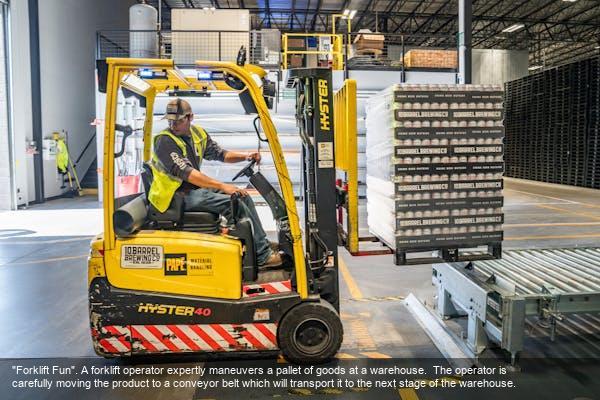"
},
"typeVersion": 1
},
{
"id": "23db0c90-45b6-4b85-b017-a52ad5a9ad5b",
"name": "Image Captioning Agent",
"type": "@n8n/n8n-nodes-langchain.chainLlm",
"position": [
1280,
560
],
"parameters": {
"text": "Generate a caption for this image.",
"messages": {
"messageValues": [
{
"message": "=You role is to provide an appropriate image caption for user provided images.\n\nThe individual components of a caption are as follows: who, when, where, context and miscellaneous. For a really good caption, follow this template: who + when + where + context + miscellaneous\n\nGive the caption a punny title."
},
{
"type": "HumanMessagePromptTemplate",
"messageType": "imageBinary"
}
]
},
"promptType": "define",
"hasOutputParser": true
},
"typeVersion": 1.4
}
],
"pinData": {},
"connections": {
"Get Info": {
"main": [
[
{
"node": "Merge Image & Caption",
"type": "main",
"index": 0
}
]
]
},
"Get Image": {
"main": [
[
{
"node": "Resize For AI",
"type": "main",
"index": 0
},
{
"node": "Get Info",
"type": "main",
"index": 0
}
]
]
},
"Resize For AI": {
"main": [
[
{
"node": "Image Captioning Agent",
"type": "main",
"index": 0
}
]
]
},
"Calculate Positioning": {
"main": [
[
{
"node": "Merge Caption & Positions",
"type": "main",
"index": 1
}
]
]
},
"Merge Image & Caption": {
"main": [
[
{
"node": "Calculate Positioning",
"type": "main",
"index": 0
},
{
"node": "Merge Caption & Positions",
"type": "main",
"index": 0
}
]
]
},
"Image Captioning Agent": {
"main": [
[
{
"node": "Merge Image & Caption",
"type": "main",
"index": 1
}
]
]
},
"Google Gemini Chat Model": {
"ai_languageModel": [
[
{
"node": "Image Captioning Agent",
"type": "ai_languageModel",
"index": 0
}
]
]
},
"Structured Output Parser": {
"ai_outputParser": [
[
{
"node": "Image Captioning Agent",
"type": "ai_outputParser",
"index": 0
}
]
]
},
"Merge Caption & Positions": {
"main": [
[
{
"node": "Apply Caption to Image",
"type": "main",
"index": 0
}
]
]
},
"When clicking ‘Test workflow’": {
"main": [
[
{
"node": "Get Image",
"type": "main",
"index": 0
}
]
]
}
}
} |