
Spaces:
Build error

Build error
File size: 21,993 Bytes
6f25064 99640e0 6f25064 99640e0 6f25064 |
1 2 3 4 5 6 7 8 9 10 11 12 13 14 15 16 17 18 19 20 21 22 23 24 25 26 27 28 29 30 31 32 33 34 35 36 37 38 39 40 41 42 43 44 45 46 47 48 49 50 51 52 53 54 55 56 57 58 59 60 61 62 63 64 65 66 67 68 69 70 71 72 73 74 75 76 77 78 79 80 81 82 83 84 85 86 87 88 89 90 91 92 93 94 95 96 97 98 99 100 101 102 103 104 105 106 107 108 109 110 111 112 113 114 115 116 117 118 119 120 121 122 123 124 125 126 127 128 129 130 131 132 133 134 135 136 137 138 139 140 141 142 143 144 145 146 147 148 149 150 151 152 153 154 155 156 157 158 159 160 161 162 163 164 165 166 167 168 169 170 171 172 173 174 175 176 177 178 179 180 181 182 183 184 185 186 187 188 189 190 191 192 193 194 195 196 197 198 199 200 201 202 203 204 205 206 207 208 209 210 211 212 213 214 215 216 217 218 219 220 221 222 223 224 225 226 227 228 229 230 231 232 233 234 235 236 237 238 239 240 241 242 243 244 245 246 247 248 249 250 251 252 253 254 255 256 257 258 259 260 261 262 263 264 265 266 267 268 269 270 271 272 273 274 275 276 277 278 279 280 281 282 283 284 285 286 287 288 289 290 291 292 293 294 295 296 297 298 299 300 301 302 303 304 305 306 307 308 309 310 311 312 313 314 315 316 317 318 319 320 321 322 323 324 325 326 327 328 329 330 331 332 333 334 335 336 337 338 339 340 341 342 343 344 345 346 347 348 349 350 351 352 353 354 355 356 357 358 359 360 361 362 363 364 365 366 367 368 369 370 371 372 373 374 375 376 377 378 379 380 381 382 383 384 385 386 387 388 389 390 391 392 393 394 395 396 397 398 399 400 401 402 403 404 405 406 407 408 409 410 411 412 413 414 415 416 417 418 419 420 421 422 423 424 425 426 427 428 429 430 431 432 433 434 435 436 437 438 439 440 441 442 443 444 445 446 447 448 449 450 451 452 453 454 455 456 |
<a id="readme-top"></a>
<!-- [![Contributors][contributors-shield]][contributors-url] -->
[![Forks][forks-shield]][forks-url]
[![Stargazers][stars-shield]][stars-url]
[![Issues][issues-shield]][issues-url]
[![MIT License][license-shield]][license-url]
<!-- [![LinkedIn][linkedin-shield]][linkedin-url] -->
<!-- PROJECT LOGO -->
<br />
<div align="center">
<a href="https://github.com/lfnovo/open-notebook">
<img src="docs/assets/hero.svg" alt="Logo">
</a>
<h3 align="center">Open Notebook</h3>
<p align="center">
An open source, privacy-focused alternative to Google's Notebook LM!
<br /><strong>Join our <a href="https://discord.gg/37XJPXfz2w">Discord server</a> for help, to share workflow ideas, and suggest features!</strong>
<br />
<a href="https://www.open-notebook.ai"><strong>Checkout our website »</strong></a>
<br />
<br />
<a href="docs/getting-started/index.md">📚 Get Started</a>
·
<a href="docs/user-guide/index.md">📖 User Guide</a>
·
<a href="docs/features/index.md">✨ Features</a>
·
<a href="docs/deployment/index.md">🚀 Deploy</a>
</p>
</div>
<div align="center">
<!-- Keep these links. Translations will automatically update with the README. -->
<a href="https://zdoc.app/de/lfnovo/open-notebook">Deutsch</a> |
<a href="https://zdoc.app/es/lfnovo/open-notebook">Español</a> |
<a href="https://zdoc.app/fr/lfnovo/open-notebook">français</a> |
<a href="https://zdoc.app/ja/lfnovo/open-notebook">日本語</a> |
<a href="https://zdoc.app/ko/lfnovo/open-notebook">한국어</a> |
<a href="https://zdoc.app/pt/lfnovo/open-notebook">Português</a> |
<a href="https://zdoc.app/ru/lfnovo/open-notebook">Русский</a> |
<a href="https://zdoc.app/zh/lfnovo/open-notebook">中文</a>
</div>
## A private, multi-model, 100% local, full-featured alternative to Notebook LM

In a world dominated by Artificial Intelligence, having the ability to think 🧠 and acquire new knowledge 💡, is a skill that should not be a privilege for a few, nor restricted to a single provider.
**Open Notebook empowers you to:**
- 🔒 **Control your data** - Keep your research private and secure
- 🤖 **Choose your AI models** - Support for 16+ providers including OpenAI, Anthropic, Ollama, LM Studio, and more
- 📚 **Organize multi-modal content** - PDFs, videos, audio, web pages, and more
- 🎙️ **Generate professional podcasts** - Advanced multi-speaker podcast generation
- 🔍 **Search intelligently** - Full-text and vector search across all your content
- 💬 **Chat with context** - AI conversations powered by your research
Learn more about our project at [https://www.open-notebook.ai](https://www.open-notebook.ai)
---
## ⚠️ IMPORTANT: v1.0 Breaking Changes
**If you're upgrading from a previous version**, please note:
- 🏷️ **Docker tags have changed**: The `latest` tag is now **frozen** at the last Streamlit version
- 🆕 **Use `v1-latest` tag** for the new React/Next.js version (recommended)
- 🔌 **Port 5055 required**: You must expose port 5055 for the API to work
- 📖 **Read the migration guide**: See [MIGRATION.md](MIGRATION.md) for detailed upgrade instructions
**New users**: You can ignore this notice and proceed with the Quick Start below using the `v1-latest-single` tag.
---
## 🆚 Open Notebook vs Google Notebook LM
| Feature | Open Notebook | Google Notebook LM | Advantage |
|---------|---------------|--------------------|-----------|
| **Privacy & Control** | Self-hosted, your data | Google cloud only | Complete data sovereignty |
| **AI Provider Choice** | 16+ providers (OpenAI, Anthropic, Ollama, LM Studio, etc.) | Google models only | Flexibility and cost optimization |
| **Podcast Speakers** | 1-4 speakers with custom profiles | 2 speakers only | Extreme flexibility |
| **Context Control** | 3 granular levels | All-or-nothing | Privacy and performance tuning |
| **Content Transformations** | Custom and built-in | Limited options | Unlimited processing power |
| **API Access** | Full REST API | No API | Complete automation |
| **Deployment** | Docker, cloud, or local | Google hosted only | Deploy anywhere |
| **Citations** | Comprehensive with sources | Basic references | Research integrity |
| **Customization** | Open source, fully customizable | Closed system | Unlimited extensibility |
| **Cost** | Pay only for AI usage | Monthly subscription + usage | Transparent and controllable |
**Why Choose Open Notebook?**
- 🔒 **Privacy First**: Your sensitive research stays completely private
- 💰 **Cost Control**: Choose cheaper AI providers or run locally with Ollama
- 🎙️ **Better Podcasts**: Full script control and multi-speaker flexibility vs limited 2-speaker deep-dive format
- 🔧 **Unlimited Customization**: Modify, extend, and integrate as needed
- 🌐 **No Vendor Lock-in**: Switch providers, deploy anywhere, own your data
### Built With
[![Python][Python]][Python-url] [![Next.js][Next.js]][Next-url] [![React][React]][React-url] [![SurrealDB][SurrealDB]][SurrealDB-url] [![LangChain][LangChain]][LangChain-url]
## 🚀 Quick Start
**Docker Images Available:**
- **Docker Hub**: `lfnovo/open_notebook:v1-latest-single`
- **GitHub Container Registry**: `ghcr.io/lfnovo/open-notebook:v1-latest-single`
Both registries contain identical images - choose whichever you prefer!
### Choose Your Setup:
<table>
<tr>
<td width="50%">
#### 🏠 **Local Machine Setup**
Perfect if Docker runs on the **same computer** where you'll access Open Notebook.
```bash
mkdir open-notebook && cd open-notebook
docker run -d \
--name open-notebook \
-p 8502:8502 -p 5055:5055 \
-v ./notebook_data:/app/data \
-v ./surreal_data:/mydata \
-e OPENAI_API_KEY=your_key_here \
-e SURREAL_URL="ws://localhost:8000/rpc" \
-e SURREAL_USER="root" \
-e SURREAL_PASSWORD="root" \
-e SURREAL_NAMESPACE="open_notebook" \
-e SURREAL_DATABASE="production" \
lfnovo/open_notebook:v1-latest-single
```
**Access at:** http://localhost:8502
</td>
<td width="50%">
#### 🌐 **Remote Server Setup**
Use this for servers, Raspberry Pi, NAS, Proxmox, or any remote machine.
```bash
mkdir open-notebook && cd open-notebook
docker run -d \
--name open-notebook \
-p 8502:8502 -p 5055:5055 \
-v ./notebook_data:/app/data \
-v ./surreal_data:/mydata \
-e OPENAI_API_KEY=your_key_here \
-e API_URL=http://YOUR_SERVER_IP:5055 \
-e SURREAL_URL="ws://localhost:8000/rpc" \
-e SURREAL_USER="root" \
-e SURREAL_PASSWORD="root" \
-e SURREAL_NAMESPACE="open_notebook" \
-e SURREAL_DATABASE="production" \
lfnovo/open_notebook:v1-latest-single
```
**Replace `YOUR_SERVER_IP`** with your server's IP (e.g., `192.168.1.100`) or domain
**Access at:** http://YOUR_SERVER_IP:8502
</td>
</tr>
</table>
> **⚠️ Critical Setup Notes:**
>
> **Both ports are required:**
> - **Port 8502**: Web interface (what you see in your browser)
> - **Port 5055**: API backend (required for the app to function)
>
> **API_URL must match how YOU access the server:**
> - ✅ Access via `http://192.168.1.100:8502` → set `API_URL=http://192.168.1.100:5055`
> - ✅ Access via `http://myserver.local:8502` → set `API_URL=http://myserver.local:5055`
> - ❌ Don't use `localhost` for remote servers - it won't work from other devices!
### Using Docker Compose (Recommended for Easy Management)
Create a `docker-compose.yml` file:
```yaml
services:
open_notebook:
image: lfnovo/open_notebook:v1-latest-single
# Or use: ghcr.io/lfnovo/open-notebook:v1-latest-single
ports:
- "8502:8502" # Web UI
- "5055:5055" # API (required!)
environment:
- OPENAI_API_KEY=your_key_here
# For remote access, uncomment and set your server IP/domain:
# - API_URL=http://192.168.1.100:5055
# Database connection (required for single-container)
- SURREAL_URL=ws://localhost:8000/rpc
- SURREAL_USER=root
- SURREAL_PASSWORD=root
- SURREAL_NAMESPACE=open_notebook
- SURREAL_DATABASE=production
volumes:
- ./notebook_data:/app/data
- ./surreal_data:/mydata
restart: always
```
Start with: `docker compose up -d`
**What gets created:**
```
open-notebook/
├── docker-compose.yml # Your configuration
├── notebook_data/ # Your notebooks and research content
└── surreal_data/ # Database files
```
### 🆘 Quick Troubleshooting
| Problem | Solution |
|---------|----------|
| **"Unable to connect to server"** | Set `API_URL` environment variable to match how you access the server (see remote setup above) |
| **Blank page or errors** | Ensure BOTH ports (8502 and 5055) are exposed in your docker command |
| **Works on server but not from other computers** | Don't use `localhost` in `API_URL` - use your server's actual IP address |
| **"404" or "config endpoint" errors** | Don't add `/api` to `API_URL` - use just `http://your-ip:5055` |
| **Still having issues?** | Check our [5-minute troubleshooting guide](docs/troubleshooting/quick-fixes.md) or [join Discord](https://discord.gg/37XJPXfz2w) |
### How Open Notebook Works
```
┌─────────────────────────────────────────────────────────┐
│ Your Browser │
│ Access: http://your-server-ip:8502 │
└────────────────┬────────────────────────────────────────┘
│
▼
┌───────────────┐
│ Port 8502 │ ← Next.js Frontend (what you see)
│ Frontend │ Also proxies API requests internally!
└───────┬───────┘
│ proxies /api/* requests ↓
▼
┌───────────────┐
│ Port 5055 │ ← FastAPI Backend (handles requests)
│ API │
└───────┬───────┘
│
▼
┌───────────────┐
│ SurrealDB │ ← Database (internal, auto-configured)
│ (Port 8000) │
└───────────────┘
```
**Key Points:**
- **v1.1+**: Next.js automatically proxies `/api/*` requests to the backend, simplifying reverse proxy setup
- Your browser loads the frontend from port 8502
- The frontend needs to know where to find the API - when accessing remotely, set: `API_URL=http://your-server-ip:5055`
- **Behind reverse proxy?** You only need to proxy to port 8502 now! See [Reverse Proxy Guide](docs/deployment/reverse-proxy.md)
## Star History
[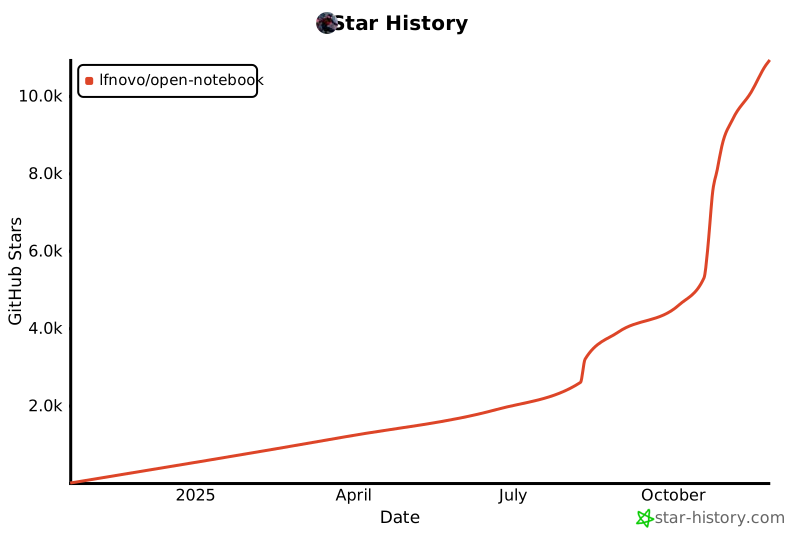](https://www.star-history.com/#lfnovo/open-notebook&type=date&legend=top-left)
### 🛠️ Full Installation
For development or customization:
```bash
git clone https://github.com/lfnovo/open-notebook
cd open-notebook
make start-all
```
### 📖 Need Help?
- **🤖 AI Installation Assistant**: We have a [CustomGPT built to help you install Open Notebook](https://chatgpt.com/g/g-68776e2765b48191bd1bae3f30212631-open-notebook-installation-assistant) - it will guide you through each step!
- **New to Open Notebook?** Start with our [Getting Started Guide](docs/getting-started/index.md)
- **Need installation help?** Check our [Installation Guide](docs/getting-started/installation.md)
- **Want to see it in action?** Try our [Quick Start Tutorial](docs/getting-started/quick-start.md)
## Provider Support Matrix
Thanks to the [Esperanto](https://github.com/lfnovo/esperanto) library, we support this providers out of the box!
| Provider | LLM Support | Embedding Support | Speech-to-Text | Text-to-Speech |
|--------------|-------------|------------------|----------------|----------------|
| OpenAI | ✅ | ✅ | ✅ | ✅ |
| Anthropic | ✅ | ❌ | ❌ | ❌ |
| Groq | ✅ | ❌ | ✅ | ❌ |
| Google (GenAI) | ✅ | ✅ | ❌ | ✅ |
| Vertex AI | ✅ | ✅ | ❌ | ✅ |
| Ollama | ✅ | ✅ | ❌ | ❌ |
| Perplexity | ✅ | ❌ | ❌ | ❌ |
| ElevenLabs | ❌ | ❌ | ✅ | ✅ |
| Azure OpenAI | ✅ | ✅ | ❌ | ❌ |
| Mistral | ✅ | ✅ | ❌ | ❌ |
| DeepSeek | ✅ | ❌ | ❌ | ❌ |
| Voyage | ❌ | ✅ | ❌ | ❌ |
| xAI | ✅ | ❌ | ❌ | ❌ |
| OpenRouter | ✅ | ❌ | ❌ | ❌ |
| OpenAI Compatible* | ✅ | ❌ | ❌ | ❌ |
*Supports LM Studio and any OpenAI-compatible endpoint
## ✨ Key Features
### Core Capabilities
- **🔒 Privacy-First**: Your data stays under your control - no cloud dependencies
- **🎯 Multi-Notebook Organization**: Manage multiple research projects seamlessly
- **📚 Universal Content Support**: PDFs, videos, audio, web pages, Office docs, and more
- **🤖 Multi-Model AI Support**: 16+ providers including OpenAI, Anthropic, Ollama, Google, LM Studio, and more
- **🎙️ Professional Podcast Generation**: Advanced multi-speaker podcasts with Episode Profiles
- **🔍 Intelligent Search**: Full-text and vector search across all your content
- **💬 Context-Aware Chat**: AI conversations powered by your research materials
- **📝 AI-Assisted Notes**: Generate insights or write notes manually
### Advanced Features
- **⚡ Reasoning Model Support**: Full support for thinking models like DeepSeek-R1 and Qwen3
- **🔧 Content Transformations**: Powerful customizable actions to summarize and extract insights
- **🌐 Comprehensive REST API**: Full programmatic access for custom integrations [](http://localhost:5055/docs)
- **🔐 Optional Password Protection**: Secure public deployments with authentication
- **📊 Fine-Grained Context Control**: Choose exactly what to share with AI models
- **📎 Citations**: Get answers with proper source citations
### Three-Column Interface
1. **Sources**: Manage all your research materials
2. **Notes**: Create manual or AI-generated notes
3. **Chat**: Converse with AI using your content as context
[](https://www.youtube.com/watch?v=D-760MlGwaI)
## 📚 Documentation
### Getting Started
- **[📖 Introduction](docs/getting-started/introduction.md)** - Learn what Open Notebook offers
- **[⚡ Quick Start](docs/getting-started/quick-start.md)** - Get up and running in 5 minutes
- **[🔧 Installation](docs/getting-started/installation.md)** - Comprehensive setup guide
- **[🎯 Your First Notebook](docs/getting-started/first-notebook.md)** - Step-by-step tutorial
### User Guide
- **[📱 Interface Overview](docs/user-guide/interface-overview.md)** - Understanding the layout
- **[📚 Notebooks](docs/user-guide/notebooks.md)** - Organizing your research
- **[📄 Sources](docs/user-guide/sources.md)** - Managing content types
- **[📝 Notes](docs/user-guide/notes.md)** - Creating and managing notes
- **[💬 Chat](docs/user-guide/chat.md)** - AI conversations
- **[🔍 Search](docs/user-guide/search.md)** - Finding information
### Advanced Topics
- **[🎙️ Podcast Generation](docs/features/podcasts.md)** - Create professional podcasts
- **[🔧 Content Transformations](docs/features/transformations.md)** - Customize content processing
- **[🤖 AI Models](docs/features/ai-models.md)** - AI model configuration
- **[🔧 REST API Reference](docs/development/api-reference.md)** - Complete API documentation
- **[🔐 Security](docs/deployment/security.md)** - Password protection and privacy
- **[🚀 Deployment](docs/deployment/index.md)** - Complete deployment guides for all scenarios
<p align="right">(<a href="#readme-top">back to top</a>)</p>
## 🗺️ Roadmap
### Upcoming Features
- **Live Front-End Updates**: Real-time UI updates for smoother experience
- **Async Processing**: Faster UI through asynchronous content processing
- **Cross-Notebook Sources**: Reuse research materials across projects
- **Bookmark Integration**: Connect with your favorite bookmarking apps
### Recently Completed ✅
- **Next.js Frontend**: Modern React-based frontend with improved performance
- **Comprehensive REST API**: Full programmatic access to all functionality
- **Multi-Model Support**: 16+ AI providers including OpenAI, Anthropic, Ollama, LM Studio
- **Advanced Podcast Generator**: Professional multi-speaker podcasts with Episode Profiles
- **Content Transformations**: Powerful customizable actions for content processing
- **Enhanced Citations**: Improved layout and finer control for source citations
- **Multiple Chat Sessions**: Manage different conversations within notebooks
See the [open issues](https://github.com/lfnovo/open-notebook/issues) for a full list of proposed features and known issues.
<p align="right">(<a href="#readme-top">back to top</a>)</p>
## 🤝 Community & Contributing
### Join the Community
- 💬 **[Discord Server](https://discord.gg/37XJPXfz2w)** - Get help, share ideas, and connect with other users
- 🐛 **[GitHub Issues](https://github.com/lfnovo/open-notebook/issues)** - Report bugs and request features
- ⭐ **Star this repo** - Show your support and help others discover Open Notebook
### Contributing
We welcome contributions! We're especially looking for help with:
- **Frontend Development**: Help improve our modern Next.js/React UI
- **Testing & Bug Fixes**: Make Open Notebook more robust
- **Feature Development**: Build the coolest research tool together
- **Documentation**: Improve guides and tutorials
**Current Tech Stack**: Python, FastAPI, Next.js, React, SurrealDB
**Future Roadmap**: Real-time updates, enhanced async processing
See our [Contributing Guide](CONTRIBUTING.md) for detailed information on how to get started.
<p align="right">(<a href="#readme-top">back to top</a>)</p>
## 📄 License
Open Notebook is MIT licensed. See the [LICENSE](LICENSE) file for details.
## 📞 Contact
**Luis Novo** - [@lfnovo](https://twitter.com/lfnovo)
**Community Support**:
- 💬 [Discord Server](https://discord.gg/37XJPXfz2w) - Get help, share ideas, and connect with users
- 🐛 [GitHub Issues](https://github.com/lfnovo/open-notebook/issues) - Report bugs and request features
- 🌐 [Website](https://www.open-notebook.ai) - Learn more about the project
## 🙏 Acknowledgments
Open Notebook is built on the shoulders of amazing open-source projects:
* **[Podcast Creator](https://github.com/lfnovo/podcast-creator)** - Advanced podcast generation capabilities
* **[Surreal Commands](https://github.com/lfnovo/surreal-commands)** - Background job processing
* **[Content Core](https://github.com/lfnovo/content-core)** - Content processing and management
* **[Esperanto](https://github.com/lfnovo/esperanto)** - Multi-provider AI model abstraction
* **[Docling](https://github.com/docling-project/docling)** - Document processing and parsing
<p align="right">(<a href="#readme-top">back to top</a>)</p>
<!-- MARKDOWN LINKS & IMAGES -->
<!-- https://www.markdownguide.org/basic-syntax/#reference-style-links -->
[contributors-shield]: https://img.shields.io/github/contributors/lfnovo/open-notebook.svg?style=for-the-badge
[contributors-url]: https://github.com/lfnovo/open-notebook/graphs/contributors
[forks-shield]: https://img.shields.io/github/forks/lfnovo/open-notebook.svg?style=for-the-badge
[forks-url]: https://github.com/lfnovo/open-notebook/network/members
[stars-shield]: https://img.shields.io/github/stars/lfnovo/open-notebook.svg?style=for-the-badge
[stars-url]: https://github.com/lfnovo/open-notebook/stargazers
[issues-shield]: https://img.shields.io/github/issues/lfnovo/open-notebook.svg?style=for-the-badge
[issues-url]: https://github.com/lfnovo/open-notebook/issues
[license-shield]: https://img.shields.io/github/license/lfnovo/open-notebook.svg?style=for-the-badge
[license-url]: https://github.com/lfnovo/open-notebook/blob/master/LICENSE.txt
[linkedin-shield]: https://img.shields.io/badge/-LinkedIn-black.svg?style=for-the-badge&logo=linkedin&colorB=555
[linkedin-url]: https://linkedin.com/in/lfnovo
[product-screenshot]: images/screenshot.png
[Next.js]: https://img.shields.io/badge/Next.js-000000?style=for-the-badge&logo=next.js&logoColor=white
[Next-url]: https://nextjs.org/
[React]: https://img.shields.io/badge/React-61DAFB?style=for-the-badge&logo=react&logoColor=black
[React-url]: https://reactjs.org/
[Python]: https://img.shields.io/badge/Python-3776AB?style=for-the-badge&logo=python&logoColor=white
[Python-url]: https://www.python.org/
[LangChain]: https://img.shields.io/badge/LangChain-3A3A3A?style=for-the-badge&logo=chainlink&logoColor=white
[LangChain-url]: https://www.langchain.com/
[SurrealDB]: https://img.shields.io/badge/SurrealDB-FF5E00?style=for-the-badge&logo=databricks&logoColor=white
[SurrealDB-url]: https://surrealdb.com/
|