
Spaces:
Sleeping

Sleeping
| # Text Classification & Regression | |
| Training a text classification/regression model with AutoTrain is super-easy! Get your data ready in | |
| proper format and then with just a few clicks, your state-of-the-art model will be ready to | |
| be used in production. | |
| Config file task names: | |
| - `text_classification` | |
| - `text-classification` | |
| - `text_regression` | |
| - `text-regression` | |
| ## Data Format | |
| Text classification/regression supports datasets in both CSV and JSONL formats. | |
| ### CSV Format | |
| Let's train a model for classifying the sentiment of a movie review. The data should be | |
| in the following CSV format: | |
| ```csv | |
| text,target | |
| "this movie is great",positive | |
| "this movie is bad",negative | |
| . | |
| . | |
| . | |
| ``` | |
| As you can see, we have two columns in the CSV file. One column is the text and the other | |
| is the label. The label can be any string. In this example, we have two labels: `positive` | |
| and `negative`. You can have as many labels as you want. | |
| And if you would like to train a model for scoring a movie review on a scale of 1-5. The data can be as follows: | |
| ```csv | |
| text,target | |
| "this movie is great",4.9 | |
| "this movie is bad",1.5 | |
| . | |
| . | |
| . | |
| ``` | |
| ### JSONL Format | |
| Instead of CSV you can also use JSONL format. The JSONL format should be as follows: | |
| ```json | |
| {"text": "this movie is great", "target": "positive"} | |
| {"text": "this movie is bad", "target": "negative"} | |
| . | |
| . | |
| . | |
| ``` | |
| and for regression: | |
| ```json | |
| {"text": "this movie is great", "target": 4.9} | |
| {"text": "this movie is bad", "target": 1.5} | |
| . | |
| . | |
| ``` | |
| ### Column Mapping / Names | |
| Your CSV dataset must have two columns: `text` and `target`. | |
| If your column names are different than `text` and `target`, you can map the dataset column to AutoTrain column names. | |
| ## Training | |
| ### Local Training | |
| To train a text classification/regression model locally, you can use the `autotrain --config config.yaml` command. | |
| Here is an example of a `config.yaml` file for training a text classification model: | |
| ```yaml | |
| task: text_classification # or text_regression | |
| base_model: google-bert/bert-base-uncased | |
| project_name: autotrain-bert-imdb-finetuned | |
| log: tensorboard | |
| backend: local | |
| data: | |
| path: stanfordnlp/imdb | |
| train_split: train | |
| valid_split: test | |
| column_mapping: | |
| text_column: text | |
| target_column: label | |
| params: | |
| max_seq_length: 512 | |
| epochs: 3 | |
| batch_size: 4 | |
| lr: 2e-5 | |
| optimizer: adamw_torch | |
| scheduler: linear | |
| gradient_accumulation: 1 | |
| mixed_precision: fp16 | |
| hub: | |
| username: ${HF_USERNAME} | |
| token: ${HF_TOKEN} | |
| push_to_hub: true | |
| ``` | |
| In this example, we are training a text classification model using the `google-bert/bert-base-uncased` model on the IMDB dataset. | |
| We are using the `stanfordnlp/imdb` dataset, which is already available on Hugging Face Hub. | |
| We are training the model for 3 epochs with a batch size of 4 and a learning rate of `2e-5`. | |
| We are using the `adamw_torch` optimizer and the `linear` scheduler. | |
| We are also using mixed precision training with a gradient accumulation of 1. | |
| If you want to use a local CSV/JSONL dataset, you can change the `data` section to: | |
| ```yaml | |
| data: | |
| path: data/ # this must be the path to the directory containing the train and valid files | |
| train_split: train # this must be either train.csv or train.json | |
| valid_split: valid # this must be either valid.csv or valid.json | |
| column_mapping: | |
| text_column: text # this must be the name of the column containing the text | |
| target_column: label # this must be the name of the column containing the target | |
| ``` | |
| To train the model, run the following command: | |
| ```bash | |
| $ autotrain --config config.yaml | |
| ``` | |
| You can find example config files for text classification and regression in the [here](https://github.com/huggingface/autotrain-advanced/tree/main/configs/text_classification) and [here](https://github.com/huggingface/autotrain-advanced/tree/main/configs/text_regression) respectively. | |
| ### Training on Hugging Face Spaces | |
| The parameters for training on Hugging Face Spaces are the same as for local training. | |
| If you are using your own dataset, select "Local" as dataset source and upload your dataset. | |
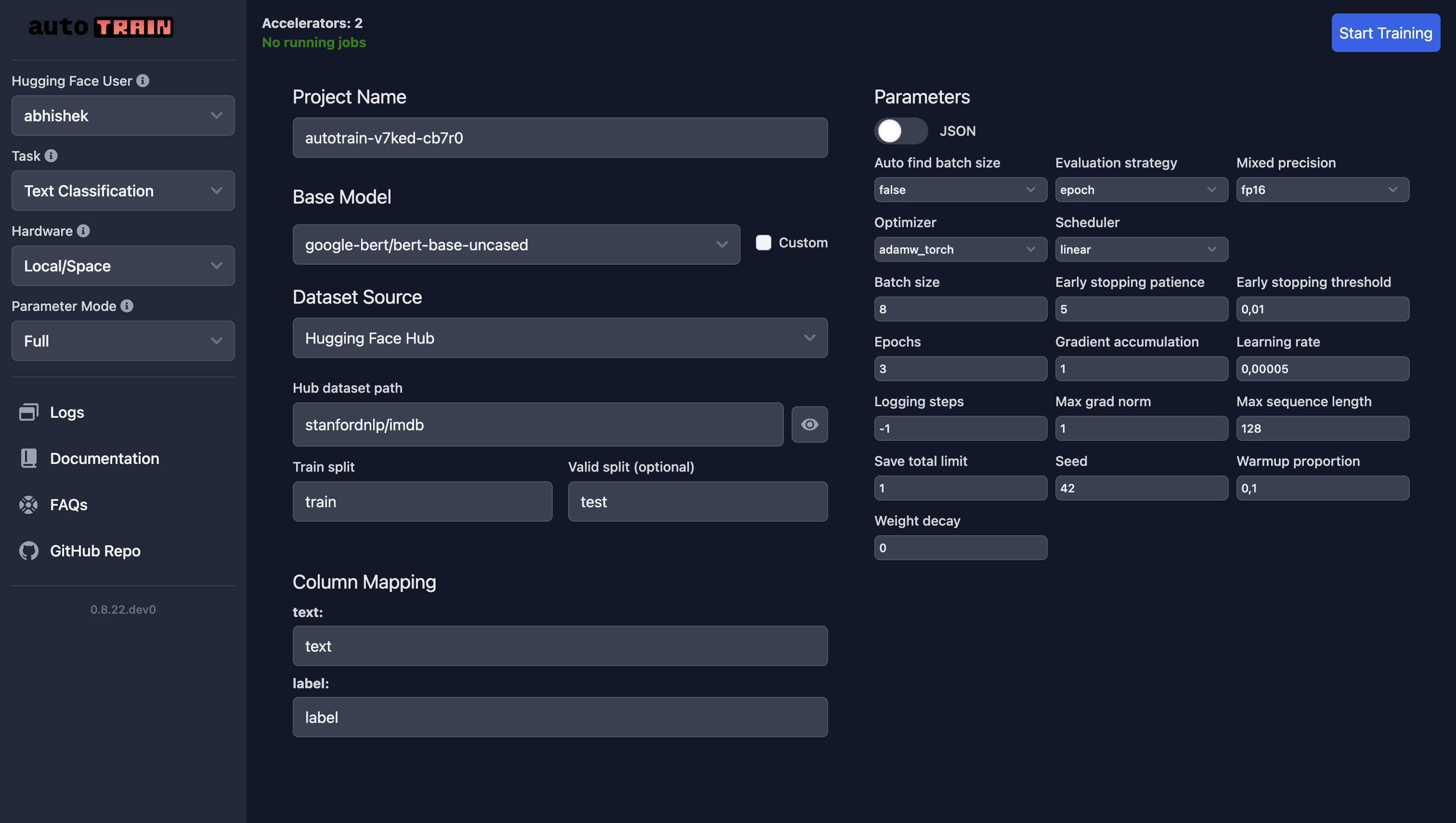
| In the following screenshot, we are training a text classification model using the `google-bert/bert-base-uncased` model on the IMDB dataset. | |
|  | |
| For text regression, all you need to do is select "Text Regression" as the task and everything else remains the same (except the data, of course). | |
| ## Training Parameters | |
| Training parameters for text classification and regression are the same. | |
| [[autodoc]] trainers.text_classification.params.TextClassificationParams | |