

File size: 14,365 Bytes
35e7795 e5c962a 35e7795 56115b9 8c318db 56115b9 8c318db 56115b9 8c318db 56115b9 2367922 56115b9 8c318db 56115b9 8c318db 56115b9 bfc9405 56115b9 bfc9405 56115b9 bfc9405 56115b9 bfc9405 56115b9 bfc9405 56115b9 bfc9405 56115b9 bfc9405 56115b9 bfc9405 56115b9 8c318db 56115b9 8c318db 56115b9 8c318db 56115b9 8c318db 56115b9 8c318db 56115b9 8c318db 56115b9 35e7795 56115b9 35e7795 56115b9 35e7795 56115b9 35e7795 56115b9 b3f878b 56115b9 b3f878b 56115b9 b3f878b 56115b9 b3f878b 56115b9 b3f878b 35e7795 56115b9 35e7795 56115b9 35e7795 56115b9 35e7795 56115b9 35e7795 56115b9 35e7795 8a81296 56115b9 35e7795 56115b9 35e7795 56115b9 35e7795 56115b9 35e7795 56115b9 35e7795 56115b9 35e7795 56115b9 35e7795 56115b9 35e7795 56115b9 35e7795 56115b9 35e7795 56115b9 35e7795 56115b9 35e7795 56115b9 35e7795 56115b9 35e7795 56115b9 35e7795 56115b9 35e7795 56115b9 35e7795 56115b9 35e7795 56115b9 35e7795 56115b9 35e7795 56115b9 35e7795 56115b9 35e7795 56115b9 35e7795 56115b9 35e7795 56115b9 35e7795 56115b9 35e7795 56115b9 35e7795 56115b9 35e7795 56115b9 35e7795 56115b9 35e7795 56115b9 35e7795 56115b9 35e7795 56115b9 35e7795 56115b9 35e7795 56115b9 35e7795 56115b9 35e7795 56115b9 35e7795 56115b9 35e7795 56115b9 35e7795 56115b9 35e7795 56115b9 35e7795 56115b9 35e7795 56115b9 35e7795 56115b9 35e7795 56115b9 35e7795 56115b9 35e7795 56115b9 35e7795 56115b9 35e7795 56115b9 35e7795 56115b9 35e7795 56115b9 35e7795 56115b9 35e7795 56115b9 35e7795 56115b9 35e7795 56115b9 35e7795 56115b9 35e7795 56115b9 35e7795 56115b9 35e7795 e5c962a 35e7795 56115b9 35e7795 56115b9 35e7795 56115b9 | 1 2 3 4 5 6 7 8 9 10 11 12 13 14 15 16 17 18 19 20 21 22 23 24 25 26 27 28 29 30 31 32 33 34 35 36 37 38 39 40 41 42 43 44 45 46 47 48 49 50 51 52 53 54 55 56 57 58 59 60 61 62 63 64 65 66 67 68 69 70 71 72 73 74 75 76 77 78 79 80 81 82 83 84 85 86 87 88 89 90 91 92 93 94 95 96 97 98 99 100 101 102 103 104 105 106 107 108 109 110 111 112 113 114 115 116 117 118 119 120 121 122 123 124 125 126 127 128 129 130 131 132 133 134 135 136 137 138 139 140 141 142 143 144 145 146 147 148 149 150 151 152 153 154 155 156 157 158 159 160 161 162 163 164 165 166 167 168 169 170 171 172 173 174 175 176 177 178 179 180 181 182 183 184 185 186 187 188 189 190 191 192 193 194 195 196 197 198 199 200 201 202 203 204 205 206 207 208 209 210 211 212 213 214 215 216 217 218 219 220 221 222 223 224 225 226 227 228 229 230 231 232 233 234 235 236 237 238 239 240 241 242 243 244 245 246 247 248 249 250 251 252 253 254 255 256 257 258 259 260 261 262 263 264 265 266 267 268 269 270 271 272 273 274 275 276 277 278 279 280 281 282 283 284 285 286 287 288 289 290 291 292 293 294 295 296 297 298 299 300 301 302 303 304 305 306 307 308 309 310 311 312 313 314 315 316 317 318 319 320 321 322 323 324 325 326 327 328 329 330 331 332 333 334 335 336 337 338 339 340 341 342 343 344 345 346 347 348 349 350 351 352 353 354 355 356 357 358 359 360 361 362 363 364 365 366 367 368 369 370 371 372 373 374 375 376 377 378 379 380 | ---
title: QALoop Annotation Platform
emoji: 📝
colorFrom: blue
colorTo: green
sdk: docker
pinned: false
---
# QA Annotation System
The **Expert Validation Platform** in [QALoop](https://github.com/JackKuo666/QALoop) — a human-in-the-loop framework for large-scale agricultural QA construction and evaluation (ICDM). This web application supports **collaborative QA annotation and quality management**: multi-user task workflows, configurable annotation schemas, statistics and export, plus optional **LLM-assisted review of annotation notes**. It receives candidate QA pairs from upstream synthesis pipelines and converts expert judgments into structured feedback for pipeline iteration.
## Demo Usage
This Space is a demo environment — **works out of the box with no manual Secrets configuration**.
### Login
When you open the Space page, the login form is **pre-filled** with the default admin credentials. Click "Login" to start exploring.
| Item | Default |
|------|---------|
| Admin username | `admin` |
| Admin password | `123456` |
### Quick Demo Flow
After login, sample projects and QA data are pre-loaded. You can:
1. **Browse projects / datasets** — View the pre-loaded "Test" project and QA pairs in the admin dashboard
2. **View annotation configs** — Explore existing rating, single-select, and other annotation dimensions
3. **Claim and annotate** — Switch to the user center to complete tasks
4. **View analysis / export** — Check annotation progress, LLM analysis reports, and export results
To build from scratch, you can also create projects, configure schemas, and import JSON / CSV data yourself.
### Demo Sample Data (`seed/demo.sql`)
On first HF Space startup with an empty database, `scripts/space_init.py` automatically imports `seed/demo.sql` (SQLite text dump, git-friendly; HF does not accept binary `.db` files).
| Item | Details |
|------|---------|
| Pre-loaded content | 1 project, 3 datasets, 50 QA pairs, annotation configs, and sample annotation results |
| LLM config | Pre-filled Base URL and `gpt-5.1`; API Key injected via `LLM_API_KEY` env var, **not written to sql** |
| Runtime data | After import, written to `/data/annotations.db` inside the container; web UI changes only affect the runtime DB |
| Relation to sql | **Web UI actions do not write back to `demo.sql`**; updating Demo data requires manual export and push |
Example for updating Demo data:
```bash
# Export from local runtime DB (remember to redact llm_api_key)
sqlite3 ../data/annotations.db ".dump" > seed/demo.sql
git add seed/demo.sql && git commit -m "Update demo seed" && git push space main
```
To disable auto-import: set environment variable `SEED_DEMO_DATA=false`.
### Registering Regular Users
Currently in `production` mode: new users can self-register, but must be **manually enabled** by an admin in "User Management" before they can annotate.
### Demo Default Configuration
| Setting | Default | Description |
|---------|---------|-------------|
| `SECRET_KEY` | `qaloop-demo-jwt-secret-key-32bytes` | JWT signing key (Demo only, do not use in production) |
| `ADMIN_USERNAME` | `admin` | Admin auto-created on first startup |
| `ADMIN_PASSWORD` | `123456` | Admin password |
| `DB_DIR` | `/data` | Database storage directory |
| `ENVIRONMENT` | `production` | New registrations require admin enablement |
> **Security note**: The above are public Demo settings. Do not store real sensitive data. For production deployment, override `SECRET_KEY` and `ADMIN_PASSWORD` via HF Secrets.
## Deploy to Hugging Face Spaces
1. Create a Space on [Hugging Face](https://huggingface.co/new-space), SDK type **Docker**
2. Push the contents of `platform/` to the Space repository (you can upload only the platform subdirectory as the repo root)
3. **No Secrets needed for Demo** — build and run directly
4. For production deployment, override in Space **Settings → Repository secrets**:
| Secret | Demo Default | Description |
|--------|--------------|-------------|
| `SECRET_KEY` | `qaloop-demo-jwt-secret-key-32bytes` | JWT key; use a random string in production |
| `ADMIN_USERNAME` | `admin` | Admin username auto-created on first startup |
| `ADMIN_PASSWORD` | `123456` | Admin password (at least 6 characters) |
5. Optional **Variables**:
| Variable | Default | Description |
|----------|---------|-------------|
| `DB_DIR` | `/data` | SQLite data directory (Dockerfile defaults to `/data`) |
| `ENVIRONMENT` | `production` | New registrations require admin enablement |
| `LLM_BASE_URL` | `http://43.159.131.233:3001/v1` | LLM API Base URL (OpenAI-compatible) |
| `LLM_MODEL_NAME` | `gpt-5.1` | LLM model name |
6. **LLM Analysis (optional)**: Set in Space **Settings → Repository secrets**:
| Secret | Description |
|--------|-------------|
| `LLM_API_KEY` | LLM API Token (auto-written to system config on startup) |
Demo pre-fills Base URL and model name for OpenAI-compatible calls:
```python
from openai import OpenAI
client = OpenAI(
base_url="http://43.159.131.233:3001/v1",
api_key="your-token", # Set LLM_API_KEY in HF Secrets
)
# model: gpt-5.1
```
7. After the Space build completes, visit the page and log in with `admin` / `123456`
> **Note**: On free Spaces, annotation data may be lost after sleep/restart if persistent storage is not enabled. Fine for Demo purposes; for production collaborative annotation, deploy on your own server.
## Highlights
- **Projects and datasets** — Project-level organization with JSON / CSV import and export
- **Flexible annotation configs** — Rating, category, text, single/multi-select, binary; optional reason and confidence fields
- **Collaboration and permissions** — Superuser admin dashboard; regular users claim tasks and annotate; JWT auth
- **Analysis and export** — Annotation progress and statistics; configurable simplified export
- **Optional LLM** — OpenAI-compatible Chat API, default `http://43.159.131.233:3001/v1` + `gpt-5.1`; Token injected via `LLM_API_KEY` env var
- **Seed questions** — Predefined question templates organized by type/subtype
- **UI language** — Chinese and English (i18n)
## System Overview
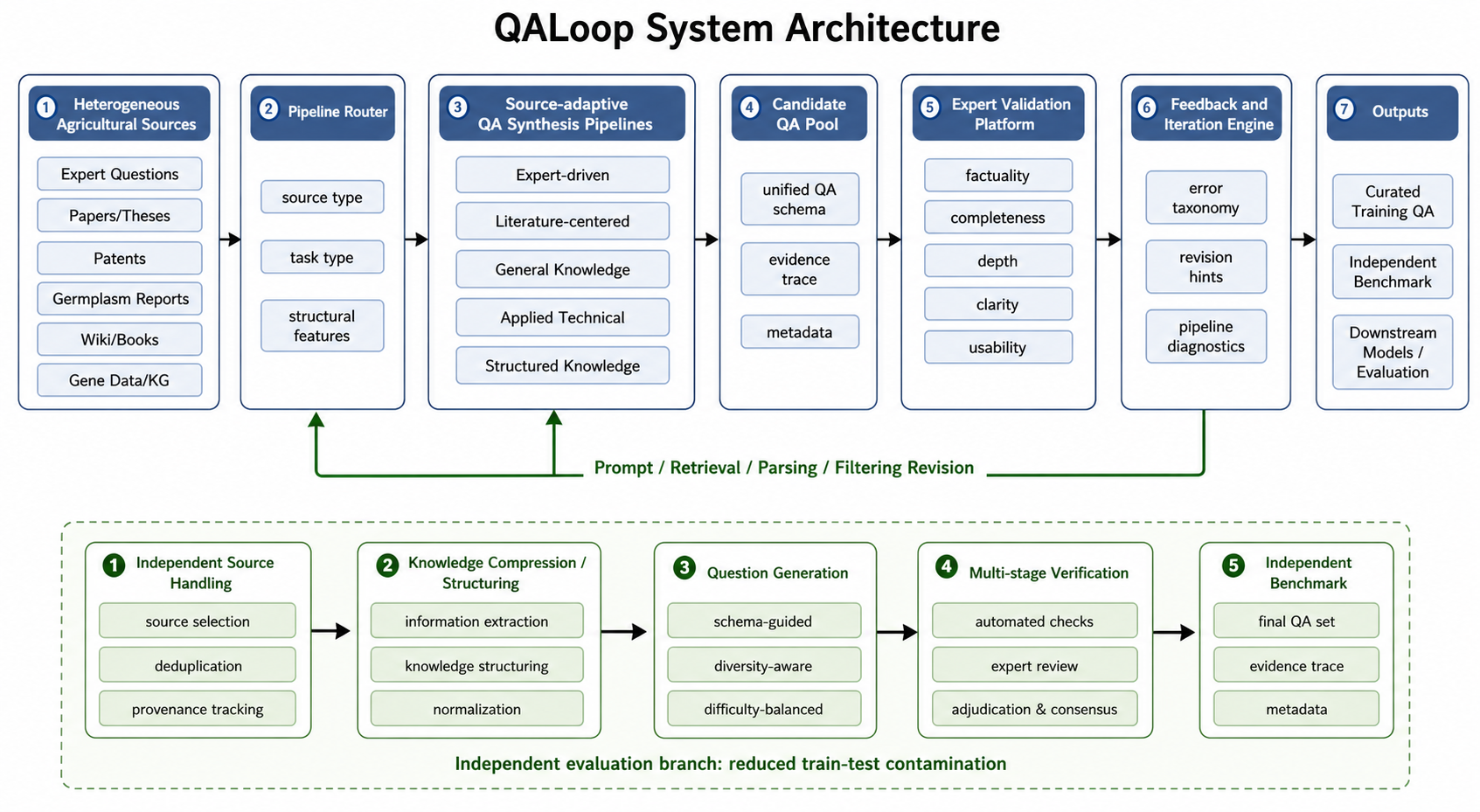
The diagram above shows the full QALoop workflow. This platform corresponds to the **Expert Validation Platform** stage — receiving candidate QA pairs from upstream synthesis pipelines and supporting human quality review, feedback, and export.
This repository covers **data import → schema configuration → multi-user annotation → statistics/analysis → export**. It does not include built-in "automatic QA generation" or "automatic model scoring/evaluation" modules; these can be integrated via upstream/downstream systems.
```mermaid
flowchart LR
subgraph external [External Optional]
Gen[QA Generation]
Eval[Model Evaluation]
end
subgraph app [This System]
Import[Import Dataset]
Config[Annotation Config]
Ann[Human Annotation]
Stats[Statistics & Analysis]
Export[Export Results]
end
Gen -.-> Import
Import --> Config --> Ann --> Stats --> Export
Export -.-> Eval
```
## Configurable Schema Example
Annotation dimensions and field names are defined by admins in **Annotation Config**, not hardcoded in the product. If your research uses multi-dimensional quality scales (e.g., factuality, completeness), implement them via multiple `score` / `category` configs. Below is an **illustrative JSON** (actual export structure depends on your config):
```json
{
"question": "What is drought resistance?",
"answer": "Drought resistance refers to a plant's ability to maintain growth and yield under drought conditions.",
"annotations": {
"factuality_score": 5,
"completeness_score": 4,
"notes": "Correct explanation but could add mechanistic details"
}
}
```
## Tech Stack
- **Backend**: Python 3.12+ / FastAPI / SQLAlchemy / SQLite
- **Frontend**: Vanilla HTML + JS + CSS (no framework)
- **Auth**: JWT (SHA-256 client-side hashing)
- **Package manager**: uv
## Requirements
- Python >= 3.12
- [uv](https://docs.astral.sh/uv/) (Python package manager)
## Quick Start
### 1. Clone the Repository
```bash
git clone <repo-url>
cd qa-annotation
```
### 2. Install Dependencies
```bash
# Install uv (if not already installed)
curl -LsSf https://astral.sh/uv/install.sh | sh
# Create virtual environment and install all dependencies
uv sync
# For dev tools (pre-commit, etc.)
uv sync --group dev
```
### 3. Configure Environment Variables
Create a `.env` file:
```bash
cp .env.example .env
```
Then edit `.env` and **must update `SECRET_KEY`**:
```ini
# Required
SECRET_KEY=your-random-secret-key-here
# Optional (defaults below)
ENVIRONMENT=development
HOST=0.0.0.0
PORT=8000
RELOAD=false
TOKEN_EXPIRE_DAYS=7
```
| Variable | Required | Description | Default |
|----------|----------|-------------|---------|
| `SECRET_KEY` | Yes | JWT key; must be a random string in production | - |
| `ENVIRONMENT` | No | `development` or `production` | `development` |
| `HOST` | No | Listen address | `0.0.0.0` |
| `PORT` | No | Listen port | `8000` |
| `RELOAD` | No | Enable hot reload (for development) | `false` |
| `TOKEN_EXPIRE_DAYS` | No | Token expiration in days | `7` |
> In production, newly registered users are disabled by default and require manual admin enablement.
### 4. Create Superuser
```bash
# Interactive creation (recommended)
python scripts/create_superuser.py
# Create via command-line arguments
python scripts/create_superuser.py --username admin --password yourpassword
```
### 5. Start the Server
```bash
# Option 1: Direct run
uvicorn qa_annotate.main:app --reload --host 0.0.0.0 --port 8000
# Option 2: Via entry point (requires uv sync first)
qa
```
After startup, visit `http://localhost:8000` and log in with the superuser account. API docs: `http://localhost:8000/docs`.
## User Guide
### Admin Workflow
1. **Login** — Log in with superuser account, enter admin dashboard
2. **Create project** — Set name and description
3. **Create annotation config** — Define task type (rating, category, text, single-select, multi-select, binary), and whether reason/confidence fields are required
4. **Link config to project** — Associate annotation configs with projects, with ordering support
5. **Import dataset** — Upload QA data in JSON or CSV format
6. **Manage users** — Create/enable/disable annotator accounts
7. **Configure LLM (optional)** — Fill in the following keys in "System Config" (stored in database, **not** `.env`):
| Config Key | Description |
|------------|-------------|
| `llm_api_key` | LLM API Key |
| `llm_base_url` | Base URL (e.g., `https://api.openai.com/v1`) |
| `llm_model_name` | Model name (e.g., `gpt-4o`) |
Use "Test Connection" to verify. Current implementation is mainly for **summarizing and analyzing annotation notes**; core annotation works without LLM config.
8. **View analysis** — Annotation progress, statistics, and (if configured) LLM analysis reports
### Annotator Workflow
1. **Register/Login** — In development, registered users can usually annotate immediately; in production, admin must enable the account
2. **Claim task** — Claim a dataset from "Available Tasks"
3. **Annotate** — Fill in fields according to config
4. **My tasks** — View and track progress
### Permissions (Summary)
| Capability | Superuser | Regular User |
|------------|-----------|--------------|
| Admin dashboard (projects, datasets, users, system config, etc.) | Yes | No |
| Claim tasks and submit annotations | Yes | Yes (must be enabled) |
Superusers also have an active regular user identity and can participate in annotation when needed.
### Data Format
**Import QA dataset (JSON)**:
```json
[
{
"question": "Question content",
"answer": "Answer content"
}
]
```
Extra fields are supported; specify which extra fields to display in project config.
## Project Structure
```
qa_annotate/
├── api/ # FastAPI router modules
│ ├── analysis.py # Annotation result analysis and LLM endpoints
│ ├── annotation.py # Annotation configs and results
│ ├── auth.py # Authentication and permissions
│ ├── dataset.py # Dataset management
│ ├── project.py # Project management
│ ├── seed_question.py # Seed questions
│ ├── system_config.py # System configuration
│ └── user.py # User management
├── database/ # Database layer
│ ├── base.py # Engine, session, initialization
│ ├── models.py # SQLAlchemy ORM models
│ └── crud.py # CRUD operations
├── schema/ # Pydantic request/response models
├── services/ # Business services (e.g., LLM calls)
├── utils/ # Utilities (password hashing, etc.)
├── config.py # Global config (pydantic-settings)
├── html/ # HTML pages
├── static/
│ ├── js/ # JavaScript
│ ├── css/ # Stylesheets
│ └── locales/ # i18n translation files
└── main.py # Application entry point
```
## Database Backup
```bash
# Manual backup
python scripts/backup_db.py
# Scheduled backup (every 12 hours)
python scripts/backup_db.py --schedule --interval 12
```
## Development
```bash
# Install dev dependencies
uv sync --group dev
# Install pre-commit hooks
pre-commit install
# Lint and format
ruff check --fix .
ruff format .
```
## Research and Citation
This platform is the **Expert Validation Platform** component of QALoop. If you use it in a publication, please cite the QALoop ICDM paper and describe **annotation dimensions and guideline version**, **export format and field meanings**. See the [root README](https://github.com/JackKuo666/QALoop#citation) for BibTeX.
## Roadmap
- Inter-annotator agreement (IAA) metrics and adjudication tools
- Active learning or priority queue (integrated with task claiming)
- Richer chain-of-thought / multi-segment annotation display (extend Schema and UI as needed)
- Multimodal field display (if datasets include image URLs, etc.)
## License
MIT
|