## Table Of Contents
1. [Using These Docs](#1-using-these-docs)
1. [What Lives Here](#what-lives-here)
2. [Reading Map](#reading-map)
3. [Repository Terms](#repository-terms)
2. [Documentation Standards](#2-documentation-standards)
1. [Heading Structure](#heading-structure)
2. [Markdown Formatting Rules](#markdown-formatting-rules)
3. [GitHub Callouts](#github-callouts)
4. [Link And Backlink Rules](#link-and-backlink-rules)
5. [Static Figure Rules](#static-figure-rules)
# 1. Using These Docs
## What Lives Here
This directory is the GitHub-rendered manual for `kneifftools`. The root
[README](../README.md) stays short enough for installation and first use.
These files hold longer task recipes, maintainer workflow, exact references,
and conceptual explanations.
|  |
|:--:|
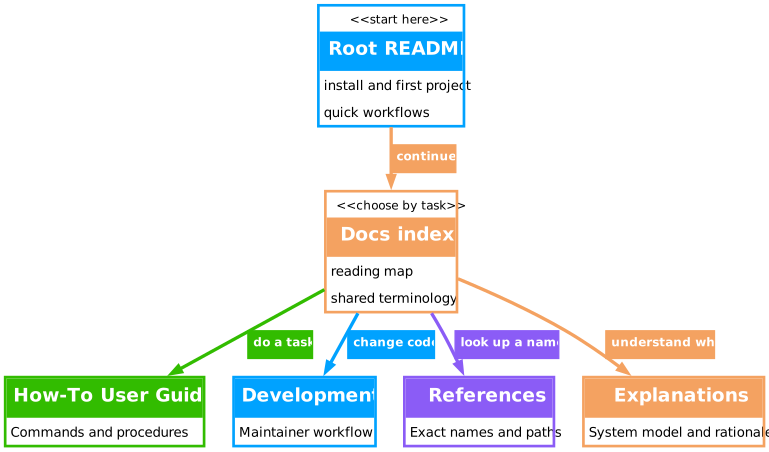
| **Fig. 1 - Documentation Reading Map:** Start at the root README, then move into the docs file that matches the job: recipe, maintainer workflow, exact names, or system model. |
> [!NOTE]
> Related: use [How-To User Guides](How-To-User-Guides.md) for commands in
> order, [References](References.md) for exact names, and
> [Explanations](Explanations.md) for why the project behaves as it does.
## Reading Map
- **[How-To User Guides](How-To-User-Guides.md):** task recipes for install,
first run, dataset sync, LoRA, image utilities, and troubleshooting.
- **[Development](Development.md):** maintainer setup, repository routing,
implementation standards, docs authoring, verification, and commit checks.
- **[References](References.md):** exact paths, commands, environment
variables, config files, public interfaces, and figure visual tokens.
- **[Explanations](Explanations.md):** package layout, manifest/export model,
caption sidecar model, LoRA flow, image utility model, and failure model.
The first reading path is:
1. Use the root [README](../README.md) for the shortest setup route.
2. Use [How-To User Guides](How-To-User-Guides.md) for commands in order.
3. Use [References](References.md) when you need exact names.
4. Use [Explanations](Explanations.md) when you need the system model.
5. Use [Development](Development.md) before changing source files.
## Repository Terms
Use these terms the same way in every docs file:
| Term | Meaning | Main Reference |
|---|---|---|
| `repository root` | The Kneiff source checkout that contains `pyproject.toml`, `README.md`, and `src`. | [References: project paths](References.md#project-paths) |
| `package source` | The importable Python package under `src/kneiff`. | [References: project paths](References.md#project-paths) |
| `maintainer environment` | The local development environment with dependency groups installed. | [Development: maintainer loop](Development.md#maintainer-loop) |
| `runtime dependency` | A dependency needed by users of the installed package. | [Explanations: dependency model](Explanations.md#dependency-model) |
| `development dependency` | A dependency used for tests, linting, typing, docs, profiling, or local tooling. | [References: dependency surfaces](References.md#dependency-surfaces) |
| `project root` | The AppRC-selected Kneiff scaffold containing root vocabulary/prompt overlays, `default_tags.txt`, `.env.apprc-storage`, project Git files, `configs/ANIMA.knf.yaml`, `configs/F2K_9B.knf.yaml`, starter `SOURCE/` folders, ignored `HF/`/`TRAINING/` directories, `MANIFEST.knf.xlsx`, and generated `MANIFEST.yaml`. | [Explanations: manifest-to-export model](Explanations.md#manifest-to-export-model) |
# 2. Documentation Standards
## Heading Structure
Long docs files may use multiple `#` headings. Use them for major document
parts, not only for the file title. The table of contents must mirror the real
structure so a reader can tell which sections are sequences, which sections are
tool groups, and which sections are independent references.
Use this hierarchy:
| Level | Use |
|---|---|
| `#` | Major document parts, for example `First-Time Setup`, `Common Workflows`, or `Failure Model`. |
| `##` | Recipes or concept chapters inside a major part. |
| `###` | Ordered substeps inside a large recipe. |
Avoid a flat file where every section is a `##` peer. A long sequence should be
one recipe with substeps, not a cluster of unrelated recipes.
## Markdown Formatting Rules
- Start every major docs file with a compact table of contents.
- Make the ToC match the heading hierarchy.
- Use the repository terms from [Repository Terms](#repository-terms).
- Use exact technical names: source paths, environment variables, CLI commands,
config attributes, and file names.
- Avoid generic advice such as "check settings"; say which value to inspect,
for example `KNF_WORKERS`, `configs/*.knf.yaml`, `MANIFEST.knf.xlsx`, or
generated `MANIFEST.yaml`.
- Use separator comments before major sections:
```md
## Section Title
```
- Use centralized reference links near the bottom of a file when a link is
reused:
```md
[`uv`]: https://github.com/astral-sh/uv
```
- Use `` dropdowns for long examples inside procedural docs:
````md
Longer command sequence
```bash
knf dataset sync example.knf.yaml
knf train prepare example.knf.yaml
```
## GitHub Callouts
Use callouts to mark the job a paragraph does. GitHub renders only the fixed
labels `TIP`, `NOTE`, `IMPORTANT`, `WARNING`, and `CAUTION`; text after the
marker is not rendered as a custom title.
### Callout Syntax
````md
> [!TIP]
> Explanation text goes here.
>
> ```bash
> knf --help
> ```
````
### Callout Types
> [!TIP]
> Optional advice that improves speed, clarity, or workflow.
> [!NOTE]
> Helpful context that is not required to complete the task.
> [!IMPORTANT]
> Required prerequisites, environment variables, version constraints, or
> architecture rules.
> [!WARNING]
> Risks, deprecated behavior, high-cost operations, or temporary bugs.
> [!CAUTION]
> Destructive or security-relevant actions.
## Link And Backlink Rules
- Prefer relative links.
- Link to exact chapters when the target section matters.
- Use `[!NOTE]` callouts for return links from concept and reference sections.
- Start one-line related-link callouts with `Related:`.
- Start multi-link related-link callouts with `Related links:`.
- Add a short purpose phrase for every related link so the reader knows why it
matters.
- Do not use standalone backlink labels in prose.
- Add return links from explanations to the relevant how-to recipes and
references.
- Add reference links from recipes when exact paths, config keys, or
environment variables matter.
- Link to source files directly when a user may need to edit the file.
- After moving docs, check file links, image links, and local anchors together.
## Static Figure Rules
Docs figure assets live in [assets](assets/). Their repository-owned source is
[render_figures.py](render_figures.py), which defines the local Graphviz theme,
node contract, and rendering pipeline. Add more figures only when a diagram
makes the prose easier to understand.
Figure rules:
1. Change `docs/render_figures.py`, then regenerate assets with
`just docs-figures`.
2. Keep the generated canvas transparent.
3. Keep black text on a readable surface fill so GitHub dark mode remains
legible.
4. Use semantic strokes from `FigureTheme` and match each edge to its target
node color.
5. Use [Figure Visual Tokens](References.md#figure-visual-tokens) before
choosing or changing local theme values.
6. Embed SVG files in Markdown with a centered table:
```md
|  |
|:--:|
| **Fig. N - Figure Title:** Caption sentence. |
```
> [!NOTE]
> Related links:
> - Use [References: figure visual tokens](References.md#figure-visual-tokens)
> for the repository-owned figure theme source of truth.
> - Use [Development: documentation authoring](Development.md#documentation-authoring)
> before expanding the docs structure or adding new figure assets.
[`uv`]: https://github.com/astral-sh/uv