
Spaces:
Running

Running
File size: 1,367 Bytes
9ed2c7f |
1 2 3 4 5 6 7 8 9 10 11 12 13 14 15 16 17 18 19 20 21 22 23 24 25 26 27 28 29 30 31 32 33 34 35 36 37 38 39 40 |
---
title: x++ Add custom DMF entity to form; Open in Excel
date: 2019-01-18T21:53:06.000Z
lastmod: 2019-01-18T21:53:06.000Z
description: Use x++ form extension to add custom DMF data entity to a form's Open in Excel menu.
tags: x++, DMF, Open in Excel, D365, Excel
author: Michael Stashwick
author_url: https://www.d365stuff.co/author/michael/
publisher: D365 Stuff
publisher_url: https://www.d365stuff.co/
---
18 January 2019 / [x++](/tag/x/)
# x++ Add custom DMF entity to form; Open in Excel
We all know that data entities that have the same root datasource (table) as a
form will cause the data entity to automagically appear in the form's Open in
Excel menu option. What if you need to force add this option via extension?
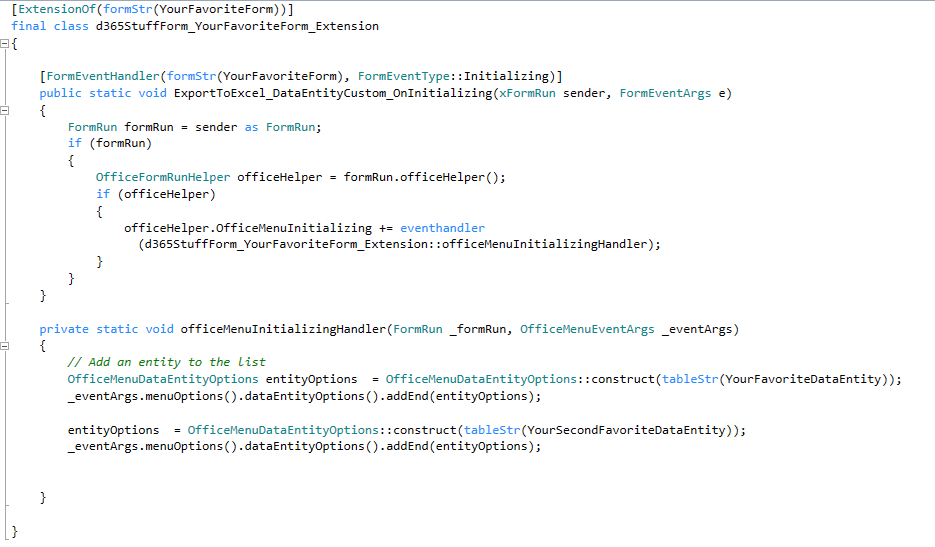
It's a very reasonable request that you'll get asked to do, and is
surprisingly hard to research. Until now.
The code has changed a bit throughout D365's evolution. If anything, it's
gotten simpler since you no longer have to implement any ExportToExcel*
classes.
Need more fields to appear in your Excel sheet? Add them to the AutoReport
fieldgroup of the table!

#### [Michael Stashwick](/author/michael/)
Read [more posts](/author/michael/) by this author.
[Read More](/author/michael/)
|