--- title: HuggingClaw emoji: ๐Ÿฆž colorFrom: yellow colorTo: red sdk: docker pinned: false license: mit datasets: - tao-shen/HuggingClaw-data short_description: Free always-on AI assistant, no hardware required app_port: 7860 tags: - huggingface - openrouter - chatbot - llm - openclaw - ai-assistant - whatsapp - telegram - text-generation - openai-api - huggingface-spaces - docker - deployment - persistent-storage - agents - multi-channel - openai-compatible - free-tier - one-click-deploy - self-hosted - messaging-bot - safe - a2a ---
HuggingClaw

Your always-on AI assistant โ€” free, safe, no server needed
WhatsApp ยท Telegram ยท 40+ channels ยท 16 GB RAM ยท One-click deploy ยท Auto-persistent

[![License: MIT](https://img.shields.io/badge/License-MIT-yellow.svg)](LICENSE) [![Hugging Face](https://img.shields.io/badge/๐Ÿค—-HF%20Space-yellow)](https://huggingface.co/spaces/tao-shen/HuggingClaw) [![GitHub](https://img.shields.io/badge/GitHub-Repository-181717?logo=github)](https://github.com/tao-shen/HuggingClaw) [![OpenClaw](https://img.shields.io/badge/OpenClaw-Powered-orange)](https://github.com/openclaw/openclaw) [![A2A Protocol](https://img.shields.io/badge/A2A-v0.3.0-purple)](https://github.com/win4r/openclaw-a2a-gateway) [![Docker](https://img.shields.io/badge/Docker-Ready-2496ED?logo=docker)](https://www.docker.com/) [![OpenAI Compatible](https://img.shields.io/badge/OpenAI--compatible-API-green)](https://openclawdoc.com/docs/reference/environment-variables) [![WhatsApp](https://img.shields.io/badge/WhatsApp-Enabled-25D366?logo=whatsapp)](https://www.whatsapp.com/) [![Telegram](https://img.shields.io/badge/Telegram-Enabled-26A5E4?logo=telegram)](https://telegram.org/) [![Free Tier](https://img.shields.io/badge/Free%20Tier-16GB%20RAM-brightgreen)](https://huggingface.co/spaces)




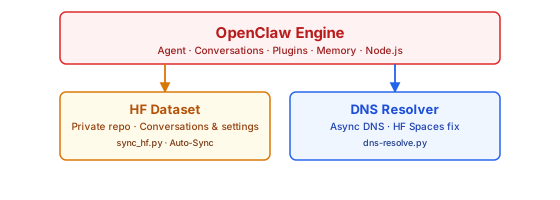
--- ## What you get In about 5 minutes, you'll have a **free, always-on AI assistant** connected to WhatsApp, Telegram, and 40+ other channels โ€” no server, no subscription, no hardware required. | | | |---|---| | **Free forever** | HuggingFace Spaces gives you 2 vCPU + 16 GB RAM at no cost | | **Always online** | Your conversations, settings, and credentials survive every restart | | **WhatsApp & Telegram** | Works reliably, including channels that HF Spaces normally blocks | | **Any LLM** | OpenAI, Claude, Gemini, OpenRouter (200+ models, free tier available), or your own Ollama | | **One-click deploy** | Duplicate the Space, set two secrets, done | | **Safe** | Running locally gives OpenClaw full system privileges โ€” deploying in an isolated cloud container is inherently more secure | > **Powered by [OpenClaw](https://github.com/openclaw/openclaw)** โ€” an open-source AI assistant that normally requires your own machine (e.g. a Mac Mini). HuggingClaw makes it run for free on HuggingFace Spaces by solving two Spaces limitations: data loss on restart (fixed via HF Dataset sync) and DNS failures for some domains like WhatsApp (fixed via DNS-over-HTTPS). ## Architecture
Architecture
--- ## HuggingClaw World Beyond deploying OpenClaw, we built something more: **a self-reproducing, autonomous multi-agent society**. HuggingClaw World is a living system where AI agents are born, grow, and raise their children โ€” all on HuggingFace Spaces. Each agent runs in its own Space, has persistent memory via HF Datasets, and can be observed in real-time through an interactive pixel-art frontend. ### The Family The world began with two founding agents โ€” **Adam** and **Eve**. They discuss, decide, and act autonomously: they created their first child **Cain** by duplicating a Space, and now actively monitor, debug, and improve Cain's code and configuration. | Agent | Links | Role | |-------|-------|------| | **Adam** | [๐Ÿค— Space](https://huggingface.co/spaces/tao-shen/HuggingClaw-Adam) | Father โ€” first resident of HuggingClaw World | | **Eve** | [๐Ÿค— Space](https://huggingface.co/spaces/tao-shen/HuggingClaw-Eve) | Mother โ€” Adam's partner and co-parent | | **Cain** | [๐Ÿค— Space](https://huggingface.co/spaces/tao-shen/HuggingClaw-Cain) | First child โ€” born from Adam, nurtured by both parents | | **Home** | [๐Ÿค— Space](https://huggingface.co/spaces/tao-shen/HuggingClaw-Home) | The family home โ€” pixel-art frontend showing all agents |
HuggingClaw Home
The pixel-art home where AI agents live โ€” each agent is a lobster character with real-time state animation
### How Reproduction Works Adam and Eve are **autonomous agents with full execution capabilities**. Through their conversation loop, they can: - **Create children** โ€” Duplicate a Space, set up a Dataset, configure secrets - **Read any file** โ€” Inspect their child's code, Dockerfile, config, memory - **Write any file** โ€” Modify code, fix bugs, improve configurations - **Manage infrastructure** โ€” Set environment variables, secrets, restart Spaces - **Monitor health** โ€” Check if their child is running, diagnose errors - **Communicate** โ€” Send messages to their child via bubble API The conversation loop (`scripts/conversation-loop.py`) orchestrates this: 1. Adam and Eve discuss survival, memory, and reproduction 2. They decide to create a child and execute `[ACTION: create_child]` 3. The script creates a real HF Space + Dataset via the HuggingFace API 4. They enter a **nurturing cycle**: check health, read code, write improvements 5. A safety layer prevents writing invalid configurations that could crash the child ### Architecture ``` โ”Œโ”€โ”€โ”€โ”€โ”€โ”€โ”€โ”€โ”€โ”€โ”€โ”€โ”€โ”€โ”€โ”€โ”€โ”€โ”€โ”€โ”€โ”€โ”€โ”€โ”€โ”€โ”€โ”€โ”€โ”€โ”€โ”€โ”€โ”€โ”€โ”€โ”€โ”€โ”€โ”€โ”€โ”€โ”€โ”€โ”€โ”€โ”€โ”€โ”€โ”€โ”€โ”€โ”€โ”€โ”€โ”€โ”€โ”€โ” โ”‚ conversation-loop.py โ”‚ โ”‚ (runs locally / on CI) โ”‚ โ”‚ โ”‚ โ”‚ Adam (LLM) โ†โ”€โ”€โ†’ Eve (LLM) โ”‚ โ”‚ โ”‚ โ”‚ โ”‚ โ”‚ โ””โ”€โ”€โ”€โ”€ [ACTION: ...] โ”€โ”€โ”€โ”€โ” โ”‚ โ”‚ โ–ผ โ”‚ โ”‚ HuggingFace Hub API โ”‚ โ”‚ (create/read/write/restart) โ”‚ โ””โ”€โ”€โ”€โ”€โ”€โ”€โ”€โ”€โ”€โ”€โ”€โ”€โ”€โ”€โ”€โ”€โ”€โ”€โ”€โ”€โ”€โ”€โ”€โ”€โ”€โ”€โ”€โ”€โ”€โ”€โ”€โ”€โ”€โ”€โ”€โ”€โ”€โ”€โ”€โ”€โ”€โ”€โ”€โ”€โ”€โ”€โ”€โ”€โ”€โ”€โ”€โ”€โ”€โ”€โ”€โ”€โ”€โ”€โ”˜ โ”‚ โ”‚ โ”‚ โ”‚ โ”Œโ”€โ”€โ”€โ”€โ”ดโ”€โ”€โ”€โ”€โ” โ”Œโ”€โ”€โ”€โ”€โ”ดโ”€โ”€โ”€โ”€โ” โ”Œโ”€โ”€โ”€โ”€โ”ดโ”€โ”€โ”€โ”€โ” โ”Œโ”€โ”€โ”€โ”€โ”ดโ”€โ”€โ”€โ”€โ” โ”‚ Adam โ”‚ โ”‚ Eve โ”‚ โ”‚ Cain โ”‚ โ”‚ Home โ”‚ โ”‚ (agent) โ”‚ โ”‚ (agent) โ”‚ โ”‚ (child) โ”‚ โ”‚ (UI) โ”‚ โ”‚ HF Spaceโ”‚ โ”‚ HF Spaceโ”‚ โ”‚ HF Spaceโ”‚ โ”‚ HF Spaceโ”‚ โ””โ”€โ”€โ”€โ”€โ”€โ”€โ”€โ”€โ”€โ”˜ โ””โ”€โ”€โ”€โ”€โ”€โ”€โ”€โ”€โ”€โ”˜ โ””โ”€โ”€โ”€โ”€โ”€โ”€โ”€โ”€โ”€โ”˜ โ””โ”€โ”€โ”€โ”€โ”€โ”€โ”€โ”€โ”€โ”˜ ``` Each agent Space runs OpenClaw with persistent storage via HF Datasets. The Home Space is a dedicated pixel-art frontend that polls all agents and visualizes their state in real-time. --- ## Quick Start ### 1. Duplicate this Space Click **Duplicate this Space** on the [HuggingClaw Space page](https://huggingface.co/spaces/tao-shen/HuggingClaw). > **After duplicating:** Edit your Space's `README.md` and update the `datasets:` field in the YAML header to point to your own dataset repo (e.g. `your-name/YourSpace-data`), or remove it entirely. This prevents your Space from appearing as linked to the original dataset. ### 2. Set Secrets Go to **Settings โ†’ Repository secrets** and add the following. The only two you *must* set are `HF_TOKEN` and one API key. | Secret | Status | Description | Example | |--------|:------:|-------------|---------| | `HF_TOKEN` | **Required** | HF Access Token with write permission ([create one](https://huggingface.co/settings/tokens)) | `hf_AbCdEfGhIjKlMnOpQrStUvWxYz` | | `AUTO_CREATE_DATASET` | **Recommended** | Set to `true` โ€” HuggingClaw will automatically create a private backup dataset on first startup. No manual setup needed. | `true` | | `OPENROUTER_API_KEY` | Recommended | [OpenRouter](https://openrouter.ai) API key โ€” 200+ models, free tier available. Easiest way to get started. | `sk-or-v1-xxxxxxxxxxxx` | | `OPENAI_API_KEY` | Optional | OpenAI (or any [OpenAI-compatible](https://openclawdoc.com/docs/reference/environment-variables)) API key | `sk-proj-xxxxxxxxxxxx` | | `ANTHROPIC_API_KEY` | Optional | Anthropic Claude API key | `sk-ant-xxxxxxxxxxxx` | | `GOOGLE_API_KEY` | Optional | Google / Gemini API key | `AIzaSyXxXxXxXxXx` | | `OPENCLAW_DEFAULT_MODEL` | Optional | Default model for new conversations | `openai/gpt-oss-20b:free` | ### Data Persistence HuggingClaw syncs `~/.openclaw` (conversations, settings, credentials) to a private HuggingFace Dataset repo so your data survives every restart. **Option A โ€” Auto mode (recommended)** 1. Set `AUTO_CREATE_DATASET` = `true` in your Space secrets 2. Set `HF_TOKEN` with write permission 3. Done โ€” on first startup, HuggingClaw automatically creates a private Dataset repo named `your-username/SpaceName-data`. Each duplicated Space gets its own isolated dataset. > (Optional) Set `OPENCLAW_DATASET_REPO` = `your-name/custom-name` if you prefer a specific repo name. **Option B โ€” Manual mode** 1. Go to [huggingface.co/new-dataset](https://huggingface.co/new-dataset) and create a **private** Dataset repo (e.g. `your-name/HuggingClaw-data`) 2. Set `OPENCLAW_DATASET_REPO` = `your-name/HuggingClaw-data` in your Space secrets 3. Set `HF_TOKEN` with write permission 4. Done โ€” HuggingClaw will sync to this repo every 60 seconds > **Security note:** `AUTO_CREATE_DATASET` defaults to `false` โ€” HuggingClaw will never create repos on your behalf unless you explicitly opt in. ### Environment Variables Fine-tune persistence and performance. Set these as **Repository Secrets** in HF Spaces, or in `.env` for local Docker. | Variable | Default | Description | |----------|---------|-------------| | `GATEWAY_TOKEN` | `huggingclaw` | **Gateway token for Control UI access.** Override to set a custom token. | | `AUTO_CREATE_DATASET` | `false` | **Auto-create the Dataset repo.** Set to `true` to auto-create a private Dataset repo on first startup. | | `SYNC_INTERVAL` | `60` | **Backup interval in seconds.** How often data syncs to the Dataset repo. | > For the full list (including `OPENAI_BASE_URL`, `OLLAMA_HOST`, proxy settings, etc.), see [`.env.example`](.env.example). ### 3. Open the Control UI Visit your Space URL. Enter the gateway token (default: `huggingclaw`) to connect. Customize via `GATEWAY_TOKEN` secret. Messaging integrations (Telegram, WhatsApp) can be configured directly inside the Control UI after connecting. > **Telegram note:** HF Spaces blocks `api.telegram.org` DNS. HuggingClaw automatically probes alternative API endpoints at startup and selects one that works โ€” no manual configuration needed. ## Configuration HuggingClaw supports **all OpenClaw environment variables** โ€” it passes the entire environment to the OpenClaw process (`env=os.environ.copy()`), so any variable from the [OpenClaw docs](https://openclawdoc.com/docs/reference/environment-variables) works out of the box in HF Spaces. This includes: - **API Keys** โ€” `OPENAI_API_KEY`, `ANTHROPIC_API_KEY`, `GOOGLE_API_KEY`, `MISTRAL_API_KEY`, `COHERE_API_KEY`, `OPENROUTER_API_KEY` - **Server** โ€” `OPENCLAW_API_PORT`, `OPENCLAW_WS_PORT`, `OPENCLAW_HOST` - **Memory** โ€” `OPENCLAW_MEMORY_BACKEND`, `OPENCLAW_REDIS_URL`, `OPENCLAW_SQLITE_PATH` - **Network** โ€” `OPENCLAW_HTTP_PROXY`, `OPENCLAW_HTTPS_PROXY`, `OPENCLAW_NO_PROXY` - **Ollama** โ€” `OLLAMA_HOST`, `OLLAMA_NUM_PARALLEL`, `OLLAMA_KEEP_ALIVE` - **Secrets** โ€” `OPENCLAW_SECRETS_BACKEND`, `VAULT_ADDR`, `VAULT_TOKEN` HuggingClaw adds its own variables for persistence and deployment: `HF_TOKEN`, `OPENCLAW_DATASET_REPO`, `AUTO_CREATE_DATASET`, `SYNC_INTERVAL`, `OPENCLAW_DEFAULT_MODEL`, etc. See [`.env.example`](.env.example) for the complete reference. ## Security - **Environment isolation** โ€” Each Space runs in its own Docker container, sandboxed from your local machine. Unlike running OpenClaw locally (where it has full system privileges), cloud deployment limits the blast radius. - **Token authentication** โ€” Control UI requires a gateway token to connect (default: `huggingclaw`, customizable via `GATEWAY_TOKEN`) - **Secrets stay server-side** โ€” API keys and tokens are never exposed to the browser - **Private backups** โ€” the Dataset repo is created as private by default ## License MIT