| instructions_markdown = """ |
| # How to get personalized FSRS parameters |
| If you have been using Anki for some time and have accumulated a lot of review logs, you can try this |
| FSRS optimizer app to generate parameters for you. |
| |
| This is based on the amazing work of [Jarrett Ye](https://github.com/L-M-Sherlock). My goal is to further |
| democratize this technology so anyone can use it! |
| # Step 1 - Get the `Review Logs` to upload |
| 1. Click the gear icon to the right of a deck’s name |
| 2. Export |
| 3. Check “Include scheduling information” and “Support older Anki versions” |
| 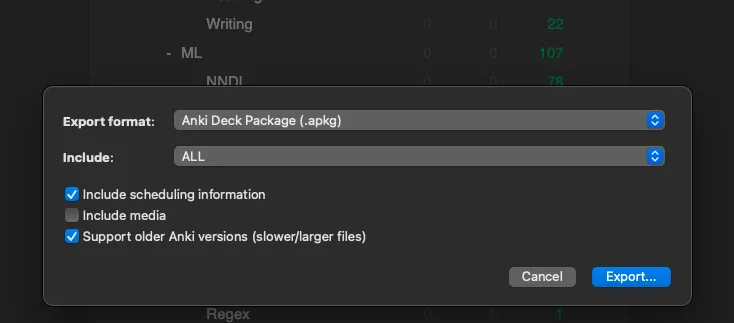 |
| 4. Export and upload that file to the app |
| |
| # Step 2 - Get the `Next Day Starts At` parameter |
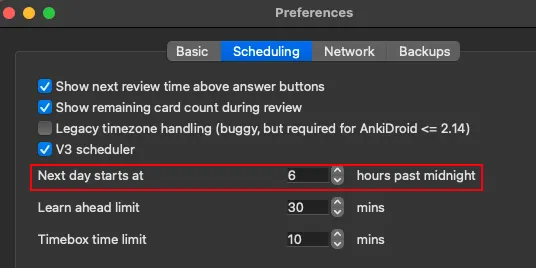
| 1. Open preferences |
| 2. Copy the next day starts at value and paste it in the app |
|  |
| |
| # Step 3 - Fill in the rest of the settings |
| 1. Your `Time Zone` |
| 2. `Advanced settings` if you know what you are doing |
| |
| # Step 4 - Click `Optimize your Anki!` |
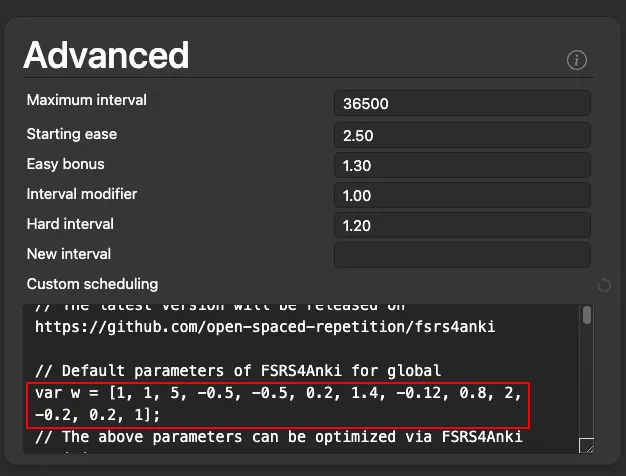
| 1. After it runs copy `var w = [...]` |
| 2. Check out the analysis tab for more info |
| |
| # Step 5 - Update FSRS4Anki with the optimized parameters |
|  |
| """ |
|
|
| faq_markdown = """ |
| Where can I find more information on FSRS? |
| |
| Check out the plugin [wiki](https://github.com/open-spaced-repetition/fsrs4anki/wiki) |
| |
| What is the original paper? |
| |
| You can find it here: [https://www.maimemo.com/paper/](https://www.maimemo.com/paper/) |
| |
| What is the original author's research story? |
| |
| You can find it here: [https://medium.com/@JarrettYe/how-did-i-publish-a-paper-in-acmkdd-as-an-undergraduate-c0199baddf31](https://medium.com/@JarrettYe/how-did-i-publish-a-paper-in-acmkdd-as-an-undergraduate-c0199baddf31) |
| """ |
|
|