# 🌍 RisingBrain-Extension: Surfing the AI wave on your Browser 🚀
Welcome to the browser extension of **RisingBrain** - an exciting piece of innovation bringing smart, AI-powered functionality right into your browser.
Compatible with all major browsers – think ***Chrome, Safari, Firefox***, and more!

## Salient Features 🌟
With **RisingBrain** Extension, your browser does more than just surf the web. Here's what you're in for:
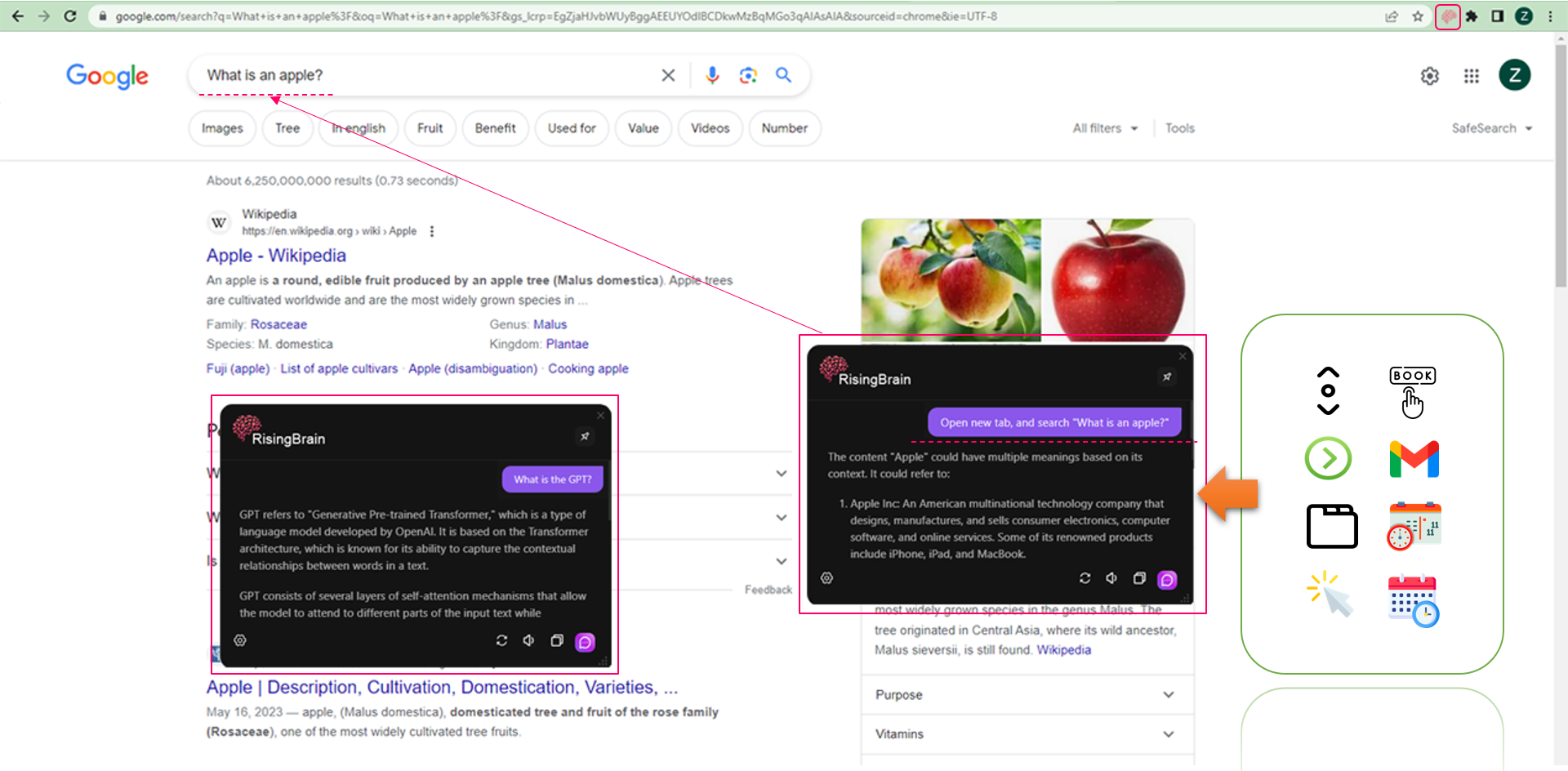
- **Converse Freely**: Enjoy casual, yet interactive chat experiences with Rising AI, even while you browser surf.
- **Browser Control**: Execute a host of browser functions like opening a new tab, scrolling, switching tabs, or clicking items on the webpage, all through simple prompts.
- **Seamless Automation**: RisingBrain Extension goes further to automate routine tasks such as sending emails, booking tables, making appointments, or scheduling calendars.
## Quick Installation Guide 🔧
Ready to experience smarter browsing with **RisingBrain** Extension? Here's how to get started:
- Clone the RisingBrain Extension repository to your local machine.
- Using terminal, navigate to its directory and run this command to install all required node modules:
``` bach
npm install
```
- Once the installation is complete, simply build the project using:
``` bach
npm run build
```
- The build will create a new directory named ***'build'*** inside the Extension directory.
You should now see this directory with built files as your directory location:
``` bash
[project directory]/Brain/Extension/build
```
## Compatibility and Beyond 🎓
**RisingBrain** Extension is designed to foster compatibility across all browsers, ensuring no user feels left out.
With the power of AI transforming your everyday browsing, you'll experience comfort, ease, and innovation like never before.
The future is here with the **RisingBrain** Extension!
***Ride*** the ***wave*** of the future with us 🚀.
## Contributing 💪
We appreciate your interest in enhancing our work! Please respect the style and contribution guidelines of every project when submitting patches and additions. Our general Git workflow of choice is "fork-and-pull".
1. **Fork** the repository on GitHub
2. **Clone** your fork to your machine
3. **Commit** the changes to your personal branch
4. **Push** these updates back to your fork
5. Don't forget to submit a **Pull Request** for us to study your contributions.
NOTE: Sync with "upstream" to have the latest updates before you make a pull request!