
Gemini Business2API
Empowering AI with seamless integration
简体中文 | English






Convert Gemini Business to OpenAI-compatible API with multi-account load balancing, image generation, video generation, multimodal capabilities, and built-in admin panel.
---
## 📜 License & Disclaimer
**License**: MIT License - See [LICENSE](../LICENSE) for details
### ⚠️ Prohibited Use & Anti-Abuse Policy
**This tool is strictly prohibited for:**
- Commercial use or profit-making activities
- Batch operations or automated abuse of any scale
- Market disruption or malicious competition
- Violations of Google's Terms of Service
- Violations of Microsoft's Terms of Service
**Consequences**: Violations may result in permanent account suspension and legal liability. All consequences are the sole responsibility of the user.
**Legitimate Use Only**: Personal learning, technical research, and non-commercial educational purposes only.
📖 **Full Disclaimer**: [DISCLAIMER_EN.md](DISCLAIMER_EN.md)
---
## ✨ Features
- ✅ Full OpenAI API compatibility - Seamless integration with existing tools
- ✅ Multi-account load balancing - Round-robin with automatic failover
- ✅ Automated account management - Auto registration & login, multiple temp email providers, headless browser mode
- ✅ Streaming output - Real-time responses
- ✅ Multimodal input - 100+ file types (images, PDF, Office docs, audio, video, code, etc.)
- ✅ Image generation & image-to-image - Configurable models, Base64 or URL output
- ✅ Video generation - Dedicated model with HTML/URL/Markdown output formats
- ✅ Smart file handling - Auto file type detection, supports URL and Base64
- ✅ Logging & monitoring - Real-time status and statistics
- ✅ Proxy support - Configure via admin settings panel
- ✅ Built-in admin panel - Online configuration and account management
- ✅ PostgreSQL / SQLite storage - Persistent accounts/settings/stats
## 🤖 Model Capabilities
| Model ID | Vision | Native Web | File Multimodal | Image Gen | Video Gen |
| ------------------------ | ------ | ---------- | --------------- | --------- | --------- |
| `gemini-auto` | ✅ | ✅ | ✅ | Optional | - |
| `gemini-2.5-flash` | ✅ | ✅ | ✅ | Optional | - |
| `gemini-2.5-pro` | ✅ | ✅ | ✅ | Optional | - |
| `gemini-3-flash-preview` | ✅ | ✅ | ✅ | Optional | - |
| `gemini-3-pro-preview` | ✅ | ✅ | ✅ | Optional | - |
| `gemini-3.1-pro-preview` | ✅ | ✅ | ✅ | Optional | - |
| `gemini-imagen` | ✅ | ✅ | ✅ | ✅ | - |
| `gemini-veo` | ✅ | ✅ | ✅ | - | ✅ |
> `gemini-imagen`: Dedicated image generation model · `gemini-veo`: Dedicated video generation model
---
## 🚀 Quick Start
### Method 1: Docker Compose (Recommended)
**Supports ARM64 and AMD64 architectures**
```bash
git clone https://github.com/Dreamy-rain/gemini-business2api.git
cd gemini-business2api
cp .env.example .env
# Edit .env to set ADMIN_KEY
docker-compose up -d
# View logs
docker-compose logs -f
# Update to latest version
docker-compose pull && docker-compose up -d
```
---
### Method 2: Setup Script
> **Prerequisites**: Git, Node.js & npm (for frontend build). Script auto-installs Python 3.11 and uv.
**Linux / macOS / WSL:**
```bash
git clone https://github.com/Dreamy-rain/gemini-business2api.git
cd gemini-business2api
bash setup.sh
# Edit .env to set ADMIN_KEY
source .venv/bin/activate
python main.py
# Background with pm2
pm2 start main.py --name gemini-api --interpreter ./.venv/bin/python3
```
**Windows:**
```cmd
git clone https://github.com/Dreamy-rain/gemini-business2api.git
cd gemini-business2api
setup.bat
# Edit .env to set ADMIN_KEY
.venv\Scripts\activate.bat
python main.py
# Background with pm2
pm2 start main.py --name gemini-api --interpreter ./.venv/Scripts/python.exe
```
The script handles: uv install, Python 3.11 download, dependency install, frontend build, `.env` creation.
To update, simply re-run the same script.
---
### Method 3: Manual Deployment
```bash
git clone https://github.com/Dreamy-rain/gemini-business2api.git
cd gemini-business2api
curl -LsSf https://astral.sh/uv/install.sh | sh
uv python install 3.11
cd frontend && npm install && npm run build && cd ..
uv venv --python 3.11 .venv
source .venv/bin/activate # Windows: .venv\Scripts\activate.bat
uv pip install -r requirements.txt
cp .env.example .env
# Edit .env to set ADMIN_KEY
python main.py
```
---
### Access
- **Admin Panel**: `http://localhost:7860/` (Login with `ADMIN_KEY`)
- **API Endpoint**: `http://localhost:7860/v1/chat/completions`
---
## 🗄️ Database Persistence
Set `DATABASE_URL` to persist accounts, settings, and stats. Without it, SQLite (`data.db`) is used automatically.
**Configuration:**
- Local deployment → add to `.env`
- Cloud platforms → set in platform environment variables
```
DATABASE_URL=postgresql://user:password@host/dbname?sslmode=require
```
**Free PostgreSQL Providers:**
| Service | Free Tier | How to Get |
|---------|-----------|-----------|
| [Neon](https://neon.tech) | 512MB / 100 CPUH/month | Sign up → Create Project → Copy Connection string |
| [Aiven](https://aiven.io) | More generous | Sign up → Create PostgreSQL service → Copy connection string |
> Both `postgres://` and `postgresql://` formats are supported natively.
⚠️ FAQ: Periodic save failure / ConnectionDoesNotExistError
If you see errors like:
```
ERROR [COOLDOWN] Save failed: connection was closed in the middle of operation
asyncpg.exceptions.ConnectionDoesNotExistError: connection was closed in the middle of operation
```
This happens when free PostgreSQL providers (e.g., Aiven free tier) close idle connections. **It does not affect normal usage** — the next operation will auto-reconnect. If frequent, consider switching to [Neon](https://neon.tech) or upgrading your database plan.
📦 Database Migration (Upgrading from older versions)
If you have legacy local files (`accounts.json` / `settings.yaml` / `stats.json`), run:
```bash
python scripts/migrate_to_database.py
```
The script auto-detects the environment (PostgreSQL / SQLite) and renames old files after migration.
---
## 📡 API Endpoints
Fully OpenAI API compatible. Works with ChatGPT-Next-Web, LobeChat, OpenCat, and other clients.
| Endpoint | Method | Description |
|----------|--------|-------------|
| `/v1/chat/completions` | POST | Chat completions (streaming supported) |
| `/v1/models` | GET | List available models |
| `/v1/images/generations` | POST | Image generation (text-to-image) |
| `/v1/images/edits` | POST | Image editing (image-to-image) |
| `/health` | GET | Health check |
**Example:**
```bash
curl http://localhost:7860/v1/chat/completions \
-H "Authorization: Bearer your-api-key" \
-H "Content-Type: application/json" \
-d '{
"model": "gemini-2.5-flash",
"messages": [{"role": "user", "content": "Hello"}],
"stream": true
}'
```
> `API_KEY` is configured in Admin Panel → System Settings. Leave empty for public access. Multiple keys supported (comma-separated).
---
## 📧 Email Provider Configuration
The project supports 4 temporary email providers for automatic account registration. Switch and configure them in **Admin Panel → System Settings → Temp Email Provider**.
### Moemail (Default)
Open-source temporary email service, ready to use out of the box.
- **Project**: [github.com/beilunyang/moemail](https://github.com/beilunyang/moemail)
- **Website**: [moemail.app](https://moemail.app)
- **Config**: API URL + API Key + Domain (optional)
### DuckMail
Temporary email API service. Custom domain recommended.
- **Domain Management**: [domain.duckmail.sbs](https://domain.duckmail.sbs/)
- **Config**: API URL + API Key + Registration Domain
### GPTMail
Temporary email API service, no password required.
- **Default URL**: `https://mail.chatgpt.org.uk`
- **Default API Key**: `gpt-test`
- **Config**: API URL + API Key + Domain (optional)
### Freemail
Self-hosted temporary email service, for users with their own servers.
- **Project**: [github.com/idinging/freemail](https://github.com/idinging/freemail)
- **Config**: Self-hosted service URL + JWT Token + Domain (optional)
> **Tip**: All email settings are configured in the admin panel. Microsoft email login is also handled through the admin panel.
---
## 🌐 Recommended Deployment Platforms
In addition to local Docker Compose, these platforms support Docker image deployment:
| Platform | Free Tier | Features |
|----------|-----------|----------|
| [Render](https://render.com) | ✅ Yes | Docker support, auto SSL, free PostgreSQL |
| [Railway](https://railway.app) | $5/month credit | One-click Docker deploy, built-in database |
| [Fly.io](https://fly.io) | ✅ Yes | Global edge deployment, persistent volumes |
| [Claw Cloud](https://claw.cloud) | ✅ Yes | Container cloud, simple and easy |
| Self-hosted VPS (Recommended) | — | Full control with Docker Compose |
> Docker image: `cooooookk/gemini-business2api:latest`
>
> Set `ADMIN_KEY` and `DATABASE_URL` environment variables when deploying.
### Zeabur Deployment Guide
1. Fork this repository to your GitHub
2. Log in to [Zeabur](https://zeabur.com) → **Create Project** → **Shared Cluster** → **Deploy New Service** → **Connect GitHub** → Select your forked repo
3. Add environment variables:
| Variable | Required | Description |
|----------|----------|-------------|
| `ADMIN_KEY` | ✅ | Admin panel login key |
| `DATABASE_URL` | Optional | PostgreSQL connection string (recommended to avoid data loss on restart) |
4. **Persistent Storage** (Important):
Add persistent storage in service settings:
| Disk ID | Mount Path |
|---------|-----------|
| `data` | `/app/data` |
5. Click **Redeploy** to apply settings
**Update**: GitHub repo → **Sync fork** → **Update branch**, Zeabur will auto-redeploy.
---
## 🔄 Standalone Refresh Service
To deploy the account refresh service separately from the main API, use the [`refresh-worker` branch](https://github.com/Dreamy-rain/gemini-business2api/tree/refresh-worker):
```bash
git clone -b refresh-worker https://github.com/Dreamy-rain/gemini-business2api.git gemini-refresh-worker
cd gemini-refresh-worker
cp .env.example .env
# Edit .env to set DATABASE_URL
docker-compose up -d
```
This service reads accounts from the database and runs scheduled credential refresh independently. Supports cron scheduling, batch processing, and cooldown deduplication.
---
## 🌐 Socks5 Free Proxy Pool
Configure a proxy when auto-registering/refreshing accounts to improve success rates:
- **Project**: [github.com/Dreamy-rain/socks5-proxy](https://github.com/Dreamy-rain/socks5-proxy)
- **Note**: Free proxies are not very stable, but can help improve registration success rates
- **Usage**: Configure in Admin Panel → System Settings → Proxy Settings
---
## 📸 Screenshots
### Admin System
### Image Effects
### Documentation
- Supported file types: [SUPPORTED_FILE_TYPES.md](SUPPORTED_FILE_TYPES.md)
## ⭐ Star History
[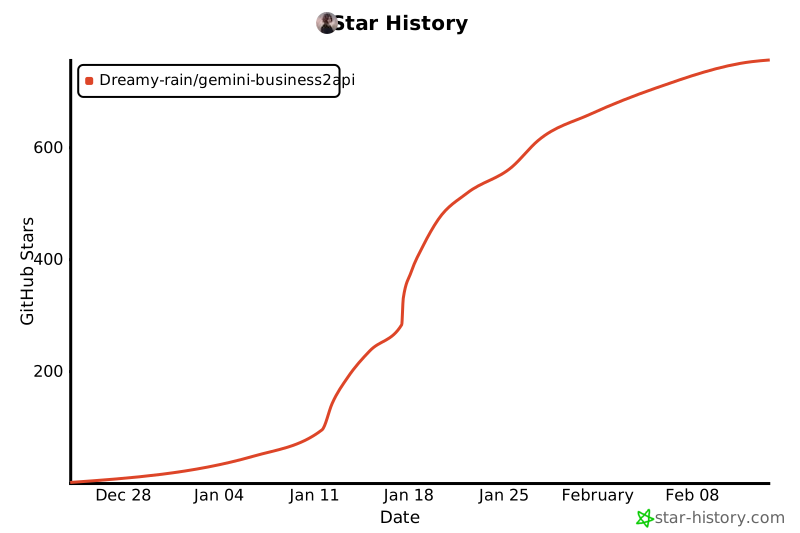](https://www.star-history.com/#Dreamy-rain/gemini-business2api&type=date&legend=top-left)
**If this project helps you, please give it a ⭐ Star!**


