

File size: 22,733 Bytes
ba96580 | 1 2 3 4 5 6 7 8 9 10 11 12 13 14 15 16 17 18 19 20 21 22 23 24 25 26 27 28 29 30 31 32 33 34 35 36 37 38 39 40 41 42 43 44 45 46 47 48 49 50 51 52 53 54 55 56 57 58 59 60 61 62 63 64 65 66 67 68 69 70 71 72 73 74 75 76 77 78 79 80 81 82 83 84 85 86 87 88 89 90 91 92 93 94 95 96 97 98 99 100 101 102 103 104 105 106 107 108 109 110 111 112 113 114 115 116 117 118 119 120 121 122 123 124 125 126 127 128 129 130 131 132 133 134 135 136 137 138 139 140 141 142 143 144 145 146 147 148 149 150 151 152 153 154 155 156 157 158 159 160 161 162 163 164 165 166 167 168 169 170 171 172 173 174 175 176 177 178 179 180 181 182 183 184 185 186 187 188 189 190 191 192 193 194 195 196 197 198 199 200 201 202 203 204 205 206 207 208 209 210 211 212 213 214 215 216 217 218 219 220 221 222 223 224 225 226 227 228 229 230 231 232 233 234 235 236 237 238 239 240 241 242 243 244 245 246 247 248 249 250 251 252 253 254 255 256 257 258 259 260 261 262 263 264 265 266 267 268 269 270 271 272 273 274 275 276 277 278 279 280 281 | # ComfyUI VideoX-Fun
Easily use VideoX-Fun and Wan2.1-Fun inside ComfyUI!
- [Installation](#1-installation)
- [Node types](#node-types)
- [Example workflows](#example-workflows)
## Installation
### 1. ComfyUI Installation
#### Option 1: Install via ComfyUI Manager
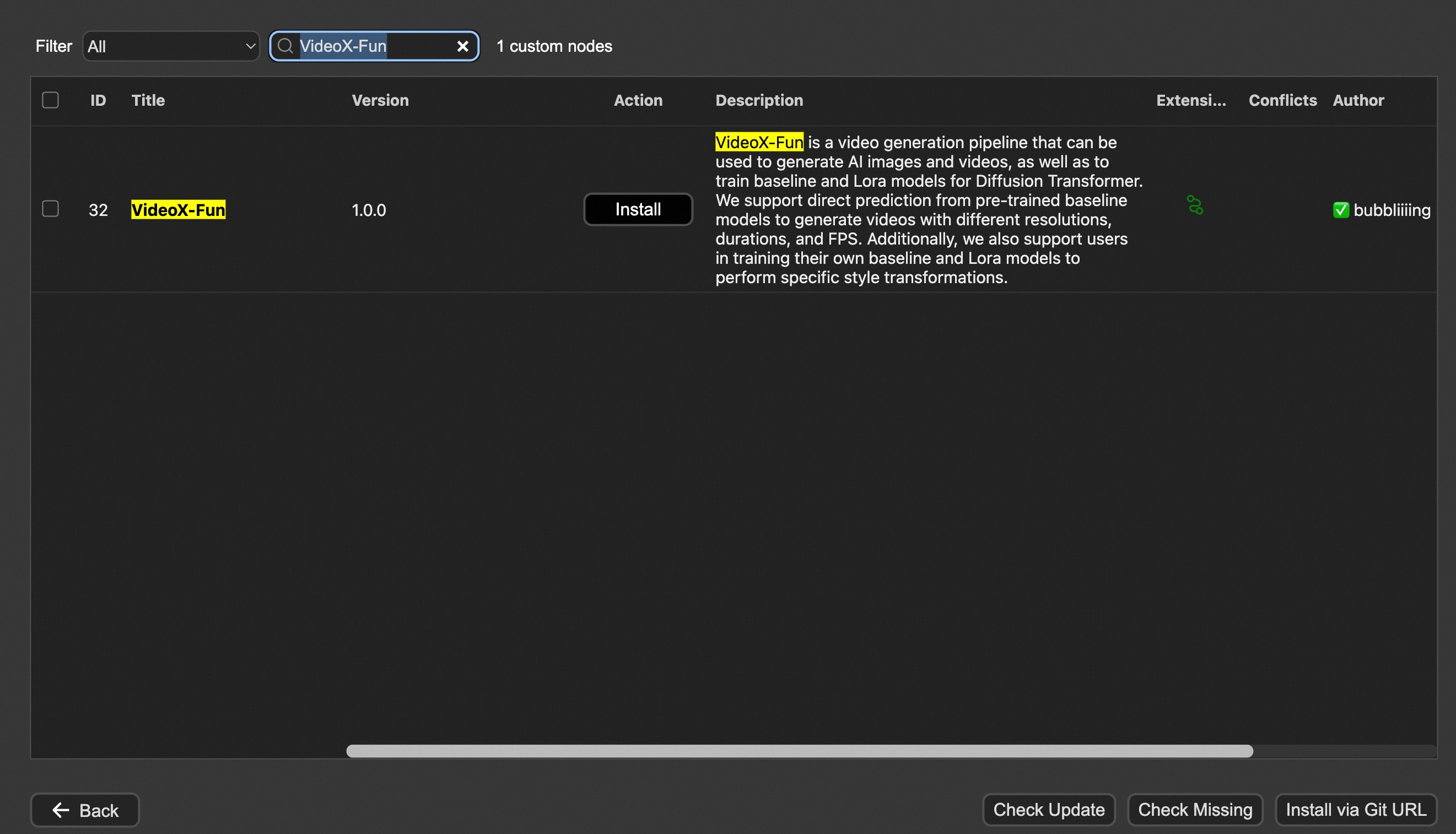
#### Option 2: Install manually
The VideoX-Fun repository needs to be placed at `ComfyUI/custom_nodes/VideoX-Fun/`.
```
cd ComfyUI/custom_nodes/
# Git clone the cogvideox_fun itself
git clone https://github.com/aigc-apps/VideoX-Fun.git
# Git clone the video outout node
git clone https://github.com/Kosinkadink/ComfyUI-VideoHelperSuite.git
# Git clone the KJ Nodes
git clone https://github.com/kijai/ComfyUI-KJNodes.git
cd VideoX-Fun/
python install.py
```
### 2. Download models
#### i、Full loading
Download full model into `ComfyUI/models/Fun_Models/`.
#### ii、Chunked loading
Put the transformer model weights to the `ComfyUI/models/diffusion_models/`.
Put the text encoer model weights to the `ComfyUI/models/text_encoders/`.
Put the clip vision model weights to the `ComfyUI/models/clip_vision/`.
Put the vae model weights to the `ComfyUI/models/vae/`.
Put the tokenizer files to the `ComfyUI/models/Fun_Models/` (For example: `ComfyUI/models/Fun_Models/umt5-xxl`).
### 3. (Optional) Download preprocess weights into `ComfyUI/custom_nodes/Fun_Models/Third_Party/`.
Except for the fun models' weights, if you want to use the control preprocess nodes, you can download the preprocess weights to `ComfyUI/custom_nodes/Fun_Models/Third_Party/`.
```
remote_onnx_det = "https://huggingface.co/yzd-v/DWPose/resolve/main/yolox_l.onnx"
remote_onnx_pose = "https://huggingface.co/yzd-v/DWPose/resolve/main/dw-ll_ucoco_384.onnx"
remote_zoe= "https://huggingface.co/lllyasviel/Annotators/resolve/main/ZoeD_M12_N.pt"
```
#### i. Wan2.2-Fun
| Name | Hugging Face | Model Scope | Description |
|--|--|--|--|--|
| Wan2.2-Fun-A14B-InP | 64.0 GB | [🤗Link](https://huggingface.co/alibaba-pai/Wan2.2-Fun-A14B-InP) | [😄Link](https://modelscope.cn/models/PAI/Wan2.2-Fun-A14B-InP) | Wan2.2-Fun-14B text-to-video generation weights, trained at multiple resolutions, supports start-end image prediction. |
| Wan2.2-Fun-A14B-Control | 64.0 GB | [🤗Link](https://huggingface.co/alibaba-pai/Wan2.2-Fun-A14B-Control) | [😄Link](https://modelscope.cn/models/PAI/Wan2.2-Fun-A14B-Control)| Wan2.2-Fun-14B video control weights, supporting various control conditions such as Canny, Depth, Pose, MLSD, etc., and trajectory control. Supports multi-resolution (512, 768, 1024) video prediction at 81 frames, trained at 16 frames per second, with multilingual prediction support. |
| Wan2.2-Fun-A14B-Control-Camera | 64.0 GB | [🤗Link](https://huggingface.co/alibaba-pai/Wan2.2-Fun-A14B-Control-Camera) | [😄Link](https://modelscope.cn/models/PAI/Wan2.2-Fun-A14B-Control-Camera)| Wan2.2-Fun-14B camera lens control weights. Supports multi-resolution (512, 768, 1024) video prediction, trained with 81 frames at 16 FPS, supports multilingual prediction. |
| Wan2.2-Fun-5B-InP | 23.0 GB | [🤗Link](https://huggingface.co/alibaba-pai/Wan2.2-Fun-5B-InP) | [😄Link](https://modelscope.cn/models/PAI/Wan2.2-Fun-5B-InP) | Wan2.2-Fun-5B text-to-video weights trained at 121 frames, 24 FPS, supporting first/last frame prediction. |
| Wan2.2-Fun-5B-Control | 23.0 GB | [🤗Link](https://huggingface.co/alibaba-pai/Wan2.2-Fun-5B-Control) | [😄Link](https://modelscope.cn/models/PAI/Wan2.2-Fun-5B-Control)| Wan2.2-Fun-5B video control weights, supporting control conditions like Canny, Depth, Pose, MLSD, and trajectory control. Trained at 121 frames, 24 FPS, with multilingual prediction support. |
| Wan2.2-Fun-5B-Control-Camera | 23.0 GB | [🤗Link](https://huggingface.co/alibaba-pai/Wan2.2-Fun-5B-Control-Camera) | [😄Link](https://modelscope.cn/models/PAI/Wan2.2-Fun-5B-Control-Camera)| Wan2.2-Fun-5B camera lens control weights. Trained at 121 frames, 24 FPS, with multilingual prediction support. |
#### ii. Wan2.2
| Name | Hugging Face | Model Scope | Description |
|--|--|--|--|
| Wan2.2-TI2V-5B | [🤗Link](https://huggingface.co/Wan-AI/Wan2.2-TI2V-5B) | [😄Link](https://www.modelscope.cn/models/Wan-AI/Wan2.2-TI2V-5B) | Wan2.2-5B Text-to-Video Weights |
| Wan2.2-T2V-14B | [🤗Link](https://huggingface.co/Wan-AI/Wan2.2-T2V-A14B) | [😄Link](https://www.modelscope.cn/models/Wan-AI/Wan2.2-T2V-A14B) | Wan2.2-14B Text-to-Video Weights |
| Wan2.2-I2V-A14B | [🤗Link](https://huggingface.co/Wan-AI/Wan2.2-I2V-A14B) | [😄Link](https://www.modelscope.cn/models/Wan-AI/Wan2.2-I2V-A14B) | Wan2.2-I2V-A14B Image-to-Video Weights |
#### iii. Wan2.1-Fun
V1.1:
| Name | Storage Size | Hugging Face | Model Scope | Description |
|------|--------------|--------------|-------------|-------------|
| Wan2.1-Fun-V1.1-1.3B-InP | 19.0 GB | [🤗Link](https://huggingface.co/alibaba-pai/Wan2.1-Fun-V1.1-1.3B-InP) | [😄Link](https://modelscope.cn/models/PAI/Wan2.1-Fun-V1.1-1.3B-InP) | Wan2.1-Fun-V1.1-1.3B text-to-video generation weights, trained at multiple resolutions, supports start-end image prediction. |
| Wan2.1-Fun-V1.1-14B-InP | 47.0 GB | [🤗Link](https://huggingface.co/alibaba-pai/Wan2.1-Fun-V1.1-14B-InP) | [😄Link](https://modelscope.cn/models/PAI/Wan2.1-Fun-V1.1-14B-InP) | Wan2.1-Fun-V1.1-14B text-to-video generation weights, trained at multiple resolutions, supports start-end image prediction. |
| Wan2.1-Fun-V1.1-1.3B-Control | 19.0 GB | [🤗Link](https://huggingface.co/alibaba-pai/Wan2.1-Fun-V1.1-1.3B-Control) | [😄Link](https://modelscope.cn/models/PAI/Wan2.1-Fun-V1.1-1.3B-Control) | Wan2.1-Fun-V1.1-1.3B video control weights support various control conditions such as Canny, Depth, Pose, MLSD, etc., supports reference image + control condition-based control, and trajectory control. Supports multi-resolution (512, 768, 1024) video prediction, trained with 81 frames at 16 FPS, supports multilingual prediction. |
| Wan2.1-Fun-V1.1-14B-Control | 47.0 GB | [🤗Link](https://huggingface.co/alibaba-pai/Wan2.1-Fun-V1.1-14B-Control) | [😄Link](https://modelscope.cn/models/PAI/Wan2.1-Fun-V1.1-14B-Control) | Wan2.1-Fun-V1.1-14B video control weights support various control conditions such as Canny, Depth, Pose, MLSD, etc., supports reference image + control condition-based control, and trajectory control. Supports multi-resolution (512, 768, 1024) video prediction, trained with 81 frames at 16 FPS, supports multilingual prediction. |
| Wan2.1-Fun-V1.1-1.3B-Control-Camera | 19.0 GB | [🤗Link](https://huggingface.co/alibaba-pai/Wan2.1-Fun-V1.1-1.3B-Control-Camera) | [😄Link](https://modelscope.cn/models/PAI/Wan2.1-Fun-V1.1-1.3B-Control-Camera) | Wan2.1-Fun-V1.1-1.3B camera lens control weights. Supports multi-resolution (512, 768, 1024) video prediction, trained with 81 frames at 16 FPS, supports multilingual prediction. |
| Wan2.1-Fun-V1.1-14B-Control-Camera | 47.0 GB | [🤗Link](https://huggingface.co/alibaba-pai/Wan2.1-Fun-V1.1-14B-Control-Camera) | [😄Link](https://modelscope.cn/models/PAI/Wan2.1-Fun-V1.1-14B-Control-Camera) | Wan2.1-Fun-V1.1-14B camera lens control weights. Supports multi-resolution (512, 768, 1024) video prediction, trained with 81 frames at 16 FPS, supports multilingual prediction. |
V1.0:
| Name | Storage Space | Hugging Face | Model Scope | Description |
|--|--|--|--|--|
| Wan2.1-Fun-1.3B-InP | 19.0 GB | [🤗Link](https://huggingface.co/alibaba-pai/Wan2.1-Fun-1.3B-InP) | [😄Link](https://modelscope.cn/models/PAI/Wan2.1-Fun-1.3B-InP) | Wan2.1-Fun-1.3B text-to-video weights, trained at multiple resolutions, supporting start and end frame prediction. |
| Wan2.1-Fun-14B-InP | 47.0 GB | [🤗Link](https://huggingface.co/alibaba-pai/Wan2.1-Fun-14B-InP) | [😄Link](https://modelscope.cn/models/PAI/Wan2.1-Fun-14B-InP) | Wan2.1-Fun-14B text-to-video weights, trained at multiple resolutions, supporting start and end frame prediction. |
| Wan2.1-Fun-1.3B-Control | 19.0 GB | [🤗Link](https://huggingface.co/alibaba-pai/Wan2.1-Fun-1.3B-Control) | [😄Link](https://modelscope.cn/models/PAI/Wan2.1-Fun-1.3B-Control) | Wan2.1-Fun-1.3B video control weights, supporting various control conditions such as Canny, Depth, Pose, MLSD, etc., and trajectory control. Supports multi-resolution (512, 768, 1024) video prediction at 81 frames, trained at 16 frames per second, with multilingual prediction support. |
| Wan2.1-Fun-14B-Control | 47.0 GB | [🤗Link](https://huggingface.co/alibaba-pai/Wan2.1-Fun-14B-Control) | [😄Link](https://modelscope.cn/models/PAI/Wan2.1-Fun-14B-Control) | Wan2.1-Fun-14B video control weights, supporting various control conditions such as Canny, Depth, Pose, MLSD, etc., and trajectory control. Supports multi-resolution (512, 768, 1024) video prediction at 81 frames, trained at 16 frames per second, with multilingual prediction support. |
#### iv. Wan2.1
| Name | Hugging Face | Model Scope | Description |
|--|--|--|--|
| Wan2.1-T2V-1.3B | [🤗Link](https://huggingface.co/alibaba-pai/Wan2.1-Fun-1.3B-InP) | [😄Link](https://www.modelscope.cn/models/Wan-AI/Wan2.1-T2V-1.3B) | Wanxiang 2.1-1.3B text-to-video weights |
| Wan2.1-T2V-14B | [🤗Link](https://huggingface.co/alibaba-pai/Wan2.1-Fun-1.3B-InP) | [😄Link](https://www.modelscope.cn/models/Wan-AI/Wan2.1-T2V-14B) | Wanxiang 2.1-14B text-to-video weights |
| Wan2.1-I2V-14B-480P | [🤗Link](https://huggingface.co/alibaba-pai/Wan2.1-Fun-14B-InP) | [😄Link](https://www.modelscope.cn/models/Wan-AI/Wan2.1-I2V-14B-480P) | Wanxiang 2.1-14B-480P image-to-video weights |
| Wan2.1-I2V-14B-720P| [🤗Link](https://huggingface.co/alibaba-pai/Wan2.1-Fun-14B-InP) | [😄Link](https://www.modelscope.cn/models/Wan-AI/Wan2.1-I2V-14B-720P) | Wanxiang 2.1-14B-720P image-to-video weights |
#### v. CogVideoX-Fun
V1.5:
| Name | Storage Space | Hugging Face | Model Scope | Description |
|--|--|--|--|--|
| CogVideoX-Fun-V1.5-5b-InP | 20.0 GB | [🤗Link](https://huggingface.co/alibaba-pai/CogVideoX-Fun-V1.5-5b-InP) | [😄Link](https://modelscope.cn/models/PAI/CogVideoX-Fun-V1.5-5b-InP) | Our official graph-generated video model is capable of predicting videos at multiple resolutions (512, 768, 1024) and has been trained on 85 frames at a rate of 8 frames per second. |
| CogVideoX-Fun-V1.5-Reward-LoRAs | - | [🤗Link](https://huggingface.co/alibaba-pai/CogVideoX-Fun-V1.1-Reward-LoRAs) | [😄Link](https://modelscope.cn/models/PAI/CogVideoX-Fun-V1.5-Reward-LoRAs) | The official reward backpropagation technology model optimizes the videos generated by CogVideoX-Fun-V1.5 to better match human preferences. |
V1.1:
| Name | Storage Space | Hugging Face | Model Scope | Description |
|--|--|--|--|--|
| CogVideoX-Fun-V1.1-2b-InP | 13.0 GB | [🤗Link](https://huggingface.co/alibaba-pai/CogVideoX-Fun-V1.1-2b-InP) | [😄Link](https://modelscope.cn/models/PAI/CogVideoX-Fun-V1.1-2b-InP) | Our official graph-generated video model is capable of predicting videos at multiple resolutions (512, 768, 1024, 1280) and has been trained on 49 frames at a rate of 8 frames per second. |
| CogVideoX-Fun-V1.1-5b-InP | 20.0 GB | [🤗Link](https://huggingface.co/alibaba-pai/CogVideoX-Fun-V1.1-5b-InP) | [😄Link](https://modelscope.cn/models/PAI/CogVideoX-Fun-V1.1-5b-InP) | Our official graph-generated video model is capable of predicting videos at multiple resolutions (512, 768, 1024, 1280) and has been trained on 49 frames at a rate of 8 frames per second. Noise has been added to the reference image, and the amplitude of motion is greater compared to V1.0. |
| CogVideoX-Fun-V1.1-2b-Pose | 13.0 GB | [🤗Link](https://huggingface.co/alibaba-pai/CogVideoX-Fun-V1.1-2b-Pose) | [😄Link](https://modelscope.cn/models/PAI/CogVideoX-Fun-V1.1-2b-Pose) | Our official pose-control video model is capable of predicting videos at multiple resolutions (512, 768, 1024, 1280) and has been trained on 49 frames at a rate of 8 frames per second.|
| CogVideoX-Fun-V1.1-2b-Control | 13.0 GB | [🤗Link](https://huggingface.co/alibaba-pai/CogVideoX-Fun-V1.1-2b-Control) | [😄Link](https://modelscope.cn/models/PAI/CogVideoX-Fun-V1.1-2b-Control) | Our official control video model is capable of predicting videos at multiple resolutions (512, 768, 1024, 1280) and has been trained on 49 frames at a rate of 8 frames per second. Supporting various control conditions such as Canny, Depth, Pose, MLSD, etc.|
| CogVideoX-Fun-V1.1-5b-Pose | 20.0 GB | [🤗Link](https://huggingface.co/alibaba-pai/CogVideoX-Fun-V1.1-5b-Pose) | [😄Link](https://modelscope.cn/models/PAI/CogVideoX-Fun-V1.1-5b-Pose) | Our official pose-control video model is capable of predicting videos at multiple resolutions (512, 768, 1024, 1280) and has been trained on 49 frames at a rate of 8 frames per second.|
| CogVideoX-Fun-V1.1-5b-Control | 20.0 GB | [🤗Link](https://huggingface.co/alibaba-pai/CogVideoX-Fun-V1.1-5b-Control) | [😄Link](https://modelscope.cn/models/PAI/CogVideoX-Fun-V1.1-5b-Control) | Our official control video model is capable of predicting videos at multiple resolutions (512, 768, 1024, 1280) and has been trained on 49 frames at a rate of 8 frames per second. Supporting various control conditions such as Canny, Depth, Pose, MLSD, etc.|
| CogVideoX-Fun-V1.1-Reward-LoRAs | - | [🤗Link](https://huggingface.co/alibaba-pai/CogVideoX-Fun-V1.1-Reward-LoRAs) | [😄Link](https://modelscope.cn/models/PAI/CogVideoX-Fun-V1.1-Reward-LoRAs) | The official reward backpropagation technology model optimizes the videos generated by CogVideoX-Fun-V1.1 to better match human preferences. |
<details>
<summary>(Obsolete) V1.0:</summary>
| Name | Storage Space | Hugging Face | Model Scope | Description |
|--|--|--|--|--|
| CogVideoX-Fun-2b-InP | 13.0 GB | [🤗Link](https://huggingface.co/alibaba-pai/CogVideoX-Fun-2b-InP) | [😄Link](https://modelscope.cn/models/PAI/CogVideoX-Fun-2b-InP) | Our official graph-generated video model is capable of predicting videos at multiple resolutions (512, 768, 1024, 1280) and has been trained on 49 frames at a rate of 8 frames per second. |
| CogVideoX-Fun-5b-InP | 20.0 GB | [🤗Link](https://huggingface.co/alibaba-pai/CogVideoX-Fun-5b-InP)| [😄Link](https://modelscope.cn/models/PAI/CogVideoX-Fun-5b-InP)| Our official graph-generated video model is capable of predicting videos at multiple resolutions (512, 768, 1024, 1280) and has been trained on 49 frames at a rate of 8 frames per second. |
</details>
### 3. (Optional) Download Lora models into `ComfyUI/models/loras/fun_models/`
If you want to use lora in CogVideoX-Fun, please put the lora to `ComfyUI/models/loras/fun_models/`.
## Node types
### 1. Wan-Fun
- **LoadWanFunModel**
- Loads the Wan-Fun Model.
- **LoadWanFunLora**
- Write the prompt for Wan-Fun model
- **WanFunInpaintSampler**
- Wan-Fun Sampler for Image to Video
- **WanFunT2VSampler**
- Wan-Fun Sampler for Text to Video
### 2. Wan
- **LoadWanModel**
- Loads the Wan-Fun Model.
- **LoadWanLora**
- Write the prompt for Wan-Fun model
- **WanI2VSampler**
- Wan-Fun Sampler for Image to Video
- **WanT2VSampler**
- Wan-Fun Sampler for Text to Video
### 3. CogVideoX-Fun
- **LoadCogVideoXFunModel**
- Loads the CogVideoX-Fun model
- **FunTextBox**
- Write the prompt for CogVideoX-Fun model
- **CogVideoXFunInpaintSampler**
- CogVideoX-Fun Sampler for Image to Video
- **CogVideoXFunT2VSampler**
- CogVideoX-Fun Sampler for Text to Video
- **CogVideoXFunV2VSampler**
- CogVideoX-Fun Sampler for Video to Video
## Example workflows
### 1. Wan-Fun
#### i. Image to video generation
[Download link](https://pai-aigc-photog.oss-cn-hangzhou.aliyuncs.com/wan_fun/asset/v1.1/wan2.1_fun_workflow_i2v.json) for wan-fun.
Our ui is shown as follow:
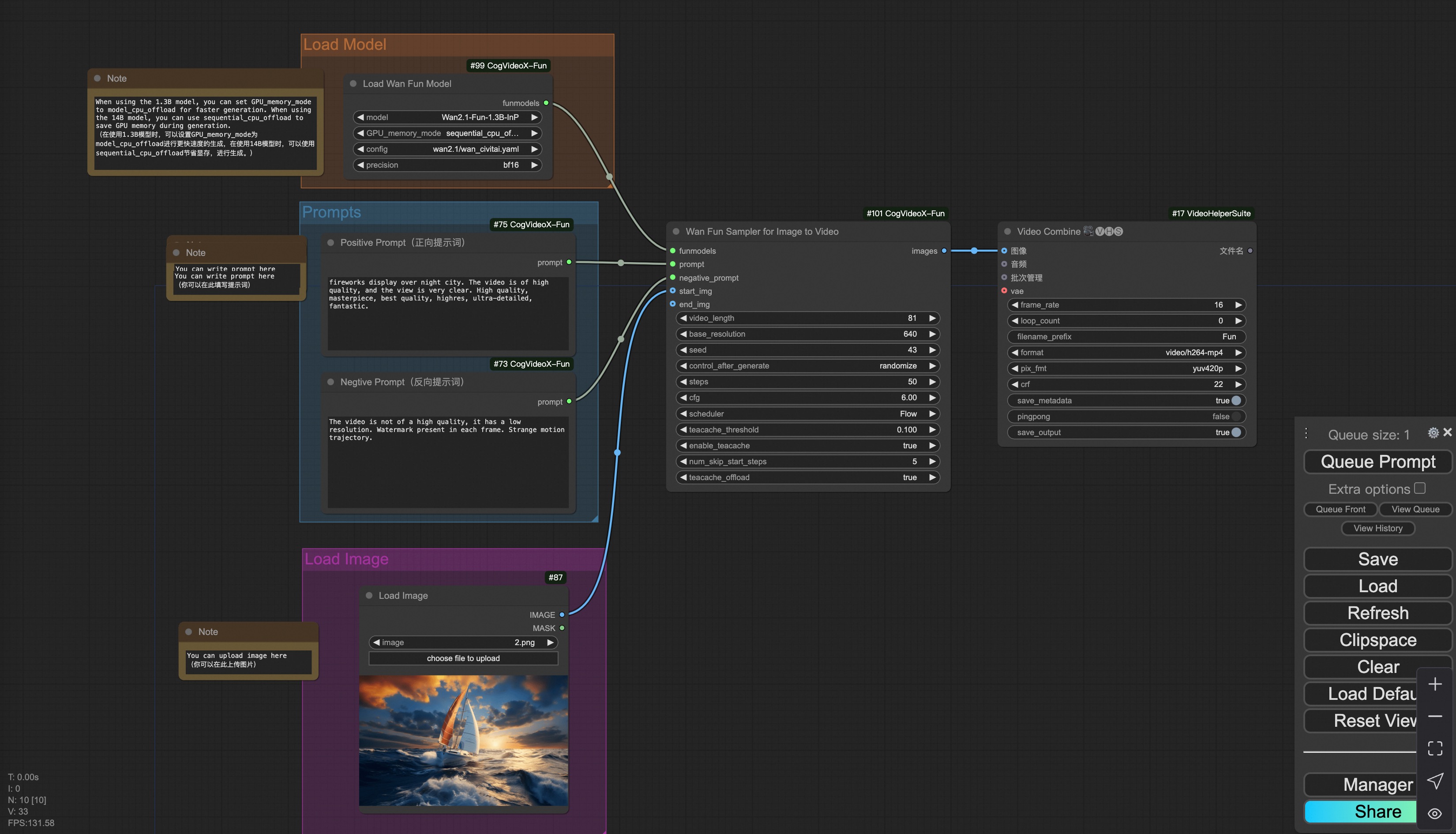
You can run the demo using following photo:

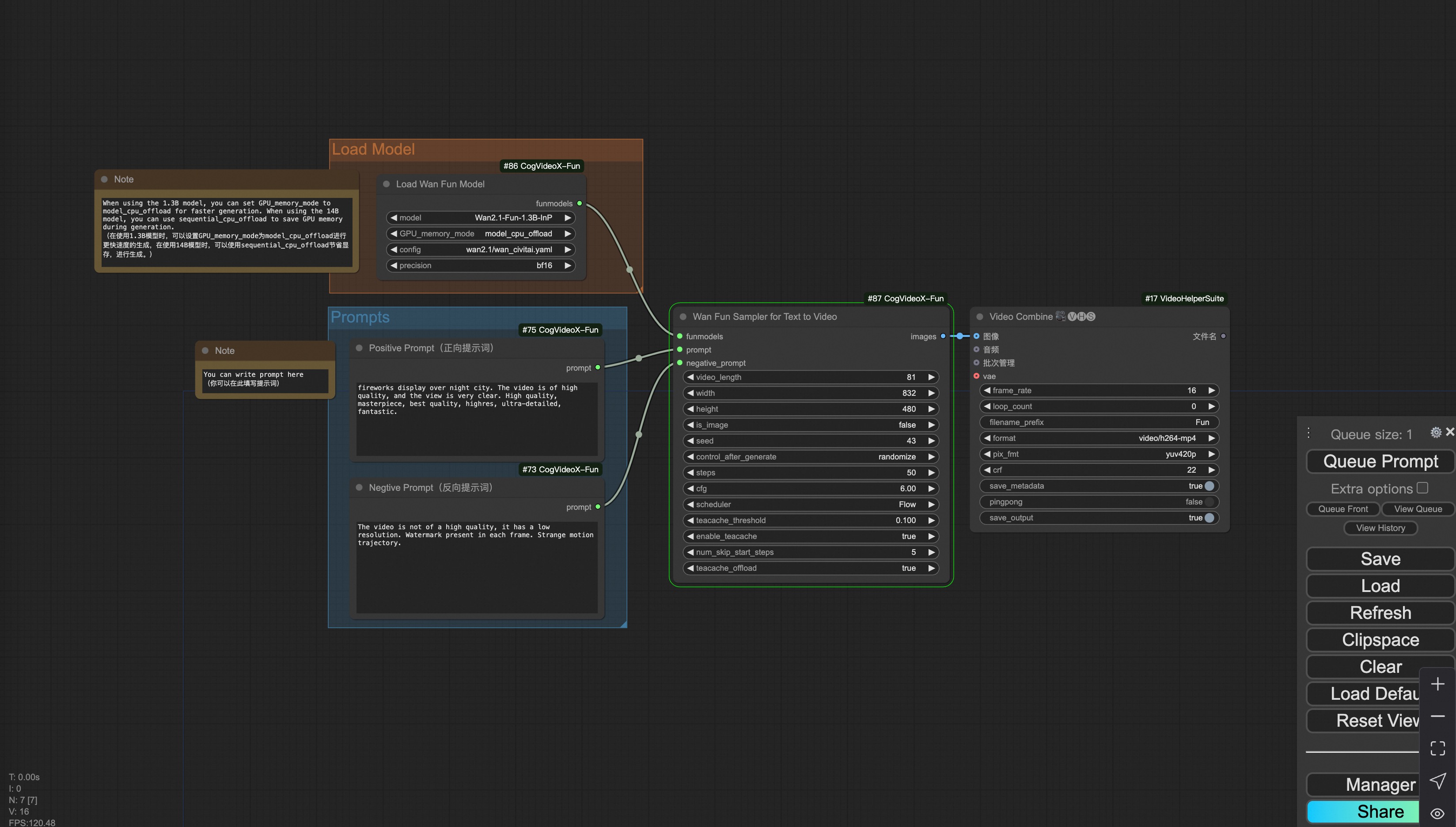
#### ii. Text to video generation
[Download link](https://pai-aigc-photog.oss-cn-hangzhou.aliyuncs.com/wan_fun/asset/v1.1/wan2.1_fun_workflow_t2v.json) for wan-fun.
### iii. Trajectory Control Video Generation
Our user interface is shown as follows, this is the [json](https://pai-aigc-photog.oss-cn-hangzhou.aliyuncs.com/wan_fun/asset/v1.1/wan2.1_fun_workflow_control_trajectory.json):
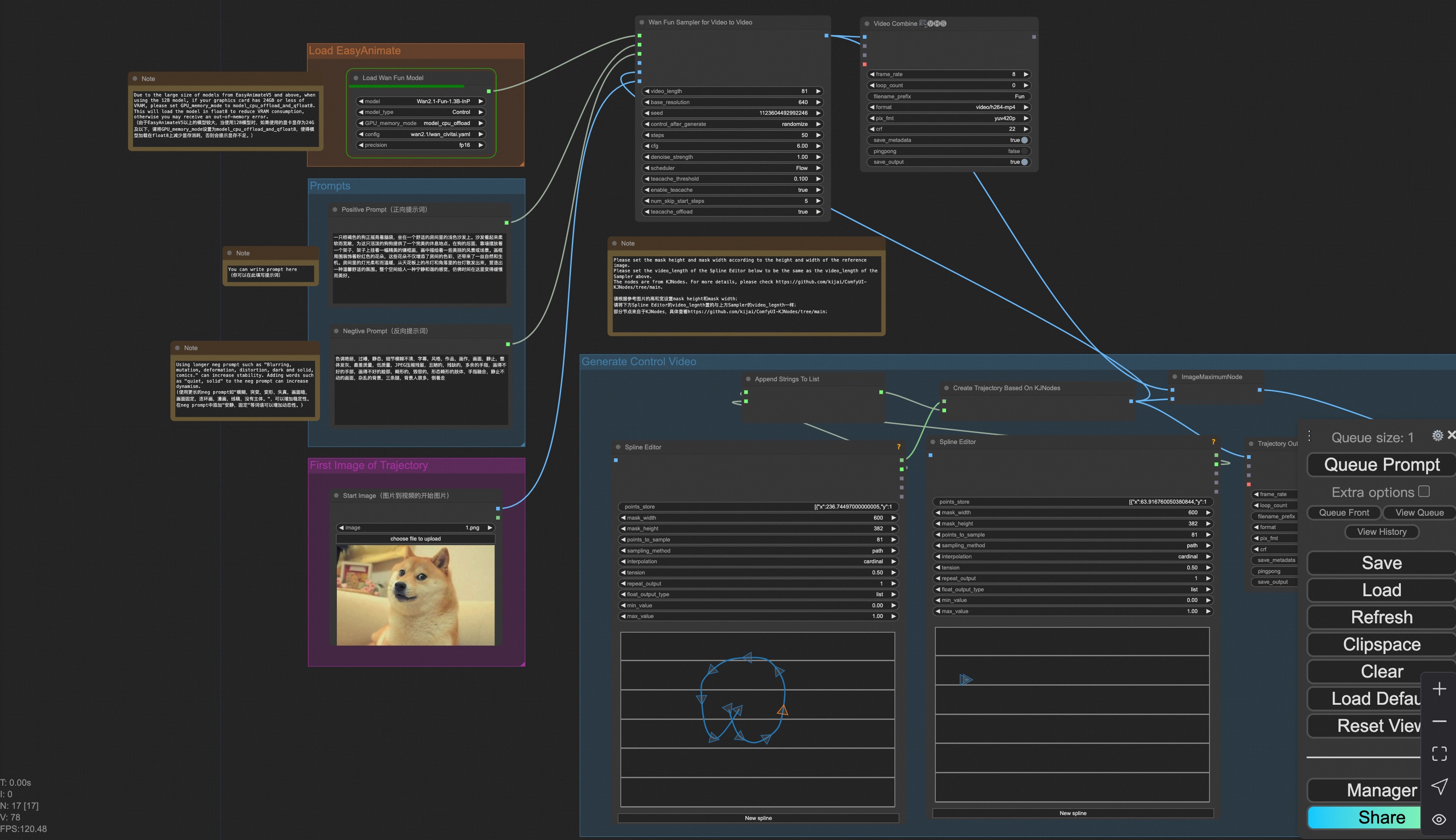
You can run a demo using the following photo:

### iv. Control Video Generation
Our user interface is shown as follows, this is the [json](https://pai-aigc-photog.oss-cn-hangzhou.aliyuncs.com/wan_fun/asset/v1.1/wan2.1_fun_workflow_v2v_control.json):
To facilitate usage, we have added several JSON configurations that automatically process input videos into the necessary control videos. These include [canny processing](https://pai-aigc-photog.oss-cn-hangzhou.aliyuncs.com/wan_fun/asset/v1.1/wan2.1_fun_workflow_v2v_control_canny.json), [pose processing](https://pai-aigc-photog.oss-cn-hangzhou.aliyuncs.com/wan_fun/asset/v1.1/wan2.1_fun_workflow_v2v_control_pose.json), and [depth processing](https://pai-aigc-photog.oss-cn-hangzhou.aliyuncs.com/wan_fun/asset/v1.1/wan2.1_fun_workflow_v2v_control_depth.json).
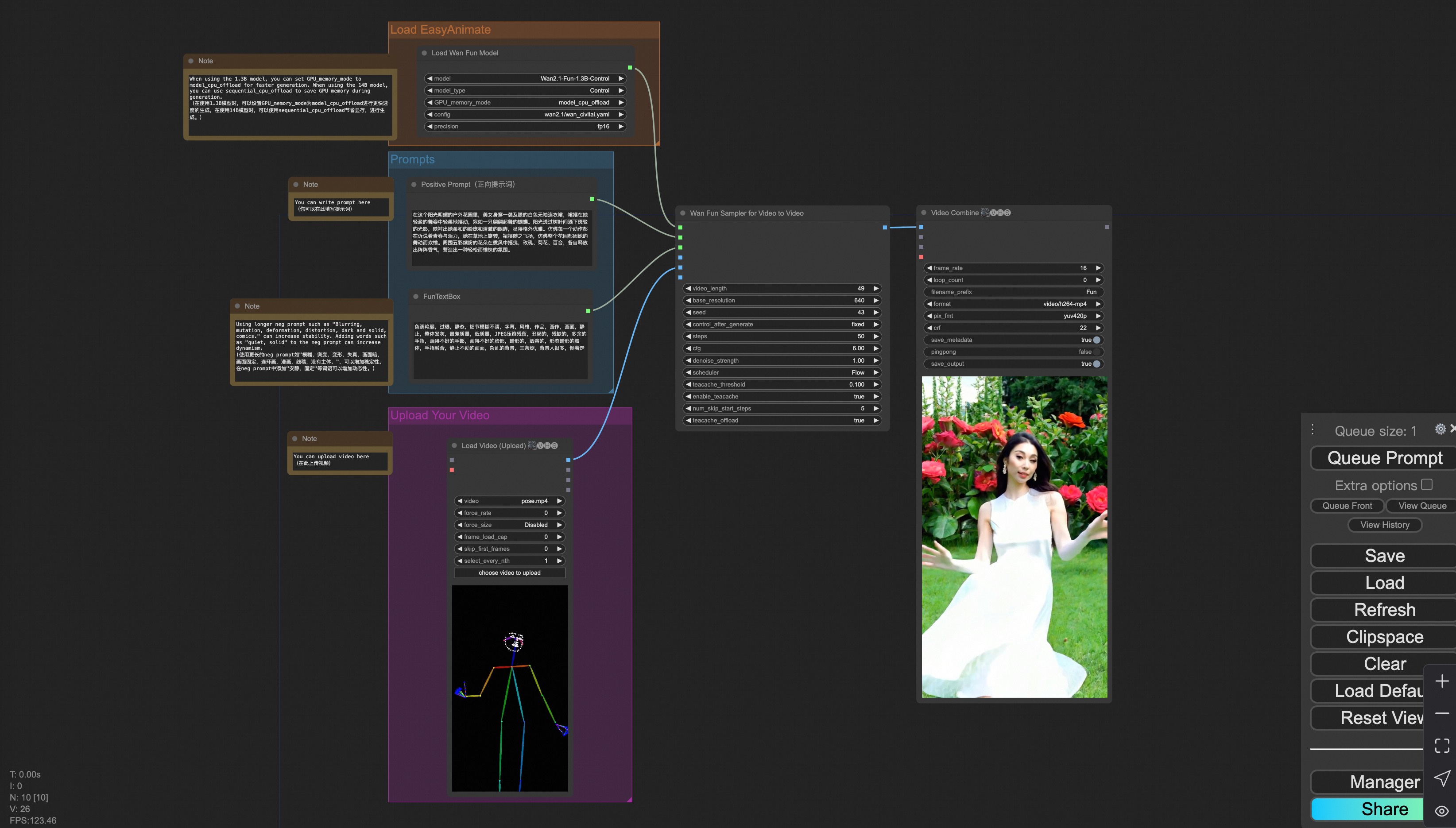
You can run a demo using the following video:
[Demo Video](https://pai-aigc-photog.oss-cn-hangzhou.aliyuncs.com/cogvideox_fun/asset/v1.1/pose.mp4)
### v. Control + Ref Video Generation
Our user interface is shown as follows, this is the [json](https://pai-aigc-photog.oss-cn-hangzhou.aliyuncs.com/wan_fun/asset/v1.1/wan2.1_fun_workflow_v2v_control_ref.json):
To facilitate usage, we have added several JSON configurations that automatically process input videos into the necessary control videos. These include [pose processing](https://pai-aigc-photog.oss-cn-hangzhou.aliyuncs.com/wan_fun/asset/v1.1/wan2.1_fun_workflow_v2v_control_pose_ref.json), and [depth processing](https://pai-aigc-photog.oss-cn-hangzhou.aliyuncs.com/wan_fun/asset/v1.1/wan2.1_fun_workflow_v2v_control_depth_ref.json).
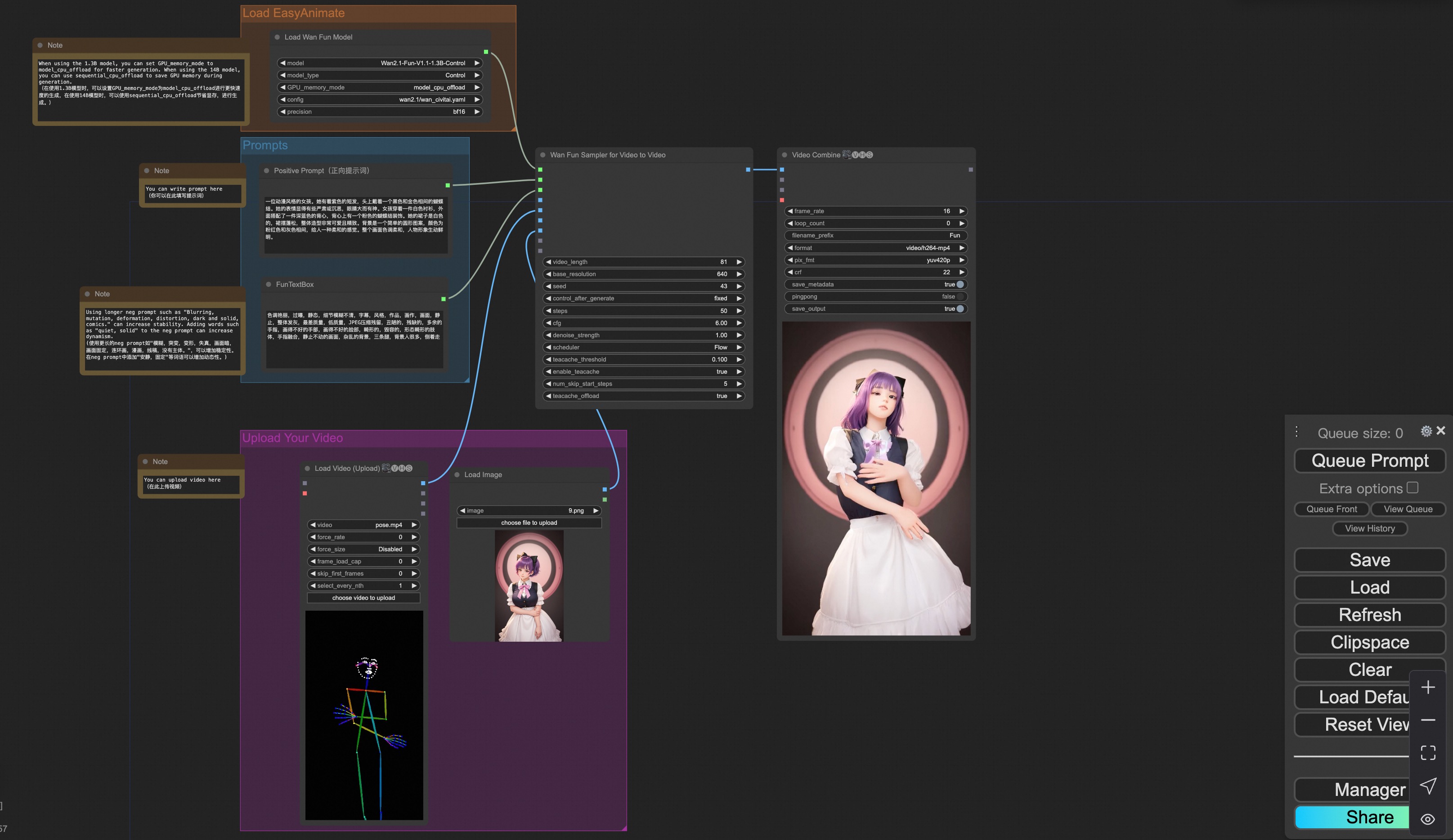
You can run a demo using the following video:
[Demo Image](https://pai-aigc-photog.oss-cn-hangzhou.aliyuncs.com/wan_fun/asset/v1.1/6.png)
[Demo Video](https://pai-aigc-photog.oss-cn-hangzhou.aliyuncs.com/wan_fun/asset/v1.1/pose.mp4)
### vi. Camera Control Video Generation
Our user interface is shown as follows, this is the [json](https://pai-aigc-photog.oss-cn-hangzhou.aliyuncs.com/wan_fun/asset/v1.1/wan2.1_fun_workflow_control_camera.json):
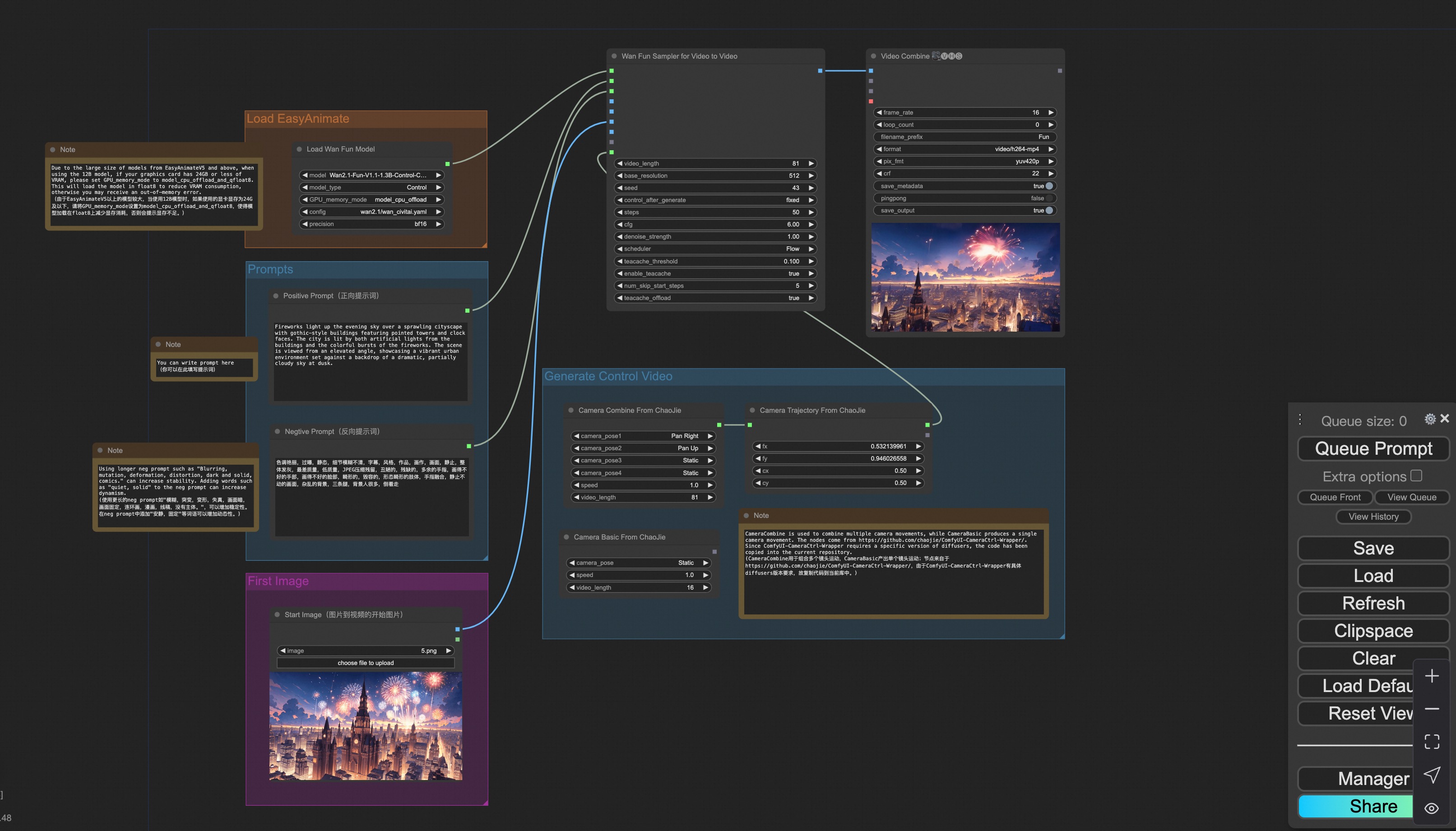
You can run a demo using the following photo:

### 2. Wan
#### i. Image to video generation
[Download link](https://pai-aigc-photog.oss-cn-hangzhou.aliyuncs.com/wan/asset/v1.0/wan2.1_workflow_i2v.json) for wan-fun.
Our ui is shown as follow:
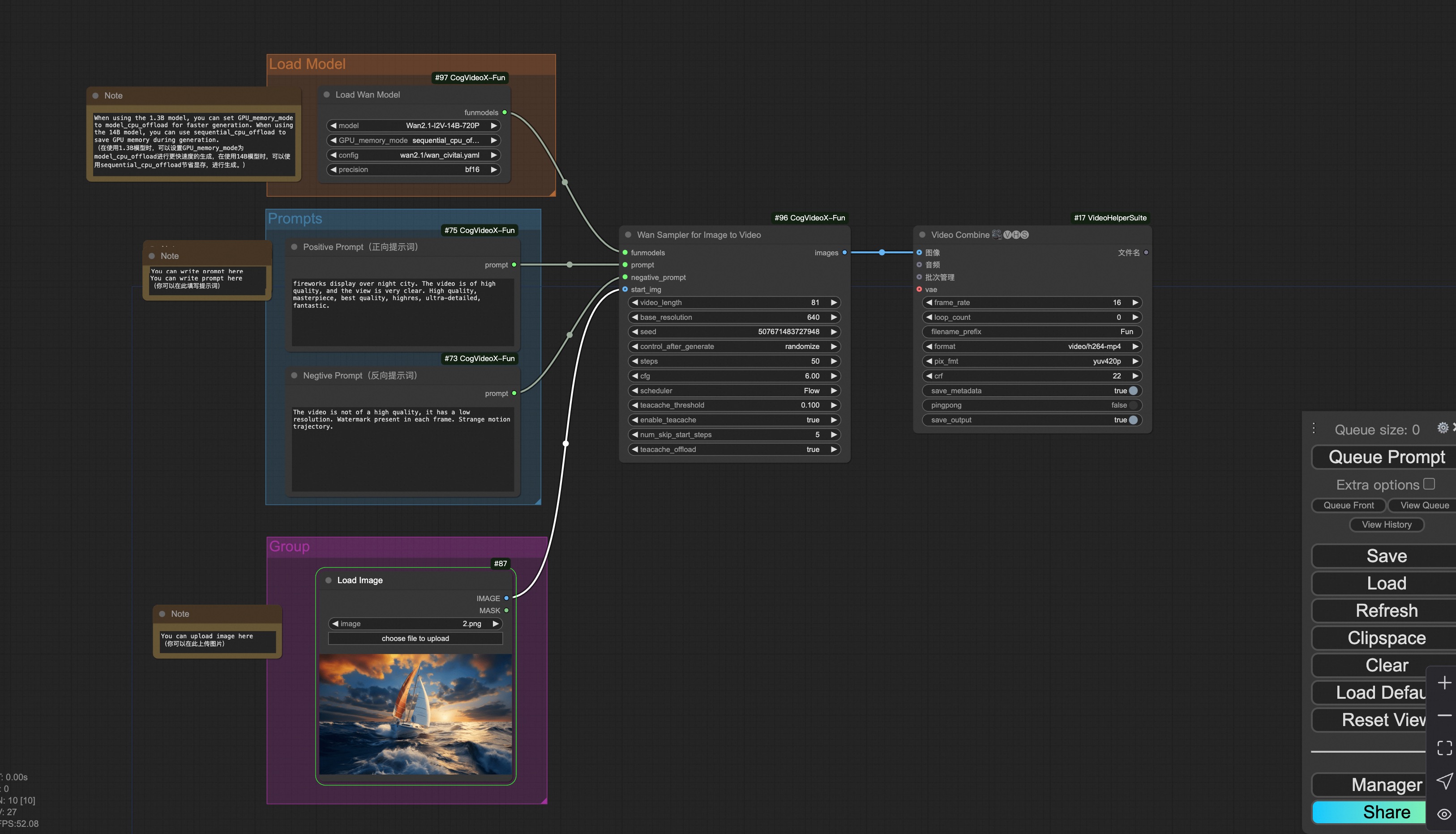
You can run the demo using following photo:

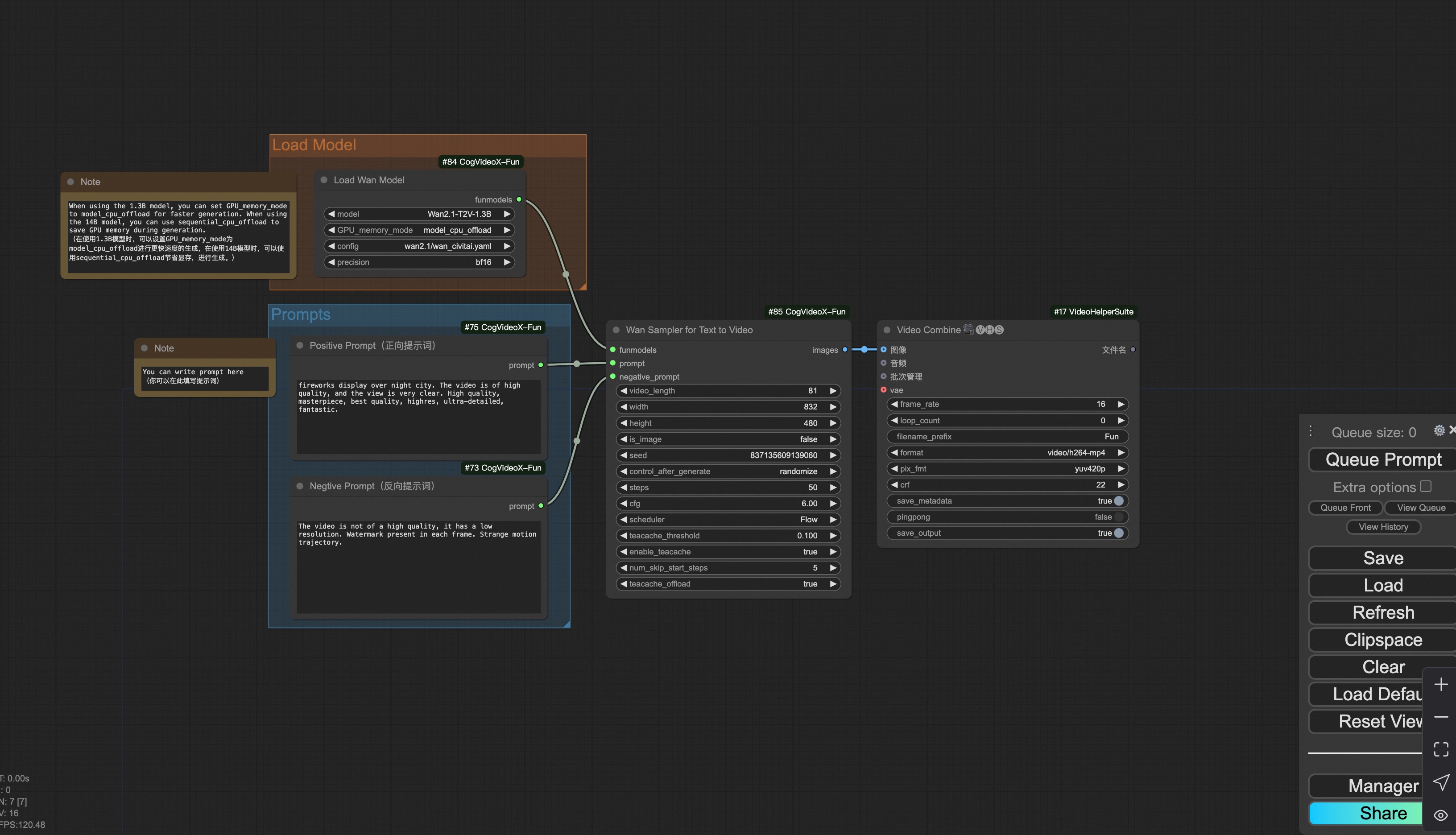
#### ii. Text to video generation
[Download link](https://pai-aigc-photog.oss-cn-hangzhou.aliyuncs.com/wan/asset/v1.0/wan2.1_workflow_t2v.json) for wan-fun.
### 3. CogVideoX-Fun
#### i. Video to video generation
[Download link](https://pai-aigc-photog.oss-cn-hangzhou.aliyuncs.com/cogvideox_fun/asset/v1.5/cogvideoxfunv1.5_workflow_v2v.json) for v1.5.
[Download link](https://pai-aigc-photog.oss-cn-hangzhou.aliyuncs.com/cogvideox_fun/asset/v1.1/cogvideoxfunv1.1_workflow_v2v.json) for v1.1.
Our ui is shown as follow:

You can run the demo using following video:
[demo video](https://pai-aigc-photog.oss-cn-hangzhou.aliyuncs.com/cogvideox_fun/asset/v1/play_guitar.mp4)
#### ii. Image to video generation
[Download link](https://pai-aigc-photog.oss-cn-hangzhou.aliyuncs.com/cogvideox_fun/asset/v1.5/cogvideoxfunv1.5_workflow_i2v.json) for v1.5.
[Download link](https://pai-aigc-photog.oss-cn-hangzhou.aliyuncs.com/cogvideox_fun/asset/v1.1/cogvideoxfunv1.1_workflow_i2v.json) for v1.1.
Our ui is shown as follow:

You can run the demo using following photo:

#### iii. Text to video generation
[Download link](https://pai-aigc-photog.oss-cn-hangzhou.aliyuncs.com/cogvideox_fun/asset/v1.5/cogvideoxfunv1.5_workflow_t2v.json) for v1.5.
[Download link](https://pai-aigc-photog.oss-cn-hangzhou.aliyuncs.com/cogvideox_fun/asset/v1.1/cogvideoxfunv1.1_workflow_t2v.json) for v1.1.

#### iv. Control video generation
[Download link](https://pai-aigc-photog.oss-cn-hangzhou.aliyuncs.com/cogvideox_fun/asset/v1.1/cogvideoxfunv1.1_workflow_v2v_control.json) for v1.1.
Our ui is shown as follow:

You can run the demo using following video:
[demo video](https://pai-aigc-photog.oss-cn-hangzhou.aliyuncs.com/cogvideox_fun/asset/v1.1/pose.mp4)
#### v. Lora usage.
[Download link](https://pai-aigc-photog.oss-cn-hangzhou.aliyuncs.com/cogvideox_fun/asset/v1.1/cogvideoxfunv1.1_workflow_t2v_lora.json) for v1.1.
Our ui is shown as follow:
 |