

| <!--Copyright 2025 The HuggingFace Team. All rights reserved. | |
| Licensed under the Apache License, Version 2.0 (the "License"); you may not use this file except in compliance with | |
| the License. You may obtain a copy of the License at | |
| http://www.apache.org/licenses/LICENSE-2.0 | |
| Unless required by applicable law or agreed to in writing, software distributed under the License is distributed on | |
| an "AS IS" BASIS, WITHOUT WARRANTIES OR CONDITIONS OF ANY KIND, either express or implied. See the License for the | |
| specific language governing permissions and limitations under the License. | |
| ⚠️ Note that this file is in Markdown but contain specific syntax for our doc-builder (similar to MDX) that may not be | |
| rendered properly in your Markdown viewer. | |
| --> | |
| # Training Vision Models using Backbone API | |
| Computer vision workflows follow a common pattern. Use a pre-trained backbone for feature extraction ([ViT](../model_doc/vit), [DINOv3](../model_doc/dinov3)). Add a "neck" for feature enhancement. Attach a task-specific head ([DETR](../model_doc/detr) for object detection, [MaskFormer](../model_doc/maskformer) for segmentation). | |
| The Transformers library implements these models and the [backbone API](../backbones) lets you swap different backbones and heads with minimal code. | |
| 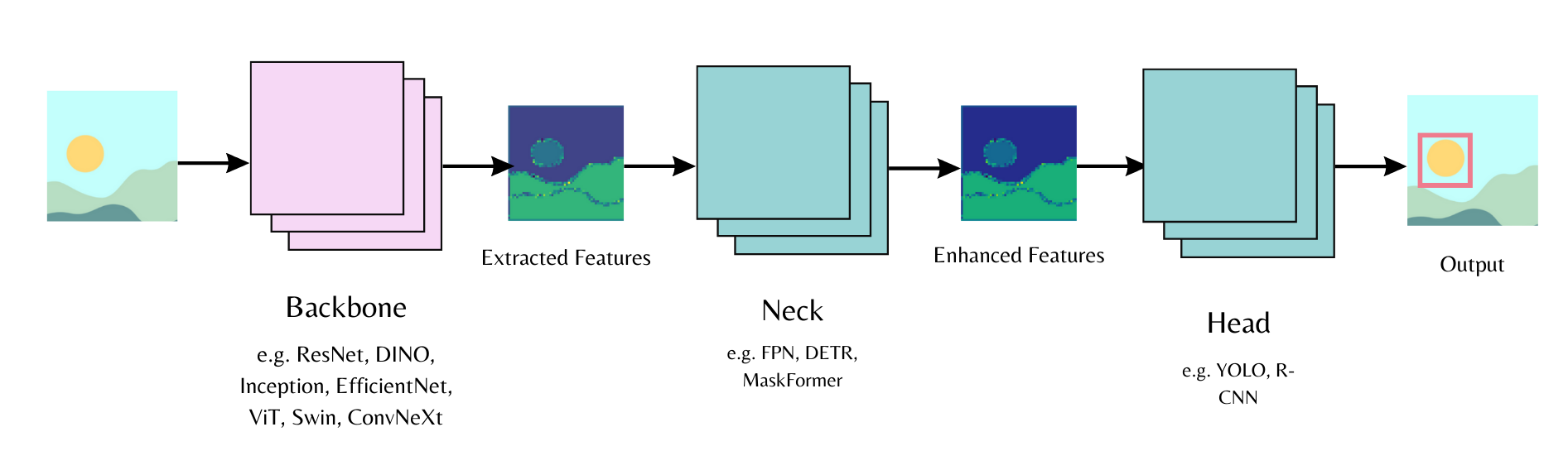 | |
| This guide combines [DINOv3 with ConvNext architecture](https://huggingface.co/facebook/dinov3-convnext-large-pretrain-lvd1689m) and a [DETR head](https://huggingface.co/facebook/detr-resnet-50). You'll train on the [license plate detection dataset](https://huggingface.co/datasets/merve/license-plates). DINOv3 delivers the best performance as of this writing. | |
| > [!NOTE] | |
| > This model requires access approval. Visit [the model repository](https://huggingface.co/facebook/dinov3-convnext-large-pretrain-lvd1689m) to request access. | |
| Install [trackio](https://github.com/gradio-app/trackio) for experiment tracking and [albumentations](https://albumentations.ai/) for data augmentation. Use the latest transformers version. | |
| ```bash | |
| pip install -Uq albumentations trackio transformers datasets | |
| ``` | |
| Initialize [`DetrConfig`] with the pre-trained DINOv3 ConvNext backbone. Use `num_labels=1` to detect the license plate bounding boxes. Create [`DetrForObjectDetection`] with this configuration. Freeze the backbone to preserve DINOv3 features without updating weights. Load the [`DetrImageProcessor`]. | |
| ```py | |
| from transformers import DetrConfig, DetrForObjectDetection, AutoImageProcessor | |
| config = DetrConfig(backbone="facebook/dinov3-convnext-large-pretrain-lvd1689m", | |
| use_pretrained_backbone=True, use_timm_backbone=False, | |
| num_labels=1, id2label={0: "license_plate"}, label2id={"license_plate": 0}) | |
| model = DetrForObjectDetection(config) | |
| for param in model.model.backbone.parameters(): | |
| param.requires_grad = False | |
| image_processor = AutoImageProcessor.from_pretrained("facebook/detr-resnet-50") | |
| ``` | |
| Load the dataset and split it for training. | |
| ```py | |
| from datasets import load_dataset | |
| ds = load_dataset("merve/license-plates") | |
| ds = ds["train"] | |
| ds = ds.train_test_split(test_size=0.05) | |
| train_dataset = ds["train"] | |
| val_dataset = ds["test"] | |
| len(train_dataset) | |
| # 5867 | |
| ``` | |
| Augment the dataset. Rescale images to a maximum size, flip them, and apply affine transforms. Eliminate invalid bounding boxes and ensure annotations stay clean with `rebuild_objects`. | |
| ```py | |
| import albumentations as A | |
| import numpy as np | |
| from PIL import Image | |
| train_aug = A.Compose( | |
| [ | |
| A.LongestMaxSize(max_size=1024, p=1.0), | |
| A.HorizontalFlip(p=0.5), | |
| A.Affine(rotate=(-5, 5), shear=(-5, 5), translate_percent=(0.05, 0.05), p=0.5), | |
| ], | |
| bbox_params=A.BboxParams(format="coco", label_fields=["category_id"], min_visibility=0.0), | |
| ) | |
| def train_transform(batch): | |
| imgs_out, objs_out = [], [] | |
| original_imgs, original_objs = batch["image"], batch["objects"] | |
| for i, (img_pil, objs) in enumerate(zip(original_imgs, original_objs)): | |
| img = np.array(img_pil) | |
| labels = [0] * len(objs["bbox"]) | |
| out = train_aug(image=img, bboxes=list(objs["bbox"]), category_id=labels) | |
| if len(out["bboxes"]) == 0: | |
| imgs_out.append(img_pil) # if no boxes left after augmentation, use original | |
| objs_out.append(objs) | |
| continue | |
| H, W = out["image"].shape[:2] | |
| clamped = [] | |
| for (x, y, w, h) in out["bboxes"]: | |
| x = max(0.0, min(x, W - 1.0)) | |
| y = max(0.0, min(y, H - 1.0)) | |
| w = max(1.0, min(w, W - x)) | |
| h = max(1.0, min(h, H - y)) | |
| clamped.append([x, y, w, h]) | |
| imgs_out.append(Image.fromarray(out["image"])) | |
| objs_out.append(rebuild_objects(clamped, out["category_id"])) | |
| batch["image"] = imgs_out | |
| batch["objects"] = objs_out | |
| return batch | |
| def rebuild_objects(bboxes, labels): | |
| bboxes = [list(map(float, b)) for b in bboxes] | |
| areas = [float(w*h) for (_, _, w, h) in bboxes] | |
| ids = list(range(len(bboxes))) | |
| return { | |
| "id": ids, | |
| "bbox": bboxes, | |
| "category_id": list(map(int, labels)), | |
| "area": areas, | |
| "iscrowd": [0]*len(bboxes), | |
| } | |
| train_dataset = train_dataset.with_transform(train_transform) | |
| ``` | |
| Build COCO-style annotations for the image processor. | |
| ```py | |
| import torch | |
| def format_annotations(image, objects, image_id): | |
| n = len(objects["id"]) | |
| anns = [] | |
| iscrowd_list = objects.get("iscrowd", [0] * n) | |
| area_list = objects.get("area", None) | |
| for i in range(n): | |
| x, y, w, h = objects["bbox"][i] | |
| area = area_list[i] if area_list is not None else float(w * h) | |
| anns.append({ | |
| "id": int(objects["id"][i]), | |
| "iscrowd": int(iscrowd_list[i]), | |
| "bbox": [float(x), float(y), float(w), float(h)], | |
| "category_id": int(objects.get("category_id", objects.get("category"))[i]), | |
| "area": float(area), | |
| }) | |
| return {"image_id": int(image_id), "annotations": anns} | |
| ``` | |
| Create batches in the data collator. Format annotations and pass them with transformed images to the image processor. | |
| ```py | |
| def collate_fn(examples): | |
| images = [example["image"] for example in examples] | |
| ann_batch = [format_annotations(example["image"], example["objects"], example["image_id"]) for example in examples] | |
| inputs = image_processor(images=images, annotations=ann_batch, return_tensors="pt") | |
| return inputs | |
| ``` | |
| Initialize the [`Trainer`] and set up [`TrainingArguments`] for model convergence. Pass datasets, data collator, arguments, and model to `Trainer` to start training. | |
| ```py | |
| from transformers import Trainer, TrainingArguments | |
| training_args = TrainingArguments( | |
| output_dir="./license-plate-detr-dinov3", | |
| per_device_train_batch_size=4, | |
| per_device_eval_batch_size=4, | |
| num_train_epochs=8, | |
| learning_rate=1e-5, | |
| weight_decay=1e-4, | |
| warmup_steps=500, | |
| eval_strategy="steps", | |
| eval_steps=500, | |
| save_total_limit=2, | |
| dataloader_pin_memory=False, | |
| fp16=True, | |
| report_to="trackio", | |
| load_best_model_at_end=True, | |
| remove_unused_columns=False, | |
| push_to_hub=True, | |
| ) | |
| trainer = Trainer( | |
| model=model, | |
| args=training_args, | |
| train_dataset=train_dataset, | |
| eval_dataset=val_dataset, | |
| data_collator=collate_fn, | |
| ) | |
| trainer.train() | |
| ``` | |
| Push the trainer and image processor to the Hub. | |
| ```py | |
| trainer.push_to_hub() | |
| image_processor.push_to_hub("merve/license-plate-detr-dinov3") | |
| ``` | |
| Test the model with an object detection pipeline. | |
| ```py | |
| from transformers import pipeline | |
| obj_detector = pipeline( | |
| "object-detection", model="merve/license-plate-detr-dinov3" | |
| ) | |
| results = obj_detector("https://huggingface.co/datasets/merve/vlm_test_images/resolve/main/license-plates.jpg", threshold=0.05) | |
| print(results) | |
| ``` | |
| Visualize the results. | |
| ```py | |
| from PIL import Image, ImageDraw | |
| import numpy as np | |
| import requests | |
| def plot_results(image, results, threshold): | |
| image = Image.fromarray(np.uint8(image)) | |
| draw = ImageDraw.Draw(image) | |
| width, height = image.size | |
| for result in results: | |
| score = result["score"] | |
| label = result["label"] | |
| box = list(result["box"].values()) | |
| if score > threshold: | |
| x1, y1, x2, y2 = tuple(box) | |
| draw.rectangle((x1, y1, x2, y2), outline="red") | |
| draw.text((x1 + 5, y1 + 10), f"{score:.2f}", fill="green" if score > 0.7 else "red") | |
| return image | |
| image = Image.open(requests.get("https://huggingface.co/datasets/merve/vlm_test_images/resolve/main/license-plates.jpg", stream=True).raw) | |
| plot_results(image, results, threshold=0.05) | |
| ``` | |
|  | |