Instructions to use AdProducer/AdProducer-SFT-9B with libraries, inference providers, notebooks, and local apps. Follow these links to get started.
- Libraries
- Transformers
How to use AdProducer/AdProducer-SFT-9B with Transformers:
# Use a pipeline as a high-level helper from transformers import pipeline pipe = pipeline("image-text-to-text", model="AdProducer/AdProducer-SFT-9B") messages = [ { "role": "user", "content": [ {"type": "image", "url": "https://huggingface.co/datasets/huggingface/documentation-images/resolve/main/p-blog/candy.JPG"}, {"type": "text", "text": "What animal is on the candy?"} ] }, ] pipe(text=messages)# pip install -U transformers accelerate # Load model directly from transformers import AutoProcessor, AutoModelForMultimodalLM processor = AutoProcessor.from_pretrained("AdProducer/AdProducer-SFT-9B") model = AutoModelForMultimodalLM.from_pretrained("AdProducer/AdProducer-SFT-9B", device_map="auto") messages = [ { "role": "user", "content": [ {"type": "image", "url": "https://huggingface.co/datasets/huggingface/documentation-images/resolve/main/p-blog/candy.JPG"}, {"type": "text", "text": "What animal is on the candy?"} ] }, ] inputs = processor.apply_chat_template( messages, add_generation_prompt=True, tokenize=True, return_dict=True, return_tensors="pt", ).to(model.device) outputs = model.generate(**inputs, max_new_tokens=256) print(processor.decode(outputs[0][inputs["input_ids"].shape[-1]:])) - Notebooks
- Google Colab
- Kaggle
- Local Apps Settings
- vLLM
How to use AdProducer/AdProducer-SFT-9B with vLLM:
Install from pip and serve model
# Install vLLM from pip: pip install vllm # Start the vLLM server: vllm serve "AdProducer/AdProducer-SFT-9B" # Call the server using curl (OpenAI-compatible API): curl -X POST "http://localhost:8000/v1/chat/completions" \ -H "Content-Type: application/json" \ --data '{ "model": "AdProducer/AdProducer-SFT-9B", "messages": [ { "role": "user", "content": [ { "type": "text", "text": "Describe this image in one sentence." }, { "type": "image_url", "image_url": { "url": "https://cdn.britannica.com/61/93061-050-99147DCE/Statue-of-Liberty-Island-New-York-Bay.jpg" } } ] } ] }'Use Docker
docker model run hf.co/AdProducer/AdProducer-SFT-9B
- SGLang
How to use AdProducer/AdProducer-SFT-9B with SGLang:
Install from pip and serve model
# Install SGLang from pip: pip install sglang # Start the SGLang server: python3 -m sglang.launch_server \ --model-path "AdProducer/AdProducer-SFT-9B" \ --host 0.0.0.0 \ --port 30000 # Call the server using curl (OpenAI-compatible API): curl -X POST "http://localhost:30000/v1/chat/completions" \ -H "Content-Type: application/json" \ --data '{ "model": "AdProducer/AdProducer-SFT-9B", "messages": [ { "role": "user", "content": [ { "type": "text", "text": "Describe this image in one sentence." }, { "type": "image_url", "image_url": { "url": "https://cdn.britannica.com/61/93061-050-99147DCE/Statue-of-Liberty-Island-New-York-Bay.jpg" } } ] } ] }'Use Docker images
docker run --gpus all \ --shm-size 32g \ -p 30000:30000 \ -v ~/.cache/huggingface:/root/.cache/huggingface \ --env "HF_TOKEN=<secret>" \ --ipc=host \ lmsysorg/sglang:latest \ python3 -m sglang.launch_server \ --model-path "AdProducer/AdProducer-SFT-9B" \ --host 0.0.0.0 \ --port 30000 # Call the server using curl (OpenAI-compatible API): curl -X POST "http://localhost:30000/v1/chat/completions" \ -H "Content-Type: application/json" \ --data '{ "model": "AdProducer/AdProducer-SFT-9B", "messages": [ { "role": "user", "content": [ { "type": "text", "text": "Describe this image in one sentence." }, { "type": "image_url", "image_url": { "url": "https://cdn.britannica.com/61/93061-050-99147DCE/Statue-of-Liberty-Island-New-York-Bay.jpg" } } ] } ] }' - Docker Model Runner
How to use AdProducer/AdProducer-SFT-9B with Docker Model Runner:
docker model run hf.co/AdProducer/AdProducer-SFT-9B
AdProducer-SFT-9B Model
This repository contains the AdProducer-SFT-9B model (the supervised cold-start checkpoint) presented in AdProducer: Towards Agentic Advertising Video Generation.
🌐 Project Page | 💻 Code | 📖 Paper
👀 Intro
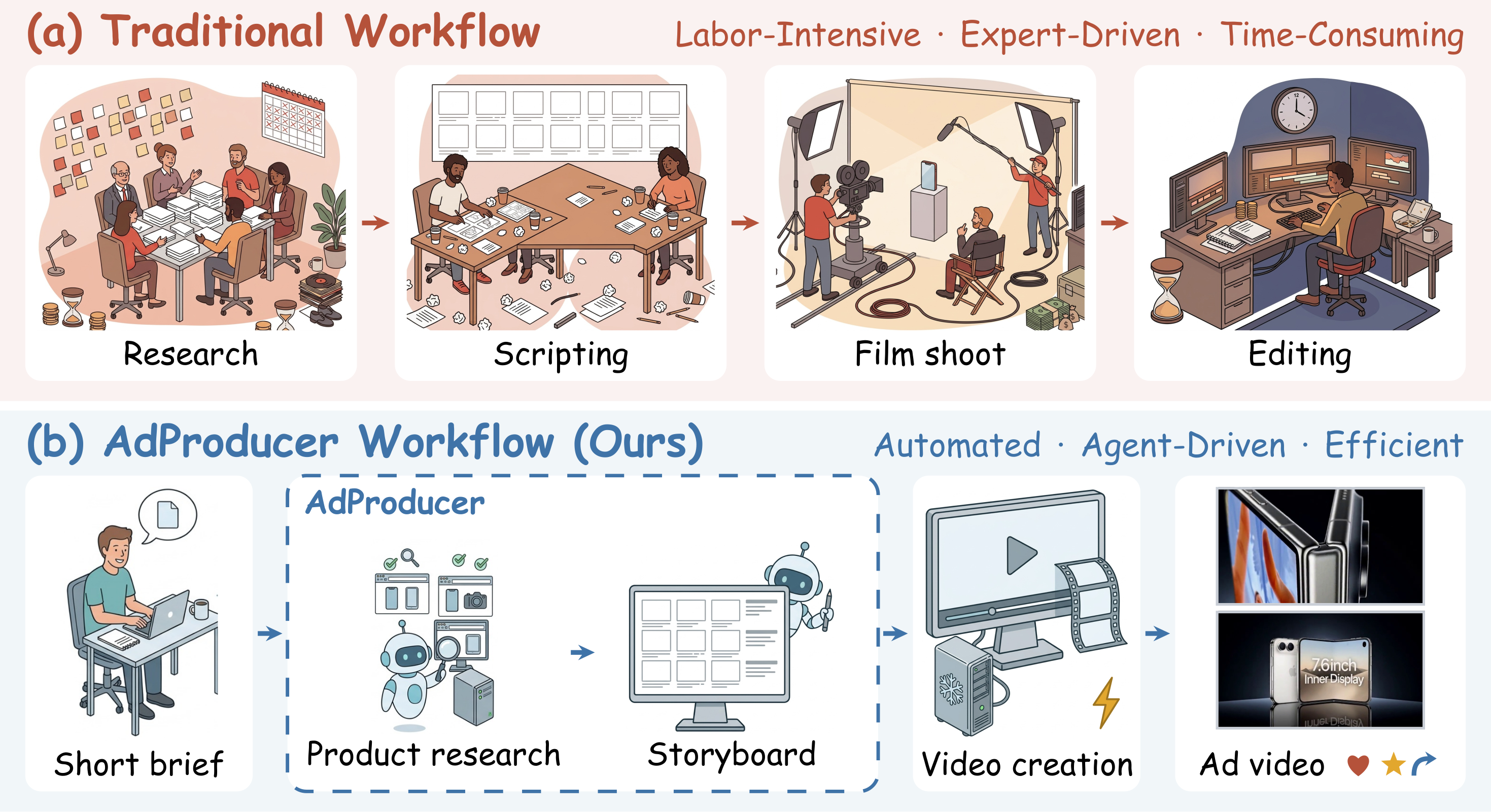
A compelling ad starts with understanding what makes a product worth showing. AdProducer turns a short creative brief into a product-grounded visual story: it discovers and verifies real product information, retrieves official visual references, and crafts a shot-by-shot storyboard that brings the product's defining features into focus. A frozen video generator then brings that storyboard to life.
Compared with sending the brief directly to the video generator, AdProducer's storyboards improve product accuracy (the right product, shape, colours and logo), information accuracy (correct on-screen facts and specifications), selling-point expression, shot design and visual quality. The same storyboards transfer to other video generators without retraining.
We release the SFT and RL models, the training data, the training code, and AdCreation-Bench (305 advertising briefs across eight domains).
🧠 Model
AdProducer-SFT-9B is a full-parameter fine-tune of Qwen3.5-9B (vision tower frozen) on 3,710 agentic trajectories for 2 epochs with ms-swift. It is the starting point of the RL stage that produced AdProducer-RL-9B. The training command and data are in training/sft/ of the GitHub repository.
🚀 Training and Inference
For setup, SFT/RL training, inference and evaluation, please refer to the official GitHub repository.
📐 Citation
If you find our work helpful for your research, please consider citing:
@article{li2026adproducer,
title = {AdProducer: Towards Agentic Advertising Video Generation},
author = {Li, Kunyang and Wang, Chaoyang and Shah, Mubarak and Shang, Yuzhang},
journal = {arXiv preprint arXiv:2611.31466},
year = {2026}
}
- Downloads last month
- 26