The Illustrated Image Captioning using transformers
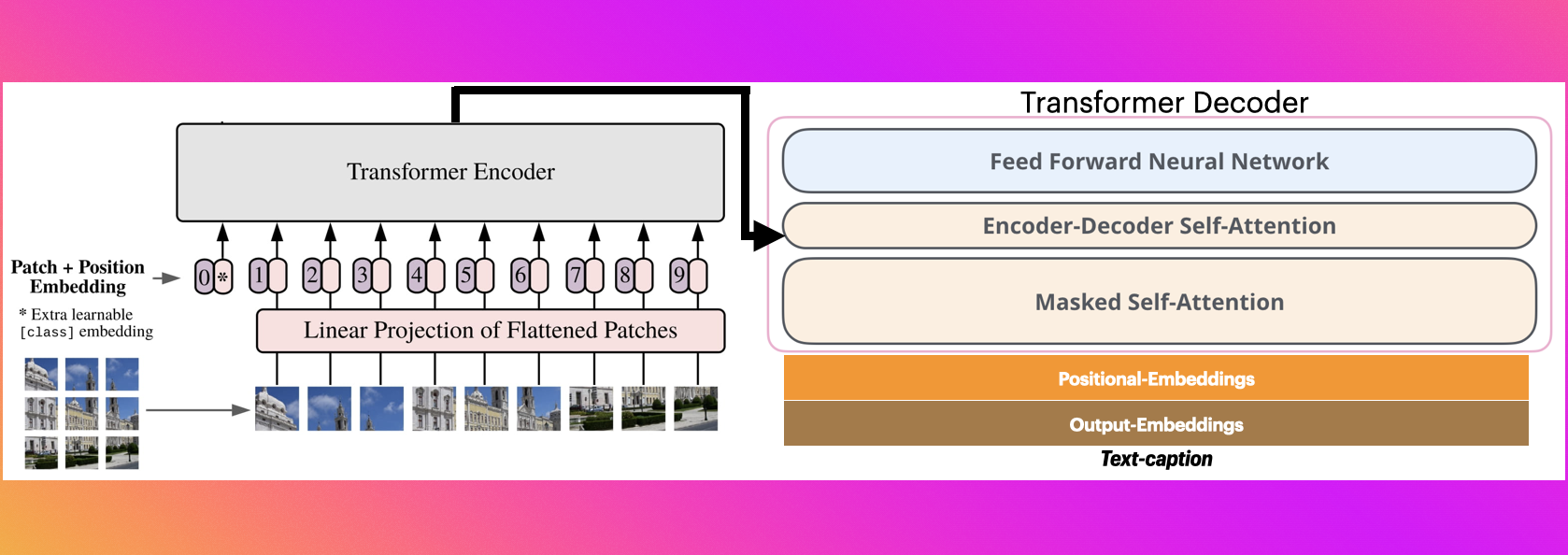
Sample running code
from transformers import VisionEncoderDecoderModel, ViTImageProcessor, AutoTokenizer
import torch
from PIL import Image
model = VisionEncoderDecoderModel.from_pretrained("Ayansk11/Image_Caption_using_ViT_GPT2")
feature_extractor = ViTImageProcessor.from_pretrained("Ayansk11/Image_Caption_using_ViT_GPT2")
tokenizer = AutoTokenizer.from_pretrained("Ayansk11/Image_Caption_using_ViT_GPT2")
device = torch.device("cuda" if torch.cuda.is_available() else "cpu")
model.to(device)
max_length = 16
num_beams = 4
gen_kwargs = {"max_length": max_length, "num_beams": num_beams}
def predict_step(image_paths):
images = []
for image_path in image_paths:
i_image = Image.open(image_path)
if i_image.mode != "RGB":
i_image = i_image.convert(mode="RGB")
images.append(i_image)
pixel_values = feature_extractor(images=images, return_tensors="pt").pixel_values
pixel_values = pixel_values.to(device)
output_ids = model.generate(pixel_values, **gen_kwargs)
preds = tokenizer.batch_decode(output_ids, skip_special_tokens=True)
preds = [pred.strip() for pred in preds]
return preds
predict_step(['doctor.e16ba4e4.jpg'])
Sample running code using transformers pipeline
from transformers import pipeline
image_to_text = pipeline("image-to-text", model="Ayansk11/Image_Caption_using_ViT_GPT2")
image_to_text("https://ankur3107.github.io/assets/images/image-captioning-example.png")

