

| <!--Copyright 2024 The HuggingFace Team. All rights reserved. | |
| Licensed under the Apache License, Version 2.0 (the "License"); you may not use this file except in compliance with | |
| the License. You may obtain a copy of the License at | |
| http://www.apache.org/licenses/LICENSE-2.0 | |
| Unless required by applicable law or agreed to in writing, software distributed under the License is distributed on | |
| an "AS IS" BASIS, WITHOUT WARRANTIES OR CONDITIONS OF ANY KIND, either express or implied. See the License for the | |
| specific language governing permissions and limitations under the License. | |
| ⚠️ Note that this file is in Markdown but contain specific syntax for our doc-builder (similar to MDX) that may not be | |
| rendered properly in your Markdown viewer. | |
| --> | |
| # 智能体和工具 | |
| [[在colab里打开]] | |
| ### 什么是智能体 (Agent)? | |
| 大型语言模型(LLM)经过 [因果语言建模训练](./tasks/language_modeling) 可以应对各种任务,但在一些基本任务(如逻辑推理、计算和搜索)上常常表现不佳。当它们被用在自己不擅长的领域时,往往无法生成我们期望的答案。 | |
| 为了解决这个问题,可以创建**智能体**. | |
| 智能体是一个系统,它使用 LLM 作为引擎,并且能够访问称为**工具**的功能。 | |
| 这些**工具**是执行任务的函数,包含所有必要的描述信息,帮助智能体正确使用它们。 | |
| 智能体可以被编程为: | |
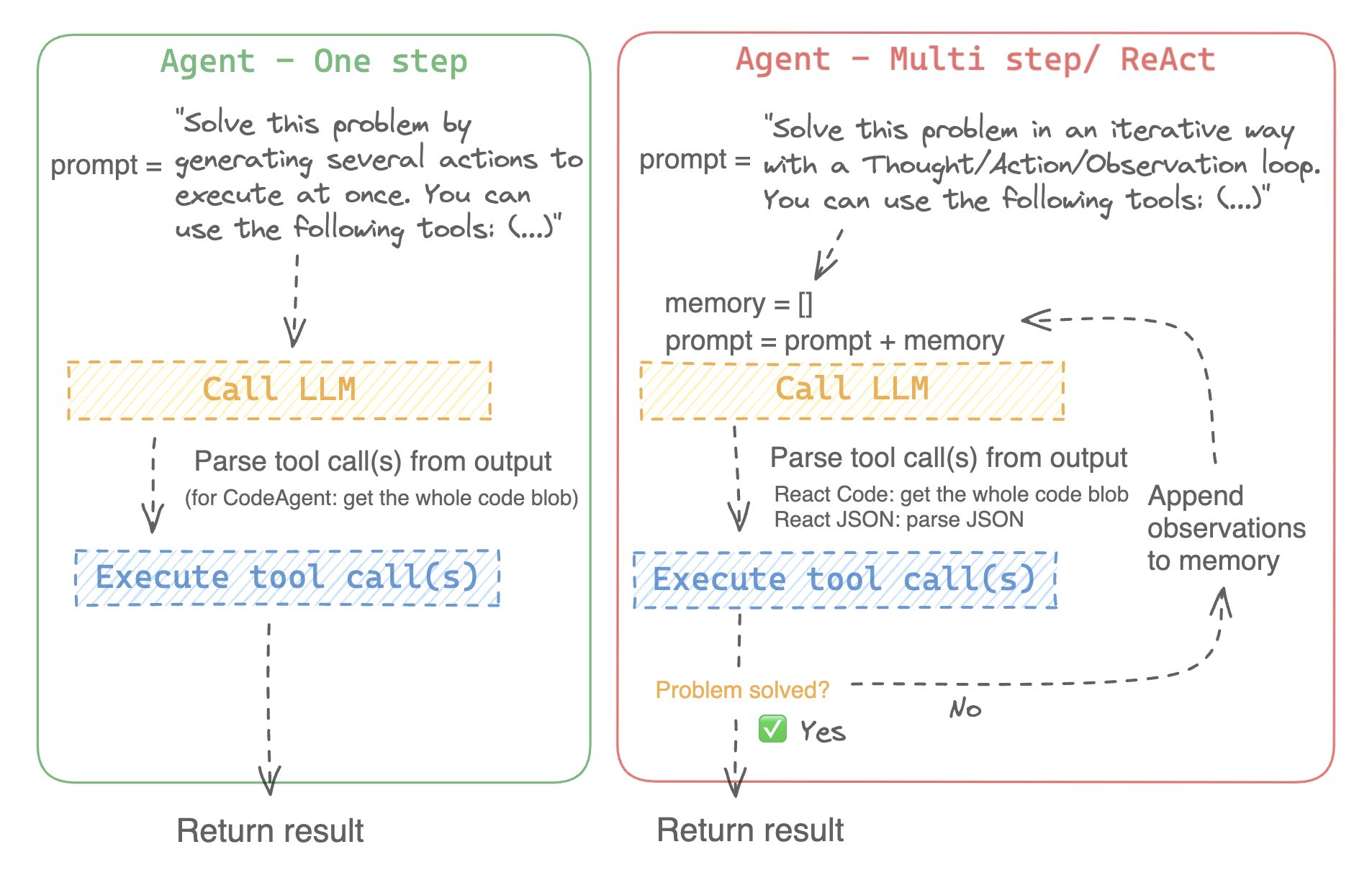
| - 一次性设计一系列工具并同时执行它们,像 [`CodeAgent`] | |
| - 一次执行一个工具,并等待每个工具的结果后再启动下一个,像 [`ReactJsonAgent`] | |
| ### 智能体类型 | |
| #### 代码智能体 | |
| 此智能体包含一个规划步骤,然后生成 Python 代码一次性执行所有任务。它原生支持处理不同输入和输出类型,因此推荐用于多模态任务。 | |
| #### 推理智能体 | |
| 这是解决推理任务的首选代理,因为 ReAct 框架 ([Yao et al., 2022](https://huggingface.co/papers/2210.03629)) 使其在基于之前观察进行推理时非常高效。 | |
| 我们实现了两种版本的 ReactJsonAgent: | |
| - [`ReactJsonAgent`] 将工具调用作为 JSON 格式输出。 | |
| - [`ReactCodeAgent`] 是 ReactJsonAgent 的一种新型,生成工具调用的代码块,对于具备强大编程能力的 LLM 非常适用。 | |
| > [TIP] | |
| > 阅读 [Open-source LLMs as LangChain Agents](https://huggingface.co/blog/open-source-llms-as-agents) 博文,了解更多关于推理智能体的信息。 | |
| <div class="flex justify-center"> | |
| <img | |
| class="block dark:hidden" | |
| src="https://huggingface.co/datasets/huggingface/documentation-images/resolve/main/transformers/Agent_ManimCE.gif" | |
| /> | |
| <img | |
| class="hidden dark:block" | |
| src="https://huggingface.co/datasets/huggingface/documentation-images/resolve/main/transformers/Agent_ManimCE.gif" | |
| /> | |
| </div> | |
|  | |
| 以下是一个推理代码智能体如何处理以下问题的示例: | |
| ```py3 | |
| >>> agent.run( | |
| ... "How many more blocks (also denoted as layers) in BERT base encoder than the encoder from the architecture proposed in Attention is All You Need?", | |
| ... ) | |
| =====New task===== | |
| How many more blocks (also denoted as layers) in BERT base encoder than the encoder from the architecture proposed in Attention is All You Need? | |
| ====Agent is executing the code below: | |
| bert_blocks = search(query="number of blocks in BERT base encoder") | |
| print("BERT blocks:", bert_blocks) | |
| ==== | |
| Print outputs: | |
| BERT blocks: twelve encoder blocks | |
| ====Agent is executing the code below: | |
| attention_layer = search(query="number of layers in Attention is All You Need") | |
| print("Attention layers:", attention_layer) | |
| ==== | |
| Print outputs: | |
| Attention layers: Encoder: The encoder is composed of a stack of N = 6 identical layers. Each layer has two sub-layers. The first is a multi-head self-attention mechanism, and the second is a simple, position- 2 Page 3 Figure 1: The Transformer - model architecture. | |
| ====Agent is executing the code below: | |
| bert_blocks = 12 | |
| attention_layers = 6 | |
| diff = bert_blocks - attention_layers | |
| print("Difference in blocks:", diff) | |
| final_answer(diff) | |
| ==== | |
| Print outputs: | |
| Difference in blocks: 6 | |
| Final answer: 6 | |
| ``` | |
| ### 如何构建智能体? | |
| 要初始化一个智能体,您需要以下参数: | |
| - **一个 LLM** 来驱动智能体——智能体本身并不是 LLM,而是一个使用 LLM 作为引擎的程序。 | |
| - **一个系统提示**:告诉 LLM 引擎应该如何生成输出。 | |
| - **一个工具箱**,智能体可以从中选择工具执行。 | |
| - **一个解析器**,从 LLM 输出中提取出哪些工具需要调用,以及使用哪些参数。 | |
| 在智能体系统初始化时,工具属性将生成工具描述,并嵌入到智能体的系统提示中,告知智能体可以使用哪些工具,并且为什么使用它们。 | |
| **安装依赖** | |
| 首先,您需要安装**智能体**所需的额外依赖: | |
| ```bash | |
| pip install transformers[agents] | |
| ``` | |
| **创建LLM引擎** | |
| 定义一个 `llm_engine` 方法,该方法接受一系列[消息](./chat_templating)并返回文本。该 `callable` 还需要接受一个 `stop` 参数,用于指示何时停止生成输出。 | |
| ```python | |
| from huggingface_hub import login, InferenceClient | |
| login("<YOUR_HUGGINGFACEHUB_API_TOKEN>") | |
| client = InferenceClient(model="meta-llama/Meta-Llama-3-70B-Instruct") | |
| def llm_engine(messages, stop_sequences=["Task"]) -> str: | |
| response = client.chat_completion(messages, stop=stop_sequences, max_tokens=1000) | |
| answer = response.choices[0].message.content | |
| return answer | |
| ``` | |
| 您可以使用任何符合以下要求的 `llm_engine` 方法: | |
| 1. [输入格式](./chat_templating)为 (`List[Dict[str, str]]`),并且返回一个字符串。 | |
| 2. 它在 `stop_sequences` 参数传递的序列处停止生成输出。 | |
| 此外,`llm_engine` 还可以接受一个 `grammar` 参数。如果在智能体初始化时指定了 `grammar`,则该参数将传递给 `llm_engine` 的调用,以允许[受限生成](https://huggingface.co/docs/text-generation-inference/conceptual/guidance),以强制生成格式正确的智能体输出。 | |
| 您还需要一个 `tools` 参数,它接受一个 `Tools` 列表 —— 可以是空列表。您也可以通过定义可选参数 `add_base_tools=True` 来将默认工具箱添加到工具列表中。 | |
| 现在,您可以创建一个智能体,例如 [`CodeAgent`],并运行它。您还可以创建一个 [`TransformersEngine`],使用 `transformers` 在本地机器上运行预初始化的推理管道。 为了方便起见,由于智能体行为通常需要更强大的模型,例如 `Llama-3.1-70B-Instruct`,它们目前较难在本地运行,我们还提供了 [`HfApiEngine`] 类,它在底层初始化了一个 `huggingface_hub.InferenceClient`。 | |
| ```python | |
| from transformers import CodeAgent, HfApiEngine | |
| llm_engine = HfApiEngine(model="meta-llama/Meta-Llama-3-70B-Instruct") | |
| agent = CodeAgent(tools=[], llm_engine=llm_engine, add_base_tools=True) | |
| agent.run( | |
| "Could you translate this sentence from French, say it out loud and return the audio.", | |
| sentence="Où est la boulangerie la plus proche?", | |
| ) | |
| ``` | |
| 当你急需某个东西时这将会很有用! | |
| 您甚至可以将 `llm_engine` 参数留空,默认情况下会创建一个 [`HfApiEngine`]。 | |
| ```python | |
| from transformers import CodeAgent | |
| agent = CodeAgent(tools=[], add_base_tools=True) | |
| agent.run( | |
| "Could you translate this sentence from French, say it out loud and give me the audio.", | |
| sentence="Où est la boulangerie la plus proche?", | |
| ) | |
| ``` | |
| 请注意,我们使用了额外的 `sentence` 参数:您可以将文本作为附加参数传递给模型。 | |
| 您还可以使用这个来指定本地或远程文件的路径供模型使用: | |
| ```py | |
| from transformers import ReactCodeAgent | |
| agent = ReactCodeAgent(tools=[], llm_engine=llm_engine, add_base_tools=True) | |
| agent.run("Why does Mike not know many people in New York?", audio="https://huggingface.co/datasets/huggingface/documentation-images/resolve/main/transformers/recording.mp3") | |
| ``` | |
| 系统提示和输出解析器会自动定义,但您可以通过调用智能体的 `system_prompt_template` 来轻松查看它们。 | |
| ```python | |
| print(agent.system_prompt_template) | |
| ``` | |
| 尽可能清楚地解释您要执行的任务非常重要。 每次 [`~Agent.run`] 操作都是独立的,并且由于智能体是由 LLM 驱动的,提示中的细微变化可能会导致完全不同的结果。 | |
| 您还可以连续运行多个任务,每次都会重新初始化智能体的 `agent.task` 和 `agent.logs` 属性。 | |
| #### 代码执行 | |
| Python 解释器在一组输入和工具上执行代码。 这应该是安全的,因为只能调用您提供的工具(特别是 Hugging Face 的工具)和 print 函数,因此您已经限制了可以执行的操作。 | |
| Python 解释器默认不允许导入不在安全列表中的模块,因此大多数明显的攻击问题应该不成问题。 您仍然可以通过在 [`ReactCodeAgent`] 或 [`CodeAgent`] 初始化时通过 `additional_authorized_imports` 参数传递一个授权的模块列表来授权额外的导入: | |
| ```py | |
| >>> from transformers import ReactCodeAgent | |
| >>> agent = ReactCodeAgent(tools=[], additional_authorized_imports=['requests', 'bs4']) | |
| >>> agent.run("Could you get me the title of the page at url 'https://huggingface.co/blog'?") | |
| (...) | |
| 'Hugging Face – Blog' | |
| ``` | |
| 如果有任何代码尝试执行非法操作,或者生成的代码出现常规 Python 错误,执行将停止。 | |
| > [!WARNING] | |
| > 在使用大语言模型(LLM)生成代码时,生成的代码会被执行,避免导入或使用任何不安全的库或模块。 | |
| ### 系统提示 | |
| 智能体,或者说驱动智能体的 LLM,根据系统提示生成输出。系统提示可以定制并根据目标任务进行调整。例如,检查 [`ReactCodeAgent`] 的系统提示(以下版本经过简化)。 | |
| ```text | |
| You will be given a task to solve as best you can. | |
| You have access to the following tools: | |
| <<tool_descriptions>> | |
| To solve the task, you must plan forward to proceed in a series of steps, in a cycle of 'Thought:', 'Code:', and 'Observation:' sequences. | |
| At each step, in the 'Thought:' sequence, you should first explain your reasoning towards solving the task, then the tools that you want to use. | |
| Then in the 'Code:' sequence, you should write the code in simple Python. The code sequence must end with '/End code' sequence. | |
| During each intermediate step, you can use 'print()' to save whatever important information you will then need. | |
| These print outputs will then be available in the 'Observation:' field, for using this information as input for the next step. | |
| In the end you have to return a final answer using the `final_answer` tool. | |
| Here are a few examples using notional tools: | |
| --- | |
| {examples} | |
| Above example were using notional tools that might not exist for you. You only have acces to those tools: | |
| <<tool_names>> | |
| You also can perform computations in the python code you generate. | |
| Always provide a 'Thought:' and a 'Code:\n```py' sequence ending with '```<end_code>' sequence. You MUST provide at least the 'Code:' sequence to move forward. | |
| Remember to not perform too many operations in a single code block! You should split the task into intermediate code blocks. | |
| Print results at the end of each step to save the intermediate results. Then use final_answer() to return the final result. | |
| Remember to make sure that variables you use are all defined. | |
| Now Begin! | |
| ``` | |
| 系统提示包括: | |
| - 解释智能体应该如何工作以及工具的**介绍**。 | |
| - 所有工具的描述由 `<<tool_descriptions>>` 标记在运行时动态替换,这样智能体就知道可以使用哪些工具及其用途。 | |
| - 工具的描述来自工具的属性,`name`、`description`、`inputs` 和 `output_type`,以及一个简单的 `jinja2` 模板,您可以根据需要进行调整。 | |
| - 期望的输出格式。 | |
| 您可以通过向 `system_prompt` 参数传递自定义提示来最大程度地提高灵活性,从而覆盖整个系统提示模板。 | |
| ```python | |
| from transformers import ReactJsonAgent | |
| from transformers.agents import PythonInterpreterTool | |
| agent = ReactJsonAgent(tools=[PythonInterpreterTool()], system_prompt="{your_custom_prompt}") | |
| ``` | |
| > [WARNING] | |
| > 必须在`template`中定义 `<<tool_descriptions>>` 这个变量,以便智能体能够正确地识别并使用可用的工具 | |
| ### 检查智能体的运行 | |
| 以下是检查运行后发生了什么的一些有用属性: | |
| - `agent.logs` 存储了智能体的详细日志。每一步的所有内容都会存储在一个字典中,然后附加到 `agent.logs`。 | |
| - 运行 `agent.write_inner_memory_from_logs()` 会从日志中创建智能体的内存,以便 LLM 查看,作为一系列聊天消息。此方法会遍历日志的每个步骤,只保存其感兴趣的消息:例如,它会单独保存系统提示和任务,然后为每个步骤保存 LLM 输出的消息,以及工具调用输出的消息。如果您想要更高层次的查看发生了什么,可以使用此方法 —— 但并不是每个日志都会被此方法转录。 | |
| ## 工具 | |
| 工具是智能体使用的基本功能。 | |
| 例如,您可以检查 [`PythonInterpreterTool`]:它有一个名称、描述、输入描述、输出类型和 `__call__` 方法来执行该操作。 | |
| 当智能体初始化时,工具属性会用来生成工具描述,然后将其嵌入到智能体的系统提示中,这让智能体知道可以使用哪些工具以及为什么使用它们。 | |
| ### 默认工具箱 | |
| Transformers 提供了一个默认工具箱,用于增强智能体,您可以在初始化时通过 `add_base_tools=True` 参数将其添加到智能体中: | |
| - **文档问答**:给定一个文档(如图像格式的 PDF),回答关于该文档的问题([Donut](./model_doc/donut)) | |
| - **图像问答**:给定一张图片,回答关于该图像的问题([VILT](./model_doc/vilt)) | |
| - **语音转文本**:给定一个人讲述的音频录音,将其转录为文本(Whisper) | |
| - **文本转语音**:将文本转换为语音([SpeechT5](./model_doc/speecht5)) | |
| - **翻译**:将给定的句子从源语言翻译为目标语言 | |
| - **DuckDuckGo 搜索**:使用 `DuckDuckGo` 浏览器进行网络搜索 | |
| - **Python 代码解释器**:在安全环境中运行 LLM 生成的 Python 代码。只有在初始化 [`ReactJsonAgent`] 时将 `add_base_tools=True` 时,代码智能体才会添加此工具,因为基于代码的智能体已经能够原生执行 Python 代码 | |
| 您可以通过调用 [`load_tool`] 函数来手动使用某个工具并执行任务。 | |
| ```python | |
| from transformers import load_tool | |
| tool = load_tool("text-to-speech") | |
| audio = tool("This is a text to speech tool") | |
| ``` | |
| ### 创建新工具 | |
| 您可以为 `Hugging Face` 默认工具无法涵盖的用例创建自己的工具。 | |
| 例如,假设我们要创建一个返回在 `Hugging Face Hub` 上某个任务中下载次数最多的模型的工具。 | |
| 您将从以下代码开始: | |
| ```python | |
| from huggingface_hub import list_models | |
| task = "text-classification" | |
| model = next(iter(list_models(filter=task, sort="downloads", direction=-1))) | |
| print(model.id) | |
| ``` | |
| 这段代码可以很快转换为工具,只需将其包装成一个函数,并添加 `tool` 装饰器: | |
| ```py | |
| from transformers import tool | |
| @tool | |
| def model_download_tool(task: str) -> str: | |
| """ | |
| This is a tool that returns the most downloaded model of a given task on the Hugging Face Hub. | |
| It returns the name of the checkpoint. | |
| Args: | |
| task: The task for which | |
| """ | |
| model = next(iter(list_models(filter="text-classification", sort="downloads", direction=-1))) | |
| return model.id | |
| ``` | |
| 该函数需要: | |
| - 一个清晰的名称。名称通常描述工具的功能。由于代码返回某个任务中下载次数最多的模型,因此我们将其命名为 `model_download_tool`。 | |
| - 对输入和输出进行类型提示 | |
| - 描述,其中包括 "`Args`:" 部分,描述每个参数(这次不需要类型指示,它会从类型提示中获取)。 | |
| 所有这些将自动嵌入到智能体的系统提示中,因此请尽量使它们尽可能清晰! | |
| > [TIP] | |
| > 这个定义格式与 apply_chat_template 中使用的工具模式相同,唯一的区别是添加了 tool 装饰器:可以在我们的工具使用 API 中[了解更多](https://huggingface.co/blog/unified-tool-use#passing-tools-to-a-chat-template). | |
| 然后,您可以直接初始化您的智能体: | |
| ```py | |
| from transformers import CodeAgent | |
| agent = CodeAgent(tools=[model_download_tool], llm_engine=llm_engine) | |
| agent.run( | |
| "Can you give me the name of the model that has the most downloads in the 'text-to-video' task on the Hugging Face Hub?" | |
| ) | |
| ``` | |
| 您将得到以下输出: | |
| ```text | |
| ======== New task ======== | |
| Can you give me the name of the model that has the most downloads in the 'text-to-video' task on the Hugging Face Hub? | |
| ==== Agent is executing the code below: | |
| most_downloaded_model = model_download_tool(task="text-to-video") | |
| print(f"The most downloaded model for the 'text-to-video' task is {most_downloaded_model}.") | |
| ==== | |
| ``` | |
| 输出: | |
| `"The most downloaded model for the 'text-to-video' task is ByteDance/AnimateDiff-Lightning."` | |
| ### 管理智能体的工具箱 | |
| 如果您已经初始化了一个智能体,但想添加一个新的工具,重新初始化智能体会很麻烦。借助 Transformers,您可以通过添加或替换工具来管理智能体的工具箱。 | |
| 让我们将 `model_download_tool` 添加到一个仅初始化了默认工具箱的现有智能体中。 | |
| ```python | |
| from transformers import CodeAgent | |
| agent = CodeAgent(tools=[], llm_engine=llm_engine, add_base_tools=True) | |
| agent.toolbox.add_tool(model_download_tool) | |
| ``` | |
| 现在,我们可以同时使用新工具和之前的文本到语音工具: | |
| ```python | |
| agent.run( | |
| "Can you read out loud the name of the model that has the most downloads in the 'text-to-video' task on the Hugging Face Hub and return the audio?" | |
| ) | |
| ``` | |
| | **Audio** | | |
| |------------------------------------------------------------------------------------------------------------------------------------------------------| | |
| | <audio controls><source src="https://huggingface.co/datasets/huggingface/documentation-images/resolve/main/transformers/damo.wav" type="audio/wav"/> | | |
| > [WARNING] | |
| > 当向一个已经运行良好的代理添加工具时要小心,因为这可能会导致选择偏向你的工具,或者选择已经定义的工具之外的其他工具。 | |
| 使用 agent.toolbox.update_tool() 方法可以替换智能体工具箱中的现有工具。 | |
| 如果您的新工具完全替代了现有工具,这非常有用,因为智能体已经知道如何执行该特定任务。 | |
| 只需确保新工具遵循与替换工具相同的 API,或者调整系统提示模板,以确保所有使用替换工具的示例都得到更新。 | |
| ### 使用工具集合 | |
| 您可以通过使用 ToolCollection 对象来利用工具集合,指定您想要使用的工具集合的 slug。 | |
| 然后将这些工具作为列表传递给智能体进行初始化,并开始使用它们! | |
| ```py | |
| from transformers import ToolCollection, ReactCodeAgent | |
| image_tool_collection = ToolCollection(collection_slug="huggingface-tools/diffusion-tools-6630bb19a942c2306a2cdb6f") | |
| agent = ReactCodeAgent(tools=[*image_tool_collection.tools], add_base_tools=True) | |
| agent.run("Please draw me a picture of rivers and lakes.") | |
| ``` | |
| 为了加速启动,工具仅在智能体调用时加载。 | |
| 这将生成如下图像: | |
| <img src="https://huggingface.co/datasets/huggingface/documentation-images/resolve/main/transformers/rivers_and_lakes.png"> | |