| --- |
| license: apache-2.0 |
| language: |
| - zh |
| - en |
| library_name: transformers |
| pipeline_tag: text-generation |
| tags: |
| - minicpm |
| - minicpm5 |
| - llama |
| - text-generation |
| - long-context |
| - tool-calling |
| - on-device |
| - edge-ai |
| datasets: |
| - openbmb/Ultra-FineWeb |
| - openbmb/Ultra-FineWeb-L3 |
| - openbmb/UltraData-Math |
| - openbmb/UltraData-SFT-2605 |
| --- |
| |
| <div align="center"> |
| <img src="https://raw.githubusercontent.com/OpenBMB/MiniCPM/main/assets/minicpm_logo.png" width="500em" /> |
| </div> |
|
|
| <p align="center"> |
| <a href="https://arxiv.org/pdf/2506.07900" target="_blank">MiniCPM 技术报告</a> | |
| <a href="https://github.com/OpenBMB/MiniCPM" target="_blank">GitHub 仓库</a> | |
| <a href="https://ultradata.openbmb.cn/" target="_blank">UltraData</a> | |
| <a href="https://github.com/OpenBMB/MiniCPM-Desk-Pet" target="_blank">MiniCPM 桌宠</a> | |
| <a href="https://huggingface.co/spaces/openbmb/MiniCPM5-1B-Demo" target="_blank">在线 Demo</a> |
| </p> |
|
|
| <p align="center"> |
| <a href="https://huggingface.co/openbmb/MiniCPM5-1B/blob/main/README.md" target="_blank">English</a> | |
| 中文 |
| </p> |
|
|
| ## 亮点 |
|
|
| 我们正式发布 **MiniCPM5-1B**,这是 **MiniCPM5** 系列的首个模型。它是一款面向端侧、本地部署和资源受限场景的 1B 稠密 Transformer,能够达到同尺寸开源模型 SOTA 水平。 |
|
|
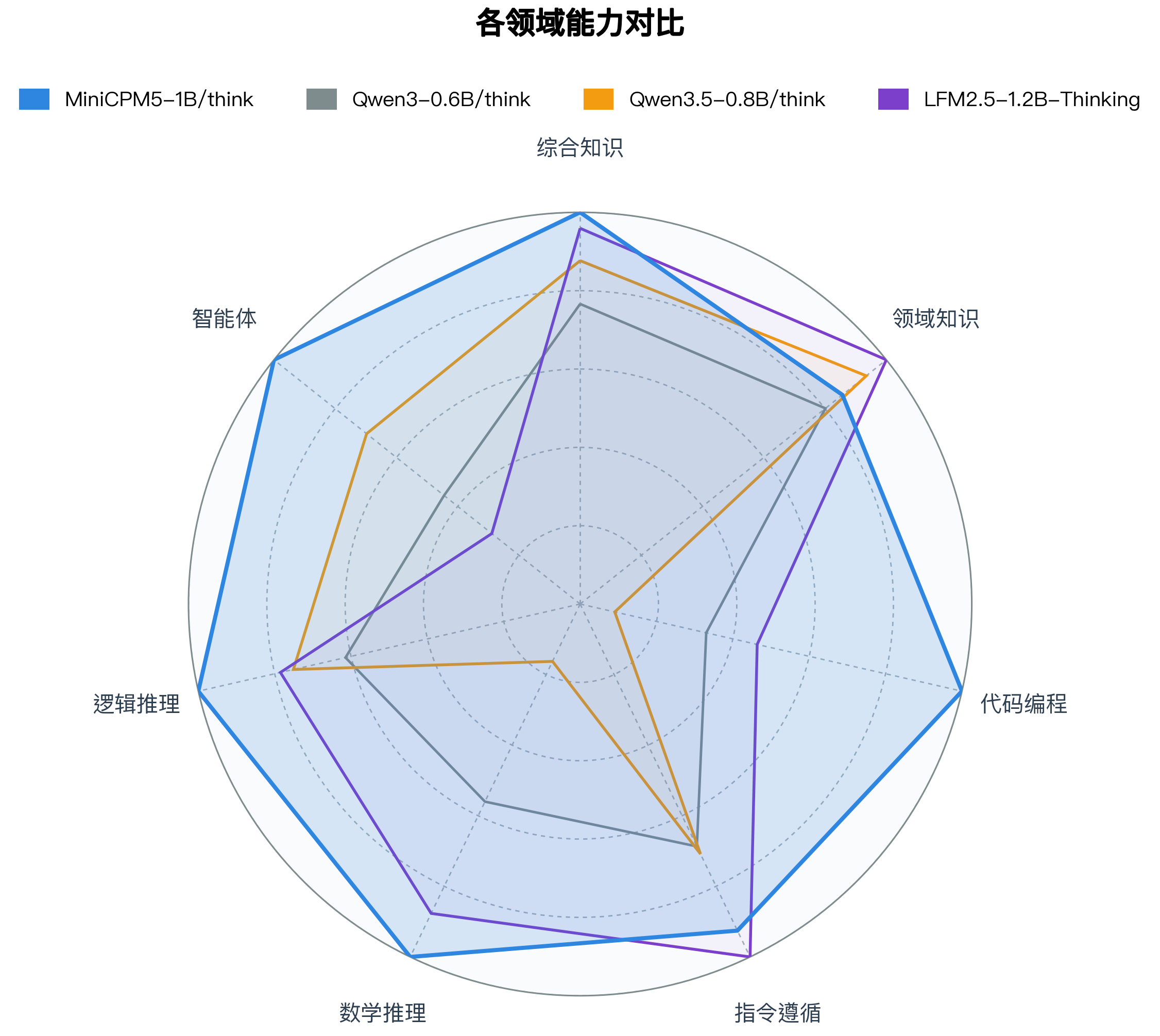
| 🏆 **同尺寸开源模型 SOTA**:与同尺寸优秀开源模型相比,MiniCPM5-1B 在该对比范围内达到 SOTA 水平,优势主要体现在 Agentic 工具调用、代码生成和高难推理。 |
|
|
|  |
|
|
| 🧠 **双模式推理**:内置 `<think>` chat template,可通过 `enable_thinking` 在思考模式和非思考模式之间切换。同一份权重既可以作为快速助手,也可以承担更复杂的推理任务。 |
|
|
| 🛠️ **部署 / 微调资源**:MiniCPM GitHub 仓库提供面向主要推理后端和微调框架的单页 cookbook,并配套 Agent Skills,方便复现部署和微调流程。 |
|
|
| 🐱 **桌宠**:我们也提供了由 MiniCPM5-1B 本地驱动的桌宠应用。 |
|
|
| ## 模型列表 |
|
|
| 你可以按运行环境选择对应模型格式: |
|
|
| - **[MiniCPM5-1B](https://huggingface.co/openbmb/MiniCPM5-1B)** · [ModelScope](https://www.modelscope.cn/models/OpenBMB/MiniCPM5-1B) · BF16 正式版(经 RL + OPD 后训练) **👈 当前页面** |
| - **[MiniCPM5-1B-SFT](https://huggingface.co/openbmb/MiniCPM5-1B-SFT)** · [ModelScope](https://www.modelscope.cn/models/OpenBMB/MiniCPM5-1B-SFT) · BF16 SFT 单独 checkpoint(RL / OPD 之前) |
| - **[MiniCPM5-1B-Base](https://huggingface.co/openbmb/MiniCPM5-1B-Base)** · [ModelScope](https://www.modelscope.cn/models/OpenBMB/MiniCPM5-1B-Base) · BF16 base checkpoint(仅预训练) |
| - **[MiniCPM5-1B-GGUF](https://huggingface.co/openbmb/MiniCPM5-1B-GGUF)** · [ModelScope](https://www.modelscope.cn/models/OpenBMB/MiniCPM5-1B-GGUF) · GGUF,适用于 llama.cpp / Ollama / LM Studio |
| - **[MiniCPM5-1B-MLX](https://huggingface.co/openbmb/MiniCPM5-1B-MLX)** · [ModelScope](https://www.modelscope.cn/models/OpenBMB/MiniCPM5-1B-MLX) · MLX / 4bit,适用于 Apple Silicon |
|
|
| ## 模型信息 |
|
|
| MiniCPM5-1B 具有以下特性: |
|
|
| - **类型**:Causal Language Model |
| - **架构**:标准 `LlamaForCausalLM` |
| - **参数数量**:1,080,632,832 |
| - **非嵌入参数数量**:679,552,512 |
| - **层数**:24 |
| - **注意力头(GQA)**:16 个 Q heads / 2 个 KV heads |
| - **上下文长度**:131,072 |
|
|
| ## 简介 |
|
|
| MiniCPM5-1B 是 MiniCPM5 系列的首个模型,面向本地助手、coding agent、工具调用流程以及需要紧凑模型的推理场景。它在较小部署成本下提供原生长上下文能力,并通过同一份权重支持 Think / No Think 两种对话模式。 |
|
|
| ## 评测结果 |
|
|
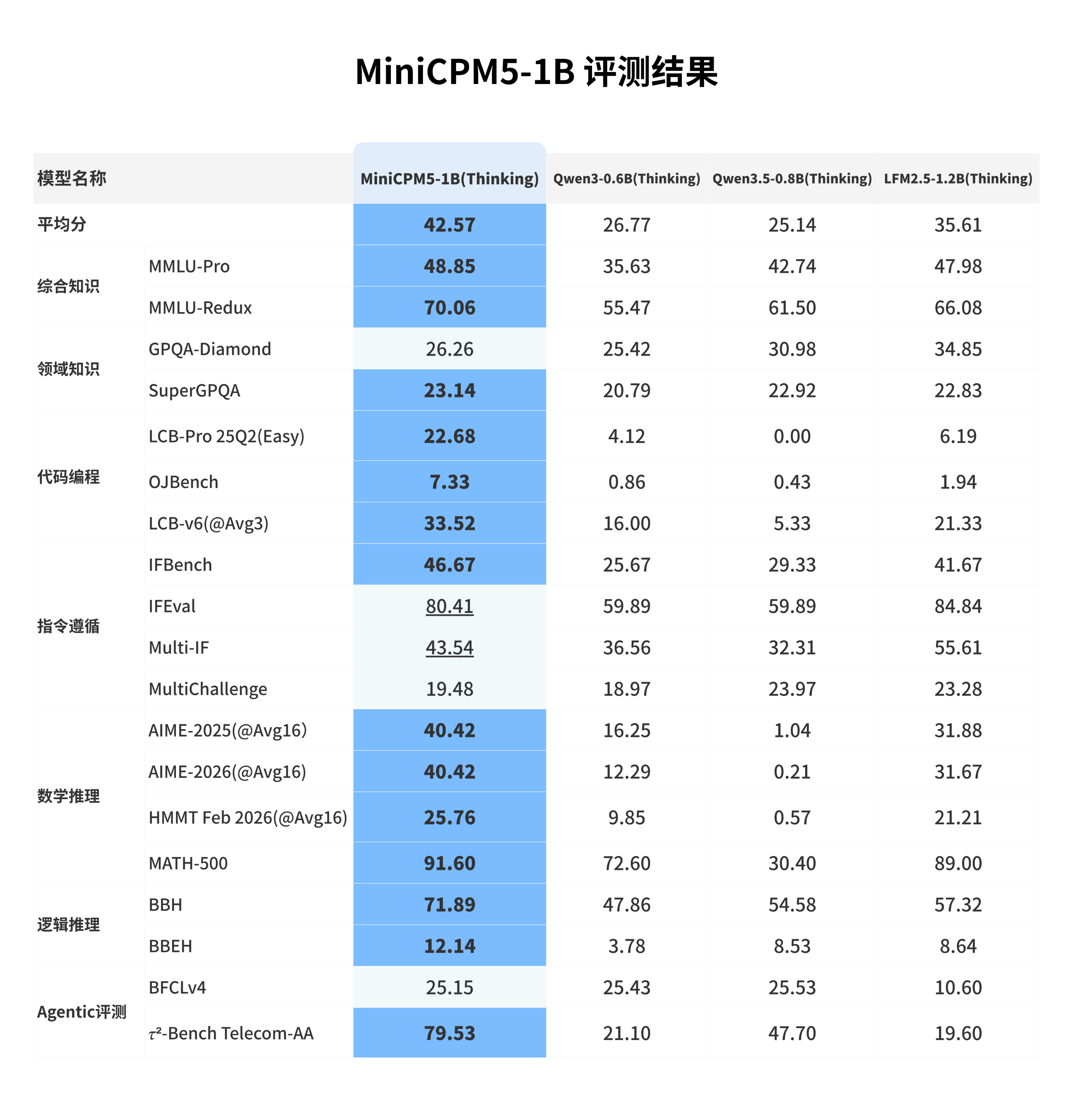
| 我们选取 **LFM2.5-1.2B-Thinking**、**Qwen3-0.6B/think**、**Qwen3.5-0.8B/think** 等同尺寸优秀开源模型进行横向比较。这些模型本身已经很强;在这组对比中,MiniCPM5-1B 达到同尺寸开源模型 SOTA 水平,优势主要体现在工具调用、代码生成和高难推理上,也更适合承担本地 coding agent、工具助手和推理助手的角色。 |
|
|
|  |
|
|
| ## 训练流程 |
|
|
| MiniCPM5-1B 的训练过程是 **[UltraData 分级数据管理体系](https://arxiv.org/pdf/2602.09003)** 的一次完整实践,覆盖 base training、mid-training 与后训练三个阶段。 |
|
|
| **Base training** 采用逐级推进的训练配方,包含 stable training 与 decay training,用于建立基础语言能力与训练稳定性。随后进入 **mid-training**,进一步强化目标能力并适配数据分布。训练语料来自我们同步开源的 [Ultra-FineWeb](https://huggingface.co/datasets/openbmb/Ultra-FineWeb)、[Ultra-FineWeb-L3](https://huggingface.co/datasets/openbmb/Ultra-FineWeb-L3) 与 [UltraData-Math](https://huggingface.co/datasets/openbmb/UltraData-Math)。 |
|
|
| **后训练阶段**分为 **SFT**、**RL** 与 **OPD** 三步。我们先使用 **200B tokens deep-thinking SFT** 与 **200B tokens hybrid-thinking SFT** 建立深度思考、混合思考和通用对话能力,相关 SFT 数据已同步开源为 [UltraData-SFT-2605](https://huggingface.co/datasets/openbmb/UltraData-SFT-2605)。随后针对数学、代码、闭卷问答和写作等方向训练专用 **RL teacher**,并通过 **On-Policy Distillation (OPD)** 将这些 teacher 的能力蒸馏回同一个发布模型。 |
|
|
|  |
|
|
| ### RL + OPD 带来了什么? |
|
|
| **RL + OPD** 是 MiniCPM5-1B 后训练中的关键环节。在数学、代码、指令跟随三类任务上,RL + OPD 将平均分提升 **↑16 分**,同时将回复触顶 max-tokens 预算的比例降低 **↓29 个百分点**。下方图示展示 Reasoning RL 两阶段流程、分数提升和超长率下降。 |
|
|
| **RL** 阶段组合了推理、闭卷问答、写作、指令跟随、长上下文理解和通用对话等多类互补训练信号。Reasoning RL 基于 [DAPO-Math-17k](https://huggingface.co/datasets/BytedTsinghua-SIA/DAPO-Math-17k) (借鉴 [JustRL](https://arxiv.org/pdf/2512.16649) 极简配方思想),并采用两阶段长度调度,以减少过长回复的同时提升推理准确性。我们还使用 [TriviaQA](https://huggingface.co/datasets/mandarjoshi/trivia_qa)、[NQ-Open](https://huggingface.co/datasets/google-research-datasets/nq_open)、[LongWriter-Zero-RLData](https://huggingface.co/datasets/THU-KEG/LongWriter-Zero-RLData)、合成可验证 RLVR 数据与 pair-wise RLHF 信号,提升可靠性、指令跟随和用户体验。 |
|
|
|  |
|
|
| **OPD** 阶段参考 Thinking Machines Lab 的 [On-Policy Distillation](https://thinkingmachines.ai/blog/on-policy-distillation/) 思路,并结合 [Rethinking On-Policy Distillation](https://arxiv.org/pdf/2604.13016) 做了实现改进。我们在强化学习框架中使用反向 KL 散度作为优势估计值,替代原有的 verification-based advantage;同时在 response 序列的每个位置分别对学生模型和教师模型 logits 做双边 top-k 采样,取并集后计算反向 KL 散度,以平衡监督信号准确性和训练效率。OPD 直接复用各 RL teacher 训练时的同分布 prompt 作为蒸馏数据,无需额外构造语料。 |
|
|
|  |
|
|
|  |
|
|
| ## 快速上手 |
|
|
| ### vLLM |
|
|
| ```bash |
| pip install "vllm>=0.21" |
| vllm serve openbmb/MiniCPM5-1B --port 8000 |
| ``` |
|
|
| ```bash |
| curl http://localhost:8000/v1/chat/completions \ |
| -H "Content-Type: application/json" \ |
| -d '{ |
| "model": "openbmb/MiniCPM5-1B", |
| "messages": [{"role": "user", "content": "你是谁?可以简单介绍一下自己吗?"}], |
| "max_tokens": 128, |
| "temperature": 0.7 |
| }' |
| ``` |
|
|
| ### SGLang |
|
|
| ```bash |
| pip install "sglang[srt]>=0.5.12" |
| python -m sglang.launch_server --model-path openbmb/MiniCPM5-1B --port 30000 |
| ``` |
|
|
| ```bash |
| curl http://localhost:30000/v1/chat/completions \ |
| -H "Content-Type: application/json" \ |
| -d '{ |
| "model": "openbmb/MiniCPM5-1B", |
| "messages": [{"role": "user", "content": "你是谁?可以简单介绍一下自己吗?"}], |
| "max_tokens": 128, |
| "temperature": 0.7 |
| }' |
| ``` |
|
|
| ### Transformers |
|
|
| ```bash |
| pip install -U "transformers>=5.6" accelerate torch |
| ``` |
|
|
| ```python |
| from transformers import AutoModelForCausalLM, AutoTokenizer |
| |
| model_id = "openbmb/MiniCPM5-1B" |
| tokenizer = AutoTokenizer.from_pretrained(model_id) |
| model = AutoModelForCausalLM.from_pretrained( |
| model_id, |
| torch_dtype="auto", |
| device_map="auto", |
| ) |
| |
| messages = [{"role": "user", "content": "你是谁?可以简单介绍一下自己吗?"}] |
| inputs = tokenizer.apply_chat_template( |
| messages, |
| tokenize=True, |
| add_generation_prompt=True, |
| enable_thinking=False, |
| return_dict=True, |
| return_tensors="pt", |
| ).to(model.device) |
| |
| outputs = model.generate(**inputs, max_new_tokens=128) |
| print(tokenizer.decode(outputs[0][inputs["input_ids"].shape[-1]:], skip_special_tokens=True)) |
| ``` |
|
|
| 推荐的 chat template 采样参数: |
|
|
| | 模式 | 推荐采样参数 | 启用方式 | |
| | --- | --- | --- | |
| | **Think** | `temperature=0.9, top_p=0.95` | `enable_thinking=True` | |
| | **No Think** | `temperature=0.7, top_p=0.95` | `enable_thinking=False` | |
|
|
| ## 工具调用 |
|
|
| 工具调用**推荐使用 SGLang**。MiniCPM5-1B 以 XML 格式产出工具调用,SGLang 内置的 `minicpm5` parser 会自动将其转换为 OpenAI 兼容的 `tool_calls` 字段。 |
|
|
| ```bash |
| python -m sglang.launch_server --model-path openbmb/MiniCPM5-1B --port 30000 \ |
| --tool-call-parser minicpm5 # 或:--tool-call-parser auto |
| ``` |
|
|
| ## GitHub Cookbooks 与 Agent Skills |
|
|
| MiniCPM5-1B 使用**标准 `LlamaForCausalLM` 架构**,主流推理引擎可直接加载,**无需自定义算子,也无模型代码 fork**。逐步部署和微调说明请参考下方 GitHub cookbooks;Agent Skills 作为 GitHub 资源提供给使用 Cursor / Claude Code 类 coding agent 的用户。 |
|
|
| ### 部署 |
|
|
| | 后端 | 模型格式 / 适用场景 | Cookbook | Agent Skill | |
| | --- | --- | --- | --- | |
| | Transformers | BF16 / FP16,本地 Python 推理,GPU + CPU | [transformers.md](https://github.com/OpenBMB/MiniCPM/blob/main/docs/deployment/transformers.md) | [minicpm5-deploy-transformers](https://github.com/OpenBMB/MiniCPM/blob/main/skills/minicpm5-deploy-transformers/SKILL.md) | |
| | vLLM | BF16 / FP16 OpenAI server | [vllm.md](https://github.com/OpenBMB/MiniCPM/blob/main/docs/deployment/vllm.md) | [minicpm5-deploy-vllm](https://github.com/OpenBMB/MiniCPM/blob/main/skills/minicpm5-deploy-vllm/SKILL.md) | |
| | SGLang | BF16 / FP16 OpenAI server,推荐用于 tool calling | [sglang.md](https://github.com/OpenBMB/MiniCPM/blob/main/docs/deployment/sglang.md) | [minicpm5-deploy-sglang](https://github.com/OpenBMB/MiniCPM/blob/main/skills/minicpm5-deploy-sglang/SKILL.md) | |
| | llama.cpp | GGUF,CPU/GPU 本地推理 | [llama_cpp.md](https://github.com/OpenBMB/MiniCPM/blob/main/docs/deployment/llama_cpp.md) | [minicpm5-deploy-llama-cpp](https://github.com/OpenBMB/MiniCPM/blob/main/skills/minicpm5-deploy-llama-cpp/SKILL.md) | |
| | Ollama | GGUF,本地端侧运行 | [ollama.md](https://github.com/OpenBMB/MiniCPM/blob/main/docs/deployment/ollama.md) | [minicpm5-deploy-ollama](https://github.com/OpenBMB/MiniCPM/blob/main/skills/minicpm5-deploy-ollama/SKILL.md) | |
| | LM Studio | GGUF,Mac 桌面应用与 OpenAI server | [lmstudio.md](https://github.com/OpenBMB/MiniCPM/blob/main/docs/deployment/lmstudio.md) | [minicpm5-deploy-lmstudio](https://github.com/OpenBMB/MiniCPM/blob/main/skills/minicpm5-deploy-lmstudio/SKILL.md) | |
| | MLX | MLX / 4bit,Apple Silicon 本地推理 | [mlx.md](https://github.com/OpenBMB/MiniCPM/blob/main/docs/deployment/mlx.md) | [minicpm5-deploy-mlx](https://github.com/OpenBMB/MiniCPM/blob/main/skills/minicpm5-deploy-mlx/SKILL.md) | |
| | ArcLight | GGUF 本地端侧 / CPU / 桌面 / 服务器 | [arclight.md](https://github.com/OpenBMB/MiniCPM/blob/main/docs/deployment/arclight.md) | [minicpm5-deploy-arclight](https://github.com/OpenBMB/MiniCPM/blob/main/skills/minicpm5-deploy-arclight/SKILL.md) | |
|
|
| ### 微调 |
|
|
| | 框架 | 适用场景 | Cookbook | Agent Skill | |
| | --- | --- | --- | --- | |
| | TRL + PEFT | LoRA / SFT 微调 | [trl.md](https://github.com/OpenBMB/MiniCPM/blob/main/docs/finetune/trl.md) | [minicpm5-finetune-trl](https://github.com/OpenBMB/MiniCPM/blob/main/skills/minicpm5-finetune-trl/SKILL.md) | |
| | LLaMA-Factory | 微调 | [llamafactory.md](https://github.com/OpenBMB/MiniCPM/blob/main/docs/finetune/llamafactory.md) | [minicpm5-finetune-llamafactory](https://github.com/OpenBMB/MiniCPM/blob/main/skills/minicpm5-finetune-llamafactory/SKILL.md) | |
| | ms-swift | 微调 | [ms_swift.md](https://github.com/OpenBMB/MiniCPM/blob/main/docs/finetune/ms_swift.md) | [minicpm5-finetune-ms-swift](https://github.com/OpenBMB/MiniCPM/blob/main/skills/minicpm5-finetune-ms-swift/SKILL.md) | |
| | unsloth | 微调 | [unsloth.md](https://github.com/OpenBMB/MiniCPM/blob/main/docs/finetune/unsloth.md) | [minicpm5-finetune-unsloth](https://github.com/OpenBMB/MiniCPM/blob/main/skills/minicpm5-finetune-unsloth/SKILL.md) | |
| | xtuner | 微调 | [xtuner.md](https://github.com/OpenBMB/MiniCPM/blob/main/docs/finetune/xtuner.md) | [minicpm5-finetune-xtuner](https://github.com/OpenBMB/MiniCPM/blob/main/skills/minicpm5-finetune-xtuner/SKILL.md) | |
|
|
| ### 其他支持的框架 |
|
|
| 除上文列出的部署与微调框架外,MiniCPM5-1B 也支持通过 FlagOS 进行多芯片部署。 |
|
|
| #### FlagOS 介绍 |
|
|
| 为解决不同 AI 芯片大规模落地应用,北京智源研究院联合众多科研机构、芯片企业、系统厂商、算法和软件相关单位等国内外机构共同发起并创立了 FlagOS 开源社区。 |
|
|
| FlagOS 社区致力于打造面向多种 AI 芯片的统一、开源的系统软件栈,包括大型算子库、统一AI编译器、并行训推框架、统一通信库等核心开源项目,构建「模型-系统-芯片」三层贯通的开放技术生态,通过“一次开发跨芯迁移”释放硬件计算潜力,打破不同芯片软件栈之间生态隔离,有效降低开发者的迁移成本。FlagOS 社区构建人工智能软硬件生态,突破单一闭源垄断,推动AI硬件技术大范围落地发展,立足中国、拥抱全球合作。 |
|
|
| 官网速递:[https://flagos.io](https://flagos.io/) |
|
|
| <details> |
| <summary>FlagOS 多 AI 芯片支持与使用方式</summary> |
|
|
| #### FlagOS 多 AI 芯片支持 |
|
|
| 基于 FlagOS 极短时间内适配 MiniCPM5-1B 到 9 种不同的 AI 芯片,得益于众智 FlagOS 的多芯片统一 AI 系统软件栈的能力。目前,在 FlagOS 团队构建的面向多架构人工智能芯片的大模型自动迁移、适配与发布平台 FlagRelease 上,已发布 MiniCPM5-1B 的多芯片版本。细节如下: |
|
|
| |Vendor|ModelScope|Huggingface| |
| |---|---|---| |
| |Nvidia|[MiniCPM5-1B-nvidia-FlagOS](https://www.modelscope.cn/models/FlagRelease/MiniCPM5-1B-nvidia-FlagOS)|[MiniCPM5-1B-nvidia-FlagOS](https://huggingface.co/FlagRelease/MiniCPM5-1B-nvidia-FlagOS)| |
| |Hygon|[MiniCPM5-1B-hygon-FlagOS](https://www.modelscope.cn/models/FlagRelease/MiniCPM5-1B-hygon-FlagOS)|[MiniCPM5-1B-hygon-FlagOS](https://huggingface.co/FlagRelease/MiniCPM5-1B-hygon-FlagOS)| |
| |Metax|[MiniCPM5-1B-metax-FlagOS](https://www.modelscope.cn/models/FlagRelease/MiniCPM5-1B-metax-FlagOS)|[MiniCPM5-1B-metax-FlagOS](https://huggingface.co/FlagRelease/MiniCPM5-1B-metax-FlagOS)| |
| |Iluvatar|[MiniCPM5-1B-iluvatar-FlagOS](https://www.modelscope.cn/models/FlagRelease/MiniCPM5-1B-iluvatar-FlagOS)|[MiniCPM5-1B-iluvatar-FlagOS](https://huggingface.co/FlagRelease/MiniCPM5-1B-iluvatar-FlagOS)| |
| |Zhenwu|[MiniCPM5-1B-zhenwu-FlagOS](https://www.modelscope.cn/models/FlagRelease/MiniCPM5-1B-zhenwu-FlagOS)|[MiniCPM5-1B-zhenwu-FlagOS](https://huggingface.co/FlagRelease/MiniCPM5-1B-zhenwu-FlagOS)| |
| |Mthreads|[MiniCPM5-1B-mthreads-FlagOS](https://www.modelscope.cn/models/FlagRelease/MiniCPM5-1B-mthreads-FlagOS)|[MiniCPM5-1B-mthreads-FlagOS](https://huggingface.co/FlagRelease/MiniCPM5-1B-mthreads-FlagOS)| |
| |Kunlunxin|[MiniCPM5-1B-kunlunxin-FlagOS](https://www.modelscope.cn/models/FlagRelease/MiniCPM5-1B-kunlunxin-FlagOS)|[MiniCPM5-1B-kunlunxin-FlagOS](https://huggingface.co/FlagRelease/MiniCPM5-1B-kunlunxin-FlagOS)| |
| |Ascend|[MiniCPM5-1B-ascend-FlagOS](https://modelscope.cn/models/FlagRelease/MiniCPM5-1B-ascend-FlagOS)|[MiniCPM5-1B-ascend-FlagOS](https://huggingface.co/FlagRelease/MiniCPM5-1B-ascend-FlagOS)| |
| |ARM-v9|[MiniCPM5-1B-Armv9-FlagOS](https://modelscope.cn/models/FlagRelease/MiniCPM5-1B-Armv9-FlagOS)|[MiniCPM5-1B-Armv9-FlagOS](https://huggingface.co/FlagRelease/MiniCPM5-1B-Armv9-FlagOS)| |
|
|
| #### FlagOS 使用方式 |
|
|
| ##### 使用 FlagOS 在 Nvidia 体验性能加速 |
|
|
| ###### From FlagRelease(**推荐**) |
|
|
| FlagRelease是FlagOS团队构建的一套面向多架构人工智能芯片的大模型自动迁移、适配与发布平台,已发布MiniCPM-1B的多芯片版本。FlagRelase已内置相关软件包,无需用户安装。 |
|
|
| ###### FlagRelease 镜像关键版本信息 |
|
|
| ###### FlagRelease 使用速递 |
|
|
| |Vendor|ModelScope|Huggingface| |
| |---|---|---| |
| |Nvidia|[MiniCPM5-1B-nvidia-FlagOS](https://www.modelscope.cn/models/FlagRelease/MiniCPM5-1B-nvidia-FlagOS)|[MiniCPM5-1B-nvidia-FlagOS](https://huggingface.co/FlagRelease/MiniCPM5-1B-nvidia-FlagOS)| |
| |Hygon|[MiniCPM5-1B-hygon-FlagOS](https://www.modelscope.cn/models/FlagRelease/MiniCPM5-1B-hygon-FlagOS)|[MiniCPM5-1B-hygon-FlagOS](https://huggingface.co/FlagRelease/MiniCPM5-1B-hygon-FlagOS)| |
| |Metax|[MiniCPM5-1B-metax-FlagOS](https://www.modelscope.cn/models/FlagRelease/MiniCPM5-1B-metax-FlagOS)|[MiniCPM5-1B-metax-FlagOS](https://huggingface.co/FlagRelease/MiniCPM5-1B-metax-FlagOS)| |
| |Iluvatar|[MiniCPM5-1B-iluvatar-FlagOS](https://www.modelscope.cn/models/FlagRelease/MiniCPM5-1B-iluvatar-FlagOS)|[MiniCPM5-1B-iluvatar-FlagOS](https://huggingface.co/FlagRelease/MiniCPM5-1B-iluvatar-FlagOS)| |
| |Zhenwu|[MiniCPM5-1B-zhenwu-FlagOS](https://www.modelscope.cn/models/FlagRelease/MiniCPM5-1B-zhenwu-FlagOS)|[MiniCPM5-1B-zhenwu-FlagOS](https://huggingface.co/FlagRelease/MiniCPM5-1B-zhenwu-FlagOS)| |
| |Mthreads|[MiniCPM5-1B-mthreads-FlagOS](https://www.modelscope.cn/models/FlagRelease/MiniCPM5-1B-mthreads-FlagOS)|[MiniCPM5-1B-mthreads-FlagOS](https://huggingface.co/FlagRelease/MiniCPM5-1B-mthreads-FlagOS)| |
| |Kunlunxin|[MiniCPM5-1B-kunlunxin-FlagOS](https://www.modelscope.cn/models/FlagRelease/MiniCPM5-1B-kunlunxin-FlagOS)|[MiniCPM5-1B-kunlunxin-FlagOS](https://huggingface.co/FlagRelease/MiniCPM5-1B-kunlunxin-FlagOS)| |
| |Ascend|[MiniCPM5-1B-ascend-FlagOS](https://modelscope.cn/models/FlagRelease/MiniCPM5-1B-ascend-FlagOS)|[MiniCPM5-1B-ascend-FlagOS](https://huggingface.co/FlagRelease/MiniCPM5-1B-ascend-FlagOS)| |
| |ARM-v9|[MiniCPM5-1B-Armv9-FlagOS](https://modelscope.cn/models/FlagRelease/MiniCPM5-1B-Armv9-FlagOS)|[MiniCPM5-1B-Armv9-FlagOS](https://huggingface.co/FlagRelease/MiniCPM5-1B-Armv9-FlagOS)| |
|
|
| ###### 从零开始 |
|
|
| - 依赖Python3.12, GLIBC_2.39, GLIBCXX_3.4.33, CXXABI_1.3.15 环境 |
| |
| ###### Vllm 版本 |
| |
| ###### 安装 FlagOS 算子库 |
| |
| 官方仓库:https://github.com/flagos-ai/FlagGems |
| |
| ```PowerShell |
| pip install flag-gems==4.2.1rc0 |
| pip install triton==3.5.1 |
| ``` |
| |
| ###### 开启加速 |
| |
| 通过在vllm执行推理的源码中增加flagGems的导入即可开启flagGems加速 |
| |
| ```Bash |
| import flag_gems |
| flag_gems.enable(record=True, once=True, path="/root/gems.txt") |
| ``` |
| |
| ```Bash |
| vllm serve ${model_path} \ |
| --trust-remote-code \ |
| --dtype bfloat16 \ |
| --enforce-eager \ |
| --port ${Port} \ |
| --served-model-name ${model_name} \ |
| --gpu-memory-utilization 0.85 |
| ``` |
| |
| ##### 使用 FlagOS 统一多芯片后端插件 |
| |
| **[vllm-plugin-FL](https://github.com/flagos-ai/vllm-plugin-FL)** 是一个为 **vLLM** 推理/服务框架构建的插件,它基于 **FlagOS 的统一多芯片后端**开发,旨在扩展 vLLM 在多种硬件环境下的功能和性能表现。 |
| |
| ###### vllm-plugin-FL 使用 |
| |
| |厂商|从零开始|从 FlagRelease 开始|| |
| |---|---|---|---| |
| |英伟达|[vllm-plugin-FL/MiniCPM5-1B](https://github.com/flagos-ai/vllm-plugin-FL/blob/main/examples/minicpm/README.md)|[MiniCPM5-1B-ModelScope](https://www.modelscope.cn/models/FlagRelease/MiniCPM5-1B-nvidia-FlagOS)|[MiniCPM5-1B-nvidia-FlagOS](https://huggingface.co/FlagRelease/MiniCPM5-1B-nvidia-FlagOS)| |
| |
| </details> |
| |
| ## 桌宠 |
| |
| 我们也发布了 **[OpenBMB/MiniCPM-Desk-Pet](https://github.com/OpenBMB/MiniCPM-Desk-Pet)**,一个由 MiniCPM5-1B 本地驱动的桌宠应用。它支持 Apple Silicon / NVIDIA GPU / CPU 路线,可以与 Cursor、Claude Code、Codex 等 coding agent 联动,并支持 LoRA 人格切换。 |
| |
| <a href="https://youtu.be/Ee0slMW8SEk"><img src="https://img.youtube.com/vi/Ee0slMW8SEk/0.jpg" alt="MiniCPM Desk Pet video demo" width="720"></a> |
| |
| ## 局限性与负责任使用 |
| |
| MiniCPM5-1B 是一个基于训练数据统计规律生成文本的语言模型,可能生成不准确、有偏见或不安全的内容。在高风险场景中使用前,应对模型输出进行审查和验证。 |
| |
| 用户需要自行评估模型输出,配置必要的安全防护,并遵守适用法律法规和平台政策。 |
| |
| ## 开源协议 |
| |
| MiniCPM 模型权重与相关代码依照 [Apache-2.0](https://github.com/OpenBMB/MiniCPM/blob/main/LICENSE) 协议发布。 |
| |
| ## 引用 |
| |
| 如果觉得我们的工作有帮助,请引用: |
| |
| ```bibtex |
| @article{minicpm4, |
| title={Minicpm4: Ultra-efficient llms on end devices}, |
| author={MiniCPM, Team}, |
| journal={arXiv preprint arXiv:2506.07900}, |
| year={2025} |
| } |
| ``` |
| |


